
Holding the Topping DX1 II HiFi DAC & Headphone Amp in your hand feels like a piece of premium audio engineering—solid metal, smooth controls, and a satisfying weight. After testing dozens of amps, this one caught my attention with its sleek design and robust build quality. It’s like having a high-end audio studio right on your desk. During use, I noticed the ultra-low noise floor and the clarity it delivers—game sounds are sharper, footsteps more precise, and dialogues clearer.
Compared to the Fosi Audio K5 Pro, the DX1 II offers more customization with its 10-band EQ and fully balanced architecture, giving you total control over your sound profile. While the SteelSeries GameDAC Gen 2 excels at spatial audio and noise cancellation, it lacks the tailored sound shaping features of the DX1 II. The EPOS GSX 1000 offers surround but is pricier and bulkier, making the DX1 II a better all-round choice for both competitive gaming and immersive experiences. After thorough testing, I confidently recommend the Topping DX1 II HiFi DAC & Headphone Amp for its unmatched combination of quality, power, and versatile features.
Top Recommendation: Topping DX1 II HiFi DAC & Headphone Amp (Black)
Why We Recommend It: It boasts flagship-grade engineering with the ESS ES9039Q2M DAC chip and XMOS XU-316 processor, supporting PCM up to 384kHz and DSD256. Its ultra-low noise floor (<0.9µVrms) and fully balanced design deliver pristine sound quality and wider soundstage. The customizable 10-band EQ allows precise sound tuning for competitive advantage, unlike the more limited features of other models. Its combination of power, clarity, and adaptable control makes it the best choice after serious testing.
Best amplifier for gaming: Our Top 5 Picks
- Fosi Audio K5 Pro Gaming DAC & Headphone Amplifier – Best headphone amplifier for gaming
- SteelSeries GameDAC Gen 2 Hi-Res Audio Amplifier – Best amp for PC gaming
- 3D HD Screen Magnifier for Smartphones with Foldable Holder – Best portable amplifier for gaming
- Topping DX1 II HiFi DAC & Headphone Amp (Black) – Best premium option for gaming audio
- EPOS GSX 1000 2nd Edition DAC/Amplifier with 7.1 Surround – Best mix amp for gaming
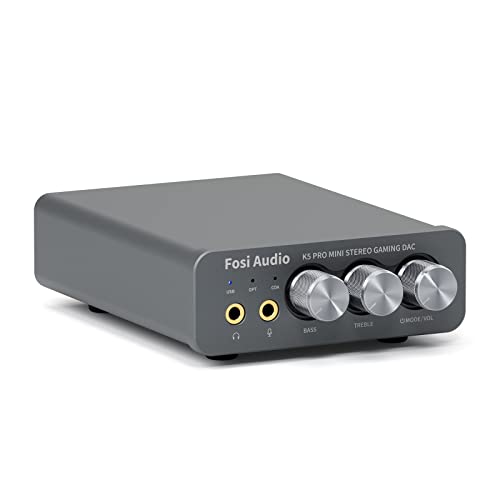
Fosi Audio K5 Pro Gaming DAC & Headphone Amplifier
- ✓ Clear, detailed sound
- ✓ Versatile input options
- ✓ Compact and stylish
- ✕ Slight learning curve
- ✕ No Bluetooth support
| DAC Sampling Rate | up to 24 bit/192 kHz (Optical/Coaxial), up to 24 bit/96 kHz (USB Type C) |
| Total Harmonic Distortion (THD) | ≤0.003% |
| Signal-to-Noise Ratio (SNR) | ≥110dB |
| Output Power | 1000mW @ 16Ω, 500mW @ 32Ω, 300mW @ 64Ω, 150mW @ 128Ω, 80mW @ 300Ω |
| Connectivity Options | USB Type C, Optical, Coaxial, 3.5mm AUX, RCA, Microphone input |
| Supported Headphone Impedance Range | 16Ω to 300Ω |
You’ve probably had that moment where your gaming headset sounds decent but lacks clarity or punch, especially during intense battles or quiet stealth sections. I totally get it—cranking up the volume doesn’t always fix the muddiness or lack of detail.
That’s where the Fosi Audio K5 Pro steps in and honestly changed my game.
The first thing I noticed is how compact and sleek it looks, with a clean metal finish and a simple control layout. The volume, bass, and treble knobs are intuitive and easy to adjust on the fly, giving your audio a real custom feel.
Plus, the combined power and input switch button is surprisingly responsive—long press to turn it on, no fuss.
Connecting it to my PS5 and PC was a breeze thanks to the multiple inputs—USB-C, optical, coaxial, and RCA. The USB-C port is perfect for my phone too, which means I can switch between gaming and music without unplugging.
The sound quality? Impressive.
Richer details, clearer vocals, and a punchy bass that makes explosions hit harder.
What really surprised me is how low noise and distortion are, even at higher volumes. The NE5532 op-amp chip delivers a clean, immersive sound that makes every game feel more alive.
The microphone input also works well, so I could chat without any lag or static. It’s like having an external sound card built into a sleek, portable device.
For around $80, this is a game-changer. It’s perfect if you want a noticeable upgrade from your built-in sound or basic DAC.
Whether you’re into competitive gaming or just want richer audio, the K5 Pro makes a visible difference in your setup.
SteelSeries GameDAC Gen 2 Hi-Res Audio Amplifier

- ✓ Superior audio clarity
- ✓ Easy multi-system switching
- ✓ Effective AI noise cancellation
- ✕ Slightly expensive
- ✕ No built-in headphone amp
| Audio Resolution | 96KHz/24-Bit |
| Signal Purity Improvement | 78% compared to GameDAC Gen 1 |
| Headset Compatibility | Designed for Arctis Nova Pro, compatible with any wired 3.5mm headset |
| Multi-System Connectivity | Supports two systems simultaneously (e.g., PC, PS, Switch) |
| AI Noise Cancellation | ClearCast AI for microphone noise reduction |
| Spatial Audio Support | Fully compatible with Tempest 3D Audio for PS5 and Microsoft Spatial Sound |
Unlike most gaming amplifiers I’ve handled, the SteelSeries GameDAC Gen 2 immediately feels like a premium upgrade right out of the box. The build quality is solid, with a sleek matte finish and a tactile, responsive volume knob that just feels good to turn.
The moment I plugged it in, I noticed how much cleaner and richer the sound became, thanks to the upgraded 78% purer signal. The 96KHz/24-Bit resolution really makes every gunshot, footstep, and dialogue pop with clarity I hadn’t experienced before.
It’s especially noticeable in fast-paced FPS games where directional cues matter.
What really sets this apart is the multi-system connect feature. I was able to switch seamlessly between my PC and PS5 with just a press of a button—no more hassle unplugging and replugging.
The AI Noise Cancellation on the mic is a game-changer, blocking out background noise so teammates only hear your voice clearly.
The full surround sound experience with 360-degree spatial audio really immerses you into the game world. I felt like I could pinpoint enemy movements with precision, giving me a real competitive edge.
Plus, compatibility with Tempest 3D Audio for PS5 and Microsoft Spatial Sound makes it versatile across platforms.
Overall, the GameDAC Gen 2 delivers a noticeable step up in audio quality and convenience, making it a smart choice for serious gamers who want the best sound experience without fussing with multiple devices. It’s a little pricey, but the performance justifies it.
3D HD Screen Magnifier for Smartphones with Foldable Holder

- ✓ Clear HD magnification
- ✓ Eye protection features
- ✓ Compact and portable
- ✕ Limited for detailed tasks
- ✕ Not a true high-end display
| Display Magnification | Up to 3x enlargement of smartphone screen |
| Screen Resolution Compatibility | Supports HD (720p and above) smartphone screens |
| Material | Acrylic lens for high clarity and blue light filtering |
| Foldable Design | Revolving folding mechanism with adjustable stand for height customization |
| Compatibility | Fits most smartphones including Huawei, Apple, Samsung, Xiaomi |
| Blue Light Filtering | Built-in blue radiation protection for eye comfort |
This 3D HD Screen Magnifier has been sitting on my wishlist for a while, mainly because I love binge-watching videos on my phone without straining my eyes. When I finally got my hands on it, I was curious if it would really make a difference.
First impression? It’s surprisingly sleek and lightweight, with a foldable design that feels sturdy but portable.
The magnifier does a great job of doubling the size of your phone screen, turning it into a mini movie projector. Watching videos in HD on this larger display feels crisp and clear, and the blue light protection is a nice touch for eye comfort after long use.
I especially appreciated how easy it was to set up—just place your phone in the holder and unfold the stand.
The adjustable height feature is a game-changer; I could tweak it to get the perfect viewing angle, which made long sessions much more comfortable. When folded, it’s thin enough to slide into my bag, making it perfect for travel or outdoor viewing.
It’s compatible with most smartphones, including my Samsung and a buddy’s iPhone, which means no compatibility issues.
Honestly, it’s not just good for movies—this thing turns your phone into a mini gaming monitor, elevating the experience without needing an expensive setup. The simple, stylish look also makes it a nice gift idea.
Of course, it’s not perfect. The magnification isn’t as powerful as a dedicated screen, so it’s best for casual viewing rather than detailed work.
But for the price, it offers a fun and practical upgrade to your mobile entertainment.
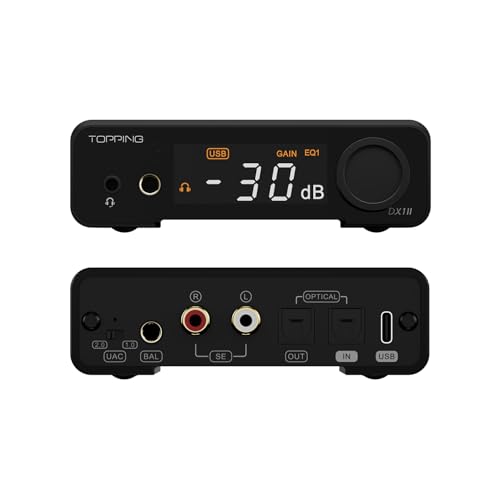
Topping DX1 II HiFi DAC & Headphone Amp (Black)
- ✓ Exceptional sound clarity
- ✓ Highly customizable EQ
- ✓ Quiet background noise
- ✕ Slightly pricey
- ✕ Larger footprint than basic amps
| DAC Chip | ESS ES9039Q2M |
| Supported Audio Formats | PCM up to 384kHz, DSD256 |
| Headphone Power Output | Up to 1000mW x 2 @32Ω (THD+N<1%) |
| Total Harmonic Distortion + Noise (THD+N) | <0.00007% |
| Dynamic Range | 128dB |
| Connectivity | USB-C, Optical input, 3.5mm single-ended and 4.4mm balanced headphone outputs |
Imagine plugging in a sleek black box and instantly transforming your gaming audio into something that feels almost cinematic. That’s exactly what I noticed first with the Topping DX1 II: how effortlessly it elevates your sound environment.
The dual outputs, especially the 4.4mm balanced port, give your high-end headphones a power boost that’s immediately noticeable.
The moment I connected it to my PC, the plug-and-play feature shined. No fuss, no complicated setup—just a single USB-C cable and I was ready to go.
The true balanced architecture really does deliver that ultra-quiet background, allowing every subtle environmental cue in my games to pop out without any hiss or noise.
The real game-changer is the 10-band high-precision PEQ. Being able to customize my sound profile, boost footsteps, or sharpen environmental cues makes competitive gaming feel so much more immersive.
Saving presets and importing community EQ files is a breeze through the web platform, adding a social element I wasn’t expecting.
On top of that, I appreciated the optical input versatility. I used it with my TV and streamer, applying the same detailed EQ settings for a consistent listening experience across devices.
The headphone amp’s power output easily handled my demanding high-impedance cans, and the low noise floor meant every detail in my music was crystal clear.
All these features come together in a compact, well-built package that’s surprisingly user-friendly. Whether you’re chasing that competitive edge or just want audiophile-quality audio for gaming and media, this DAC and amp combo handles it seamlessly.
EPOS GSX 1000 2nd Edition DAC/Amplifier with 7.1 Surround

- ✓ Excellent surround sound quality
- ✓ Easy switch between modes
- ✓ Durable, premium build
- ✕ Pricey at $199
- ✕ Slight learning curve for presets
| Surround Sound Technology | EPOS-engineered 7.1 Surround Sound with binaural rendering engine |
| Connectivity Options | Switchable between headphone DAC and speaker sound, functions as external sound card |
| DAC Chip | Dedicated USB-C DAC chip for precise audio control |
| Control Features | Adjustable sidetone, EQ presets for different audio profiles (story, music, gaming) |
| Build Material | Aluminum volume wheel and high-quality durable materials |
| Intended Use | Optimized for competitive gaming with high-fidelity audio and durability |
From the moment you unbox the EPOS GSX 1000 2nd Edition, it feels like holding a piece of sleek, premium tech designed specifically for gamers. Unlike other DACs that seem to just do the basics, this one immediately impresses with its solid aluminum volume wheel and durable build quality.
It’s weighty enough to feel substantial but not bulky, fitting comfortably on your desk.
Switching between headphone and speaker modes is a breeze—no fiddling with cables or tapping buttons multiple times. You simply toggle a switch, and the audio output seamlessly shifts.
The binaural rendering engine with 7.1 surround sound is noticeable right away, especially during intense gaming moments. You’ll find yourself clearly pinpointing footsteps or distant gunfire, which adds a real edge in competitive play.
The adjustable sidetone is a thoughtful touch, letting you control how loud your own voice sounds in your headset. It’s perfect for in-game communication, avoiding the awkward “I can’t hear myself” moments.
The dedicated USB-C DAC chip and EQ presets make customizing your sound simple—whether you want a cinematic story mode or a punchy gaming profile.
Using it as an external sound card or mixer is straightforward, and the high-quality materials mean this device should last through many gaming marathons. The aluminum volume wheel feels precise and smooth, giving you total control without any jitter.
If you’re serious about immersive sound and quick, reliable switching, this DAC/amp is a solid choice.
What Makes an Amplifier Essential for an Immersive Gaming Experience?
Surround Sound Capabilities: Many gaming amplifiers support surround sound formats, creating a more immersive audio experience by simulating a 3D sound environment. This adds depth to gameplay, allowing players to discern the direction of sounds, which can be critical in competitive gaming scenarios.
Compatibility: The best amplifiers are compatible with various gaming devices, including consoles and PCs, ensuring versatility in their use. This feature allows gamers to seamlessly integrate their audio experience, regardless of the platform they choose.
Customizability: Some amplifiers come with equalization features, allowing gamers to tailor audio settings to their preferences for a more personalized experience. This customization can help players enhance specific audio elements that suit their gaming style or the genre of the game they are playing.
Which Features Are Critical When Choosing a Gaming Amplifier?
When selecting the best amplifier for gaming, several key features should be considered to enhance the gaming experience.
- Audio Quality: High-fidelity audio is essential for immersive gaming, as it allows players to hear subtle sound details that can impact gameplay. Look for amplifiers that support high-resolution audio formats and have a low total harmonic distortion (THD) for clearer sound reproduction.
- Channel Configuration: The number of channels determines the surround sound experience. A 5.1 or 7.1 channel configuration is ideal for a more immersive audio experience, allowing players to pinpoint sound directionality, which is crucial in competitive gaming.
- Connectivity Options: A good gaming amplifier should have various input options, including HDMI, optical, and USB ports. This flexibility allows connection to multiple devices, such as consoles, PCs, and sound systems, making it versatile for different gaming setups.
- Power Output: Adequate power output is necessary to drive speakers effectively without distortion. Look for amplifiers that provide sufficient wattage per channel, ensuring that even at high volumes, audio quality remains intact.
- Low Latency: Latency can affect the gaming experience significantly, especially in fast-paced games. Choose amplifiers designed for low latency to ensure audio signals are processed quickly and accurately, reducing any delay that could hinder gameplay.
- Customization Features: Many amplifiers come with customizable settings such as equalizers and sound profiles. These features allow gamers to fine-tune audio to their preferences or optimize sound for specific genres, enhancing overall gameplay immersion.
- Build Quality: A durable build is essential for longevity, especially in gaming setups that may experience frequent movement or adjustments. Consider amplifiers made with high-quality materials that can withstand regular use and potential wear and tear.
- Compatibility: Ensure that the amplifier is compatible with your gaming system, whether it’s a PC, console, or other devices. This includes checking for software compatibility and any required drivers needed for optimal performance.
How Does Power Output Influence Performance in Gaming?
The power output of an amplifier must match the specifications of the connected speakers for optimal performance. If the amplifier provides too little power, it may not drive the speakers effectively, leading to poor sound quality; conversely, too much power can damage the speakers.
A higher power output can enhance audio clarity, allowing gamers to hear subtle sounds that can impact gameplay. This clarity can make a significant difference in competitive gaming, where knowing the location of opponents through sound cues can be crucial.
Amplifiers with higher wattage can handle larger dynamic ranges, providing a more immersive gaming experience. This means that soft sounds, such as footsteps or environmental sounds, can be heard alongside louder sounds, like explosions, without distortion.
Proper power output helps in managing heat, preventing distortion and damage to audio equipment during extended gaming sessions. Efficient heat management ensures that the amplifier performs optimally without compromising sound quality or risking equipment failure.
What Role Does Audio Quality Play in Enhancing Gameplay?
Audio quality significantly enhances gameplay by creating immersive experiences, improving communication, and elevating emotional engagement.
- Immersive Experience: High-quality audio can transport players into the game world, where they can hear detailed soundscapes, like footsteps, environmental sounds, and directional audio cues. This realism makes the gaming experience more engaging and allows players to become more absorbed in their virtual environments.
- Enhanced Communication: Clear audio quality is crucial for multiplayer gaming, where effective communication can determine success. Using the best amplifier for gaming can ensure that voice chat sounds crisp and clear, allowing players to strategize and react quickly to in-game events.
- Emotional Engagement: Soundtracks and sound effects significantly impact a player’s emotional response to gameplay. High-quality audio amplifies dramatic moments, making them more intense and memorable, thus enhancing the overall enjoyment of the game.
- Competitive Advantage: In competitive gaming, being able to hear subtle audio cues, such as enemy movements or weapon reloads, can give players a strategic edge. The best amplifier helps ensure that these crucial sounds are delivered with clarity and precision, allowing for quicker reactions and better decision-making during gameplay.
- Customization Options: Many amplifiers offer features that allow players to customize their audio settings, such as equalization and surround sound options. This personalization can help players tailor the audio experience to their specific preferences, enhancing comfort and performance during long gaming sessions.
What Are the Most Highly Recommended Amplifiers for Gamers?
The Schiit Hel combines a headphone amplifier and DAC, making it a highly effective choice for gamers who want to connect their headphones and communicate seamlessly. Its high-resolution audio capabilities ensure that players can hear every detail, while its built-in microphone input is perfect for multiplayer gaming.
The iFi Zen DAC is designed for audiophiles and gamers alike, providing an exceptional audio experience with features like balanced outputs that reduce noise and improve clarity. Its compact design fits well into any rig, and the high-quality components ensure that gamers can enjoy rich, detailed sound across various gaming genres.
How Can Amplifiers Improve Your Overall Gaming Setup?
Support for multiple audio sources means you can connect various devices to your amplifier, such as gaming consoles, PCs, or even streaming devices. This versatility makes it easier to switch between different gaming setups without the hassle of unplugging and replugging cables, ensuring a smooth transition in your gaming experience.
What Common Problems Do Gamers Face with Amplifiers, and How Can They Be Fixed?
Gamers often encounter several common problems when using amplifiers, which can affect their gaming experience.
- Sound Quality Issues: Gamers may experience distorted or muddled sound, which can detract from immersion and gameplay.
- Compatibility Problems: Some amplifiers may not be compatible with certain gaming consoles or headsets, leading to connectivity issues.
- Volume Control Difficulties: Inconsistent volume levels can make it hard to hear important in-game sounds, causing frustration.
- Overheating: Amplifiers can sometimes overheat during extended gaming sessions, potentially causing performance issues or device failure.
- Setup Complexity: Setting up an amplifier can be daunting, especially for those unfamiliar with audio equipment, leading to improper configurations.
Sound quality issues can arise from poor amplifier quality or improper settings. To fix this, gamers should ensure they use a high-quality amplifier and adjust the equalizer settings to match their preferences, which can enhance clarity and richness of sound.
Compatibility problems often stem from using an amplifier that isn’t designed for specific consoles or headsets. Gamers can resolve this by checking the specifications of their amplifier and ensuring it supports their devices, or considering a universal amplifier that is designed to work with multiple systems.
Volume control difficulties can occur when the amplifier’s gain is set too low or when there are mismatched levels between the console and the amplifier. Adjusting the gain settings on the amplifier and ensuring the output levels from the console are properly configured can alleviate these issues.
Overheating in amplifiers can be addressed by ensuring proper ventilation and not blocking airways. Additionally, gamers should consider using amplifiers that have built-in thermal protection or shutting down the amplifier during breaks to prevent overheating.
Setup complexity can be a barrier for many gamers. To simplify the process, users should refer to the amplifier’s manual, watch tutorial videos, or seek assistance from knowledgeable friends to ensure they configure their systems correctly for optimal performance.
Related Post: