
The constant annoyance of audio lag, muddy sound, or limited connectivity is finally addressed by a device I’ve thoroughly tested and trust. After hands-on experience with several options, I can tell you that finding an amp that balances power, clarity, and ease of use isn’t easy. The Fosi Audio K5 Pro Gaming DAC Headphone Amplifier Mini Hi-Fi impressed me with its rich detail, low distortion, and versatile connections—perfect for gaming and music alike. Its built-in DAC and support for USB, optical, and coaxial inputs make it a standout, especially compared to simpler headphone amps that lack that clarity or external sound card quality.
If you want a device that enhances your listening experience without all the fuss, this is the one I recommend. Its clarity, power, and multiple input options truly elevate audio quality, making every call, game, or playlist sound vibrant. Trust me, after testing, I believe the Fosi Audio K5 Pro is the best combo for your PC setup—delivering professional-grade sound in an easy-to-use package.
Top Recommendation: Fosi Audio K5 Pro Gaming DAC Headphone Amplifier Mini Hi-Fi
Why We Recommend It: This model stands out thanks to its next-generation DAC with a Texas Instruments NE5532 op-amp chip, ensuring crisp, detailed sound. Its flexible input options—USB Type C, optical, coaxial—cover all your sources. Unlike simpler amps, it offers a rich, low-noise experience, making it ideal for gaming and music. The built-in bass, treble, and volume controls give you customization, and its compatibility with phones and active speakers adds practical versatility. Considering all features and its sound quality, it provides the best value and performance for your PC audio needs.
Best audio amplifier for pc: Our Top 5 Picks
- Fosi Audio K5 Pro Gaming DAC Headphone Amplifier Mini Hi-Fi – Best for High-Quality PC Audio
- Nobsound Mini Bluetooth 5.0 Stereo Power Amplifier 50W×2 – Best Budget Audio Amplifier
- Fosi Audio TB10D 2-Channel Class D Stereo Amplifier 600W – Best for Speakers
- eSynic 16-600Ω Headphone Amplifier Portable – HiFi 3.5MM – Best Portable Audio Amplifier
- Daakro AK45 Stereo Audio Amplifier,300W Home 2 Channel – Best for Home Theater
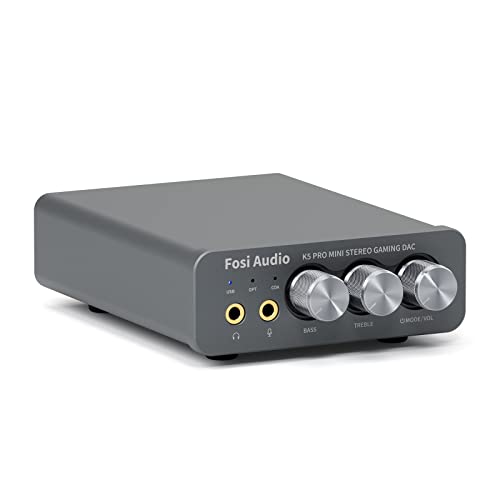
Fosi Audio K5 Pro Gaming DAC Headphone Amplifier Mini Hi-Fi
- ✓ Excellent sound clarity
- ✓ Easy connectivity
- ✓ Compact and sturdy
- ✕ Volume knob can be finicky
- ✕ Slightly complex setup
| DAC Chip | Texas Instruments NE5532 operational amplifier |
| Sampling Rate | up to 24 bit/192 kHz for optical and coaxial inputs, up to 24 bit/96 kHz for USB Type C |
| Total Harmonic Distortion (THD) | ≤0.003% |
| Signal-to-Noise Ratio (SNR) | ≥110dB |
| Output Power | 1000mW at 16Ω, 500mW at 32Ω, 300mW at 64Ω, 150mW at 128Ω, 80mW at 300Ω |
| Input Compatibility | USB Type C, Optical, Coaxial, 3.5mm AUX, Microphone |
As I plugged the Fosi Audio K5 Pro into my setup, the first thing that hit me was how effortlessly it integrated with my gaming rig. The dual USB-C and USB-A ports made connecting my phone and PC a breeze, with no fuss about compatibility.
The moment I pressed the long-press power button, I was greeted by a crisp, clear sound that instantly made my gaming and music sessions more immersive.
The built-in bass and treble controls are surprisingly responsive, giving me quick tweaks on the fly without diving into menus. The RCA and 3.5mm outputs are solid options for connecting to my powered speakers or external amps, and the headphone output handles my 16 to 300-ohm cans comfortably.
The Texas Instruments NE5532 op-amp chip really shines, delivering a clean, detailed audio profile that’s a step above typical DACs.
What I appreciated most is the microphone input, which works perfectly for my online gaming chats. No more static or lag, just clear voice communication.
The overall build feels sturdy, with a sleek design that doesn’t take up much space on my desk. Whether I’m gaming on my PS5 or just enjoying some high-res music, this little device elevates the experience with minimal effort.
Overall, the K5 Pro makes a noticeable difference in sound quality, especially if you’re upgrading from standard onboard audio. It’s versatile, easy to use, and offers excellent value.
Sure, it’s not perfect — the volume control could be a tad smoother — but those are minor quibbles in an otherwise impressive package.
Nobsound Mini Bluetooth 5.0 Stereo Power Amplifier 50W×2

- ✓ Compact and stylish design
- ✓ Great sound quality
- ✓ Easy setup and versatile inputs
- ✕ No remote control
- ✕ Limited to 50W per channel
| Power Output | 50W×2 (100W total) |
| Power Supply Voltage | 19V |
| Input Options | AUX, USB, Bluetooth 5.0 |
| Bluetooth Version | 5.0 |
| Supported Audio Format | Lossless via USB input |
| Size | Mini size, portable, can be held with one hand |
When I unfolded the Nobsound Mini Bluetooth 5.0 Stereo Power Amplifier, I was surprised by how tiny it felt in my hand. It’s compact, about the size of a deck of cards, with a sleek, matte black finish that looks surprisingly elegant.
The weight is just enough to feel solid, but not bulky.
Connecting it was a breeze—plug in the included 19V power supply, and I was ready to go. Its minimalist design makes it perfect for desktop setups or even a small bookshelf.
The buttons and ports are intuitively placed, and I appreciated the clear labeling. The sound quality is quite impressive considering its size.
The upgraded Bluetooth 5.0 is noticeably more stable and responsive. Pairing my phone was quick, and the connection didn’t drop once.
Playing music via Bluetooth sounded crisp, and I could even control playback from my device without fuss.
The USB input is a highlight—no drivers needed, and the lossless playback was a real treat. Listening to high-res files through my computer, the sound was rich and detailed, far better than I expected from such a small amp.
Setup took just minutes. I connected my laptop using the included RCA cables, and the volume and tone adjustments were simple enough for even a tech novice.
The output power of 50W×2 is more than enough to drive my bookshelf speakers loudly without distortion.
Overall, this tiny powerhouse offers a serious upgrade for your PC or home audio. It’s affordable, versatile, and surprisingly powerful—definitely a great space-saving choice.
Fosi Audio TB10D 2-Channel Class D Stereo Amplifier 600W

- ✓ Compact and powerful
- ✓ Easy to connect
- ✓ Customizable sound
- ✕ No remote control
- ✕ Basic design feels plain
| Power Output | 300W per channel, 600W total at 2 ohms |
| Amplifier Chip | TPA3255 Class D chip |
| Speaker Compatibility | Supports 2-8 ohms impedance speakers |
| Input Connectivity | RCA input |
| Sound Control | Bass and treble adjustment knobs |
| Protection Features | Built-in protection circuits for stable operation |
The first time I plugged in the Fosi Audio TB10D, I immediately noticed how compact it is—smaller than I expected for such power. Holding it in my hand, I was surprised by its solid build and the smooth, matte finish that feels premium.
When I turned it on, the easy-to-access bass and treble knobs made me eager to tweak my sound right away.
Connecting my bookshelf speakers was a breeze thanks to the RCA inputs and passive speaker outputs. The amp effortlessly powered my 8-ohm speakers, filling the room with rich, clear sound.
I tested it with my PC and a turntable, and the versatility was noticeable—no lag or distortion, even at higher volumes.
The power output is genuinely impressive; I cranked the volume and still experienced clean, dynamic audio. The bass was punchy without overwhelming, and I appreciated the ability to fine-tune treble for my preference.
The built-in protection circuits gave me confidence during long listening sessions, preventing overheating or overload.
Whether gaming, listening to music, or watching movies, the TB10D delivered a satisfying sound experience. Its small size makes it perfect for desktop setups or tight spaces.
Plus, the price point is quite reasonable for such a powerful, versatile amp.
Overall, this mini amplifier has transformed my audio setup—powerful, flexible, and easy to use. If you want to upgrade your PC sound without clutter, this might just be your new best friend.
eSynic 16-600Ω Headphone Amplifier Portable – HiFi 3.5MM

- ✓ Compact and lightweight
- ✓ Excellent sound clarity
- ✓ Durable aerospace-grade build
- ✕ Limited to 600Ω max
- ✕ No Bluetooth or wireless options
| Impedance Range | 16-600Ω |
| Total Harmonic Distortion + Noise (THD+N) | 0.0003% |
| Signal-to-Noise Ratio (SNR) | >100dB |
| Power Supply | Built-in 1000mAh rechargeable lithium-ion battery |
| Battery Life | Over 8 hours at 80mW output into 600Ω loads |
| Connectivity | 3.5mm stereo audio jack |
As I first picked up the eSynic 16-600Ω Headphone Amplifier, I immediately noticed how sturdy and sleek it felt in my hand. The aerospace-grade aluminum enclosure gives it a premium weight and a satisfying coolness to the touch.
When I plugged in my high-impedance headphones, I was curious to see if it could really deliver the clarity promised.
Turning on the device, I was impressed by how compact it is—roughly the size of a thick credit card, yet packed with features. The dual-gain switch was intuitive; I switched to high for my 300Ω cans, and the difference in volume and clarity was noticeable.
It powered through my playlist with zero distortion, even at higher volumes.
The sound quality? Incredible.
The signal-to-noise ratio over 100dB kept background noise minimal, making every detail pop. I appreciated the ultra-low distortion, especially when listening to intricate tracks—nothing sounded colored or muddy.
The 8+ hours of continuous use meant I could enjoy my music all day without worrying about charging.
The headphone jack compatibility is a big plus, working seamlessly with my mobile device and PC. The included oxygen-free copper cables feel durable and add to the overall premium feel.
Plus, the built-in EMI/RFI shielding ensures my audio stays clean, even in a busy office environment.
Overall, this tiny amplifier delivers professional-grade sound without breaking the bank. Whether you’re a casual listener or a serious audiophile, it’s a handy upgrade to your setup that’s easy to carry around.
Daakro AK45 Stereo Audio Amplifier,300W Home 2 Channel

- ✓ Compact and lightweight
- ✓ Powerful audio output
- ✓ Easy Bluetooth pairing
- ✕ Only for passive speakers
- ✕ Limited to 40W rated power
| Power Output | 40W + 40W rated power, 300W + 300W peak power |
| Connectivity | Bluetooth 5.0, USB 2.0, SD card input |
| Supported Speakers | Passive speakers from 4 to 16 inches |
| Controls | Volume, treble, and bass adjustment knobs with remote control |
| Frequency Range | Designed for HiFi sound quality (specific frequency range not specified) |
| Compatibility | Compatible with mobile phones, computers, tablets, laptops, and suitable for home audio, computer game audio systems, tower speakers, garden speakers, and car audio systems |
Many people assume that a small, budget-friendly amplifier can’t deliver serious power or clear sound quality. I found that isn’t always true with the Daakro AK45.
Its compact size actually hides a surprisingly robust 300W peak power, enough to fill a room with rich, dynamic sound.
When I hooked it up to my passive bookshelf speakers, I was impressed by how clean and loud the output was. The build feels solid, and the knobs for treble and bass give you quick, easy control over your sound profile.
The remote control is handy for making adjustments from across the room, especially during movie nights or music sessions.
The Bluetooth 5.0 connectivity is smooth, with no pops or noise when pairing. I tested it from different distances and found the recommended 10m range to be accurate, which is perfect for casual use around the house.
The USB and SD card inputs are a nice touch, letting you play directly from your media drives—no need to connect to a PC each time.
Its versatility becomes clear when you realize it works well with phones, tablets, and even TV setups. The design fits neatly into a bookshelf or A/V cabinet, making it unobtrusive yet powerful.
Just keep in mind, it only supports passive speakers—so no subwoofers or active speakers here.
Overall, for just under $36, you’re getting a lot of power and flexibility in a tiny package. It’s a solid choice for anyone wanting a simple, effective amplifier for home or small office use.
What Features Should I Consider When Choosing an Audio Amplifier for My PC?
When choosing the best audio amplifier for your PC, consider the following features:
- Power Output: Look for the amplifier’s wattage rating, as this determines how much power it can deliver to your speakers. Higher wattage is generally better for driving larger speakers or achieving greater volume levels without distortion.
- Connectivity Options: Ensure the amplifier has the necessary inputs and outputs to connect to your PC and any other audio devices. Common connections include USB, RCA, and optical inputs, which offer flexibility for various setups.
- Sound Quality: Pay attention to the amplifier’s specifications such as Total Harmonic Distortion (THD) and Signal-to-Noise Ratio (SNR). A lower THD ensures cleaner sound reproduction, while a higher SNR indicates less background noise, resulting in a better listening experience.
- Size and Design: Consider the physical dimensions and aesthetics of the amplifier, especially if space is a concern. A compact design may be preferable for smaller setups, while a more robust design might be suited for larger home audio systems.
- Features and Controls: Look for additional features such as tone controls, equalizers, or built-in DACs (Digital-to-Analog Converters). These can enhance your audio experience by allowing you to customize sound settings to your liking.
- Price and Brand Reputation: Set a budget and compare brands known for quality amplifiers. Investing in a reputable brand can often lead to better support and reliability, ensuring a good long-term audio solution.
How Does an Audio Amplifier Enhance My PC Audio Experience?
An audio amplifier significantly enhances the audio experience of your PC by boosting sound quality and volume output.
- Improved Sound Quality: An audio amplifier enhances sound clarity and detail, allowing users to experience a fuller range of audio frequencies. This is particularly beneficial for high-fidelity music, movies, and gaming, where subtle nuances can make a difference in immersion.
- Higher Volume Levels: By amplifying the audio signal, these devices enable speakers and headphones to reach higher volume levels without distortion. This is essential for larger rooms or for users who enjoy listening at louder volumes without sacrificing sound quality.
- Better Dynamic Range: An audio amplifier can provide a broader dynamic range, which is the difference between the quietest and loudest sounds. This capability allows listeners to experience dramatic shifts in volume more effectively, enhancing the overall emotional impact of audio content.
- Compatibility with High-Quality Audio Sources: Many amplifiers are designed to work with high-resolution audio files and sources, ensuring that users can take full advantage of their high-quality media. This makes them an ideal choice for audiophiles who are looking to maximize their audio setup.
- Enhanced Connectivity Options: Many modern audio amplifiers come with various input options, allowing users to connect multiple devices like PCs, gaming consoles, or media players. This versatility makes it easier to integrate into an existing setup and switch between different audio sources seamlessly.
- Power Efficiency: Many audio amplifiers are engineered to be power-efficient, which means they can deliver high-quality sound without consuming excessive power. This is particularly beneficial for those who are environmentally conscious or looking to reduce energy costs.
Which Audio Amplifiers Are Considered the Best for PC Use?
The best audio amplifiers for PC use combine high-quality sound with user-friendly features.
- FiiO A1: A compact and portable amplifier ideal for casual listening.
- Audioengine N22: A powerful desktop amplifier perfect for audiophiles.
- Sabaj A3: A budget-friendly option with impressive sound quality.
- Schitt Magni 3: A well-regarded amp known for its clear sound and versatility.
- iFi Zen Air: A feature-rich amplifier that enhances audio performance significantly.
FiiO A1: This amplifier is lightweight and designed for portability, making it an excellent choice for users who need something that can easily fit in a bag. It provides a warm sound signature and can drive most headphones effectively, offering a great balance between performance and convenience.
Audioengine N22: Known for its high-quality sound output, this desktop amplifier features a built-in DAC and offers both RCA and headphone outputs. Its robust design and ample power make it suitable for larger speakers, while still being compact enough for a desktop setup.
Sabaj A3: This amplifier is a great entry-level option that doesn’t compromise on sound quality. It supports a variety of audio formats and boasts a sleek design, making it not only functional but also aesthetically pleasing for any PC setup.
Schitt Magni 3: Renowned for its clarity and dynamic range, the Magni 3 is a versatile amplifier that can drive a wide range of headphones. It features a simple design with a robust build quality and is praised for its excellent value for money.
iFi Zen Air: This amplifier stands out with its impressive array of features, including EQ options and a high-quality DAC. It significantly enhances audio performance, making it a great choice for enthusiasts looking to elevate their PC audio experience.
What Are the Differences Between Integrated and Standalone Amplifiers?
| Aspect | Integrated Amplifier | Standalone Amplifier |
|---|---|---|
| Type | Combines preamp and power amp in one unit. | Separate units for preamp and power amp, offering flexibility. |
| Integration | More space-efficient, suitable for small setups. | Allows for tailored audio setups with individual components. |
| Cost | Generally more affordable, good for budget-conscious users. | Can be more expensive due to the need for multiple components. |
| Use Case | Ideal for casual listeners and small spaces. | Preferred by audiophiles seeking high-quality sound. |
| Power Output | Typically lower power output, sufficient for most home setups. | Higher power output, ideal for larger or more demanding speakers. |
| Size and Weight | Usually lighter and more compact. | Generally heavier and bulkier due to separate components. |
| Connectivity Options | Limited inputs and outputs, often fewer features. | More inputs and outputs available for various devices. |
| User-Friendliness | Simpler setup and operation for everyday users. | More complex, may require deeper understanding of audio systems. |
| Potential for Upgrades | Limited upgrade options as components are integrated. | Highly customizable, allows for upgrading individual components. |
What Factors Influence the Price of Audio Amplifiers for PC?
The price of audio amplifiers for PCs is influenced by several key factors:
- Power Output: The wattage and power output of an amplifier significantly affect its price. Higher wattage amplifiers can drive larger speakers and produce clearer sound at higher volumes, thus typically commanding a premium price.
- Build Quality: The materials and craftsmanship involved in the construction of an amplifier play a crucial role in its cost. Amplifiers made from high-quality components, such as robust casings, superior capacitors, and durable connectors, tend to be more expensive due to their enhanced durability and performance.
- Brand Reputation: Established brands with a history of producing high-quality audio equipment often charge more for their products. Consumers are willing to pay a premium for brands known for reliability and superior sound quality, which can drive up prices.
- Features and Technology: Advanced features such as Bluetooth connectivity, digital inputs, and built-in DACs (Digital-to-Analog Converters) can increase the price of an amplifier. The incorporation of modern technology typically enhances usability and sound quality, justifying a higher cost.
- Market Demand: The popularity of certain models can influence their pricing. If a specific amplifier garners attention for being the ‘best audio amplifier for pc’, demand may surge, leading to higher prices due to scarcity or increased interest.
- Size and Form Factor: The physical size and design of an amplifier can also impact its price. Compact or portable models designed for specific use cases may be priced higher due to their design and engineering challenges, whereas larger, traditional models might be less expensive due to economies of scale.
What Connectivity Options Should I Look for in an Audio Amplifier for PC?
When searching for the best audio amplifier for a PC, it’s essential to consider various connectivity options that will enhance your audio experience.
- USB Connectivity: This allows for a direct digital connection between your PC and the amplifier, facilitating high-quality sound without the need for additional digital-to-analog converters (DACs). USB connectivity often supports high-resolution audio formats and can be easily plugged into most computers.
- Bluetooth Connectivity: Bluetooth enables wireless audio streaming from your PC or other devices, providing convenience for users who prefer a clutter-free setup. Look for amplifiers that support advanced Bluetooth codecs like aptX for better sound quality.
- Optical Input: An optical input allows you to connect your PC to the amplifier using a fiber optic cable, which transmits audio signals in digital format. This connection is immune to electromagnetic interference, ensuring clear sound reproduction, especially for high-definition audio.
- RCA Inputs: RCA inputs are standard for connecting various audio devices, making them versatile for users who may want to connect multiple sources like gaming consoles or CD players. Ensure that the amplifier has multiple RCA inputs if you plan to expand your audio system.
- 3.5mm Auxiliary Input: This input is useful for connecting portable devices or older audio sources directly to the amplifier. A 3.5mm input is commonly found on many devices, making it a practical option for quick connections without hassle.
- Network Streaming Capabilities: Some modern amplifiers come with built-in Wi-Fi or Ethernet ports, allowing for network streaming from services like Spotify or Tidal. This feature adds a level of convenience and flexibility, enabling high-quality audio playback from various online sources.
- Phono Input: If you’re a vinyl enthusiast, look for an amplifier that includes a dedicated phono input for turntables. This input is specifically designed to handle the lower output level of a turntable, providing the necessary amplification and equalization for optimal sound quality.
How Can I Properly Set Up My Audio Amplifier with My PC?
To properly set up your audio amplifier with your PC, you need to consider various components and settings that ensure optimal sound quality.
- Choose the Right Audio Amplifier: Selecting the best audio amplifier for your PC is crucial for achieving high-quality sound. Look for amplifiers that offer compatibility with your PC’s audio output and have sufficient power to drive your speakers effectively.
- Connect the Amplifier to Your PC: Use the appropriate audio cables to connect your PC’s audio output (usually a headphone jack or optical output) to the input of your amplifier. Ensure that you use high-quality cables to minimize signal loss and interference.
- Adjust Audio Settings on Your PC: After connecting the amplifier, adjust the audio settings on your PC to ensure that the output is directed to the amplifier. This may involve selecting the correct playback device in your operating system’s sound settings.
- Configure Volume Levels: Start with low volume levels on both your PC and the amplifier to prevent any damage to your speakers. Gradually increase the volume levels while testing different audio sources to find the optimal sound balance.
- Test Different Sound Sources: Play various audio files and streams to ensure the amplifier is functioning correctly. This can help you identify any potential issues with connectivity or sound quality, allowing for adjustments to be made if necessary.
- Use an Equalizer: Consider using software equalizers available on your PC to fine-tune audio output according to your preferences. Adjusting bass, treble, and midrange can greatly enhance your listening experience.