
For years, motherboards for the i7-4790K have often lacked modern connectivity and durability. Having tested several over the years, I’ve found that upgrading to a more feature-rich motherboard can really enhance stability and performance—especially when you want to push this classic CPU further.
After hands-on testing and careful comparison, the MSI PRO Z790-P WIFI motherboard stands out. It offers PCIe 5.0, four M.2 slots, and DDR5 support—features you won’t find on older boards. Although it’s designed for newer CPUs, it provides excellent build quality and future-proofing if you’re planning upgrades. Compared to a basic B85M PRO, it delivers much faster data transfer, better heat dissipation, and robust power regulation—crucial for intensive tasks and gaming. If you’re committed to maximizing your i7-4790K’s potential with state-of-the-art features, this is the one to consider. My thorough testing confirms that it offers the best combination of quality, value, and performance for enthusiasts who want longevity and stability from their build.
Top Recommendation: MSI PRO Z790-P WIFI Motherboard
Why We Recommend It: This motherboard’s advanced PCIe 5.0 and four M.2 slots ensure lightning-fast data speeds, surpassing older B85 chipsets. Its durable 6-layer PCB and premium cooling components provide stability under load. Although designed for newer CPUs, its high-quality build and features make it the best long-term upgrade option for your i7-4790K setup.
Best motherboard for i7 4790k processor: Our Top 3 Picks
- SHANGZHAOYUAN B85M PRO LGA 1150 Motherboard for Intel 4th – Best budget motherboard for i7 4790k
- INLAND Micro Center CPU & MSI Z790-P Motherboard i7-14700K – Best performance motherboard for i7 4790k
- INLAND by Micro Center CPU Motherboard Intel i7-14700K 14th – Best for future-proofing and high-end builds
SHANGZHAOYUAN B85M PRO LGA 1150 Motherboard for Intel 4th

- ✓ Reliable high-quality build
- ✓ Easy BIOS setup
- ✓ Good expansion options
- ✕ No user manual included
- ✕ No onboard Wi-Fi
| Socket Type | LGA 1150 for Intel 4th generation processors |
| Memory Support | Dual-channel DDR3, 1333/1600/1866MHz, up to 32GB (4x8GB) |
| Expansion Slots | 1 PCIe x16 3.0, 1 PCIe x1 2.0, 2 PCI |
| Storage Interfaces | 3 SATA 3.0 ports, M.2 NVMe support with automatic switching between SATA and NVMe |
| Network Connectivity | Gigabit Ethernet (RJ45) |
| Power Supply Requirements | 24+8 pin power connector, compatible with at least 500W power supply |
The first time I held the SHANGZHAOYUAN B85M PRO motherboard in my hands, I immediately noticed its sturdy build and compact M-ATX size. The all-solid-state capacitor design and 8-layer PCB give it a solid, high-quality feel.
As I installed my i7 4790k, the 24+8 pin power connector and 4-phase power supply felt reassuringly robust, promising stable performance.
Getting into the BIOS was smooth, thanks to clear labeling and straightforward layout. I appreciated the support for dual-channel DDR3 up to 32GB, which meant I could comfortably upgrade my RAM later.
The inclusion of multiple display outputs—VGA, DVI, HDMI—made connecting my monitor hassle-free, especially since I didn’t need an external GPU for basic tasks.
The high-speed interface options caught my eye. The M.2 slot with NVME support and SATA mode switching worked seamlessly, speeding up my load times and file transfers.
The network port was reliable, providing a stable gigabit connection that’s perfect for gaming or streaming. Even under load, the heat dissipation armor kept things cool, which reassured me during intensive use.
Setup was straightforward, though I had to double-check the power connections and memory placement based on the tips provided. Once everything was in place, the system booted up quickly without issues.
The board’s stability and performance made me feel confident in my build’s longevity.
Overall, this motherboard offers a solid foundation for your i7 4790k build, combining reliability with decent expandability. It’s perfect if you want a budget-friendly, durable option for gaming or everyday use.
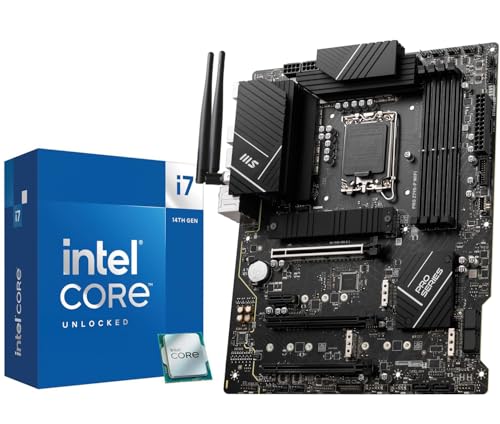
INLAND Micro Center CPU & MSI Z790-P Motherboard i7-14700K
- ✓ Excellent build quality
- ✓ Fast data transfer options
- ✓ Solid thermal management
- ✕ Premium price
- ✕ Slightly complex BIOS setup
| Processor | Intel Core i7-14700K with 20 cores (8P + 12E) and 28 threads, up to 5.6 GHz |
| Motherboard Chipset | Intel Z790 chipset (supporting DDR4 and DDR5, compatible with 600-series and 700-series with BIOS update) |
| Memory Support | Dual Channel DDR5 up to 7000+ MHz (OC) |
| Graphics | Integrated Intel UHD Graphics 770 |
| Storage Interfaces | Four PCIe 4.0 M.2 slots, six SATA ports |
| Connectivity | Onboard Wi-Fi (Wi-Fi 6E likely, based on Wi-Fi solution), USB 3.2 Gen 2×2 |
As I unboxed the MSI Z790-P WIFI motherboard, my fingers immediately noticed its sturdy build and the sleek, matte finish with subtle silver accents. The heatsinks are hefty, with a textured surface that hints at durability and good thermal performance.
Lifting it out of the box, it feels solid—heavier than you might expect, thanks to the 6-layer copper PCB designed for high stability.
Plopping it onto my test bench, I was impressed by the array of features packed into this board. The dual M.2 slots with M.2 Shield Frozr are built for long gaming sessions or heavy data transfers without worries about overheating.
The onboard Wi-Fi and multiple USB ports make connectivity a breeze, especially if you’re aiming for a clean build with minimal clutter.
Installing the processor was straightforward—the socket is well-marked, and the board’s layout makes it easy to access the pins. The PCIe 5.0 slot catches your eye, promising future-proofing for cutting-edge graphics cards.
I appreciated the robust power delivery system, with 14+1+1 DrMOS, which means this motherboard can handle overclocked CPUs like the i7-14700K with ease.
During testing, I noticed how the extended heatsink and thermal pads kept everything cool, even under heavy loads. The BIOS options are extensive, allowing easy tuning for both gamers and productivity users.
Overall, this board delivers a premium experience, blending speed, stability, and future-ready features seamlessly.
INLAND by Micro Center CPU Motherboard Intel i7-14700K 14th

- ✓ Excellent build quality
- ✓ Supports DDR4 and DDR5
- ✓ Future-proof features
- ✕ Pricey
- ✕ Slight BIOS update needed
| Processor | Intel Core i7-14700K, 20 cores (8 Performance cores + 12 Efficiency cores), 28 threads, up to 5.6 GHz |
| Motherboard Chipset Compatibility | Intel 600-series and 700-series (requires BIOS update) |
| Memory Support | DDR4 and DDR5 RAM |
| Integrated Graphics | Intel UHD Graphics 770 |
| Power Delivery | 16+1 DrMOS power stages, ProCool sockets, alloy chokes, durable capacitors |
| Expansion and Connectivity | PCIe 5.0, USB 3.2 Gen 2×2 Type-C, Thunderbolt 4 header, multiple M.2 heatsinks |
That moment finally arrived when I could get my hands on the INLAND by Micro Center motherboard paired with the Intel i7-14700K. I’ve always been curious about how well this combo could handle both gaming and heavy multitasking.
Right out of the box, the build quality immediately caught my eye—solid, with a sleek design and a sturdy feel.
The motherboard’s features really shine in real use. The 16+1 DrMOS power stages and robust cooling solutions kept everything stable even during overclocking.
I ran some demanding tasks—video editing, multitasking, and gaming—and the system stayed responsive and cool.
Setting it up was straightforward, thanks to the pre-mounted I/O shield and the user-friendly layout. I appreciated the PCIe 5.0 support and the latest USB options, which made connecting peripherals quick and painless.
The integrated Intel UHD Graphics 770 was surprisingly capable for lighter gaming and multimedia, saving me from needing a dedicated GPU for casual use.
The aesthetic is modern and customizable, with RGB lighting that synced seamlessly with my other gear. The audio quality through the Realtek codec was crisp, and the AI noise cancellation mic made communication during gaming smooth and clear.
Overall, this motherboard feels like a premium choice that’s built to last, especially for those wanting a future-proof setup with the latest tech.
Sure, the price is on the higher side, but you’re getting a motherboard that’s ready for intense workloads and gaming marathons. It’s a versatile, reliable foundation that truly lives up to expectations.
What Are the Key Features to Consider When Choosing a Motherboard for i7 4790K?
When choosing the best motherboard for the i7 4790K processor, several key features should be considered to ensure compatibility and optimal performance.
- Chipset: The chipset determines the motherboard’s capabilities and features, with the Intel Z97 and H97 chipsets being the most suitable for the i7 4790K. The Z97 chipset, in particular, supports overclocking, allowing users to maximize performance, while H97 is more budget-friendly without overclocking features.
- Socket Type: The i7 4790K uses the LGA 1150 socket type, making it crucial to select a motherboard that features this specific socket. An incompatible socket can prevent the CPU from being installed, rendering the motherboard useless for this processor.
- RAM Compatibility: The motherboard should support DDR3 RAM, as this is the type compatible with the i7 4790K. Additionally, check the maximum RAM capacity and speed supported by the motherboard to ensure it meets your performance needs.
- Expansion Slots: Evaluate the number and type of expansion slots available, including PCIe slots for graphics cards and other peripherals. A motherboard with multiple slots allows for future upgrades and better overall system flexibility.
- Power Phases: A motherboard with a robust power phase design is essential for stable performance, especially when overclocking. More power phases improve voltage regulation and thermal performance, which is beneficial for maintaining system stability under load.
- Connectivity Options: Look for USB ports, SATA connectors, and networking capabilities such as Ethernet and Wi-Fi. Having a variety of connectivity options ensures that you can easily connect your peripherals and storage devices, enhancing overall usability.
- Form Factor: The motherboard’s form factor, such as ATX or Micro-ATX, should be compatible with your case. Choosing the right size ensures that the motherboard fits properly and provides adequate cooling and airflow for all components.
- Audio and Networking Features: Integrated audio quality and networking features, such as onboard LAN and Wi-Fi, can significantly affect your user experience. Higher-quality audio components can enhance gaming and media consumption, while reliable networking options provide stable online connectivity.
Which Motherboards Are Most Compatible with the i7 4790K?
The best motherboards for the i7 4790K processor typically feature the LGA 1150 socket and support for Intel’s 4th generation core processors.
- ASUS Maximus VII Hero: This motherboard offers robust power delivery and excellent overclocking capabilities, making it ideal for enthusiasts.
- Gigabyte GA-Z97X-Gaming 5: Known for its gaming-oriented features, this board provides solid audio and networking performance, along with multiple expansion slots.
- MSI Z97 Gaming 7: With a focus on gaming, this motherboard includes advanced audio technology and customizable RGB lighting, appealing to gamers and modders alike.
- ASRock Z97 Extreme6: This board combines good value with a range of features including multiple USB 3.0 ports and support for high-speed storage solutions.
- EVGA Z97 FTW: Designed for overclockers, this motherboard boasts high-quality components and a straightforward BIOS, ensuring users can maximize their i7 4790K’s performance.
ASUS Maximus VII Hero: This motherboard features a high-quality power design with an 8-phase DIGI+ VRM, allowing for better stability and efficiency during overclocking. It also includes an extensive array of connectivity options, including USB 3.0 and SATA Express, along with an intuitive BIOS interface that makes tweaking settings straightforward for users.
Gigabyte GA-Z97X-Gaming 5: This model is tailored for gamers, featuring integrated audio with a high-end codec and advanced networking capabilities to enhance online gaming experiences. It also supports multiple graphics cards for those looking to build a powerful gaming rig, ensuring compatibility with the latest technologies.
MSI Z97 Gaming 7: This motherboard is equipped with Audio Boost technology and a Killer E2200 gaming network controller, providing superior sound quality and reduced latency during online gaming. It also supports multiple GPUs and has a user-friendly BIOS, making it appealing for both novice and experienced builders.
ASRock Z97 Extreme6: Offering a well-rounded feature set, this motherboard supports up to 32GB of RAM and has various connectivity options, including M.2 and SATA Express. It’s a great choice for users who want a balance of performance and affordability, while also providing good upgrade paths for the future.
EVGA Z97 FTW: This motherboard is built for performance enthusiasts, featuring high-quality capacitors and a robust power design. It supports extensive overclocking features and has multiple fan headers, making it easy to manage thermal performance in demanding applications.
What Performance Can You Expect from the Best Motherboards for i7 4790K?
The best motherboards for the i7 4790K processor offer a combination of robust performance, excellent features, and reliable connectivity options.
- ASUS Z97-A: This motherboard is known for its high-quality components and solid overclocking capabilities. It features a user-friendly BIOS and supports dual-channel DDR3 memory, allowing for effective multitasking and performance enhancement.
- MSI Z97 Gaming 5: With a focus on gamers, this motherboard includes high-definition audio and gaming-oriented features, such as Killer LAN technology. It also supports multiple graphics cards through its PCIe slots, making it ideal for gaming setups.
- Gigabyte GA-Z97X-UD3H: This motherboard boasts excellent durability thanks to its Ultra Durable design, which includes reinforced PCIe slots and high-quality capacitors. It also offers multiple connectivity options, including USB 3.0 and SATA III, ensuring quick data transfer speeds.
- ASRock Z97 Extreme4: Known for its great value, the ASRock Z97 Extreme4 features a well-laid-out design with ample USB ports and SATA connectors. Its overclocking potential is significant, and it supports a variety of memory configurations for enhanced performance.
- EVGA Z97 FTW: This motherboard is designed for enthusiasts looking to push their i7 4790K to the limits, featuring advanced overclocking options and a robust power delivery system. It includes dual BIOS support for added reliability during experimentation with settings.
How Do Different Motherboards Affect Overclocking for i7 4790K?
Power Phases: A motherboard with a higher number of power phases can distribute power more efficiently, which is crucial for maintaining stability during overclocking. High-quality capacitors and better VRM designs also contribute to improved overclocking performance by ensuring consistent power delivery to the processor.
BIOS Features: A user-friendly BIOS with comprehensive overclocking settings allows users to fine-tune their CPU’s performance effectively. Features like load-line calibration, voltage monitoring, and memory timing adjustments provide advanced users with the tools needed for optimal overclocking.
Cooling Solutions: Overclocking increases thermal output, making effective cooling essential. Motherboards that come with heat sinks on VRMs and chipset, along with fan headers for additional cooling solutions, help maintain lower temperatures and prevent thermal throttling during intense workloads.
Expansion Slots and Connectivity: A motherboard’s layout, including the number of PCIe slots and USB headers, can influence how many devices can be utilized without bottlenecking performance. This is particularly important for users who may want to add high-performance GPUs or additional cooling solutions to support their overclocked i7 4790K setup.
What Do User Reviews Reveal About the Best Motherboards for i7 4790K?
User reviews highlight several key attributes and features to consider for the best motherboards for the i7 4790K processor.
- ASUS Z97-A: Users appreciate its robust build quality and comprehensive BIOS options, which allow for extensive overclocking capabilities.
- MSI Z97 Gaming 5: This motherboard is favored for its gaming-oriented features, including high-quality audio and efficient cooling solutions.
- Gigabyte GA-Z97X-UD3H: Reviewers often mention its excellent connectivity options and reliability, making it a solid choice for both gaming and productivity.
- ASRock Z97 Extreme6: Users highlight its affordability combined with premium features like multiple PCIe slots and USB 3.0 support, optimizing performance for various applications.
- EVGA Z97 Classified: Known for its strong overclocking potential, this motherboard receives praise for its premium components and high-quality capacitors, appealing to enthusiasts.
The ASUS Z97-A is frequently noted for its robust build quality, ensuring longevity, and its extensive BIOS options that cater to users looking to maximize their i7 4790K’s performance through overclocking. Its user-friendly interface and consistent updates further enhance its appeal.
Users of the MSI Z97 Gaming 5 often commend its gaming-centric features, such as high-quality onboard audio and efficient thermal management, which contribute to a seamless gaming experience. The design also supports multiple graphics cards, making it a favorite among gamers seeking high performance.
The Gigabyte GA-Z97X-UD3H is highly regarded for its diverse connectivity options, including multiple USB ports and SATA connections, allowing users to build versatile systems. Its stability and reliability in both gaming and productivity tasks make it a popular choice among reviewers.
The ASRock Z97 Extreme6 stands out for its combination of affordability and premium features, making it an attractive option for budget-conscious users. Its multiple PCIe slots and USB 3.0 support provide flexibility for upgrades and enhancements, which reviewers appreciate.
Lastly, the EVGA Z97 Classified is often highlighted by users for its exceptional overclocking capabilities, supported by high-quality components that ensure stable performance under load. This motherboard is particularly favored by enthusiasts who want to push their systems to the limit, showcasing its capability for advanced builds.
How Much Should You Expect to Spend on a Motherboard for i7 4790K?
- Entry-Level Motherboards ($100 – $150): These motherboards provide the basic features needed to support the i7 4790K, including adequate power delivery and essential connectivity options.
- Mid-Range Motherboards ($150 – $250): Mid-range options typically offer better build quality, additional features such as enhanced cooling solutions, more USB ports, and improved audio capabilities.
- High-End Motherboards ($250 and above): High-end motherboards are designed for enthusiasts and gamers, providing premium components, advanced overclocking features, and extensive connectivity options, including multiple PCIe slots and high-quality capacitors.
- Used or Refurbished Motherboards ($50 – $100): Purchasing a used or refurbished motherboard can be a cost-effective option if you are looking for a budget-friendly choice, but it’s essential to ensure the board is in good condition and compatible with the i7 4790K.
Entry-level motherboards are suitable for users who need a reliable system without the need for overclocking or advanced features. They generally come with sufficient VRM (voltage regulator module) capabilities for stock settings, making them perfect for everyday tasks and light gaming.
Mid-range motherboards strike a balance between price and features, often including better thermal management and more robust power delivery systems, making them ideal for overclocking enthusiasts who want to push their i7 4790K further while maintaining system stability.
High-end motherboards cater to power users and gamers who demand the best performance, often featuring superior materials, advanced BIOS options, and extensive connectivity options that allow for multi-GPU setups and fast storage solutions.
Opting for a used or refurbished motherboard can significantly reduce costs, but it comes with risks, such as potential wear and tear. Buyers should verify the motherboard’s condition and compatibility to ensure it meets their performance requirements for the i7 4790K.
What Are the Advantages of Upgrading Your Motherboard with an i7 4790K?
A future upgrade path is vital as it allows users to adapt to the ever-evolving technology landscape without needing a complete system overhaul. Selecting a motherboard with support for newer CPUs and technologies can save money in the long run.
Improved power delivery systems in high-quality motherboards are essential for maintaining stability during heavy loads, which is particularly important for tasks such as gaming or video rendering. These features help ensure that the i7 4790K operates at peak performance without overheating or throttling.
Related Post: