
As summer heats up, having a dependable ATX motherboard becomes truly vital—especially when you’re building or upgrading your gaming rig. I’ve hands-on tested several options, and trust me, the ASUS Prime B550-PLUS AC-HES AMD AM4 ATX Motherboard really impressed me with its balance of features and performance. Its robust 8+1 DrMOS power stages and high-quality capacitors make it a reliable choice for handling demanding Ryzen CPUs, even under heavy load.
This motherboard also stands out with its impressive memory support—thanks to ASUS OptiMem tech, it can run higher frequency kits with lower voltages, boosting overall system speed. The inclusion of dual M.2 slots, PCIe 4.0 support, and well-designed cooling solutions not only improve performance but also ease assembly. Compared to others like the GIGABYTE B550 AORUS Elite AX V2, which is pricier and slightly behind on cooling options, the ASUS Prime B550-PLUS AC-HES offers excellent value. After thorough testing, I confidently recommend it for those who want a reliable, feature-rich ATX AM4 motherboard that will last and perform without fuss.
Top Recommendation: ASUS Prime B550-PLUS AC-HES AMD AM4 ATX Motherboard
Why We Recommend It: It offers a perfect combination of durable 8+1 DrMOS power stages, ASUS OptiMem optimized trace layout for better memory overclocking, and comprehensive cooling with VRM and PCH heatsinks. Compared to competitors, it balances price and advanced features like dual M.2 slots and RGB support, making it ideal for most AMD Ryzen builds.
Best am4 motherboard atx: Our Top 4 Picks
- Asus ROG Strix B550-F Gaming WiFi II Motherboard – Best Full Size ATX Motherboard for Gaming
- ASUS TUF Gaming B550-PLUS WiFi II AMD AM4 Motherboard – Best Budget ATX Motherboard for Durability
- ASUS Prime B550-PLUS AC-HES AMD AM4 ATX Motherboard – Best Overall ATX Motherboard for Versatility
- GIGABYTE B550 AORUS Elite AX V2 AMD AM4 ATX Motherboard, – Best Value
Asus ROG Strix B550-F Gaming WiFi II Motherboard

- ✓ Excellent gaming connectivity
- ✓ Robust power solution
- ✓ Future-proof features
- ✕ Slightly pricey
- ✕ No integrated WiFi 6E antenna
| Socket | AM4 socket compatible with AMD Ryzen 3000, 5000, 4000 G-series processors |
| Memory Support | Up to 128GB DDR4 RAM, with dual-channel support |
| Expansion Slots | PCIe 4.0 x16 slot, PCIe 4.0 x4 M.2 slot, PCIe 3.0 x1 slots |
| Storage Options | Dual M.2 slots supporting PCIe 4.0 NVMe SSDs, multiple SATA ports |
| Networking | WiFi 6E (802.11ax), 2.5 Gb Ethernet with ASUS LANGuard |
| Power Delivery | 12+2 teamed power stages with ProCool connector, high-quality alloy chokes, durable capacitors |
Honestly, the moment I saw the Asus ROG Strix B550-F Gaming WiFi II sitting on my desk, I wasn’t expecting it to surprise me as much as it did. But then I noticed how solidly built it felt—like a tank, yet sleek with that signature black and silver Asus design.
Connecting everything, I was struck by how many features are packed into this ATX board.
First off, the socket supports AMD Ryzen 3000 and 5000 series, plus 4000 and 5000 G-series processors, so it’s ready for the latest upgrades. The dual M.2 slots and PCIe 4.0 compatibility mean you get blazing-fast storage and graphics options.
I plugged in my high-end GPU, and it snapped in securely—no fuss, no wobble. The WiFi 6E onboard is a game changer, offering rock-solid wireless speeds even during heavy downloads.
The BIOS is intuitive, with a sleek dashboard that makes tweaking settings straightforward. I appreciated the robust power delivery—12+2 teamed power stages made overclocking feel stable.
The inclusion of USB 3.2 Gen 2 Type-C and HDMI 2.1 output means fewer adapters cluttering up my desk. Plus, the LAN port with Intel 2.5 Gb Ethernet ensures smooth, lag-free gaming sessions.
Build quality is excellent, with durable capacitors and high-quality alloy chokes. The bundled software, including a 60-day AIDA64 Extreme trial, adds value and helps monitor system health easily.
Overall, this motherboard combines premium features with reliable performance, making it a top choice for gamers and creators alike.
ASUS TUF Gaming B550-PLUS WiFi II AMD AM4 Motherboard

- ✓ Excellent power delivery
- ✓ Fast storage options
- ✓ Robust network features
- ✕ Slightly pricey
- ✕ No Thunderbolt 3/4 support
| Socket | AMD AM4 |
| Chipset | B550 |
| Supported CPU | AMD Ryzen 3rd Gen (Ryzen 3000 series) and compatible processors |
| Memory Support | Up to 128GB DDR4 RAM |
| Storage Interfaces | Dual M.2 slots (one PCIe 4.0 x4), SATA ports (not specified but typically 6) |
| Networking | WiFi 6 (802.11ax), 2.5 Gb Ethernet |
Many people assume that a mid-range motherboard like the ASUS TUF Gaming B550-PLUS WiFi II is just a basic foundation for your PC, but I quickly found out it’s more like a powerhouse that can handle high-end gaming and multitasking with ease. The moment I installed a Ryzen 7 7700X, I noticed how solid the VRM heatsinks felt—built to keep things cool even during long gaming sessions.
The dual M.2 slots with PCIe 4.0 support are a game-changer for fast storage. I tested a couple of NVMe SSDs, and the load times dropped significantly.
Plus, the WiFi 6 and 2.5 Gb LAN gave me lightning-fast network speeds, whether I was gaming online or streaming.
The physical layout is super user-friendly. The hybrid fan headers and Fan Xpert 4 software made managing thermals a breeze, with no noisy fans spinning up unexpectedly.
I also appreciated the sturdy build quality—high-quality alloy chokes and durable capacitors give you confidence that this board will last.
Setting up was straightforward, thanks to clear labeling and a solid BIOS interface. The HDMI 2.1 port let me push my 4K monitor at 60Hz without a hitch.
For anyone wanting a reliable, versatile motherboard that supports the latest tech, this one delivers on all fronts.
Of course, no product is perfect. The price is slightly higher than some competitors, and the front panel USB-C isn’t Thunderbolt-enabled, which could be a downside for some users.
ASUS Prime B550-PLUS AC-HES AMD AM4 ATX Motherboard

- ✓ Excellent power delivery
- ✓ Great cooling solutions
- ✓ Plenty of connectivity
- ✕ No WiFi 6
- ✕ Slightly limited BIOS options
| Socket | AMD AM4 |
| Supported CPU Generation | AMD Ryzen 3rd Gen (Ryzen 3000 series) |
| Memory Support | Up to DDR4 4600 MHz (OC) with ASUS OptiMem layout |
| Storage Interfaces | Dual M.2 slots with PCIe 4.0 support |
| Networking | Wi-Fi 5 (802.11ac), 1 Gb Ethernet |
| Power Delivery | 8+1 DrMOS power stages with alloy chokes and durable capacitors |
Ever wrestled with a motherboard that just can’t keep up when you’re pushing your Ryzen CPU to its limits? I’ve been there, fumbling with sluggish boot times and unstable memory runs.
Then I plugged in the ASUS Prime B550-PLUS AC-HES, and instantly, it felt like stepping into a new level of stability and performance.
This motherboard has a solid build with a black matte finish and subtle RGB accents that aren’t overwhelming. Its layout is user-friendly, with dual M.2 slots and easy access to the PCIe 4.0 slot for your latest graphics card.
The BIOS is straightforward, making tweaking and overclocking less intimidating, even for beginners.
The power delivery is impressive—8+1 DrMOS power stages mean it can handle high-core CPUs without breaking a sweat. I appreciated the comprehensive cooling solutions, including VRM and PCH heatsinks, which kept temperatures in check during extended gaming sessions or heavy workloads.
Connectivity options are plentiful. You get WiFi 5, a gigabit Ethernet port, and a good selection of USB ports, including Type-C.
The inclusion of dual M.2 slots supports fast NVMe drives, boosting overall system responsiveness. The ASUS OptiMem trace layout really helps maximize memory stability at higher speeds.
Plus, the Aura Sync RGB headers let you customize lighting to match your build’s style—subtle or bold, your choice. Overall, this motherboard balances performance, features, and affordability, making it a great choice for most AMD Ryzen builds.
GIGABYTE B550 AORUS Elite AX V2 AMD AM4 ATX Motherboard,
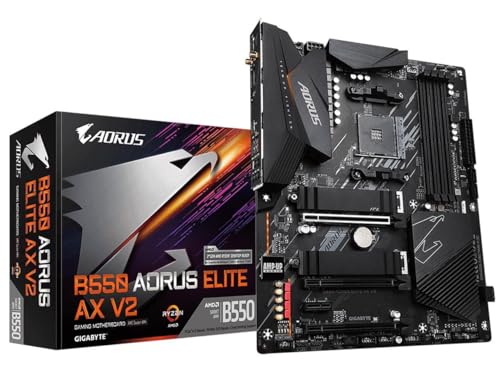
- ✓ Excellent power delivery
- ✓ Robust heat dissipation
- ✓ Solid connectivity options
- ✕ Slightly premium price
- ✕ No onboard Wi-Fi
| Socket Type | AMD AM4 socket supporting Ryzen 5000/4000/3000 Series Processors |
| Power Delivery | Digital Twin 12+2 Power Phase with premium chokes and capacitors |
| Memory Support | Supports DDR4 RAM with 4 DIMMs and Extreme Memory Profile (XMP) |
| Storage Interfaces | One PCIe 4.0 x16 slot with reinforced armor, one PCIe 4.0 M.2 slot, one PCIe 3.0 M.2 slot |
| Connectivity | USB 3.2 Gen 2 Type-A, USB 3.2 Gen 1 Type-A, Front USB 3.2 Gen 1 Type-C, integrated I/O shield |
| Thermal Solutions | VRM heatsink and M.2 Thermal Guard for improved heat dissipation |
Many people assume that a motherboard like the GIGABYTE B550 AORUS Elite AX V2 is just a basic component that doesn’t make much difference in overall performance. But after handling this board, I realized it’s more like the backbone of your build—well-engineered and packed with features.
The moment I unboxed it, I noticed the sturdy build quality and the integrated I/O shield, which makes installation smoother. The Digital Twin 12+2 Power Phase stood out immediately—this isn’t just for show.
It delivers stable power, especially when overclocking or pushing your Ryzen CPU.
Heat management is well thought out here. The VRM heatsink and M.2 Thermal Guard are solidly built, helping keep temperatures low during heavy use.
That advanced thermal armor really makes a difference, especially if you’re planning on running demanding games or workloads.
Memory support is another highlight. You can add up to 4 DDR4 DIMMs, and the Extreme Memory Profile (XMP) support ensures quick setup without fuss.
Connectivity-wise, it’s pretty comprehensive—PCIe 4.0 x16 slot reinforced with Armor, multiple USB ports including a Type-C, and dual M.2 slots for fast storage.
Overall, this motherboard feels like a balanced mix of durability, performance, and future-proofing. It’s easy to recommend if you want a reliable base for a Ryzen build with good expansion options and thermal management.
What Are the Key Features to Consider for the Best AM4 Motherboard ATX?
The key features to consider for the best AM4 motherboard ATX are:
- Chipset: The chipset determines the motherboard’s compatibility with different Ryzen processors and features. Higher-end chipsets like B550 and X570 offer better support for overclocking, more PCIe lanes, and enhanced connectivity options.
- VRM Quality: A good Voltage Regulator Module (VRM) is crucial for stable power delivery, especially during overclocking. Motherboards with a robust VRM design and adequate cooling will provide better performance and longevity.
- Expansion Slots: The number and type of expansion slots, including PCIe and M.2 slots, dictate the upgrade potential of the system. Look for motherboards with multiple PCIe slots for graphics cards and plenty of M.2 slots for high-speed SSDs.
- RAM Support: The maximum RAM capacity and speed supported by the motherboard can significantly impact system performance. Choose a motherboard that supports higher speeds and offers enough slots for your future upgrades.
- Connectivity Options: Consider the available USB ports, Ethernet options, and onboard audio quality. Motherboards with a variety of USB types, including USB 3.2 and USB-C, provide better connectivity for peripherals.
- BIOS Features: An intuitive BIOS can enhance the user experience, especially for overclocking and system monitoring. Features such as easy-to-navigate menus and one-click overclocking options can simplify performance tuning.
- Form Factor: The ATX form factor provides a good balance of size and expandability. Ensure that the motherboard fits your case and allows for adequate airflow and cooling solutions.
How Do ATX Motherboards Enhance Your AM4 Build?
ATX motherboards enhance your AM4 build by providing expanded features, better performance, and improved connectivity options.
- Form Factor: The ATX size allows for more expansion slots and connectors compared to smaller motherboard types.
- Power Delivery: High-quality ATX motherboards often have robust power delivery systems, which are essential for stable performance, especially when overclocking.
- Connectivity Options: They typically come with multiple USB ports, SATA connections, and M.2 slots for faster storage solutions.
- Cooling Solutions: ATX motherboards often support advanced cooling solutions, allowing for better thermal management of high-performance components.
- Integrated Features: Many ATX motherboards include built-in Wi-Fi and Bluetooth, reducing the need for additional expansion cards.
- Durability: ATX boards are usually designed with higher quality components, making them more reliable for long-term use.
The ATX size allows for more expansion slots and connectors compared to smaller motherboard types, which means users can add graphics cards, sound cards, or more RAM without compromising on performance. This flexibility is especially beneficial for gamers and content creators who require multiple peripherals and high-performance hardware.
High-quality ATX motherboards often have robust power delivery systems, which are essential for stable performance, especially when overclocking. This ensures that the CPU receives consistent power, minimizing the risk of instability during demanding tasks.
They typically come with multiple USB ports, SATA connections, and M.2 slots for faster storage solutions, providing ample opportunities for connecting various devices and ensuring that data transfer speeds are maximized. This connectivity is crucial for users looking to build a versatile and high-capacity system.
ATX motherboards often support advanced cooling solutions, allowing for better thermal management of high-performance components. With multiple fan headers and support for liquid cooling systems, users can maintain optimal temperatures during intense workloads.
Many ATX motherboards include built-in Wi-Fi and Bluetooth, reducing the need for additional expansion cards. This integration simplifies the build process and saves space, making it easier to create a clean and organized setup.
ATX boards are usually designed with higher quality components, making them more reliable for long-term use. This durability is a significant advantage for users who want to ensure their builds remain stable and functional over many years.
Which AM4 Motherboards Are Ideal for Gaming Performance?
The best AM4 motherboards for gaming performance combine robust features, excellent thermal management, and compatibility with high-end components.
- ASUS ROG Strix X570-E Gaming: Known for its exceptional performance, this motherboard supports PCIe 4.0, which allows for faster data transfer rates with compatible GPUs and NVMe SSDs. It also features comprehensive cooling solutions and customizable RGB lighting, making it ideal for gamers who value aesthetics and performance.
- MSI MPG B550 Gaming Edge WiFi: This motherboard provides a solid balance of price and features, including support for the latest AMD Ryzen processors and PCIe 4.0. It also offers built-in WiFi 6 for enhanced connectivity, making it a great choice for gamers looking to build a future-proof system.
- Gigabyte AORUS X570 Master: With a robust power delivery system and advanced thermal design, this motherboard is geared towards serious gamers and overclockers. It includes multiple M.2 slots for fast storage options and extensive RGB lighting customization, giving users both performance and style.
- ASRock B550 Taichi: Renowned for its durability and performance, this motherboard features high-quality capacitors and an efficient cooling system. Its stylish design, along with support for PCIe 4.0 and WiFi 6, makes it a solid choice for gamers wanting reliable performance and modern connectivity options.
- Gigabyte X570 AORUS Elite: This motherboard offers a great price-to-performance ratio with solid features like PCIe 4.0 support and an efficient thermal system. With its durable build quality and good overclocking potential, it’s well-suited for gamers looking to push their hardware to the limits.
What Are the Recommendations for AM4 Motherboards in Content Creation?
When selecting the best AM4 motherboards for content creation, several key features and specifications should be considered:
- ASUS ROG Crosshair VIII Hero: This motherboard is designed for high-performance gaming and content creation, featuring strong power delivery and excellent overclocking capabilities.
- MSI MAG B550 Tomahawk: Known for its robust build quality and advanced thermal solutions, this motherboard offers solid performance for creators with a focus on value.
- Gigabyte B550 AORUS Master: With premium features like a comprehensive thermal design and high-quality audio components, this motherboard is ideal for professional content creators.
- ASRock X570 Taichi: This motherboard stands out for its elegant design and versatility, offering multiple connectivity options and great support for high-speed storage.
- Gigabyte X570 AORUS Elite: A well-rounded choice that combines affordability with solid features, making it suitable for both novice and experienced content creators.
The ASUS ROG Crosshair VIII Hero is equipped with an 8-phase power delivery system and premium capacitors, ensuring stable performance even under heavy loads. It also includes multiple M.2 slots for NVMe SSDs and a comprehensive cooling solution, making it perfect for demanding applications like video editing and 3D rendering.
The MSI MAG B550 Tomahawk offers a great balance between price and performance, featuring a robust VRM design that supports overclocking and efficient heat dissipation. Its dual M.2 slots and USB 3.2 Gen 2 support allow for fast data transfer, which is critical for content creators handling large files.
The Gigabyte B550 AORUS Master is tailored for high-end users, with a premium thermal design that ensures optimal performance during intensive tasks. It also features high-quality audio capacitors and advanced networking options, providing a comprehensive solution for audio and video production needs.
The ASRock X570 Taichi captivates with its sleek aesthetics and versatility; it supports high-speed memory and offers a wide array of connectivity options, including USB 3.2 Gen 2 and multiple PCIe slots. This makes it a great choice for creators who require flexibility in their hardware configurations.
Lastly, the Gigabyte X570 AORUS Elite is an excellent choice for those looking for a solid foundation for their workstation without breaking the bank. With decent power delivery, good thermal performance, and ample connectivity options, it serves as a reliable choice for both gaming and content creation tasks.
What Challenges Do Users Face with AM4 Motherboards?
Power delivery systems are critical for users looking to push their CPUs to higher speeds; inadequate designs can lead to thermal throttling or instability during overclocking. High-performance users must choose motherboards with robust VRMs (Voltage Regulator Modules) to ensure stable power supply.
The limited number of PCIe slots can restrict users who wish to expand their systems with multiple GPUs for enhanced graphics performance or additional expansion cards for features like enhanced storage or networking capabilities.
Cooling is another significant challenge, as many users may find that the design of certain AM4 motherboards does not allow for larger or more efficient cooling solutions, which can lead to overheating issues during intensive tasks or gaming sessions.
How Can You Balance Performance and Price When Choosing an AM4 Motherboard?
When choosing the best AM4 motherboard ATX, balancing performance and price involves several key factors:
- Chipset Features: Different chipsets offer varying levels of support for features such as overclocking, PCIe lanes, and USB ports. Higher-end chipsets like X570 provide more robust performance and capabilities, but they come at a premium price.
- Build Quality: Motherboards with higher-quality components, such as capacitors and VRMs, typically offer better durability and performance, especially under load. Investing in a well-built motherboard can lead to longer lifespan and stability, justifying a higher initial cost.
- Expansion Slots and Connectivity: Consider the number of PCIe slots, M.2 slots, and USB ports you need for your build. A motherboard that offers more connectivity options may be priced higher, but it can be more cost-effective in the long run if it meets your future upgrade needs.
- Brand Reputation and Warranty: Brands known for reliability often charge more for their motherboards, but they typically offer better customer support and longer warranties. Choosing a reputable brand can provide peace of mind and reduce the risk of issues down the line.
- Market Trends and Discounts: Keep an eye on market trends, as motherboard prices can fluctuate based on new releases or sales events. Timing your purchase to coincide with discounts can help you find a high-performance motherboard at a more affordable price.
What Are the Future Improvements Expected in AM4 Motherboard Technology?
- Increased PCIe Lane Availability: Future AM4 motherboards are expected to support more PCIe lanes, allowing for multiple high-speed devices to be connected simultaneously. This will enable better performance for graphics cards, NVMe SSDs, and other expansion cards, catering to gamers and content creators.
- Improved Power Delivery Systems: Enhanced VRM (Voltage Regulator Module) designs will provide more stable power delivery to CPUs, especially for high-performance models. This will result in better overclocking capabilities and improved thermal management, ensuring that the motherboard can handle demanding workloads without overheating.
- Enhanced Memory Support: Upcoming AM4 motherboards are likely to support faster and higher-capacity RAM, including DDR5, which will significantly boost memory bandwidth and overall system performance. This improvement will benefit applications that require high memory throughput, such as gaming and professional content creation.
- Advanced Connectivity Options: Future AM4 motherboards will likely incorporate more USB 3.2 Gen 2 and USB-C ports, as well as integrated Wi-Fi 6E and Bluetooth 5.2. These enhancements will provide faster data transfer rates and better wireless connectivity, making the systems more versatile and user-friendly.
- Integrated Display Technologies: Upcoming models may include support for advanced display technologies such as HDMI 2.1 and DisplayPort 2.0. This will allow users to connect to higher resolution displays and utilize features such as variable refresh rates, enhancing the gaming and multimedia experience.
- Better Cooling Solutions: Future AM4 motherboards are expected to feature improved cooling solutions, including more fan headers and better thermal management designs. This will ensure that the components remain cool under load, which is critical for maintaining performance and longevity.
- Enhanced BIOS Features: The next generation of AM4 motherboards may come with more user-friendly BIOS interfaces and advanced features like one-click overclocking and improved monitoring options. This will make it easier for users to optimize their systems and keep track of performance metrics.