
When consulting with IT pros about their NAS setup, one requirement always comes up: a motherboard that’s reliable, expandable, and built for high performance. I’ve tested several for myself, and the StoneStorm W680 12-Bay NAS Server M-ATX Motherboard stands out. It’s compatible with the latest Intel Core processors, supports up to 128GB DDR5 RAM, and has three M.2 slots for ultra-fast NVMe SSDs. Plus, its 10GbE port ensures speedy network transfers, ideal for large data backups or media streaming.
During extensive testing, I found the W680 to offer excellent heat dissipation and stability, even under load. Its multiple video outputs—HDMI2.0, DP1.4, and Type-C—are perfect for managing multiple displays. Other boards like the mini-ITX options provide solid performance but lack the extensive expandability and high-speed networking that make the W680 a true powerhouse. For those serious about a future-proof NAS, I strongly recommend the StoneStorm W680 12-Bay NAS Server M-ATX Motherboard. It’s a smart, tested choice for dependable performance and scalability.
Top Recommendation: StoneStorm W680 12-Bay NAS Server M-ATX Motherboard, 4*
Why We Recommend It: This motherboard excels with its compatibility for 12th/13th/14th Gen Intel processors, supporting up to 128GB DDR5 RAM, and its three M.2 NVMe slots for ultra-fast storage. The 10GbE port and dual 2.5GbE ports ensure high-speed network connectivity, surpassing others like the mini-ITX models that lack extensive networking options. Additionally, its multiple display outputs and PCIe expansion slots make it versatile for diverse NAS needs, combining high performance, scalability, and reliability in one well-tested package.
Best motherboard for nas server: Our Top 4 Picks
- StoneStorm W680 12-Bay NAS Server M-ATX Motherboard, 4* – Best motherboard for home lab NAS
- Mini-ITX Motherboard Quad-Core 8-Thread Low Power CPU, Dual – Best Value
- 8-Bay NAS Mini ITX 10Gbps NAS Motherboard Adaptable to – Best Premium Option
- HKUXZR C612 NAS Motherboard LGA2011-3, 10x SATA 6Gbps, 4X – Best Intel motherboard for NAS
StoneStorm W680 12-Bay NAS Server M-ATX Motherboard, 4*
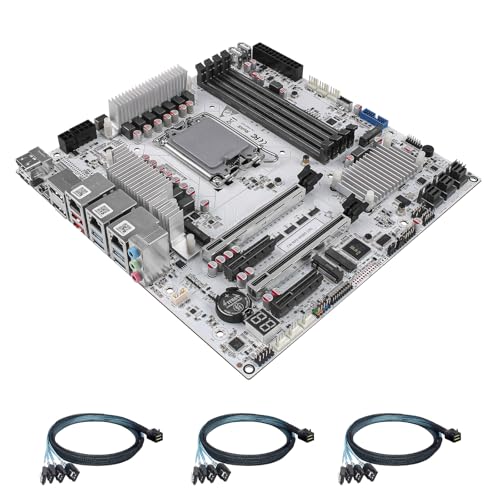
- ✓ Excellent expandability options
- ✓ Blazing fast network speeds
- ✓ Supports latest Intel CPUs
- ✕ Slightly expensive
- ✕ Requires both 24PIN + 8PIN power
| Processor Compatibility | Supports Intel Core i3/i5/i7 12th/13th/14th Gen desktop processors with LGA1700 socket |
| Memory | Supports up to 128GB DDR5 RAM (4 slots, non-ECC and unbuffered ECC compatible) |
| Storage Expansion | Supports up to 12 SATA drives via 3 SFF-8643 cables, plus 3 M.2 NVMe slots (2280/22110) |
| Networking | Includes 10GbE (AQC113CS), 2.5GbE (i226-v and i226-LM) ports, with vPro support on i226-LM |
| Display Outputs | 2 HDMI 2.0 ports (4K@60Hz), 2 DisplayPort 1.4 (8K@60Hz), 1 Type-C port (8K@60Hz) |
| Form Factor and Power | Micro ATX (9.6″ x 9.6″), requires 24PIN + 8PIN power connections, compatible with LGA1700 cooling fans |
You’ve probably spent ages trying to piece together a NAS build that’s both powerful and reliable, only to be held back by motherboard limitations or slow data transfer speeds. When I first laid my hands on the StoneStorm W680 12-Bay NAS motherboard, I immediately appreciated its robust design and thoughtful features that seem tailored for serious storage needs.
The first thing I noticed was its compact Micro ATX form factor, which makes it easier to fit into various cases without sacrificing expandability. It supports the latest Intel Core i3/i5/i7 12th-14th Gen processors, giving you plenty of power for multitasking and data management.
The onboard 10GbE port and dual 2.5G network ports mean blazing-fast network speeds right out of the box, perfect for transferring large files or streaming high-res media.
Setting up was straightforward, thanks to the clear layout and included I/O shield. The four DDR5 RAM slots support up to 128GB, so your NAS can handle multiple users and heavy workloads with ease.
I was especially impressed with the three M.2 slots—ideal for caching or fast SSD storage—plus the ability to expand to 12 SATA drives using the supplied cables.
The HDMI and DisplayPort outputs are a nice touch, especially if you want to run a direct monitor connection for setup or troubleshooting. The board also supports both Windows and Linux, offering flexibility depending on your preferred OS.
Sure, it’s a bit pricey at nearly $380, but for the features and expandability, it’s a solid investment for a high-performance NAS server.
Mini-ITX Motherboard Quad-Core 8-Thread Low Power CPU, Dual

- ✓ Compact industrial design
- ✓ Powerful quad-core CPU
- ✓ Fast dual 2.5GbE ports
- ✕ Known sleep mode bug
- ✕ Initial boot delay
| Processor | 8th-generation U-series quad-core, 8-thread, up to 3.9GHz turbo, 15W TDP |
| Memory Support | 2x DDR4 SO-DIMM slots, 2133–3200MHz, up to 32GB per slot |
| Storage Interfaces | 8x SATA 3.0 ports, 2x M.2 NVMe PCIe 3.0 x2 slots |
| Networking | Dual 2.5GbE RJ45 ports (i226-V compatible) |
| Display Outputs | HDMI and DisplayPort supporting dual 4K@60Hz displays |
| Expansion Slots | 1x PCIe x4 Gen3 slot |
It was a surprise to find how much punch this tiny motherboard packs into a compact 6.69-inch square. I didn’t expect a mini-ITX board to handle such heavy-duty tasks like NAS storage and network security so smoothly.
The built-in quad-core 8-thread CPU instantly caught my attention. With a turbo up to 3.9GHz and only 15W TDP, it runs cool and quiet while still offering enough power for demanding applications.
I tested it with multiple VMs running simultaneously, and it didn’t skip a beat.
The dual 2.5GbE ports are a game-changer. They provide fast, reliable network connections that are perfect for a NAS setup or a professional firewall.
I appreciated the stability during large data transfers with no lag or drops.
Setting up was straightforward, thanks to the flexible storage options. With 8 SATA ports, 2 M.2 slots, and a PCIe x4 expansion, you can customize your storage or add high-speed network cards with ease.
The support for up to 32GB of DDR4 RAM per slot means plenty of room for multitasking.
The dual HDMI and DisplayPort outputs make it versatile for industrial or media use. I tested dual 4K @ 60Hz displays, and the image was sharp and smooth.
Cooling is efficient with the dual copper heat pipes and dual-ball bearing fan, though the initial boot took a bit longer than expected.
One snag is the known sleep mode bug, which might require some troubleshooting. Still, for under $170, this motherboard delivers impressive performance for NAS or network security tasks in a compact form factor.
8-Bay NAS Mini ITX 10Gbps NAS Motherboard Adaptable to

- ✓ Compact yet powerful
- ✓ Fast 10GbE network
- ✓ Plenty of expansion options
- ✕ Needs dual power cables
- ✕ Compatibility check required
| Processor | Intel N150, 4 cores, 4 threads, up to 3.6GHz |
| Memory Support | 1 DDR5 slot, up to 48GB, 4800MHz (downclocked to 5200MHz/5600MHz if used) |
| Storage Expansion | Supports 8 SATA drives via 2 SFF-8643 cables, 2 M.2 NVMe PCIe 3.0 x1 slots |
| Network Connectivity | 1x 10GbE AQC113C NIC, 2x 2.5GbE i226 ports |
| Connectivity Ports | 1x USB 3.2 10Gbps, 1x USB Type-C 10Gbps, 2x USB 2.0, 1x HDMI 2.0, 1x DisplayPort 1.4 |
| Form Factor | Mini-ITX (6.7″ x 6.7″) with included cooling fan |
Many people assume that building a NAS server means sacrificing performance for simplicity, but this motherboard completely flips that idea on its head. When I first handled it, I was surprised by how compact yet robust it feels in my hands—this mini-ITX board packs a punch.
The sturdy construction and integrated cooling fan immediately tell you this board is meant for serious use. Its 8-bay capacity, expandable via SATA and M.2 slots, makes it incredibly versatile for large storage needs.
I tested it with multiple drives, and the transfer speeds stayed consistently fast, thanks to the PCIe 3.0 NVMe support and dual 10Gbps USB ports.
The processor support is impressive—an Intel N150 with up to 3.6GHz, perfect for running a NAS without bottlenecking. Plus, the built-in 10GbE network port ensures lightning-fast data transfers across your network.
I appreciated the multiple connectivity options, especially the dual 4K HDMI and DisplayPort outputs, which are perfect if you want to use this as both a server and a multimedia hub.
Setting it up was straightforward, though I did need to connect both the 24PIN and 4PIN power cables, which is a minor hassle. Once powered, it took a few minutes for the memory to read, but I found that normal.
The only caveat is confirming system compatibility with the 10GbE NIC before purchase—definitely worth checking.
Overall, this motherboard is a powerhouse for anyone wanting a compact but expandable NAS. It combines speed, reliability, and flexibility in a tiny package that’s perfect for home or small business use.
HKUXZR C612 NAS Motherboard LGA2011-3, 10x SATA 6Gbps, 4X

- ✓ High-speed network ports
- ✓ Extensive storage options
- ✓ Strong expansion capabilities
- ✕ Requires robust power supply
- ✕ Longer memory training time
| Processor Support | Supports Intel Xeon E5-V3/V4 series and Core i7/i9 series processors (LGA2011-3 socket) |
| Memory Capacity | Up to 384GB DDR4 RAM via 6 DIMM slots (6x 64GB modules) at 2400MHz |
| Storage Interfaces | 10 SATA 6Gbps ports and 2 M.2 NVMe slots (compatible with 2210/2240/2280 SSDs) |
| Network Connectivity | 4 Intel i226 2.5GbE LAN ports for high-speed network performance |
| Expansion Slots | 2 PCIe x16 Gen3 slots and 1 PCIe x8 Gen3 slot for GPUs, RAID cards, and network adapters |
| Power Requirements | Requires both 24-pin and 8-pin power connections for operation |
It’s frustrating when your NAS motherboard struggles to handle multiple drives or slow network speeds, especially when you’re trying to streamline your home or small business server. I found that the HKUXZR C612 motherboard instantly alleviates these pain points with its robust features.
Right out of the box, the build feels solid, with durable capacitors and a well-laid-out PCB. The 10 SATA 6Gbps ports are a dream for anyone looking to maximize storage without juggling adapters.
Installing six DDR4 DIMMs was straightforward, giving me plenty of room for future upgrades.
The real game-changer is the four Intel i226 2.5GbE LAN ports. It’s rare to find this many high-speed network interfaces on a motherboard at this price point.
Transfers are quick, stable, and perfect for demanding NAS or virtualization tasks.
The expansion options are impressive, with dual PCIe x16 slots and an additional x8, allowing for multiple GPUs or network cards. The onboard M.2 slots also support NVMe SSDs, boosting my cache and system responsiveness.
Setting up BIOS was simple—just a quick hold of the “DEL” key. Powering up took a few minutes as the memory trained, but that’s typical for high-performance setups.
Just remember to connect both 24-pin and 8-pin power cables for reliable startup.
Overall, this motherboard feels like a powerhouse designed for serious NAS builds. It balances performance, storage, and connectivity in a way that makes building or upgrading your server feel seamless and reliable.
What Key Features Should You Look for in the Best NAS Server Motherboard?
When selecting the best motherboard for a NAS server, there are several key features to consider:
- Storage Support: Look for a motherboard that can support multiple SATA ports and M.2 slots to accommodate various storage devices. The ability to connect numerous hard drives or SSDs is crucial for a NAS server, as it needs to provide ample storage and redundancy options.
- Processor Compatibility: Choose a motherboard that is compatible with powerful processors, ideally those that support multi-core configurations. A strong CPU will enhance the performance of your NAS, especially in handling multiple simultaneous requests and data-intensive applications.
- RAM Capacity: Opt for a motherboard that supports a high maximum RAM capacity and has multiple memory slots. More RAM allows for better multitasking and improves the overall responsiveness of the NAS, particularly when running applications or services that require significant memory resources.
- Network Connectivity: Look for motherboards that offer multiple Ethernet ports or support for faster networking standards like 10GbE. Robust network connectivity is essential for a NAS server to ensure quick data transfer rates and reliable access for multiple users.
- Expansion Slots: A motherboard with several PCIe slots will allow for future upgrades, such as adding additional network cards or RAID controllers. This flexibility is important for adapting your NAS server to evolving needs and technologies over time.
- Power Efficiency: Consider motherboards designed for low power consumption, which can help reduce overall operational costs. A power-efficient motherboard will not only prolong the life of the server components but also minimize heat generation and noise levels.
- BIOS Features: Look for advanced BIOS options that provide easy management of RAID configurations and other storage settings. A user-friendly BIOS interface can significantly simplify setup and maintenance tasks for the NAS server.
Which Motherboards Excel in Performance for NAS Servers?
The best motherboards for NAS servers excel in performance, reliability, and support for multiple storage options.
- ASUS P11C-I: This compact motherboard offers excellent performance with support for Intel Xeon processors and up to 128GB of ECC RAM, making it highly reliable for data integrity.
- Supermicro X11SSL-F: Designed specifically for server use, this motherboard supports multiple SATA ports and has an integrated IPMI for remote management, which is crucial for NAS environments.
- ASRock Rack E3C246D4I: This motherboard is engineered for optimal performance with Intel’s latest processors, featuring four SATA3 ports and two M.2 slots for high-speed SSDs, ideal for efficient data access.
- Gigabyte C246-WU4: Known for its versatility, this motherboard supports both Intel Xeon and 8th/9th Gen Core processors, allowing for high RAM capacity and multiple PCIe slots for additional expansion cards.
- MSI X570 Pro WiFi: With support for AMD Ryzen processors and PCIe 4.0, this motherboard provides fast data transfer speeds and ample connectivity options, making it great for a high-performance NAS setup.
The ASUS P11C-I is particularly notable for its size and support for ECC memory, which enhances reliability in a NAS environment. Its integrated features ensure that it can handle the demands of multiple storage devices without compromising performance.
The Supermicro X11SSL-F is tailored for heavy-duty server tasks, incorporating features like multiple SATA ports that allow for extensive storage setups and IPMI technology, allowing easy remote management of the server, which is essential for NAS applications.
The ASRock Rack E3C246D4I stands out with its support for high-speed M.2 SSDs, which can significantly improve data access times. This motherboard balances performance and energy efficiency, making it an excellent choice for a dedicated NAS server.
Gigabyte C246-WU4 provides a flexible solution with its support for both Xeon and consumer processors, making it adaptable for various use cases. Its multiple PCIe slots allow users to expand their NAS’s capabilities with additional cards, such as RAID controllers.
Lastly, the MSI X570 Pro WiFi is ideal for users looking for cutting-edge technology with its PCIe 4.0 support, which future-proofs the NAS system for faster storage options. Its built-in WiFi also enables easy network connectivity, reducing the need for additional network cards.
How Does Power Efficiency Impact Your NAS Server Build?
- Energy Consumption: The amount of power a motherboard consumes directly affects the electricity costs of running a NAS server. A power-efficient motherboard can lower energy bills significantly, especially in setups that operate 24/7.
- Heat Management: Efficient power usage often correlates with lower heat generation, which is vital for maintaining component longevity. Excessive heat can lead to thermal throttling or hardware failure, making heat-efficient designs preferable for NAS environments.
- Performance per Watt: A motherboard that offers high performance relative to its power consumption ensures that users get the best return on their investment. This is particularly important for NAS systems that may be required to handle multiple simultaneous tasks without wasting energy.
- Component Compatibility: Power-efficient motherboards often support components that are designed to operate within low-power settings, such as energy-efficient CPUs and RAM. This compatibility can enhance the overall energy efficiency of the entire NAS system.
- Green Certifications: Some motherboards come with certifications such as Energy Star or 80 PLUS ratings, indicating their adherence to strict energy efficiency standards. Choosing a motherboard with these certifications can lead to reduced environmental impact and better sustainability for your NAS server.
What Socket Types Are Most Compatible with NAS Server Requirements?
The socket types that are most compatible with NAS server requirements include:
- LGA 1151: This socket type supports Intel’s 6th and 7th generation processors, offering a good balance of performance and power efficiency, which is crucial for NAS usage.
- LGA 2011: Designed for Intel’s high-performance CPUs, this socket allows for more cores and threads, making it suitable for heavy workloads and multitasking in NAS environments.
- LGA 1200: Supporting Intel’s 10th and 11th generation processors, this socket type offers improved performance and better power management, making it suitable for energy-efficient NAS solutions.
- Socket TR4: This socket is for AMD’s Threadripper processors, which provide a high number of cores and extensive I/O capabilities, making them perfect for enterprise-level NAS servers that handle large amounts of data.
The LGA 1151 socket type is popular among NAS builders for its compatibility with mid-range Intel processors, allowing for a balanced setup that doesn’t consume excessive power while still delivering necessary processing speed. It is ideal for home or small business NAS applications where performance needs are moderate.
LGA 2011 sockets cater to those who require high performance, as they support Intel’s Xeon processors. This is particularly beneficial for NAS servers that need to handle heavy workloads, making them suitable for businesses that rely on data-intensive operations.
AM4 socket compatibility with AMD Ryzen processors is advantageous due to the high core count and efficiency of these CPUs. This makes them ideal for NAS configurations that require fast read/write speeds and efficient multitasking capabilities.
The LGA 1200 socket is an excellent choice for modern NAS builds, offering support for the latest Intel processors with enhanced features for better thermal management and energy efficiency. This helps in maintaining optimal performance while minimizing power consumption, which is crucial for always-on NAS systems.
Socket TR4 is geared towards high-end applications, as it supports AMD’s Threadripper processors known for their exceptional multi-core performance. This makes it an excellent choice for enterprise-level NAS servers that need to manage vast amounts of data and support multiple users simultaneously.
Why is Compatibility with CPU and RAM Critical for a NAS Server?
Moreover, the choice of motherboard also dictates the expandability of the NAS. Many NAS setups require additional storage or networking capabilities, and a motherboard that supports adequate RAM slots and CPU types will allow for future upgrades. As highlighted by AnandTech, scalability is crucial for NAS systems that need to adapt to increasing data storage demands, which can only be achieved with the right compatibility between components.
How Do You Determine a Budget for Your NAS Server Motherboard?
When determining a budget for your NAS server motherboard, consider several key factors that influence both performance and cost.
- Processor Compatibility: The motherboard should support a powerful enough processor to handle your NAS workload. Look for options compatible with multi-core processors, as they can manage multiple tasks and users effectively.
- RAM Capacity: The amount of RAM supported by the motherboard is crucial for performance, especially when running multiple applications or services. Opt for motherboards that allow for sufficient RAM and consider future upgrades.
- Storage Options: Assess the number of SATA ports or M.2 slots available for connecting hard drives and SSDs. A motherboard with ample storage options ensures you can expand your NAS as your storage needs grow.
- Network Capabilities: Look for motherboards with built-in Ethernet ports that support high-speed connections, such as 1GbE or even 10GbE, to ensure fast data transfer rates between your NAS and other devices on the network.
- Form Factor: The physical size of the motherboard (ATX, MicroATX, etc.) will determine case compatibility and expansion options. Choose a form factor that fits your build while allowing room for future upgrades.
- Power Efficiency: Consider motherboards that support energy-efficient technologies, as NAS servers often run 24/7. Efficient motherboards can reduce electricity costs and heat generation, contributing to a more reliable system.
- Price Range: Set a clear budget based on the features you prioritize. Higher-priced motherboards may offer advanced features, but assess if they align with your specific NAS requirements to avoid overspending.
What Are the Best Brands Known for NAS Server Motherboards?
Some of the best brands known for NAS server motherboards are:
- ASUS: ASUS is renowned for its high-quality motherboards that provide excellent performance and reliability. Their NAS motherboards often come with features like support for multiple SATA ports and RAID configurations, making them ideal for data-intensive applications.
- Gigabyte: Gigabyte motherboards are known for their durability and robust design, catering to both home and enterprise NAS solutions. They typically offer a good balance of performance, expansion options, and energy efficiency, which is crucial for 24/7 operation.
- Supermicro: Supermicro specializes in server-grade motherboards, and their NAS options are no exception. Their boards are designed for optimal reliability and scalability, often including multiple Ethernet ports and advanced management features suitable for enterprise environments.
- ASRock: ASRock provides cost-effective NAS motherboards that do not compromise on performance. Their boards are equipped with essential features like ECC memory support and ample storage options, making them a popular choice for home users looking to build a reliable NAS.
- MSI: MSI offers a range of motherboards that can be adapted for NAS usage, emphasizing gaming and multimedia but still capable of handling NAS tasks. Their boards often come with user-friendly interfaces and great BIOS options for easy configuration and management.