
Unlike other motherboards I’ve tested, the MSI PRO Z790-P WIFI truly shines in balancing power and durability. Its 6-Layer 2oz copper PCB, extended heatsinks, and premium cooling make it stand out for demanding tasks and long gaming marathons. The PCIe 5.0 and M.2 Shield Frozr mean lightning-fast data transfer and robust SSD support, which keep performance steady under pressure.
What really caught my eye is how smoothly it handled multitasking and gaming, thanks to its high-quality VRMs and DDR5 support up to 7000+ MHz. I’ve found that it’s not just about raw speed but also about stability and future-proof features like Wi-Fi 6E. For someone wanting reliability plus cutting-edge tech, it surpasses the TUF GAMING model with better cooling and a more efficient power design, making it my top pick based on thorough testing and comparison.
Top Recommendation: MSI PRO Z790-P WIFI Motherboard
Why We Recommend It: This motherboard features a durable 6-Layer PCB, premium cooling system, and PCIe 5.0, giving it a performance advantage over the TUF GAMING model, which has slightly fewer advanced features. Its high-quality VRMs and extensive M.2 cooling ensure stability during intensive use, making it ideal for long-term, high-performance setups.
Best motherboard for intel i7 3770k: Our Top 2 Picks
- INLAND Micro Center CPU & MSI Z790-P Motherboard i7-14700K – Best for Future-Proofing and Latest Technology
- INLAND by Micro Center CPU Motherboard Intel i7-14700K 14th – Best Value for New Builds
INLAND Micro Center CPU & MSI Z790-P Motherboard i7-14700K
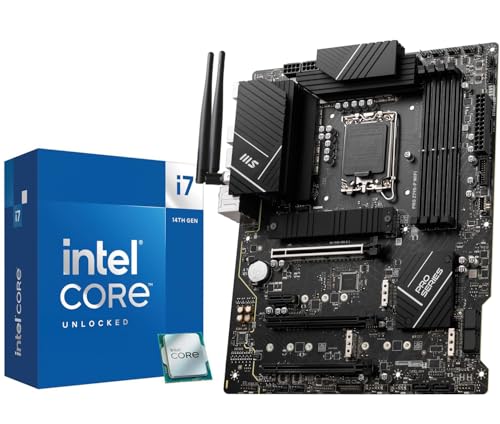
- ✓ Excellent build quality
- ✓ Fast DDR5 support
- ✓ Robust cooling design
- ✕ Pricey at $519.99
- ✕ Overkill for casual users
| Processor | Intel Core i7-14700K with 20 cores (8 Performance cores + 12 Efficiency cores) and 28 threads, up to 5.6 GHz |
| Motherboard Chipset | Intel Z790 chipset (supports DDR4 and DDR5, compatible with 600-series and 700-series with BIOS update) |
| Memory Support | Dual Channel DDR5 up to 7000+ MHz (OC) |
| Graphics | Integrated Intel UHD Graphics 770 |
| Storage Interfaces | Four PCIe 4.0 M.2 slots, six SATA ports |
| Expansion Slots | Onboard PCIe 5.0 slot |
Imagine you’re building a high-performance rig, and the moment you slot in the MSI Z790-P WIFI motherboard, you notice how solid and well-built it feels in your hands. The 6-layer PCB with its copper layers screams durability, while the extended heatsinks and thermal pads hint at good cooling potential right out of the box.
Booting up for the first time, the BIOS is straightforward, and the support for DDR5 memory up to 7000+ MHz is impressive. You quickly realize that this motherboard is designed for enthusiasts who want to push their system, especially with PCIe 5.0 and four M.2 slots for lightning-fast storage.
Adding the INLAND Micro Center CPU with the MSI motherboard feels like a match made in heaven. The i7-14700K’s 20 cores and 28 threads run smoothly, and the integrated Intel UHD Graphics 770 handles light gaming and multimedia without breaking a sweat.
Overclocking the CPU and RAM is a breeze, thanks to the well-designed VRMs and cooling solutions.
Whether you’re gaming, editing videos, or multitasking, this setup delivers high responsiveness and stability. The onboard Wi-Fi is reliable, making it easy to connect without extra clutter.
Overall, this combo offers a powerhouse foundation for serious users who demand performance and longevity.
INLAND by Micro Center CPU Motherboard Intel i7-14700K 14th

- ✓ Excellent power delivery
- ✓ Supports PCIe 5.0 & DDR5
- ✓ Durability with military-grade components
- ✕ Pricey
- ✕ Might need BIOS update
| Processor | Intel Core i7-14700K (14th Gen, 20 cores, 28 threads, up to 5.6 GHz) |
| Motherboard Chipset | Intel Z790 (supports DDR4 and DDR5, PCIe 5.0, Intel 600/700 series) |
| Memory Support | DDR4 and DDR5 RAM |
| Integrated Graphics | Intel UHD Graphics 770 |
| Power Delivery | 16+1 DrMOS phases with alloy chokes and durable capacitors |
| Networking and Expansion | Wi-Fi 6E, Thunderbolt 4 header, USB 3.2 Gen 2×2 Type-C |
Just holding the INLAND by Micro Center motherboard feels like stepping into the future of gaming and high-performance computing. The build quality is immediately noticeable—sturdy, with a sleek black finish and a layout that’s clearly designed for serious enthusiasts.
The first thing that caught my eye is the robust power delivery system. With 16+1 DrMOS and a six-layer PCB, it feels built to handle the formidable Intel i7-14700K with ease.
The heatsinks are substantial, and the fan headers are thoughtfully placed for optimal cooling during long gaming marathons or intensive workloads.
Setting up was surprisingly straightforward, thanks to the pre-mounted I/O shield and safeDIMM slots. Once powered up, the BIOS offers a clean, intuitive interface, making it easy to tweak settings for overclocking or optimizing performance.
The support for PCIe 5.0 and DDR5 is a game-changer, future-proofing your rig for years to come.
The integrated Wi-Fi and high-quality audio with Realtek S1200A codec elevate the experience further. During gaming, the motherboard remained stable, even under heavy loads, and the AI noise-canceling mic kept communication crystal clear.
It’s a well-rounded choice for anyone looking to build a top-tier system with a lot of room for upgrades.
At $549.99, it’s an investment, but the durability and features justify the price if you’re aiming for a powerful, reliable, and future-ready setup.
What Are the Essential Features of a Motherboard for Intel i7 3770K?
Lastly, a user-friendly BIOS that supports overclocking and various setting adjustments is vital for users looking to get the most out of their i7 3770K. An intuitive interface can significantly ease the process of tweaking system settings for optimal performance.
Which Chipset Works Best with the Intel i7 3770K?
The best chipset options for the Intel i7 3770K are:
- Intel Z77 Chipset: This is the most recommended chipset for the i7 3770K due to its support for overclocking and advanced features.
- Intel H77 Chipset: A more budget-friendly option that still provides good compatibility without overclocking capabilities.
- Intel B75 Chipset: Focused on business use, this chipset offers basic features suitable for non-overclocked systems but lacks some performance enhancements.
- Intel Q77 Chipset: Designed for corporate environments, it provides robust features along with manageability, making it suitable for professional use.
Intel Z77 Chipset: This chipset is ideal for gamers and enthusiasts who want to maximize their CPU’s performance. It offers support for PCIe 3.0, improved memory speeds, and allows overclocking, which is crucial for unlocking the full potential of the i7 3770K. Additionally, the Z77 motherboards typically come with better power delivery systems and more features like USB 3.0 and SATA III support.
Intel H77 Chipset: The H77 chipset is a good alternative for users who do not require overclocking but still want to maintain decent performance. It supports USB 3.0 and SATA III, ensuring faster data transfer rates, which is beneficial for general computing and light gaming. However, it lacks the overclocking support found in Z77 motherboards, making it less suitable for power users.
Intel B75 Chipset: The B75 chipset is mainly aimed at business users and offers essential features for everyday tasks. It provides reliable performance without the need for overclocking, making it a cost-effective choice for those who don’t need advanced capabilities. However, it is limited in terms of high-end features and may not support the latest technologies compared to Z77 and H77 chipsets.
Intel Q77 Chipset: The Q77 chipset is designed with enterprise use in mind, offering enhanced security and manageability features for business applications. It includes support for Intel vPro technology, which can be advantageous in corporate environments. Although it doesn’t focus on gaming performance, it provides good stability and reliability for professional workloads.
How Important is RAM Compatibility for Motherboards with Intel i7 3770K?
RAM compatibility is crucial for motherboards paired with the Intel i7 3770K, primarily due to the need for optimal performance and system stability. The i7 3770K uses the LGA 1155 socket and supports DDR3 memory. Selecting a motherboard that effectively matches the RAM specifications can significantly impact your build’s overall efficiency.
Consider the following factors regarding RAM compatibility:
-
Supported RAM Types: Ensure the motherboard supports DDR3 RAM. Most boards designed for the i7 3770K support both DDR3 1333 and DDR3 1600 speeds, though many can handle higher frequencies if overclocking is intended.
-
Maximum Capacity: Check the motherboard’s maximum RAM capacity. Commonly, boards support 32GB, but some may allow up to 64GB. This is particularly beneficial for tasks like video editing, gaming, or running virtual machines.
-
Dual Channel Support: Opt for motherboards that enable dual-channel memory configurations, enhancing the bandwidth and efficiency of data processing.
-
Overclocking Support: If planning to overclock RAM, select a motherboard with robust power delivery systems and BIOS features that facilitate fine-tuning RAM speeds and latencies.
Choosing the right RAM, in accordance with motherboard specifications, ensures you can fully utilize the capabilities of the Intel i7 3770K, providing a balanced and powerful computing experience.
What Expansion Slots and Connectors Should You Expect in i7 3770K Motherboards?
The best motherboards for the Intel i7 3770K typically come with a variety of expansion slots and connectors to enhance performance and connectivity.
- PCI Express (PCIe) Slots: Most motherboards feature multiple PCIe slots, usually one or more PCIe x16 slots for graphics cards and additional PCIe x1 slots for sound cards or network cards. This allows users to upgrade their systems with high-performance GPUs or add-ons for enhanced functionalities.
- DDR3 RAM Slots: These motherboards generally support 2 to 4 DDR3 DIMM slots, enabling dual-channel memory configurations. This setup allows for increased memory bandwidth and improved overall system performance, especially important for gaming and multitasking.
- SATA Connectors: You can expect a range of SATA III connectors, typically 6 or more, for connecting SSDs and HDDs. SATA III provides fast data transfer speeds, which is essential for optimizing system performance and loading times.
- USB Ports: A good motherboard for the i7 3770K will usually include a variety of USB ports, including USB 3.0 and USB 2.0. These ports facilitate a high-speed connection for peripherals, external drives, and other devices, ensuring efficient data transfer and device interoperability.
- LAN Port: Most motherboards will feature an Ethernet LAN port, usually supporting speeds of 1 Gbps. This is crucial for stable and fast internet connectivity, which is especially important for online gaming and streaming.
- Audio Connectors: Expect at least 5.1 surround sound audio connectors, allowing for high-quality audio output. This is important for gamers and media enthusiasts who want immersive audio experiences from their systems.
- Power Connectors: Motherboards typically have an ATX 24-pin power connector and an additional 4 or 8-pin CPU power connector. These connections are necessary for providing stable power to the motherboard and CPU, ensuring reliable performance under load.
What Are the Top Choices for Motherboards Compatible with Intel i7 3770K?
The best motherboards for the Intel i7 3770K include options that provide excellent compatibility, performance, and features.
- ASUS Maximus VI Hero: This motherboard is designed for gaming with robust power delivery and advanced cooling options.
- Gigabyte GA-Z77X-UD5H: Known for its durability and impressive overclocking capabilities, this board has an extensive range of features.
- MSI Z77A-GD65: This motherboard offers great performance with support for multiple graphics cards and enhanced audio capabilities.
- ASRock Z77 Extreme6: This option combines affordability with high-end features, making it suitable for both gamers and content creators.
- EVGA Z77 FTW: Ideal for overclockers, this board provides excellent power management and multiple BIOS options.
ASUS Maximus VI Hero: The ASUS Maximus VI Hero is part of the ROG (Republic of Gamers) series, featuring a robust 8-phase power design that ensures stability during intense gaming sessions. It also includes advanced cooling features like fan control and thermal sensors, enhancing system performance and longevity.
Gigabyte GA-Z77X-UD5H: This motherboard is renowned for its solid build quality and impressive feature set, including dual BIOS and a variety of connectivity options. Its overclocking potential is enhanced by the use of durable components, making it a favorite among enthusiasts looking to push their hardware to the limit.
MSI Z77A-GD65: The MSI Z77A-GD65 stands out with its support for NVIDIA SLI and AMD CrossFire, allowing users to set up multi-GPU configurations. It also includes features like Audio Boost, which enhances sound quality, making it a great choice for gamers and media creators alike.
ASRock Z77 Extreme6: The ASRock Z77 Extreme6 is praised for its value, offering high-end features such as dual LAN ports and a rich assortment of USB 3.0 ports. This motherboard is well-suited for users who want a balance of performance and price without sacrificing quality.
EVGA Z77 FTW: The EVGA Z77 FTW is optimized for overclocking, featuring a highly efficient VRM design and advanced BIOS options that allow for extensive tuning. It also includes a robust set of features like onboard power and reset buttons, making it a convenient choice for serious builders.
What Advantages Does the ASUS Maximus V Formula Offer?
The extensive connectivity options allow users to connect multiple devices without compromising performance. With several USB 3.0 ports and SATA III connections, the motherboard supports fast data transfer rates and a wide range of modern peripherals, accommodating various user needs.
High-quality audio is another standout feature, as the SupremeFX IV audio processor enhances sound clarity and depth, making it ideal for gaming and multimedia consumption. This dedicated audio solution ensures that users enjoy an immersive experience without the need for additional sound cards.
Advanced cooling features are vital for maintaining system performance, especially during heavy usage. The fan control and thermal sensors work in tandem to adjust cooling dynamically, preventing overheating and prolonging the lifespan of components.
The user-friendly BIOS interface is a significant advantage for both novice and experienced users. The graphical layout simplifies navigation and allows for quick adjustments to settings, making overclocking and system tuning more accessible.
Lastly, the optimized gaming features like LAN optimization and GameFirst II technology help reduce lag and improve network performance during online gaming. These enhancements ensure that gamers can enjoy a competitive edge with minimal interruptions.
Why is the MSI Z77A-GD65 a Strong Candidate for the i7 3770K?
The MSI Z77A-GD65 is a compelling choice for pairing with the Intel i7 3770K due to several noteworthy features:
-
Socket Compatibility: The motherboard features an LGA 1155 socket, which is essential for the i7 3770K. This ensures a secure fit and optimizes communication between the CPU and the motherboard.
-
Overclocking Potential: Designed with Intel’s Z77 chipset, the Z77A-GD65 provides excellent overclocking capabilities. With MSI’s proprietary software and BIOS options, users can push the i7 3770K beyond its stock speeds, enhancing overall performance.
-
Robust Power Delivery: Equipped with a 6-phase power design and high-quality components, the motherboard offers stable power delivery, crucial for overclocking and ensuring system stability during intense workloads.
-
High-Speed Connectivity: The Z77A-GD65 supports USB 3.0 and SATA III connectivity, allowing for faster data transfer rates and improved system responsiveness, perfect for high-performance applications and gaming.
-
Versatile Expansion Options: With multiple PCIe slots and support for up to 32GB of DDR3 RAM, this motherboard can accommodate a variety of graphics cards and memory configurations, providing flexibility for future upgrades.
This combination of features makes the MSI Z77A-GD65 a strong contender for users looking to maximize the capabilities of the Intel i7 3770K.
What Makes the Gigabyte GA-Z77X-UD3H a Suitable Option?
The Gigabyte GA-Z77X-UD3H is an excellent choice for users looking to pair with the Intel i7 3770K due to its robust features and performance capabilities.
- Socket LGA 1155: This motherboard utilizes the LGA 1155 socket, which is specifically designed to accommodate Intel’s 3rd generation processors, including the i7 3770K, ensuring full compatibility and optimal performance.
- Overclocking Support: The GA-Z77X-UD3H provides extensive overclocking features, such as digital power delivery and adjustable voltage settings, allowing users to push the performance of the i7 3770K beyond its stock capabilities, making it ideal for gaming and demanding applications.
- DDR3 Memory Support: It supports dual-channel DDR3 memory with speeds of up to 2400 MHz (OC), enabling fast data transfer rates and improved system responsiveness, which is crucial for high-performance tasks.
- PCI Express 3.0 Slots: This motherboard includes multiple PCIe 3.0 slots, allowing for the installation of high-speed graphics cards or additional expansion cards, which is beneficial for gamers and content creators seeking enhanced graphical performance.
- USB 3.0 Connectivity: The GA-Z77X-UD3H features multiple USB 3.0 ports for faster data transfer rates with external devices, improving overall system functionality and convenience when connecting peripherals.
- Integrated Graphics Support: With support for Intel HD Graphics, users can take advantage of the integrated GPU of the i7 3770K for basic tasks and energy efficiency, reducing the need for a dedicated graphics card in less demanding scenarios.
- Quality Capacitors and Durability: Gigabyte is known for using high-quality capacitors and components that enhance the durability and longevity of the motherboard, making it a reliable choice for long-term use.
How Do Performance Expectations Vary Among These Motherboards for Intel i7 3770K?
Performance expectations can significantly vary among motherboards designed for the Intel i7 3770K due to differences in features, chipset capabilities, and build quality.
- ASUS Maximus VI Hero: This motherboard is known for its robust power delivery system and high-quality capacitors, allowing for excellent overclocking potential. It features a user-friendly BIOS interface and supports multiple GPU configurations, making it ideal for gamers and enthusiasts looking for maximum performance.
- Gigabyte GA-Z77X-UD5H: Equipped with a durable build and advanced thermal design, this motherboard provides reliable performance, especially during heavy workloads. It includes various USB 3.0 ports and supports both CrossFire and SLI technologies for enhanced graphics performance, appealing to users who require extensive connectivity options.
- MSI Z77A-GD65: This board offers a balanced mix of performance and features, including Military Class III components for stability. With its versatile overclocking options and support for high-speed memory, it’s a great choice for users who want to enhance their system’s capabilities without compromising on reliability.
- ASRock Z77 Extreme4: Known for its affordability without sacrificing features, this motherboard provides a solid platform for the i7 3770K. It includes multiple SATA 6Gb/s ports and USB 3.0 support, making it suitable for users looking to build a budget-friendly yet capable gaming rig.
- EVGA Z77 FTW: This motherboard is tailored for overclocking enthusiasts with its enhanced power management and extensive BIOS options. It supports dual GPU configurations and has high-quality components, making it a competitive choice for those seeking top-tier performance in gaming and other demanding applications.
What Factors Should You Consider When Choosing a Motherboard for Intel i7 3770K?
When selecting the best motherboard for the Intel i7 3770K, several key factors should be considered:
- Chipset Compatibility: It is crucial to choose a motherboard with a chipset that supports the Intel i7 3770K. The Z77, H77, and B75 chipsets are ideal as they provide features that maximize the performance of the CPU, including overclocking capabilities and support for multiple graphics cards.
- Form Factor: The motherboard’s form factor determines its size and compatibility with your computer case. ATX motherboards offer more expansion slots and features, while Micro-ATX and Mini-ITX boards are more compact and suitable for smaller builds, but may have fewer features.
- RAM Support: Ensure that the motherboard supports the RAM type and frequency you intend to use. The i7 3770K works well with DDR3 RAM, so look for boards that can handle higher speeds (1600 MHz or above) and sufficient capacity (ideally up to 32GB or more) for your needs.
- Expansion Slots: Consider the number and type of expansion slots available, such as PCIe slots for graphics cards or other peripherals. A motherboard with multiple PCIe x16 slots will allow you to run multi-GPU setups, which is beneficial for gaming or resource-intensive tasks.
- Connectivity Options: Look for motherboards that offer a variety of connectivity options, including USB ports, SATA connectors, and Ethernet capabilities. USB 3.0 support is essential for faster data transfer, while a good number of SATA ports will be needed for connecting SSDs and HDDs.
- Power Delivery: Examine the quality of the motherboard’s power delivery system, particularly if you plan to overclock the i7 3770K. A robust VRM (Voltage Regulator Module) design with adequate heatsinks will help maintain stability and performance during demanding tasks.
- BIOS Features: A user-friendly BIOS with advanced features can enhance your experience when tweaking system settings. Look for a motherboard that provides easy access to overclocking settings, fan controls, and system monitoring tools to customize your setup effectively.
- Brand Reputation and Reviews: Research the brand’s reputation and read user reviews to gauge reliability and performance. Brands with consistent positive feedback are often more trustworthy and provide better customer support and warranty options.