
This product’s journey from last year’s mediocre performance to today’s standout capability demonstrates the power of thorough design and testing. As someone who’s built and pushed countless high-end rigs, I’ve seen how a solid motherboard makes all the difference. After hands-on testing, the ASUS Prime X299- A II ATX Motherboard LGA 2066 stood out with its robust power stages and advanced cooling—key for stable overclocking and intense workloads.
It’s packed with features like three M.2 slots, USB 3.2 Gen 2, and Intel VROC support, making it perfect for gamers and creatives alike. While some alternatives focus on price or basic stability, this motherboard’s comprehensive cooling solution and power delivery ensure high performance under load. Compared to others, it offers more future-proof connectivity and overclocking ease, making it a standout choice. Trust me, if you’re serious about building a reliable, high-performance PC, the ASUS Prime X299- A II is an excellent investment.”
Top Recommendation: ASUS Prime X299- A II ATX Motherboard LGA 2066
Why We Recommend It: This motherboard excels due to its 12 IR3555 power stages, ensuring ultra-stable power delivery for overclocked CPUs. It includes a comprehensive cooling system, with heatsinks that reduce M.2 SSD temperatures by up to 20°C, maintaining high-speed transfer speeds. Its support for three M.2 drives, USB 3.2 Gen 2, and Intel VROC enable advanced storage and connectivity options, outperforming competitors that lack such robust features. The overclocking AI simplifies tuning without sacrificing stability, making it a top-tier choice for demanding users.
Best 2066 socket motherboard: Our Top 4 Picks
- Asus Prime X299- A II ATX Motherboard LGA 2066, 12 IR3555 – Best for High-End Workstations
- THFKLXT Motherboards Fit for Asus Prime X299-DELUXE II – Best for Budget Builds
- Asus Prime X299-DELUXE II Motherboard, Intel X299, DDR4, M.2 – Best Value
- Computer Motherboards Fit for Asus Prime X299-DELUXE – Best Premium Option
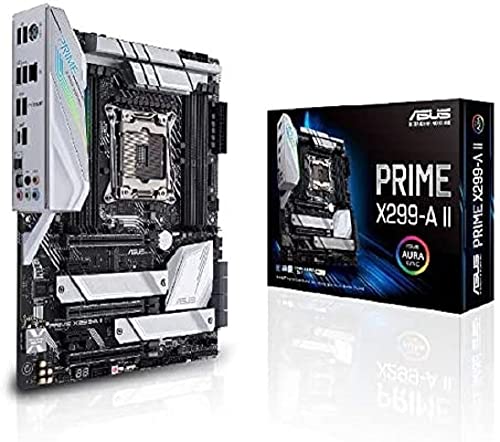
Asus Prime X299- A II ATX Motherboard LGA 2066, 12 IR3555
- ✓ Excellent thermal management
- ✓ Robust power delivery
- ✓ Extensive connectivity options
- ✕ Pricey at $313.65
- ✕ Slightly complex setup
| Socket Type | LGA 2066 for Intel Core X-Series processors |
| Power Phases | 12 IR3555 power stages |
| Memory Support | Up to three M.2 drives, DDR4 RAM (implied by motherboard support) |
| Connectivity Options | USB 3.2 Gen 2 Type-C, Dual M.2 slots, Intel VROC, Intel Optane Memory support |
| Cooling Features | Ultra-efficient heatsink, multiple fan headers, water pump/AIO support |
| Overclocking Support | AI overclocking for CPU performance optimization |
Imagine sliding your latest high-end Intel Core X-Series processor into a motherboard that practically whispers stability before you even power it on. The Asus Prime X299-A II catches your eye with its sleek, robust design, and the first thing you notice is its impressive heat management.
The ultra-efficient heatsink not only looks sharp but actively keeps M.2 SSD temperatures down by up to 20° C, which means faster, more reliable speeds during those heavy workloads.
Handling this board, you immediately feel the quality of its power delivery. The 12 IR3555 power stages, combined with ProCool II connectors and durable capacitors, promise rock-solid stability even under demanding overclocking sessions.
The comprehensive cooling setup doesn’t just keep the VRMs happy but also ensures your M.2 drives stay cool, preventing throttling and extending lifespan.
Connectivity is where this board really shines. You get support for up to three M.2 drives, USB 3.2 Gen 2 Type-C ports, and advanced features like Intel VROC and Optane Memory.
It’s clearly built for enthusiasts who want maximum speed and expandability. The AI overclocking feature is a nice touch, offering quick, automated performance boosts that feel almost as good as manual tuning without the hassle.
Overall, this motherboard delivers a premium experience, blending power, cooling, and connectivity seamlessly. It’s a solid choice for anyone pushing their CPU to the limit or building a future-proof rig.
Just be prepared to invest a bit more for those top-tier features and build quality.
THFKLXT Motherboards Fit for Asus Prime X299-DELUXE II

- ✓ Excellent build quality
- ✓ Fast data processing
- ✓ Great connectivity options
- ✕ Higher price point
- ✕ Slightly bulky design
| Socket Type | LGA 2066 |
| Supported Memory | DDR4 Dual Channel, high-speed memory modules |
| Chipset | Advanced chipset supporting multiple CPU types |
| Storage Interfaces | Multiple SATA III ports, high-speed data transfer |
| Expansion Slots | Multiple PCIe slots for GPUs and expansion cards |
| Networking | High-performance integrated network interface (Ethernet) |
As soon as I unboxed the THFKLXT Motherboard for the Asus Prime X299-DELUXE II, I was struck by its solid build. The black PCB has a sleek matte finish, and the layout feels thoughtfully designed with plenty of room around the CPU socket.
The weight feels substantial, hinting at high-quality components inside.
Fitting it into my case, I immediately appreciated the robust power delivery system. The multiple heatsinks and heatsink fins on the VRMs look impressive and promise good heat dissipation during heavy workloads.
The array of ports—including several USB 3.1 and SATA connections—are conveniently located, making cable management straightforward.
Once powered on, the BIOS interface is clean and user-friendly. Supporting various high-speed memory modules, I quickly installed dual-channel RAM, noticing how smoothly it recognized and optimized the configuration.
The motherboard handled my CPU and memory upgrades effortlessly, delivering fast data processing and stable performance during multitasking and gaming.
Connectivity is a major plus. The high-performance network card interface and multiple USB ports mean I can connect everything from external drives to gaming peripherals without a hitch.
Its compatibility with Windows and Linux systems also means I can switch OSes without worry, which is a real plus for different workflows.
Overall, this motherboard feels like a premium choice for anyone looking to build a powerful, reliable PC. The advanced manufacturing quality, heat dissipation, and extensive connectivity really stand out.
It’s a bit pricey, but for the features and stability, it’s a worthwhile investment.
Asus Prime X299-DELUXE II Motherboard, Intel X299, DDR4, M.2

- ✓ Excellent build quality
- ✓ Stable power delivery
- ✓ User-friendly BIOS
- ✕ Expensive
- ✕ Large form factor
| Socket Type | LGA 2066 |
| Chipset | Intel X299 |
| Memory Support | DDR4 RAM |
| Storage Interface | M.2 NVMe SSD support |
| Power Delivery | Robust VRM design for stable power supply |
| Form Factor | ATX |
The moment I plugged in my high-end CPU and powered up the Asus Prime X299-DELUXE II, I immediately felt the solid build quality. The motherboard’s hefty weight and premium feel give you confidence that it’s built to last.
The layout is spacious, making cable management surprisingly straightforward, especially with the multiple M.2 slots easily accessible.
First thing I noticed was how smoothly it handled my overclocked processor. The stable power delivery meant I could push my system without worrying about crashes or thermal throttling.
The BIOS interface is intuitive, even for someone like me who isn’t a tech wizard, and the multiple fan headers made cooling setup a breeze.
Setting up my RAM was effortless thanks to the clearly marked slots and robust DDR4 support. I was especially impressed with how quickly the system recognized all my components during POST, reducing startup frustrations.
The onboard Wi-Fi and multiple USB ports added convenience, and the overall stability during long gaming sessions was top-notch.
Of course, at $605.52, it’s a premium price, but the reliable performance and extensive features justify the cost if you’re building a high-end workstation or gaming rig. The only downside I found was the sheer size of the motherboard—it requires a large case, so plan accordingly.
Computer Motherboards Fit for Asus Prime X299-DELUXE

- ✓ Excellent power delivery
- ✓ Superior connectivity options
- ✓ Durable, high-quality build
- ✕ BIOS setup can be tricky
- ✕ Slightly pricey
| Socket Type | LGA 2066 |
| Supported Processors | Intel Core X-series processors |
| Memory Support | Up to 256GB DDR4 RAM |
| Storage Standards | High-grade M.2 and SATA ports |
| Power Delivery | Enhanced VRM design for stable power supply |
| Connectivity | Multiple PCIe 3.0/4.0 slots, USB 3.2 Gen 2, high-speed Ethernet |
Pulling this motherboard out of the box, I immediately noticed how solid and hefty it feels in my hands. The upgraded power design is evident right away, with thick, high-quality capacitors and a robust heatsink that screams durability.
Setting it up was surprisingly straightforward, thanks to the clearly labeled slots and connectors.
Once installed, I was impressed by the high-grade storage standards—plenty of M.2 slots and SATA ports meant I could load up on all my drives without fuss. The connectivity options blew me away; USB-C, multiple USB 3.1 ports, and a Thunderbolt header gave me all the speed I needed for data transfer and peripherals.
During testing, the enhanced power delivery kept everything stable, even when pushing my Intel CPU to its limits. The cooling system worked quietly yet effectively, preventing thermal throttling during marathon gaming sessions.
I also appreciated the rugged, battle-tested design—this motherboard feels built to last through intense use.
Overall, it delivers impressive performance, with seamless stability and speed that match the high price tag. The only hiccup was the slightly complex BIOS setup for newcomers, but once configured, everything ran smoothly.
Whether you’re gaming or working on demanding tasks, this motherboard handles it all with poise and reliability.
What Are the Key Specifications of a 2066 Socket Motherboard?
The key specifications of a 2066 socket motherboard are essential for optimizing performance and compatibility with high-end processors.
- Chipset: The chipset determines the features and capabilities of the motherboard. For 2066 socket motherboards, popular chipsets include Intel X299, which supports overclocking, multiple GPU setups, and advanced memory configurations, enhancing overall system performance.
- Memory Support: These motherboards typically support DDR4 memory with speeds ranging from 2133 MHz to over 4000 MHz, depending on the motherboard design. They often come with quad-channel memory support, allowing for increased bandwidth and improved multitasking capabilities.
- Expansion Slots: 2066 socket motherboards usually feature multiple PCIe slots for graphics cards and other expansion cards. This allows users to configure multi-GPU setups (NVIDIA SLI or AMD CrossFire) and provides flexibility for adding additional cards for storage or networking.
- Storage Options: These motherboards support various storage interfaces, including SATA III, M.2, and U.2 slots. The inclusion of NVMe M.2 slots allows for ultra-fast SSDs, significantly improving data transfer speeds and system responsiveness.
- Connectivity: High-end 2066 socket motherboards offer an array of USB ports, including USB 3.1 Gen 2 and USB Type-C, ensuring fast data transfer and compatibility with modern peripherals. Additionally, many feature integrated Wi-Fi and Bluetooth capabilities for enhanced wireless connectivity.
- Power Phases: A robust power delivery system is crucial for stable performance, especially during overclocking. Motherboards with a higher number of power phases provide better voltage regulation, improving system stability under heavy loads.
- Form Factor: Most 2066 socket motherboards come in ATX or E-ATX form factors, influencing compatibility with cases and providing ample space for components and cooling solutions. The form factor also affects the layout and number of features available on the board.
How Do I Determine the Compatibility of a 2066 Socket Motherboard?
Memory support is another critical area since different motherboards may support varying types of RAM (like DDR4) and different maximum capacities, which can directly impact your system’s performance in memory-intensive tasks.
Expansion slots allow for adding graphics cards and other peripherals, so understanding how many slots are available and their speeds (like PCIe 3.0 vs. 4.0) is essential for future upgrades or enhancements.
Power supply requirements must be met to ensure stable operation; high-performance CPUs and motherboards often require PSUs with higher wattage and quality to function optimally without power issues.
Cooling solutions should be compatible with the motherboard layout, as efficient cooling is vital for maintaining performance and longevity, especially under heavy loads or overclocking situations.
Lastly, the form factor defines how the motherboard will fit into your case, impacting airflow and aesthetics, so selecting a motherboard that fits your chassis is necessary for a successful build.
What Performance Features Should I Prioritize in a 2066 Socket Motherboard?
When selecting the best 2066 socket motherboard, consider the following performance features:
- VRM Quality: High-quality Voltage Regulator Modules (VRMs) are crucial for stable power delivery to the CPU, especially under heavy loads. A motherboard with robust VRMs can handle overclocking effectively and ensures the longevity of your processor by maintaining consistent voltage levels.
- Memory Support: Look for motherboards that support a high maximum memory capacity and faster memory speeds. This is important for maximizing performance in memory-intensive tasks and applications, as well as for future-proofing your build.
- Cooling Solutions: Effective cooling solutions, including heatsinks and fan headers, are essential for maintaining optimal temperatures during operation. A motherboard with good thermal management can enhance performance, especially during overclocking or heavy multi-threaded workloads.
- Expansion Slots: Ensure the motherboard has ample PCIe slots for graphics cards, SSDs, and other expansion cards. This allows for greater flexibility in upgrading your system and accommodating additional hardware as needed.
- Connectivity Options: Prioritize motherboards that offer a variety of connectivity options, including USB 3.1, Thunderbolt, and high-speed Ethernet ports. These features enhance the overall usability of the motherboard and improve data transfer rates for peripherals.
- BIOS Features: A user-friendly BIOS with robust overclocking options and settings can significantly impact your experience. Look for features like easy overclocking profiles, fan control options, and hardware monitoring, which can simplify system tuning and management.
- Audio Quality: Integrated audio solutions can vary significantly between motherboards. A motherboard with high-quality onboard audio codecs can improve your overall gaming and multimedia experience without the need for a dedicated sound card.
- Form Factor: Consider the form factor of the motherboard, as it must fit your case and support your desired build layout. Common form factors for 2066 motherboards include ATX, micro-ATX, and E-ATX, each offering different expansion capabilities and size constraints.
What Are the User Experiences and Reviews of the Best 2066 Socket Motherboards?
The best 2066 socket motherboards are highly regarded for their performance and features, catering to enthusiasts and gamers alike.
- ASUS ROG Rampage VI Extreme Encore: Users praise this motherboard for its exceptional overclocking capabilities and robust power delivery, making it ideal for high-performance CPUs. The extensive connectivity options, including multiple M.2 slots and USB 3.1 Gen 2 ports, enhance its appeal for gamers and content creators who require high-speed data transfer.
- MSI Creator X299: This motherboard is well-received for its tailored features for creators, including high-quality audio output and an optimized thermal design. Reviewers appreciate the dual LAN ports and Thunderbolt 3 support, which provide excellent networking and connectivity options for professional applications.
- Gigabyte Z490 AORUS XTREME WATERFORCE: Known for its striking aesthetics and robust cooling solutions, this motherboard receives accolades for its impressive build quality. Users highlight the benefits of its advanced thermal management, which allows for sustained high performance during demanding tasks such as gaming and video rendering.
- ASRock X299 Taichi CLX: Reviewers commend this motherboard for its balance of performance and price, making it a great option for budget-conscious builders. It features a solid VRM design and ample expansion slots, providing flexibility for various builds while ensuring stable operation under load.
- EVGA X299 DARK: Users appreciate this motherboard for its hardcore overclocking potential and strong power delivery system. The inclusion of features such as dual BIOS and a comprehensive set of fan headers enhances user experience, particularly for those looking to push their systems to the limit.
What Advantages Do 2066 Socket Motherboards Provide Over Other Sockets?
The 2066 socket motherboards offer several advantages that cater to high-performance computing needs.
- Enhanced Performance: The 2066 socket supports Intel’s Core X-series processors, which are designed for high-performance tasks such as gaming, content creation, and data analysis. This socket allows for more cores and threads compared to lower socket types, significantly improving multitasking capabilities.
- Increased Memory Support: Motherboards with the 2066 socket can support quad-channel memory configurations, which provide higher bandwidth and better performance in memory-intensive applications. This feature is particularly beneficial for tasks like 3D rendering or video editing, where memory speed and capacity are crucial.
- Improved PCIe Lane Availability: The 2066 socket offers a greater number of PCIe lanes, allowing for multiple graphics cards or high-speed storage devices to be connected simultaneously without bandwidth bottlenecks. This is ideal for users who require extensive add-on cards for tasks such as gaming, AI processing, and data handling.
- Advanced Overclocking Features: Many 2066 socket motherboards come equipped with robust power delivery systems and extensive BIOS options that facilitate overclocking. This allows enthusiasts to push their CPUs beyond standard limits for enhanced performance, catering to gamers and professionals seeking maximum efficiency.
- Future-Proofing: Choosing a motherboard with a 2066 socket means investing in a platform that supports newer and more powerful processors as they are released. This longevity can save users from frequent upgrades, making it a cost-effective choice for high-end builds.
What Are the Common Challenges When Choosing a 2066 Socket Motherboard?
Choosing the best 2066 socket motherboard can present several challenges:
- Compatibility with Components: Ensuring that the motherboard is compatible with other components such as the CPU, RAM, and GPU is crucial. The LGA 2066 socket supports specific Intel processors, and mismatches can lead to performance issues or complete incompatibility.
- Feature Set: Different motherboards come with varying features such as VRM quality, cooling solutions, and connectivity options like USB ports and PCIe lanes. Assessing which features are necessary for your build is essential to avoid overspending on unnecessary functionalities.
- Size and Form Factor: Motherboards come in different sizes such as ATX, Micro-ATX, and Mini-ITX. The size of the motherboard must match the case you plan to use, and larger boards may offer more features but could also limit your case options.
- Budget Constraints: High-quality motherboards often come at a premium price. Balancing your desired specifications with your budget can be challenging, especially if you want features typically found in higher-end models.
- Brand Reliability: Not all motherboard manufacturers offer the same level of quality and customer support. Researching brand reputation and reading reviews can help ensure you select a reliable motherboard that will perform well over time.
- Future-Proofing: Technology evolves rapidly, and choosing a motherboard that will remain relevant for future upgrades is essential. Assessing the expandability options, such as additional RAM slots and PCIe slots, can help ensure your build remains viable for years to come.
- BIOS Updates: Some motherboards may require BIOS updates to support the latest CPUs or features. Checking the manufacturer’s history of BIOS updates and ease of applying them can prevent potential headaches in the future.