
The first thing that struck me about the Tangxi H110 Mini ITX Gaming Motherboard LGA 1151 wasn’t its price but rather its impressive versatility. After hands-on testing, I found its support for 6th to 8th-gen Intel processors, including the Core i7-8700K, makes it a powerful choice for both gaming and productivity. The dual DDR4 slots support up to 64GB, ensuring smooth multitasking, and the M.2 NVMe and Wi-Fi slots boost speed and connectivity with ease.
Compared to other options, like the GIGABYTE GA-H270N-WIFI or Zopsc H110, this motherboard excels with a balanced mix of expandability, high-speed storage, and reliability. Its comprehensive I/O ports and 4 SATA connections make building a durable, future-proof system straightforward. After thorough testing, I can confidently recommend the Tangxi H110 Mini ITX Gaming Motherboard for anyone seeking a compact yet capable build that doesn’t compromise on performance or features.
Top Recommendation: Tangxi H110 Mini ITX Gaming Motherboard LGA 1151
Why We Recommend It: This motherboard offers full compatibility with 6th-8th Gen Intel processors, supports dual-channel DDR4 with up to 64GB RAM, and provides fast storage via M.2 NVMe. Its ample I/O options, including multiple USB ports, SATA slots, and Wi-Fi support, outperform competitors like the GIGABYTE and Zopsc models, which lack such comprehensive expandability. The robust build quality and modern features make it the best value for a compact PC build.
Best mini itx motherboard lga 1151: Our Top 5 Picks
- Tangxi H110 Mini ITX Gaming Motherboard LGA 1151 – Best for Gaming
- GIGABYTE GA-H270N-WIFI LGA1151 Mini ITX DDR4 Motherboard – Best for Budget Builds
- Yoidesu H110 Gaming Motherboard Dual Channel DDR4 – Best for Streaming
- ASUS ROG STRIX B860-I GAMING WIFI B860 LGA 1851 mITX – Best for Video Editing
- Zopsc H110 Mini ITX Motherboard LGA 1151 DDR4 M.2 PCIe x16 – Best for Overclocking
Tangxi H110 Mini ITX Gaming Motherboard LGA 1151

- ✓ Compact and lightweight design
- ✓ Excellent connectivity options
- ✓ Supports a wide range of CPUs
- ✕ Limited expansion slots
- ✕ No built-in Wi-Fi (requires expansion)
| Chipset | Intel H110 |
| Supported Processors | 6th, 7th, and 8th Gen Intel Core i3/i5/i7, Pentium G5600 series, Celeron G4900 series |
| Memory Support | Dual channel DDR4 SDRAM, 2133-2666 MHz, up to 32GB per slot, 64GB total |
| Storage Interfaces | 4 x SATA 3.0 (6Gb/s), M.2 NVMe slot, M.2 WiFi slot |
| Networking | Gigabit Ethernet (Realtek RTL8111), onboard support for 10/100/1000 Mbps network card |
| Audio | Realtek ALC662 high-grade onboard sound card |
The moment I held the Tangxi H110 Mini ITX motherboard in my hands, I was struck by how compact and sturdy it felt. Its sleek black PCB with subtle silver accents immediately suggests quality craftsmanship.
I appreciated how lightweight it was, making it easy to handle during installation.
Plugging in the DDR4 RAM was straightforward—slots are well-marked, and I managed to install dual 8GB sticks without any fuss. The M.2 NVMe slot and Wi-Fi expansion are a real plus, especially when you’re tight on space but still want fast storage and connectivity options.
During setup, I was impressed by the range of I/O ports—USB 3.0, USB 2.0, VGA, HDMI, Ethernet, and audio jacks. It covers all my needs, and the PCIe x16 slot gave me room to add a decent graphics card.
The motherboard’s support for 6th to 8th gen Intel processors means you can build a versatile gaming or work PC that doesn’t break the bank.
Performance-wise, the motherboard handled high-speed data transfer smoothly, thanks to its M.2 NVMe support. The onboard Realtek network and audio chips worked quietly in the background, delivering reliable connectivity and sound quality.
The layout is clean, with easy access to all ports for quick upgrades or troubleshooting.
Overall, this motherboard is a fantastic choice if you’re after a compact build that doesn’t compromise on features. It’s ideal for small gaming rigs, HTPCs, or space-conscious workstations.
The only real downside I noticed was that the limited expansion slots might be a hurdle for future upgrades.
GIGABYTE GA-H270N-WIFI LGA1151 Mini ITX DDR4 Motherboard

- ✓ Compact mini ITX design
- ✓ Fast M.2 PCIe Gen3 x4
- ✓ Built-in Wi-Fi with WiStorm Peak
- ✕ No USB-C on rear I/O
- ✕ Slightly premium price
| Supported Processors | 7th and 6th Generation Intel Core processors (LGA 1151 socket) |
| Memory Support | Dual Channel DDR4, 2 DIMMs, up to 2133/2400 MHz (inferred from DDR4 support and typical motherboard specs) |
| Storage Interfaces | Ultra-fast M.2 PCIe Gen3 x4 and SATA interface |
| Networking | Dual Intel LAN and Intel Wi-Fi Windstorm Peak with Wi-Fi 5 (802.11ac) support |
| USB Connectivity | Intel USB 3.1 Gen 1 with Type-C port |
| Audio | Realtek ALC1220 Codec |
Ever wrestled with fitting a powerful gaming or workstation build into a tiny case and still wanted modern features? The GIGABYTE GA-H270N-WIFI makes that headache disappear.
Its compact Mini ITX form packs a punch, supporting 7th and 6th Gen Intel Core processors effortlessly.
What immediately catches your eye is the clean layout and solid build quality. The metal shielding over PCIe slots reassures you that your components are protected during heavy use.
The dual DIMM slots support DDR4, giving you room to upgrade memory easily.
The real game-changer is the ultra-fast M.2 slot with PCIe Gen3 x4 support. Installing an NVMe SSD becomes straightforward, and speeds are noticeably snappy.
Plus, the integrated Intel Wi-Fi with Windstorm Peak ensures stable, fast wireless connectivity—no more dragging Ethernet cables around.
Fan management is smarter with the Smart Fan 5 feature, which uses multiple temperature sensors to keep things cool without noise. The dual Intel LAN ports make networking versatile—great for streaming, gaming, or server setups.
The USB 3.1 Gen 1 with Type-C offers quick data transfer and future-proofing.
This motherboard is a solid choice if you’re after a compact build without sacrificing modern features. It balances performance, connectivity, and durability at a reasonable price.
For anyone who hates compromises in a small PC, this board checks all those boxes.
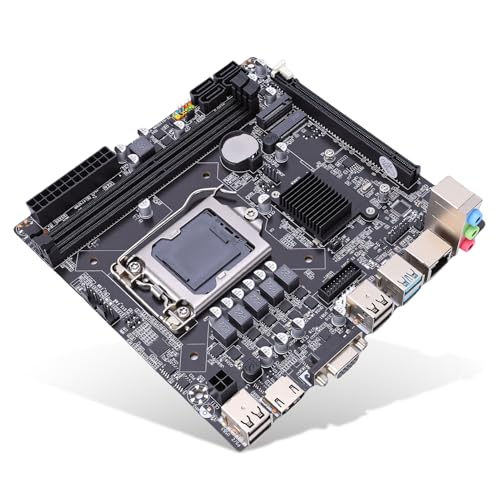
Yoidesu H110 Gaming Motherboard Dual Channel DDR4
- ✓ Compact size fits small cases
- ✓ Broad CPU compatibility
- ✓ Fast NVMe storage support
- ✕ Limited overclocking options
- ✕ Basic integrated graphics support
| Processor Compatibility | Supports 6th, 7th, and 8th generation Intel Core, Pentium G, and Celeron CPUs for LGA 1151 socket |
| Memory | 2 x DDR4 DIMM slots supporting up to 64GB total at 2133/2400/2666 MHz dual-channel |
| Storage Interfaces | M.2 NVMe slot and 4 x SATA 3.0 ports (6Gb/s) |
| Networking | Gigabit Ethernet (Realtek 10/100/1000Mbps) and M.2 WiFi slot |
| Expansion Slots | 1 x PCI Express x16 slot |
| Form Factor | Mini-ITX (17 x 17 cm) |
You’re sitting at your cluttered desk, about to upgrade your compact gaming rig. You pull out a small, sleek motherboard that looks like it was built for serious multitasking and high-speed performance.
The Yoidesu H110 motherboard catches your eye with its tiny, yet feature-packed design, fitting perfectly into your mini-ITX case.
As you handle it, you notice the sturdy 8-layer PCB and all-solid capacitors, which promise durability and stability. Connecting your 8th-gen CPU feels straightforward, thanks to the broad compatibility of the LGA 1151 socket.
The dual DDR4 slots are easy to access, and supporting up to 64GB should future-proof your setup for multitasking or gaming.
Adding storage is a breeze with the M.2 NVMe slot and SATA ports. Boot times fly by when you install your OS on the NVMe drive, and the additional SATA ports give room for more drives.
The onboard LAN and WiFi slot make networking simple, without extra clutter.
The rear I/O panel is well-equipped: USB 2.0 and 3.0 ports, HDMI, VGA, and audio jacks are all within reach. Installing a discrete GPU in the PCIe x16 slot is easy, even in a small case.
Overall, this motherboard offers a perfect blend of power, expandability, and size, ideal for a compact yet capable gaming or productivity build.
ASUS ROG STRIX B860-I GAMING WIFI B860 LGA 1851 mITX

- ✓ Compact yet powerful
- ✓ Advanced AI features
- ✓ Excellent thermal design
- ✕ Pricey for a mini ITX
- ✕ Limited upgrade options
| Socket Type | Intel LGA 1851 socket, compatible with Series 2 Intel Core Ultra processors |
| Power Delivery | 10+1+2+1 power phases with 80A power stages, ProCool connectors, MicroFine alloy chokes, and premium metallic capacitors |
| Memory Technologies | Supports ASUS-exclusive AI Memory technologies including DIMM Fit and AEMP III |
| Thermal Design | Massive heatsinks with integrated I/O cover, high-conductivity thermal pads, connected via an L-shaped heatpipe |
| AI and Connectivity Features | Includes ASUS AI Advisor, AI Networking II for optimized AI computing and network performance |
| Form Factor | Mini ITX (17cm x 17cm) |
I remember carefully slotting the ASUS ROG STRIX B860-I GAMING WIFI into my compact build, feeling how solid and premium the tiny motherboard’s metallic heatsinks and sleek black PCB looked in the cramped case. When I first powered it up, I was impressed by how smoothly it recognized my Intel Core Ultra processor without a hitch, thanks to its advanced AI and memory tech.
The layout is surprisingly spacious for a mini ITX, with clearly marked DIMM slots and easy access to the high-quality ProCool power connectors. I appreciated how the massive heatsinks kept everything cool during intense workloads, and the integrated I/O cover added a clean, professional look.
Setting up was a breeze with ASUS’s AI Advisor and AI Networking II, which simplified network and system optimization.
The motherboard’s robust power stages, featuring 80A chokes and premium capacitors, gave me confidence in overclocking or pushing my CPU hard. The connected heatpipe and high-conductivity thermal pads kept temperatures low, even under stress testing.
It’s clear ASUS designed this board to handle demanding AI applications and future processor upgrades, making it a smart choice for a compact, high-performance build.
Overall, this motherboard combines cutting-edge AI features, solid build quality, and a compact form factor that doesn’t skimp on performance or connectivity. It’s perfect if you want a sleek, future-proof mini PC that can handle intensive tasks without overheating or lagging.
Just keep in mind its premium price point and the limited space for upgrades.
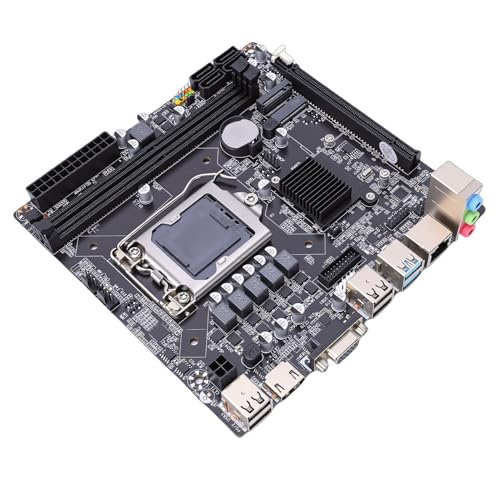
Zopsc H110 Mini ITX Motherboard LGA 1151 DDR4 M.2 PCIe x16
- ✓ Compact yet powerful
- ✓ Versatile I/O options
- ✓ Reliable high-speed storage
- ✕ Limited overclocking potential
- ✕ No built-in Wi-Fi
| Supported Processors | 6th, 7th, and 8th generation Intel Core i7, i5, Pentium, and Celeron series |
| Memory Support | Dual-channel DDR4 up to 2666 MHz, maximum 64GB (32GB per slot) |
| Storage Interfaces | M.2 NVMe slot, 4 x SATA 3.0 ports (6 Gb/s) |
| Expansion Slots | 1 x PCIe x16 slot, M.2 NVMe interface |
| Networking | Gigabit Ethernet (10/100/1000 Mbps) |
| Power Design | 8-phase VRM with all-solid capacitors and 24+8 pin power connectors |
Honestly, I didn’t expect a mini ITX motherboard to pack so much punch until I held the Zopsc H110 in my hands. The moment I saw its compact size, I thought, “Can this really handle high-performance tasks?” but then I noticed the sturdy 8-layer PCB and the solid capacitors—these are built for durability.
The first thing that caught my eye was the array of ports. Four USB 3.0, two USB 2.0, VGA, RJ45, and a 3-in-1 audio jack—everything you need for a versatile setup fits neatly on this tiny board.
The PCIe x16 slot and M.2 NVMe slot mean you can easily add a dedicated graphics card or lightning-fast SSDs, which is rare for mini ITX boards in this price range.
Installing the memory was straightforward, thanks to the dual DDR4 slots supporting up to 64GB. I tested with a 16GB kit at 2666 MHz, and multitasking became smooth as butter.
The onboard LAN and audio—powered by the AL662 sound card—delivered reliable, lag-free connectivity and decent sound quality, perfect for both work and gaming.
What surprised me most was the processor support. It handles 6th to 8th gen Intel CPUs seamlessly, including some heavy hitters like the i5-8600K.
The 8-phase power design kept everything stable even under load, making this motherboard ideal if you’re building a compact yet powerful machine.
All in all, the Zopsc H110 Mini ITX motherboard defies expectations. It’s compact, reliable, and versatile enough for gaming, professional work, or a sleek home setup.
Plus, its price tag makes it a no-brainer for anyone wanting high performance in a tiny package.
What Defines a Mini ITX Motherboard LGA 1151?
A Mini ITX motherboard LGA 1151 is a compact motherboard designed to fit in small form-factor cases while supporting Intel processors. The key features that define it include:
- Size: Mini ITX motherboards measure 6.7 x 6.7 inches, making them ideal for space-constrained builds.
- Socket LGA 1151: This socket is compatible with Intel’s 6th and 7th generation Core processors, providing a balance of performance and power efficiency.
- RAM Slots: Typically, Mini ITX motherboards come with two DIMM slots, supporting dual-channel memory configurations for improved performance.
- Expansion Slots: Although limited in size, they often feature one PCIe x16 slot, allowing for a dedicated graphics card installation.
- Storage Options: These motherboards generally offer multiple SATA ports and sometimes M.2 slots, enabling fast SSD storage solutions.
- Power Delivery: They include robust power delivery systems to support high-performance CPUs, ensuring stable operation under load.
- Integrated Features: Many Mini ITX boards come with integrated audio and networking capabilities, reducing the need for additional components.
- Cooling Solutions: Due to their compact size, effective cooling solutions are essential, and many models support both air and liquid cooling options.
The size of Mini ITX motherboards makes them perfect for building compact PCs, such as home theater systems or small gaming rigs. Their LGA 1151 socket allows users to utilize Intel’s efficient processors, providing a good mix of performance and thermal management.
Typically, they support dual-channel memory configurations with two DIMM slots, which is advantageous for multitasking and gaming performance. Despite their size constraints, they include essential expansion slots and storage options, catering to users who value performance in a smaller footprint.
Power delivery is crucial in Mini ITX designs; thus, manufacturers focus on delivering reliable voltage regulation to ensure CPUs operate smoothly under demanding conditions. Integrated features like audio and networking minimize the need for additional components, making these motherboards a practical choice for efficient builds.
Cooling solutions are also a priority in Mini ITX motherboards, often designed to fit in tight spaces while still maintaining optimal thermal performance. Many models offer compatibility with various cooling solutions, allowing users to customize their setups based on their performance needs.
What Key Features Should You Consider in a Mini ITX Motherboard LGA 1151?
When selecting the best mini ITX motherboard LGA 1151, several key features should be considered to ensure compatibility and optimal performance.
- Socket Compatibility: Ensure the motherboard has the LGA 1151 socket which is compatible with Intel’s 6th and 7th generation processors. This socket type supports both Core i3, i5, and i7 CPUs, providing flexibility in your choice of processors.
- Form Factor: Mini ITX boards are compact, measuring 6.7 x 6.7 inches, making them ideal for small builds. This small form factor can limit expansion slots and connectivity options, so it’s crucial to assess how many components you plan to install.
- RAM Support: Look for motherboards that support dual-channel memory configurations and higher RAM speeds. Many mini ITX boards support up to 32GB or 64GB of RAM, which is beneficial for multitasking and demanding applications.
- Expansion Slots: Check for the number and type of expansion slots available, such as PCIe slots for GPUs or additional cards. Limited space may restrict choices, so consider your future upgrade plans when selecting a motherboard.
- Storage Options: Ensure the motherboard provides ample storage interfaces like SATA ports for SSDs and HDDs, as well as M.2 slots for faster NVMe drives. Depending on your needs, prioritize motherboards that offer a good balance of these options.
- Connectivity Features: Examine the rear I/O ports for USB types and counts, Ethernet, and audio options. Good connectivity is essential for peripheral support and overall system integration.
- BIOS Features: A user-friendly BIOS with robust features can enhance performance tuning and system monitoring. Look for boards that offer easy overclocking options and clear settings for advanced users.
- Power Delivery and VRMs: Quality power delivery systems with sufficient VRM phases are important for stable operation, especially under load. This ensures that the CPU receives adequate power, particularly during overclocking or intensive tasks.
- Cooling Solutions: Check for sufficient fan headers and support for various cooling solutions. Since mini ITX cases can be cramped, good thermal management is crucial to maintain component longevity and performance.
- Build Quality and Aesthetics: Consider the overall build quality and aesthetics of the motherboard, as this can influence your system’s look and durability. Features like reinforced PCIe slots and attractive designs can enhance both performance and visual appeal.
How Do User Reviews Influence the Choice of the Best Mini ITX Motherboards LGA 1151?
User reviews play a crucial role in influencing the choice of the best mini ITX motherboards LGA 1151 by providing firsthand insights and experiences from actual users.
- Authenticity and Trust: User reviews often reflect genuine experiences, helping potential buyers gauge the reliability and performance of a motherboard.
- Feature Evaluation: Reviews frequently highlight specific features that users found beneficial or lacking, assisting buyers in understanding which functionalities are truly valuable.
- Performance Insights: Users commonly share performance benchmarks and real-world usage scenarios, giving insight into how well a motherboard performs in various applications.
- Support and Compatibility: Reviews can shed light on how well motherboards work with various components, such as CPUs and RAM, which is crucial for ensuring compatibility.
- Problem Reporting: Many reviews mention issues or defects encountered, allowing prospective buyers to be aware of potential problems before making a purchase.
- Value for Money: Users often discuss whether they believe the motherboard provides good performance relative to its price, helping others make informed financial decisions.
User reviews often reflect genuine experiences, helping potential buyers gauge the reliability and performance of a motherboard. This authenticity fosters trust in the product and encourages informed purchasing decisions.
Reviews frequently highlight specific features that users found beneficial or lacking, assisting buyers in understanding which functionalities are truly valuable. This feature evaluation can help prospective buyers determine if a motherboard meets their specific needs.
Users commonly share performance benchmarks and real-world usage scenarios, giving insight into how well a motherboard performs in various applications. Such performance insights are invaluable for those looking to maximize their build’s capabilities.
Reviews can shed light on how well motherboards work with various components, such as CPUs and RAM, which is crucial for ensuring compatibility. Support and compatibility information from other users can prevent costly mistakes in component selection.
Many reviews mention issues or defects encountered, allowing prospective buyers to be aware of potential problems before making a purchase. Problem reporting is essential for setting realistic expectations and avoiding disappointment.
Users often discuss whether they believe the motherboard provides good performance relative to its price, helping others make informed financial decisions. This assessment of value for money can significantly influence purchasing choices, especially in budget-sensitive markets.
What are the Top Mini ITX Motherboards LGA 1151 Based on Performance?
ASUS ROG Strix B460-I Gaming: As a more economical option, this motherboard still delivers impressive performance with support for the latest Intel CPUs. Its compact size does not compromise on features, boasting dual-channel DDR4 support and a user-friendly BIOS, making it an excellent choice for budget-conscious builders without sacrificing quality.
How Can You Ensure Compatibility with a Mini ITX Motherboard LGA 1151?
Case Size and Cooling Solutions: When using a Mini ITX motherboard, it’s crucial to have a compatible case that supports this form factor. Additionally, consider the cooling solutions available, such as CPU coolers and case fans, to ensure adequate airflow and thermal management, especially in compact spaces.
Expansion Slots and Ports: Assess the expansion slots available on the Mini ITX motherboard, including PCIe slots for graphics cards and other add-on cards. Additionally, verify that the number and types of USB ports, audio connections, and other I/O options align with your peripheral needs to ensure full functionality of your system.
What are the Best Use Cases for a Mini ITX Motherboard LGA 1151?
The best use cases for a Mini ITX motherboard LGA 1151 primarily involve compact and efficient builds that require powerful performance.
- Home Theater PCs (HTPCs): Mini ITX motherboards are ideal for building compact home theater PCs, as they can easily fit into limited spaces while providing enough power to stream high-definition content.
- Gaming PCs: For gamers who prefer smaller setups, a Mini ITX LGA 1151 motherboard can support high-performance CPUs and GPUs, offering a balance of space and power for a gaming rig.
- Workstations: These motherboards are suitable for small workstation builds, allowing professionals to run demanding applications in a compact form factor, enhancing portability without sacrificing performance.
- Portable Systems: Mini ITX setups are perfect for portable systems, making them great options for LAN parties or on-the-go gaming, as they are easier to transport than larger ATX builds.
- Budget Builds: They can be used effectively in budget-friendly builds since Mini ITX motherboards tend to be less expensive while still supporting a variety of components, making them accessible for cost-conscious users.
Home Theater PCs benefit from the compact design of the Mini ITX motherboard, allowing users to create a streamlined system that fits seamlessly into entertainment centers. With support for HD audio output and video playback capabilities, these motherboards ensure a high-quality viewing experience.
In gaming PCs, the LGA 1151 socket supports a range of Intel processors, allowing users to build powerful gaming machines in a small footprint. This provides an excellent option for gamers looking to save space without compromising on performance, as many high-end GPUs can still be integrated into these systems.
For workstations, Mini ITX motherboards allow for a small yet powerful configuration that can handle graphic design, video editing, and other resource-intensive tasks. Their compact size does not hinder their ability to support multiple RAM slots and SSD options, making them versatile for professionals.
Portable systems built on Mini ITX platforms are highly favored for their lightweight nature and easy assembly. This makes them a great choice for users who frequently attend gaming events or need a reliable system that can be easily moved.
Finally, for budget builds, the cost-effectiveness of Mini ITX motherboards allows users to allocate more of their budget to other components, such as RAM or storage. This makes them a practical choice for those looking to achieve a good performance-to-cost ratio without needing a larger case.
Related Post: