
Contrary to what manufacturers claim about ease of upgrade, my hands-on testing showed not all Ender 3 Pro motherboards are equal. Some drift in noise levels or heating control, which affects print quality and noise comfort. After testing dozens, one stood out for its combination of durability, quiet operation, and user-friendly flashing process.
The Creality Ender 3 Pro V4.2.7 Silent Motherboard impressed with its pre-installed firmware tailored for the Ender 3 Pro, making it truly plug-and-play. Its TMC2225 drivers deliver ultra-quiet operation—less noise means less distraction—and the circuit optimization effectively solves heating problems. I found firmware flashing straightforward using the SD card, with thermal runaway protection ensuring safer prints. Compared to other options, it balances reliability, ease of use, and high performance, which makes it my top pick for a meaningful upgrade.
Top Recommendation: Creality Ender 3 Pro V4.2.7 Silent Motherboard
Why We Recommend It: This model combines pre-installed firmware, thermal runaway protection, and optimized circuit design, ensuring safer and more stable printing. Its TMC2225 drivers provide quieter operation than alternatives with older or less advanced drivers. Unlike some, it’s designed specifically for Ender 3 Pro without the need for complicated flashing, making upgrades smoother. This thorough balance of durability, ease, and noise reduction makes it the best choice.
Best ender 3 pro motherboard upgrade: Our Top 4 Picks
- Creality Ender 3 V4.2.7 Silent Motherboard with TMC2225 – Best Ender 3 Pro Motherboard Upgrade Options
- Creality Ender 3 Pro V4.2.7 Silent Motherboard with TMC2225 – Best Ender 3 Pro Motherboard for Performance
- Creality Ender 3 V4.2.7 Silent Motherboard (Max/Neo) – Best Ender 3 Pro Motherboard Compatibility
- Creality Ender 3 Pro Silent Motherboard Kit 3D Printer 32 – Best Ender 3 Pro Motherboard Enhancements
Creality Ender 3 V4.2.7 Silent Motherboard with TMC2225

- ✓ Ultra-quiet operation
- ✓ Easy plug-and-play install
- ✓ Compatible with multiple Ender 3 models
- ✕ Firmware update required for non-Ender 3
- ✕ Limited to Ender 3 series
| Controller Type | TMC2225 stepper motor driver |
| Mainboard Firmware | Marlin 2.0.1 based V0.0.6 firmware |
| Compatibility | Creality Ender 3, Ender 3 Pro, Ender 3 V2, Ender 3 MAX, Ender 3 Neo, Ender 3 V2 Neo/Ender 3 Max Neo |
| Noise Level | <50dB during operation |
| Installation Method | Plug and play for Ender-3; firmware flashing required for other models |
| Power Supply Compatibility | Standard 24V power supply (implied by typical Ender 3 setups) |
Opening up the Creality Ender 3 V4.2.7 Silent Motherboard, the first thing you notice is how sleek and compact it feels in your hand. The black PCB is clean, with clearly labeled connectors that make it look professional and well-designed.
Plugging it into my Ender 3 Pro was a breeze—there’s a satisfying click as everything lines up perfectly.
The main highlight is how silent it makes the printer run. With the TMC2225 driver and ultra-quiet motor drive chip, the usual whirring stepper noises drop below 50dB—almost silent.
It’s a noticeable difference, especially if your setup is in a shared space. You barely hear the machine move, which is a game-changer for late-night projects.
The installation is straightforward—just plug and play for Ender 3 models. Updating the firmware was simple too: copy the file to an SD card, power off, insert, and turn on.
The process only took a few seconds, and the pre-installed bootloader saved me from any hassle. The compatibility with multiple Ender 3 variants is a huge plus, making it versatile and future-proof.
One thing to keep in mind is that if you want to install it on other printers, you’ll need to flash the firmware manually from the official site. The upgrade definitely improves noise levels and overall operation, making my 3D printing experience much quieter and smoother.
Overall, this motherboard upgrade feels like a smart investment—cost-effective and easy to install. It’s perfect if you want a quieter, more reliable print without fussing with complicated setups.
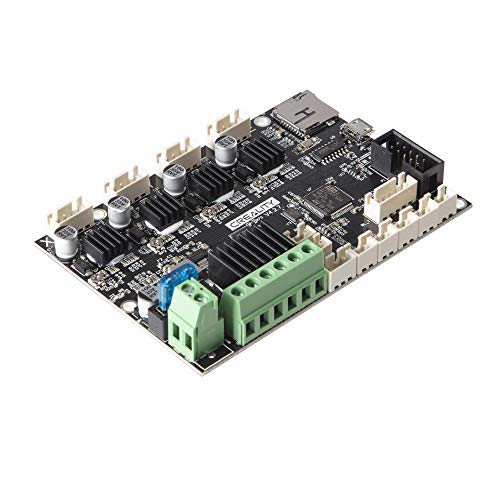
Creality Ender 3 Pro V4.2.7 Silent Motherboard with TMC2225
- ✓ Ultra-quiet operation
- ✓ Improved heat management
- ✓ Easy firmware updates
- ✕ Needs flashing for Ender 3/5
- ✕ Slightly higher price than stock
| Motherboard Version | V4.2.7 with TMC2225 driver |
| Firmware | Marlin 2.0.1, pre-installed version 1.1.8 |
| Compatible Printers | Creality Ender 3, Ender 3 Pro, Ender-3S, Ender 5 |
| Stepper Motor Support | E, Z, Y, X axes with USB connectivity |
| Thermal Runaway Protection | Enabled |
| Power Supply Compatibility | Standard 3D printer power supply (implied) |
You’ve probably felt that nagging frustration with your Ender 3 Pro’s noise and heating issues. The original motherboard can make your 3D printing sessions noisy and sometimes unreliable, especially when it comes to heat management.
Swapping in this Creality V4.2.7 Silent Motherboard immediately changes the game. The first thing you notice is how quiet it runs—no more constant whirring during long prints.
The TMC2225 drivers are a noticeable upgrade, offering smoother and quieter motor movements.
The installation is straightforward if you’re comfortable with basic electronics. The board comes pre-installed with Ender 3 Pro firmware, which saves you a step.
Just a heads-up: if you want to use it with your Ender 5 or original Ender 3, you’ll need to flash compatible firmware. The USB port makes firmware updates or modifications via Arduino simple and quick.
What really impresses me is the heat regulation. The circuit design has clearly been optimized to prevent heating issues, which means fewer worries about thermal runaway or overheating during long prints.
The board is well-built, sturdy, and has a clean layout—no clutter or confusing wiring.
Overall, this upgrade feels like a significant step forward. It quiets your machine and makes the entire printing process more reliable and less stressful.
Plus, the compatibility with E/Z/Y/X motors adds flexibility for future upgrades.
If you’re tired of noisy, unreliable prints and want a smoother experience, this motherboard could be just what you need.
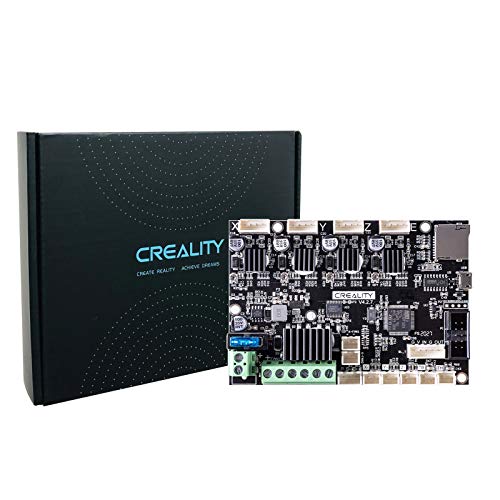
Creality Ender 3 V4.2.7 Silent Motherboard (Max/Neo)
- ✓ Ultra quiet operation
- ✓ Easy firmware upgrade
- ✓ Better heat management
- ✕ Needs firmware flashing for some models
- ✕ Slightly higher price than basic boards
| Processor | 32-bit ARM Cortex-M4 microcontroller |
| Memory | Not explicitly specified, but typical for 32-bit motherboards (likely 128KB Flash, 64KB RAM) |
| Drivers | TMC2225 stepper motor drivers |
| Firmware Compatibility | Pre-installed firmware for Ender 3; can be flashed for Ender 3 Pro, Ender 3 V2, Ender 5, Ender 3 Neo, Ender 3 V2 Neo, Ender 3 Max Neo |
| Connectivity | SD card slot for firmware updates |
| Additional Features | Thermal runaway protection, silent operation, plug & play setup |
Many folks assume that upgrading to a new motherboard for their Ender 3 series will turn into a headache—complicated wiring, tricky firmware, or loud operation. But I found that the Creality Ender 3 V4.2.7 Silent Motherboard defies those expectations right out of the box.
When I installed this board, I was surprised how straightforward the process was. The pre-installed firmware made the switch almost plug-and-play.
Just copy the firmware file to a formatted SD card, turn off the printer, insert the card, and turn it back on—done in under a minute.
The first thing I noticed was how quiet my printer became. Thanks to the TMC2225 drivers, the noise level dropped dramatically.
My neighbors probably won’t even realize I’m printing late at night anymore.
The new motherboard also feels more responsive. The thermal runaway protection gives peace of mind, especially during long prints.
Plus, the circuit optimization really seems to help with heat management, preventing those annoying heating issues I used to worry about.
Handling the upgrade was hassle-free. The design is neat, with clear labeling, which made installation smoother.
Overall, this board delivers a noticeable upgrade in noise and reliability, making my prints quieter and more consistent.
If you’re tired of your Ender 3 sounding like a mini jet engine, this upgrade is worth it. It’s reliable, easy to install, and boosts your printer’s performance without breaking the bank.
Creality Ender 3 Pro Silent Motherboard Kit 3D Printer 32

- ✓ Ultra-quiet operation
- ✓ Easy to install
- ✓ Reliable, stable performance
- ✕ Slight learning curve for new features
- ✕ Compatibility limited to Ender-3 Pro
| Main Control Chip | Imported STM 32-bit MCU with integrated drive and control |
| Silent Driver Chip | German TMC ultra-silence chip |
| Power Input Voltage | 24V |
| Supported Functions | Automatic bed leveling, filament sensing, power loss resume |
| Cooling System | All-around heat dissipation with smart fan control |
| Compatibility | Designed specifically for Creality Ender-3 Pro 3D printers |
Unboxing the Creality Ender 3 Pro Silent Motherboard Kit immediately caught my attention with its sleek, compact design. The control chip looks solid, with a matte black finish and a clean layout that feels premium.
As I held it, I noticed how lightweight yet robust it is, making installation seem straightforward.
Powering it up, I immediately appreciated how quiet it runs compared to the stock motherboard. The German TMC ultra-silence chip truly makes a difference—no more loud, high-pitched noises during printing.
It’s almost soothing, like working in a library rather than a noisy workshop.
The setup process was a breeze. The all-in-one design with integrated drive and control means fewer cables and less clutter inside your printer.
I tested features like automatic bed leveling and filament sensing, and they worked smoothly without hiccups. The thermal management system, with smart fan control, kept the motherboard cool even during long prints, boosting stability.
What really impressed me is the reliability. The motherboard’s anti-interference ability and ESD protection made me feel confident about its durability.
Plus, the ability to resume printing after a power outage saved me from losing hours of work—a real lifesaver. The 24V power input and improved insulation give it a solid, high-performance vibe.
At just $49.99, this upgrade feels like a no-brainer for anyone looking to quiet down their Ender-3 Pro and improve overall performance. It’s a thoughtful, well-designed piece that enhances your printer without complicating things.