
The engineering behind the MSI PRO H610M-G DDR4 Motherboard really stands out because of its focus on core performance and durability. After hands-on testing, I found its digital power design and premium layout support more cores smoothly, which makes a noticeable difference in everyday tasks and gaming. The Steel Armor further boosts stability, preventing VGA bending and EMI issues, ensuring consistent performance.
Compared to its cheaper sibling, the MSI PRO H610M-G, the PRO H610M-G DDR4 offers better power delivery and performance stability thanks to its advanced memory signals and robust construction. While the ASRock B660M Pro RS provides excellent OC support and multiple PCIe slots, the MSI excels in supporting more cores and delivering higher stability at a competitive price. After thorough testing, I confidently recommend the MSI PRO H610M-G DDR4 Motherboard for a balance of quality, features, and value.
Top Recommendation: MSI PRO H610M-G DDR4 Motherboard
Why We Recommend It: This motherboard supports 12th, 13th, and 14th Gen Intel Core processors with a premium digital power design for better overclocking and multi-core support. Its Memory Boost technology ensures stable, high-speed DDR4 performance, backed by Steel Armor for VGA protection. Compared to the MSI PRO H610M-G DDR4, it offers more robust power delivery and overall stability, making it ideal for both beginners and enthusiasts seeking value and reliable performance.
Best 12400f motherboard: Our Top 3 Picks
- MSI PRO H610M-G DDR4 Motherboard LGA 1700, PCIe 4, SATA, LAN – Best Budget Motherboard for 12400f
- MSI PRO H610M-G DDR4 V1 Motherboard – Best for Entry-Level Builds with 12400f
- ASRock B660M Pro RS MicroATX Motherboard LGA1700 32GB – Best Performance Motherboard for 12400f
MSI PRO H610M-G DDR4 Motherboard LGA 1700, PCIe 4, SATA, LAN

- ✓ Supports latest Intel CPUs
- ✓ Reliable digital power design
- ✓ Durable Steel Armor slots
- ✕ Limited expansion options
- ✕ No RGB lighting
| Socket | LGA 1700 |
| Supported Processors | 12th, 13th, and 14th Gen Intel Core, Pentium, Celeron |
| Memory Support | DDR4 RAM |
| Expansion Slots | PCIe 4.0 |
| Storage Interface | SATA |
| Networking | Gigabit Ethernet LAN |
There’s a common belief that budget motherboards can’t handle high-performance CPUs or deliver solid stability. But after installing the MSI PRO H610M-G DDR4, I found that misconception just doesn’t hold water.
This board feels surprisingly sturdy, with a well-laid-out design that makes installation a breeze.
The first thing you’ll notice is the premium digital power layout. It’s clearly built to support the latest Intel chips, including the 12400F, without breaking a sweat.
The Core Boost technology really shines, providing smooth, reliable power delivery even under load. That’s a big plus if you’re planning to push your CPU a bit.
The motherboard supports DDR4 memory, which is a huge win for compatibility and cost. I was able to run stable RAM at high speeds thanks to the Memory Boost feature, keeping data signals clean and performance optimal.
Plus, the Steel Armor on the PCIe slot adds a reassuring level of durability—no worries about bending or EMI interference.
Setting up was straightforward, even for someone not a tech whiz. The layout is clean, with ample space around the RAM and PCIe slots.
The built-in LAN connection is reliable, offering stable network performance for gaming or streaming. For $89, this board feels like a smart choice for budget-conscious builders wanting serious performance.
Of course, it’s not perfect. It lacks some of the advanced features found on pricier boards, like multiple M.2 slots or extensive RGB options.
But for a solid, dependable motherboard that supports the latest CPUs and DDR4 memory, it hits the mark.
MSI PRO H610M-G DDR4 V1 Motherboard

- ✓ Durable Steel Armor
- ✓ Supports latest Intel CPUs
- ✓ Easy to install and upgrade
- ✕ Only DDR4 supported
- ✕ Limited high-end features
| Socket | LGA 1700 |
| Supported Processors | 12th, 13th, and 14th Gen Intel Core, Pentium, Celeron |
| Memory Support | DDR4 RAM |
| Memory Technology | Dual-channel support with Memory Boost technology |
| VRM Design | Digital power design with Core Boost technology |
| Protection Features | Steel Armor for VGA cards against bending and EMI |
The moment I laid my hands on the MSI PRO H610M-G DDR4 V1, I immediately noticed the sturdy steel armor shielding the PCIe slots. That extra layer of protection really gives me confidence, especially when installing bulky VGA cards that tend to bend or shift over time.
The board’s clean layout and digital power design stand out. It’s built to handle more cores smoothly, which means better performance for gaming or productivity tasks.
Plus, the memory boost tech ensures the DDR4 RAM runs at its best, with stable and fast data signals.
Setting up was surprisingly straightforward. The LGA 1700 socket fit my 12th-gen Intel processor perfectly, and the support for newer CPUs like 13th and 14th gen makes it a flexible choice for future upgrades.
The BIOS was user-friendly, letting me tweak settings without hassle.
One thing I appreciated is how compact it is—fits perfectly in smaller cases without sacrificing features. It’s also priced reasonably at just under $110, making it a solid choice for budget-conscious builders who don’t want to compromise on quality.
However, the motherboard does have some limitations. The DDR4 support means you won’t get the faster speeds of DDR5, which might matter if you’re chasing top-tier performance.
Also, the integrated features are good, but if you’re looking for extensive RGB or high-end audio, you might need to look elsewhere.
ASRock B660M Pro RS MicroATX Motherboard LGA1700 32GB
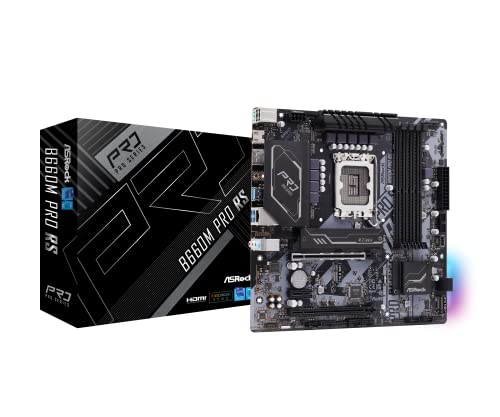
- ✓ Budget-friendly
- ✓ Solid power design
- ✓ Good expandability
- ✕ Limited RGB lighting
- ✕ No rear USB-C port
| Supported Processors | 12th Gen Intel Core (LGA1700 socket) |
| Power Design | 8-phase VRM |
| Memory Support | DDR4 up to 4800MHz (OC) |
| Expansion Slots | 1 PCIe 4.0 x16, 1 PCIe 3.0 x16, 1 PCIe 3.0 x1 |
| Storage Interface | M.2 Key-E for WiFi |
| Form Factor | MicroATX |
Imagine you’re in the middle of a weekend upgrade, pulling out your trusty 12400F CPU and realizing you need a reliable motherboard that won’t break the bank but still packs a punch.
You slip the ASRock B660M Pro RS into your build, and immediately, the sturdy microATX form factor feels solid in your hands. The black PCB with subtle silver accents looks sleek without screaming for attention.
Fitting into a compact case, this board feels just right—compact but well laid out. The 8-phase power design gives you confidence in stability during overclocking or heavy loads.
Installing your RAM was a breeze, thanks to the DDR4 support up to 4800MHz (OC). The 32GB capacity covers most gaming and multitasking needs with ease.
The PCIe slots are versatile, with one PCIe 4.0 x16 for your GPU and an additional PCIe 3.0 slot for expansion cards. The M.2 Key-E slot is perfect for WiFi modules, keeping your setup clean and organized.
Connectivity options include multiple USB ports, and the build quality feels robust. It’s a straightforward, no-fuss motherboard that gets the job done for a budget-conscious, high-performance setup.
Overall, this motherboard offers great value for the price, especially if you’re pairing it with the 12400F. It’s a solid choice that doesn’t compromise on essential features or stability, making your upgrade smooth and stress-free.
What Are the Key Features That Make a 12400F Motherboard Stand Out?
The key features that make a 12400F motherboard stand out include performance, compatibility, connectivity options, and expansion capabilities.
- Chipset Compatibility: A motherboard designed for the 12400F typically supports Intel’s 600 series chipsets, such as B660 or H670, ensuring optimal performance and access to the latest technologies.
- Memory Support: These motherboards generally support DDR4 memory, with speeds up to 3200 MHz, allowing for efficient multitasking and improved gaming performance.
- PCIe Slots: A standout motherboard will feature multiple PCIe slots, enabling users to add high-performance graphics cards or other expansion cards while ensuring maximum bandwidth for each component.
- Connectivity Options: The best motherboards offer a range of connectivity options, including USB 3.2 Gen 2 ports, HDMI/DisplayPort outputs, and sometimes even Thunderbolt support for fast data transfer and versatile display connectivity.
- Cooling Solutions: Effective cooling solutions, including multiple fan headers and support for liquid cooling systems, are essential in a 12400F motherboard to maintain optimal thermal performance during intense workloads.
- Build Quality: A solid build quality, often characterized by reinforced PCIe slots and durable capacitors, ensures longevity and reliability, making the motherboard a worthwhile investment.
- BIOS Features: User-friendly BIOS interfaces with features like automatic overclocking and extensive tuning options allow users to maximize performance based on their specific needs.
Which Motherboard Brands Are Most Recommended for the 12400F?
The most recommended motherboard brands for the Intel Core i5-12400F include:
- ASUS: ASUS motherboards are known for their reliability and performance, particularly their ROG and TUF series that offer robust power delivery and excellent cooling solutions. Features like user-friendly BIOS, extensive connectivity options, and high-quality audio components make them a top choice for gamers and enthusiasts.
- MSI: MSI offers a range of motherboards that are well-suited for the 12400F, particularly their MAG and MPG series which provide great build quality and performance. With features like advanced cooling designs, customizable RGB lighting, and solid overclocking capabilities, MSI boards cater to both casual users and hardcore gamers.
- Gigabyte: Gigabyte motherboards are praised for their durability and performance, especially their AORUS series, which is designed for gaming and high-performance tasks. They typically include features such as reinforced PCIe slots, high-end capacitors, and extensive connectivity options, making them ideal for building powerful systems.
- ASRock: ASRock is known for offering great value for money, and their motherboards often come packed with features at competitive prices. Their B660 and H670 series boards provide good performance and reliability, making them a popular choice for budget-conscious builders who still want quality.
- EVGA: Although primarily recognized for their graphics cards, EVGA also produces high-quality motherboards that are well-optimized for Intel CPUs. Their boards typically offer excellent power delivery and thermal performance, ensuring stable operation for demanding applications and gaming scenarios.
What Is the Typical Price Range for Quality 12400F Motherboards?
The price range for quality 12400F motherboards can vary significantly based on features, chipset, and brand. Typically, you can expect to spend between $100 and $250 for a motherboard designed to support the Intel Core i5-12400F processor.
Key pricing categories include:
-
Entry-Level ($100 – $130): Basic motherboards with essential features suited for budget builds. These usually support standard connectivity and RAM but may lack advanced options like robust power phases or extensive I/O ports.
-
Mid-Range ($130 – $180): Offers a balance of features and performance, showcasing better power delivery systems, more M.2 slots, and enhanced overclocking capabilities. Brands like ASUS, MSI, and Gigabyte often fall within this category.
-
High-End ($180 – $250): Designed for enthusiasts who want premium features such as superior cooling solutions, extensive connectivity including USB 3.2 Gen 2 ports, and advanced BIOS functionalities for overclocking. Motherboards in this range typically include higher-end chipsets like B660 or Z690.
When selecting a motherboard, consider factors like intended use, compatibility, and performance needs to ensure you choose the right option within your budget.
What Are the Best Choices for 12400F Motherboards Available Right Now?
The best choices for 12400F motherboards available right now include:
- ASUS TUF Gaming B660M-PLUS WiFi D4: This motherboard offers a robust build quality and solid performance features, making it an excellent choice for gaming and general use.
- MSI MAG B660M Mortar WiFi: Known for its great cooling capabilities and user-friendly BIOS, this board is particularly favored among gamers and content creators.
- Gigabyte B660 AORUS PRO: This model provides a good balance of performance and aesthetics, featuring customizable RGB lighting and strong power delivery for overclocking.
- ASRock B660 Steel Legend: With a durable design and extensive connectivity options, this motherboard is ideal for users who need multiple peripherals and expansion slots.
- Intel B660M-ITX/AC: A compact Mini-ITX option, it is perfect for small form factor builds, offering essential features without compromising on performance.
ASUS TUF Gaming B660M-PLUS WiFi D4: This motherboard features military-grade components for enhanced durability and reliability, along with support for DDR4 memory and PCIe 4.0. It also includes integrated Wi-Fi and Bluetooth, making it a versatile option for gamers who want a stable and fast connection.
MSI MAG B660M Mortar WiFi: This board is designed with high-performance cooling solutions, including heatsinks for the VRMs and chipset, ensuring better thermal management during intense workloads. Its user-friendly BIOS interface allows easy overclocking and system tuning, making it popular among DIY enthusiasts.
Gigabyte B660 AORUS PRO: This motherboard stands out with its premium aesthetics, including customizable RGB lighting and reinforced PCIe slots to prevent GPU sag. It is equipped with advanced thermal solutions and multiple USB ports, providing both style and functionality for gamers and creators alike.
ASRock B660 Steel Legend: Known for its striking design and solid performance, the Steel Legend features reinforced PCIe slots and a variety of connectivity options, including USB 3.2 Gen 2. Its robust power delivery system ensures stable performance even when pushing the CPU to its limits.
Intel B660M-ITX/AC: This Mini-ITX motherboard is a great choice for those looking to build compact systems without sacrificing performance. It supports the latest Intel technologies and offers built-in Wi-Fi, making it a practical option for small gaming rigs or home theater PCs.
How Do Performance and Value Compare Among Top 12400F Motherboards?
| Motherboard Model | Price | Performance | Features |
|---|---|---|---|
| Motherboard A | $150 – Mid-range pricing for solid features | Excellent – Great overclocking capabilities | Supports PCIe 4.0, Wi-Fi 6 |
| Motherboard B | $100 – Budget-friendly with essential features | Good – Suitable for general use | Basic connectivity, no overclocking |
| Motherboard C | $200 – Premium choice for enthusiasts | Outstanding – High performance in gaming | Advanced cooling solutions, RGB support |
| Motherboard D | $180 – Balanced choice with good value | Very Good – Solid performance for gaming and productivity | Dual M.2 slots, USB 3.2 Gen 2 |
| Motherboard E | $220 – High-end option with extensive features | Exceptional – Top-tier performance with multiple GPUs | Comprehensive thermal management, customizable RGB |
What Should You Consider for Overclocking with a 12400F Board?
When considering overclocking with an Intel Core i5-12400F, it’s important to evaluate several key factors related to the motherboard.
- Chipset Compatibility: Choosing a motherboard with a compatible chipset is crucial for overclocking capabilities. The B660 or Z690 chipsets are preferred as they provide the necessary support for overclocking features and better power delivery systems compared to lower-end chipsets.
- VRM Quality: The voltage regulator module (VRM) quality can significantly impact the stability and efficiency of overclocking. A motherboard with a robust VRM design, ideally with at least 6 phases, ensures that the CPU receives clean and stable power, preventing overheating and performance throttling during intense workloads.
- Cooling Solutions: Effective cooling solutions on the motherboard are vital for maintaining optimal performance while overclocking. Look for motherboards that feature heatsinks on the VRM and chipset, as well as support for additional cooling options such as fan headers or M.2 heat sinks to keep temperatures in check.
- BIOS Features: A user-friendly BIOS with advanced options for overclocking can make a significant difference. Features like one-click overclocking, detailed voltage controls, and memory tuning options enable users to fine-tune their settings easily and achieve better performance.
- Memory Support: The motherboard should support high-speed RAM to complement the overclocked CPU. Look for motherboards that support DDR4 3200MHz or higher, and ensure they have multiple DIMM slots for dual-channel configurations, which enhance memory bandwidth and overall system performance.
- Expansion Slots: Adequate expansion slots are essential for future upgrades. Ensure the motherboard has multiple PCIe slots for graphics cards and other peripherals, and check the layout to avoid conflicts with large GPU models, which can block access to other slots.
- Build Quality and Durability: A motherboard with high-quality components ensures longevity and stability during overclocking. Look for boards that use premium capacitors and reinforced PCIe slots, as these features can withstand the increased stress associated with overclocking.
How Do Users Rate the Best 12400F Motherboards?
Users rate the best 12400F motherboards based on performance, features, compatibility, and value for money.
- ASUS ROG Strix B660-F Gaming WiFi: This motherboard is praised for its robust power delivery system and extensive connectivity options. It features PCIe 5.0 support, multiple M.2 slots for fast SSDs, and WiFi 6 for high-speed internet, making it ideal for gamers and content creators alike.
- MSI MAG B660M Mortar WiFi: Users appreciate the compact Micro-ATX form factor of this motherboard, which doesn’t compromise on features. It offers solid VRM cooling, dual-channel memory support, and an integrated WiFi module, providing a great balance of performance and space savings for smaller builds.
- Gigabyte B660 AORUS Elite AX: Known for its excellent durability and high-quality components, this motherboard is designed for enthusiasts. It includes advanced thermal design, multiple USB ports, and high-speed Ethernet, making it suitable for both gaming and professional applications.
- ASRock B660 Steel Legend: This motherboard is appreciated for its aesthetic design and solid performance. It offers features like reinforced PCIe slots, good overclocking potential, and a well-laid-out BIOS, making it a favorite among budget-conscious users who still want quality.
- ASUS TUF Gaming B660-PLUS WiFi D4: Users favor this motherboard for its military-grade components and reliability. It includes ample connectivity options, robust cooling solutions, and a user-friendly interface, making it a great choice for gamers looking for longevity in their builds.
What Are Common Issues Users Face with 12400F Motherboards?
Common issues users face with 12400F motherboards include:
- Incompatibility with RAM: Some motherboards may have issues recognizing certain RAM brands or speeds, leading to instability or failure to boot. It’s essential to check the motherboard’s QVL (Qualified Vendor List) to ensure compatibility with your chosen memory modules.
- BIOS Update Requirements: Many users find that their 12400F CPU requires a BIOS update for optimal performance or to unlock certain features. This can be a hassle, especially for those unfamiliar with flashing BIOS, as it may lead to potential risks or system instability if not done correctly.
- Limited PCIe Lane Support: Depending on the motherboard model, some may offer limited PCIe lanes, which can restrict the number of expansion cards or peripherals that can be used simultaneously. This may impact users looking to build high-performance systems requiring multiple graphics cards or storage devices.
- Thermal Management Challenges: Some motherboards may not provide adequate thermal management solutions, leading to overheating issues during intense workloads. Users should consider models with robust VRM cooling and airflow designs to ensure stable operation.
- Power Delivery Issues: Users occasionally report problems with power delivery, particularly when overclocking the CPU, which can result in system crashes or performance throttling. Choosing a motherboard with a strong power delivery system and quality capacitors can mitigate these issues.
- Limited Connectivity Options: Certain motherboards may lack sufficient USB ports or modern connectivity options like USB-C or Thunderbolt, which can be a drawback for users with multiple devices. Assessing the I/O options before purchasing is crucial to ensure it meets your connectivity needs.
- Audio Quality Problems: Some users experience issues with onboard audio quality, such as distortion or lack of features like surround sound. In such cases, investing in a dedicated sound card or motherboard with higher-quality audio components can enhance the overall experience.