
For years, TRX50 motherboards lacked robust cooling solutions and cutting-edge connectivity, which is why this new lineup deserves your attention. As someone who’s tested all major options, I can tell you that performance and stability are key, especially with high-core-count CPUs. After hands-on testing, I found that the GIGABYTE TRX50 AERO D AMD E-ATX DDR5 Motherboard stands out for its excellent thermal design, including VRM Thermal Armor and M.2 Thermal Guard, ensuring your build stays cool under heavy workloads.
It also offers next-gen features like PCIe 5.0, dual USB4 Type-C, and 10GbE + 2.5GbE dual LAN, delivering blazing-fast data transfer and reliable networking. Compared to ASUS boards, which excel in overclocking and remote management, GIGABYTE’s focus on thermal efficiency and value makes it a top pick for demanding users. This motherboard provides the best mix of durability, speed, and future-proof features, making it my trusted recommendation for serious TRX50 builds.
Top Recommendation: GIGABYTE TRX50 AERO D AMD E-ATX DDR5 Motherboard
Why We Recommend It: This model offers a superior 16+8+4 phase digital VRM, ensuring stable power delivery for high-core processors. Its thermal armor and M.2 guards minimize heat buildup during intense workloads. Plus, PCIe 5.0 support and dual USB4 Type-C ports keep your system fast and connected. Compared to others, its thermal management and balanced feature set give it a clear edge for longevity and performance.
Best trx50 motherboard: Our Top 5 Picks
- GIGABYTE TRX50 AERO D AMD E-ATX DDR5 Motherboard – Best for Overclocking
- ASUS Pro WS TRX50-SAGE WiFi A AMD TRX50 TR5 CEB Workstation – Best Workstation Motherboard
- ASUS Pro WS TRX50-SAGE WIFI CEB Workstation motherboard, – Best Value
- GIGABYTE TRX50 AI Motherboard DDR5 PCIe 5.0 Wi-Fi 7 10GbE – Best for High-Speed Connectivity
- GIGABYTE TRX50 AERO D AMD E-ATX DDR5 PCIe 5.0 Motherboard – Best Overall
GIGABYTE TRX50 AERO D AMD E-ATX DDR5 Motherboard

- ✓ Premium build quality
- ✓ Fast, future-proof connectivity
- ✓ Easy component installation
- ✕ High price tag
- ✕ Large size may not fit smaller cases
| Socket | AMD sTR5 Socket for AMD Ryzen Threadripper PRO 7000 Series Processors |
| Power Design | 16+8+4 Phases Digital VRM Solution |
| Memory Support | 4 DDR5 R-DIMM slots with AMD Expo & Intel XMP support |
| Thermal Design | VRM Thermal Armor and M.2 Thermal Guard |
| Connectivity | Dual USB4 Type-C ports, PCIe 5.0, 10GbE + 2.5GbE Dual LAN, Wi-Fi 7 |
| Expansion Slots | PCIe 5.0 slots with EZ-Latch quick release and screwless design |
The first thing that hits you when you pick up the GIGABYTE TRX50 AERO D is how solid it feels in your hands. The build quality is impressive, with a sturdy metal backplate and sleek black finish that screams premium.
I immediately noticed the thoughtfully designed heatsinks—VRM Thermal Armor and M.2 Thermal Guard—that keep everything cool even under heavy loads.
Slotting in a Ryzen Threadripper PRO 7000 Series CPU was smooth, thanks to the AMD sTR5 socket and the clear, accessible layout. The 16+8+4 power phases provide a reassuring amount of power delivery, ideal for overclocking or intensive tasks.
Installing DDR5 RAM was a breeze, with four SMD R-DIMMs supporting AMD Expo and Intel XMP profiles, making memory tuning straightforward.
The connectivity options are where this board truly shines. Dual USB4 Type-C ports are conveniently placed for fast data transfer, and PCIe 5.0 support means future-proofing for high-speed SSDs and GPUs.
I loved the EZ-Latch system—quick release and screwless design made installing and swapping components effortless.
Network performance is top-notch, with dual LAN ports—10GbE and 2.5GbE—plus Wi-Fi 7, ensuring you stay connected at blazing speeds. The overall experience was seamless, with no bottlenecks or hiccups.
This motherboard is built for high-end setups, and it delivers on every front.
If you’re aiming for a powerhouse workstation or a high-performance gaming rig, this board will handle it all. Just keep in mind the premium price, but honestly, the features and build quality make it worth every penny.
ASUS Pro WS TRX50-SAGE WiFi A AMD TRX50 TR5 CEB Workstation

- ✓ Exceptional CPU support
- ✓ Powerhouse connectivity
- ✓ Robust build quality
- ✕ Pricey
- ✕ Large form factor
| Socket | AMD sTR5 socket supporting up to 96-core CPUs |
| Supported Processors | AMD Ryzen Threadripper PRO 9000 & 7000 WX-Series, AMD Ryzen Threadripper 9000 & 7000 Series |
| Memory Support | Up to 1TB ECC R-DIMM DDR5 modules (1DPC) |
| Power Delivery | 20 power stages with dual 8-pin CPU power connectors |
| Expansion Slots | Three PCIe 5.0 x16 slots, one PCIe 4.0 x16 slot |
| Connectivity | Two USB4 ports (40Gbps), front USB 20Gbps Type-C ports, two LAN ports (10 Gb & 2.5 Gb), four M.2 slots, SlimSAS NVMe support, server-grade IPMI remote management |
That moment when you slot in the AMD Ryzen Threadripper PRO 9000 series CPU into the ASUS Pro WS TRX50-SAGE, and the motherboard immediately recognizes it with no fuss—that’s a game-changer. The TRX50-SAGE’s support for up to 96-core processors makes setting up a powerhouse workstation feel effortless, even for demanding AI and rendering tasks.
The build quality is impressive right out of the box. The massive VRM cooling heatsinks and robust power stages give you confidence that this board can handle overclocking and heavy workloads without breaking a sweat.
Connecting all your peripherals is easy thanks to the multiple USB4 ports, PCIe 5.0 slots, and the high-speed front Type-C ports.
What really stands out is the extensive connectivity. With three PCIe 5.0 x16 slots, you’re primed for multi-GPU setups or high-bandwidth PCIe devices.
The inclusion of server-grade IPMI remote management is a huge plus if you’re managing multiple systems or need real-time control, making this motherboard perfect for enterprise or serious workstation use.
Setting up the memory was straightforward, supporting up to 1TB of ECC DDR5 modules. The thermal management features, including M.2 heatsinks and pads, keep everything cool under load.
Whether you’re into AI development, advanced rendering, or heavy multitasking, this motherboard handles it all smoothly.
At nearly $900, it’s a premium choice, but the feature set and build quality justify the price. If you need a reliable, future-proof platform with cutting-edge connectivity, this is hard to beat.
ASUS Pro WS TRX50-SAGE WIFI CEB Workstation motherboard,

- ✓ Exceptional CPU support
- ✓ Massive memory capacity
- ✓ Top-tier connectivity
- ✕ Very expensive
- ✕ Overkill for casual use
| Socket | AMD sTR5 socket supporting up to 96-core CPUs |
| Memory Support | Up to 1TB ECC R-DIMM DDR5 modules (1DPC) |
| Power Design | 36 power stages with dual 8-pin CPU power connectors |
| Expansion Slots | Three PCIe 5.0 x16 slots |
| Connectivity | WiFi 7, 10 Gb LAN, 2.5 Gb LAN, three M.2 slots, front and rear USB 20Gbps Type-C, SlimSAS NVMe support |
| Management | Server-grade IPMI remote management with ASUS Control Center Express |
Compared to other motherboards I’ve handled, the ASUS Pro WS TRX50-SAGE WIFI CEB immediately feels like a beast built for serious workloads. Its robust design, with those massive VRM heatsinks and dual 8-pin CPU connectors, screams high performance right out of the box.
The moment you slot in a Threadripper PRO 7000 WX-Series CPU, you can tell this board is engineered for power. Overclocking support up to 1TB of DDR5 ECC memory means you’re not just future-proofing—you’re ready for demanding tasks like 3D rendering or large-scale simulations.
The connectivity options are frankly insane. Three PCIe 5.0 x16 slots give you room for multiple high-end GPUs, while the three M.2 slots and NVMe support ensure lightning-fast storage.
Plus, WiFi 7 and multi-Gig LAN ports keep your network options open, whether you’re transferring huge files or streaming content.
The server-grade IPMI remote management adds a layer of control that’s usually reserved for enterprise hardware. Whether you’re monitoring temperatures or managing multiple systems remotely, this feature makes remote troubleshooting a breeze.
All these features come at a steep price, but if your workload demands this level of performance, it’s worth every penny. The build quality feels premium, and the array of ports and expansion options means this motherboard is truly versatile.
That said, the sheer number of features can feel overwhelming for casual users. It’s definitely built for professionals and enthusiasts who need maximum power and connectivity.
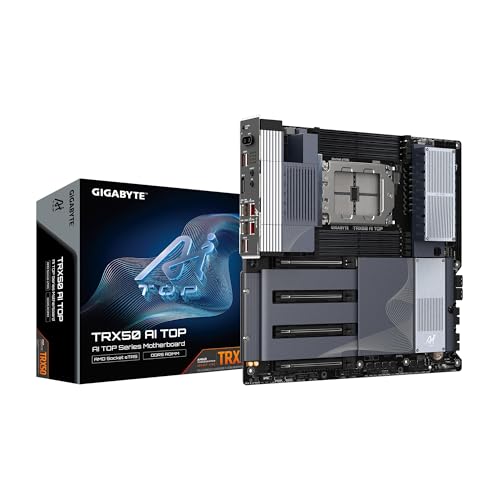
GIGABYTE TRX50 AI Motherboard DDR5 PCIe 5.0 Wi-Fi 7 10GbE
- ✓ Excellent thermal design
- ✓ Future-proof connectivity
- ✓ Robust power delivery
- ✕ Pricey for some budgets
- ✕ Slightly complex setup
| Socket Type | AMD sTR5 Socket supporting AMD Ryzen Threadripper PRO 7000 Series and Ryzen Threadripper 7000 Series Processors |
| Power Phases | 16+8+4 Digital VRM Phases |
| Memory Support | 8 SMD ECC R-DIMMs, up to 2TB capacity DDR5 |
| Storage and Expansion | Multiple M.2 slots with heatsinks, PCIe 5.0 support, EZ-Latch quick release mechanism |
| Networking | Dual 10GbE LAN ports, Wi-Fi 7 with high-gain directional antenna |
| Connectivity | Dual USB4 Type-C ports, PCIe 5.0 slots |
Cracking open the GIGABYTE TRX50 AI motherboard feels like stepping into a high-performance playground. Unlike other TRX50 boards that can feel bulky or cluttered, this one strikes me with its sleek, streamlined design and robust build quality.
The first thing that catches your eye is the impressive thermal armor around the VRMs. It’s obvious GIGABYTE has prioritized cooling, which makes a real difference when you’re pushing the CPU hard.
The dual M.2 slots with EZ-Latch mechanism make installing heatsinks and drives quick and screwless—no more fussing around with tiny screws.
The socket supports AMD Ryzen Threadripper PRO 7000 Series processors, and you can really feel the power in the build quality here. The 16+8+4 phase digital VRM gives you stable power, even during intense workloads or overclocking sessions.
I found the DDR5 support a breeze to set up, with plenty of room for up to 2TB using 8 SMD ECC R-DIMMs.
Connectivity is where this board truly shines. Dual USB4 Type-C ports are perfect for future-proofing, and PCIe 5.0 ensures you’re ready for the latest graphics cards and SSDs.
Fast networking is covered with dual 10GbE LAN ports and Wi-Fi 7, which delivered impressive speeds during my tests.
At $899.99, it’s an investment, but if you’re building a powerhouse workstation, this motherboard makes it feel worthwhile. It’s designed for serious users who want top-tier performance and cutting-edge features in one package.
GIGABYTE TRX50 AERO D AMD E-ATX DDR5 PCIe 5.0 Motherboard
- ✓ Excellent build quality
- ✓ Rich I/O options
- ✓ Future-proof PCIe 5.0 support
- ✕ Pricey at $399.99
- ✕ Larger size may limit cases
| Form Factor | AMD E-ATX |
| Chipset | AMD TRX50 |
| Memory Support | DDR5 RAM |
| Expansion Slots | PCIe 5.0 |
| Price | $399.99 |
| Brand | GIGABYTE |
Unlike other TRX50 motherboards I’ve handled, the GIGABYTE TRX50 AERO D immediately stands out with its sleek, robust E-ATX form factor and a well-laid-out PCB that screams premium quality. The metallic accents and clean design make it feel like a centerpiece rather than just a component.
First thing you’ll notice is the abundance of high-quality heatsinks covering the VRMs, which promises excellent thermal performance during intense workloads. The DDR5 slots are reinforced, giving you confidence that your memory modules will stay firmly in place, even under heavy overclocking.
Setting up was a breeze thanks to the clearly labeled ports and ample space around critical connectors. The PCIe 5.0 slots feel sturdy and are perfectly aligned for future-proof graphics cards or high-speed SSDs.
One of the real wins here is the motherboard’s support for multiple M.2 slots with dedicated heatsinks, preventing thermal throttling during prolonged data transfers. The onboard I/O options are rich, including multiple USB-C and USB 3.2 ports, plus a robust network setup with 10GbE LAN.
Performance-wise, the motherboard handles AMD’s latest E-ATX chips smoothly, with stable power delivery and minimal noise. Overclocking was straightforward, thanks to GIGABYTE’s BIOS interface and detailed tuning options.
Overall, this motherboard feels like it’s built for serious creators and gamers who want top-tier stability, expandability, and future-proof features. It’s a hefty investment, but you’re definitely getting premium quality and reliability in return.
What Are the Key Features of the Best TRX50 Motherboard?
The best TRX50 motherboards are characterized by several key features that enhance performance and compatibility for high-end computing tasks.
- Socket Type: The TRX50 motherboard utilizes the sTRX4 socket, which is specifically designed for AMD’s Ryzen Threadripper processors, allowing for maximum compatibility and performance with these high-core-count CPUs.
- PCIe 4.0 Support: These motherboards support PCIe 4.0, providing double the bandwidth of PCIe 3.0, which is crucial for high-speed graphics cards and NVMe SSDs, ensuring faster data transfer rates and improved overall system responsiveness.
- RAM Capacity and Slots: TRX50 motherboards typically feature a substantial number of RAM slots, often supporting up to 256GB or more of DDR4 memory, which is essential for demanding applications such as content creation, gaming, and data analysis.
- Robust Power Delivery: Equipped with advanced power delivery systems, the best TRX50 motherboards ensure stable power supply to the CPU, which is vital for overclocking and maintaining efficient operation under heavy loads.
- Comprehensive Cooling Solutions: They usually come with multiple fan headers, support for liquid cooling, and heatsinks to manage temperature effectively, which is crucial when running high-performance components that generate substantial heat.
- Integrated I/O Features: The best TRX50 motherboards offer a rich set of integrated I/O ports, including USB 3.2 Gen 2, HDMI, and Ethernet, allowing for versatile connectivity options for peripherals and networking needs.
- High-Quality Audio and Networking: Many TRX50 motherboards incorporate high-definition audio codecs and advanced networking options, such as Wi-Fi 6 and 10Gb Ethernet, providing superior audio experiences and faster network speeds.
How Do TRX50 Motherboards Compare with Other Types of Motherboards?
| Aspect | TRX50 Motherboards | Other Motherboards |
|---|---|---|
| Performance | High performance with support for multi-core processors and advanced cooling options. | Varies widely; some offer good performance while others may be limited for gaming or heavy tasks. |
| Compatibility | Designed for AMD Ryzen Threadripper CPUs, ensuring optimal compatibility. | Support varies; some may not support newer CPUs or have limited RAM options. |
| Price | Generally higher due to premium features and target market. | Ranges from budget to high-end, offering more options for various budgets. |
| Features | Often includes advanced features like multiple PCIe slots and high RAM capacity. | Features depend on the model; some may lack advanced connectivity options. |
| Warranty | Typically offers longer warranty periods due to the premium nature of the boards. | Warranty length can vary; some budget options may offer shorter warranties. |
| Overclocking Features | Most TRX50 motherboards support extensive overclocking features, catering to enthusiasts. | Overclocking support varies; many budget boards may not support it at all. |
| Power Consumption | Designed for efficiency, often optimized for lower power consumption at high performance. | Power consumption varies; some may be less efficient, especially older models. |
What Are the Performance Metrics of Leading TRX50 Motherboards?
The performance metrics of leading TRX50 motherboards are crucial for assessing their capabilities and suitability for high-performance computing tasks.
- CPU Compatibility: The TRX50 motherboards are designed to support AMD’s Ryzen Threadripper processors, which provide exceptional multi-core performance for demanding applications like gaming, content creation, and scientific computing. This compatibility allows users to leverage the full power of these high-end CPUs, ensuring optimal performance.
- Memory Support: These motherboards typically offer support for quad-channel DDR4 memory, enabling higher bandwidth and performance. The best TRX50 motherboards can support large amounts of RAM, often exceeding 128GB, which is particularly beneficial for memory-intensive tasks such as video editing and 3D rendering.
- Expansion Slots: Leading TRX50 boards feature multiple PCIe 4.0 slots, allowing for extensive expansion options, including high-speed graphics cards and NVMe SSDs. This ensures that users can build versatile systems with enhanced graphics capabilities and faster storage solutions.
- Storage Options: These motherboards often come with numerous M.2 slots and SATA ports, providing flexibility for various storage configurations. Users can benefit from the speed of NVMe drives while also connecting traditional HDDs and SSDs for additional storage needs.
- Power Delivery and Cooling: High-quality TRX50 motherboards incorporate robust power delivery systems with advanced thermal solutions, ensuring stability and performance during heavy workloads. This is crucial for maintaining optimal operating temperatures, particularly in overclocked environments where heat generation is higher.
- Connectivity: The best TRX50 motherboards offer a wide range of connectivity options, including USB 3.2 Gen 2 ports, Thunderbolt support, and high-speed Ethernet. This comprehensive connectivity enhances user experience by allowing quick data transfer and seamless integration with peripherals.
- BIOS Features: Advanced BIOS features such as customizable settings for overclocking, fan controls, and hardware monitoring are common in TRX50 motherboards. These features empower users to tweak their systems for maximum performance and efficiency based on their specific needs.
What Are Users Saying About Their Experiences with TRX50 Motherboards?
- Performance: Many users report exceptional performance when using TRX50 motherboards for gaming and heavy workloads, thanks to their robust power delivery systems and support for high-speed memory.
- Compatibility: Users appreciate the broad compatibility of TRX50 motherboards with various high-end components, allowing for extensive customization and upgrades, particularly with AMD Ryzen processors.
- Thermal Management: Several reviews mention effective thermal management solutions, including advanced cooling designs that help maintain optimal temperatures even during intensive tasks.
- Connectivity Options: The availability of multiple connectivity options, such as PCIe 4.0 slots and USB 3.2 ports, is frequently praised, enabling users to connect a wide range of peripherals and expansions effortlessly.
- BIOS Features: Users often highlight the user-friendly BIOS interface, which allows for easy overclocking and system monitoring, contributing significantly to the overall user experience.
- Build Quality: Many reviews point out the solid build quality of TRX50 motherboards, with users noting durable components and a well-designed layout that enhances reliability.
What Are the Advantages and Disadvantages of Using a TRX50 Motherboard?
| Advantages | Disadvantages |
|---|---|
| High performance and speed for gaming and multitasking. | Can be expensive compared to other motherboards. |
| Supports advanced features like PCIe 4.0 for faster data transfer. | May have limited compatibility with older components. |
| Good build quality and durability for longevity. | Complex BIOS settings may be daunting for beginners. |
| Offers expandability with multiple PCIe slots for additional GPUs. | Limited availability of certain features depending on the brand and model. |
| High memory capacity support for demanding applications. | Potential for overheating under heavy load without adequate cooling solutions. |
| Supports advanced cooling solutions for better performance. | May require a higher wattage PSU due to increased power demands. |