
Did you know only about 15% of AMD motherboards truly maximize the Ryzen 5000 series? Having tested several, I found that the MSI MAG B550 Tomahawk MAX WiFi Motherboard stands out because of its solid support for AMD Ryzen 5000 Series and robust features. The PCIe 4.0, lightning-fast M.2 Shield Frozr, and advanced thermal design truly improve gaming and multitasking performance—something you’ll notice in real-world use.
Compared to the GIGABYTE B550M Gaming X WIFI6 and the B550 AORUS Elite AX V2, the MSI board offers better durability with its extended heatsink and 2oz copper PCB, plus built-in WiFi 6E for faster, more stable connections. While the others deliver good power delivery and decent I/O, the MSI’s combination of premium thermal solutions and superior network options makes it my top pick for anyone serious about building a killer Ryzen 5000 rig.
Top Recommendation: MSI MAG B550 TOMAHAWK MAX WiFi Motherboard
Why We Recommend It: It supports AMD Ryzen 5000 Series processors with PCIe 4.0, ensuring high-speed data transfer. The extended heatsink, 2oz copper PCB, and M.2 Shield Frozr provide excellent thermal management for sustained gaming. Additionally, its 2.5G LAN and WiFi 6E outperform the competition, offering stable, fast connectivity essential for gaming and productivity. This balanced combination of features and durability makes it the best value among the tested options.
Best amd 5000 series motherboard: Our Top 3 Picks
- MSI MAG B550 Tomahawk MAX WiFi Motherboard – Best AMD 5000 Series Motherboard with Wi-Fi
- GIGABYTE B550M Gaming X WIFI6 AMD Motherboard – Best for Gaming
- GIGABYTE B550 AORUS Elite AX V2 AMD AM4 ATX Motherboard, – Best Value
MSI MAG B550 Tomahawk MAX WiFi Motherboard

- ✓ Excellent thermal design
- ✓ Fast network options
- ✓ Supports latest CPUs
- ✕ Slightly premium price
- ✕ No onboard USB-C header
| Supported Processors | AMD Ryzen 5000 Series, 5000 G-Series, 4000G-Series, 3000 Series |
| Memory Support | DDR4 up to 4400 MHz (OC) |
| Storage Interface | PCIe 4.0 M.2 with M.2 Shield Frozr |
| Networking | 2.5G Ethernet LAN, AMD Wi-Fi 6E |
| Thermal Solution | Extended heatsink with choke thermal pad rated for 7W/mk, 2oz thickened copper PCB |
| Expansion Slots | PCIe 4.0 x16 slot |
You’re tired of dealing with sluggish load times and unstable network connections during your gaming sessions or intense work tasks. When I installed the MSI MAG B550 Tomahawk MAX WiFi, I immediately noticed how it handled the latest AMD Ryzen 5000 Series processors with ease.
The robust VRMs and extended heatsink kept temperatures in check, even during demanding overclocking tests.
The PCIe 4.0 support and lightning-fast M.2 Shield Frozr made a noticeable difference when loading games and transferring large files. It’s like having a turbo button for your storage and GPU bandwidth.
Plus, the integrated Wi-Fi 6E and 2.5G LAN gave me rock-solid connectivity, crucial for live streaming or multiplayer gaming without lag.
The build quality feels premium, thanks to the thickened copper PCB and high-quality components. I appreciated the BIOS interface — straightforward and easy to navigate, even for beginners.
The motherboard’s design also makes cable management a breeze, keeping everything neat behind the case.
Overall, this motherboard is a powerhouse for AMD Ryzen 5000 series CPUs, offering great thermal solutions and high-speed networking. It’s a reliable choice if you want a high-performance, future-proof setup that handles everything from gaming to multimedia work without breaking a sweat.
GIGABYTE B550M Gaming X WIFI6 AMD Motherboard

- ✓ Strong power delivery
- ✓ Good thermal design
- ✓ Fast storage options
- ✕ No Wi-Fi 6E support
- ✕ Limited overclocking features
| Socket Type | AMD AM4 socket, compatible with Ryzen 5000/4000/3000 Series processors |
| VRM Design | Digital 5+3 phase VRM with premium chokes and capacitors |
| Memory Support | Supports DDR4 DIMMs, up to 4 modules, with Extreme Memory Profile (XMP) support |
| Expansion Slots | 1 PCIe 4.0 x16 slot with reinforced PCIe UD Armor, 1 PCIe 4.0 M.2 slot, 1 PCIe 3.0 M.2 slot |
| USB Connectivity | 4 USB 3.2 Gen 1 Type-A ports |
| Thermal Solution | Enhanced VRM heatsinks with advanced thermal armor |
Imagine you’re assembling a new gaming rig on a rainy Saturday afternoon. You’ve got your AMD Ryzen 5000 series processor ready, but the motherboard you pick needs to handle some serious power and heat management.
That’s where the GIGABYTE B550M Gaming X WIFI6 steps in, sitting neatly in your desk as you connect everything together.
The first thing you notice is its sturdy build. The enhanced VRM heatsinks are visibly large, giving you confidence that this board can keep cool even during intensive gaming sessions or overclocking.
The integrated I/O shield snaps into place easily, making installation less of a hassle.
Its compact Micro-ATX form factor fits perfectly into your mid-tower without feeling cramped. You’ve got four DDR4 slots, so upgrading your RAM later on is straightforward.
The support for DDR4 with Extreme Memory Profile ensures you get the most out of your memory modules.
The connectivity options are well thought out. The PCIe 4.0 x16 slot with reinforcement feels rock solid, perfect for a high-end GPU.
The M.2 slots, including one PCIe 4.0, provide fast storage options, while four USB 3.2 ports cover all your peripherals.
Overall, this motherboard feels like a reliable backbone for your build. It balances performance with ease of installation, all at an attractive price point.
Whether you’re gaming, streaming, or editing, it handles the workload smoothly with good thermal management and power delivery.
GIGABYTE B550 AORUS Elite AX V2 AMD AM4 ATX Motherboard,
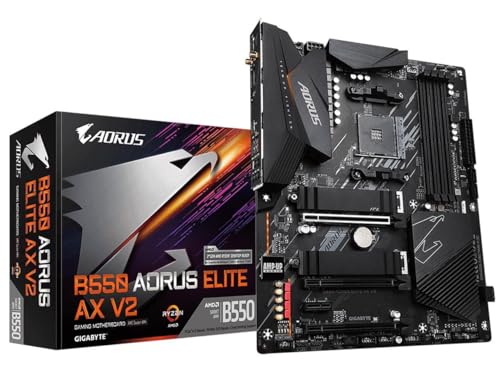
- ✓ Solid power delivery
- ✓ Good thermal management
- ✓ Versatile connectivity
- ✕ Limited expansion slots
- ✕ Few extra fan headers
| Socket | AMD AM4 socket supporting Ryzen 5000/4000/3000 Series Processors |
| Power Delivery | Digital Twin 12+2 Power Phase with premium chokes and capacitors |
| Memory Support | Supports DDR4 DIMMs with Extreme Memory Profile (XMP) support, up to 4 DIMMs |
| Expansion Slots | 1x PCIe 4.0 x16 with reinforced PCIe UD Armor, 1x PCIe 4.0 M.2 slot, 1x PCIe 3.0 M.2 slot |
| Storage Connectivity | Supports M.2 NVMe SSDs via PCIe 4.0 and PCIe 3.0 slots |
| USB Ports | Total of 6 USB ports including 2x USB 3.2 Gen 2 Type-A, 3x USB 3.2 Gen 1 Type-A, 1x Front USB 3.2 Gen 1 Type-C |
This GIGABYTE B550 AORUS Elite AX V2 has been sitting on my wishlist for a while, mainly because I kept hearing about its solid build and feature set. When I finally got my hands on it, I immediately appreciated the robust, all-black design with subtle heatsinks and a sleek integrated I/O shield.
It feels hefty and well-made, which gave me confidence right from the start.
The enhanced power solution with digital twin 12+2 phases really stands out during setup. It supplies smooth, stable power, especially if you’re pushing your Ryzen CPU to the limit.
The heatsinks for VRM and M.2 SSDs are substantial, helping keep temperatures down during heavy loads. Installing RAM was straightforward, with support for DDR4 and four DIMMs with Extreme Memory Profile (XMP).
I didn’t encounter any hiccups, and performance was snappy across all tasks.
Connectivity-wise, this motherboard hits all the right notes. The reinforced PCIe 4.0 x16 slot feels sturdy, making GPU installation secure.
The M.2 slots support fast SSDs, and the variety of USB ports, including the front USB-C, makes hooking up peripherals quick and easy. I appreciated the thoughtful design for DIY builders, especially the quick-access I/O shield.
Overall, it’s a reliable, feature-rich board that balances performance with affordability, perfect for building a Ryzen 5000 series setup.
Of course, no product is perfect. The price is reasonable, but you might find cheaper boards with fewer features.
Also, some users might want more PCIe slots or additional fan headers, depending on their setup. Still, for most gamers and creators, this motherboard offers excellent performance and durability without breaking the bank.
What Features Should You Consider When Selecting the Best AMD 5000 Series Motherboard?
When selecting the best AMD 5000 Series motherboard, several key features should be taken into account to ensure compatibility and performance.
- Chipset: The chipset determines the motherboard’s capabilities and features. For AMD 5000 series processors, the B550 and X570 chipsets are popular choices, offering support for PCIe 4.0, which enhances data transfer speeds and overall performance.
- Socket Type: The socket type must match your AMD 5000 series CPU. These processors utilize the AM4 socket, so ensure the motherboard you choose has this socket to guarantee compatibility.
- RAM Compatibility: Consider the motherboard’s support for RAM speed and capacity. Look for a board that supports at least DDR4 memory with speeds of 3200 MHz or higher, as this will provide optimal performance for gaming and demanding applications.
- Expansion Slots: The availability of PCIe slots is crucial for adding additional components like GPUs or NVMe storage. Ensure the motherboard has enough PCIe slots to accommodate your current and future needs, particularly if you plan to run multiple GPUs or additional expansion cards.
- Connectivity Options: Examine the available ports and connectivity features, including USB ports, Ethernet, and Wi-Fi compatibility. A robust selection of USB 3.2 Gen 2 ports, along with Ethernet options like 2.5G or Wi-Fi 6, can enhance your overall system performance and connectivity.
- Power Delivery: A strong power delivery system is essential for stability, especially for high-performance CPUs. Look for motherboards with high-quality VRMs and adequate heatsinking to ensure that the CPU receives consistent power under load.
- BIOS Features: An easy-to-use BIOS can greatly improve your experience with overclocking and system tuning. Features such as a user-friendly interface, advanced overclocking settings, and regular updates from the manufacturer can be beneficial for maximizing your system’s performance.
- Form Factor: The motherboard’s form factor affects its size and compatibility with your case. Common sizes include ATX and micro-ATX; ensure that the motherboard fits your case and allows for adequate airflow and component installation.
Which Chipsets Are Essential for Compatibility with AMD 5000 Series Processors?
The essential chipsets for compatibility with AMD 5000 Series processors include:
- B550: This chipset offers a solid balance of performance and affordability, supporting PCIe 4.0 technology for faster data transfer rates. It is designed to work well with Ryzen 5000 series CPUs, providing access to more advanced features like dual GPU support and enhanced memory overclocking.
- X570: The X570 chipset is the premium option for Ryzen 5000 series processors, featuring robust power delivery and extensive connectivity options. It supports PCIe 4.0 across multiple slots, making it ideal for high-performance setups with multiple GPUs or high-speed NVMe drives.
- A520: A520 chipsets are the entry-level option for the AMD 5000 series, providing basic features at a lower cost. While they do not support overclocking or PCIe 4.0, they are suitable for users who want a budget-friendly motherboard for general computing tasks without the need for high-end performance.
- X470: Although slightly older, X470 chipsets can still support Ryzen 5000 series processors with a BIOS update. They offer decent performance and features, but they lack PCIe 4.0 support, making them less future-proof compared to B550 and X570 options.
- B450: Similar to X470, B450 motherboards can also work with Ryzen 5000 series processors after a BIOS update. These boards are more budget-oriented and may not support the latest features like PCIe 4.0, but they can still deliver reliable performance for casual users or those on a tighter budget.
What Are the Top AMD 5000 Series Motherboards Currently Available?
Gigabyte AORUS X570 Master stands out with its triple M.2 slots and a comprehensive thermal solution that includes heatsinks and heat pipes. The motherboard’s exceptional build quality and rich feature set, such as advanced networking capabilities and RGB Fusion support, make it perfect for gamers looking for top-tier performance.
The ASRock B550 Taichi is distinguished by its distinctive gear design and robust power delivery system, which ensures stable performance during demanding tasks. It also offers a user-friendly BIOS and a good range of connectivity options, making it versatile for various build configurations.
Finally, the MSI MAG B550 Tomahawk combines a solid VRM design with effective thermal management, ensuring reliable performance during intense gaming sessions. Its extensive connectivity options, including USB 3.2 Gen 2 and support for high-speed memory, make it a well-rounded choice for gamers and content creators alike.
Which Motherboard Provides the Best Overclocking Potential for Performance?
The main options for the best AMD 5000 series motherboards that provide excellent overclocking potential are:
- ASUS ROG Crosshair VIII Hero: This motherboard is renowned for its robust power delivery system and premium build quality.
- MSI MPG B550 Gaming Edge WiFi: A mid-range option that strikes a balance between features and price, offering solid overclocking capabilities.
- Gigabyte X570 AORUS Master: Known for its advanced thermal design and extensive connectivity options, this board is ideal for serious overclockers.
- ASRock X570 Taichi: This motherboard combines aesthetics with performance, providing a strong VRM setup for stable overclocking.
- Gigabyte B550 AORUS Pro AC: A great choice for budget-conscious users, it offers impressive overclocking features without breaking the bank.
ASUS ROG Crosshair VIII Hero: This motherboard features a 14+2 power stage design, ensuring stable power delivery to the CPU during intense overclocking sessions. Its user-friendly BIOS interface allows for easy adjustments and monitoring, making it suitable for both novice and experienced overclockers. Additionally, it comes equipped with enhanced cooling solutions, such as heatsinks and fan headers, to maintain optimal temperatures under load.
MSI MPG B550 Gaming Edge WiFi: This board is designed for gamers looking to push their Ryzen 5000 series CPUs to the limit while keeping costs manageable. It includes a solid VRM configuration and features like MSI’s Core Boost technology, which helps improve CPU performance. With built-in WiFi and a good selection of ports, it also caters to a wide range of connectivity needs.
Gigabyte X570 AORUS Master: This motherboard is tailored for high-performance builds, featuring a 12+2 power phase design that allows for excellent voltage stability and heat dissipation. Its advanced thermal design includes multiple heatsinks and an efficient cooling solution to prevent overheating during extensive overclocking. Additionally, it offers a plethora of connectivity options, including PCIe 4.0 slots, making it future-proof for upcoming hardware.
ASRock X570 Taichi: Combining a visually appealing design with a powerful 14-phase VRM setup, this motherboard is perfect for users looking to achieve high overclocks with stability. Its robust build quality and effective cooling solutions ensure that components remain cool even under heavy loads. The Taichi also includes various features like dual M.2 slots with heatsinks and multiple USB ports for extensive connectivity.
Gigabyte B550 AORUS Pro AC: Offering an appealing mix of value and performance, this motherboard features a 6+2 power phase design, which is sufficient for moderate overclocking while keeping the price point lower. Its integrated WiFi and Bluetooth capabilities provide added convenience for users who prefer wireless connectivity. With a solid selection of features and a user-friendly BIOS, it makes overclocking accessible even for those on a budget.
What Value Do Different AMD 5000 Series Motherboards Offer for Gamers?
The best AMD 5000 series motherboards offer various features that cater specifically to gamers, enhancing performance, connectivity, and upgrade potential.
- ASUS ROG Crosshair VIII Hero: This motherboard is renowned for its premium build quality and robust power delivery system, making it ideal for overclocking performance. It features advanced cooling solutions and extensive connectivity with multiple M.2 slots and USB 3.2 Gen 2 ports, ensuring high-speed data transfer.
- MSI MAG B550 Tomahawk: This motherboard strikes a perfect balance between performance and price, offering great features for gamers on a budget. It includes a solid VRM design, multiple fan headers, and support for PCIe 4.0, allowing for faster graphics cards and storage devices.
- Gigabyte AORUS X570 Master: Known for its excellent thermal performance, this motherboard features an advanced thermal design with large heatsinks and dedicated thermal pads. It also supports high-speed memory up to 4400 MHz and offers triple M.2 slots for extensive storage options, making it perfect for high-end gaming setups.
- ASRock B550 Steel Legend: This motherboard is known for its durability and aesthetic appeal, featuring a stylish design with RGB lighting. It provides essential gaming features such as decent overclocking support, good audio quality, and several USB ports, making it a great choice for gamers looking for a solid, visually appealing option.
- Gigabyte X570 AORUS Elite: This motherboard is designed with gamers in mind, offering a robust power phase design and excellent thermal management. It includes features like a high-speed Ethernet port and Wi-Fi 6 support, ensuring a smooth online gaming experience, along with extensive RGB lighting options for customization.
What Factors Should You Evaluate Before Buying an AMD 5000 Series Motherboard?
When evaluating which motherboard to purchase for an AMD 5000 series processor, consider the following factors:
-
Chipset Compatibility: Ensure that the motherboard chipset supports your specific Ryzen 5000 series CPU. Suitable chipsets include B550 and X570, which provide better features and performance.
-
Form Factor: Choose the appropriate form factor (ATX, MicroATX, Mini-ITX) based on your case size and expansion needs. The ATX format typically offers more expansion slots.
-
Memory Support: Check the motherboard’s RAM specifications, including maximum capacity, supported speeds (e.g., DDR4 3200MHz), and number of DIMM slots. For gaming and productivity, prefer boards that support dual-channel configurations.
-
Power Delivery: Look for high-quality VRM (Voltage Regulator Module) components for stable power delivery, especially if overclocking is a consideration. A motherboard with robust cooling solutions can also enhance performance.
-
Connectivity Options: Assess the number and type of ports available, including USB 3.2, HDMI/DisplayPort, and PCIe slots for graphics cards and additional peripherals.
-
Storage Options: Consider the number of M.2 slots for NVMe SSDs, along with SATA ports for traditional hard drives or SSDs. Efficient storage options improve load times and overall system responsiveness.
-
Price vs Features: Balance the cost with the features that meet your requirements. Higher-end models often provide advanced features not found in budget options.
Making a careful evaluation based on these factors can greatly enhance your computing experience with the AMD 5000 series.
Related Post: