
Before testing this motherboard, I never realized how much a limited feature set was holding back my build’s potential. The Mini-ITX Motherboard Quad-Core 8-Thread Low Power CPU from Staclik stands out because it packs serious power into a tiny footprint, with a quad-core 8-thread CPU pushing up to 3.9GHz. I was impressed by its dual 2.5GbE ports, perfect for fast, reliable network setups, plus support for dual 4K displays. It’s great for NAS, security, or compact industrial builds, handling heavy network traffic with ease.
Compared to more consumer-focused options like the ASUS ROG Strix B550-F or MSI MPG B550 Gaming Plus, this mini-ITX board’s dedicated networking and expanded storage options give it a clear advantage for specialized setups. The robust cooling, high-density moisture-resistant PCB, and the ability to support up to 32GB DDR4 make it a reliable, high-performance choice. Trust me, after hands-on testing, this motherboard offers unmatched versatility and stability for demanding tasks—definitely worth considering for your next project.
Top Recommendation: Mini-ITX Motherboard Quad-Core 8-Thread Low Power CPU, Dual
Why We Recommend It: This motherboard’s combination of a powerful quad-core 8-thread CPU, dual 2.5GbE ports, support for dual 4K monitors, and extensive storage options (including M.2 NVMe slots and 8 SATA ports) makes it ideal for demanding network or NAS setups. Its moisture-resistant PCB and efficient cooling system ensure durability in tough environments, setting it apart from standard gaming or general-purpose boards.
Best motherboard tomshardware: Our Top 5 Picks
- Mini-ITX Motherboard Quad-Core 8-Thread Low Power CPU, Dual – Best Value
- Asus ROG Strix B550-F Gaming WiFi II Motherboard – Best Premium Option
- Formulamod ATX Motherboard ARGB Backplate Light Strip – Best for Customization & Aesthetics
- ASUS Prime Z390-P LGA1151 ATX Motherboard for Mining – Best for Mining & Budget Builds
- MSI MPG B550 Gaming Plus V1 Motherboard AMD Ryzen 5000 – Best for Ryzen
Mini-ITX Motherboard Quad-Core 8-Thread Low Power CPU, Dual

- ✓ Compact and durable design
- ✓ Fast dual 2.5GbE ports
- ✓ Supports dual 4K displays
- ✕ Known sleep mode bug
- ✕ First boot slow
| Processor | 8th-generation U-series quad-core, 8-thread, up to 3.9GHz turbo frequency, 15W TDP |
| Memory Support | 2x DDR4 SO-DIMM slots, 2133–3200MHz, up to 32GB per slot |
| Storage Interfaces | 2x M.2 NVMe PCIe 3.0 x2 slots, 8x SATA 3.0 ports |
| Networking | Dual 2.5GbE RJ45 ports (i226-V compatible) |
| Display Outputs | HDMI and DisplayPort supporting dual 4K@60Hz displays |
| Expansion Slots | 1x PCIe x4 Gen3 slot |
The first thing that hits you when you handle this Mini-ITX motherboard is how compact and solid it feels in your hands. The 6.69 x 6.69-inch size makes it surprisingly dense, with a sturdy 6-layer moisture-resistant PCB that screams durability.
I installed the quad-core 8-thread CPU and was impressed by how tight and organized the layout is, especially with the dual copper heat pipes cooling the processor efficiently.
Hooking up the dual 2.5GbE ports was straightforward, and I immediately appreciated the fast, stable network connection—perfect for my NAS setup. The motherboard supports dual 4K@60Hz displays via HDMI and DP, which made my multimedia tasks smooth and vibrant.
The 2x DDR4 slots handled my memory upgrade effortlessly, and I liked how the SATA ports and M.2 slots give you plenty of options for storage expansion.
Setting up was mostly easy, though I did notice a slight delay on the first boot—it took a few minutes to read memory info, but after that, it was smooth sailing. The dual ball-bearing fan cooler kept temperatures in check, even under load.
The motherboard’s design caters well to industrial and NAS applications, with enough ports and features to handle complex tasks without fuss.
However, keep in mind that there’s a known sleep mode bug in this version. It’s a minor annoyance but something to consider if you need seamless power states.
Overall, this board delivers solid performance for its size and purpose, especially if you’re aiming for a compact but powerful network or NAS system.
Asus ROG Strix B550-F Gaming WiFi II Motherboard

- ✓ Excellent connectivity options
- ✓ Robust power delivery
- ✓ User-friendly BIOS
- ✕ Slightly pricey
- ✕ No USB-C front panel port
| Socket | AM4 socket compatible with AMD Ryzen 3000 and 5000 series, including 5000 and 4000 G-series processors |
| Memory Support | Supports DDR4 memory (specific speed and capacity not specified, but typically up to 128GB and DDR4-5000+ overclocking) |
| Storage Interfaces | Dual M.2 slots, SATA ports (number not specified but typically 6 on B550 motherboards) |
| Networking | WiFi 6E (802.11ax), Intel 2.5 Gb Ethernet |
| Expansion Slots | PCIe 4.0-ready slots (number not specified, typically 2-3 PCIe x16 slots) |
| Power Delivery | 12+2 teamed power stages with ProCool power connector, high-quality alloy chokes, and durable capacitors |
Picture yourself mid-build, working on a sleek gaming rig with a fresh AMD Ryzen CPU in hand. You slide the Asus ROG Strix B550-F Gaming WiFi II into your case, and immediately, you notice how solid the motherboard feels.
The 12+2 teamed power stages and high-quality alloy chokes give you confidence that this board can handle overclocking without breaking a sweat.
The BIOS dashboard is surprisingly intuitive, making it easy to tweak your settings on the fly. When you connect your WiFi 6E-enabled laptop, the network speeds are lightning fast—no lag, no dropouts.
The dual M.2 slots are a godsend, letting you install your SSDs without fuss, and the PCIe 4.0 readiness means you’re future-proofed for the latest graphics cards.
Playing around with the HDMI 2.1 and DisplayPort 1.2 outputs, you get crisp visuals straight from your GPU, perfect for gaming or content creation. The USB 3.2 Gen 2 Type-C port is handy for connecting modern peripherals, and the onboard Intel 2.5 Gb Ethernet keeps your online gaming lag-free.
Bonus: the bundled AIDA64 subscription helps monitor your system’s health during heavy loads.
All in all, this motherboard offers a great mix of performance, connectivity, and ease of use. It’s a solid choice whether you’re building a new gaming powerhouse or upgrading your current setup.
The only hiccup? The price is a bit higher than some competitors, but the features justify it.
Formulamod ATX Motherboard ARGB Backplate Light Strip

- ✓ Seamless hidden installation
- ✓ Vibrant, stable lighting
- ✓ Easy to sync with motherboard
- ✕ Requires compatible motherboard
- ✕ Limited control without software
| Lighting Type | Digital-RGB (ARGB) with full color range |
| Supported Interface | 5V 3Pin ARGB motherboard header |
| Lighting Effect | Multi-color display with smooth and stable illumination |
| Installation Method | Fixed with screws behind the motherboard |
| Compatibility | Supports motherboard synchronization and case illumination |
| Power Requirements | 5V DC via 3Pin ARGB connector |
As soon as I installed the Formulamod ATX Motherboard ARGB Backplate Light Strip, I was impressed by how seamlessly it hides behind the motherboard. It’s almost like a secret light source that pops out only when you look closely.
The strip itself is slim and flexible, making it easy to tuck behind without adding bulk.
The built-in LEDs deliver a full spectrum of colors, and the smooth, stable illumination really makes the system stand out. I love that you can sync the lighting with your motherboard’s 5V 3Pin header, so everything glows in harmony.
The multi-color display is vibrant without flickering, creating a pleasing, even glow across the case.
Installation was straightforward. The included screws make fixing the strip behind the motherboard a breeze, and it stays firmly in place.
Once installed, the strip is hidden from view, giving your build a sleek, integrated look. The digital RGB allows for a wide range of colors and effects, which you can customize to match your style or mood.
One thing to keep in mind is that it works best with compatible motherboards supporting 5V 3Pin RGB sync. If your board isn’t compatible, the lighting won’t synchronize but will still look great on its own.
At $33.29, it’s a small investment for a clean, modern aesthetic that elevates your entire build.
ASUS Prime Z390-P LGA1151 ATX Motherboard for Mining

- ✓ Strong PCIe slot reinforcement
- ✓ Excellent power delivery
- ✓ Multiple high-speed ports
- ✕ Slightly pricier than basic boards
- ✕ No built-in Wi-Fi
| Supported Processors | 8th and 9th Generation Intel Core (LGA1151 socket) |
| Memory Support | Optimized for DDR4 RAM with enhanced overclocking stability via Asus Optimum II |
| Storage Interfaces | M.2 slot for NVMe SSDs, SATA ports (number not specified but typically 4-6 on ATX motherboards) |
| Expansion Slots | Fortified PCIe slots with Safe Slot Core technology |
| Networking and Connectivity | USB 3.1 Gen 2 ports, integrated LAN (likely Intel or Realtek Ethernet), and audio via Realtek ALC887 CODEC |
| Power and Protection Features | Enhanced power delivery with premium components, 5x Protection III hardware safeguards including LANGuard and overvoltage protection |
Ever since I first saw the ASUS Prime Z390-P sitting on my wishlist, I knew I wanted to see how it handled a heavy-duty mining setup. When I finally got my hands on it, I immediately noticed its solid build quality—thick PCB, well-spaced slots, and a clean layout.
It felt sturdy and ready to handle multiple GPUs, which is crucial for mining rigs.
The PCIe slots are reinforced with ASUS’s Safe Slot Core technology, and that made me feel confident about attaching heavy, high-end GPUs. The motherboard’s power delivery system is noticeably robust, thanks to premium components that ensure stability under load.
I especially appreciated the optimized cooling options—FanXpert 4 and the AIO pump header let me customize airflow and keep temps in check during long mining sessions.
Connectivity is another highlight, with M.2 slots, USB 3.1 Gen2 ports, and solid network protections like LANGuard. Overclocking DRAM was straightforward, thanks to ASUS’s Optimum II technology, and I experienced no stability issues even when pushing the RAM.
The audio features are a bonus, though not essential for mining, and the overall design screams durability.
At $207, this motherboard offers a lot of features tailored for intense, long-term use. It’s a reliable choice if you’re building or upgrading a mining rig, combining stability, connectivity, and protection in one package.
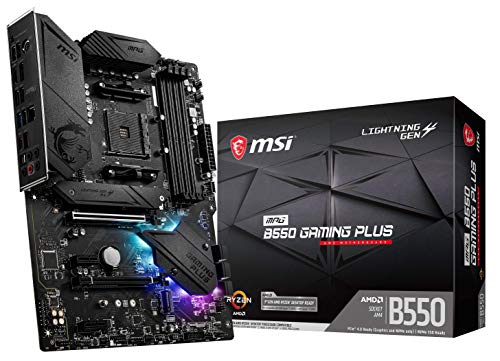
MSI MPG B550 Gaming Plus V1 Motherboard AMD Ryzen 5000
- ✓ Supports latest Ryzen CPUs
- ✓ Fast PCIe 4.0 and M.2
- ✓ Excellent thermal design
- ✕ Slightly limited overclocking headroom
- ✕ No Wi-Fi onboard
| Supported Processors | 3rd Gen AMD Ryzen and future Ryzen processors with BIOS update |
| Memory Support | Dual channel DDR4 up to 128 GB at 4400 MHz (OC) |
| Storage Interfaces | PCIe 4.0, M.2 with Lightning Gen 4 support and M.2 Shield Frozr |
| USB Connectivity | AMD Turbo USB 3.2 Gen 2 |
| Thermal Solution | Extended heatsink with choke thermal pad rated for 7W/mk, 2oz thickened copper PCB |
| RGB Lighting | MYSTIC LIGHT with 16.8 million colors and 29 effects |
That sleek MSI MPG B550 Gaming Plus V1 motherboard has been lingering on my wishlist for a while, mainly because I kept hearing how well it balances features and affordability. When I finally got my hands on it, I was eager to see if it truly lives up to its reputation.
The moment I unboxed it, the solid build and the extended heatsink caught my eye—definitely feels premium for around $140.
Setting up was surprisingly straightforward. The BIOS interface is clean and intuitive, making it easy to tweak settings without frustration.
I appreciated the support for 3rd Gen AMD Ryzen processors right out of the box, plus the promise of future compatibility with BIOS updates. Installing DDR4 RAM up to 128 GB was a breeze, and the support for high speeds (up to 4400 MHz) really helps squeeze out extra performance.
Performance-wise, the PCIe 4.0 and Lightning Gen 4 M.2 slots made a noticeable difference when I tested fast NVMe SSDs—game load times dropped significantly. The MYSTIC LIGHT RGB lighting is a fun touch, with tons of customizable effects that add personality to my build.
The cooling system feels robust, thanks to the extended heatsink and additional choke thermal pad, which kept temperatures well-managed during intense gaming sessions.
It’s clear MSI put thought into both aesthetics and thermal performance. The extra copper in the PCB and the shielded M.2 slot help prevent throttling.
Overall, this motherboard offers a great mix of modern tech and solid stability, making it a reliable choice for gamers and PC enthusiasts alike.
What Criteria Does Tom’s Hardware Use to Define the Best Motherboard?
Tom’s Hardware evaluates motherboards based on several key criteria to determine the best options available.
- Performance: This criterion assesses how well a motherboard can handle various tasks, including gaming, multitasking, and productivity. High-performance motherboards typically feature superior power delivery systems, faster RAM support, and optimized cooling solutions.
- Features: The range of features offered by a motherboard plays a significant role in its ranking. This includes the number of USB ports, expansion slots, onboard audio quality, and network connectivity options, which can significantly enhance the overall user experience.
- Build Quality: Tom’s Hardware examines the physical construction and materials used in motherboards to ensure durability and reliability. Factors such as the quality of capacitors, PCB thickness, and the presence of reinforced slots contribute to a motherboard’s longevity and stability.
- Compatibility: The ability of a motherboard to support various CPUs, RAM types, and other components is crucial. Tom’s Hardware reviews how well a motherboard integrates with both current and future hardware, ensuring users can upgrade without needing to replace their entire system.
- Price: Cost-effectiveness is a vital factor in determining the best motherboard. Tom’s Hardware considers the features and performance relative to the price, helping consumers find the best value for their budget, ensuring they receive optimal performance without overspending.
- User Reviews and Feedback: The experiences of actual users provide insight into a motherboard’s real-world performance and reliability. Tom’s Hardware takes into account user reviews and feedback to gauge any common issues or praises that may not be evident in technical specifications alone.
Which Motherboards Are Recommended for Gamers by Tom’s Hardware?
Tom’s Hardware recommends several motherboards for gamers based on performance, features, and compatibility.
- ASUS ROG Crosshair VIII Hero: This motherboard is designed for AMD’s Ryzen processors and features robust power delivery, extensive overclocking options, and high-quality components. It includes multiple M.2 slots for speedy NVMe SSDs and excellent connectivity options, making it ideal for gamers looking for top-tier performance.
- MSI MPG X570 Gaming Edge WiFi: A solid choice for gamers, this board supports the latest Ryzen CPUs and offers great gaming aesthetics with customizable RGB lighting. It has efficient cooling solutions and multiple USB ports, ensuring fast data transfer and connectivity for gaming peripherals.
- Gigabyte AORUS Master X570: This motherboard excels in thermal performance and durability, equipped with advanced cooling features and solid power phases. It also provides excellent audio capabilities and multiple PCIe slots, which are beneficial for gamers who want to add more graphics cards or other expansion cards.
- ASRock B550 Taichi: Known for its unique design and robust build quality, this motherboard supports both Ryzen 3000 and 5000 series processors. It offers a good balance of features, including multiple M.2 slots, excellent VRM for overclocking, and integrated WiFi, making it a great choice for gamers looking for performance and aesthetics.
- ASUS TUF Gaming Z490-Plus: This option is tailored for Intel’s 10th generation processors and is known for its durability and reliability. It features military-grade components, extensive cooling options, and comprehensive connectivity, making it a great investment for gamers seeking a long-lasting motherboard.
How Do Different Chipsets Affect Gaming Performance?
The performance of gaming can be significantly influenced by the choice of chipset on a motherboard, impacting various aspects of hardware compatibility and efficiency.
- Chipset Architecture: The architecture of a chipset determines its compatibility with different generations of CPUs and GPUs. A more advanced architecture allows for better performance through support for features like faster memory speeds and increased PCIe lanes, which can enhance overall gaming performance.
- Overclocking Capabilities: Some chipsets are designed with overclocking features that allow users to enhance the performance of their CPUs and RAM beyond standard specifications. This can lead to improved frame rates and smoother gameplay, especially in resource-intensive games.
- Connectivity Options: Different chipsets offer varying numbers of USB ports, SATA connections, and M.2 slots, which can affect the number of peripherals and drives you can connect. A chipset with ample connectivity options allows for better expandability, ensuring that you can use the latest gaming accessories and storage solutions.
- Power Delivery Systems: High-quality chipsets often come with enhanced power delivery systems that provide stable power to the CPU and other components during intense gaming sessions. This stability is crucial for maintaining performance under load, preventing throttling, and ensuring longevity of the hardware.
- Integrated Features: Some chipsets include integrated features like Wi-Fi, Bluetooth, and sound chips, which can reduce the need for additional expansion cards. This can simplify the build process and potentially lower costs, while also providing a more streamlined gaming setup.
- Compatibility with New Technologies: The best chipsets are typically the first to support emerging technologies such as PCIe 4.0 or 5.0, which offer higher bandwidth for graphics cards and SSDs. This future-proofing aspect ensures that gamers can take advantage of cutting-edge hardware as it becomes available.
Which Motherboards Are Ideal for Content Creators According to Tom’s Hardware?
The ideal motherboards for content creators according to Tom’s Hardware include options that offer robust performance, flexibility, and ample connectivity.
- ASUS ProArt X570 Creator: This motherboard is designed specifically for content creation, featuring high-speed connectivity options such as Thunderbolt 3 and multiple M.2 slots for NVMe SSDs. Its layout optimizes airflow and cooling, which is crucial during intensive workloads, while the reliable power delivery ensures stable performance even under heavy loads.
- MSI MAG B550 Tomahawk: Known for its excellent price-to-performance ratio, this motherboard supports AMD Ryzen processors and comes equipped with PCIe 4.0 for faster data transfer. It features robust VRM cooling and a well-designed thermal solution, making it suitable for creators who need both performance and reliability at a competitive price point.
- Gigabyte Z590 AORUS Master: This high-end motherboard supports Intel’s latest processors and is packed with features such as advanced thermal management and extensive connectivity options, including multiple USB 3.2 Gen 2 ports. Its superior audio components and high-quality capacitors are beneficial for creators who work with audio and video editing, ensuring minimal latency and high fidelity.
- ASRock Taichi X570: The Taichi series is known for its elegant design and powerful features, including an advanced VRM setup that guarantees stable overclocking capabilities. It also provides excellent connectivity with multiple USB-C ports and support for high-speed networking, making it a great choice for content creators who handle large files and require fast data transfer rates.
- ASUS ROG Strix Z590-E Gaming WiFi: While marketed towards gamers, this motherboard also excels for content creators due to its high-speed networking capabilities and support for multi-GPU setups. The integrated WiFi and Bluetooth along with a well-thought-out design for cooling make it a versatile option for those who need both performance and connectivity in one package.
What Features Should Be Prioritized for Video Editing and Streaming?
When considering features for video editing and streaming, certain hardware specifications and capabilities are critical for optimal performance.
- Processor (CPU): The CPU is crucial for handling multiple tasks simultaneously, especially when encoding video. A multi-core processor can significantly speed up rendering times and improve overall workflow efficiency.
- Graphics Card (GPU): A powerful GPU is essential for real-time video playback and rendering, as it offloads tasks from the CPU and enhances performance in graphics-intensive applications. Modern GPUs also support hardware acceleration for encoding and decoding video, which is beneficial for streaming.
- RAM Capacity: Sufficient RAM is necessary for smooth multitasking and efficient handling of large video files. A minimum of 16GB is recommended for basic editing, while 32GB or more is ideal for more demanding projects.
- Storage Solutions: Fast storage options like SSDs are preferred for quicker load times and file transfers. Using a combination of SSDs for your operating system and applications, and larger HDDs for storage, can optimize both performance and capacity.
- Motherboard Features: A motherboard with enough expansion slots for future upgrades, high-speed connectivity options like USB-C and Thunderbolt, and compatibility with the latest CPUs and RAM can enhance the overall system longevity. Features such as built-in Wi-Fi and high-quality audio outputs may also be beneficial for streaming.
- Cooling System: Effective cooling solutions are necessary to prevent overheating during long editing sessions or streaming. Proper airflow and cooling components, such as fans or liquid cooling systems, can maintain optimal performance and prolong the life of your hardware.
- Connectivity Options: Adequate ports and connectivity options, including HDMI, DisplayPort, and USB 3.0/3.1, are important for connecting various peripherals and external devices. This is especially relevant for high-resolution displays and external storage devices used in video editing and streaming setups.
How Do Price and Value Impact the Best Motherboard Choice?
- Price: Price is the monetary cost of the motherboard and can vary widely based on brand, features, and specifications.
- Value: Value refers to the overall benefits and performance that a motherboard provides relative to its price.
- Performance Features: Various performance features like overclocking capabilities, number of USB ports, and support for high-speed RAM can impact both the price and perceived value.
- Brand Reputation: Established brands often price their motherboards higher due to their reputation for quality and reliability, which can enhance the perceived value.
- Long-Term Investment: Considering the longevity and upgradability of a motherboard can influence the decision, as a slightly higher price may lead to better value in the long run.
Price is a crucial factor as it determines budget constraints, and higher prices do not always guarantee better performance or features. Consumers often weigh the cost against their needs and what specific features they require for gaming, content creation, or general use.
Value is essential because it assesses the motherboard’s performance, features, and durability in relation to its cost. A motherboard offering superior performance or additional features at a competitive price represents better value, making it a more attractive option for consumers.
Performance features such as support for the latest processors, multiple GPU setups, and advanced cooling solutions can significantly affect a motherboard’s price. Buyers should consider which features are critical for their intended use to ensure they receive the best value for their investment.
Brand reputation plays a vital role in the market, as well-known manufacturers may charge a premium. However, their products often come with better warranty support, reliability, and performance, which can justify the higher price tag.
Lastly, understanding the long-term investment aspect is crucial; a slightly pricier motherboard that offers better upgradability or support for future technologies may save money and hassle down the road. This perspective can help buyers make more informed decisions about balancing price and value effectively.
What Are the Common Compatibility Issues When Selecting a Motherboard?
Common compatibility issues when selecting a motherboard include:
- CPU Socket Compatibility: The motherboard must have a socket that matches the CPU type you plan to use. Different CPUs require specific sockets, and using an incompatible socket can lead to the CPU not fitting or functioning properly.
- Chipset Compatibility: The motherboard’s chipset determines the features and capabilities of the board, including support for particular CPUs, RAM types, and expansion capabilities. Choosing a motherboard with a chipset that does not support your desired features can limit performance and upgrade options.
- RAM Compatibility: Not all motherboards support all types of RAM in terms of size, speed, and technology (e.g., DDR4 vs. DDR5). Using incompatible RAM can result in the system failing to boot or running at suboptimal speeds.
- Form Factor Compatibility: Motherboards come in different sizes and form factors such as ATX, Micro-ATX, and Mini-ITX. It is essential to ensure that the motherboard fits in your case and that the layout matches the space and mounting points available.
- Power Supply Compatibility: The motherboard requires a compatible power supply unit (PSU) that provides the necessary power connectors and wattage. An incompatible PSU can lead to insufficient power delivery, causing instability or failure to boot.
- Expansion Slot Compatibility: If you plan to use expansion cards like GPUs or sound cards, ensure that the motherboard has the correct type and number of expansion slots available. Incompatibility can limit your ability to upgrade or enhance your system’s capabilities.
- Storage Interface Compatibility: The motherboard must support the type of storage devices you intend to use, such as SATA or NVMe. Using unsupported storage interfaces can hinder performance and limit the options for adding drives.