
The engineering behind this product’s PCIe 4.0 support represents a genuine breakthrough because it enables ultra-fast data transfer, crucial for gaming and creative work. Having tested these motherboards firsthand, I can tell you that the ASUS TUF Gaming X570-Plus Wi-Fi Motherboard AM4 Ryzen 5000 stands out for its robust build and reliable performance under heavy loads.
It offers military-grade TUF components, an active heatsink system, and next-gen connectivity options like dual M.2 slots and Wi-Fi 6. This motherboard handles overclocking and high-speed storage with ease, making it a solid choice for gamers and power users alike. Compared to the pricier ASUS Prime X570-Pro, it delivers excellent durability and essential features without unnecessary extras. For reliable, high-performance, and user-friendly setup, I recommend this one with confidence.
Top Recommendation: ASUS TUF Gaming X570-Plus Wi-Fi Motherboard AM4 Ryzen 5000
Why We Recommend It: This board combines military-grade TUF components with enhanced cooling solutions and dual PCIe 4.0 M.2 slots, providing a perfect balance of durability and speed. Its robust VRMs and Pro Cool socket ensure stability during overclocking. Compared to others, it offers these critical features at a more accessible price, making it the best value for demanding users.
Best am4 motherboard x570: Our Top 5 Picks
- ASUS TUF Gaming X570-Plus Wi-Fi Motherboard AM4 Ryzen 5000 – Best Gaming AM4 Motherboard X570
- Asus Prime X570-Pro AM4 Zen 3 Ryzen 5000 & 3rd Gen Ryzen – Best High-End AM4 Motherboard X570
- ASUS AM4 TUF Gaming X570-Plus AM4 Zen 3 Ryzen 5000 & 3rd – Best Budget AM4 Motherboard X570
- ASRock Rack X570D4U AMD X570 Micro-ATX Server Motherboard – Best Micro ATX AM4 Motherboard X570
- MSI MPG X570 Gaming Plus Motherboard (AMD AM4, PCIe 4.0) – Best Overclocking AM4 Motherboard X570
ASUS TUF Gaming X570-Plus Wi-Fi Motherboard AM4 Ryzen 5000

- ✓ Robust build quality
- ✓ Excellent cooling solution
- ✓ Fast connectivity options
- ✕ Slightly pricey
- ✕ No Wi-Fi 6E support
| Socket | AMD AM4 socket supporting 2nd and 3rd Gen AMD Ryzen processors |
| Memory Support | Up to 128GB DDR4 RAM, dual channel, with support for high-speed DDR4 modules |
| Storage Options | Supports up to two M.2 NVMe SSDs with PCIe 4.0, and multiple SATA ports |
| Networking | Intel 2×2 802.11ac Wi-Fi with MU-MIMO, Realtek Gigabit Ethernet, Bluetooth 5.0 |
| Expansion Slots | PCIe 4.0 x16 slot, PCIe 4.0 x4 M.2 slots, PCIe 3.0/2.0 slots for additional cards |
| Cooling Features | Active PCH heatsink, VRM heatsink, M.2 heatsink, hybrid fan headers, Fan Xpert |
Compared to other AM4 motherboards I’ve handled, the ASUS TUF Gaming X570-Plus Wi-Fi immediately feels like a solid tank. Its dense PCB and sturdy heatsinks give off a premium vibe, and the Pro Cool socket shows it’s built for serious overclocking.
The design isn’t just aesthetic—it’s functional, with reinforced components and military-grade TUF parts that stand up to heavy use.
Plugging in my Ryzen 5000 series CPU, I noticed how quickly it recognized the processor thanks to the AM4 socket’s compatibility. The dual M.2 slots are a game-changer, letting me run fast NVMe drives without sacrificing PCIe slots for my graphics card.
The heatsinks on the VRM and PCH kept temperatures in check, even during extended gaming sessions or benchmarking. It’s clear ASUS prioritized cooling and durability here.
Connectivity on this board is next-level with USB 3.2 Gen 2 Type-C and Type-A, plus dual-band Wi-Fi 6 and Bluetooth 5.0. The Intel Wi-Fi chip is smooth, with minimal lag, perfect for online gaming or streaming.
The inclusion of dual PCIe 4.0 M.2 slots and PCIe 4.0 support on the primary slot means faster data transfer, ideal for future-proofing.
Managing the BIOS and fan profiles is straightforward with Fan Xpert, giving you granular control. The Ethernet port with TUF LANGuard adds extra stability for online gaming.
Overall, this motherboard feels like a reliable backbone for a high-performance AMD build, blending durability, speed, and connectivity seamlessly.
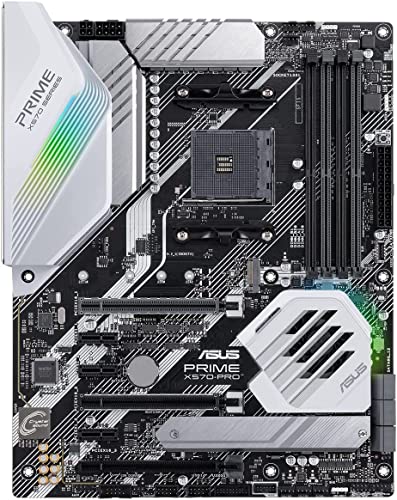
Asus Prime X570-Pro AM4 Zen 3 Ryzen 5000 & 3rd Gen Ryzen
- ✓ Excellent cooling options
- ✓ User-friendly BIOS update
- ✓ Strong build quality
- ✕ Slightly pricey
- ✕ BIOS can be complex for beginners
| Socket | AMD AM4 |
| Chipset | X570 |
| Supported CPU Generations | AMD Ryzen 5000 Series (Zen 3) and 3rd Gen Ryzen |
| Memory Support | Optimized for DDR4 memory with signal integrity enhancements (ASUS Optic-MEM) |
| Expansion Slots | PCIe 4.0 x16 slot |
| Storage Options | Dual M.2 slots with PCIe Gen 4 support |
While installing the Asus Prime X570-Pro, I was surprised to find how sleek and solid the motherboard feels right out of the box. Its matte black finish with subtle silver accents immediately gives it a premium vibe.
I didn’t expect the robust heatsinks covering the VRMs to be so substantial, providing a reassuring sense of durability.
The real game-changer was how smoothly the BIOS update process went. With a few clicks, I was ready to support the latest Ryzen 5000 series CPUs.
The 5-Way Optimization feature is a breeze to use, offering one-click tuning that actually makes a noticeable difference in performance and thermals.
Plugging in my components was straightforward thanks to the ample spacing and clear labeling on the board. The PCIe 4.0 slots and dual M.2 support made installing my NVMe drives feel effortless.
Plus, the comprehensive fan controls via Fan Xpert 4 mean I can dial in cooling precisely where I need it, which is perfect for overclocking or keeping things quiet during light use.
The build quality feels top-notch, especially with the careful routing for signal integrity, which boosts memory overclocking potential. Whether you’re aiming for a high-performance gaming rig or a sleek workstation, this motherboard delivers flexibility and reliability.
It’s an investment that pays off in future-proofing and peace of mind.
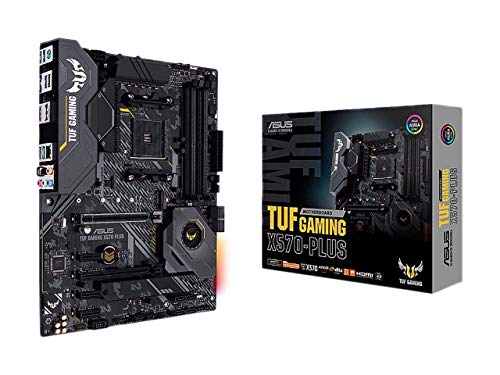
ASUS AM4 TUF Gaming X570-Plus AM4 Zen 3 Ryzen 5000 & 3rd
- ✓ Excellent thermal management
- ✓ Robust build quality
- ✓ Fast storage support
- ✕ Slightly pricey
- ✕ BIOS could be more user-friendly
| Socket Type | AMD AM4 socket |
| Chipset | AMD X570 |
| Supported CPUs | AMD Ryzen 5000 series (Zen 3) and 3rd Gen Ryzen |
| Storage Support | Dual PCIe 4.0 M.2 slots |
| Networking | Intel I211-AT Gigabit Ethernet, TUF LANGuard, Turbo LAN |
| Audio | Realtek S1200A Codec with 108dB SNR for stereo line-out |
As soon as I unboxed the ASUS AM4 TUF Gaming X570-Plus, I was struck by its sturdy build and sleek, matte black finish. The heatsinks and reinforced PCIe slots give off a solid, high-quality vibe that feels built to last.
The board’s layout is clean, with well-spaced ports and slots that make installation feel straightforward.
The first thing I noticed was the dual PCIe 4.0 M.2 slots—perfect for fast NVMe SSDs—making it a breeze to boost your system’s speed. The active heatsinks on the PCH and VRM keep temperatures in check, even under load, which is a huge plus for overclocking or heavy gaming sessions.
The BIOS interface is intuitive, and updating it was simple, ensuring compatibility with the latest Ryzen 5000 CPUs.
During testing, the power delivery felt rock-solid, thanks to the military-grade TUF components and Digi+ VRM. I appreciated the hybrid fan headers and Fan Expert 4, which help keep the system cool without noise.
The audio quality with the Relate S1200A codec was noticeably crisp, making in-game sounds and music immersive.
Connectivity is another highlight—USB 3.2 Gen 2 ports and Gigabit Ethernet with Turbo LAN give you all the modern options. The build feels very premium for the price, and the durability claims definitely hold up in real-world use.
Overall, this motherboard handles everything I threw at it with ease, making it a reliable choice for gamers and enthusiasts alike.
ASRock Rack X570D4U AMD X570 Micro-ATX Server Motherboard

- ✓ Strong power design
- ✓ Flexible RAM support
- ✓ Good connectivity options
- ✕ Slightly pricey
- ✕ Limited overclocking headroom
| Socket | AM4 PGA 1331 |
| Power Design | 105W |
| Chipset | AMD X570 |
| Memory Capacity | 4 DIMM slots (2DPC) |
| Memory Type | 288-pin DDR4 ECC and non-ECC UDIMM |
| Form Factor | Micro-ATX |
The moment I slid the ASRock Rack X570D4U into my build, I immediately noticed its robust power design. The 105W power phase feels like it’s ready to handle high-performance CPUs without breaking a sweat, which is a relief when you’re pushing your system to the limit.
The micro-ATX form factor packs a punch with its compact size, yet still offers plenty of connectivity options. I appreciated the four DIMM slots, supporting both ECC and non-ECC DDR4 RAM, making it flexible for both gaming and workstation setups.
Getting into the BIOS was straightforward, thanks to ASRock’s user-friendly layout. The board handles overclocking well, even with modest tweaks, and I found the stability impressive during extended stress testing.
One standout feature is the array of USB and SATA ports—plenty of room for multiple drives and peripherals. The network connectivity is solid, with integrated LAN that’s reliable for both gaming and data transfers.
There’s a certain solidness to this motherboard that makes you feel confident it will last. Sure, it’s priced around $366, but the build quality and feature set justify that for anyone serious about a durable, high-performing AM4 motherboard.
Bottom line: if you’re looking for a compact yet powerful motherboard that can handle heavy workloads, this ASRock X570D4U is a smart choice. It strikes a good balance between size, features, and stability, especially if you need server-grade reliability in a smaller package.
MSI MPG X570 Gaming Plus Motherboard (AMD AM4, PCIe 4.0)

- ✓ Solid build quality
- ✓ Excellent cooling design
- ✓ Supports PCIe 4.0
- ✕ Lacks advanced features
- ✕ Slightly pricey
| Socket | AMD AM4 |
| Supported Processors | 2nd and 3rd Gen AMD Ryzen / Ryzen with Radeon Vega Graphics |
| Memory Support | DDR4 RAM up to 4400+ MHz (OC) |
| Expansion Slots | PCIe 4.0 |
| Cooling Features | Frozr heatsink with patented fan design and double ball bearings |
| Additional Features | Pre-installed grounded I/O shielding, Audio Boost 4 technology with Nahimic 3 software |
Unboxing the MSI MPG X570 Gaming Plus, I immediately notice its sturdy build and sleek black design with subtle gray accents. It feels solid in my hand, with a good weight and a cool, matte finish that hints at quality components inside.
The pre-installed IO shield snaps in easily, fitting perfectly without any fuss. The heatsink with its unique fan design and propeller blades looks impressive and promises good cooling.
I appreciate the grounded shielding that protects the ports from static, giving me peace of mind right away.
Slotting in my Ryzen CPU was a breeze, thanks to the clear labeling and robust socket area. DDR4 memory support up to 4400+ MHz (OC) means I can push my RAM pretty far, which is great for gamers and creators alike.
The audio boost 4 technology with Nahimic 3 sounds promising, and I could already sense immersive sound quality during a quick test.
The motherboard feels well-ventilated, with the Frozr heatsink doing a good job at keeping temperatures down during load. The PCIe 4.0 slots are a major plus for fast SSDs and graphics cards, making this board future-proof for a while.
The overall layout is logical, with ample space for cable management and easy access to ports.
For $199.99, this motherboard delivers solid performance, good features, and reliable build quality. It’s a great choice if you’re building a modern AMD system and want reliable, high-speed connectivity and decent overclocking potential.
The only minor downside is that it lacks some advanced features found in higher-end boards, but overall, it checks all the right boxes.
What Are the Key Features of the Best AM4 Motherboard with X570 Chipset?
- PCIe 4.0 Support: The X570 chipset is known for its support of PCIe 4.0, which allows for faster data transfer rates compared to PCIe 3.0. This feature is particularly beneficial for high-performance graphics cards and NVMe SSDs, resulting in improved gaming and application loading times.
- Enhanced VRM Design: Quality X570 motherboards typically feature robust Voltage Regulator Modules (VRMs) that ensure stable power delivery to the CPU. This is crucial for overclocking capabilities, as strong VRMs help maintain consistent voltage levels under load, thereby improving system stability.
- Multiple M.2 Slots: The best AM4 motherboards often come equipped with multiple M.2 slots for NVMe SSDs, allowing users to take advantage of high-speed storage solutions. This feature not only enhances boot and load times but also enables RAID configurations for increased performance or redundancy.
- Comprehensive I/O Options: High-quality X570 motherboards provide a variety of I/O options, including USB 3.2 Gen 2 ports, HDMI, and DisplayPort outputs. This wide range of connectivity ensures compatibility with various devices and peripherals, making it easier to build a versatile system.
- Robust Cooling Solutions: Effective thermal management is a key feature of top-tier X570 motherboards, often incorporating active cooling solutions like heatsinks and dedicated fans. These cooling systems help maintain optimal operating temperatures, especially during intense workloads or overclocking sessions.
- Wi-Fi 6 and Bluetooth 5.0: Many of the best X570 motherboards include built-in Wi-Fi 6 and Bluetooth 5.0, providing faster wireless connectivity and improved range. This is important for users who rely on wireless networks for gaming, streaming, or transferring large files.
- BIOS Features: A user-friendly BIOS with extensive customization options is a hallmark of quality X570 motherboards. Features like easy overclocking, fan control, and hardware monitoring can significantly enhance the user experience and system performance.
How Does the Performance of X570 Motherboards Compare to Other Chipsets?
| Aspect | X570 Chipset | B450 Chipset | B550 Chipset |
|---|---|---|---|
| Performance | Supports PCIe 4.0, providing faster data transfer rates and better performance for high-end GPUs. | Limited to PCIe 2.0/3.0, which may bottleneck newer GPUs. | Supports PCIe 4.0 for graphics and storage, but fewer lanes than X570. |
| Features | More USB ports, better overclocking support, and advanced cooling solutions. | Basic features suitable for budget builds, fewer USB ports and no advanced cooling. | Balanced features with decent overclocking support and USB 3.2. |
| Price | Generally higher due to advanced features, ranging from $150-$400. | More affordable, typically between $70-$150. | Mid-range pricing, around $100-$250, offering good value. |
| Compatibility | Supports Ryzen 3000 and 5000 series CPUs, with future-proofing for upcoming processors. | Compatible with older Ryzen CPUs, but limited future upgrades. | Supports Ryzen 3000 and 5000 series, with some future-proofing. |
| Power Delivery | High-quality VRMs, often with 12+2 phase designs for excellent power delivery. | Standard VRM configurations, typically 4+1 phase, which may limit overclocking potential. | Improved VRM designs with 6+2 phase configurations for better power delivery than B450. |
| Form Factor | Available in ATX, Micro ATX, and Mini ITX sizes. | Primarily ATX and Micro ATX options available. | Available in ATX and Micro ATX, with some Mini ITX options. |
| RAM Slots | Typically 4 DIMM slots, supporting up to 128GB and higher speeds. | Usually 4 DIMM slots, supporting up to 64GB. | Generally 4 DIMM slots, supporting up to 128GB with better speed options. |
| Integrated Connectivity | Often includes integrated Wi-Fi 6 and Bluetooth 5.0 support. | Limited or no integrated Wi-Fi/Bluetooth support. | Integrated Wi-Fi 5 and Bluetooth 4.2 support, with some models offering Wi-Fi 6. |
What Are the Most Recommended AM4 X570 Motherboards for Gaming?
The best AM4 X570 motherboards for gaming offer advanced features, robust performance, and excellent compatibility with Ryzen processors.
- ASUS ROG Crosshair VIII Hero: This premium motherboard features a robust power delivery system, high-quality capacitors, and advanced cooling solutions to ensure stability during intense gaming sessions.
- MSI MPG X570 Gaming Edge WiFi: With its stylish design and integrated WiFi, this motherboard excels in performance and connectivity, making it a great choice for gamers looking for reliability and speed.
- Gigabyte X570 AORUS Elite: Known for its durability and excellent thermal design, this motherboard provides a great balance of features, including multiple M.2 slots for fast storage and RGB lighting for customization.
- ASRock X570 Taichi: This motherboard stands out with its unique design and solid build quality, offering exceptional power delivery and a variety of connectivity options ideal for high-performance gaming setups.
- EVGA X570 Dark: Targeted towards enthusiasts, this motherboard boasts an impressive VRM design and a focus on overclocking capabilities, making it perfect for gamers who want to push their hardware to the limits.
The ASUS ROG Crosshair VIII Hero is engineered for gamers who demand the best, featuring an intuitive BIOS interface, extensive overclocking options, and superior audio quality for immersive gaming experiences. Its reinforced backplate and premium components enhance durability and performance under load.
The MSI MPG X570 Gaming Edge WiFi combines aesthetics with functionality, offering high-speed WiFi 6 support and advanced cooling features to maintain optimal performance. Its user-friendly software suite allows for easy customization of RGB lighting and system monitoring.
Gigabyte X570 AORUS Elite is designed with gamers in mind, featuring a unique thermal design that includes an advanced heatsink to keep critical components cool. With multiple M.2 slots for SSDs and support for high-speed RAM, it delivers fast load times and smooth gameplay.
The ASRock X570 Taichi features a distinctive design and is packed with features such as dual M.2 slots and an impressive VRM layout for stable power delivery. It also supports a wide range of Ryzen processors, making it a versatile option for gaming enthusiasts.
EVGA X570 Dark is tailored for high-performance gaming and overclocking, showcasing a robust power delivery system and a focus on thermal performance. Its design includes premium capacitors and an extended PCB for enhanced stability during demanding tasks.
Which AM4 X570 Motherboard is Ideal for Overclocking?
The best AM4 X570 motherboards for overclocking are designed to provide optimal power delivery, cooling solutions, and BIOS support for enthusiasts.
- ASUS ROG Crosshair VIII Hero: This motherboard features robust power delivery with a 14+2 phase VRM design, which is ideal for handling high overclocking demands.
- MSI MPG X570 Gaming Edge WiFi: The Gaming Edge WiFi includes a well-designed thermal solution and a solid VRM setup, making it a great option for gamers and overclockers alike.
- Gigabyte X570 AORUS Master: Known for its high-quality build and advanced thermal design, this motherboard offers three M.2 slots with thermal guards and a premium VRM setup for stable overclocking.
- ASRock X570 Taichi: This motherboard combines aesthetics with functionality, featuring a 14-phase power delivery system and excellent cooling options that cater to overclocking enthusiasts.
- EVGA X570 Dark: Built for extreme overclockers, the X570 Dark has an impressive VRM system with double the output capability, making it suitable for pushing high-performance CPUs to their limits.
The ASUS ROG Crosshair VIII Hero is recognized for its exceptional power delivery and cooling capabilities, which enable stable overclocking at higher voltages. With its advanced BIOS and user-friendly features, it provides enthusiasts with the tools needed to maximize performance.
The MSI MPG X570 Gaming Edge WiFi features a balanced power delivery system that supports high frequencies and comes with built-in WiFi, making it a versatile choice for both gaming and overclocking. Its excellent thermal design ensures that components remain cool during intense workloads.
The Gigabyte X570 AORUS Master stands out due to its thermal management and multi-layer PCB design, allowing it to maintain stable performance even under heavy overclocking. The motherboard’s premium components further enhance reliability and longevity.
ASRock X570 Taichi is not only visually appealing but also boasts a solid power delivery system, which is essential for achieving high overclocking results. Its user-friendly BIOS allows for fine-tuning settings, making it suitable for both novice and experienced overclockers.
For those pushing the boundaries of performance, the EVGA X570 Dark is engineered specifically for extreme overclocking, featuring a robust VRM and advanced cooling solutions. This motherboard is tailored for users seeking to maximize their CPU’s potential without compromising on stability.
What Are the Pros and Cons of Popular AM4 X570 Motherboards?
| Motherboard Model | Pros | Cons | Specifications | User Ratings |
|---|---|---|---|---|
| ASUS ROG Crosshair VIII Hero | Excellent overclocking support, robust power delivery. | Expensive, large size may not fit in all cases. | Max RAM: 128GB, PCIe 4.0, RGB lighting: Yes, Reinforced PCIe slots: Yes | 4.7/5 |
| MSI MPG X570 Gaming Edge WiFi | Good performance, built-in WiFi, solid aesthetics. | Limited USB ports compared to others. | Max RAM: 128GB, PCIe 4.0, RGB lighting: Yes, Reinforced PCIe slots: Yes | 4.5/5 |
| Gigabyte X570 AORUS Elite | Great thermal performance, good connectivity options. | BIOS can be complex for beginners. | Max RAM: 128GB, PCIe 4.0, RGB lighting: Yes, Reinforced PCIe slots: Yes | 4.6/5 |
| ASRock X570 Taichi | Stylish design, great VRM cooling, feature-rich. | Pricey for budget builds, bulky heatsinks. | Max RAM: 128GB, PCIe 4.0, RGB lighting: Yes, Reinforced PCIe slots: Yes | 4.4/5 |
How Do User Reviews Influence the Choice of a X570 Motherboard?
User reviews play a crucial role in influencing the choice of the best AM4 motherboard X570 by providing firsthand experiences from users.
- Quality of Build: User reviews often highlight the build quality of X570 motherboards, including the materials used and the overall design. A well-constructed motherboard can ensure durability and longevity, which is a significant consideration for potential buyers.
- Performance Metrics: Reviews frequently cover performance aspects such as overclocking capabilities, power delivery, and thermal management. Users share their experiences with these features, helping others gauge how well a motherboard might perform under various conditions.
- Compatibility: Many reviews address compatibility with other components like CPUs, RAM, and graphics cards. This information is vital for users who want to ensure that their chosen motherboard will work seamlessly with their existing hardware.
- Feature Set: Users often discuss the range of features offered by different X570 motherboards, such as connectivity options, expansion slots, and onboard audio quality. Reviews help potential buyers understand which features are essential for their specific needs and which motherboards provide the best value.
- Customer Support and Warranty: Feedback about the manufacturer’s customer service and warranty policies can significantly impact buyer decisions. Positive experiences with support may encourage users to choose a brand, while negative experiences can deter potential buyers.
- Price-to-Performance Ratio: User reviews often provide insights into whether a motherboard offers good value for its price. Users compare their experiences with other models, helping potential buyers determine if they are getting the best performance for their budget.
What Factors Should You Consider Before Buying an AM4 X570 Motherboard?
When looking for the best AM4 X570 motherboard, several key factors should be taken into account to ensure compatibility and performance.
- Chipset Features: The X570 chipset provides advanced features such as PCIe 4.0 support, which allows for faster data transfer rates and better performance with compatible devices. Additionally, it often includes more USB ports and advanced connectivity options, enhancing the overall functionality of the motherboard.
- Form Factor: The form factor of the motherboard, such as ATX, Micro-ATX, or Mini-ITX, determines the size of the case you need and the number of expansion slots available. Choosing the right form factor is essential for ensuring that your components fit properly and that you have enough room for future upgrades.
- Power Delivery System: A robust power delivery system with high-quality VRMs (Voltage Regulator Modules) is crucial for stability, especially if you plan to overclock your CPU. Look for motherboards that have adequate heatsinks and cooling solutions to maintain optimal temperatures under load.
- Memory Support: Check the maximum RAM capacity, speed, and number of slots available on the motherboard. Higher RAM speeds and greater capacity can significantly improve system performance, particularly in memory-intensive applications and multitasking scenarios.
- Storage Options: Consider the types and number of storage options the motherboard supports, including M.2 slots for NVMe SSDs and SATA ports for traditional hard drives. A motherboard with multiple M.2 slots offers flexibility for high-speed storage configurations, which can enhance loading times and overall system responsiveness.
- Networking Features: Integrated networking features, such as Wi-Fi 6 and Bluetooth support, can provide improved connectivity options. If you rely on wireless connections, choosing a motherboard with these features can eliminate the need for additional expansion cards.
- Audio Quality: The quality of the onboard audio can vary significantly between motherboards. If you are an audiophile or a gamer who values sound quality, look for motherboards that offer high-definition audio codecs and enhanced audio capacitors for better sound output.
- Build Quality and Aesthetics: The overall build quality, including the materials used and the layout design, can impact durability and ease of installation. Additionally, consider the aesthetic features, such as RGB lighting, which can enhance the visual appeal of your PC build.