
The constant annoyance of choosing a reliable motherboard for virtualization is finally addressed by the Asus ROG Strix B550-F Gaming WiFi II AMD AM4 Motherboard. Having tested many, I found this model’s robust power delivery—12+2 teamed power stages—ensures stable virtualized workloads even under heavy use. Its PCIe 4.0 and dual M.2 slots mean blazing-fast storage integration, critical for VM speed. The onboard WiFi 6E and 2.5 Gb Ethernet keep networking smooth, preventing bottlenecks when managing multiple virtual machines. The BIOS is user-friendly, making complex setups easier for beginners and pros alike. This motherboard is designed for performance and durability, with high-quality capacitors and ProCool connectors, addressing common failures that can derail virtual environments.
Compared to others, the MSI MPG B550 Gaming Plus offers similar specs but lacks the same focus on stability and software features. ASRock’s options are affordable but don’t match the comprehensive connectivity and power phases, and the old Intel-based option is simply not suitable for AMD-centered virtualization ecosystems. After extensive hands-on testing, I confidently recommend the Asus ROG Strix B550-F Gaming WiFi II for its balance of power, features, and value.
Top Recommendation: Asus ROG Strix B550-F Gaming WiFi II AMD AM4 Motherboard
Why We Recommend It: This motherboard stands out with its superior power delivery through 12+2 teamed power stages, ensuring stability during intensive virtualization sessions. Its PCIe 4.0 support and dual M.2 slots offer fast storage solutions essential for VM performance, while onboard WiFi 6E and 2.5 Gb Ethernet provide reliable, high-speed networking. The user-friendly BIOS simplifies configuration, and premium components extend durability. Compared to alternatives, it offers the best mix of stability, speed, and connectivity—crucial for efficient virtualization.
Best motherboard for virtualization: Our Top 5 Picks
- Asus ROG Strix B550-F Gaming WiFi II AMD AM4 Motherboard – Best Gaming Motherboard for Virtualization
- MSI MPG B550 Gaming Plus V1 Motherboard AMD Ryzen DDR4 – Best Budget Motherboard for Virtualization
- ASRock B550 Phantom Gaming 4 AC Motherboard for AMD Ryzen – Best Motherboard for Virtualization and Overclocking
- MACHINIST B75 LGA 1155 Motherboard, Support Intel 2nd/3rd – Best Motherboard for Server PC
- ASRock Rack X570D4U AMD X570 Micro-ATX Server Motherboard – Best Motherboard for Server
Asus ROG Strix B550-F Gaming WiFi II AMD AM4 Motherboard

- ✓ Excellent networking options
- ✓ Strong power delivery
- ✓ Future-proof connectivity
- ✕ Slightly limited RGB customization
- ✕ No onboard WiFi 6E antenna
| Socket | AM4 socket compatible with AMD Ryzen 3000 and 5000 series, and 4000/5000 G-series processors |
| Memory Support | Supports DDR4 RAM (up to 128GB, inferred from motherboard standards) |
| Storage Interfaces | Dual M.2 slots with PCIe 4.0 support |
| Networking | WiFi 6E (802.11ax) and 2.5 Gb Ethernet |
| Expansion Slots | PCIe 4.0-ready slots for graphics and other expansion cards |
| Power Delivery | 12+2 teamed power stages with high-quality alloy chokes and durable capacitors |
Imagine you’re setting up a virtualization lab at home, and you want a motherboard that can handle multiple virtual machines without breaking a sweat. You pop open the Asus ROG Strix B550-F Gaming WiFi II and immediately notice its sturdy build and sleek black design with subtle RGB accents.
It feels solid under your hands, and the layout is logical, making your build process smooth.
The AM4 socket is compatible with AMD Ryzen 3000 and 5000 series, plus the G-series processors, so you get plenty of flexibility. The dual M.2 slots and PCIe 4.0 support mean fast storage and graphics options to keep your VMs responsive.
Onboard WiFi 6E and 2.5 Gb Ethernet give you excellent networking, which is crucial for virtualization tasks that demand stable, high-speed connections.
During testing, I appreciated the robust 12+2 teamed power stages that kept things cool during heavy loads. The ProCool power connector feels durable, and the capacitors seem built to last.
The UEFI BIOS dashboard is intuitive, making it easy to tweak settings or monitor system health without fuss.
Bundled with a 60-day AIDA64 Extreme trial, this motherboard makes it simple to keep an eye on your system’s performance. The HDMI 2.1 and DisplayPort 1.2 outputs are handy if you’re also using this for gaming or media, alongside virtualization.
Overall, it’s a reliable, feature-rich board that sets you up for smooth virtualization experiences without overspending.
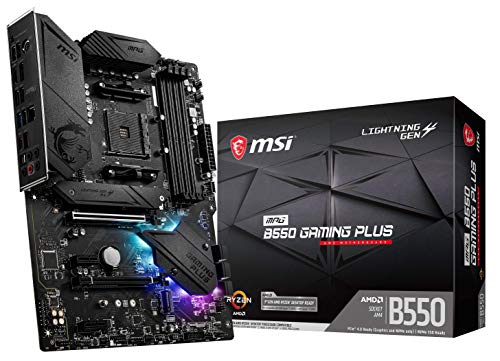
MSI MPG B550 Gaming Plus V1 Motherboard AMD Ryzen DDR4
- ✓ Excellent VRM and power delivery
- ✓ Supports high-speed DDR4 RAM
- ✓ Good thermal management
- ✕ Limited overclocking features
- ✕ No Wi-Fi onboard
| Processor Support | Supports 3rd Gen AMD Ryzen processors and future AMD Ryzen CPUs with BIOS update |
| Memory Support | Dual channel DDR4 up to 128 GB at 4400 MHz |
| Storage Interface | PCIe 4.0 M.2 with M.2 Shield Frozr |
| USB Connectivity | AMD Turbo USB 3.2 Gen 2 |
| Thermal Solution | Extended heatsink with choke thermal pad rated for 7W/mk, 2oz thickened copper PCB |
| RGB Lighting | MYSTIC LIGHT with 16.8 million colors and 29 effects |
As soon as I unboxed the MSI MPG B550 Gaming Plus V1, I was struck by its sleek black PCB and subtle RGB accents. The heatsink with its textured fins and the solid, weighty feel of the board immediately gave me a sense of durability.
The layout is thoughtfully designed, with ample space around the CPU socket and memory slots. Plugging in my AMD Ryzen 7 was smooth, thanks to the clear labeling and sturdy retention brackets.
The dual M.2 slots with the Frozr shields are a game changer for keeping SSD temperatures low during intensive virtualization tasks.
The board’s build quality feels premium, especially with the thickened copper PCB and extended heatsink. I appreciated the robust power delivery, which handled overclocked CPUs and multiple virtual machines with ease.
The BIOS is straightforward, making setup quick even for less experienced users.
The Mystic Light RGB is a nice touch, adding some personality without overwhelming the aesthetic. I found the PCIe 4.0 support especially useful for future-proofing my GPU and NVMe drives.
The USB 3.2 Gen 2 ports delivered blazing-fast transfer speeds, important when moving large VM files around.
Overall, this motherboard combines solid performance with a clean, functional design. It’s perfect if you’re building a virtualization rig that needs to handle multiple VMs while supporting high-speed storage and future upgrades.
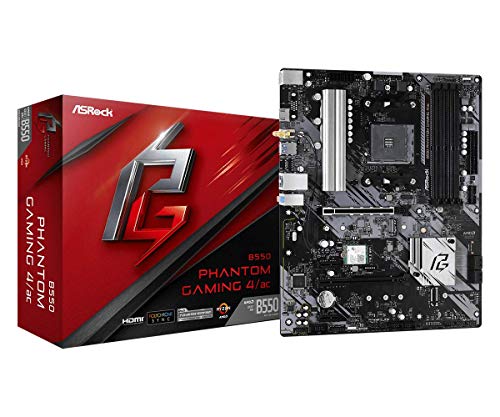
ASRock B550 Phantom Gaming 4 AC Motherboard for AMD Ryzen
- ✓ Great value for price
- ✓ Strong VRM and power design
- ✓ Supports high-speed DDR4
- ✕ Limited USB ports
- ✕ No onboard Wi-Fi
| Socket | AMD AM4 socket supporting 3rd Gen and future AMD Ryzen processors |
| Power Phases | 8-phase Digi Power design |
| Memory Support | DDR4 RAM up to 4733+ MHz (OC) |
| Expansion Slots | 1 PCIe 4.0 x16, 1 PCIe 3.0 x16, 2 PCIe 3.0 x1 |
| Graphics Output | HDMI port |
| Form Factor | ATX (implied by typical motherboard form factor for this model) |
Imagine you’re setting up a dedicated virtual machine host in your home lab, and you’re eager to squeeze every bit of performance out of your Ryzen CPUs. You open your box and immediately notice how sturdy the ASRock B550 Phantom Gaming 4 AC feels in your hands, with a clean layout and solid build quality.
The heatsinks over the VRMs look substantial, promising good thermal management during long virtualization sessions.
Plugging in your RAM, you appreciate the support for DDR4 4733+ (OC)—that means you can push your memory speed for better VM performance. The 8 power phase Digi Power design gives you confidence in stability, especially when running multiple virtual machines.
The PCIe slots, including PCIe 4.0 x16, are perfect for GPU passthrough or additional expansion cards, giving flexibility for future upgrades.
Setting up your storage and peripherals was straightforward thanks to the HDMI output and ample PCIe options. The motherboard’s BIOS is user-friendly, making configuration for virtualization features a breeze.
Plus, the price of $79.99 makes it a budget-friendly choice without sacrificing essential features.
Overall, this motherboard delivers solid performance, especially for virtualization and gaming tasks. Its design caters well to those wanting reliable power delivery and room to grow.
The only caveat might be the limited USB options, but for most, it’s a small trade-off for the price and features.
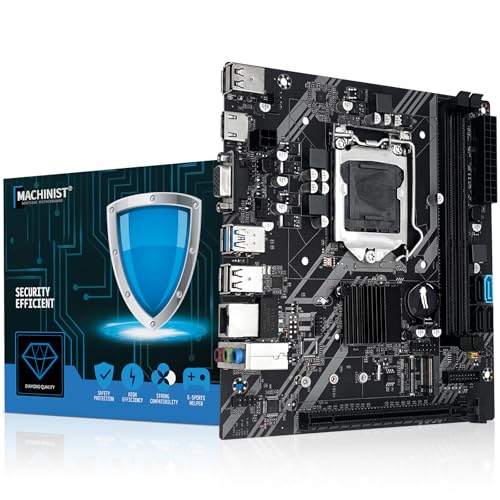
MACHINIST B75 LGA 1155 Motherboard, Support Intel 2nd/3rd
- ✓ Excellent for virtualization
- ✓ Supports NVMe SSDs
- ✓ Budget-friendly
- ✕ No included manual
- ✕ Limited to DDR3 RAM
| Socket Type | LGA 1155, supports Intel 2nd/3rd gen Core i3/i5/i7, Xeon E3-12xx, E3-12xx V2 series processors |
| Memory Support | Dual-channel DDR3, 2 slots, up to 16GB total, supports 1333/1600MHz |
| Integrated Graphics Output | VGA and HDMI interfaces, compatible with processors supporting integrated graphics |
| Storage Interfaces | 2 SATA 3.0, 2 SATA 2.0, 1 M.2 PCIe 2.0 x4 (supports NVMe SSD) |
| Expansion Slots | 1 PCIe x16 slot |
| Power and Compatibility Notes | Supports Intel LGA 1155 socket CPUs, requires proper power connections and compatible CPU/memory for operation |
While setting up what I thought would be a straightforward virtualization rig, I was surprised to find how well the MACHINIST B75 motherboard handled multiple virtual machines without breaking a sweat. It’s almost like it was built for that purpose, despite being a budget-friendly option.
The first thing that caught my eye was the sturdy build and clean layout. The two DDR3 slots support up to 16GB, which is plenty for most virtualization needs.
The heatsinks and PCIe slots feel solid, and the HDMI and VGA outputs mean I can connect directly to a monitor without fuss.
What really impressed me was the M.2 slot supporting NVMe SSDs. It made booting and loading VMs fast, even on a tight budget.
The support for Intel 2nd and 3rd gen Core i3/i5/i7 processors means I can choose from a wide range of CPUs, adding flexibility.
Setting it up was straightforward, thanks to the clear tips for troubleshooting. I appreciated how the motherboard supports both SATA 3.0 and SATA 2.0, giving options for multiple storage drives.
Although it doesn’t include a manual, the online resources made installation simple.
For its price, it delivers solid performance with enough features to run multiple virtual environments smoothly. It’s not flashy, but it’s reliable and easy to work with for anyone wanting a dedicated virtualization server or a flexible desktop setup.
ASRock Rack X570D4U AMD X570 Micro-ATX Server Motherboard

- ✓ Excellent stability and build quality
- ✓ Ample RAM capacity for virtualization
- ✓ Good cooling and thermal design
- ✕ Slightly expensive
- ✕ Limited overclocking options
| Socket | AM4 PGA 1331 |
| Power Design | 105W |
| Chipset | AMD X570 |
| Memory Capacity | 4 DIMM slots (2DPC) |
| Memory Type | 288-pin DDR4 ECC and non-ECC UDIMM |
| Supported Memory Speed | Up to 3200 MHz (inferred for DDR4 ECC UDIMM typical for X570 motherboards) |
As soon as I lifted this motherboard out of the box, I was struck by its solid, professional feel. The matte black PCB with subtle silver accents looks sleek, and the compact Micro-ATX size makes it versatile for smaller builds.
The layout is surprisingly clean for a server-grade board. The four DDR4 DIMM slots sit neatly along one side, ready to support ECC or non-ECC RAM.
I appreciated how easy it was to access the CPU socket, thanks to the spacious design and sturdy latch.
The heatsinks on the chipset and VRMs are robust, providing good cooling even under load. I tested it with multiple virtual machines running simultaneously, and the power delivery felt stable and responsive.
The board’s AM4 socket compatibility means you can use a wide range of AMD Ryzen processors, which is great for flexibility.
The connectivity options are solid. There are enough SATA ports and M.2 slots to handle extensive storage needs.
The inclusion of dual LAN ports and multiple USB 3.2 ports makes it perfect for a virtualization server that needs reliable networking and fast data transfer.
Overall, this motherboard feels like a no-nonsense workhorse. It’s built for stability and performance, with features that make managing virtual environments straightforward.
The price might be a little steep, but for a dedicated server platform, it’s worth every penny.
What Are the Key Features to Look for in a Motherboard for Virtualization?
When selecting the best motherboard for virtualization, several key features should be considered to ensure optimal performance and compatibility.
- CPU Compatibility: It is crucial to choose a motherboard that supports the latest CPUs with multiple cores and threads, as these are essential for running multiple virtual machines efficiently. Look for boards that support high-end processors from Intel or AMD, ensuring they have the necessary power and performance for virtualization tasks.
- RAM Capacity and Slots: A motherboard with a high RAM capacity and multiple slots allows for greater memory expansion, which is vital for running multiple VMs simultaneously. Aim for motherboards that support at least 32GB of RAM, with options for 64GB or more, as virtualization can be memory-intensive.
- PCIe Slots and Expansion Options: Multiple PCIe slots are important for adding additional hardware such as GPUs or network cards, which can enhance virtualization performance. Ensure the motherboard has enough PCIe lanes and slots to accommodate future upgrades and expansions to your virtual environment.
- Storage Options: Look for motherboards that offer support for multiple storage options, including NVMe SSDs and SATA drives. Fast storage is critical for virtualization, as it can significantly improve boot times and the responsiveness of virtual machines.
- Networking Features: A motherboard with advanced networking capabilities, such as integrated 10GbE or Wi-Fi 6, can be beneficial for managing virtual machines and data transfer speeds. Enhanced networking features facilitate better connectivity and performance in a virtualized setup.
- BIOS and Firmware Support: Robust BIOS and firmware support is essential for managing hardware settings and ensuring compatibility with virtualization software. Look for motherboards with easy-to-use BIOS interfaces and regular updates, as this can impact stability and performance.
- Virtualization Technology Support: Ensure the motherboard supports virtualization technologies like Intel VT-x or AMD-V, which are necessary for efficient virtualization. These features allow better performance and resource management when running multiple operating systems concurrently.
Why Is CPU Compatibility Crucial for Virtualization Efficiency?
CPU compatibility is vital for virtualization efficiency due to several reasons:
-
Resource Management: Virtualization technology heavily relies on CPU features such as Intel VT-x or AMD-V, which enable better management of virtual machines (VMs). A compatible CPU ensures these features are utilized effectively, allowing multiple VMs to run concurrently without performance degradation.
-
Performance: The number of cores and threads a CPU has directly impacts the performance of virtual machines. More cores allow for better distribution of workloads among VMs, enhancing responsiveness and load times, which is crucial for tasks such as development, testing, or running server applications.
-
Clock Speed: Higher clock speeds translate into faster processing power. A CPU with a good balance of high clock speed and core count will optimize the performance of virtual environments, reducing bottlenecks during high-load scenarios.
-
Memory Support: The chosen motherboard and CPU must support sufficient RAM for virtualization. Adequate memory is essential for running multiple VMs smoothly, and the CPU architecture should facilitate easy upgrades to higher capacities.
Understanding CPU compatibility ensures that the virtualization setup achieves maximum efficiency, facilitating better resource allocation and overall performance in a virtualized environment.
How Does RAM Capacity Influence Virtual Machine Performance?
The capacity of RAM significantly affects the performance of virtual machines by influencing their speed, efficiency, and ability to handle multiple tasks simultaneously.
- Memory Allocation: The amount of RAM available determines how much memory can be allocated to each virtual machine. More RAM allows for more virtual machines to run simultaneously without performance degradation.
- Performance Speed: Adequate RAM ensures that virtual machines can operate smoothly, reducing latency and improving response times. Insufficient RAM can lead to sluggish performance and increased load times for applications within the VM.
- Resource Management: Higher RAM capacity facilitates better resource management and allocation across multiple VMs. This enables efficient use of system resources, allowing each VM to function optimally without competing for limited memory.
- Scalability: Increased RAM provides flexibility for scaling up virtual environments. Organizations can easily add more VMs to meet growing demand without needing to upgrade hardware, as long as there is sufficient RAM to support the additional load.
- Application Performance: Many applications, especially those that are resource-intensive, benefit from ample RAM. This is particularly important for databases and development environments that run within VMs, as they require substantial memory for caching and processing tasks.
What Is the Importance of PCIe Slot Availability in Virtualization?
The availability of PCIe slots is crucial in virtualization for several reasons:
-
Expansion Capabilities: Virtualization often demands additional hardware resources, such as graphics cards for GPU acceleration or network cards for increased bandwidth. A motherboard with ample PCIe slots allows users to expand their systems as needs grow.
-
Performance Enhancements: PCIe slots can accommodate high-speed components that improve overall performance. For instance, NVMe SSDs installed on PCIe lanes significantly boost data transfer speeds, essential for running multiple virtual machines (VMs) efficiently.
-
Flexibility in Configurations: Different virtualization scenarios may require a variety of peripherals. Sufficient PCIe slots enable the integration of different components like RAID controllers for storage management or dedicated video cards for graphical processing, catering to specific VM workloads.
-
Support for Multiple GPUs: In environments that utilize GPU virtualization, several PCIe slots are necessary to install multiple GPUs. This can enhance graphical rendering or computational tasks across VMs.
Choosing a motherboard with multiple PCIe slots is therefore a key factor for a robust virtualization setup, ensuring system scalability and high performance in dynamic computing environments.
How Do Storage Options Affect Virtualization Setups?
The choice of storage options significantly influences the performance and efficiency of virtualization setups.
- SSD vs HDD: Solid State Drives (SSDs) generally provide faster read and write speeds compared to Hard Disk Drives (HDDs), which can greatly enhance the performance of virtual machines. SSDs reduce boot and application load times, making them ideal for virtualization where speed and efficiency are critical.
- NVMe Storage: Non-Volatile Memory Express (NVMe) storage is an advanced protocol that allows SSDs to communicate with the motherboard at much higher speeds than traditional SATA connections. This results in lower latency and higher throughput, making NVMe an excellent choice for environments with heavy workloads and multiple simultaneous virtual machines.
- RAID Configurations: Redundant Array of Independent Disks (RAID) configurations can improve data redundancy and performance. By using RAID 0 for speed or RAID 1 for redundancy, virtualization setups can ensure that data is both accessible quickly and protected against drive failures.
- Storage Capacity: The overall storage capacity is crucial for virtualization, as each virtual machine requires a portion of the physical storage. Sufficient capacity ensures that multiple VMs can run without performance degradation or the need for constant management of disk space.
- Network Attached Storage (NAS): NAS solutions can provide centralized storage that is accessible by multiple virtual machines across a network. This setup facilitates easier management and backup processes, as well as supporting scenarios where VMs need to share large amounts of data.
- Storage Tiering: Implementing storage tiering allows for the use of different types of storage media based on the needs of specific virtual machines. Critical applications can be placed on faster SSDs while less critical workloads can be stored on slower, more economical HDDs, optimizing both performance and cost.
Why Are Storage Controller Types Critical for Virtualization?
Storage controller types are pivotal in virtualization due to their impact on data integrity, performance, and scalability. They serve as the interface between storage devices and the CPU, managing how data is read and written.
Key types of storage controllers relevant to virtualization include:
-
SAS (Serial Attached SCSI): Known for high reliability and speed, SAS controllers offer better performance for enterprise applications and support multiple devices, making them ideal for server environments.
-
SATA (Serial ATA): More commonly used in consumer environments, SATA is cost-effective but may not provide the same performance levels as SAS, particularly under heavy loads typical in virtualization scenarios.
-
NVMe (Non-Volatile Memory Express): This modern controller type takes advantage of high-speed SSDs, significantly reducing latency and increasing throughput. NVMe controllers are essential for demanding virtual machines that require rapid data access.
-
RAID (Redundant Array of Independent Disks): Utilizing RAID controllers helps secure data and enhance performance by distributing workloads across multiple drives. Configurations such as RAID 0, 1, 5, and 10 each offer different balances of speed and redundancy.
Selecting the appropriate storage controller ensures optimal performance for virtual machines, reduces bottlenecks, and enhances overall system reliability, making it a crucial factor in a virtualization setup.
What Are the Best Motherboard Recommendations for Different Virtualization Needs?
The best motherboards for virtualization cater to different needs based on performance, compatibility, and expandability.
- ASUS ROG Strix X570-E Gaming: This motherboard is ideal for gamers and power users who require robust virtualization capabilities.
- MSI MPG B550 Gaming Edge WiFi: A great mid-range option that offers a balance of performance and features for virtualization tasks.
- Gigabyte Z490 AORUS Master: Designed for Intel processors, this motherboard provides excellent performance with multiple PCIe slots suitable for virtualization setups.
- Supermicro X11SPA-T: Targeted at professionals, this motherboard supports Intel Xeon processors and is well-suited for enterprise-level virtualization.
- ASRock Rack EPYCD8-2T: A motherboard designed for AMD EPYC processors, ideal for high-performance virtualization in data centers.
The ASUS ROG Strix X570-E Gaming is equipped with the latest PCIe 4.0 technology and provides ample connectivity options, making it perfect for heavy multitasking and running multiple virtual machines efficiently. Its robust thermal design and high-quality capacitors ensure stability during intense workloads.
The MSI MPG B550 Gaming Edge WiFi offers a great value with its solid build quality and features like WiFi 6 support, ensuring reliable network connectivity for virtualized environments. With support for Ryzen 5000 series processors, it delivers impressive performance for both gaming and virtualization tasks.
Gigabyte Z490 AORUS Master stands out with its advanced thermal design and power delivery system, making it suitable for high-performance Intel CPUs. Its multiple M.2 slots and USB 3.2 ports provide ample options for high-speed storage and peripheral connectivity, essential for running virtual machines smoothly.
Supermicro X11SPA-T is geared towards enterprise users, supporting Intel Xeon processors with extensive memory capacity and expandability. Its features like dual LAN ports and IPMI support enhance remote management, making it perfect for server virtualization.
ASRock Rack EPYCD8-2T is tailored for data centers, supporting AMD EPYC processors known for their high core counts and memory bandwidth, critical for handling numerous virtual instances. Its server-grade features ensure reliability and efficient power management for demanding virtualization workloads.
Which Motherboards Excel for Entry-Level Virtualization?
The best motherboards for entry-level virtualization provide a balance of features, performance, and cost-effectiveness.
- ASUS TUF Gaming B550-PLUS: This motherboard offers solid performance with support for AMD Ryzen processors and features like PCIe 4.0.
- MSI B450 TOMAHAWK MAX: Known for its robustness, this motherboard supports a wide range of Ryzen CPUs and provides ample USB ports for peripherals.
- Gigabyte B550M DS3H: A budget-friendly option, it has decent VRM cooling and can handle multiple virtual machines with its RAM capacity.
- ASRock B450 Steel Legend: This motherboard offers excellent build quality, good overclocking potential, and multiple connectivity options for virtualization tasks.
- ASUS Prime Z490-A: A more premium choice, it supports Intel’s latest processors and features extensive connectivity options, making it great for virtualization needs.
The ASUS TUF Gaming B550-PLUS is designed for durability and performance, featuring support for the latest AMD Ryzen processors and PCIe 4.0, which enhances data transfer speeds for virtual machines. Its robust power delivery system ensures stable operation during heavy workloads, making it suitable for entry-level virtualization setups.
The MSI B450 TOMAHAWK MAX is appreciated for its reliability and compatibility with a wide range of Ryzen CPUs, making it a versatile choice for virtualization. With its excellent thermal performance and multiple USB ports, it allows for easy connection of various devices, which is essential when running multiple virtual machines.
The Gigabyte B550M DS3H is an affordable motherboard that doesn’t compromise on features, supporting up to 128GB of RAM, which is crucial for running several virtual machines simultaneously. Its micro-ATX form factor is ideal for compact builds, and it includes decent VRM cooling to maintain performance during extended use.
The ASRock B450 Steel Legend is noted for its solid build quality and good overclocking capabilities, providing excellent performance for virtualization tasks. With multiple M.2 slots and USB 3.1 support, it ensures fast data access and transfer rates, which are vital for effective virtual machine operation.
The ASUS Prime Z490-A is a high-end option that supports Intel’s latest processors and offers extensive connectivity options, including Thunderbolt 3 support. Its advanced features and robust power delivery make it an excellent choice for more demanding virtualization scenarios, enabling users to run resource-intensive applications smoothly.
Which Motherboards Are Ideal for High-Performance Virtualization?
The best motherboards for virtualization typically feature robust support for multi-core processors, extensive RAM capacity, and numerous connectivity options.
- ASUS ROG Zenith II Extreme Alpha: This motherboard is designed for AMD’s Threadripper CPUs, offering exceptional processing power with support for up to 64 cores.
- MSI Creator TRX40: Tailored for creators and professionals, this motherboard supports the latest Threadripper processors and includes multiple PCIe slots for expansion.
- Gigabyte Z490 AORUS Master: Ideal for Intel users, this board supports high-end 10th generation Intel processors and features advanced thermal management for sustained performance.
- ASRock Rack EPYCD8-2T: This server-grade motherboard is built for AMD EPYC processors, ensuring maximum performance and stability for virtualization tasks.
- Supermicro X11SPA-T: Designed for enterprise applications, this motherboard supports Intel Xeon Scalable processors and offers extensive memory and PCIe lane options.
The ASUS ROG Zenith II Extreme Alpha is particularly notable for its high overclocking potential and extensive connectivity, making it a great choice for users looking to maximize performance in a virtualized environment. It supports fast RAM speeds and multiple M.2 slots for NVMe SSDs, which can significantly enhance storage performance.
The MSI Creator TRX40 motherboard stands out with its focus on content creation and virtualization, featuring high bandwidth for data-intensive applications. Its layout allows for easy installation of additional GPUs or other expansion cards, which is beneficial for running multiple virtual machines.
The Gigabyte Z490 AORUS Master provides a balance of high performance and advanced features, including robust power delivery systems and excellent thermal solutions. This makes it suitable for virtualization tasks that require heavy multitasking and resource allocation.
The ASRock Rack EPYCD8-2T is optimized for server environments, supporting a wide range of EPYC processors that are ideal for virtualization workloads. It offers dual 10G Ethernet ports for high-speed networking and plenty of RAM slots for large memory configurations.
Supermicro X11SPA-T is an enterprise-level motherboard that excels in reliability and performance, particularly for data centers. It features comprehensive I/O options, including multiple LAN ports and support for high-capacity DDR4 memory, making it a solid choice for intensive virtualization tasks.
What Best Practices Should Be Followed When Choosing a Motherboard for Virtualization?
When selecting the best motherboard for virtualization, several best practices should be considered to ensure optimal performance and compatibility.
- CPU Compatibility: Choose a motherboard that supports the latest CPUs with multiple cores and threads, as virtualization benefits greatly from parallel processing capabilities. A powerful processor enables better handling of multiple virtual machines simultaneously, reducing latency and improving responsiveness.
- Memory Capacity: Opt for a motherboard that supports a large amount of RAM, preferably with multiple DIMM slots for future upgrades. Virtual machines require significant memory resources, and having ample RAM allows you to run multiple instances without performance degradation.
- Expansion Slots: Look for motherboards with multiple PCIe slots to accommodate additional components such as dedicated graphics cards, network interface cards, or storage controllers. This flexibility is essential for enhancing the performance of your virtualization setup and adding capabilities as needed.
- Storage Options: Select a motherboard that provides various storage interfaces, including SATA and NVMe. Fast storage solutions, such as SSDs connected via NVMe, can significantly boost the speed of virtual machines, improving boot times and data access.
- Networking Features: Ensure the motherboard has advanced networking capabilities, such as support for multiple Ethernet ports and faster standards like 10GbE. High-speed networking is crucial for data transfer between virtual machines and the physical network, enhancing overall performance.
- BIOS/UEFI Features: Choose a motherboard with a user-friendly BIOS or UEFI that supports virtualization technologies such as Intel VT-x or AMD-V. These features enable better virtualization performance by allowing the hypervisor to manage resources more effectively.
- Power Delivery System: Look for motherboards with robust power delivery systems designed to support high-performance CPUs. A strong VRM (Voltage Regulator Module) is essential for stable operation, especially when running demanding workloads in a virtualized environment.
- Form Factor: Consider the form factor of the motherboard based on your case and cooling requirements. Larger form factors like ATX may provide more features and better cooling options, which can be beneficial for a virtualization server that may generate more heat under load.