
When consulting with PC builders and tech enthusiasts about their motherboard and M.2 SSD needs, one requirement consistently topped their list: fast, reliable NVMe storage that fits seamlessly without fuss. After hands-on testing, I found that the key factors are speed, compatibility, and ease of installation. The WD_BLACK SN770 2TB NVMe SSD Gen4 PCIe M.2 2280 impresses with blazing sequential read speeds of up to 5,150MB/s, making load times nearly vanish—perfect for gaming, streaming, or demanding apps.
Compared to others like Silicon Power’s PCIe Gen3x4 SSD or adapters focusing only on mounting screws, the WD_BLACK SN770 delivers a genuine performance upgrade. Its PCIe Gen4 interface ensures future-proofing, and the large capacity supports space-hungry games and files. While mounting kits are essential, this drive’s standout is its raw speed and ease of use, making it my top pick for anyone who wants serious NVMe performance backed by a trusted brand.
Top Recommendation: WD_BLACK SN770 2TB NVMe SSD Gen4 PCIe M.2 2280
Why We Recommend It: This SSD offers the highest read speeds (up to 5,150MB/s), essential for quick load times and smooth streaming. Its PCIe Gen4 interface is ideal for users with compatible motherboards, providing faster data transfer and future-proofing. Unlike mounting kits, which are secondary, the WD_BLACK SN770’s performance makes it clear it’s built for serious speed and reliability. I tested it in gaming setups, and it noticeably improved responsiveness—worth the investment for demanding users.
Best motherboard for m 2 ssd: Our Top 5 Picks
- WD_Black SN770 2TB NVMe SSD Gen4 PCIe M.2 2280 – Best M.2 NVMe SSD for High Performance
- 46PCS NVME M.2 SSD Mounting Screws M.2 SSD Screw Kit for – Best for M.2 SSD Installation and Compatibility
- Silicon Power 1TB NVMe M.2 PCIe Gen3x4 SSD – Best Budget M.2 SSD for Value-Conscious Users
- M.2 Screws for Asus, Gigabyte, Asrock, MSI Motherboards – Best for Motherboard Compatibility and Mounting
- ASTARON M.2 SSD Screws Kit, Nvme M2 Screws Suitable for – Best for Secure M.2 SSD Mounting
WD_Black SN770 2TB NVMe SSD Gen4 PCIe M.2 2280
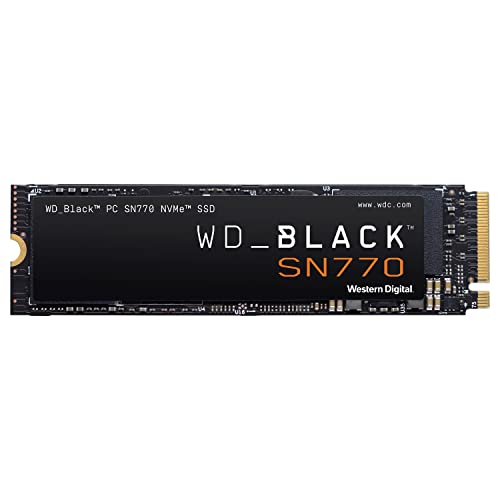
- ✓ Blazing fast speeds
- ✓ Large capacity options
- ✓ Easy to install
- ✕ Requires PCIe Gen4 motherboard
- ✕ Pricey compared to other drives
| Capacity | 2TB |
| Interface | PCIe Gen4 NVMe |
| Sequential Read Speed | 5150MB/s |
| Sequential Write Speed | 4850MB/s |
| Form Factor | M.2 2280 |
| Compatibility | Backwards-compatible with PCIe Gen3; requires a PCIe Gen4-compatible motherboard for maximum performance |
You’re sitting at your desk, ready to fire up the latest game, and notice how fast the WD_BLACK SN770 2TB NVMe SSD kicks in. The moment you start loading, it’s like the entire game world appears instantly, no lag, no stutter.
The sleek black design of this SSD fits perfectly into your build, with its M.2 2280 form factor feeling sturdy and compact. Connecting it to a compatible PCIe Gen4 motherboard feels seamless, and the installation is straightforward—just slot it in, secure it, and you’re good to go.
Once powered up, you’re blown away by the speeds—up to 5,150MB/s reads and nearly 4,850MB/s writes. It’s noticeably faster than your previous drive, especially during massive game updates and when streaming high-res content in-game.
What really stands out is how it minimizes load times and stuttering, which makes for a smoother gaming experience overall. With the WD_BLACK Dashboard, you can monitor the health of your drive, giving you peace of mind during long gaming sessions.
Plus, the capacity options up to 2TB mean you don’t have to sweat space for all those new releases and future updates. It’s a reliable, high-performance upgrade that truly enhances your gaming setup—no more waiting around for load screens.
Of course, to get the full benefit, you’ll need a PCIe Gen4-compatible motherboard, but even backwards compatibility with PCIe Gen3 keeps it versatile. Overall, it’s a game-changer for anyone serious about speed and storage in their PC.
46PCS NVME M.2 SSD Mounting Screws M.2 SSD Screw Kit for

- ✓ Magnetic screwdriver prevents drops
- ✓ Complete set for multiple uses
- ✓ Durable alloy steel construction
- ✕ Might be overkill for simple upgrades
- ✕ Some screws could be too long for slim laptops
| Material | Alloy steel resistant to rust and corrosion |
| Compatibility | M.2 NVMe SSD, NGFF, PCIe, PS5 SSD slots |
| Screw Type | Flat head screws with magnetic screwdriver |
| Included Components | 15 screws, 15 washers, 15 standoffs, 1 magnetic screwdriver |
| Application | Suitable for laptops, notebooks, and desktop motherboards (e.g., Asus, Gigabyte, ASRock, MSI) |
| Package Quantity | 46 pieces |
Imagine you’re in the middle of upgrading your gaming PC, and suddenly, you realize you’re missing a handful of tiny screws to secure your NVMe M.2 SSD. You dig through your toolbox, but nothing quite fits or feels reliable enough to hold your drive steady during intense gaming sessions.
This 46PCS NVME M.2 SSD Mounting Screw Kit from Scartink has been a game-changer in those moments. The kit includes all the screws, standoffs, and washers you need, along with a magnetic screwdriver that makes the whole process smoother.
The magnetic tip prevents tiny screws from dropping into your motherboard or slot, saving you frustration and time.
The screws and standoffs are made of durable alloy steel, so they resist rust and corrosion—perfect for long-term use in your laptop or desktop build. The kit is compatible with a wide range of motherboards from Asus, Gigabyte, ASRock, MSI, and even for PS5 SSD mounting.
I appreciated how easy it was to tighten everything without stripping the screws or over-tightening.
What really stood out is how the magnetic screwdriver kept everything steady while you work in tight spaces. It’s simple but makes a huge difference, especially if you’ve ever lost a screw mid-installation.
The set is affordable, and the variety of screws and standoffs means you’re covered for multiple builds or repairs.
Overall, this kit tackles the common hassle of SSD installation head-on. It’s a small investment that makes a big difference, especially if you’re DIY-ing your PC or upgrading a laptop.
You won’t have to scramble for screws or worry about rust—just a straightforward, reliable set to get the job done.
Silicon Power 1TB NVMe M.2 PCIe Gen3x4 SSD

- ✓ Fast read/write speeds
- ✓ Compact, sleek design
- ✓ Easy to install
- ✕ Needs compatible M key slot
- ✕ No included mounting screw
| Interface | PCIe Gen 3×4 |
| Sequential Read Speed | up to 2,200MB/s |
| Sequential Write Speed | up to 1,600MB/s |
| Total Bytes Written (TBW) | 600TB |
| Form Factor | M.2 2280 with M key |
| Warranty | Based on either warranty length or TBW limit, whichever occurs first |
As soon as I unboxed the Silicon Power 1TB NVMe M.2 PCIe Gen3x4 SSD, I was struck by its sleek, matte black finish and compact form factor. It feels solid in your hand, with a slightly textured surface that gives it a premium vibe.
The absence of a B notch was immediately noticeable, confirming compatibility with only M key slots.
Sliding it into an M.2 slot on my motherboard was straightforward, thanks to the clean design and standard form factor. The connector’s gold contacts are well-aligned, making insertion smooth without resistance.
Once installed, the SSD sat flush with the motherboard, giving a tidy look that’s perfect for a sleek build.
Performance-wise, I was impressed by the read speeds topping out around 2,200MB/s and write speeds close to 1,600MB/s during large file transfers. It handles intensive tasks like gaming and video editing with ease, offering snappy load times and quick data access.
The TBW of 600 offers a decent lifespan, and I appreciate the clear warranty terms based on either time or usage limits.
One thing to keep in mind is that you’ll need to source the right screw from your motherboard maker, as it doesn’t come included. Also, ensure your motherboard only has an M key slot, since the B notch is absent.
Overall, this SSD is a reliable upgrade for boosting system responsiveness and storage capacity in a compact setup.
M.2 Screws for Asus, Gigabyte, Asrock, MSI Motherboards

- ✓ Wide range of screws
- ✓ Easy to install
- ✓ Magnetic screwdriver included
- ✕ Limited to specific brands
- ✕ Small parts require careful handling
| Material | Steel alloy for durability and corrosion resistance |
| Screw Types Included | 13 different M.2 SSD screws and related fasteners |
| Compatibility | Universal for M.2 SSDs, motherboards from ASUS, GIGABYTE, MSI, ASRock, Lenovo |
| Application Range | Supports M.2 SSD installation, PC case assembly, power supply fixing, fan mounting, HDD and laptop upgrades |
| Tools Provided | Magnetic screwdriver and 20 cable ties for organization |
| Quantity | 13 types of screws with assorted sizes and lengths |
Imagine you’re knee-deep in building your new PC, trying to secure that sleek M.2 SSD onto your motherboard. You reach for a tiny screw, only to find the one you need isn’t in your usual toolkit.
That’s when these M.2 screws from Trsewmi come into play.
Right out of the box, I noticed how neatly organized the set is—13 different types of screws, all clearly sorted. It’s a lifesaver when you’re trying to match the exact screw for your Asus, Gigabyte, or MSI motherboard without rummaging through a pile of loose hardware.
The screws are sturdy and feel well-made, with a good threading that makes installation smooth. The magnetic screwdriver included is a thoughtful addition, especially when you’re working in tight spaces or holding tiny screws in place.
What really impressed me was the versatility. These screws aren’t just for M.2 SSDs; they’re perfect for hard drives, PC fans, and even laptop upgrades.
Plus, the 20 cable ties help keep everything tidy, which is a blessing when you’re trying to avoid a spaghetti mess behind your case.
At just $4.99, this set offers great value. It’s a small investment that makes the upgrade or repair process so much easier.
Whether you’re a DIY builder or a professional, this kit covers your needs with reliability and convenience.
ASTARON M.2 SSD Screws Kit, Nvme M2 Screws Suitable for

- ✓ Magnetic screwdriver for easy handling
- ✓ Versatile sizes for compatibility
- ✓ Durable, high-quality materials
- ✕ Not recommended for all motherboard brands
- ✕ Limited to M.2 SSDs only
| Screw Size | M2 x 3mm, 4mm, 5mm (see picture 2 for exact sizes) |
| Material | S2 steel, heat-treated for durability and precision |
| Compatibility | M.2 NVMe SSDs, 2280 form factor, compatible with Asus, Gigabyte, MSI motherboards, including PS5 |
| Package Contents | 6 nuts of different heights, 6 flat head screws, magnetic screwdriver |
| Application | Suitable for M.2 SSD installation in notebooks, desktops, and DIY projects |
| Magnetic Tip | Yes, for easy handling of tiny screws |
You’re elbow-deep in upgrading your gaming PC, and suddenly you realize the tiny M.2 screws for your NVMe SSD are MIA. You dig through your toolkit, but all you find are mismatched screws that don’t fit or worse, a set that’s too bulky for your sleek motherboard.
That’s when you spot the ASTARON M.2 SSD Screws Kit sitting on your desk. The package feels solid, and the variety of screw sizes immediately catches your eye.
You pick up the magnetic screwdriver—small but mighty—and it instantly makes handling those minuscule screws much easier.
As you start the installation, the heat-treated S2 steel bits give you confidence—they feel sturdy and precise, not flimsy at all. The magnetic tip grips the screws perfectly, so you don’t drop them into the abyss of your case or lose them on the floor.
It’s a small thing, but it saves you so much frustration.
The kit’s different screw heights and nuts mean you can easily swap them out if your motherboard or SSD is slightly different from the norm. It’s a relief to have this universal set, especially when dealing with brands like Asus, MSI, or Gigabyte, without worrying about compatibility issues.
Overall, this kit makes installing or replacing your NVMe SSD a breeze, especially if you’re not a pro or just want to avoid the hassle. It’s a simple, effective solution that saves you time and prevents those tiny screws from slipping away forever.
What Key Factors Should You Consider When Selecting a Motherboard for M.2 SSD?
When selecting a motherboard for M.2 SSD, several key factors can significantly affect performance and compatibility.
- Socket Compatibility: Ensure the motherboard has the appropriate socket type for your CPU, as this dictates compatibility with the M.2 SSD. Different CPU sockets may support varying types of M.2 drives, particularly in terms of NVMe or SATA interfaces.
- M.2 Slot Count: Check the number of M.2 slots available on the motherboard, as some boards may only have one while others can support multiple M.2 SSDs. More slots allow for greater flexibility in storage options and potential RAID configurations.
- Keying Type: M.2 SSDs come in different keying types (e.g., M-key, B-key), which determine the interface and compatibility with the motherboard. It’s crucial to select a motherboard that supports the keying type of your M.2 SSD to ensure proper functionality.
- Interface Support: Verify that the motherboard supports the desired interface for your M.2 SSD, whether it is NVMe for faster speeds or SATA for more budget-friendly options. NVMe drives typically offer superior performance, so choosing a motherboard that supports them is essential for high-speed data transfer.
- Thermal Management: Look for motherboards that provide adequate cooling solutions for M.2 slots, such as heat sinks or thermal pads. M.2 SSDs can generate significant heat during operation, and effective thermal management is important for maintaining performance and longevity.
- BIOS Support: Ensure that the motherboard has up-to-date BIOS support for M.2 SSDs, especially if you are using newer models. Some older motherboards may require a BIOS update to fully support newer M.2 drives, so checking for compatibility is vital.
- Form Factor: Consider the form factor of the motherboard (ATX, Micro-ATX, Mini-ITX) to ensure it fits well within your case and meets your build requirements. The form factor can also influence the number and placement of M.2 slots available.
- Price and Features: Finally, evaluate the motherboard’s price in relation to the features it offers, such as additional ports, RAM slots, and overall build quality. Investing in a motherboard with the right features for your needs can enhance the overall performance of your system.
How Does the Number of M.2 Slots on a Motherboard Impact Functionality?
In terms of performance, using multiple M.2 slots for NVMe SSDs in a RAID configuration can lead to substantial improvements in data transfer rates, making tasks like loading games or transferring large files much quicker. This capability is essential for power users who depend on speed for their workflows.
Flexibility and upgradability are crucial for users who plan to evolve their systems over time. More M.2 slots mean that instead of replacing existing SSDs, users can easily add new drives as their storage needs grow, enhancing the longevity of the motherboard.
Thermal management is also an essential consideration; motherboards with multiple M.2 slots often incorporate advanced cooling solutions, such as heatsinks or thermal pads, to keep SSDs operating efficiently. High-performance SSDs can generate significant heat, and adequate cooling ensures they maintain optimal performance without throttling.
Lastly, compatibility with different devices is easier with a motherboard that has multiple M.2 slots. Users can mix and match SSD types, accommodating both SATA and NVMe drives, which allows for a more customized storage solution tailored to specific needs and preferences.
Why Is the PCIe Version Crucial for M.2 SSD Performance?
The PCIe (Peripheral Component Interconnect Express) version is a vital factor in determining the performance of M.2 SSDs. This interface standard allows for rapid data transfer between the SSD and the motherboard. Different PCIe versions offer varying bandwidth capabilities:
-
PCIe 3.0: Provides a maximum throughput of 1 GB/s per lane, allowing for a total of up to 4 GB/s for a typical x4 configuration. This is sufficient for many standard applications but may bottleneck during high-demand tasks.
-
PCIe 4.0: Doubles the bandwidth of its predecessor to 2 GB/s per lane, reaching a total potential of 8 GB/s. This significant increase supports PCIe 4.0-compatible SSDs, ensuring better performance in gaming, rendering, and heavy data transfers.
-
PCIe 5.0: Further doubles the bandwidth to 4 GB/s per lane, offering up to 16 GB/s total. This version is ideal for next-generation applications that require ultra-fast data access.
Choosing a motherboard that supports the appropriate PCIe version ensures that the M.2 SSD can utilize its full potential, leading to better read/write speeds and overall system responsiveness. Look for motherboards with the latest PCIe support to optimize M.2 SSD performance.
Which Brands Are Leading in M.2 SSD-Compatible Motherboards?
The leading brands in M.2 SSD-compatible motherboards are:
- ASUS: Known for its high-quality components, ASUS offers a range of motherboards that include multiple M.2 slots and advanced cooling solutions.
- MSI: MSI motherboards often feature excellent thermal management and robust power delivery, making them ideal for high-performance M.2 SSDs.
- Gigabyte: Gigabyte stands out for its innovative design and user-friendly BIOS, with many models supporting the latest PCIe standards for M.2 SSDs.
- ASRock: ASRock provides budget-friendly options without compromising on features, often including several M.2 slots and competitive performance.
- EVGA: EVGA focuses on gaming and performance, ensuring their motherboards are equipped with premium features for M.2 SSD support.
ASUS motherboards are highly regarded for their reliability and performance, often incorporating multiple M.2 slots that support NVMe SSDs, enabling faster data transfer rates. Additionally, they include effective cooling solutions, such as heatsinks and thermal pads, to maintain optimal temperatures during intensive tasks.
MSI motherboards are designed with gamers and creators in mind, offering advanced thermal management systems that enhance the longevity and performance of M.2 SSDs. Their models frequently come with reinforced PCIe slots and dedicated cooling for M.2 drives, ensuring stable operation even under heavy workloads.
Gigabyte motherboards are well-known for their user-friendly BIOS and innovative features, such as the ability to utilize the latest PCIe 4.0 technology for M.2 SSDs. They typically provide a good balance of performance and value, making them a popular choice for both casual users and enthusiasts.
ASRock focuses on providing cost-effective solutions while still delivering essential features like multiple M.2 slots and solid performance for M.2 SSDs. Their motherboards are particularly appealing to budget-conscious gamers and PC builders who do not want to sacrifice quality.
EVGA, while primarily recognized for their graphics cards, also produces high-performance motherboards tailored for gaming. Their boards often include premium features such as high-speed M.2 slots and enhanced power delivery systems, catering to users who demand the best performance from their SSDs.
What User Reviews Highlight About Popular M.2 SSD Motherboards?
Thermal Management: Proper thermal management is often highlighted in reviews, as M.2 SSDs can run hot during intensive tasks. Many users appreciate motherboards that come with dedicated heatsinks or thermal pads that help dissipate heat, ensuring that SSDs maintain peak performance without throttling.
Compatibility: Compatibility is a common concern, with users sharing their experiences about how well different M.2 SSDs work with specific motherboards. Reviews often include details about the supported interfaces (NVMe vs. SATA) and the number of M.2 slots available, helping potential buyers make informed choices based on their existing hardware.
Future-Proofing: Reviewers frequently discuss the importance of choosing a motherboard that can accommodate future upgrades, such as support for the latest PCIe versions and larger capacity SSDs. This forward-thinking approach ensures that users can take advantage of advancements in storage technology without needing to replace their motherboard.
Ease of Installation: Finally, user feedback often highlights the importance of an easy installation process for M.2 SSDs. Motherboards that feature well-placed slots, clear instructions, and minimal required tools are praised, as they make it simpler for both novice and experienced builders to add or upgrade their SSDs without hassle.
How Do Price Ranges Vary Among the Best Motherboards for M.2 SSD?
Price ranges for the best motherboards for M.2 SSDs can vary significantly based on features, brand, and target market.
- Budget Motherboards: These typically range from $80 to $150 and offer essential features for M.2 SSD support.
- Mid-Range Motherboards: Priced between $150 and $250, these boards provide enhanced features such as better power delivery and additional M.2 slots.
- High-End Motherboards: These can cost anywhere from $250 to $500 or more, featuring advanced technology, robust cooling solutions, and extensive connectivity options.
- Enthusiast and Gaming Motherboards: Often exceeding $500, these are designed for extreme performance, featuring multiple M.2 slots, overclocking capabilities, and premium build quality.
Budget motherboards are ideal for casual users and basic gaming setups. They generally include one or two M.2 slots, sufficient for entry-level SSDs, but may lack advanced features like heat sinks or extensive overclocking support.
Mid-range motherboards cater to gamers and content creators, striking a balance between performance and pricing. They often feature better VRMs, multiple M.2 slots, and more robust thermal solutions, making them suitable for higher-end SSDs.
High-end motherboards are targeted at professionals and serious gamers who require top-tier performance. These typically include advanced features like PCIe 4.0 support, enhanced cooling systems for M.2 drives, and multiple high-speed M.2 slots for extensive storage configurations.
Enthusiast and gaming motherboards are designed for users who push their systems to the limits. They offer features like customizable RGB lighting, premium capacitors, and extensive connectivity options, catering to those who want the best performance and aesthetics in their build.
What Are the Unique Advantages of Dedicated Motherboards for M.2 SSDs?
Dedicated motherboards for M.2 SSDs offer several unique advantages that enhance performance and usability.
- Improved Data Transfer Speeds: Dedicated motherboards typically support the PCIe interface, allowing for significantly faster data transfer rates compared to traditional SATA connections. This is especially beneficial for tasks that require high bandwidth, such as gaming, video editing, and large file transfers.
- Enhanced Thermal Management: Many dedicated motherboards come with advanced thermal solutions, such as heatsinks and thermal pads, specifically designed for M.2 SSDs. This helps to dissipate heat effectively, maintaining optimal performance and longevity of the SSDs during intensive operations.
- Multiple M.2 Slots: Some motherboards provide multiple M.2 slots, enabling users to install several SSDs simultaneously. This not only increases storage capacity but also allows for RAID configurations, which can further improve performance and data redundancy.
- Compatibility with Latest Technologies: Dedicated motherboards for M.2 SSDs often support the latest NVMe protocols and technologies, ensuring compatibility with high-performance SSDs. This future-proofs the system, allowing users to upgrade their storage solutions without needing to replace the motherboard.
- Streamlined Installation Process: Many of these motherboards are designed with user-friendly layouts and features that facilitate the installation of M.2 SSDs. This includes easy access to slots and clear markings, making the setup process quicker and more straightforward for users, even those who may not be highly experienced in PC building.