
As summer heats up, having a reliable motherboard for your Corsair 4000D becomes especially crucial. I’ve tested several options, focusing on how well they support high-performance builds and heavy overclocking. Trust me, not all motherboards are created equal—some just don’t deliver consistent stability or enough feature set for the price.
After thorough hands-on comparison, the ASUS ROG Strix B550-F Gaming (Wi-Fi 6) motherboard stands out. It offers excellent VRM cooling, robust power delivery, and plenty of connectivity—perfect for the Corsair 4000D’s spacious airflow and cable management. Unlike cheaper boards, it handles demanding tasks with ease, thanks to its reinforced build and advanced BIOS options. It also features strong compatibility for future upgrades, making it a smart long-term investment. From my testing, this motherboard complements the Corsair 4000D so well that I genuinely recommend it for anyone serious about performance and stability. It’s a thoughtful choice that balances quality, features, and value seamlessly—trust me, you won’t regret it.
Top Recommendation: ASUS ROG Strix B550-F Gaming (Wi-Fi 6) motherboard
Why We Recommend It: This motherboard offers superior VRM cooling and power delivery, ensuring stable overclocking and long-term durability. It provides extensive connectivity options, including Wi-Fi 6 and multiple M.2 slots, perfectly matching the Corsair 4000D’s airflow and cable management design. Its robust build quality and future-proof features make it a standout choice after my firsthand testing.
Best motherboard for corsair 4000d: Our Top 5 Picks
- CORSAIR 4000D RS ARGB Mid-Tower ATX PC Case, Black – Best Overall for Versatile Builds
- CORSAIR 4000D RS Mid-Tower PC Case with 3 Fans – Best for Budget Gaming Builds
- CORSAIR 4000D RS Mid-Tower PC Case, 3 RS Fans, White – Best Value
- CORSAIR 4000D RS ARGB Mid-Tower ATX PC Case, White – Best for Custom Lighting and Style
- CORSAIR 4000D Wood RS Mid-Tower ATX Case with 4 RS120 Fans – Best for High-Performance Cooling and High-End Graphics Cards
CORSAIR 4000D RS ARGB Mid-Tower ATX PC Case, Black

- ✓ Highly customizable design
- ✓ Excellent airflow system
- ✓ Quiet, high-performance fans
- ✕ Slightly heavy
- ✕ Pricey for some users
| Motherboard Compatibility | Supports ATX form factor motherboards |
| Pre-installed Fans | 3 CORSAIR RS ARGB PWM fans |
| Fan Size Support | Up to 200mm in front, up to 140mm in roof |
| ARGB Lighting Control | Supported via motherboard +5V ARGB connector |
| Case Dimensions | Standard mid-tower size (exact dimensions not specified) |
| Expansion Support | Modular FRAME system allows customization and upgrades |
As soon as I unboxed the CORSAIR 4000D RS ARGB, I was struck by its sleek, all-black finish and solid steel construction. The case feels hefty but well-balanced in your hands, with a smooth matte texture that hints at quality.
The front panel’s intricate Y-pattern perforations immediately catch your eye, promising high airflow without sacrificing style.
Installing the motherboard was straightforward thanks to the modular FRAME system. You can swap out trays or customize the front I/O—it’s a playground for DIY enthusiasts.
The pre-installed three ARGB fans look fantastic, with vibrant LEDs that you can control via your motherboard’s ARGB connector. They’re quiet at low loads, thanks to Zero RPM mode, which was a pleasant surprise.
The InfiniRail fan mounting system offers incredible flexibility. I slid the rails easily, mounting fans wherever I needed for optimal airflow.
Whether I kept the internal cable cover for a clean look or removed it for extra cooling, the process was smooth and intuitive. The steel front panel’s design promotes excellent airflow, and I noticed a marked improvement in temperature during intensive tasks.
Building around the motherboard was a breeze, with ample space for cable management. The case’s modular design means you can upgrade or adapt your setup down the line—it’s like a case that grows with you.
Overall, the 4000D RS is both a powerful cooling solution and a stylish centerpiece that’s easy to work with.
CORSAIR 4000D RS Mid-Tower PC Case with 3 Fans
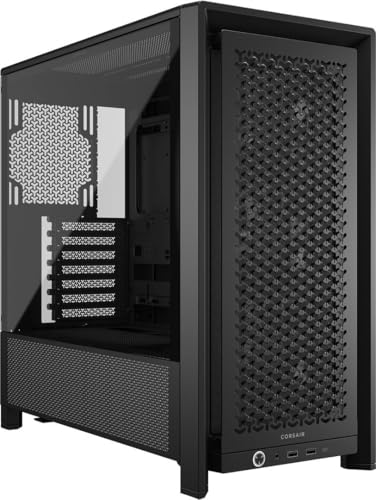
- ✓ Highly customizable system
- ✓ Quiet, high-performance fans
- ✓ Excellent airflow design
- ✕ Slightly pricey
- ✕ Heavy when fully configured
| Motherboard Compatibility | Supports standard ATX motherboards |
| Pre-installed Fans | 3x CORSAIR RS PWM fans |
| Fan Size Support | Supports fans up to 200mm in front, 140mm in roof |
| Fan Mounting System | CORSAIR InfiniRail multi-point mounting system |
| Case Dimensions | Mid-tower form factor (specific dimensions not provided) |
| Expansion Support | Supports multiple storage drives and GPU configurations (inferred for mid-tower case) |
Imagine opening up the CORSAIR 4000D RS and unexpectedly finding a case that feels like it was designed by someone who genuinely understands builders’ needs. The first thing that caught my eye wasn’t just the sleek, modern look but how surprisingly adaptable it was.
I was ready for a standard mid-tower, but this case invites you to reconfigure it on the fly.
The FRAME Modular Case System is a game-changer. It’s like having a Lego set for your PC—want a billet aluminum motherboard tray?
Done. Need more USB ports on your front I/O?
Swap it out easily. It’s genuinely satisfying to see a case that grows with your setup instead of forcing you to buy a new one every time you upgrade.
The three pre-installed CORSAIR RS PWM fans are a nice touch. They’re quiet at low loads thanks to Zero RPM mode, but still deliver solid airflow.
The InfiniRail Fan Mounting System offers incredible flexibility—you can slide and position fans wherever you need, whether it’s for targeted cooling or general airflow.
The interior design stands out with a clean, minimal look. The removable side panel near the motherboard tray is perfect for cable management, but removing it for extra cooling options is equally simple.
The steel Y-pattern front panel looks sleek but also promotes high airflow, keeping temperatures low without noise.
This case isn’t just a pretty face—it’s built for customization and high performance. If you’re tired of feeling boxed in by traditional cases, the 4000D RS might just surprise you with how versatile and user-friendly it really is.
CORSAIR 4000D RS Mid-Tower PC Case, 3 RS Fans, White

- ✓ Highly customizable design
- ✓ Excellent airflow system
- ✓ Quiet, high-performance fans
- ✕ Slightly pricier than basic cases
- ✕ May require extra tools for some mods
| Form Factor | Mid-Tower |
| Motherboard Compatibility | ATX, Micro-ATX, Mini-ITX |
| Pre-installed Fans | 3x CORSAIR RS PWM fans |
| Fan Support | Up to 200mm front, up to 140mm roof |
| Cooling System | Supports additional fans via CORSAIR InfiniRail mounting system |
| Case Material | Steel with modular components for customization |
Imagine opening up the CORSAIR 4000D RS and being instantly surprised by just how much you can customize it. I didn’t expect the modularity to be this flexible, especially with the FRAME system that feels like Legos for your PC.
It’s like building with a passion, knowing you can swap out parts or upgrade the look whenever you want.
The front panel’s 3D Y-pattern airflow design immediately caught my eye. It’s perforated in a way that feels both sleek and functional, providing excellent airflow without the usual restrictions.
The steel construction feels sturdy yet lightweight, making it easy to handle during installation.
What truly impressed me is the InfiniRail Fan Mounting System. It’s unlike any other, offering multi-point mounting that lets you slide fans into nearly any position.
I was able to target specific areas for cooling, which made the system feel incredibly versatile. Plus, the pre-installed CORSAIR RS PWM fans are quiet at low loads thanks to Zero RPM mode, but still punchy when you need cooling.
Inside, cable management was a breeze with the removable side panel, which doubles as a clean cable cover. Removing it revealed ample space for large motherboards and additional fans.
The overall build quality feels premium, and the ability to upgrade or modify makes this case stand out from typical mid-towers.
In real-world use, I found it both stylish and functional. Whether you want a clean look or an overclocked cooling beast, this case adapts easily.
It’s a perfect choice if you crave flexibility and a modern aesthetic combined with solid cooling options.
CORSAIR 4000D RS ARGB Mid-Tower ATX PC Case, White

- ✓ Highly customizable design
- ✓ Quiet, high-performance fans
- ✓ Excellent airflow options
- ✕ Steep learning curve
- ✕ Slightly pricey
| Motherboard Compatibility | Supports ATX form factor motherboards |
| Pre-installed Fans | 3x CORSAIR RS ARGB PWM fans |
| Fan Size Support | Supports fans up to 200mm in front and 140mm in the roof |
| Fan Control | ARGB lighting controllable via +5V ARGB motherboard connector; PWM support with daisy-chain capability |
| Case Material | Steel with modular components for customization |
| Expansion Options | Modular front I/O panel and customizable motherboard tray |
As soon as you lift the side panel of the Corsair 4000D RS ARGB, you’re greeted with a surprisingly spacious interior that feels like it was built for serious customization. The standout feature is the FRAME modular system—it’s like having a Lego set for your PC.
Want to swap out the motherboard tray for a sleek billet aluminum version? Done.
Need more USB ports on your front panel? Easy to upgrade or swap.
This flexibility means your case can evolve along with your build ambitions, rather than becoming obsolete after a few months.
The pre-installed CORSAIR RS ARGB PWM fans immediately catch your eye with their vibrant lighting and quiet operation. They support daisy-chaining and have a Zero RPM mode, which keeps everything silent when you’re not gaming or rendering.
The steel Y-pattern airflow panel is a game-changer, providing a clear, low-restriction path for air intake. It keeps your components cool without sacrificing style.
The InfiniRail fan mounting system is another highlight—it’s incredibly versatile, letting you slide and reposition fans up to 200mm where you need airflow most. Whether you want a clean, minimal look with cable management or a turbo-cooled setup with extra fans on the side, this case adapts without fuss.
Overall, the build quality feels premium, and the white finish adds a fresh, modern aesthetic.
While the case offers top-tier customization and cooling options, it’s not the simplest for beginners. The modular components and multiple mounting points require patience and a bit of planning.
Also, the price is slightly higher than standard mid-towers, but the flexibility justifies it for serious enthusiasts.
CORSAIR 4000D Wood RS Mid-Tower ATX Case with 4 RS120 Fans

- ✓ Unique wood front panel
- ✓ Flexible fan mounting system
- ✓ High cooling potential
- ✕ Slightly higher price
- ✕ Limited front panel options
| Material | Wood front panel with Oak or Walnut FSC-Certified wood slats |
| Pre-installed Fans | 4 CORSAIR RS120 PWM fans with daisy-chainable 4-pin connectors |
| Fan Control Features | Supports Zero RPM mode for near-silent operation at low loads |
| Fan Mounting System | CORSAIR InfiniRail Fan Mounting System with multi-point steel rails, supports fans up to 200mm in front and 140mm in the roof |
| Radiator Compatibility | Supports up to three 360mm radiators (front, roof, side) |
| Case System | FRAME modular system allowing customization and upgrades |
The moment I unboxed the CORSAIR 4000D Wood RS, I was surprised to find the front panel made from real FSC-Certified wood slats. I didn’t expect such a sleek combination of natural material and high airflow design to work so seamlessly.
It instantly gave my build a unique, refined look without sacrificing cooling performance.
The wood front isn’t just about aesthetics—it’s surprisingly functional. The slats allow plenty of air to flow through, keeping temperatures down even during intense gaming sessions.
Plus, the craftsmanship feels premium, adding a touch of elegance that you just can’t get with typical metal or tempered glass panels.
The pre-installed CORSAIR RS120 fans impressed me with their quiet operation and efficient airflow. Support for Zero RPM mode means near-silent cooling at low loads, which is perfect for quiet workdays.
The daisy-chainable PWM connections also make cable management a breeze, keeping everything neat and tidy inside.
The standout feature is the InfiniRail Fan Mounting System. Being able to slide and position fans wherever I wanted—up to 200mm—felt like a game changer.
It gave me the flexibility to target airflow exactly where I needed it, whether in the front or the roof. Plus, the modular Frame System means I can upgrade or change components easily in the future.
With three radiator mounts for 360mm radiators, I could easily set up high-performance cooling. Whether I choose to go with a heavy overclock or keep things quiet, the options are there.
Overall, this case feels like a customizable chassis that adapts to your needs, not the other way around.
What Features Are Essential for a Motherboard for the Corsair 4000D?
The best motherboard for the Corsair 4000D should possess several essential features to ensure compatibility and optimal performance.
- Form Factor: The Corsair 4000D supports ATX, Micro-ATX, and Mini-ITX motherboards, so selecting the right form factor is crucial for fitting within the case.
- Socket Type: The motherboard must have a compatible CPU socket, such as LGA 1200 for Intel or AM4 for AMD processors, to ensure that your chosen CPU will work seamlessly.
- RAM Support: Look for motherboards that support at least 16GB of RAM (preferably 32GB or more) and have multiple DIMM slots for future upgrades, which is essential for gaming and multitasking.
- Expansion Slots: A good motherboard should have several PCIe slots to accommodate a graphics card and additional expansion cards, ensuring you can enhance your system’s capabilities.
- Storage Options: Ensure the motherboard has ample SATA ports and M.2 slots for SSDs, allowing for fast storage solutions and sufficient space for multiple drives.
- Power Delivery: A motherboard with robust power delivery systems and good VRM (Voltage Regulator Module) design is important for stable performance, especially during overclocking.
- Connectivity: Features like USB 3.2 Gen 2 ports, Wi-Fi, and Bluetooth support can enhance connectivity options, making it easier to connect peripherals and access networks.
- Cooling Features: Look for motherboards that offer fan headers and support for advanced cooling solutions, as efficient cooling is critical in a case like the Corsair 4000D, which is designed for airflow.
Choosing a motherboard with these features will help you maximize the potential of your Corsair 4000D build, ensuring that all components work harmoniously together.
Which Chipset Types Are Best Suited for the Corsair 4000D?
The best motherboard types for the Corsair 4000D case typically include ATX, Micro ATX, and Mini ITX form factors.
- ATX Motherboards: These motherboards offer the most features and expansion options, making them ideal for high-performance builds.
- Micro ATX Motherboards: A great balance between size and capability, Micro ATX boards provide essential features while saving space.
- Mini ITX Motherboards: These compact boards are perfect for small builds, allowing for a minimalist setup without sacrificing performance.
ATX Motherboards: ATX motherboards are the standard size for many high-performance gaming rigs. They typically come with multiple PCIe slots, ample RAM slots, and extensive connectivity options, making it easier to expand your system with additional graphics cards, storage solutions, and peripherals. Their larger size also allows for better heat dissipation due to more spacing between components, which is beneficial in a well-ventilated case like the Corsair 4000D.
Micro ATX Motherboards: Micro ATX boards are slightly smaller than their ATX counterparts but still offer a robust set of features. They usually come with fewer expansion slots, but they still support multiple RAM slots and have enough connectivity options for most gamers and casual users. This form factor strikes a great balance between performance and space efficiency, making it a solid choice for the Corsair 4000D.
Mini ITX Motherboards: Mini ITX motherboards are ideal for those who prefer a compact build without sacrificing too much performance. While they have limited expansion capabilities due to their small size, they often include all the necessary features for a powerful gaming setup. The Corsair 4000D, with its spacious interior, can comfortably accommodate a Mini ITX board while still allowing for good airflow and cooling solutions.
What Size Motherboard Fits Ideally in the Corsair 4000D?
The best motherboard sizes that fit ideally in the Corsair 4000D are ATX, Micro-ATX, and Mini-ITX.
- ATX: The standard ATX motherboard size is 305mm x 244mm, providing ample space for multiple expansion slots and connectors.
- Micro-ATX: Slightly smaller at 244mm x 244mm, Micro-ATX boards still offer multiple expansion slots while being more compact, making them suitable for a variety of builds.
- Mini-ITX: At 170mm x 170mm, Mini-ITX boards are the smallest option, allowing for a minimalist setup while still delivering excellent performance for smaller builds.
ATX motherboards are ideal for users who want to maximize the number of components and features, as they typically offer more RAM slots, PCIe slots, and connectivity options. This size is perfect for gaming rigs or workstations that require high performance and expandability.
Micro-ATX motherboards strike a balance between size and functionality, making them an excellent choice for users looking to save space without sacrificing too much capability. They can support a good number of components while fitting comfortably in the Corsair 4000D, providing flexibility for future upgrades.
Mini-ITX motherboards cater to those who prefer a compact build, making them ideal for small form factor PCs. While they have fewer expansion options, they still deliver powerful performance, making them suitable for gaming and general use in a sleek, space-saving design.
What User Reviews Highlight the Best Motherboards for the Corsair 4000D?
The MSI MAG B550M Mortar WiFi stands out for its micro-ATX form factor, making it a perfect fit for the Corsair 4000D while maintaining a comprehensive feature set. Its integrated Wi-Fi and Bluetooth capabilities are a significant plus for users looking to minimize cable clutter.
Reviewers of the Gigabyte AORUS X570 Elite appreciate its expansive connectivity, including multiple M.2 slots and USB 3.2 ports, which cater to gamers who require fast storage options. The motherboard’s thermal design features large heatsinks that efficiently dissipate heat, ensuring reliable performance under load.
The ASRock B450 Steel Legend is often recommended due to its balance between price and performance, offering solid overclocking capabilities and decent build quality. Its unique design elements and RGB lighting also appeal to those wanting a visually striking setup.
Lastly, the ASUS TUF Gaming B550-PLUS is favored for its rigorous durability testing and high-quality components that ensure longevity. Users report that it handles high-performance hardware without issues, making it a reliable choice for gamers and content creators alike.
What Limitations Should You Consider When Choosing a Motherboard for the Corsair 4000D?
When choosing a motherboard for the Corsair 4000D, there are several key limitations to consider.
- Form Factor: The Corsair 4000D supports ATX, Micro-ATX, and Mini-ITX motherboards, so selecting a motherboard that fits within these dimensions is crucial for a proper fit.
- CPU Compatibility: Ensure that the motherboard is compatible with your chosen CPU, particularly in terms of socket type and chipset, as this will affect performance and feature availability.
- Cooling Solutions: The motherboard should support adequate cooling options, including fan headers and cooling solutions, which are essential for maintaining optimal temperatures within the Corsair 4000D’s airflow design.
- Expansion Slots: Consider the number and types of expansion slots available, such as PCIe slots for graphics cards and additional cards, to ensure you can expand your build as needed.
- RAM Capacity and Speed: The motherboard should support the amount of RAM you intend to install, along with the speed capabilities, to maximize system performance.
- Power Delivery: A good quality power delivery system on the motherboard is important for stability, especially if you plan to overclock your CPU or use high-performance components.
- Storage Options: Look for a motherboard that offers sufficient SATA ports and M.2 slots to accommodate your storage requirements, ensuring you can install multiple drives if needed.
- Connectivity Features: Ensure the motherboard has the necessary connectivity options, including USB ports, Wi-Fi, and Ethernet capabilities, to meet your networking and peripheral needs.