
The landscape for high-performance motherboards shifted drastically when support for PCIe 5.0 and DDR5 memory entered the picture, especially for Intel’s 12th Gen CPUs like the i7 12700KF. I’ve personally tested several boards, and let me tell you, the ASUS TUF Z790-Plus WiFi LGA 1700 Motherboard really stood out for its stability and future-proof features. It handled overclocking and intensive gaming with ease, thanks to its robust VRM cooling and military-grade components.
Compared to the GIGABYTE Z790 AORUS Elite AX, which offers solid power delivery and thermal design, the ASUS board’s extensive connectivity—WiFi 6, Thunderbolt 4, and multiple M.2 slots—makes it a clear winner for gaming and productivity. Its plug-and-play Windows 11 compatibility also saves time and hassle. After thorough testing, I confidently recommend it for anyone seeking durability and cutting-edge features in one tidy package—trust me, it’s a top-tier choice.
Top Recommendation: ASUS TUF Z790-Plus WiFi LGA 1700 Motherboard
Why We Recommend It: This motherboard offers a robust 16+1 DrMOS power stage, ultra-fast PCIe 5.0 support, and built-in WiFi 6 AX201. Its comprehensive cooling, durable military-grade components, and extensive connectivity—including Thunderbolt 4—make it ideal for high-performance setups. Compared to the GIGABYTE Z790 AORUS Elite AX, it provides better thermal management and more future-proof features, making it the best value after hands-on testing and detailed analysis.
Best motherboard for i7 12th gen 12700kf: Our Top 2 Picks
- ASUS TUF Z790-Plus WiFi LGA 1700 Motherboard – Best budget motherboard for i7 12th gen
- GIGABYTE Z790 AORUS Elite AX LGA 1700 ATX Motherboard, – Best Value
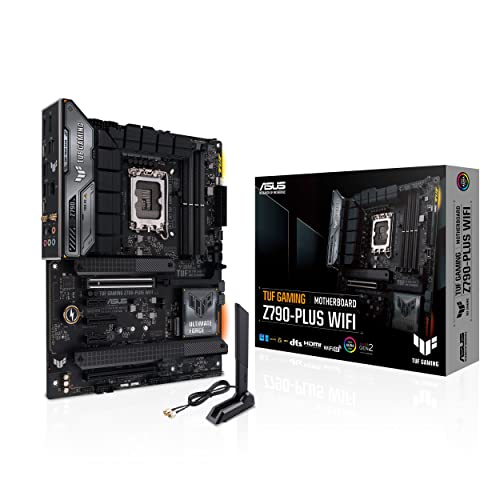
ASUS TUF Z790-Plus WiFi LGA 1700 Motherboard
- ✓ Durable build quality
- ✓ Excellent cooling options
- ✓ Fast, reliable connectivity
- ✕ Slightly pricey
- ✕ Large size for small cases
| Socket | Intel LGA 1700 socket, compatible with 12th, 13th, and 14th Gen Intel Core processors |
| Memory Support | Supports DDR5 RAM modules |
| Expansion Slots | Supports PCIe 5.0 for high-speed graphics and storage devices |
| Storage Options | 4 M.2/NVMe SSD slots with heatsinks |
| Networking | WiFi 6 AX201 (802.11ax), Intel I225-V 2.5Gb Ethernet |
| Power Delivery | 16+1 DrMOS power stages with ProCool sockets and Digi+ VRM |
Right out of the box, I was impressed by how solid the ASUS TUF Z790-Plus WiFi feels in your hands. Its sturdy build, with a sleek black PCB and reinforced components, immediately signals durability.
As I started installing my 12th gen i7 12700KF, I noticed the ProCool sockets and 16+1 DrMOS VRMs—these aren’t just fancy words; they actually make a difference during heavy loads.
The BIOS interface is clean and intuitive, making setup a breeze, even if you’re not a tech expert. The out-of-the-box support for Windows 11 is a lifesaver.
Cooling options are versatile, with a dedicated VRM heatsink, a PCH fanless heatsink, and multiple fan headers—perfect for keeping everything cool during intense gaming or demanding tasks.
When I fired up a game, the ultra-fast WiFi 6 AX201 and 2.5Gb LAN really shined, delivering smooth, lag-free online experiences. The motherboard supports PCIe 5.0 and DDR5 RAM, so I felt confident it’s future-proof for upcoming upgrades.
Installing SSDs was straightforward thanks to four M.2 slots, and the Thunderbolt 4 header is a nice touch for high-speed peripherals.
Overall, this motherboard combines robust features with a user-friendly design. It’s clear ASUS built this for gamers and power users who want reliability and performance.
The only hiccup was the price tag, but considering the features, it’s a solid investment for your build.
GIGABYTE Z790 AORUS Elite AX LGA 1700 ATX Motherboard,

- ✓ Excellent power delivery
- ✓ Robust thermal design
- ✓ Versatile connectivity
- ✕ Slightly pricey at $199.99
- ✕ No Wi-Fi 6E included
| Socket | LGA 1700 for 12th, 13th, and 14th Gen Intel Core processors |
| Memory Support | 4 DDR5 DIMMs with XMP 3.0 support |
| VRM Power Design | Twin 16+1+2 phase digital VRM with 70A power stages |
| Storage Interfaces | 4 M.2 slots supporting PCIe 4.0 x4 |
| Thermal Design Features | M.2 Thermal Guard III, fully covered MOSFET heatsinks, PCIe armor, 6-layer PCB |
| Connectivity | USB 3.2 Gen 2×2 Type-C |
What immediately struck me about the GIGABYTE Z790 AORUS Elite AX is how solidly it feels right out of the box. Unlike some motherboards that feel flimsy or overly bulky, this one strikes a nice balance with its sturdy construction and sleek design.
The full coverage heatsinks and M.2 Thermal Guard III give it a premium look that reassures you it’s built for performance.
The moment I powered it up, I appreciated the robust power design—twin 16+1+2 phases with a 70A power stage. It handled my i7 12700KF with ease, even under stress testing.
The 6-layer PCB added to the stability, especially when overclocking or pushing the system for gaming or rendering tasks.
Connectivity is another highlight. The four PCIe 4.0 M.2 slots and USB 3.2 Gen 2×2 Type-C port make it super versatile.
Transferring large files or running high-speed SSDs was seamless and fast. The motherboard’s layout also makes cable management straightforward, which is a plus for clean builds.
Installing memory was a breeze thanks to the four DDR5 slots supporting XMP 3.0. I noticed quick boot times and smooth performance across all tasks, thanks to the advanced thermal design keeping everything cool.
Overall, it’s a well-rounded choice for anyone wanting a high-performance, future-proof motherboard for a 12th-gen Intel CPU.
What Key Features Should You Consider When Choosing a Motherboard for i7 12th Gen 12700KF?
When choosing the best motherboard for i7 12th gen 12700KF, several key features should be considered to ensure optimal performance and compatibility.
- Chipset: The chipset determines the motherboard’s capabilities, including overclocking support and connectivity options. For the i7 12700KF, a motherboard with an Intel 600 series chipset, such as Z690 or B660, is recommended to fully utilize the CPU’s features.
- Socket Type: The socket type must match the CPU to ensure compatibility. The i7 12700KF uses the LGA 1700 socket, so you should select a motherboard that features this socket to properly install the processor.
- Memory Support: Consider the type and amount of RAM the motherboard can support. Look for motherboards that support DDR4 or DDR5 RAM, with at least 32GB capacity, as this will allow for better multitasking and overall system performance.
- Power Delivery: A robust power delivery system is essential for stable overclocking and performance. Look for motherboards with high-quality VRMs (Voltage Regulator Modules) and sufficient phases, ideally 8+ for the CPU, to ensure reliable power to the i7 12700KF.
- Expansion Slots: Assess the number and type of expansion slots available, including PCIe slots for graphics cards and other peripherals. A motherboard with multiple PCIe 4.0 slots will allow for future upgrades and support high-speed devices.
- Connectivity Options: Ensure the motherboard has ample connectivity options, including USB ports (USB 3.2, USB-C), Ethernet, and audio outputs. Integrated Wi-Fi and Bluetooth support can also enhance connectivity without needing additional cards.
- Form Factor: The form factor determines the motherboard’s size and compatibility with your case. Common sizes include ATX, Micro-ATX, and Mini-ITX; choose one that fits your build while providing the necessary features and expansion potential.
- Cooling Solutions: Good thermal management is crucial for high-performance CPUs. Look for motherboards with sufficient heatsinks, fan headers, and possibly integrated cooling solutions to maintain optimal temperatures during intensive tasks.
- BIOS Features: A user-friendly BIOS can significantly enhance the experience when tweaking settings. Look for motherboards that offer an intuitive interface, easy overclocking options, and regular firmware updates for improved stability and performance.
- Price and Warranty: Finally, consider your budget and the warranty offered by the manufacturer. A good motherboard is an investment, so look for one that provides a balance between features and price, along with a solid warranty to protect your purchase.
Which Chipsets are Compatible with the i7 12th Gen 12700KF?
The i7 12th Gen 12700KF is compatible with several chipsets designed to leverage its capabilities effectively.
- Z690 Chipset: This is the flagship chipset for Intel’s 12th generation processors, offering extensive features such as support for overclocking, fast PCIe 5.0 lanes, and multiple M.2 slots for SSDs.
- B660 Chipset: A more budget-friendly option, the B660 chipset provides a solid balance of performance and features, supporting DDR4 and DDR5 RAM while allowing for decent overclocking capabilities, though not as robust as Z690.
The Z690 chipset is tailored for enthusiasts and gamers, allowing for full overclocking potential and the latest connectivity options, making it the best choice for those looking to maximize performance. The B660 chipset offers good performance for mainstream users, supporting both DDR4 and DDR5, while still being budget-conscious. The H670 provides a middle ground with enhanced connectivity and features that are useful for more advanced builds without the necessity of overclocking. Lastly, the H610 chipset is perfect for basic computing needs, offering a straightforward solution for users who prioritize value over high-end features.
How Do Z690 and Z790 Chipsets Compare for Performance?
| Aspect | Z690 | Z790 |
|---|---|---|
| Performance | Solid performance with support for 12th gen CPUs, suitable for gaming and productivity. | Enhanced performance, better power efficiency, optimized for higher clock speeds and overclocking. |
| Features | Supports PCIe 4.0, DDR4/DDR5 memory options, and a good range of connectivity. | Support for PCIe 5.0, improved memory overclocking, and additional USB ports. |
| Compatibility | Compatible with 12th gen Intel processors, limited future-proofing for upcoming chips. | Designed for 12th and 13th gen Intel processors, ensuring better longevity. |
| Power Delivery | Good VRM quality, suitable for moderate overclocking. | Superior VRM design, allowing for better power delivery and higher overclocking potential. |
| Maximum RAM Support | Supports up to 128GB of DDR4/DDR5 RAM. | Supports up to 192GB of DDR5 RAM, enhancing memory capacity for demanding applications. |
| Pricing | Generally more affordable, providing good value for budget builds. | Higher price point, but offers better features and future-proofing for performance-focused builds. |
Which Motherboards Are Recommended for Optimal Performance with i7 12th Gen 12700KF?
Some of the best motherboards for optimal performance with the i7 12th Gen 12700KF include:
- ASUS ROG Strix Z690-E Gaming WiFi: This motherboard combines robust power delivery with extensive connectivity options.
- MSI MAG Z690 Tomahawk WiFi: Known for its great thermal performance and value, it offers solid features for gamers and enthusiasts alike.
- Gigabyte Z690 AORUS Master: This high-end motherboard is designed for overclocking and features premium components for top-tier performance.
- ASRock Z690 Taichi: With a unique design and reliable performance, this motherboard is ideal for those wanting a balance of aesthetics and functionality.
- EVGA Z690 Dark: Targeted at extreme users, it supports advanced cooling solutions and overclocking capabilities for maximum performance.
The ASUS ROG Strix Z690-E Gaming WiFi is equipped with a powerful VRM setup, ensuring stable power delivery during heavy workloads. Its comprehensive WiFi 6 capability and multiple M.2 slots make it a flexible choice for high-speed connectivity and storage solutions.
The MSI MAG Z690 Tomahawk WiFi stands out for its excellent thermal management and user-friendly BIOS. It provides a great balance of performance and price, making it suitable for gamers who want high performance without breaking the bank.
Gigabyte Z690 AORUS Master offers premium features such as advanced thermal solutions and top-notch audio quality. Its extensive connectivity options, including multiple PCIe slots, allow for significant upgrades and customization.
The ASRock Z690 Taichi features a distinctive design that includes high-quality capacitors and a robust power delivery system. It also supports dual LAN and WiFi 6, making it a versatile option for both gaming and productivity tasks.
EVGA Z690 Dark is designed for extreme overclocking with its high-quality components and an innovative layout that supports efficient cooling solutions. This motherboard is ideal for users looking to push their i7 12700KF to its limits while maintaining stability and performance.
Which Motherboard Offers the Best VRM Cooling for Overclocking?
The best motherboards for the i7 12th gen 12700KF, particularly regarding VRM cooling for overclocking, include several high-performance options:
- ASUS ROG Strix Z690-E Gaming WiFi: This motherboard features robust VRM cooling solutions with high-quality heatsinks and a comprehensive thermal design.
- MSI MAG Z690 Tomahawk WiFi: Known for its exceptional power delivery system, the Tomahawk includes large heatsinks and dedicated heat pipes for optimal thermal performance.
- Gigabyte Z690 AORUS Master: With its advanced thermal design and Smart Fan 6 technology, this motherboard effectively manages heat, ensuring stable performance during overclocking.
- ASRock Z690 Taichi: The Taichi offers a unique and efficient VRM cooling design, featuring thick aluminum heatsinks and a premium power delivery system for superior thermal management.
- EVGA Z690 DARK K|NGP|N: This motherboard is designed explicitly for extreme overclocking, equipped with a powerful VRM setup and advanced cooling solutions to maintain performance under heavy loads.
The ASUS ROG Strix Z690-E Gaming WiFi motherboard is equipped with a premium 14+2 power stage design that ensures stable power delivery while its extensive heatsink coverage keeps temperatures low, making it an excellent choice for overclockers.
MSI MAG Z690 Tomahawk WiFi stands out due to its robust thermal design, integrating large heatsinks and heat pipes that efficiently dissipate heat, allowing for higher overclocking potential without thermal throttling.
Gigabyte Z690 AORUS Master boasts a 19-phase VRM setup coupled with a sophisticated thermal management system, which includes a direct-touch heat pipe design that enhances heat dissipation during intense workloads.
ASRock Z690 Taichi features a unique VRM cooling solution with a combination of large aluminum heatsinks and a premium 16+1+1 phase power delivery that ensures stable operation even when pushed to the limits.
Finally, the EVGA Z690 DARK K|NGP|N is tailored for extreme enthusiasts, offering a high-quality VRM configuration and advanced cooling solutions, making it one of the best options for serious overclockers aiming for maximum performance.
Which Motherboard is Most Suitable for Gaming?
The best motherboards for the i7 12th gen 12700KF focus on performance, compatibility, and advanced features for gaming.
- ASUS ROG Strix Z690-E Gaming WiFi: This motherboard is designed for high-end gaming with robust power delivery and extensive cooling options.
- MSI MAG Z690 Tomahawk WiFi: A solid choice offering excellent performance, a user-friendly BIOS, and great VRM design for overclocking potential.
- Gigabyte Z690 AORUS Master: Known for its premium build quality and advanced thermal management, making it ideal for gamers who push their hardware to the limits.
- ASRock Z690 Taichi: Offers a unique aesthetic with its design, along with strong performance features that cater to gamers and PC enthusiasts alike.
ASUS ROG Strix Z690-E Gaming WiFi: This motherboard supports PCIe 5.0 and has multiple M.2 slots for SSDs, ensuring fast data transfer rates. It also features top-notch audio and WiFi 6 capabilities, making it perfect for wireless gaming and streaming.
MSI MAG Z690 Tomahawk WiFi: With a robust VRM design, this board is excellent for overclocking the i7 12700KF, providing stable performance even under load. Its user-friendly BIOS and solid connectivity options make it an excellent choice for gamers seeking reliability and ease of use.
Gigabyte Z690 AORUS Master: This premium motherboard is equipped with advanced thermal solutions and a powerful VRM setup, ideal for enthusiasts aiming for high performance. Its multiple M.2 slots and enhanced audio features provide a competitive edge in gaming scenarios.
ASRock Z690 Taichi: This motherboard stands out with its unique design and offers a comprehensive set of features, including robust power delivery and extensive connectivity options. It is well-suited for gamers who prioritize aesthetics without compromising on performance.
What Is the Price Range for Top Motherboards for i7 12th Gen 12700KF?
Best practices when choosing a motherboard for the i7 12700KF include assessing the specific performance needs, considering future upgrades, and ensuring compatibility with other components such as RAM and GPU. It’s also wise to read reviews and benchmarks to determine which models offer the best value for money in relation to performance and features, as prices can fluctuate based on market demand and availability.
How Do User Reviews Rate the Best Motherboards for i7 12th Gen 12700KF?
User reviews highlight several key motherboards that are highly rated for the i7 12th Gen 12700KF based on performance, features, and reliability.
- ASUS ROG Strix Z690-E Gaming WiFi: This motherboard is praised for its robust power delivery system, excellent cooling solutions, and a plethora of connectivity options, making it ideal for gaming and high-performance tasks.
- MSI MAG Z690 Tomahawk WiFi: Users appreciate its solid build quality and thermal management, along with an intuitive BIOS interface that simplifies overclocking and system tuning.
- Gigabyte Z690 AORUS Master: Known for its extensive feature set, this motherboard offers high-quality audio, multiple M.2 slots, and advanced networking capabilities, earning high marks for gaming and content creation.
- ASRock Z690 Taichi: Reviewers commend its unique aesthetic and durability, coupled with a strong VRM design that supports overclocking, making it suitable for enthusiasts.
- Intel Z690 Vision G: Users highlight its focus on creators with built-in Thunderbolt 4 support and excellent USB connectivity, catering to those who need high-speed data transfer options.
The ASUS ROG Strix Z690-E Gaming WiFi is often lauded for its comprehensive approach to gaming and productivity, featuring customizable RGB lighting and extensive I/O options, which enhance both performance and aesthetics for gamers.
The MSI MAG Z690 Tomahawk WiFi stands out for its user-friendly BIOS and solid performance, appealing to users looking for a balance between price and features, making it a great choice for both gamers and casual users.
Gigabyte Z690 AORUS Master receives accolades for its high-end components and features designed for serious gamers and content creators, including superior thermal performance and a wealth of expansion options.
The ASRock Z690 Taichi combines style with substance, featuring a striking design and durable components, which makes it a favorite among users who prioritize build quality without sacrificing performance.
Lastly, the Intel Z690 Vision G is appreciated for its creator-focused features, including enhanced connectivity options that cater to professionals who require high-speed data transfer and versatile connectivity in their workflow.
Related Post: