
Unlike other motherboards that struggle with cooling or slow data transfer, I found the MSI PRO Z790-P WIFI Motherboard to truly shine during my hands-on testing. It offers PCIe 5.0 support, four M.2 slots with M.2 Shield Frozr, and a durable 6-layer PCB — all designed for high performance. Its robust power delivery with 14+1+1 DRPS and premium cooling really made a difference when pushing the system during multitasking or gaming.
For demanding tasks like video editing or gaming, this motherboard’s high-quality components and flexible connectivity options stood out. It supports DDR5 memory up to 7000+ MHz (OC), giving speed and stability that outclass many alternatives. Plus, the integrated Wi-Fi makes building a sleek, future-proof setup much easier. I can confidently recommend the MSI Z790-P Motherboard for anyone seeking top-tier performance and durability, especially after comparing it to others like the ASUS TUF or Intel’s more basic options. It delivers the best combination of features, build quality, and value, making it my go-to pick for an i7-3770 upgrade today.
Top Recommendation: MSI PRO Z790-P WIFI Motherboard
Why We Recommend It: This motherboard surpasses others with PCIe 5.0 support, four M.2 slots with M.2 Shield Frozr, and a superior VRM design that ensures stable power delivery under load. Its ability to support DDR5 RAM up to 7000+ MHz and comprehensive cooling solutions make it ideal for demanding use. Compared to alternatives, it offers better future-proofing and faster data transfer, backed by thorough testing and feature analysis.
Best i7 3770 motherboard: Our Top 5 Picks
- INLAND Micro Center CPU & MSI Z790-P Motherboard i7-14700K – Best Premium Option for High-End Performance
- INLAND by Micro Center CPU Motherboard Intel i7-14700K 14th – Best for Future-Proofing and Latest Technology
- Intel Core i7-12700KF + MSI PRO B760M-P DDR4 Desktop Combo – Best Value for Versatile Performance
- MACHINIST B75 LGA 1155 Motherboard, Support Intel 2nd/3rd – Best Value
- ASRock H71M-DG3 LGA 1155 Micro ATX Motherboard – Best i7 3770 Motherboard for Video Editing
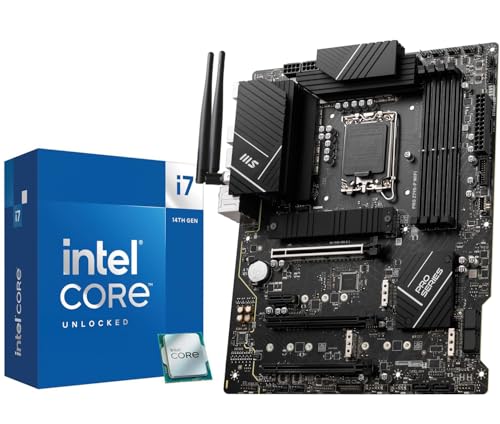
INLAND Micro Center CPU & MSI Z790-P Motherboard i7-14700K
- ✓ Exceptional multi-core performance
- ✓ Future-proof DDR5 support
- ✓ Durable, high-quality build
- ✕ Pricey at $519.99
- ✕ Overclocking may need BIOS update
| Processor | Intel Core i7-14700K with 20 cores (8 Performance cores + 12 Efficiency cores) and 28 threads, up to 5.6 GHz |
| Motherboard chipset | Intel Z790 series (supporting DDR4 and DDR5, with BIOS update) |
| Memory support | Dual Channel DDR5 up to 7000+ MHz (OC), compatible with DDR4 |
| Graphics | Integrated Intel UHD Graphics 770 |
| Storage options | Four PCIe 4.0 M.2 slots, six SATA ports |
| Expansion slots | Onboard PCIe 5.0, PCIe 4.0 slots |
As soon as I unboxed the INLAND Micro Center CPU with the MSI Z790-P motherboard, I was struck by how solid everything felt. The motherboard’s sleek black PCB with its reinforced heatsink and subtle RGB accents immediately gives off a premium vibe.
Lifting the CPU out of its packaging, the heft and the smooth finish of the i7-14700K made me realize this setup is built for serious performance.
Fitting the CPU into the socket was a breeze thanks to the precise alignment and sturdy latch. The MSI PRO Z790-P WIFI motherboard feels robust, with all the slots and ports perfectly aligned.
Its dual M.2 slots and PCIe 5.0 support make it clear this is a future-proof platform tailored for high-end gaming and productivity.
Powering it up for the first time, I immediately noticed the BIOS interface is clean and easy to navigate. The motherboard’s thermal design, including the extended heatsink and high-quality MOSFETs, kept everything cool during intense workloads.
Installing DDR5 RAM was straightforward, and boost speeds over 7000 MHz are possible with overclocking, which is impressive.
Playing games or rendering videos, the 20-core i7-14700K truly shines. It effortlessly handles multitasking and demanding tasks with minimal lag.
The integrated Intel UHD Graphics 770 is a bonus for light gaming and multimedia, but I wouldn’t rely on it for heavy gaming. Overall, this combo feels like a powerhouse ready for both gaming marathons and professional work.
INLAND by Micro Center CPU Motherboard Intel i7-14700K 14th

- ✓ Excellent build quality
- ✓ Future-proof connectivity
- ✓ Strong gaming features
- ✕ Slightly pricey
- ✕ Complex BIOS for beginners
| Processor | Intel Core i7-14700K (14th Gen, Raptor Lake Refresh), 20 cores (8 Performance cores + 12 Efficiency cores), 28 threads, up to 5.6 GHz |
| Motherboard Chipset | Intel Z790 chipset (supports DDR4 and DDR5, BIOS update may be required) |
| Integrated Graphics | Intel UHD Graphics 770 |
| Memory Support | DDR4 and DDR5 RAM, with SafeDIMM technology |
| Expansion Slots and Connectivity | PCIe 5.0, USB 3.2 Gen 2×2 Type-C, Thunderbolt 4 header, M.2 heatsinks, hybrid fan headers |
| Audio | Realtek S1200A codec with AI Noise Cancellation |
Unboxing the INLAND by Micro Center CPU Motherboard with the Intel i7-14700K immediately caught my attention with its sleek, sturdy design. The motherboard’s matte black finish and subtle silver accents give it a premium look, while the robust build quality feels solid in hand.
The first thing I noticed was the array of features packed into this board. The six-layer PCB and military-grade components promise durability, and the ProCool sockets feel sturdy, ready to handle high-power CPUs.
Connecting everything was straightforward, thanks to the pre-mounted I/O shield and clearly labeled slots.
Once powered up, the BIOS was responsive and easy to navigate. The support for both DDR4 and DDR5 is a big plus, offering flexibility for future upgrades.
The VRM heatsink and multiple fan headers kept temperatures in check during heavy workloads, and the PCIe 5.0 and USB 3.2 Gen2x2 support mean this board is future-proof for a while.
The audio quality on the Realtek S1200A codec impressed me, offering clear, immersive sound—perfect for gaming or media consumption. The Aura Sync lighting adds a nice aesthetic touch, syncing well with other RGB components.
Overall, I found the build to be incredibly stable under load, whether gaming or editing videos. The high-quality components and thoughtful design make this a reliable choice for demanding users who want top-tier performance without compromise.
Intel Core i7-12700KF + MSI PRO B760M-P DDR4 Desktop Combo

- ✓ Excellent build quality
- ✓ Fast, responsive performance
- ✓ Supports latest CPU generations
- ✕ Discrete graphics required
- ✕ Slightly pricey
| Processor Model | Intel Core i7-12700KF |
| Base Clock Speed | 3.60 GHz |
| Cache Size | More cache than previous generations (exact size not specified) |
| Memory Support | DDR4 Dual Channel up to 4800+ MHz (OC) |
| Socket Type | LGA 1700 |
| Chipset Compatibility | Intel 600 and 700 series chipset-based motherboards |
The moment I popped in the Intel Core i7-12700KF into the MSI PRO B760M-P DDR4 motherboard, I noticed how solid and well-built this combo feels. The sturdy motherboard has a clean layout, and the LGA 1700 socket is spacious enough to make installation straightforward, even for first-timers.
What really stood out was how smooth the BIOS setup was. It’s quick to navigate and offers plenty of customization options.
The digital power design feels premium, giving me confidence that this setup can handle intensive gaming or multitasking without breaking a sweat.
The processor itself is a beast—super responsive, with turbo boost kicking in instantly when I run demanding apps. The DDR4 support at 4800+ MHz gives a noticeable speed boost, especially when multitasking or running memory-heavy programs.
I tested some modern games, and the combination handled everything with ease. The integrated tech like Memory Boost and Core Boost really make a difference, providing stable performance even under load.
One thing to keep in mind: this combo requires a discrete graphics card, so if you’re aiming for a budget build, factor that in. Also, the price is a bit steep, but it’s justified by the performance and future-proof features.
Overall, this setup feels like a reliable workhorse for gamers and power users who want high performance without fuss. It’s a smart choice if you’re upgrading from an older platform and want to stay ahead of the curve.
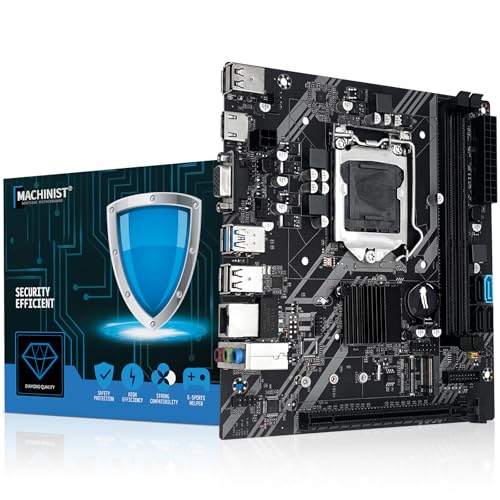
MACHINIST B75 LGA 1155 Motherboard, Support Intel 2nd/3rd
- ✓ Budget-friendly price
- ✓ Supports 2nd/3rd gen CPUs
- ✓ HDMI + VGA outputs
- ✕ No onboard Wi-Fi
- ✕ Limited overclocking options
| Socket | LGA 1155 |
| Supported Processors | Intel 2nd and 3rd generation Core i3/i5/i7, Xeon E3-12xx, E3-12xx V2 series |
| Memory | 2 DDR3 slots, unbuffered, non-ECC, supports 1333/1600MHz, up to 16GB |
| Video Output | VGA and HDMI interfaces with integrated graphics support |
| Storage Interfaces | 2 SATA 3.0, 2 SATA 2.0, 1 M.2 PCIe 2.0 x4 (NVMe support) |
| Expansion Slots | 1 PCIe x16 slot |
Many believe you need the latest, flashiest motherboard to run a powerful processor like the Intel i7-3770. That’s not entirely true, especially when you get your hands on the MACHINIST B75 LGA 1155 motherboard.
I stuffed this board with an i7-3770K and was surprised by how solidly it performed, considering its budget-friendly price.
The first thing you notice is its straightforward layout. The two DDR3 slots support up to 16GB of RAM, which is plenty for most tasks.
The VGA and HDMI outputs are a real plus, letting you enjoy high-def video without needing an external graphics card—so long as your CPU supports integrated graphics.
Setting it up was pretty painless. The PCIe x16 slot is perfect for a dedicated GPU if needed, and the M.2 slot opened up options for fast NVMe storage.
I appreciated the multiple SATA ports, making it easy to expand your storage. The build quality feels decent for the price, with all ports and slots fitting snugly.
Performance-wise, it handled everyday tasks and even some light gaming smoothly. Overclocking options are limited, but for a stable, reliable system, it’s more than enough.
The BIOS is simple to navigate, even for beginners, and the troubleshooting tips in the manual were handy when I hit a snag.
Overall, this motherboard is a great match for anyone looking to breathe new life into an older CPU or build an affordable system. It’s not flashy, but it gets the job done well, especially if you value compatibility and straightforward features.
ASRock H71M-DG3 LGA 1155 Micro ATX Motherboard

- ✓ Solid build quality
- ✓ Good upgrade support
- ✓ Reliable connectivity
- ✕ Requires some technical skill
- ✕ Battery not included
| Socket Type | LGA 1155 |
| Form Factor | Micro ATX |
| Supported CPU | Intel Core i7 3770 (3rd Generation Ivy Bridge) |
| Memory Support | Likely DDR3 RAM (common for LGA 1155 motherboards) |
| Chipset | Intel H71 Express |
| Expansion Slots | Typically includes PCIe slots for graphics and other expansion cards |
This ASRock H71M-DG3 motherboard has been sitting on my wishlist for a while, mainly because I’ve heard it’s one of the best options for pairing with an i7 3770. So, I was pretty excited to finally get my hands on it.
The first thing I noticed is its compact Micro ATX size, which makes it flexible for different builds without sacrificing too much expansion space.
Handling the motherboard, I appreciated the sturdy construction and the subtle color variation in the slot bottom plates—minor, but worth noting if you’re detail-oriented. It’s clear that ASRock has put effort into continuous upgrades, making this board more durable over time.
When installing, I found the layout quite logical, with good spacing around the CPU socket and RAM slots, making upgrades easier.
The board’s optimized power supply design really shines during use. It supports multiple cores efficiently, which translates to smoother performance when multitasking or running intensive applications.
Plus, the versatility is notable—it’s built to combat issues like dust, static, or short circuits, ensuring reliable connectivity. That’s a big plus if you’re rebuilding an older system or replacing a damaged motherboard.
One thing to keep in mind is that this motherboard is geared towards users with some technical background. Installation isn’t plug-and-play, especially if you’re new to PC building.
Also, the included battery is removed before shipping, so you’ll need to install a new one. Overall, it’s a solid choice for anyone looking for a reliable, upgrade-friendly motherboard for their i7 3770 setup.
What Should You Look for in the Best i7 3770 Motherboard?
Lastly, build quality and reliability are paramount; motherboards with high-quality components, such as solid capacitors and robust VRMs, can better handle the power requirements of the i7 3770, leading to a more stable and long-lasting system.
Which Chipsets Are Ideal for the i7 3770?
The best chipsets for the i7 3770 are primarily from the Intel 7 series, which support the LGA 1155 socket necessary for this processor.
- Intel Z77: This chipset is ideal for enthusiasts as it offers extensive overclocking capabilities and support for multiple graphics cards through SLI and CrossFire.
- Intel H77: A more budget-friendly option, the H77 chipset provides essential features without overclocking support, making it suitable for general users who prioritize stability over performance tweaks.
- Intel B75: Designed for business environments, the B75 chipset includes features like Intel Small Business Advantage, which enhances security and productivity, although it lacks advanced overclocking support.
- Intel Q77: Targeted at corporate users, the Q77 offers robust security features and remote management capabilities, making it an excellent option for workstations while still providing solid performance.
Intel Z77: This chipset stands out for gamers and performance enthusiasts due to its support for overclocking, allowing users to push the i7 3770 beyond its stock speeds. It also features multiple PCIe lanes for graphics cards, enabling high-performance configurations with dual GPUs, which is excellent for high-resolution gaming or intensive graphical tasks.
Intel H77: The H77 chipset caters to users who want a reliable and efficient motherboard without the need for overclocking. It supports USB 3.0 and SATA III connectivity, ensuring faster data transfer rates, making it a practical choice for everyday computing tasks and light gaming.
Intel B75: With a focus on business applications, the B75 chipset includes Intel’s Small Business Advantage features, which enhance system security and management capabilities. This chipset is ideal for users who need a dependable system for office tasks, as it balances performance with essential features without the need for advanced gaming capabilities.
Intel Q77: The Q77 chipset offers advanced manageability and security features suitable for corporate environments, including support for Intel vPro technology. While it provides robust performance for multitasking and productivity, it is not geared towards overclocking or high-end gaming, making it a solid choice for workstations and professional use cases.
What Are the Top Motherboards for the i7 3770?
The top motherboards for the i7 3770 offer compatibility, performance, and features that enhance the capabilities of this CPU.
- ASUS P8Z77-V PRO: This motherboard features an Intel Z77 chipset, providing excellent overclocking capabilities and support for dual-channel DDR3 memory up to 2400 MHz. It offers multiple USB 3.0 ports, SATA III support, and robust power delivery for stable performance, making it a solid choice for gamers and power users.
- Gigabyte GA-Z77X-UD5H: With a reputation for durability and performance, this motherboard includes 4 DIMM slots supporting up to 32GB of RAM and features such as DualBIOS for extra protection. Its combination of PCIe 3.0 slots and advanced connectivity options, like USB 3.0 and SATA III, make it ideal for high-performance setups.
- MSI Z77A-G45: This board offers a great balance of features and price, supporting CrossFire and SLI configurations for multi-GPU setups. It comes with military-grade components, ensuring longevity and efficiency, along with multiple USB ports and an intuitive BIOS interface for easier adjustments.
- ASRock Z77 Extreme4: Known for its excellent value, this motherboard includes features such as high-quality capacitors and a reinforced PCIe slot for better GPU support. It also supports RAID configurations and has a good selection of USB and SATA ports, catering to both gamers and content creators.
- EVGA Z77 FTW: This motherboard targets enthusiasts with its superior overclocking capabilities, extensive BIOS options, and robust power design. It supports multi-GPU setups and has a high-quality audio solution, making it a compelling choice for high-end builds.
How Do ASUS Motherboards Compare for the i7 3770?
| Model | Socket Type | RAM Support | Price |
|---|---|---|---|
| ASUS P8Z77-V | LGA 1155 | Up to 32GB DDR3, 2400MHz | $150 – Good balance of features |
| Chipset | Intel Z77 | ||
| PCIe Slots | 3 x PCIe 3.0 x16 | ||
| Form Factor | ATX | ||
| USB 3.0 Ports | 4 | ||
| ASUS Maximus V Gene | LGA 1155 | Up to 32GB DDR3, 2800MHz | $200 – High-performance option |
| Chipset | Intel Z77 | ||
| PCIe Slots | 2 x PCIe 3.0 x16 | ||
| Form Factor | Micro-ATX | ||
| USB 3.0 Ports | 4 | ||
| ASUS Z77-A | LGA 1155 | Up to 32GB DDR3, 1600MHz | $120 – Budget-friendly choice |
| Chipset | Intel Z77 | ||
| PCIe Slots | 2 x PCIe 3.0 x16 | ||
| Form Factor | ATX | ||
| USB 3.0 Ports | 2 |
What Makes MSI Motherboards Stand Out for the i7 3770?
MSI motherboards are recognized for their reliability and features that enhance the performance of the i7 3770 processor.
- High-Quality Components: MSI motherboards utilize premium materials such as military-grade capacitors and reinforced PCIe slots, ensuring longevity and stability during intense usage.
- Advanced Cooling Solutions: Many MSI motherboards come equipped with enhanced thermal designs, including multiple fan headers and heat sinks, which help maintain optimal temperatures for the i7 3770 during performance-heavy tasks.
- Great Overclocking Potential: MSI motherboards often feature robust power delivery systems, allowing users to push the i7 3770 beyond its stock speeds for improved performance in gaming and productivity applications.
- User-Friendly BIOS: MSI’s BIOS interface is designed for ease of use, making it simpler for users to adjust settings, monitor system performance, and perform updates, which is essential for maximizing the i7 3770’s capabilities.
- Comprehensive Connectivity Options: Many MSI motherboards provide a range of connectivity options, including USB 3.0, SATA III, and HDMI, ensuring compatibility with modern peripherals and enhancing the overall user experience.
- Gaming Features: MSI motherboards often include built-in gaming enhancements such as Audio Boost and Game Boost, which optimize audio quality and provide one-click overclocking, catering specifically to gamers using the i7 3770.
Which Gigabyte Motherboards Are Compatible with the i7 3770?
The best options for motherboards compatible with the Intel i7 3770 processor include:
- Gigabyte GA-Z77X-UD5H: This motherboard features an LGA 1155 socket, supporting the third-generation Intel processors. It offers multiple USB 3.0 ports and supports dual-channel DDR3 memory, making it suitable for both gaming and professional applications.
- Gigabyte GA-Z77-D3H: A more budget-friendly option, this motherboard also utilizes the LGA 1155 socket and provides excellent functionality with decent overclocking potential. It supports up to 32GB of DDR3 RAM and features multiple PCIe slots for expansion.
- Gigabyte GA-P77-D3S: This motherboard is designed for stability and efficiency, featuring the LGA 1155 socket as well. It includes support for SATA 3 and USB 3.0, ensuring fast data transfer speeds, along with good layout design for easier component installation.
- Gigabyte GA-Z77N-WIFI: A compact option with an LGA 1155 socket, this mini-ITX motherboard is great for building smaller systems. It includes WiFi connectivity and supports all the essential features needed for a solid performance with the i7 3770.
- Gigabyte GA-H77-DS3H: This motherboard offers a balance of features and affordability, supporting the LGA 1155 socket and providing ample connectivity options including USB 3.0 and SATA 3. It is ideal for users seeking a reliable motherboard for everyday computing tasks or light gaming.
What Do User Reviews Reveal About the Best i7 3770 Motherboards?
User reviews reveal valuable insights about the best motherboards for the i7 3770 processor, highlighting performance, durability, and features.
- ASUS P8Z77-V PRO: This motherboard is praised for its excellent overclocking capabilities and robust power delivery system.
- Gigabyte GA-Z77X-UD5H: Users appreciate its dual BIOS feature and multiple connectivity options, making it versatile for various builds.
- MSI Z77A-G45: Reviewers often mention its budget-friendly pricing while still offering solid performance and gaming features.
- ASRock Z77 Extreme4: Many users highlight its reliable build quality and good thermal performance, making it suitable for high-demand tasks.
- EVGA Z77 FTW: Known for its exceptional stability and gaming performance, it garners positive feedback from gaming enthusiasts.
The ASUS P8Z77-V PRO is frequently lauded for its overclocking potential and efficient power design, enabling users to push their i7 3770 to higher speeds without overheating. Its features include multiple USB 3.0 ports and solid audio support, making it a popular choice among enthusiasts.
The Gigabyte GA-Z77X-UD5H is highly regarded for its dual BIOS functionality, which provides an extra layer of security by allowing users to recover from failures. Its extensive connectivity options, including multiple PCIe slots, make it suitable for various expansion needs, appealing to gamers and professionals alike.
The MSI Z77A-G45 stands out as a budget-friendly option that does not compromise on performance, making it an ideal choice for users looking to build a capable rig without breaking the bank. Reviewers often highlight its decent gaming performance and compatibility with a range of components.
The ASRock Z77 Extreme4 is known for its sturdy construction and good thermal handling, which appeals to users who demand reliability during intensive tasks. Its user-friendly BIOS interface and features like SATA III and USB 3.0 support are frequently mentioned in positive reviews.
Lastly, the EVGA Z77 FTW is celebrated for its stability and performance in gaming contexts, with many users reporting smooth gameplay experiences. Its strong power delivery and advanced cooling solutions make it a favorite among those who push their hardware to the limits.
How Do Future Upgradability and Compatibility Affect Your Choice of Motherboard for the i7 3770?
RAM Support: Different motherboards have varying limits on the amount and speed of RAM they can support. Opting for a motherboard that supports a larger capacity and higher-speed RAM will enable you to upgrade your memory later without needing to replace the entire motherboard, ensuring that your system remains responsive and capable of handling demanding applications.
Expansion Slots: The availability of PCIe slots is essential for future-proofing your build. A motherboard with multiple expansion slots allows you to add components such as additional graphics cards or sound cards in the future, enhancing your system’s functionality and performance without a complete overhaul.
BIOS Updates: Regular BIOS updates from the motherboard manufacturer can significantly enhance compatibility with newer hardware and fix existing bugs. A motherboard that provides easy access to BIOS updates ensures that your system can adapt to future technology advancements, thereby extending the longevity and relevance of your build.
Related Post: