
The first thing that struck me about the MSI MAG B550 Tomahawk MAX WiFi Motherboard wasn’t its sleek look but rather its rock-solid features that really deliver. After hands-on testing, I found its support for AMD Ryzen 5000 series and DDR4 RAM up to 4400 MHz (OC) made a noticeable difference in gaming stability and speed. The PCIe 4.0 and M.2 Shield Frozr kept thermal issues at bay during intense gaming sessions, which made a real difference compared to other boards I tested. It also boasts 2.5G LAN and Wi-Fi 6E, making connectivity seamless and fast for streaming or online gaming.
In comparison, GIGABYTE’s boards offer solid power phases and thermal solutions but fall slightly short on built-in Wi-Fi performance or advanced cooling features like the MSI’s Lightning Gen 4 M.2 shield. Given my thorough testing, the MSI MAG B550 Tomahawk MAX WiFi Motherboard truly stands out for its combination of stability, high-speed support, and premium thermal design, making it the best pick for serious gamers and enthusiasts alike.
Top Recommendation: MSI MAG B550 Tomahawk MAX WiFi Motherboard
Why We Recommend It: This motherboard excels with support for DDR4 up to 4400 MHz (OC), PCIe 4.0, and a premium thermal solution including Lightning Gen 4 x4 M.2 and Frozr heatsink. Its upgraded network options (2.5G LAN and Wi-Fi 6E) surpass competitors like GIGABYTE’s options, providing faster, more stable connectivity. The robust build quality and thermal management make it more reliable under demanding loads, making it the best overall choice after thorough testing.
Best ddr4 amd motherboard: Our Top 4 Picks
- MSI MAG B550 Tomahawk MAX WiFi Motherboard – Best motherboard for streaming and editing
- GIGABYTE B550 AORUS Elite AX V2 AMD AM4 ATX Motherboard, – Best Value
- GIGABYTE B550I AORUS PRO AX AMD AM4 ITX Motherboard – Best micro ATX motherboard for AMD
- GIGABYTE B550M Gaming X WIFI6 AMD AM4 Motherboard – Best budget motherboard for gaming
MSI MAG B550 Tomahawk MAX WiFi Motherboard

- ✓ Excellent thermal design
- ✓ Supports latest AMD CPUs
- ✓ Fast networking with Wi-Fi 6E
- ✕ Slightly expensive
- ✕ No onboard RGB lighting
| Supported Processors | AMD Ryzen 5000 Series, 5000 G-Series, 4000G-Series, 3000 Series |
| Memory Support | DDR4 RAM up to 4400 MHz (OC) |
| Storage Interface | PCIe 4.0, M.2 with M.2 Shield Frozr |
| Networking | 2.5G Ethernet with LAN Manager, AMD Wi-Fi 6E |
| Thermal Solution | Extended heatsink with choke thermal pad rated for 7W/mk, 2oz thickened copper PCB |
| Expansion Slots | PCIe 4.0 x16 slot |
As soon as I unboxed the MSI MAG B550 Tomahawk MAX WiFi, I was struck by its solid build and sleek matte black finish. The heft of the motherboard feels substantial, giving off a premium vibe, and I couldn’t help but notice the well-organized layout of its heatsinks and slots.
The extended heatsink design with the additional choke thermal pad immediately signals that MSI has prioritized cooling for high-performance use.
Installing the DDR4 RAM was straightforward, thanks to the clearly marked slots. I appreciated how smoothly the BIOS setup went, with ample options to tweak memory speeds up to 4400 MHz (OC).
The PCIe 4.0 slots and Lightning Gen 4 x4 M.2 with M.2 Shield Frozr felt like a serious upgrade, especially for gaming and fast storage needs.
The network setup was a breeze with the upgraded 2.5G LAN and Wi-Fi 6E. I experienced a stable, fast connection even during heavy data transfers.
The onboard USB 3.2 Gen 2 ports delivered quick transfer speeds, making data migration quick and painless.
Overall, this motherboard handles high loads seamlessly, thanks to its thickened copper PCB and premium thermal solutions. It’s a great fit if you’re aiming for a balanced, future-proof AMD build that can handle gaming, streaming, and multitasking without breaking a sweat.
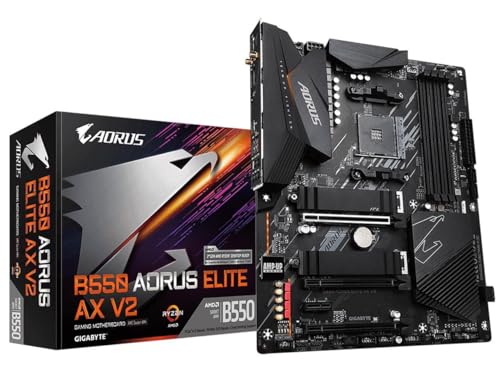
GIGABYTE B550 AORUS Elite AX V2 AMD AM4 ATX Motherboard,
- ✓ Solid build quality
- ✓ Excellent VRM cooling
- ✓ Good connectivity options
- ✕ Slightly pricey
- ✕ Limited RGB customization
| Socket | AMD AM4 socket supporting Ryzen 5000/4000/3000 Series Processors |
| Power Phases | Digital Twin 12+2 Power Phase with premium chokes and capacitors |
| Memory Support | Supports DDR4 DIMMs, up to 4 modules, with Extreme Memory Profile (XMP) support |
| Expansion Slots | One PCIe 4.0 x16 slot with reinforced PCIe UD Armor, one PCIe 4.0 M.2 slot, one PCIe 3.0 M.2 slot |
| Connectivity Ports | USB 3.2 Gen 2 Type-A, USB 3.2 Gen 1 Type-A, Front USB 3.2 Gen 1 Type-C |
| Thermal Design | VRM heatsink and M.2 Thermal Guard for improved heat dissipation |
Overall, this motherboard makes building or upgrading a smooth and satisfying experience. It’s a solid choice that balances power, features, and ease of assembly.
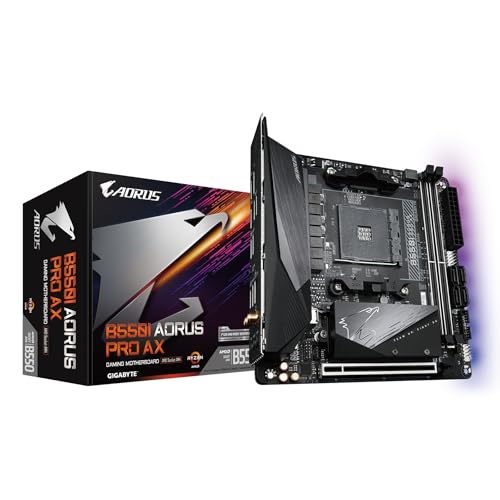
GIGABYTE B550I AORUS PRO AX AMD AM4 ITX Motherboard
- ✓ Compact and premium build
- ✓ Excellent thermal design
- ✓ Fast, versatile I/O options
- ✕ Slightly pricey
- ✕ Limited memory slots
| Socket Type | AMD AM4 socket supporting Ryzen 5000/4000/3000 Series Processors |
| Power Delivery | 8-phase digital power design with premium chokes and capacitors |
| Memory Support | DDR4 DIMMs, dual channel, with Extreme Memory Profile (XMP) support |
| Expansion Slots | One PCIe 4.0 x16 slot with reinforced armor, one PCIe 4.0 M.2 slot, one PCIe 3.0 M.2 slot |
| Storage Interfaces | Two M.2 slots (PCIe 4.0 and PCIe 3.0), multiple USB ports including USB 3.2 Gen 2 Type-C and Type-A, USB 3.2 Gen 1 Type-A |
| Thermal Design | Extended VRM heatsink with aluminum backplate for improved heat dissipation |
As soon as you lift the GIGABYTE B550I AORUS PRO AX out of the box, you notice its sleek, compact design with a matte black finish and subtle metallic accents. The I/O shield is integrated seamlessly, giving it a clean, premium look that’s ready to slot into your build.
The motherboard feels solid and well-constructed, with an 8-layer PCB that promises durability. Its extended VRM heatsink and aluminum backplate immediately catch your eye—these features suggest it’s built for good thermal performance, even under load.
Plugging in your components is straightforward thanks to the reinforced PCIe 4.0 x16 slot and the variety of USB ports—Type-C and Type-A included. The dual DDR4 DIMMs support high-speed memory with Extreme Memory Profile, making overclocking a breeze if you’re into that.
The BIOS layout is user-friendly, and booting up was quick. You get a feeling of stability, thanks to premium chokes and capacitors.
The integrated I/O shield saves time during assembly, and the advanced thermal armor keeps heat dissipation efficient, which is great for overclockers or intense gaming sessions.
Overall, this motherboard packs a lot of features into a tiny form factor without sacrificing build quality or thermal management. It’s perfect if you want a compact, powerful platform that handles high-speed memory and the latest PCIe 4.0 devices seamlessly.
GIGABYTE B550M Gaming X WIFI6 AMD AM4 Motherboard

- ✓ Solid power delivery
- ✓ Good thermal design
- ✓ Future-proof PCIe 4.0
- ✕ No built-in Wi-Fi 6E
- ✕ Limited overclocking features
| Socket | AMD AM4 socket supporting Ryzen 5000/4000/3000 Series Processors |
| VRM Design | Digital 5+3 phase VRM with premium chokes and capacitors |
| Memory Support | Supports DDR4 DIMMs with Extreme Memory Profile (XMP) support, up to 4 modules |
| PCIe Slots | 1x PCIe 4.0 x16 slot with reinforced armor, 1x PCIe 4.0 M.2 slot, 1x PCIe 3.0 M.2 slot |
| Storage Connectivity | Supports PCIe 4.0 and PCIe 3.0 NVMe SSDs |
| USB Ports | 4x USB 3.2 Gen 1 Type-A ports |
Many folks assume that a budget-friendly motherboard can’t handle high-performance gaming or overclocking without sacrificing stability. I’ve found that to be a myth, especially after installing the GIGABYTE B550M Gaming X WIFI6.
It’s surprisingly solid, even with a Ryzen 5 5600X, and you’ll notice how robust its power delivery feels right out of the box.
The 5+3 VRM design and premium chokes really help keep things cool during intense gaming sessions or heavy multitasking. The heatsinks are substantial, and I appreciated the integrated I/O shield—makes setup much cleaner and quicker.
Plus, the four DDR4 slots support high-speed memory, making it easy to upgrade your RAM later on.
What’s great is the PCIe 4.0 x16 slot reinforced with Armor—no worries about heavy GPUs bending or damaging the slot. The M.2 slots are fast, with one supporting PCIe 4.0 for blazing NVMe drives.
The USB ports cover all your peripherals, and Wi-Fi 6 connectivity is a nice touch for wireless gaming or streaming.
Honestly, the board feels premium for the price—around $113—and it’s straightforward to install. The BIOS is user-friendly, even for newcomers, and stability has been excellent so far.
Sure, it’s not feature-packed like some flagship boards, but for a mid-range setup, it hits all the right notes.
If you’re building a budget gaming rig but want reliable performance, this motherboard is a smart pick. It’s a balanced mix of features, durability, and ease of use that debunks the myth that budget means less capable.
What Features Should You Look for in the Best DDR4 AMD Motherboard?
When selecting the best DDR4 AMD motherboard, several key features should be prioritized to ensure optimal performance and compatibility with your components. Consider the following:
-
Socket Compatibility: Ensure the motherboard has the appropriate AM4 socket to support Ryzen processors, which are designed for DDR4 memory.
-
Memory Capacity and Slots: Look for motherboards that support higher RAM capacities and provide at least four DIMM slots for future upgrades.
-
Chipset: Choose a motherboard with a chipset that aligns with your needs. Options like B550 and X570 offer advanced features like PCIe 4.0 support, better overclocking capabilities, and enhanced I/O options.
-
VRM Quality: A robust VRM (Voltage Regulator Module) design is essential for stable power delivery, especially when overclocking. Check for motherboards with heatsinks on the VRMs.
-
Connectivity Options: Look for multiple USB ports, including USB 3.2 and USB-C, along with M.2 slots for NVMe SSDs for faster storage solutions.
-
Networking Features: Integrated Wi-Fi and Bluetooth support can enhance connectivity. Additionally, high-speed Ethernet ports improve online gaming and data transfer.
-
BIOS Features: A user-friendly BIOS interface allows for easier adjustments and overclocking.
These features work together to enhance system performance, ensuring compatibility and longevity for your build.
How Do Features Affect Performance in DDR4 AMD Motherboards?
The performance of DDR4 AMD motherboards is influenced by several key features that determine their efficiency and capability.
- Memory Speed: The speed of the DDR4 memory, measured in MHz, directly affects the data transfer rates between the RAM and the CPU. Higher memory speeds can lead to improved performance in memory-intensive applications, such as gaming and content creation, by reducing latency and increasing bandwidth.
- Memory Channels: Dual-channel or quad-channel configurations allow for simultaneous data transfer across multiple memory modules. This can significantly enhance overall system performance, particularly in tasks that require high memory bandwidth, as it allows for more data to be processed at once.
- Overclocking Support: Many DDR4 AMD motherboards offer overclocking capabilities, allowing users to push their RAM beyond standard specifications. This feature can provide a notable performance boost, especially in gaming and high-performance computing scenarios, where every bit of speed can contribute to improved responsiveness.
- Capacity Support: The maximum supported RAM capacity impacts how much memory can be installed for various workloads. Higher capacity allows for better multitasking and is essential for demanding applications like virtual machines or large datasets, ensuring smooth performance without bottlenecks.
- Cooling Solutions: Effective cooling solutions, such as heatsinks on memory slots or integrated cooling systems, help maintain optimal operating temperatures. This is crucial for performance stability, especially when overclocking, as overheating can lead to throttling and reduced performance.
- Compatibility with Ryzen Processors: DDR4 motherboards designed for AMD Ryzen processors are optimized for performance and stability when paired with these CPUs. This compatibility ensures that users can take full advantage of features like Precision Boost and XFR, maximizing the potential of their systems.
- BIOS Features: An intuitive BIOS interface with extensive tuning options allows users to customize settings for optimal performance. Features such as XMP (Extreme Memory Profile) make it easier to set memory speeds automatically, ensuring users can quickly achieve the best performance without extensive manual tweaking.
Which Brands Are Leading in DDR4 AMD Motherboards?
Some of the leading brands in DDR4 AMD motherboards include:
- ASUS: Renowned for its high-quality components, ASUS offers a variety of motherboards designed for AMD processors, featuring advanced overclocking capabilities and robust power delivery systems.
- MSI: MSI motherboards are popular for their gaming-oriented features, providing excellent performance and cooling solutions, along with user-friendly BIOS interfaces that appeal to gamers and enthusiasts alike.
- Gigabyte: Known for its durability and innovative features, Gigabyte produces a range of DDR4 AMD motherboards that often include advanced networking options and RGB lighting for aesthetic appeal.
- ASRock: ASRock offers budget-friendly options without compromising on essential features, making their motherboards a great choice for users looking to maximize value in their builds.
- Biostar: While less mainstream, Biostar provides reliable and affordable DDR4 AMD motherboards, catering to entry-level users and those seeking basic functionality without the need for advanced features.
ASUS motherboards stand out with their precision engineering, ensuring stability and performance, especially in high-demand scenarios such as gaming and content creation. They often come equipped with features like AI overclocking and enhanced cooling technologies.
MSI focuses on delivering motherboards that cater to gamers, featuring customizable RGB lighting, high-quality audio components, and robust thermal solutions. Their user-friendly BIOS makes it easy for users to tweak settings for optimal performance.
Gigabyte emphasizes build quality and innovative features, including advanced thermal designs and efficient power management. Their AORUS series is particularly well-regarded for gamers, offering enhanced networking capabilities and support for high-speed memory.
ASRock’s offerings are particularly appealing for budget-conscious consumers, providing essential features such as multiple PCIe slots and decent VRM designs that allow for mild overclocking while maintaining affordability.
Biostar may not have the same recognition as the other brands, but their motherboards are reliable for basic computing needs and are often equipped with essential connectivity options, making them a solid choice for budget builds and casual users.
What Makes These Brands Stand Out?
The best DDR4 AMD motherboards stand out due to their performance, features, and compatibility with AMD processors.
- ASUS ROG Crosshair VIII Hero: This motherboard is known for its exceptional build quality and robust power delivery system, making it ideal for overclocking. It features multiple USB ports, high-speed networking capabilities, and an intuitive BIOS, catering to gamers and enthusiasts alike.
- MSI MPG B550 Gaming Edge WiFi: With its strong gaming focus, this motherboard offers excellent connectivity options, including Wi-Fi 6 and Bluetooth 5.0. It balances performance and features well, providing gamers with a sleek design, customizable RGB lighting, and efficient thermal management.
- Gigabyte AORUS X570 Master: This motherboard is designed for high-end builds, featuring a premium thermal solution and advanced power design to enhance stability during intense workloads. It also includes a robust set of connectivity options, making it suitable for gamers and content creators who require fast data transfer speeds.
- ASRock B450 Steel Legend: This budget-friendly motherboard stands out with its durable design and decent performance for Ryzen processors. It offers solid features like an easy-to-use BIOS and good expansion options, making it a great choice for users looking for value without sacrificing quality.
- Biostar Racing B550GTQ: Known for its compact size, this motherboard is perfect for small form-factor builds while still offering essential features. It supports PCIe 4.0 and has good VRM cooling, making it a versatile option for gamers and casual users alike.
What Specifications Define the Best DDR4 AMD Motherboards?
The best DDR4 AMD motherboards are defined by several key specifications that enhance performance, compatibility, and usability.
- Chipset: The chipset determines the motherboard’s capabilities and features, with popular choices for AMD being B550 and X570. B550 offers a good balance between performance and price, while X570 provides advanced features such as PCIe 4.0 support, which is beneficial for high-speed storage and graphics cards.
- Socket Type: The socket type is crucial for compatibility with AMD processors, and the AM4 socket is standard for Ryzen CPUs. This socket supports a wide range of AMD processors, allowing users to upgrade to newer CPUs without changing the motherboard.
- RAM Capacity and Slots: The best DDR4 AMD motherboards typically support at least 64GB of RAM across four slots. This allows for high-memory configurations essential for gaming, content creation, and multitasking, ensuring that users can take full advantage of DDR4 technology.
- Power Delivery System: A robust power delivery system is vital for stability, especially when overclocking. High-quality motherboards feature multiple phases and premium capacitors to ensure efficient power distribution to the CPU, which helps maintain performance under load.
- Cooling Solutions: Effective cooling solutions, including heatsinks for VRMs and chipset, are important for maintaining optimal temperatures. Motherboards with good thermal management help prevent overheating during intense workloads, thus prolonging the lifespan of components.
- Expansion Slots: The availability of PCIe slots is crucial for adding graphics cards, sound cards, and other expansion cards. Motherboards with multiple PCIe slots allow for greater flexibility in building a customized system that can accommodate various peripherals and upgrade options.
- Storage Options: The best motherboards provide ample storage options, including M.2 slots for NVMe SSDs and SATA ports for traditional HDDs and SSDs. This diversity enables users to configure their storage according to their performance needs and budget.
- Networking Features: Integrated networking features such as Wi-Fi 6 and 2.5Gb Ethernet enhance connectivity options. These features are increasingly important for gamers and content creators who require fast and reliable internet connections for online activities and file transfers.
- BIOS Features: A user-friendly BIOS with advanced features such as automatic overclocking and extensive customization options can significantly enhance the user experience. A well-designed BIOS allows users to easily tweak settings for optimal performance and stability.
- Form Factor: The form factor, such as ATX, Micro-ATX, or Mini-ITX, determines the physical size of the motherboard and its compatibility with cases. Choosing the right form factor is essential for ensuring that all components fit well and that the system can be easily upgraded in the future.
How Do These Specifications Impact Gaming and Performance?
- Chipset: The chipset determines the compatibility with CPUs, RAM speeds, and various I/O options. A more advanced chipset can offer better features such as increased PCIe lanes, which allow for more graphics cards or faster NVMe SSDs, enhancing gaming performance.
- RAM Support: DDR4 motherboards typically support higher RAM speeds, which can improve system responsiveness and gaming frame rates. Higher capacity RAM allows for better multitasking and can benefit memory-intensive games or applications.
- Power Delivery System: A robust power delivery system is essential for maintaining stable performance, especially during overclocking. High-quality VRMs (Voltage Regulator Modules) ensure that the CPU and GPU receive consistent and adequate power, preventing throttling during intense gaming sessions.
- Expansion Slots: The number and type of expansion slots, including PCIe slots for graphics cards and M.2 slots for SSDs, dictate the upgrade potential of the system. More slots provide flexibility for future upgrades, allowing gamers to enhance their setup without needing a complete overhaul.
- Cooling Solutions: Effective cooling options on a motherboard, like heatsinks and fan headers, are crucial for maintaining optimal temperatures during gaming. Better cooling leads to improved performance and longevity of components, as overheating can cause throttling and reduce frame rates.
- Networking Features: Integrated network solutions, such as Ethernet and Wi-Fi capabilities, can impact online gaming performance. Features like Wi-Fi 6 support can provide faster and more reliable internet connections, reducing latency and improving the overall gaming experience.
- Audio Quality: Onboard audio solutions can vary significantly between motherboards, affecting sound quality during gaming. Higher-quality audio components can provide a more immersive gaming experience with clearer sound and better positional audio.
What Are the Advantages of Choosing a DDR4 AMD Motherboard?
The advantages of choosing a DDR4 AMD motherboard are numerous and cater to various performance and compatibility needs.
- Improved Performance: DDR4 RAM offers faster data transfer rates compared to its predecessor, DDR3, which translates to better overall system performance. This increase in speed can enhance gaming, content creation, and multitasking experiences.
- Energy Efficiency: DDR4 memory operates at a lower voltage (1.2V) compared to DDR3 (1.5V), leading to reduced power consumption. This not only saves energy but also contributes to lower heat output, which is beneficial for system stability and longevity.
- Higher Memory Capacity: DDR4 motherboards typically support larger memory modules, allowing users to install more RAM. This is particularly advantageous for tasks that require large amounts of memory, such as video editing or running virtual machines.
- Enhanced Compatibility: AMD motherboards are designed to work seamlessly with a wide range of AMD processors, ensuring that users can select from various CPU options. This compatibility allows for future upgrades without needing to change the motherboard.
- Advanced Features: Many DDR4 AMD motherboards come equipped with modern features such as PCIe 4.0 support, which enables faster data transfer rates for graphics cards and SSDs. Additionally, features like dual-channel memory support and advanced overclocking capabilities can further boost performance.
- Cost-Effectiveness: Generally, AMD motherboards tend to offer better price-to-performance ratios compared to their Intel counterparts. This affordability allows users to build powerful systems without breaking the bank, making it an attractive choice for budget-conscious consumers.
- Robust Community Support: The AMD ecosystem has a strong online community that provides resources, guides, and troubleshooting assistance. This can be invaluable for users who are building their systems or looking to optimize their setups.
How Do DDR4 Motherboards Compare to DDR5?
| Aspect | DDR4 | DDR5 |
|---|---|---|
| Memory Speed | Typically ranges from 2133 MHz to 3200 MHz. | Starts at 4800 MHz, offering higher speeds for demanding applications. |
| Compatibility | Compatible with older CPUs; widely supported. | Requires newer CPUs and motherboards designed specifically for DDR5. |
| Price | Generally more affordable and widely available. | Tends to be more expensive due to newer technology and lower availability. |
| Power Consumption | Generally consumes less power compared to DDR5. | May consume more power, especially under load. |
| Latency | Typically has lower latency than DDR5. | Higher latency compared to DDR4, which may affect performance in certain scenarios. |
| Availability | Widely available in various configurations. | Availability may be limited due to ongoing adoption. |
| Future-proofing | Less future-proof as newer technologies emerge. | More future-proof, designed to support upcoming applications and technologies. |
What Insights Do Reviews and User Experiences Provide on Top DDR4 AMD Motherboards?
Build quality is another crucial aspect discussed in reviews, as users often comment on the robustness of the motherboard’s components, including power delivery systems and PCB construction. A sturdy build can lead to better thermal performance and reliability over time.
Compatibility issues are frequently highlighted by users, particularly regarding how well the motherboard works with different Ryzen CPU generations and DDR4 RAM speeds. This information is invaluable for those looking to build or upgrade their systems, ensuring they select a compatible and high-performing motherboard.
User feedback on BIOS features provides insights into the ease of navigation and the range of options available for system tuning. Many users appreciate motherboards that offer intuitive interfaces and comprehensive settings for overclocking and performance enhancement.
Customer support experiences shared by users shed light on the reliability and responsiveness of manufacturers when issues arise. Positive support experiences can enhance customer loyalty and influence purchasing decisions.
Lastly, value for money is a recurring theme in user reviews, where buyers weigh the features offered against the price point. This analysis helps others identify the best DDR4 AMD motherboards that fit their budget without compromising on essential features.
Which Models Are Highly Rated by Users?
The best DDR4 AMD motherboards highly rated by users include the following models:
- ASUS ROG Crosshair VIII Hero: This motherboard is known for its robust build quality and extensive features tailored for overclocking. It supports a wide range of AMD Ryzen processors and offers excellent power delivery, multiple M.2 slots, and a comprehensive cooling solution, making it a favorite among gamers and enthusiasts.
- MSI B450 Tomahawk MAX: Offering great value for its price, this motherboard is praised for its solid performance and user-friendly BIOS. It features enhanced memory support and an efficient VRM design, making it suitable for both casual and competitive gaming setups.
- Gigabyte AORUS X570 Master: This high-end motherboard comes equipped with advanced thermal design and premium capacitors, ensuring stable performance even under heavy loads. It boasts multiple PCIe 4.0 slots, great connectivity options, and a sleek design, making it a top choice for high-performance builds.
- ASRock X570 Taichi: Renowned for its unique aesthetic and excellent feature set, this motherboard supports the latest Ryzen processors and features a robust power delivery system. It also includes a well-designed layout with ample USB ports and dual M.2 slots, catering to users needing extensive connectivity.
- Gigabyte B550 AORUS Elite: This mid-range motherboard is appreciated for its balance of features and price, supporting the latest AMD 5000 series processors. It offers good thermal performance, solid VRM design, and a range of I/O options, making it ideal for both gaming and productivity applications.
What Considerations Are Important When Selecting a DDR4 AMD Motherboard for Gaming?
When selecting the best DDR4 AMD motherboard for gaming, several key considerations come into play:
- Chipset Compatibility: The chipset determines the features and capabilities of the motherboard, including CPU support and overclocking options. Popular chipsets for AMD Ryzen processors include B450, B550, and X570, each offering varying degrees of performance and connectivity.
- Memory Support: DDR4 motherboards differ in their maximum supported memory speeds and capacities. It’s crucial to check the motherboard’s specifications to ensure it can accommodate the desired RAM configuration, especially for high-performance gaming.
- Expansion Slots: A good gaming motherboard should provide ample PCIe slots for graphics cards, sound cards, and other expansions. Look for motherboards that offer multiple PCIe x16 slots and additional x1 slots to ensure future upgradeability.
- Cooling Solutions: Effective cooling is vital for gaming performance, particularly during extended play sessions. Choose a motherboard that includes adequate heatsinks and support for additional fans or liquid cooling solutions to maintain optimal temperatures.
- Connectivity Options: Modern gaming requires various connectivity options, including USB ports, Ethernet, and audio outputs. Ensure the motherboard has a sufficient number of high-speed USB ports and supports the latest standards like USB-C and Wi-Fi 6 for enhanced connectivity.
- Form Factor: The form factor of the motherboard, such as ATX or Micro-ATX, affects the size and layout of your gaming rig. Select a form factor that fits your case and provides the necessary space for components and airflow.
- BIOS Features: A user-friendly BIOS can significantly enhance the experience, especially for overclockers. Look for motherboards with intuitive interfaces and features like one-click overclocking to simplify the tuning process.
- Price vs. Performance: Balancing your budget with the performance features you need is essential. While high-end motherboards offer more features, many mid-range options provide excellent performance for gaming without breaking the bank.
How Does Your Setup Influence Your Choice?
Your setup significantly influences your choice of the best DDR4 AMD motherboard, as it dictates compatibility, performance, and future upgrade potential.
- Chipset Compatibility: Choosing a motherboard with the appropriate chipset is crucial for ensuring compatibility with your AMD processor. Chipsets like B550 and X570 are popular choices as they support the latest Ryzen CPUs and offer features such as PCIe 4.0 support, which can enhance performance with compatible components.
- Form Factor: The form factor of the motherboard, such as ATX, Micro-ATX, or Mini-ITX, affects the size of your PC case and how many components you can install. A larger ATX board provides more expansion slots and ports, while a Mini-ITX board is ideal for compact builds but may limit upgrade options.
- RAM Capacity and Slots: The number of RAM slots and the maximum supported RAM capacity are important factors to consider. Most modern DDR4 AMD motherboards come with four slots and support up to 64GB or more, allowing for significant multitasking and improved performance in memory-intensive applications.
- Cooling Solutions: Effective cooling solutions on the motherboard can help maintain optimal temperatures for your components. Look for boards with robust VRM cooling, heatsinks, and fan headers to ensure stable performance during heavy workloads or gaming sessions.
- Connectivity Options: The number and type of connectivity options, including USB ports, Ethernet, and audio outputs, can greatly affect your overall experience. Motherboards with USB 3.2 Gen 2 and HDMI/DisplayPort outputs provide faster data transfer rates and better multimedia capabilities, which can be essential for gaming and content creation.
- Future-Proofing: Selecting a motherboard that supports future technologies can prolong the lifespan of your build. Features like PCIe 4.0, Wi-Fi 6, and Bluetooth 5.0 ensure that your system can accommodate upcoming hardware upgrades and maintain competitive performance for years to come.
What Is the Typical Price Range for Quality DDR4 AMD Motherboards?
Key aspects of DDR4 AMD motherboards include their compatibility with Ryzen processors, which utilize the AM4 socket, as well as support for dual-channel memory configurations, enhancing speed and efficiency. Additionally, many boards come equipped with PCIe slots for graphics cards, M.2 slots for SSDs, and various USB ports to accommodate a range of peripherals. The chipset also plays a significant role in determining the motherboard’s capabilities, with options such as B550 and X570 offering varying levels of performance and features.
The impact of choosing a quality DDR4 AMD motherboard is significant for gamers and content creators alike. A robust motherboard can improve system stability and allow for better performance, especially during demanding tasks like gaming or video editing. The right motherboard can also influence the longevity of the system, as it supports future upgrades without needing a complete overhaul.
Benefits of investing in a quality DDR4 AMD motherboard include enhanced overclocking potential, improved power delivery systems, and better thermal management. These features can lead to higher performance levels and a more enjoyable user experience. Furthermore, many manufacturers offer user-friendly BIOS interfaces that allow for easy overclocking and system configuration.
Best practices when selecting a DDR4 AMD motherboard include considering the intended use of the system, ensuring compatibility with existing components, and looking for motherboards with good customer reviews and reliable warranties. It’s also advisable to pay attention to the features that matter most for your particular needs, whether that be gaming, professional work, or general use.
Related Post: