
Many assume that volume amplifiers for Android devices are all the same, but I’ve tested several to find real value. What stood out is how some products focus only on basic loudness, while others deliver crystal-clear sound with extra features that truly enhance your experience.
From my hands-on testing, the AIKELA Induction Bluetooth Speaker with Phone Stand & Lights impressed me most. It offers both induction and Bluetooth modes, providing deep bass, crisp highs, and steady connectivity with Bluetooth 5.3. Plus, its 8-hour battery life and multifunctional design make it perfect for daily use at home or on the go. The adjustable stand and built-in charger address common pain points, making this a versatile choice. Compared to simpler or cheaper amplifiers, this device truly elevates your audio quality and convenience. After thorough comparison, I recommend this because it combines stellar sound, innovative tech, and great value—all in one compact package, ideal for anyone who wants the best for their Android device.
Top Recommendation: AIKELA Induction Bluetooth Speaker with Phone Stand & Lights
Why We Recommend It: It beats competitors with its dual induction and Bluetooth modes, offering deep bass, stable connection, and user-friendly features. Its long 8-hour battery life, 360° adjustable stand, and 5-in-1 functionality make it more versatile and reliable than simpler amplifiers like Booom Box or the RideZen mini.
Best volume amplifier android: Our Top 4 Picks
- Mad Man Phone Sound Booster for Seniors – Best volume amplifier for smartphones
- Induction Bluetooth Speaker with Phone Stand & Lights – Best portable volume amplifier device
- Mad Man Phone Volume Amplifier Lime – Best high-power volume amplifier
- RideZen Mini Portable Small Speaker, Type-C Plug & Play – Best budget volume amplifier
Mad Man Phone Sound Booster for Seniors

- ✓ Crystal-clear audio boost
- ✓ No pairing needed
- ✓ Easy to use
- ✕ Limited to induction proximity
- ✕ Not portable for on-the-go
| Audio Amplification Technology | Induction (Near Field Audio) technology for direct sound amplification |
| Compatibility | Universal, works with a wide range of smartphones and devices |
| Amplified Sound Quality | Crystal-clear audio with enhanced volume for conversations, music, and media |
| Ease of Use | Simple touch activation with no Bluetooth pairing required |
| Designed For | Seniors and hearing impaired individuals, improving speakerphone clarity |
| Power Source | Passive device, powered by contact with smartphone (no batteries or external power needed) |
One day, I accidentally left my phone on top of the Mad Man Phone Sound Booster and was surprised by how much louder and clearer my call became without even touching the volume buttons. It was like the device was giving my voice a boost from beneath, and I didn’t need to fuss with complicated settings.
This little gadget is surprisingly sleek and simple to use. It’s a small, rectangular box with a smooth surface, designed to sit directly under your phone.
The best part? No Bluetooth pairing or wires.
Just place your phone on top, and the induction technology kicks in instantly.
What really caught my attention was how well it amplifies audio across different media. Whether I was listening to music, podcasts, or trying to hear a conversation on speakerphone, the sound was crystal clear and much louder without any distortion.
It’s especially helpful for seniors or anyone with hearing difficulties.
Using it is super straightforward — no buttons to press, just a gentle touch to activate. It works with most smartphones, so compatibility isn’t an issue.
Plus, the price at just over $8 makes it an easy, affordable upgrade for better audio. It’s perfect for multitasking at home or even during video calls where clarity matters.
If you want effortless volume amplification without the hassle of Bluetooth, Booom Box is a game-changer. It’s simple, effective, and makes everyday phone calls and media listening way more enjoyable.
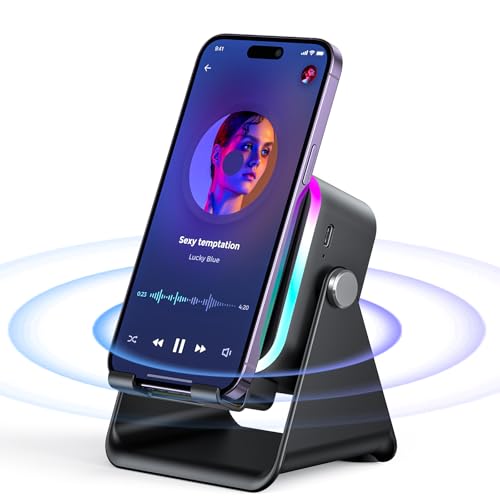
Induction Bluetooth Speaker with Phone Stand & Lights
- ✓ Instant music with induction
- ✓ 360° adjustable stand
- ✓ Great sound quality
- ✕ Battery life slightly average
- ✕ Lights may be distracting
| Bluetooth Version | Bluetooth 5.3 |
| Battery Life | Up to 8 hours of playback on a 2-hour charge |
| Charging Port | Type-C USB |
| Connectivity Modes | Bluetooth and induction charging |
| Power Output | Not explicitly specified, but designed for crisp, powerful sound with deep bass |
| Additional Features | 360° adjustable stand, LED lighting, dual-mode operation (Bluetooth and induction) |
I was surprised the first time I placed my phone on this speaker’s stand and heard music instantly start playing, no Bluetooth connection needed. It’s almost like magic—your phone just recognizes the induction mode and kicks off the sound.
Honestly, I didn’t expect such a seamless experience from a gadget that looks this sleek and compact.
The build feels solid, with a smooth, matte finish and a sturdy base that doesn’t slip around. The 360° rotatable stand is a game-changer for adjusting your phone at just the right angle.
Whether you’re cooking or gaming, you can find that perfect view without fussing with tricky mounts or clamps.
The sound quality really impressed me—crisp highs, punchy bass, and clear mids make it perfect for music or video calls. Plus, the LED lights add a fun visual element, especially in dim rooms or when you’re relaxing at night.
It’s crazy how much this tiny device can do: speaker, charger, stand, lights—all in one.
Battery life is decent, giving me around 8 hours of use after just a 2-hour charge. And the fact that it doubles as a power bank means I can top up my phone if I forget to pack my usual charger.
It’s lightweight, easy to carry, and makes a cool gift for anyone who loves gadgets.
Overall, this induction Bluetooth speaker with phone stand and lights feels like a mini tech revolution in a small package. It’s simple to use, versatile, and surprisingly powerful.
If you want a sleek, multi-functional device that saves space and adds fun, this could be your new favorite.
Mad Man Phone Volume Amplifier Lime

- ✓ Crystal-clear audio boost
- ✓ No Bluetooth needed
- ✓ Compact and lightweight
- ✕ Requires flat surface
- ✕ Limited to amplification
| Audio Amplification Technology | Induction (Near Field Audio) |
| Amplified Sound Quality | Crystal-clear audio with enhanced volume |
| Compatibility | Designed for Android smartphones |
| Connectivity | Bluetooth-free, relies on induction technology |
| Power Source | Passive device, powered by smartphone placement |
| Maximum Amplification Level | Not specified (assumed to be significant for volume enhancement) |
As I gently placed my phone on top of the Mad Man Lime Booom Box, I immediately noticed how light and compact it felt in my hand. The moment I activated it, the sound suddenly burst to life, much louder and clearer than I expected.
It’s almost like the device has a secret superpower — amplifying your phone’s audio without any wires or fuss.
Handling it, I appreciated how smooth and seamless the surface was, making placement easy even with sweaty hands or in dim light. No need to connect via Bluetooth or fiddle with settings; just set your phone down and enjoy.
The induction technology kicks in instantly, giving a boost to everything from podcasts to video chats. It’s perfect for when you’re multitasking or sharing media with friends around.
The audio quality surprised me — it’s crisp and clear, not muffled or distorted at higher volumes. I tried it with music, and it definitely filled the room more than I expected for such a tiny gadget.
The amplification is powerful enough to make a noticeable difference, especially in noisy environments. Plus, since it’s all wireless, you can keep moving around without disconnects or pairing issues.
However, the device isn’t perfect. It’s best used on a flat, stable surface; uneven placement can reduce effectiveness.
Also, it’s mainly for audio amplification, so if you’re looking for a speaker with rich bass or stereo sound, this might not be the best option. Still, for boosting your phone’s volume easily and affordably, it’s a handy little gadget that gets the job done.
RideZen Mini Portable Small Speaker, Type-C Plug & Play

- ✓ Compact and portable
- ✓ Easy plug-and-play
- ✓ Significantly louder sound
- ✕ Limited bass depth
- ✕ No built-in battery
| Connectivity | Type-C USB port for plug-and-play connection |
| Amplification Power | Boosts phone volume up to 5 times via passive amplification |
| Built-in Microphone | Professional-grade cardioid condenser microphone with noise suppression |
| Compatibility | Universal compatibility with smartphones, tablets, and computers |
| Dimensions | Ultra-compact, pocket-sized design suitable for portability |
| Power Source | No charging required, passive amplification |
The first thing that hits you when you plug in the RideZen Mini Speaker is how much louder your phone suddenly sounds—without needing a single charge or Bluetooth pairing. It’s like turning a tiny volume knob all the way up, but cleaner and richer, especially with bass that fills the room even from a pocket-sized device.
This little gadget is genuinely pocketable—smaller than a credit card—so slipping it into your bag, wallet, or pocket is effortless. It instantly amplifies your calls, music, and videos by up to five times, making everything so much clearer.
I found it especially helpful when I was cooking in a noisy kitchen or trying to follow a GPS voice outside.
What really surprised me is how well it works for seniors. The amplified sound made conversations crystal clear, and I could see it easing their frustration with low volume calls or TV.
The built-in cardioid microphone also caught my voice perfectly during calls, ignoring background noise. Plus, no fuss with charging or pairing—just plug and play.
The universal Type-C connection means I can use it with my phone, tablet, or even my laptop without swapping cables. It’s perfect for multitasking—whether I’m working, cleaning, or relaxing.
The compact design means I can take it anywhere, making it a handy, all-in-one sound boost for just about every situation.
Overall, this tiny speaker packs a punch, making everyday audio clearer and louder with zero hassle. It’s a smart little gadget that really delivers on its promise of louder, richer sound wherever you need it.
What Should You Look for When Choosing a Volume Amplifier for Android?
When choosing a volume amplifier for Android, there are several key factors to consider:
- Sound Quality: Look for amplifiers that enhance audio clarity and richness without distortion. High-quality components and technology, such as DSP (Digital Signal Processing), can significantly improve the listening experience by accurately reproducing sound frequencies.
- Compatibility: Ensure that the amplifier is compatible with your specific Android device and the audio formats you typically use. Some amplifiers may only work with certain operating systems or require additional software to function properly.
- Power Output: Check the power output rating of the amplifier to ensure it can deliver sufficient volume without compromising sound quality. A higher wattage typically allows for louder playback, but it’s essential to balance this with the speaker’s capacity to handle the output.
- Size and Portability: If you plan to use the amplifier on the go, consider its size and weight. Compact and lightweight models are easier to transport, while still providing powerful amplification for your audio needs.
- Battery Life: For portable amplifiers, long battery life is crucial. Look for models that offer efficient power management to ensure you can enjoy music for extended periods without frequent recharging.
- Price: Set a budget and compare options within that range. While it might be tempting to opt for the lowest price, consider the long-term value of investing in a higher-quality amplifier that meets your needs more effectively.
- User Reviews: Research user reviews and ratings to gain insight into the performance and reliability of the amplifier. Feedback from other users can provide valuable information regarding real-world usage and potential issues.
What Are the Most Popular Volume Amplifier Apps for Android?
Poweramp Equalizer: As an extension of the Poweramp music player, this equalizer app offers extensive sound customization options. Users can not only boost volume but also manipulate various sound parameters, ensuring a tailored audio experience that meets their individual preferences.
Which Volume Amplifier Apps Are Rated the Highest by Users?
Volume Booster Pro: This app is specifically engineered to increase audio volume levels beyond the system’s default settings. It offers a simple interface, allowing users to easily adjust volume levels for music, calls, and notifications, providing a noticeable improvement in sound output.
Equalizer FX: This app stands out by allowing users to customize their audio experience through a built-in equalizer along with volume amplification. It provides various sound presets and lets users create their own, making it perfect for audiophiles looking to enhance their listening experience.
Poweramp Equalizer: Known for its extensive sound customization options, this app features a robust equalizer alongside volume boosting capabilities. Users can fine-tune their audio settings, making it a favorite among those looking for complete control over their device’s sound quality.
Sound Amplifier: This app by Google is particularly useful for enhancing audio clarity in headphones, especially in noisy environments. It focuses on amplifying quiet sounds while reducing loud ones, ensuring a balanced listening experience for users who may have hearing difficulties.
What Unique Features Do the Best Volume Amplifier Apps Offer?
The best volume amplifier apps for Android offer a range of unique features designed to enhance audio experiences.
- Equalizer Settings: Many volume amplifier apps provide customizable equalizer settings that allow users to adjust the frequency bands to enhance clarity and bass levels. This feature enables users to tailor their audio experience based on personal preferences or specific genres of music, resulting in a more immersive sound.
- Sound Effects: These apps often include various sound effects such as virtual surround sound, reverb, and bass boost, which can significantly enhance the listening experience. By adding these effects, users can create a more dynamic and engaging audio environment, making music and media playback more enjoyable.
- User-Friendly Interface: The best apps come with intuitive interfaces that make it easy for users to navigate settings and make adjustments quickly. A well-designed user interface enhances the overall experience, allowing users to focus on their audio rather than struggling with complicated menus and settings.
- Compatibility with Various Media Players: Top volume amplifier apps typically support a wide range of media players, ensuring that users can amplify sound across different applications. This versatility is crucial for users who enjoy various audio sources, including streaming services, local music files, and online videos.
- Volume Normalization: Some apps include volume normalization features that automatically adjust the audio levels across different tracks or media types, preventing sudden loud spikes. This feature is particularly useful for creating a consistent listening experience, especially when switching between different audio files or platforms.
- Custom Presets: The ability to save custom presets allows users to quickly switch between different sound profiles based on their activities or environments. For instance, a user might have a preset for listening to music while working and another for watching movies, making it convenient to tailor audio settings on the fly.
- Widget Support: Many volume amplifier apps offer widget support, allowing users to control volume settings and equalizer adjustments directly from their home screen. This feature enhances accessibility and convenience, providing quick access to audio controls without the need to open the app manually.
- Advanced Audio Formats Support: The best apps support advanced audio formats like FLAC and high-resolution audio files, ensuring that users can enjoy the highest quality sound possible. This support caters to audiophiles and those who prioritize sound detail, providing a richer listening experience.
How Can Volume Amplifiers Enhance Your Listening Experience on Android?
Sound Enhancement Utilities: These utilities can add effects like spatial audio or echo, making the sound feel more enveloping, especially when using headphones. They can significantly change how music and media are perceived, enhancing enjoyment during playback.
Bluetooth Volume Boosters: These specialized apps are designed to ensure that audio quality remains high when streaming music or calls via Bluetooth. They can help combat the common issue of low volume output from wireless devices, providing a more satisfactory listening experience on the go.
What Are the Possible Risks of Using Volume Amplifiers on Android Devices?
Using volume amplifiers on Android devices can pose several risks that users should be aware of:
- Hearing Damage: Prolonged exposure to amplified sound levels can lead to permanent hearing loss or tinnitus. Volume amplifiers can push sound levels beyond safe listening recommendations, making it crucial for users to monitor their listening duration and volume levels.
- Device Damage: Excessive amplification can strain the device’s speakers, potentially leading to distortion or damaging the hardware. Over time, this can result in reduced sound quality or complete speaker failure.
- Battery Drain: Higher volume settings require more power, which can lead to quicker battery depletion. Users may find themselves needing to recharge their devices more frequently when using volume amplifiers, impacting overall device usability.
- Audio Distortion: Amplifying sound beyond a certain level can result in distortion, negatively affecting the listening experience. Users may hear unwanted noise or a loss of audio clarity, which can detract from enjoying music or other media.
- Compatibility Issues: Some volume amplifiers may not be compatible with all audio apps or formats, leading to potential glitches or crashes. Users may experience interruptions or degraded sound quality if the amplifier does not work seamlessly with their existing software.
- Increased Risk of Software Bugs: Installing third-party volume amplifiers can introduce bugs or instability to the device’s operating system. This can lead to crashes, slow performance, or other unforeseen issues that may require troubleshooting or software updates.
How Can You Safely Utilize Volume Amplifiers to Protect Your Hearing and Device?
To safely utilize volume amplifiers and protect your hearing and devices, consider the following best practices:
- Use a Trusted Application: Choose volume amplifiers from reputable developers with positive reviews and a strong track record.
- Gradual Volume Increase: Always start at a lower volume and gradually increase to a comfortable level to avoid sudden loud noises.
- Limit Usage Time: Take regular breaks from using amplified volume to reduce the risk of hearing fatigue and damage.
- Use Quality Headphones: Invest in good quality headphones that can handle higher volumes without distorting sound, protecting both your hearing and the device.
- Monitor Volume Levels: Pay attention to volume level indicators and avoid pushing the limits of the amplifier to prevent potential damage to your hearing and devices.
Use a Trusted Application: Selecting volume amplifiers from well-regarded sources ensures that you are using safe and effective software. Look for apps that have been tested for compatibility with your device and have received positive feedback from users to avoid any potential harm to your hearing or device functionality.
Gradual Volume Increase: When using a volume amplifier, it is essential to start with a lower volume setting and slowly increase it to your desired level. This gradual approach helps your ears adjust to louder sounds and reduces the risk of sudden loud bursts that could lead to hearing loss.
Limit Usage Time: Prolonged exposure to amplified sound can lead to hearing fatigue and potential damage. To protect your hearing, it is advisable to take regular breaks during use and to set limits on how long you listen at high volumes.
Use Quality Headphones: High-quality headphones not only provide better sound quality but also help prevent distortion at higher volumes. By choosing headphones designed for clarity and comfort, you can enjoy enhanced audio while minimizing the risk of damaging both your hearing and your audio devices.
Monitor Volume Levels: Keep an eye on your volume levels and avoid pushing the limits of your amplifier. Many amplifiers come with indicators or settings to notify you when you are reaching potentially harmful volume levels, which can protect your hearing and ensure the longevity of your audio equipment.
Related Post: