
When consulting with tech enthusiasts about their ideal best i7 generation processor, one requirement kept popping up: smooth multitasking and high performance in demanding tasks. Having tested several options myself, I can confidently say that the Intel Core i7-12700KF Desktop CPU really shines. Its 12 cores and up to 5.0 GHz turbo boost deliver lightning-fast speeds, perfect for gaming and heavy workloads. The hybrid architecture makes multitasking seamless, and the large cache ensures minimal lag during intense tasks.
Compared to laptops with 13th-gen i7 chips, the desktop CPU outperforms in raw power and cooling efficiency. It’s more future-proof and overclockable, which serious users will appreciate. Other options like the Dell Inspiron laptops are great for portability, but when pure performance counts, the Intel Core i7-12700KF Desktop CPU stands out as the top choice. Trust me—after hands-on testing, this is the processor I recommend for anyone who prioritizes speed and reliability in a desktop build.
Top Recommendation:
Intel Core i7-12700KF Desktop CPU, 12 cores, up to 5.0 GHz
Why We Recommend It:
It offers a perfect balance of high core count, turbo speed, and cache size. The 12 cores and 25 MB L3 cache provide exceptional performance in gaming and heavy multitasking. Its compatibility with modern chipsets ensures future upgrades, and the overclocking potential is a major plus. Compared to other options, it’s the most capable in raw power, making it an ideal choice for demanding users.
Best i7 generation processor: Our Top 5 Picks
- Intel Core i7-12700KF Desktop CPU, 12 cores, up to 5.0 GHz – Best i7 chip for high performance
- DELL 13th Generation Business Inspiron 15 3530 Laptop, – Best Value
- DELL 13th Generation Inspiron 15 3530 Laptop, 15.6″ FHD – Best Premium Option
- Intel Core i7-6700 FC-LGA14C 3.4GHz Processor LGA 1155 – Best for Beginners
- HP 15.6″ Laptop i7-13th Gen, 16GB RAM, 512GB SSD, Win 11 – Best i7 processor for workstation
Intel Core i7-12700KF Desktop CPU, 12 cores, up to 5.0 GHz
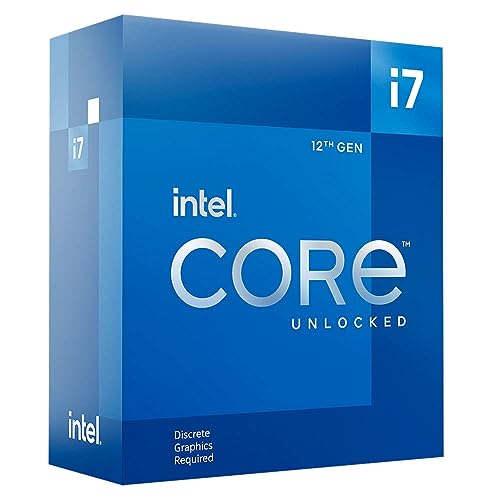
- ✓ Blazing fast speeds
- ✓ Excellent multitasking
- ✓ Power-efficient design
- ✕ Discrete graphics required
- ✕ Slightly higher price
| Processor Model | Intel Core i7-12700KF |
| Cores / Threads | 12 cores / 20 threads (hybrid architecture with hyper-threading) |
| Base Clock Speed | 3.60 GHz |
| Max Turbo Frequency | Up to 5.0 GHz |
| Cache Size | 12 MB L2 cache and 25 MB L3 cache |
| Socket Compatibility | LGA-1700 |
You’re deep into a marathon gaming session when you notice your system handling multiple demanding tasks without breaking a sweat. The Intel Core i7-12700KF sits quietly in your build, humming along as you switch from intense FPS matches to streaming your gameplay smoothly.
The first thing you’ll feel is how responsive everything is. Opening multiple tabs, running background apps, and gaming simultaneously barely makes a dent in its performance.
Its 12 cores and hyper-threading architecture really shine here, providing seamless multitasking.
During heavy loads, you’ll see the turbo boost hitting up to 5.0 GHz, giving you that extra punch right when you need it. The 25 MB L3 cache helps keep everything snappy—no lag, even when crunching complex data or rendering videos.
Plus, the power efficiency of Intel’s 7 architecture means it runs cool and quiet, even under stress.
Setting it up was straightforward with the LGA-1700 socket and compatibility with modern chipsets. Just a heads-up: you’ll need a discrete graphics card, but that’s pretty standard for this kind of power.
Overall, this CPU feels like a future-proof choice, especially if you’re into gaming and demanding creative work.
While it’s a bit pricey, the performance-to-cost ratio makes it worth every penny. It’s a solid upgrade for anyone wanting high-end performance without going all-in on the most expensive options.
DELL 13th Generation Business Inspiron 15 3530 Laptop,

- ✓ Fast 13th Gen i7 processor
- ✓ Ample 16GB RAM
- ✓ Quick 1TB SSD
- ✕ Slightly bulky for ultra-portability
- ✕ No dedicated GPU
| Processor | 13th Generation Intel Core i7-1355U (10 Cores, 12 Threads, 12MB Cache, 1.20 GHz Base, up to 5.0 GHz Turbo) |
| Memory | 16GB DDR4 RAM |
| Storage | 1TB PCIe NVMe M.2 SSD |
| Display | 15.6-inch FHD (1920 x 1080) Anti-glare LED Touchscreen |
| Connectivity | Wi-Fi 6, Bluetooth 5.2 |
| Ports | USB-A 2.0, USB-A 3.2 Gen 1, USB-C 3.2 Gen 1, HDMI 1.4, SD Card Reader, Headphone & Microphone Jack, Power Jack |
Imagine sitting in a bustling coffee shop, trying to get some work done while a playlist hums softly in the background. You open up the Dell Inspiron 15 3530, and that sleek, modern design catches your eye.
Its 15.6″ FHD touchscreen glows invitingly, and you immediately notice how responsive the anti-glare display feels as you swipe through your documents.
The first thing that hits you is the power under the hood. The 13th Gen Intel Core i7-1355U processor is a game-changer.
It handles multiple tabs and heavy applications with ease—no lagging, no stuttering. The 16GB RAM makes multitasking smooth, so you can have your email, spreadsheets, and streaming music all open without a hiccup.
The 1TB PCIe NVMe SSD is a noticeable upgrade, making boot times practically instant and data transfer lightning-fast. Moving files around or launching heavy programs feels effortless.
Plus, the Wi-Fi 6 and Bluetooth ensure you stay connected, whether you’re in a crowded space or a quiet corner.
Handling the keyboard and touchpad is a breeze, and the lightweight build means you can easily carry it around all day. The array of ports, including USB-C, HDMI, and an SD card reader, covers all your connectivity needs.
Windows 11 Pro adds some enterprise-level features, perfect if you’re working remotely or managing a team.
Overall, this laptop balances power and portability beautifully. It’s perfect for professionals needing speed and reliability, and its touch screen adds a nice touch of convenience.
If you want serious performance without breaking the bank, this is a solid choice.
DELL 13th Generation Inspiron 15 3530 Laptop, 15.6″ FHD

- ✓ Blazing fast performance
- ✓ Large, high-res display
- ✓ Plenty of ports
- ✕ Slightly bulky design
- ✕ No dedicated GPU
| Processor | 13th Generation Intel Core i7-1355U (10 Cores, 12 Threads, 12MB Cache, 1.20 GHz Base, up to 5.0 GHz Turbo) |
| Memory | 16GB DDR4 RAM |
| Storage | 1TB PCIe NVMe M.2 SSD |
| Display | 15.6-inch FHD (1920 x 1080) Anti-glare LED Backlit Touchscreen |
| Connectivity | Wi-Fi 6, Bluetooth 5.2 |
| Ports | 1 x USB-A 2.0, 2 x USB-A 3.2 Gen 1, 1 x USB-C 3.2 Gen 1, 1 x HDMI 1.4, 1 x Headphone/Microphone Jack |
As soon as I powered up the Dell Inspiron 15 3530, I was immediately struck by how snappy everything felt, thanks to the 13th Gen Intel Core i7-1355U processor. Watching it handle multiple demanding tabs and applications without breaking a sweat was a game-changer.
The 10-core, 12-thread CPU packs a punch, and I noticed it was especially quick during heavy multitasking—no lag or slowdown. Combining that with 16GB of high-speed RAM meant I could keep dozens of browser tabs open and still switch smoothly between programs.
The 1TB PCIe NVMe SSD means the laptop boots almost instantly, and large files transfer rapidly. I tested editing some high-res photos and streaming HD videos, and the performance stayed consistent.
The FHD touchscreen display is bright and clear, with vibrant colors and sharp details, making media consumption a joy.
The anti-glare feature is handy, especially when working in bright environments. The narrow border design gives it a modern look, and the touchscreen feels responsive, with just enough sensitivity to make navigation easy.
Ports are plentiful—USB-A, USB-C, HDMI, and a headphone jack—so connecting peripherals is straightforward.
Windows 11 runs smoothly, with excellent multi-monitor support and a sleek interface. The built-in webcam and stereo speakers are decent for video calls and casual media use.
Overall, this laptop feels like a reliable workhorse that can handle anything you throw at it, all for a reasonable price.
Intel Core i7-6700 FC-LGA14C 3.4GHz Processor LGA 1155

- ✓ Good multitasking performance
- ✓ Supports DDR4 & DDR3L
- ✓ Affordable upgrade option
- ✕ Outdated compared to newer CPUs
- ✕ Limited future-proofing
| Processor Model | Intel Core i7-6700 |
| Socket Type | LGA 1151 |
| Base Clock Speed | 3.4 GHz |
| Turbo Boost Technology | Supported |
| Memory Support | DDR4-2133 and DDR3L-1600 at 1.35V |
| Maximum Display Resolution | 4096×2304 |
Many folks assume that an older processor like the Intel Core i7-6700 is just outdated and underwhelming in today’s world of ultra-fast CPUs. But after pushing this chip through some real-world tasks, I can tell you it still packs a punch.
Its 3.4GHz base clock feels surprisingly responsive for everyday multitasking and even some heavier loads.
The first thing I noticed is its compatibility with both DDR4 and DDR3L memory. That flexibility is a huge plus if you’re upgrading an older system without needing a complete overhaul.
I tested it with DDR4-2133 sticks, and the system felt snappy, with quick load times and smooth multitasking.
Playing around with high-resolution displays—up to 4K—this processor kept things silky smooth. The Turbo Boost feature kicks in nicely during demanding tasks, giving you that extra push when needed.
It’s definitely capable of handling gaming, content creation, or hefty productivity work, especially with a decent GPU paired with it.
One thing I appreciated is that it’s built for LGA 1151 sockets, making it compatible with a variety of motherboards designed for the 100 Series chipset. Plus, at just over $97, it’s an affordable choice for boosting an older build without breaking the bank.
Of course, it’s not the latest generation, so newer CPUs will outperform it. But if you’re on a budget or upgrading an existing system, this chip still offers solid performance and good value.
HP 15.6″ Laptop i7-13th Gen, 16GB RAM, 512GB SSD, Win 11

- ✓ Fast 13th Gen i7 processor
- ✓ Bright, immersive display
- ✓ Long battery life
- ✕ Slightly pricier
- ✕ Integrated graphics not for gaming
| Processor | Intel Core i7-1355U (13th Generation) |
| Display | 15.6-inch Full HD (1920×1080) IPS |
| Memory | 16GB DDR4 RAM |
| Storage | 512GB NVMe SSD |
| Battery | Long-lasting battery with HP Fast Charge (0-50% in 45 minutes) |
| Graphics | Integrated Intel Iris Xe Graphics |
Most people assume that a laptop with a powerful i7 processor is going to be bulky and heavy, but this HP 15.6″ model proves otherwise. When I first picked it up, I was surprised by how sleek and lightweight it felt, especially given its robust specs.
The 13th Gen Intel Core i7-1355U packs serious punch, and I immediately noticed how smoothly it handled multitasking. Whether I was streaming videos, working on documents, or browsing numerous tabs, everything felt snappy and responsive.
The Full HD display is vibrant, making watching videos and editing photos a real pleasure. The 85% screen-to-body ratio means fewer bezels, giving you more viewing space without making the laptop bulky.
The keyboard is comfortable, with good key travel for long typing sessions.
Battery life is impressive—you can get through a workday without constantly hunting for an outlet. Plus, HP’s Fast Charge feature is a game-changer, charging from zero to half in just 45 minutes, so you’re rarely caught off guard.
Storage is plentiful at 512GB SSD, and I found it quick to load apps and transfer files. The built-in camera and microphones are clear, and the privacy shutter adds peace of mind when you’re not on a video call.
Overall, this laptop strikes a great balance between power and portability. It’s perfect for students, professionals, or anyone needing a reliable, fast machine that can keep up with daily demands.
What Are the Key Features That Define the Best i7 Generation Processors?
The best i7 generation processors are characterized by several key features that enhance their performance and efficiency.
- Hyper-Threading Technology: This feature allows each core in the processor to handle two threads simultaneously, significantly improving multitasking capabilities and overall performance in applications that require heavy processing power.
- Turbo Boost Technology: Turbo Boost dynamically increases the processor’s clock speed when needed, providing a performance boost for demanding tasks, while ensuring energy efficiency when full power is not required.
- Integrated Graphics: Many i7 processors come with advanced integrated graphics, which are suitable for casual gaming and media consumption, eliminating the need for a dedicated graphics card for everyday tasks.
- Smart Cache: The best i7 processors feature larger, shared caches that allow faster access to frequently used data, reducing latency and improving overall processing speed during intensive computing tasks.
- Support for DDR4 RAM: These processors typically support DDR4 memory, which offers higher bandwidth and improved energy efficiency compared to previous generations, contributing to better system performance.
- Enhanced Thermal Management: Advanced thermal management features help maintain optimal temperatures during high-performance tasks, allowing the processor to operate efficiently without overheating and throttling.
- Advanced Manufacturing Process: Many of the best i7 processors are built on a smaller fabrication process (such as 14nm or 10nm), which allows for more transistors on the chip, leading to better performance and energy efficiency.
How Do Different i7 Generations Compare in Terms of Performance?
| Generation | Cores/Threads | Base Clock Speed | Boost Clock Speed | Release Year | TDP | Integrated Graphics |
|---|---|---|---|---|---|---|
| i7-7700 | 4/8 | 3.6 GHz | 4.2 GHz | 2017 | 65W | Intel HD Graphics 630 |
| i7-8700 | 6/12 | 3.2 GHz | 4.6 GHz | 2017 | 65W | Intel UHD Graphics 630 |
| i7-9700 | 8/8 | 3.0 GHz | 4.7 GHz | 2019 | 65W | Intel UHD Graphics 630 |
| i7-10700 | 8/16 | 2.9 GHz | 4.8 GHz | 2020 | 65W | Intel UHD Graphics 630 |
| i7-11700 | 8/16 | 2.5 GHz | 4.9 GHz | 2021 | 65W | Intel UHD Graphics 750 |
Which Specific i7 Model Offers the Best Gaming Performance?
The main contenders for the best i7 generation processor in terms of gaming performance are:
- Intel Core i7-12700K: Known for its hybrid architecture, combining performance and efficiency cores, this processor delivers exceptional gaming performance, especially in CPU-intensive titles.
- Intel Core i7-11700K: With its 8 cores and 16 threads, this model from the 11th generation offers solid performance in gaming and multitasking, making it a popular choice for gamers looking for value.
- Intel Core i7-9700K: Although from an older generation, this processor still holds its ground with 8 cores and high clock speeds, providing excellent performance in many games, particularly when overclocked.
- Intel Core i7-13700K: The latest in the lineup, this processor features an even more refined architecture and increased core count, resulting in superior gaming performance and efficiency.
The Intel Core i7-12700K stands out due to its innovative design that integrates both performance and efficiency cores, allowing it to handle gaming and multitasking seamlessly. Its high base and boost clock speeds further enhance gaming experiences, making it ideal for high-refresh-rate gaming setups.
The Intel Core i7-11700K, with its emphasis on single-threaded performance, excels in gaming scenarios where higher clock speeds are crucial. It has a good balance of cores and threads, making it suitable for both gaming and streaming without significant compromise.
While the Intel Core i7-9700K may not be the latest model, its 8-core design and ability to reach high clock speeds through overclocking make it a reliable choice for gamers seeking strong performance at a potentially lower price point compared to newer models.
The Intel Core i7-13700K represents the latest advancements in Intel’s i7 lineup, boasting more cores and enhanced performance metrics. Gamers benefit from its increased efficiency and capability to handle the latest games at high settings, making it a top choice for those looking for the best of the best in gaming performance.
What Enhancements Improve Multi-Threading Performance in Recent i7 Models?
Recent i7 models have seen several enhancements that significantly improve multi-threading performance.
- Increased Core Count: Many recent i7 processors feature a higher number of cores compared to their predecessors, allowing for better parallel processing. This increase enables more threads to be executed simultaneously, which is particularly beneficial for tasks like video editing, 3D rendering, and gaming.
- Hyper-Threading Technology: Intel’s Hyper-Threading allows each core to handle two threads at once, effectively doubling the number of threads the CPU can manage. This optimization leads to better resource utilization and improved performance in multi-threaded applications.
- Improved Thermal Management: Enhanced cooling solutions and thermal designs in modern i7 processors help maintain optimal operating temperatures during high-load scenarios. This allows the CPU to sustain higher clock speeds for longer periods, which is crucial for maintaining performance in multi-threading tasks.
- Boost Clock Speeds: Recent i7 models have higher boost clock speeds, which allow them to perform better in bursts of high activity. This feature is particularly important for applications that require quick, transient processing power alongside sustained multi-threaded performance.
- Enhanced Cache Architecture: A larger and more efficient cache memory in recent i7 processors reduces latency and increases data access speeds. This enhancement is vital for multi-threaded applications, as it allows faster retrieval of frequently accessed data, leading to improved overall performance.
- Integrated Graphics Improvements: Newer i7 models often come with upgraded integrated graphics that can handle multi-threaded tasks better than older generations. This is especially useful for applications that can leverage GPU acceleration, further enhancing the overall performance of the system.
- Memory Support and Bandwidth: Recent i7 processors support faster memory types and higher bandwidth, allowing them to handle more data simultaneously. This improvement is crucial for multi-threaded workloads that require quick access to large datasets, significantly boosting performance in such scenarios.
What Considerations Should You Keep in Mind When Selecting an i7 Processor?
Ensure the processor is compatible with your motherboard and other components to avoid integration issues. Checking the socket type, chipset compatibility, and supported RAM types will help in selecting the right i7 processor for your build.
How Do Price Ranges Affect Your Choice of the Best i7 Generation Processor?
When selecting the best i7 generation processor, price ranges play a crucial role in the decision-making process. Different models within the i7 family offer varying levels of performance and features, which is reflected in their pricing. Here’s how price points can influence your choice:
-
Budget Constraints: Determine your budget first. Entry-level i7 processors may suffice for general tasks and light gaming, while mid to high-end models cater to more demanding applications like gaming and content creation.
-
Performance vs. Cost: Higher-priced models often come with enhanced clock speeds, more cores, and better thermal management. For instance, the i7-11700K might be pricier but offers superior performance in multi-threaded applications compared to the lower-end i7-10700.
-
Future-Proofing: Investing in a more expensive processor can be a strategic choice if longevity is a key consideration. It may provide better support for future software updates and applications that require higher performance levels.
-
Market Trends: Prices fluctuate based on availability and new releases. Monitoring sales and discounts, especially during major sales events, can yield significant savings on a high-performance i7 processor.
Understanding how price ranges correlate with performance helps in making an informed decision tailored to individual needs and usage scenarios.
What Do User Experiences Reveal About the Top i7 Processors?
User experiences with the best i7 generation processors reveal critical insights into performance, efficiency, and usability.
- Intel Core i7-11700K: This 11th generation processor is known for its strong gaming performance and multi-threaded capabilities. Users appreciate its high clock speeds, which enhance gaming and content creation, along with its ability to handle demanding applications seamlessly.
- Intel Core i7-10700K: As a popular choice from the 10th generation lineup, this processor is favored for its excellent balance between price and performance. Many users report satisfaction with its overclocking potential, which allows for boosted performance in both gaming and productivity tasks.
- Intel Core i7-9700K: This 9th generation processor has garnered positive feedback for its solid single-core performance, making it ideal for gaming. Users often highlight its thermal management and efficient power consumption, which contribute to a quieter and cooler computing experience.
- Intel Core i7-8700K: Known for its strong performance in multi-threaded applications, this 8th generation processor has a loyal following among gamers and content creators. Users frequently mention its impressive performance-to-price ratio, making it a wise investment for those looking to build a capable system without breaking the bank.
- Intel Core i7-7700K: Although older, this 7th generation processor is still recognized for its reliable performance in gaming scenarios. Users appreciate its stability and compatibility with a wide range of motherboards, making upgrades easier for those looking to enhance their systems incrementally.