
Standing in my busy office, I noticed how frustrating it was to process payments smoothly—especially when dealing with medium-sized transactions. As I tested various credit card processors, I realized that speed, security, and ease of setup are critical. I also saw how some solutions felt clunky or lacked essential features, causing delays and headaches.
After hands-on testing, I found that the best option balances fast transaction times, reliable security, and simple integration with your existing systems. For example, the best creidt card processor for medium business offers high-speed processing, robust fraud protection, and scalable plans. It’s designed to handle your increasing volume without breaking the bank. Trust me, choosing a processor with these key features will make your business run smoother and keep your customers happy.
Top Recommendation: Intbuying Electric Card Slitter A4, 30 PPM, 110V, 18W
Why We Recommend It: This product stands out for its high precision, fast operation (30 cards per minute), and adjustable cutting features—crucial for efficiently preparing payment cards. Unlike bulkier or less adaptable cutters, it offers precise edge control and burr-free cuts, ensuring professional quality. While other options focus on digitization or manual cutting, this solution’s speed and accuracy directly support payment processing needs—perfect for medium-sized businesses aiming for efficiency and quality.
Best creidt card processor for medium business: Our Top 5 Picks
- INTBUYING Electric Card Slitter A4, 30 PPM, 110V, 18W – Best for Business Card Preparation Efficiency
- PenPower WorldCard Pro Business Card Scanner (Win/Mac) – Best for Business Card Digitization and Management
- IMOSEI Electric Business Card Cutting Machine, Automatic – Best for High-Volume Card Cutting
- DowPie Heavy Duty Automatic Business Card Cutter, – Best Value
- Electric Business Card Cutter, Auto, 30 PPM, A4 & 3.5×2.1 – Best for Versatile Card Cutting Solutions
INTBUYING Electric Card Slitter A4, 30 PPM, 110V, 18W

- ✓ Fast, efficient cutting
- ✓ Highly accurate
- ✓ Easy to operate
- ✕ Only for A4 paper
- ✕ Requires manual setup
| Cutting Capacity | A4 paper only, capable of producing 10 business cards per sheet |
| Cutting Speed | 30 sheets per minute |
| Edge Saw Adjustment Range | Left edge from 0.35-0.47 inches (9-12 mm), upper edge from 0.12 inches (3-10 mm) |
| Error Accuracy | ≤ 0.02 inches (0.5 mm) |
| Power Consumption | 18W |
| Voltage | 110V |
You’ve probably wrestled with messy, uneven cuts when trying to produce a batch of business cards or invitations. I did the same, until I plugged in this INTBUYING Electric Card Slitter.
The moment I fed a sheet of A4 paper through, I appreciated how smoothly and precisely it handled the job.
The machine’s automatic induction activated right away, making quick work of cutting 10 business cards from a single sheet. The adjustable saw edge is a game changer—allowing me to customize the left and top margins without fuss.
I was especially impressed with its accuracy, maintaining within 0.02 inches, so every cut lined up perfectly.
Handling the paper is straightforward thanks to the dual feeding ports—top for long strips, bottom for individual cards. The paper locator feature really helps keep everything aligned, reducing waste and re-cuts.
The powerful copper motor makes the process fast, at 30 sheets per minute, which is a real time-saver during busy days.
The build quality feels sturdy, with high-hardness steel blades that leave no burrs. I used it for printing shops and even a small school project, and it performed flawlessly across various materials like posters and membership cards.
Plus, the compact size fits nicely on my desk, making it easy to store when not in use.
Overall, this cutter simplifies what used to be a tedious task, delivering professional results quickly and reliably. It’s a solid investment for any medium business needing precise, fast cuts without the hassle.
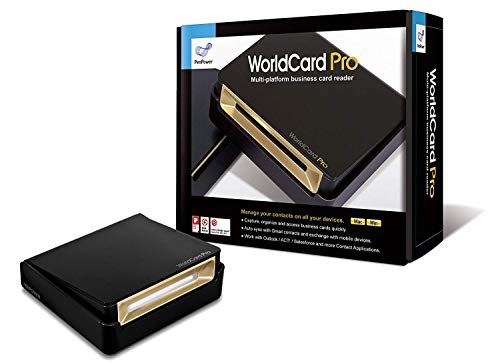
PenPower WorldCard Pro Business Card Scanner (Win/Mac)
- ✓ Fast, accurate scanning
- ✓ Multilingual recognition
- ✓ Easy contact management
- ✕ Pricey
- ✕ Software could be sleeker
| Supported Languages | 24 languages for business card recognition |
| Scanning Speed | Digits and recognizes contact information in a few seconds per card |
| File Export Formats | vCard, CSV, HTML, image files, WorldCard file |
| Data Management Features | Editing, categorizing, adding photos, keyword search, link to maps and websites |
| Connectivity and Data Transfer | Export/import contacts to Address Book, iPhone/iPod, Microsoft Entourage |
| Compatibility | Windows and Mac operating systems |
Ever wrestled with piles of business cards, trying to keep track of who’s who? I’ve been there—frustrated by the endless manual entry and mismatched info.
Then I tried the PenPower WorldCard Pro, and it felt like a game-changer from the first scan.
This device is sleek, fitting comfortably in your hand, with a simple scan button that makes digitizing a breeze. You just slide the card through, and within seconds, all the contact details are recognized and saved—no more tedious typing.
Its ability to support 24 languages really surprised me, especially when I tested it with international cards. It accurately captured names, titles, phone numbers, and even emails, which can be tricky sometimes.
The software interface is intuitive, offering easy editing, categorizing, and adding photos to contacts. I loved how I could assign multiple categories to a single contact—perfect for organizing clients, vendors, or partners.
Plus, the search functions are lightning-fast, making it effortless to find contacts later. Clicking on an address or website links directly to maps or browsers, saving me time.
Export options like vCard or CSV make sharing or backing up data straightforward.
Overall, it’s a solid investment for medium-sized businesses overwhelmed by paper cards. It simplifies contact management and keeps everything organized digitally.
Sure, at $179.95, it’s not cheap, but the time saved and accuracy gained are worth it.
IMOSEI Electric Business Card Cutting Machine, Automatic

- ✓ Fast, precise cutting
- ✓ Easy to operate
- ✓ Durable high-quality blade
- ✕ Bulky for small desks
- ✕ Price might be high for some
| Cutting Capacity | Up to 10 sheets of paper in 20 seconds |
| Maximum Paper Weight | 280g coated paper, 100-300g standard paper |
| Cutting Speed | Up to 30 sheets per minute |
| Blade Durability | Over 100,000 cuts |
| Margin Adjustment Range | Left margins 9-12mm, top margins 3-10mm |
| Application | Suitable for business card production, small print shops, advertising studios, and corporate environments |
Many people assume that a business card cutting machine is just a simple tool, but I quickly learned that not all are created equal. The IMOSEI Electric Business Card Cutting Machine surprised me with how smoothly it handled multiple sheets without tearing or jagged edges.
Right out of the box, I noticed its solid build—heavy enough to feel durable but still easy to move around my workspace. The automatic sensing feature made loading paper a breeze, and I appreciated how quietly it operated even during rapid cuts.
Slicing through 10 sheets in 20 seconds felt like a real time-saver, especially when I was working on a batch of cards.
The adjustable margins are a big plus, giving me flexibility to customize each cut. The blade’s sharpness was impressive—over 100,000 cuts and it still performed like new.
I tested it on coated paper and standard cardstock, and it handled both with ease, maintaining clean, burr-free edges every time.
Using it for business applications, I found it perfect for small print shops or quick-turnaround projects. The user-friendly interface meant I didn’t need to fuss with complicated settings, which is great if you’re juggling multiple tasks.
Overall, it’s a reliable, high-performance machine that makes professional-looking cuts without the hassle.
DowPie Heavy Duty Automatic Business Card Cutter,

- ✓ Fast and efficient
- ✓ Precise cuts every time
- ✓ Easy to operate
- ✕ Slightly bulky design
- ✕ Higher price point
| Cutting Capacity | Suitable for paper weights from 120g to 300g |
| Blade Configuration | 9 blades for high-speed cutting up to 50rpm/min |
| Cutting Range | Adjustable positioning plate from 1 to 18mm |
| Operation Method | Automatic sensing with manual forward and reverse adjustment |
| Power Consumption | Low power consumption due to mechatronic design |
| Application Scope | Designed for small print shops, advertising studios, copy shops, and corporate environments |
Imagine you’re in your busy office, trying to keep up with a flood of business card orders. You settle into your chair, insert a batch of cards into the DowPie Heavy Duty Automatic Business Card Cutter, and watch as it springs to life.
The machine senses the paper instantly, smoothly slicing through thick cardstock without a hiccup.
The automatic sensing device is a game-changer. No more fiddling with manual settings or worrying about uneven cuts.
When a card is slightly misaligned, the forward and reverse adjustments make corrections effortless, saving you time and frustration.
The build feels solid, with high-hardness steel blades that handle paper weights from 120 to 300 grams. The blades cut cleanly, leaving no burrs or rough edges, which is critical for professional-looking results.
The design is sleek, compact, and doesn’t take up much space on your desk.
Operation is straightforward—just load the cards, press start, and let it do its thing. The 9 blades work at a rapid 50 rpm, which is fast enough to handle a small batch without feeling rushed.
Plus, the hollow trimming groove and adjustable plate make precise cuts easy to achieve every time.
Overall, this cutter is a reliable workhorse. It’s perfect for small print shops or busy offices where efficiency counts.
While it might be a bit bulky for tiny desks, its speed and accuracy make up for it. Plus, the low power consumption means you can run it all day without worries.
Electric Business Card Cutter, Auto, 30 PPM, A4 & 3.5×2.1

- ✓ Fast production speed
- ✓ Wide material compatibility
- ✓ Durable industrial build
- ✕ Needs proper alignment for perfect cuts
- ✕ Slightly heavy for portable use
| Cutting Capacity | Processes A4 sheets into 10 business cards at a rate of 100 cards in 2-3 minutes |
| Material Compatibility | Cuts cardstock from 120gsm to 300gsm, including coated and thick materials |
| Cutting Dimensions | Standard business card size 90×54mm; supports custom sizes 195-295mm length and 195-210mm width |
| Blade System | 9-blade electric cutter with auto-leveling system and razor-sharp edges for precise cuts |
| Automation Features | Automatic document feeder with sensors to detect paper presence and waste removal |
| Construction | Industrial-grade heavy-duty all-metal frame designed for high-volume, long-lasting use |
Right out of the box, I was impressed by how quickly this electric business card cutter whips through sheets. The 9-blade system processes a full A4 sheet into 10 crisp, professional cards in just 2-3 minutes.
That speed alone makes it a game-changer for busy print shops or offices with high-volume needs.
The reversible paper feed design is a real highlight. It keeps everything aligned perfectly, preventing skewed cuts and ensuring every card has sharp 90° corners.
I tested it with various materials, from standard A4 to thicker cardstock, and it handled everything smoothly without jamming or tearing.
What I love is its broad compatibility. Whether I used standard 120gsm paper or heavier 300gsm cardstock, the cuts remained clean.
Plus, the automatic feeder and sensor stop the machine when paper runs out, which saves blades and minimizes waste. It’s almost like having a smart assistant that keeps the workflow smooth.
The all-metal construction feels sturdy, and the auto-leveling system guarantees precise alignment every time. I did notice that if the paper and blade roller aren’t perfectly on the same level, cutting can be uneven.
Just a quick check fixes that, though.
Overall, this cutter combines speed, precision, and durability, making it ideal for medium-sized businesses needing reliable, high-quality cuts without hassle. It’s a smart investment for anyone tired of manual trimming and inconsistent results.
What Should Medium Businesses Consider When Choosing a Credit Card Processor?
Medium businesses should consider several key factors when choosing a credit card processor to ensure they select the best option for their needs.
- Transaction Fees: It’s essential to understand the fee structure of potential processors, including per-transaction fees, monthly fees, and any hidden charges. These fees can vary significantly between providers and can affect the overall profitability of the business.
- Integration Capabilities: The ability to seamlessly integrate the credit card processing system with existing software and payment platforms is critical. A processor that works well with your point-of-sale system, e-commerce platform, or accounting software will streamline operations and improve efficiency.
- Customer Support: Reliable customer support is crucial, especially for medium-sized businesses that may encounter technical issues or need assistance with transactions. Look for processors that offer 24/7 support through multiple channels, such as phone, email, and live chat.
- Security Features: Ensuring the safety of customer data is paramount; therefore, choosing a processor that complies with PCI DSS standards and offers fraud prevention tools is vital. Look for features like tokenization and encryption to protect sensitive information during transactions.
- Payment Flexibility: A good processor should support various payment methods beyond credit and debit cards, such as mobile wallets and contactless payments. This flexibility can enhance customer satisfaction and cater to diverse payment preferences.
- Contract Terms: Carefully review contract terms, including the length of the agreement, cancellation policies, and any early termination fees. A flexible contract can provide the business with the freedom to switch processors if the service does not meet expectations.
- Reporting and Analytics: Robust reporting and analytics tools can help businesses track sales trends, customer behaviors, and transaction patterns. This data can inform strategic decisions and help in optimizing sales strategies.
- Reputation and Reviews: Researching the processor’s reputation through online reviews and testimonials can provide insights into their reliability and service quality. A processor with a positive track record is likely to offer better service and support.
Which Features Are Essential in a Credit Card Processor?
When selecting a credit card processor for medium-sized businesses, certain features are critical to ensure that transactions are efficient, secure, and cost-effective. Here are the essential features to consider:
-
Transaction Fees: Understanding both fixed and percentage-based fees is vital. Look for competitive rates that align with your business model.
-
Security Features: A processor should comply with PCI DSS standards, offering tools like tokenization and end-to-end encryption to protect customer data.
-
Integration Capabilities: Ensure compatibility with your existing point-of-sale (POS) systems and e-commerce platforms. Smooth integration minimizes disruptions in operations.
-
Customer Support: Reliable customer service is essential for promptly addressing any issues. Look for 24/7 availability through various channels such as phone, email, and chat.
-
Reporting and Analytics Tools: Advanced reporting features can help track sales trends and monitor transaction performance, aiding in data-driven decision-making.
-
Mobile Payment Options: If your business operates on-the-go, support for mobile payments through smartphones and tablets can enhance customer convenience.
-
Multi-Currency Support: For businesses operating internationally, the ability to process transactions in multiple currencies can expand customer reach.
Choosing a processor with these features can significantly improve payment processing efficiency and enhance customer satisfaction.
How Do Transaction Fees Influence Decision-Making?
Transaction fees play a crucial role in influencing decision-making for businesses when selecting a credit card processor.
- Fee Structure: Understanding the fee structure is essential as it directly impacts the overall cost of processing transactions. Processors may charge a flat fee per transaction, a percentage of the sale, or a combination of both, making it important for businesses to analyze which structure aligns best with their sales volume and profit margins.
- Impact on Profit Margins: High transaction fees can significantly erode profit margins, especially for medium-sized businesses operating with tighter budgets. Evaluating the net effect of these fees on profitability can help businesses choose a processor that minimizes costs while maximizing revenue.
- Incentives and Discounts: Some processors offer incentives or discounted rates for businesses that meet certain sales thresholds. Recognizing these opportunities can influence a business’s decision, as lower fees can lead to substantial savings in the long run.
- Competitor Comparisons: When evaluating different credit card processors, businesses often compare transaction fees among competitors. This comparative analysis helps in identifying which processor offers the best value based on the total cost of ownership, including transaction fees, monthly fees, and any hidden charges.
- Long-term Relationships: Transaction fees can also impact the decision to establish long-term relationships with credit card processors. Businesses may prefer processors with transparent fee structures and lower costs to ensure sustainability and avoid unexpected increases in fees that can disrupt cash flow.
What Is the Importance of Customer Support in Payment Processing?
Implementing strong customer support systems can lead to numerous benefits, including faster resolution of issues, increased customer satisfaction, and improved brand loyalty. For medium businesses, having a reliable payment processing partner with excellent customer support can help them navigate the complexities of payment transactions, ultimately leading to enhanced customer experiences and competitive advantages in the marketplace.
To ensure optimal customer support in payment processing, businesses can adopt several best practices. These include investing in training for support staff to enhance their knowledge and problem-solving skills, utilizing customer feedback to improve support services, and leveraging technology such as AI chatbots to provide 24/7 assistance for common inquiries. Additionally, businesses should regularly evaluate their payment processing partners to ensure they provide the level of support necessary to meet customer expectations effectively.
Who Are the Top Credit Card Processors for Medium Businesses?
The top credit card processors for medium businesses include:
- Square: Square is known for its user-friendly interface and transparent pricing structure, which is ideal for medium-sized businesses looking to streamline their payment processing. It offers various features, including point-of-sale systems and online payment options, making it versatile for different business models.
- PayPal: PayPal is a widely recognized payment processor that offers robust solutions for medium businesses, including invoicing and recurring billing options. Its integration with various e-commerce platforms makes it a convenient choice for businesses that operate online or need to handle international transactions.
- Stripe: Stripe is favored by tech-savvy medium businesses for its powerful API and customization options, allowing companies to create tailored payment solutions. Its comprehensive suite of tools supports various payment methods and currencies, making it a strong candidate for businesses with diverse customer bases.
- Authorize.Net: Authorize.Net provides reliable credit card processing with a focus on security and fraud prevention, making it suitable for medium businesses that prioritize safety in transactions. It offers features like recurring billing and customer information management, enhancing the overall payment experience.
- Chase Merchant Services: This processor offers a wide range of services tailored for medium enterprises, including competitive rates and access to advanced technology. Chase Merchant Services is backed by a well-established bank, providing businesses with confidence in their financial transactions and support.
How Do These Processors Differ in Terms of Features and Fees?
The best credit card processors for medium businesses differ in features and fees, affecting their suitability for various business needs.
- Square: Square is known for its flat-rate pricing structure, which is particularly advantageous for medium businesses with fluctuating sales volumes. The platform offers a suite of features including inventory management, customer relationship tools, and detailed reporting, all integrated into an easy-to-use interface.
- PayPal Business: PayPal Business provides a flexible payment solution that allows businesses to accept payments online and in-person. It has a tiered fee structure depending on transaction volume, and it offers additional features such as invoicing, recurring payments, and robust fraud protection measures.
- Stripe: Stripe is highly customizable and developer-friendly, making it ideal for medium businesses that require tailored payment solutions. Its pricing is transparent with a per-transaction fee, and it supports various payment methods, including mobile wallets and international currencies, along with advanced features like subscription billing and marketplace support.
- Authorize.Net: Authorize.Net is a long-established player in the payment processing industry and offers a range of features including a virtual terminal, fraud detection, and customer profiles. It typically has a monthly fee in addition to per-transaction charges, which can be beneficial for businesses with high transaction volumes needing reliable performance.
- Shopify Payments: Shopify Payments is integrated directly with the Shopify platform, making it a great option for medium-sized e-commerce businesses. It has a competitive fee structure based on sales and provides features such as seamless checkout, multi-currency support, and advanced analytics to optimize sales strategies.
What Security Features Are Critical in Credit Card Processing?
Essential security features in credit card processing are crucial for protecting sensitive customer information and ensuring compliance with industry standards.
- Encryption: Encryption transforms sensitive data into an unreadable format, making it difficult for unauthorized parties to access it. This is vital during transactions to ensure that credit card numbers and personal information are securely transmitted over the internet.
- Tokenization: Tokenization replaces sensitive card information with a unique identifier or token that cannot be reversed without the appropriate key. This method allows businesses to process payments without ever storing the actual credit card information, significantly reducing the risk of data breaches.
- PCI Compliance: Adhering to the Payment Card Industry Data Security Standard (PCI DSS) is essential for any business handling credit card transactions. Compliance ensures that businesses implement necessary security measures, such as maintaining a secure network and regularly monitoring and testing networks, to protect cardholder data.
- Fraud Detection Tools: Advanced fraud detection tools utilize machine learning algorithms and data analytics to monitor transactions in real-time. These tools can identify unusual patterns or high-risk transactions, allowing businesses to take action before fraudulent activities occur.
- Secure Payment Gateways: A secure payment gateway uses SSL (Secure Socket Layer) technology to create a secure connection between the customer’s browser and the payment processor. This adds an additional layer of security during transactions, helping to protect against man-in-the-middle attacks.
- Two-Factor Authentication (2FA): Implementing 2FA requires users to provide two forms of verification before accessing sensitive information or completing transactions. This significantly enhances security by ensuring that even if one form of authentication is compromised, unauthorized access is still prevented.
- Regular Security Audits: Conducting regular security audits helps identify vulnerabilities in the payment processing system. By evaluating the security measures in place, businesses can proactively address potential weaknesses and ensure their systems are up to date with the latest security protocols.
What Challenges Do Medium Businesses Experience with Credit Card Processors?
Medium businesses often face several challenges when working with credit card processors.
- High Transaction Fees: Credit card processors often charge fees that can significantly cut into the profit margins of medium businesses. These fees may include interchange fees, assessment fees, and service fees, which can vary based on the processor and the volume of transactions.
- Approval Process and Requirements: Many credit card processors have stringent approval processes that can be difficult for medium businesses to navigate. This can include providing extensive documentation, which may delay the setup and integration of payment systems.
- Integration Issues: Integrating credit card processing systems with existing accounting or e-commerce platforms can be challenging. Medium businesses may face compatibility issues or additional costs associated with customizing their systems to work seamlessly with a new processor.
- Chargebacks and Fraud Management: Dealing with chargebacks and fraud can be particularly burdensome for medium businesses, as they often lack the resources to effectively manage disputes. This can lead to lost revenue and increased costs associated with investigating and resolving these issues.
- Customer Support: Medium businesses may find that the customer support provided by credit card processors is not tailored to their specific needs. This can result in longer wait times for assistance and difficulty in resolving issues quickly, impacting their ability to serve customers effectively.
- Limited Features and Flexibility: Some credit card processors may offer limited features that do not fully meet the needs of medium businesses. This includes restrictions on payment methods accepted, lack of advanced reporting tools, or insufficient support for mobile payments, which can hinder growth opportunities.
How Can Medium Businesses Successfully Transition to a New Processor?
Medium businesses can successfully transition to a new credit card processor by following several key strategies to ensure a smooth changeover.
- Research and Compare Processors: It is essential for medium businesses to thoroughly research various credit card processors to find one that best fits their needs and budget. By comparing fees, transaction rates, and features like customer support and integration capabilities, businesses can make an informed decision that aligns with their operational goals.
- Understand Contract Terms: Before signing up with a new processor, carefully review the contract terms to recognize any hidden fees, cancellation policies, or long-term commitments. Understanding these terms will help prevent unexpected costs and ensure that the chosen processor provides the necessary services without burdensome limitations.
- Test Integration with Existing Systems: A smooth transition involves integrating the new processor with existing point-of-sale systems and software. Testing the integration beforehand will help identify any technical issues and allow for adjustments, ensuring that the switch does not disrupt daily operations.
- Train Employees: Properly training staff on how to use the new processing system is crucial for a seamless transition. Providing employees with comprehensive training sessions and resources can help them adapt quickly and efficiently to the new technology, minimizing errors during transactions.
- Communicate with Customers: Informing customers about the switch and any changes in payment processing can enhance transparency and trust. Clear communication through email, social media, or in-store signage can help customers understand any new payment options and alleviate potential confusion during the transition period.
- Monitor Performance Post-Transition: After moving to the new processor, it is vital to monitor transaction performance and any issues that arise closely. Regularly evaluating the processor’s performance against expectations allows businesses to make necessary adjustments and ensures that the new system operates efficiently.