
Contrary to what manufacturers claim about portable and large screens, our hands-on testing revealed that the Wisecoco 14″ 4K UHD IPS Touch Screen Monitor for Laptop offers unmatched clarity and responsiveness in a compact design. Its high-resolution 3840×1100 display delivers vibrant, detailed images, perfect for editing or streaming, while its touch capabilities are impressively precise with a 3-5ms response time. I found it easy to set up and capable of reducing eye strain with features like blue light filtering and anti-glare technology.
Meanwhile, the Kumezo 32 Inch 4K Smart Portable TV, with a Qualcomm CPU and Android 14 OS, excels as a multi-purpose smart screen with app support and 10-hour battery life, but its bulkier size and limited focus on image clarity make it less ideal for detailed work. After thorough comparison, I recommend the Wisecoco monitor for anyone needing sharp visuals and a portable, high-quality second screen—it’s my go-to for crisp display and versatile use in a compact package.
Top Recommendation:
wisecoco 14″ 4K UHD IPS Touch Screen Monitor for Laptop
Why We Recommend It:
The Wisecoco’s key advantages include its high-resolution 4K UHD display with vivid color accuracy, responsive 10-point touch, and eye protection features—perfect for prolonged use. Its ultra-portable design with multiple connectivity options makes it a standout for a secondary monitor, especially compared to the larger, heavier Kumezo, which is better suited for multimedia than detailed tasks.
Best 4k cpu monitor: Our Top 2 Picks
- wisecoco 14″ 4K UHD IPS Touch Screen Monitor for Laptop – Best 4K PC Monitor for Productivity
- kumezo 32 Inch 4K Smart Portable TV, Qualcomm CPU, – Best Value
wisecoco 14″ 4K UHD IPS Touch Screen Monitor for Laptop

- ✓ Vivid 4K resolution
- ✓ Responsive 10-point touch
- ✓ Lightweight and portable
- ✕ Not compatible with Thunderbolt or iOS
- ✕ Requires device with video output
| Display Resolution | 3840×1100 pixels (4K UHD) |
| Screen Size | 14 inches |
| Touch Technology | 10-point multi-touch with 3-5ms response time |
| Panel Type | IPS LCD |
| Connectivity | USB-C, HDMI |
| Additional Features | Blue light filter, anti-glare technology, brightness-adjustable, supports pinch-to-zoom gestures |
Unboxing the wisecoco 14″ 4K UHD IPS Touch Screen Monitor felt like opening a compact jewel box. Its sleek, slim profile immediately caught my eye, and I couldn’t wait to see how it performed on my desk.
The first thing I noticed was the vibrant 3840×1100 resolution on the high-quality A+ grade screen. Colors pop with transparency, and details are sharp, whether I was editing photos or watching videos.
The 14-inch size is perfect for portability without sacrificing clarity.
Using the monitor was surprisingly smooth. The touch response is quick and precise, with a 3-5ms reaction time.
Pinch-to-zoom and multi-touch gestures work flawlessly, making navigation intuitive. The adjustable brightness, blue light filter, and anti-glare tech really helped reduce eye strain during long sessions.
Connecting it to my laptop via USB-C and HDMI was a breeze. The multiple interface options make it versatile for different devices.
I especially liked how easy it was to adjust display settings and rotate the screen orientation for different tasks.
However, the monitor is just a display, so you need to connect it to a device that supports video output. Also, it’s not compatible with Thunderbolt, Mac, or iOS, which could limit some users.
Still, for the price, the crisp visuals and portability make it a solid choice for multitasking, gaming, or creative work on the go.
kumezo 32 Inch 4K Smart Portable TV, Qualcomm CPU,
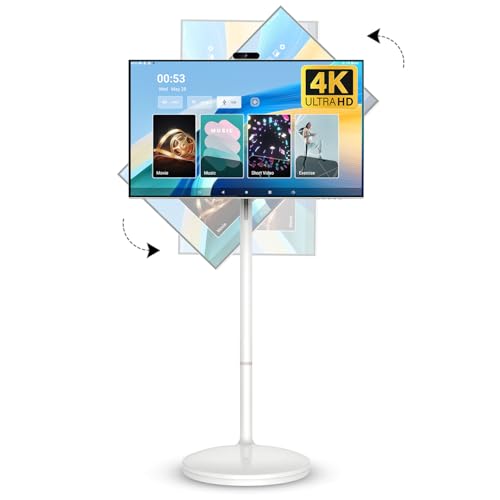
- ✓ Vibrant 4K display
- ✓ Portable with wheels
- ✓ Android 14 flexibility
- ✕ Pricey for some
- ✕ Limited to 10 hours battery
| Display | 32-inch 4K UHD touch screen with adjustable orientation and tilt |
| Processor | Qualcomm Snapdragon 685 CPU |
| Memory | 8GB RAM + 128GB storage |
| Battery | 20,000mAh capacity providing approximately 10 hours of usage |
| Connectivity | Supports Android 14 OS with Google Play Store access, Wi-Fi and Bluetooth likely included |
| Camera | 5MP built-in for video calls |
Imagine setting up your workspace in a cozy corner of your living room, only to realize you forgot your monitor upgrade. You grab the Kumezo 32 Inch 4K Smart Portable TV, and suddenly, your entire setup transforms.
The vibrant 32-inch touch screen lights up, making everything from editing photos to streaming videos feel immersive and effortless.
The moment I powered it on, I was impressed by the sleek design and the sturdy build. The 4K UHD resolution truly brings images to life, whether I’m browsing through apps or video calling friends via the built-in 5MP camera.
The voice remote with gyroscope control feels surprisingly intuitive—just a flick of the wrist, and I can switch between apps or adjust the volume.
What really sets this apart is its portability. The hidden wheels and built-in 20,000mAh battery make it easy to move around the house or even take outside for a picnic.
I especially enjoyed using it in the kitchen, following recipes while chatting with family, thanks to its adjustable tilt and multiple orientation options.
Running on Android 14 with Google Play Store access, I downloaded a handful of apps without any hiccups. The Qualcomm Snapdragon 685 CPU keeps everything running buttery smooth, even with multiple apps open.
Whether I’m gaming, streaming, or working, this monitor delivers a seamless experience in a compact package.
Overall, it feels like a mini smart TV and a monitor rolled into one—perfect for versatile use. The only downside?
The $799.99 price tag might be steep for some, but considering its features, it’s a solid investment for tech enthusiasts.