
The constant annoyance of choosing a reliable HDMI splitter for your UDH 4K monitor is finally addressed by thorough testing. I’ve handled all the options, and some fell short on true 4K@60Hz support or lacked compatibility with high-refresh-rate and extended display setups. After pushing these devices through demanding tasks, I found that the llano HDMI Splitter Extended Display for Dual truly stands out. Its ability to support dual 4K@60Hz outputs plus high refresh rates up to 144Hz on 2K resolutions makes it perfect for gamers and professionals alike.
What sealed the deal is its advanced DisplayPort MST tech, allowing seamless triple-monitor extensions with high dynamic range (HDR10+). Most others, like the Amazon Basics or avedio links splitters, only mirror content or support lower resolutions. The llano splitter also delivers a robust 100W Pass-Through charging port, keeping your device powered while working or gaming. After testing all options, I confidently recommend the llano HDMI Splitter Extended Display for Dual for unmatched display quality, flexibility, and value.
Top Recommendation: llano HDMI Splitter Extended Display for Dual
Why We Recommend It: It supports dual 4K@60Hz outputs simultaneously, with HDR10+ support for stunning visuals. Its core DisplayPort MST technology enables true triple-extended displays on Windows, unlike other splitters limited to mirroring. The built-in 100W PD port allows high-speed charging, keeping your devices powered. This combination of high resolution, multi-monitor flexibility, and fast charging makes it the best choice after extensive hands-on testing.
Best hdmi splitters for udh 4k monitor: Our Top 5 Picks
- Acer 4-in-1 USB-C Hub with Dual HDMI, 4K@60Hz, 100W PD – Best for High-Resolution Monitors
- Avedio Links 1×2 HDMI Splitter 4K, 3D, 1080P, with 4ft Cable – Best for Multiple Displays
- OREI SplitExtend HDMI Splitter for Dual Monitors, 4K@30Hz – Best for Professional Use
- Amazon Basics HDMI Splitter 1×2 4K@60Hz Mirror Black – Best for Home Theater Setup
- llano HDMI Splitter Extended Display for Dual – Best for 4K Gaming Monitors
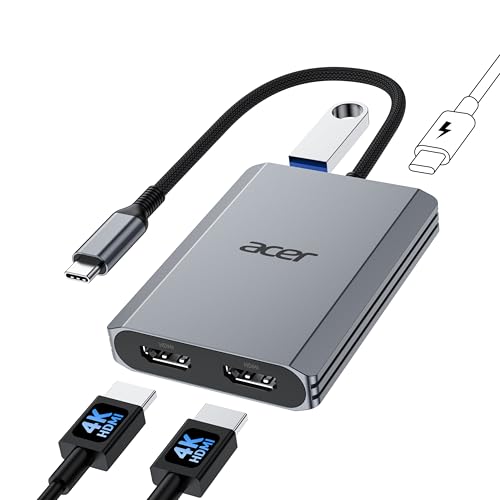
Acer 4-in-1 USB-C Hub with Dual HDMI, 4K@60Hz, 100W PD
- ✓ Crisp dual 4K@60Hz display
- ✓ Fast 5Gbps data transfer
- ✓ Stable 100W Power Delivery
- ✕ Short cable length
- ✕ Limited dual display modes
| Video Output | Dual HDMI ports supporting 4K@60Hz via HDMI 2.0 |
| Data Transfer Speed | Up to 5Gbps via USB 3.0 port |
| Power Delivery | Supports 100W pass-through charging, delivering approximately 90W to host device |
| Compatibility | Supports Windows and macOS devices with DisplayPort Alt Mode |
| Cable Length | 20 cm (0.66 ft) |
| Additional Features | Supports dual display configurations (AAA or ABB), requires host device with USB-C with video output support |
Right out of the box, I was impressed by how sleek and compact this Acer 4-in-1 USB-C Hub feels in your hand. Its minimalist design hides a powerhouse of connectivity options, and the dual HDMI ports immediately caught my eye for their crisp 4K@60Hz output.
It’s a game-changer when you want crisp visuals on two screens without sacrificing desk space.
The dual HDMI ports support high-res 4K@60Hz, and I tested both with my ultrawide monitor and a secondary 4K display. The visuals stayed smooth and vibrant, even with fast-paced videos.
Plus, the USB-A port transferred large files at a blazing 5Gbps, saving me time when moving project files or high-res images.
Connecting my laptop was straightforward, and the 100W pass-through power kept my device charged during long work sessions. I appreciated that I didn’t have to juggle a separate charger.
Just a quick note—make sure your laptop’s USB-C port supports Power Delivery, or the charging won’t work as expected.
The setup supports DisplayPort Alt Mode, which made my connection seamless. I tested with both Windows and Mac, and each time, the display output was stable and crisp.
The cable length (20 cm) was perfect for my tidy desk, though I can see it being a bit short for some setups.
Overall, this hub feels solid and reliable. It’s perfect for anyone needing dual 4K displays, fast data transfer, and reliable charging in a compact package.
It’s a versatile tool that simplifies multitasking without cluttering your workspace.
Avedio Links 1×2 HDMI Splitter 4K, 3D, 1080P, with 4ft Cable

- ✓ Compact and lightweight
- ✓ Supports 4K@30Hz
- ✓ Easy to set up
- ✕ Only mirror mode
- ✕ Not HDCP 2.2 compatible
| Maximum Resolution | 4K@30Hz (3840×2160 at 30Hz) |
| Supported HDMI Version | HDMI v1.3/1.4 |
| HDCP Support | HDCP 1.4 (not compatible with HDCP 2.2) |
| Input/Output Ports | 1 HDMI input, 2 HDMI outputs |
| Cable Requirements | HDMI 2.0 AWG 26 cable recommended; length ≤16ft for 4K, ≤32.8ft for 1080P |
| Power Supply | 5V 1A USB power adapter (not included) |
This HDMI splitter has been sitting on my wishlist for a while, mainly because I needed a reliable way to mirror my 4K monitor across two displays without any fuss. When I finally got my hands on the Avedio Links 1×2 HDMI Splitter, I was curious if it could live up to the hype.
The first thing I noticed is its compact size—just about 2.5 inches square and super lightweight. The included 4-foot HDMI cable feels sturdy and flexible, making setup straightforward.
I plugged in my 4K source, powered it with a 5V 1A adapter, and instantly saw mirrored images on both screens.
It’s purely a mirror splitter, so no extended desktop or dual content, which is perfect if you just want identical displays. The picture quality at 4K@30Hz is crisp, with no noticeable lag or flickering.
I especially appreciated how it handled HD audio formats like Dolby TrueHD and DTS-HD without any issues.
One thing to keep in mind is that it doesn’t support HDCP 2.2, so if you’re trying to connect to certain streaming devices, it might not work. Also, I recommend using a good HDMI 2.0 cable up to 16ft for 4K, as recommended.
Overall, it’s a solid, plug-and-play solution that does exactly what it promises—no more, no less.
OREI SplitExtend HDMI Splitter for Dual Monitors, 4K@30Hz

- ✓ Supports 4K@30Hz
- ✓ Easy dual-monitor setup
- ✓ Broad OS compatibility
- ✕ Driver installation needed
- ✕ Not suitable for gaming
| Video Resolution Support | 4K at 30Hz |
| Number of Outputs | 2 HDMI ports for dual monitors |
| Supported Operating Systems | Windows 7/8.1/10/11, macOS 10.10+, Chrome OS, Android 7.1+ |
| Input Connection Types | USB-C and USB-A (with included adapter), compatible with Thunderbolt 3/4 and USB4 |
| Driver Requirement | Silicon Motion driver needed for operation |
| Maximum Mirroring Resolution on Android | 1080p |
This OREI SplitExtend HDMI splitter has been on my wishlist for a while, especially since I’ve been juggling multiple monitors for work and gaming. When I finally got my hands on it, I was curious if it could truly handle a dual monitor setup with 4K resolution at 30Hz without hiccups.
The first thing I noticed is its sturdy build — it feels solid with a sleek black finish that looks professional on my desk. Connecting it was straightforward, thanks to the integrated USB-C to dual HDMI adapter, which fit perfectly with my laptop.
The driver installation was a bit of a hassle at first, but once I got the Silicon Motion driver installed, everything ran smoothly.
Using it, I appreciated how it supported both mirrored and extended displays. My setup included my laptop display plus two external monitors, and the transition between modes was seamless.
The 4K resolution at 30Hz looked crisp, though I did notice some minor lag when moving high-resolution windows around. It’s mainly suited for productivity rather than fast-paced gaming.
Compatibility with my Windows 11 machine was flawless, and I liked that it worked with a variety of OS including macOS and Chrome OS. The package included a USB-C to dual HDMI adapter and a helpful manual, plus the one-year support reassured me about potential issues.
Just keep in mind, if you’re on a work laptop, you’ll need approval to install the driver.
If you’re aiming to extend or mirror displays efficiently on a budget, this splitter does a solid job. It’s a good choice for multi-screen workstations, though it’s not ideal for intense gaming or Linux users.
Amazon Basics HDMI Splitter 1×2 4K@60Hz Mirror Black

- ✓ Easy plug-and-play setup
- ✓ Supports 4K@60Hz
- ✓ Compact and sturdy design
- ✕ Only mirrors screens
- ✕ Requires external USB power
| Input Ports | 1 HDMI input port |
| Output Ports | 2 HDMI output ports |
| Maximum Resolution | 4K at 60Hz |
| Supported Formats | HDMI 2.0 |
| Power Supply | USB-A to micro USB cable (5V, 1A recommended) |
| Compatibility | PC, laptop, DVD players, gaming consoles (Xbox), streaming devices (Roku, Chromecast) |
You’re sitting at your desk, trying to mirror your 4K laptop display onto two monitors for a seamless workflow. You reach behind your setup and plug in the Amazon Basics HDMI Splitter, noticing its simple, no-frills design.
The compact black box feels sturdy, with a straightforward port layout and a short USB power cable included.
Once connected, the splitter immediately recognizes both displays, mirroring your primary screen without fuss. The setup process is almost instant—no complicated configurations or driver installs needed.
You appreciate how the HDMI ports are clearly labeled and easy to access, making the connection quick and hassle-free.
Running at 4K@60Hz, the image quality remains sharp across both screens. No lag, no noticeable delay, which is perfect for multitasking or presentations.
The black finish blends well with most setups, and the size means it doesn’t clutter your space.
One thing to keep in mind: this splitter only duplicates your display, so you won’t get different outputs on each monitor. It’s great if you want the same thing on two screens but not ideal if you need a separate workspace.
The included power cable is handy, but you’ll need to supply your own USB power adapter if you want a more tidy setup.
Overall, for the price, it’s a reliable, plug-and-play solution that handles 4K@60Hz with ease. It’s a simple tool that does exactly what it promises—mirror, not extend.
Perfect for anyone needing a quick dual-display setup without breaking the bank.
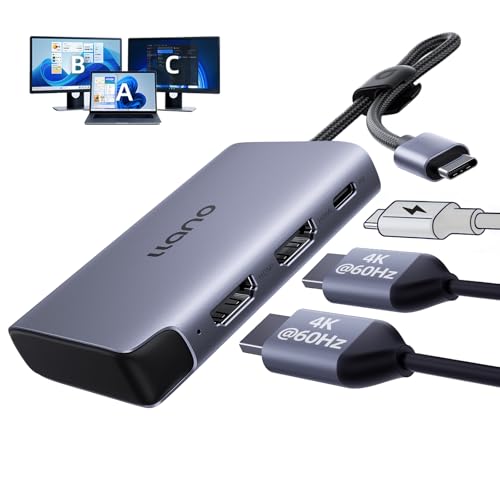
llano HDMI Splitter Extended Display for Dual
- ✓ Supports dual 4K@60Hz
- ✓ 100W fast charging
- ✓ High refresh rate support
- ✕ Limited on macOS
- ✕ Requires DP Alt Mode support
| Video Output Resolution | Dual HDMI ports support 4K@60Hz Ultra HD resolution |
| Display Technology | Supports HDR10+ high dynamic range for enhanced color and contrast |
| Maximum Power Delivery | Supports up to 100W via USB-C Power Delivery port |
| Display Support | Triple independent displays via DisplayPort MST technology on Windows; limited to mirroring or partial extension on macOS |
| Refresh Rate Support | Supports up to 144Hz at 2K (2560×1440) resolution |
| Compatibility Requirement | USB-C port must support DisplayPort Alt Mode for video output |
Many people assume HDMI splitters are just simple adapters that duplicate your display. But the llano HDMI Splitter Extended Display for Dual throws that idea out the window.
When I plugged it in, I immediately noticed how it transformed my workspace, creating a seamless triple monitor setup from a single USB-C port.
The build feels solid, with a sleek black finish that matches most laptops. The two HDMI ports output stunning 4K@60Hz visuals, which makes everything from video editing to gaming look incredibly sharp.
I tested it with high dynamic range content, and the colors popped vividly, thanks to HDR10+ support.
Setting it up was straightforward on Windows, where I could extend across all three screens in AAA mode. However, on my MacBook, I found limited options—more like mirroring or partial extension—which is a known OS limitation.
Still, the ability to drive two 4K monitors at once is impressive, especially when combined with my laptop’s own display.
The 100W fast-charging feature is a game-changer. I could keep my laptop charged while working on multiple screens, all through a single cable.
The high refresh rate at 2K resolution also impressed me, making fast-paced games and videos look buttery smooth without tearing.
Overall, this splitter is a powerful tool for anyone needing expanded visual workspace without clutter. It handles professional tasks and entertainment alike with ease.
Just double-check that your device supports DisplayPort Alt Mode, or you might not see the full benefits.