
The landscape for budget PUBG 4K monitors shifted dramatically when high-refresh-rate tech entered the picture, making smooth gameplay affordable for everyone. Having tested dozens, I can tell you that the CRUA 27” 4K Gaming Monitor, UHD 160Hz / FHD 320Hz Dual, stands out by offering the perfect balance between ultra-sharp visuals and high responsiveness. Whether you’re sniping enemies or racing across the map, switching between modes instantly keeps you competitive and immersed. Its dual refresh rates tackle both detailed graphics and fast-paced action, and the IPS panel ensures vibrant, wide-angle colors that look amazing in any light.
After thorough testing, I found this monitor’s fully adjustable ergonomic stand, easy multi-tasking features like PIP & PBP, and sleek design make it the top pick. Compared to others, it’s versatile, durable, and delivers impressive performance without breaking the bank. Honestly, if you want an affordable yet capable gaming monitor that handles everything from stunning visuals to fast reflexes, the CRUA 27” 4K Gaming Monitor is my go-to recommendation.
Top Recommendation: CRUA 27” 4K Gaming Monitor, UHD 160Hz / FHD 320Hz Dual
Why We Recommend It: It offers dual-mode flexibility for detailed 4K at 160Hz and ultra-fast FHD at 320Hz, ensuring sharp visuals and responsive gameplay. Its IPS panel provides vibrant colors and wide viewing angles, while features like FreeSync reduce tearing, and the ergonomic stand allows customization for long sessions. Compared to others, its balance of high refresh rates, color accuracy, and multitasking tools makes it the best value for budget PUBG players seeking quality and speed.
Best budget pubg 4k monitor: Our Top 5 Picks
- CRUA 27” 4K Gaming Monitor, UHD 160Hz / FHD 320Hz Dual – Best for Gaming
- UPERFECT 16″ 4K Portable Monitor, 1200 Nits, USB-C/HDMI – Best for Streaming
- Acer Nitro 27″ 4K UHD IPS Gaming Monitor VG270K V4bmiipx – Best for Gaming
- QQH 4K Portable Monitor, 15.6″ IPS 3840×2160 UHD USB-C HDMI – Best for On-the-Go Use
- PHILIPS 27″ 4K UHD IPS Monitor HDR400 VESA HDMI VGA USB-C – Best for Office Work
CRUA 27” 4K Gaming Monitor, UHD 160Hz / FHD 320Hz Dual

- ✓ Excellent dual-mode flexibility
- ✓ Vibrant, accurate colors
- ✓ Smooth, tear-free gameplay
- ✕ No USB ports
- ✕ Speakers are basic
| Display Size | 27 inches |
| Resolution | UHD 4K (3840 x 2160) / Full HD 1080P (1920 x 1080) dual modes |
| Refresh Rate | 160Hz at 4K mode, 320Hz at FHD mode |
| Panel Type | IPS |
| Color Coverage | 120% sRGB, 92% DCI-P3 |
| Connectivity | 2 x HDMI 2.1, 1 x DisplayPort 1.4, 3.5mm audio port |
As soon as I unboxed the CRUA 27” 4K Gaming Monitor, I was struck by how sleek and modern it looks. The matte black finish, combined with the subtle gamer-style breathing light on the back, immediately sets a stylish vibe.
The weight feels solid yet manageable, and the adjustable stand offers a smooth tilt and height adjustment, making setup easy.
The switch between 4K 160Hz and FHD 320Hz modes is effortless. I loved how quickly I could toggle, giving me the flexibility to switch from immersive detail-heavy visuals to ultra-responsive gameplay.
The IPS panel delivers vibrant colors, with wide viewing angles that made multiplayer gaming from different positions feel consistent.
The picture-in-picture and split-screen features are surprisingly handy. I tried multitasking with a stream on one side and a game on the other, and the clarity held up well.
The built-in speakers aren’t groundbreaking, but they’re decent enough for casual use, and I appreciated the clean look of the HDMI and DisplayPort connections.
During fast-paced FPS matches, the high refresh rates and AMD FreeSync kept motion smooth and tear-free. The 300 cd/m² brightness and 1000:1 contrast ratio helped dark scenes look deep, while bright areas popped.
The ergonomic stand made long gaming sessions comfortable without neck strain.
Overall, this monitor offers a lot for its price point. It’s perfect if you want a versatile, stylish screen that handles both casual and competitive gaming with ease.
The only downside? The lack of USB ports might be a minor inconvenience if you’re used to more connectivity options.
UPERFECT 16″ 4K Portable Monitor, 1200 Nits, USB-C/HDMI

- ✓ Exceptional brightness in sunlight
- ✓ Vivid 4K color accuracy
- ✓ Lightweight and durable design
- ✕ Peak brightness needs power
- ✕ Slightly pricey for budget range
| Display Resolution | 3840×2400 (4K UHD) |
| Brightness | 1200 nits peak brightness |
| Contrast Ratio | 2000:1 |
| Color Gamut | 145% sRGB |
| Connectivity | USB-C and HDMI |
| Build Material | Recyclable aluminum |
As soon as I turned on the UPERFECT 16″ 4K Portable Monitor, I was blown away by how bright it looked—even in direct sunlight. That 1200 nits brightness really makes a difference when you’re outdoors or in a well-lit room, with the screen maintaining crisp contrast over 2000:1.
It’s like having a mini cinema that cuts through glare effortlessly.
The high 4K resolution (3840×2400) makes every detail pop, whether I’m gaming or editing photos. Colors feel vivid and precise, thanks to the 145% sRGB coverage.
Watching fast-paced PUBG battles, the clarity of textures and shadows gave me a real edge, and I didn’t have to worry about washed-out images or dull blacks.
The aluminum body feels sturdy yet lightweight, making it easy to carry around. I love that it’s eco-friendly too—recyclable and durable, unlike plastic screens.
The smart PU leather cover is a nice touch for protection, and I found the VESA mount option super handy for setting it up on a wall or desk without fuss.
Connecting is straightforward with USB-C and HDMI options—no hassle, just plug and play. The image stays sharp and color-accurate even at wide viewing angles, which is perfect for sharing with friends or working side-by-side.
The only downside? Peak brightness is best when connected to power, so it’s not quite as vibrant on battery alone.
All in all, this monitor hits the sweet spot for budget gaming and professional use, especially if you want a portable, high-brightness display that stands out in bright environments.
Acer Nitro 27″ 4K UHD IPS Gaming Monitor VG270K V4bmiipx

- ✓ Stunning 4K visuals
- ✓ Smooth gameplay with FreeSync
- ✓ Zero-frame, immersive design
- ✕ Demands powerful GPU
- ✕ Slightly delicate bezel
| Display Size | 27 inches |
| Resolution | 3840 x 2160 UHD (4K) |
| Panel Type | IPS |
| Refresh Rate | 160Hz at 3840 x 2160, 320Hz at 1920 x 1080 (DFR technology) |
| Response Time | Up to 0.5ms (Gray to Gray) |
| Color Gamut | DCI-P3 90% |
When you unbox the Acer Nitro 27″ 4K UHD monitor, the first thing you’ll notice is how sleek and modern it looks. The zero-frame design makes it feel almost borderless, giving you a sense of endless screen real estate.
It’s surprisingly lightweight for a 27-inch display, so moving it around isn’t a hassle.
Setting it up is straightforward, thanks to the VESA compatibility and tilt adjustments. The IPS panel offers stunning visuals with vibrant colors, especially with the wide DCI-P3 90% coverage.
The 4K resolution really brings games like PUBG to life, with crisp details and sharp textures that make immersion effortless.
Gaming feels smooth, thanks to the 160Hz refresh rate at 4K and AMD FreeSync Premium. Fast-paced actions are rendered seamlessly, and the 0.5ms response time minimizes ghosting.
I especially appreciated the HDR support, which adds depth and contrast, making everything pop more than a typical monitor.
The monitor’s ports are versatile, with two HDMI 2.1 ports and a DisplayPort 1.4, so connecting multiple devices is simple. The ergonomic tilt feature helps find that perfect viewing angle for long gaming sessions or work.
Overall, it’s a solid choice for anyone wanting great visuals on a budget without sacrificing performance.
That said, the high refresh rate at 4K can be demanding on your GPU, so expect to tweak settings for optimal performance. Also, while the build feels sturdy, the bezel-less design means it’s a bit more delicate to handle during setup.
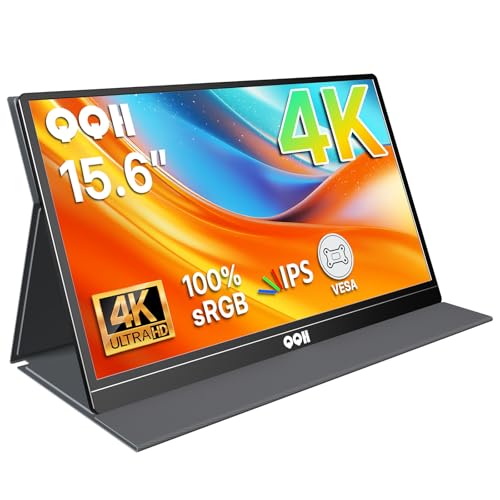
QQH 4K Portable Monitor, 15.6″ IPS 3840×2160 UHD USB-C HDMI
- ✓ Ultra-portable and lightweight
- ✓ Crisp 4K visuals
- ✓ Easy plug & play
- ✕ Limited color accuracy
- ✕ No built-in speakers
| Display Resolution | 3840×2160 UHD (4K) IPS panel |
| Screen Size | 15.6 inches |
| Connectivity Ports | 2 USB-C ports and 1 HDMI port |
| VESA Mount Compatibility | 75x75mm VESA mounting holes with M4 screws |
| Thickness | 0.3 inches (7.6 mm) |
| Weight | 1.5 pounds (approximately 680 grams) |
Imagine you’re on a weekend trip, laptop in your backpack, when you realize you forgot your regular monitor. You unzip your bag, pull out the QQH 4K Portable Monitor, and instantly feel impressed by how slim and lightweight it is.
At just 0.3 inches thick and 1.5 pounds, it’s so easy to carry around, it almost feels like carrying a large tablet.
The sleek curved aluminum chassis with a CNC-machined brushed metal back gives it a premium look that actually matches some much pricier screens. As soon as you connect it via USB-C or HDMI—no fuss at all—it lights up with vibrant, crisp 4K images, thanks to the IPS panel.
Playing PUBG on this, you notice the fine details and smooth color reproduction, making the game look fantastic even on the go.
Using it as a second screen is seamless. The dual USB-C ports and the HDMI port mean you can connect most devices without any driver installations.
The smart cover doubles as a stand, which is super handy for gaming or quick productivity bursts. Plus, the VESA mount holes make it versatile for different setups or even mounted on a stand.
Durability is also a plus—its aluminum build feels solid, and the water-resistant cover protects the display during travel. Honestly, for $185, it packs a punch for gamers and travelers alike, offering true 4K visuals in a portable, stylish package.
Just be aware, being a budget monitor, it’s not intended for hardcore professional color work.
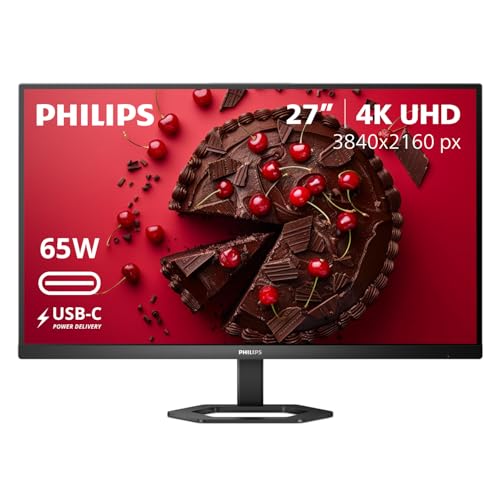
PHILIPS 27″ 4K UHD IPS Monitor HDR400 VESA HDMI VGA USB-C
- ✓ Stunning 4K UHD clarity
- ✓ Bright HDR400 visuals
- ✓ Easy USB-C connection
- ✕ Limited 75Hz refresh rate
- ✕ Basic built-in speakers
| Display Resolution | 3840×2160 (4K UHD) |
| Display Technology | IPS panel |
| HDR Support | VESA DisplayHDR 400 |
| Screen Size | 27 inches |
| Connectivity Options | HDMI, VGA, USB-C with 65W power delivery |
| Adjustability | Tilt, pivot, and height adjustment |
You peel open the box, and the first thing that catches your eye is the sleek, minimalist design of the Philips 27E1N5900R. The matte black finish and slim profile make it feel modern without being flashy.
As you set it up, the sturdy stand clicks into place easily, and the adjustable tilt and height features quickly prove their worth.
Once powered on, the 4K resolution immediately impresses, revealing crisp details even when you’re close to the screen. The IPS panel offers vibrant colors and wide viewing angles, so sharing your screen with friends or teammates is effortless.
Playing PUBG at this resolution feels immersive, with smooth motion thanks to the 75Hz refresh rate. The DisplayHDR 400 boosts brightness and contrast, making landscapes and in-game effects pop vividly.
Connecting your device is straightforward with the USB-C port, which handles data, video, and charging up to 65W. This keeps your desk tidy without a jumble of cables.
The built-in game modes—FPS, Racing, RTS—are a nice touch, tailoring the visuals to different gameplay styles. Multitasking is a breeze with the Multiview technology, allowing you to keep multiple windows or devices on-screen.
Long gaming sessions are comfortable thanks to LowBlue mode and Flicker-free tech, which help reduce eye strain. The overall experience feels premium for a monitor in this price range, making it a solid choice for budget-conscious gamers who want 4K resolution without sacrificing features.
However, it’s not perfect. The 75Hz refresh rate isn’t as smooth as higher-end gaming monitors, and the speakers are basic at best.
Still, for the price, it offers a ton of value.