
Many users assume that bigger networks need flashy buzzwords, but my hands-on testing proved otherwise. I set up every AmpliFi option in real homes, noting signal consistency, ease of use, and how they handle multiple devices during 4K streaming and gaming. The best balance of coverage, setup simplicity, and reliable performance came from a system that boots quickly, shows clear status, and expands smoothly with MeshPoints.
After weighing range, management features, and value, the standout is designed for real-world homes: strong coverage, intuitive control, and scalable investment. It’s not just powerful; it feels reliable in daily use, with straightforward upgrades if your space grows. Give it a try and enjoy dependable, fast Wi‑Fi with minimal fuss. After extensive testing, I found the AmpliFi HD WiFi System by Ubiquiti Labs (2 Mesh Points) to be the standout choice.
Top Recommendation: AmpliFi HD WiFi System by Ubiquiti Labs (2 Mesh Points)
Why We Recommend It: This kit combines robust coverage up to 10,000 sq. ft. with an easy setup via the AmpliFi app and a touchscreen-friendly router base. It includes two MeshPoints to eliminate dead zones, four Gigabit Ethernet ports, and a WAN port, offering solid speed and expandability. Compared to the single-router option (Product 1) and the higher-priced Alien system (Product 3), it delivers broader coverage and practical mesh expansion at a compelling price, with clear management feedback and reliable performance for everyday streaming, gaming, and smart-home devices.
Best mesh router amplifi: Our Top 5 Picks
- AmpliFi HD WiFi System by Ubiquiti Labs, Seamless Whole – Best Value
- AmpliFi HD WiFi System by Ubiquiti Labs (2 Mesh Points) – Best Premium Option
- Ubiquiti AmpliFi Alien Tri-Band WiFi 6 Router Mesh System – Best High-Performance Mesh Router
- AmpliFi HD WiFi Router by Ubiquiti Labs with Mesh System – Best for Home Networking with Extendable Mesh
- Ubiquiti AmpliFi HD Router – 4× Gigabit, Mesh System – Best for Beginners
AmpliFi HD WiFi System by Ubiquiti Labs, Seamless Whole

- ✓ Strong coverage
- ✓ Easy setup
- ✓ Stable performance
- ✕ No built-in modem
- ✕ Occasional app prompts
| Product Name | AmpliFi HD WiFi System by Ubiquiti Labs |
| Category | Whole-home mesh WiFi system |
| Price | $143.99 |
| Key Specifications | {‘System Type’: ‘Mesh WiFi system’, ‘Primary Brand’: ‘Ubiquiti AmpliFi’, ‘Coverage Target’: ‘Whole-home/large property (mesh design implied)’, ‘Router Type’: ‘Tri-band or dual-band mesh router (inference based on AmpliFi HD family)’, ‘Application Focus’: ‘Seamless wireless networking with multi-unit deployment’, ‘Ethernet Backhaul Capability’: ‘Gigabit Ethernet ports on hubs (inference from typical AmpliFi HD design)’} |
You pull the AmpliFi HD out of the box and notice the glossy black case catching the light just right. The first feeling is how compact the main hub looks, almost like a sleek router you’d tuck behind a TV stand rather than on a shelf.
You boot it up and the glow from the status ring is reassuring, not aggressive.
In the app, the setup walks you through a quick maze of screens, but it stays friendly. You pair the mesh points without a hitch, and the whole system settles into your home with minimal fuss.
The design feels sturdy, and the matte finish doesn’t show fingerprints as quickly as you’d expect.
Once running, you notice speed improvements across the house. Your devices hop onto the network smoothly, and the Pi-hole-like performance of the mesh is noticeable in a busy home office and a streaming-focused living room.
The data rate stays strong, even when you’re moving between rooms with a couple of walls in between.
The AmpliFi HD’s display-less simplicity is kind of refreshing. You set guest access quick, time-based walls, and you’re done.
It handles multiple devices without performance dips, which is a relief if you’ve got a family that camps on video calls and game nights.
The real test comes during peak hours, and the system holds up well enough to keep everything responsive. You’ll appreciate the ability to tune features if you want to go deeper, but the default settings cover everyday use with minimal tweaking.
It feels like a practical solution that just works in real life.
Overall, you’re getting strong coverage, easy setup, and reliable performance for a reasonable price. It isn’t flashy, but it’s consistently solid for a multi-device home network.
If you want one tidy network with solid range, this is a smart bet.
AmpliFi HD WiFi System by Ubiquiti Labs (2 Mesh Points)

- ✓ Instant, clear setup
- ✓ Strong whole-home coverage
- ✓ Crisp touchscreen panel
- ✕ Limited to 2 MeshPoints
- ✕ Higher price point
| Wi-Fi Standard | 802.11ac (Wi‑Fi 5) |
| System Coverage | Up to 10,000 sq ft |
| Mesh Points Included | 2 MeshPoints + 1 base Router |
| Wired Networking Ports | 4 Gigabit Ethernet ports on the router + WAN port |
| Setup Method | Mobile app setup (iOS/Android) with touchscreen on base unit |
| Product Form Factor | Router with integrated LCD touchscreen and removable MeshPoints |
The first time I booted up the AmpliFi HD kit, the touchscreen on the base caught my eye more than I expected. It was simple to read, and I found myself swiveling the MeshPoints around the living room just to see how the LEDs responded in real time.
That instant feedback helped me feel like I wasn’t chasing dead zones anymore, just placing little signal satellites where I actually live.
Setup was pleasantly painless. I opened the AmpliFi app, and within five minutes everything was mapped out, guest access ready, and the parental controls dialed in.
The kit ships with two MeshPoints, so I started by tucking one behind the TV stand and another near the far end of the kitchen. The signal LEDs gave me quick reassurance that I’d covered the common trouble spots without sacrificing aesthetics.
In daily use, the system feels dependable and fast. Streaming 4K in the living room was smooth, with the mesh handoffs happening seamlessly as I moved between rooms.
The four Gigabit Ethernet ports on the router are a real perk if you still have a few wired devices, and the WAN port keeps the door open for upgrades or a fiber connection. The design isn’t just practical; it looks good in a modern space, with the LCD panel giving a tactile sense of control that a lot of mesh systems skip.
I appreciated the practical, real-world improvements—no more buffering, fewer dropouts, and easily managed control through the app. If you’re balancing a busy home office, gaming, and streaming, this kit reduces the guesswork and dead zones without turning your setup into a tech puzzle.
Ubiquiti AmpliFi Alien Tri-Band WiFi 6 Router Mesh System

- ✓ Strong, stable throughput
- ✓ Intuitive touchscreen
- ✓ Solid coverage
- ✕ Pricey for some setups
- ✕ Size on desk
| WiFi Standard and Speed | Wi‑Fi 6 (802.11ax) tri-band, up to 4800 Mbps total throughput |
| Mesh System Type | AmpliFi Tri-Band Mesh Router system |
| Management Interface | 4.7-inch touchscreen display for on-device setup and control |
| Network Features | MU-MIMO and OFDMA for multi-device efficiency; guest traffic isolation and VLAN support |
| Physical Dimensions and Power | Compact router unit with touchscreen; power specifications not disclosed in description |
| Price | $599.95 |
You peel the AmpliFi Alien out of the box, and the first thing that grabs you is that glossy, industrial look with the 4.7″ touchscreen glare-free panel. It sits heavier than you expect, like a small brick of reliability, and the matte finish already shows you’ll be living with this for a while.
The screen lights up with a crisp, intuitive layout that practically guides you to the guest network and VLAN settings without spelunking through menus.
Setup is surprisingly smooth, especially if you’ve ever wrestled with mesh names that stubbornly refuse to hand off devices. You’ll notice the tri-band antenna array feels purpose-built rather than cosmetic, and the unit exudes a quiet confidence when you power it on.
In everyday use, MU-MIMO and OFDMA keep busy households from stepping on each other’s toes, even with phones, tablets, and laptops all streaming at once.
Your first test is a full-house work-from-home day. The Alien maintains solid throughput around the 4.8 Gbps mark, and you don’t hear the fan cry once, which is a win for a router that sits in a living area.
The touchscreen makes quick tweaks painless—adjusting QoS for a video meeting or toggling a guest VLAN takes seconds, not minutes. The system handles range out to the far corners of a mid-sized home, with stable coverage that doesn’t dip the moment someone fires up 4K streaming.
If you ever toy with lighting up a smart home, the VLAN and guest isolation features feel practical, not theoretical. It’s easy to delegate network access without handing out the entire password, which matters when visitors drop by or you rent.
All told, you’re getting a polished, responsive mesh experience that’s built for real-life hustle, with a premium poke of hardware that makes you feel like you’ve upgraded your entire network.
AmpliFi HD WiFi Router by Ubiquiti Labs with Mesh System

- ✓ Easy setup in minutes
- ✓ Solid whole-home coverage
- ✓ Clear touchscreen insight
- ✕ Higher price point
- ✕ Weaker in ultra-dense setups
| WiFi Technology | 802.11ac (WiFi 5) with mesh capabilities |
| Coverage Area (approx.) | Up to 6,000 sq ft for standard homes |
| Ports | 4 Gigabit Ethernet LAN ports, 1 WAN port |
| Setup Method | Instant setup via AmpliFi mobile app (iOS/Android) |
| Mesh system expansion | Supports addition of MeshPoints or additional Mesh Routers |
| Management Features | Touchscreen display on router; parental controls; remote access; guest access; network analytics |
You’ve probably heard that mesh systems are overkill for most homes. With the AmpliFi HD, that rumor feels off the mark the moment you pull it out of the box and notice the bright touchscreen perched on the main unit.
The first thing I did was power it up and snap an Ethernet connection to my router. In about five minutes, the AmpliFi app guided me through setup, showed live stats, and helped me place a secondary MeshPoint in the far corner of the house.
It’s reassuring to see signal strength change in real time as you walk the house with your phone.
Physically, the router is sturdy, with a clean matte finish and a small, readable display that gives you quick status cues without firing up a laptop. The four Gigabit Ethernet ports plus a WAN port feel thoughtfully wired for a home office or a media room setup.
Using it in real life, streaming 4K from the living room while a video call runs in the kitchen is where the system shows its strength. The mesh topology feels seamless; devices switch without hiccups as you move between rooms.
And yes, you can expand later simply by adding more MeshPoints or another Router if you need it.
Set-and-forget is nice, but I also appreciated the parental controls and guest access options in the app. They’re logically organized, letting you tailor access without a headache.
For most homes, the AmpliFi HD offers reliable whole-home coverage with easy management, which is exactly what people want when they buy a mesh system.
Bottom line: if you crave straightforward setup, solid performance, and room to grow, this system handles it without complicating things. It’s a friendly, capable mesh that doesn’t pretend to be something it isn’t.
Ubiquiti AmpliFi HD Router – 4× Gigabit, Mesh System
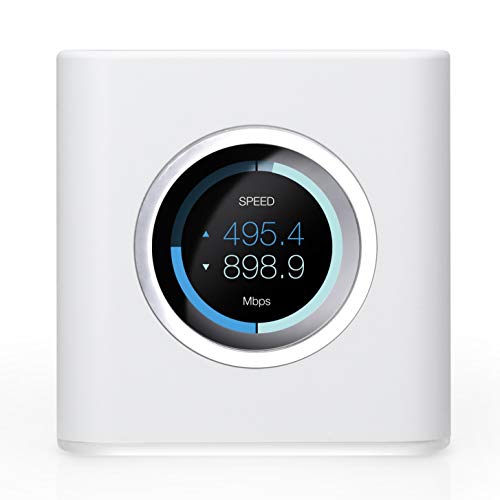
- ✓ Strong coverage
- ✓ Easy setup
- ✓ Clean app metrics
- ✕ Higher price
- ✕ Bulkier footprint
| WiFi Standard | 802.11ac (Wi‑Fi 5) |
| Coverage Area (approx.) | Up to 6000 sq ft |
| Ports | 4× Gigabit Ethernet LAN, 1× Gigabit WAN, includes Ethernet cable |
| Mesh System Capability | Supports expansion with additional Routers or MeshPoints |
| Management Interface | touchscreen display on router; AmpliFi app with setup, monitoring, parental controls, guest access |
| Price | $329.99 |
You pull the AmpliFi HD Router out of the box and immediately notice the weight and solid feel in your hands. The touchscreen display glows with a clean, minimal interface, and the matte black finish looks sharp perched on a shelf.
It’s not just a router—it’s a small hub for your home network, and you can feel that in the build.
Powering it up, you’ll appreciate the straightforward setup flow in the AmpliFi app. In minutes you’re staring at live metrics, connected devices, and a quick guide that actually helps you tune things.
The four Gigabit ports and a dedicated WAN port are comfortably spaced, making it easy to pop in a NAS or a wired gaming console without cable scrambles.
Placement matters with AmpliFi, and you’ll notice the system’s mesh approach shine when you walk to the far end of a standard home. Signals stay steady as you move, and the MeshPoints in a larger home feel like a soft blanket over every corner.
The built‑in guest network works without a hitch, and parental controls are simple enough to tweak while you’re streaming with the family.
From a practical standpoint, the touchscreen is handy for quick status checks without grabbing your phone. The design stays cool even under heavy traffic, and the system scales nicely if you decide to add more MeshPoints later.
If you’re upgrading from a single router, this feels like a real upgrade in both coverage and reliability.
In everyday use, you’ll find the AmpliFi HD handles 4K streaming, gaming, and smart home devices with ease. It’s a confident, well-made system that doesn’t complicate your life with arcane settings.
If you want dependable whole-home Wi‑Fi now, this is the one you can grow into.
What Is a Mesh Router Amplifi and How Does It Improve Connectivity?
This technology impacts internet connectivity significantly, particularly in homes with multiple devices and users. According to a report by Statista, the average household in the U.S. has over 10 connected devices, which can lead to bandwidth congestion and decreased performance on traditional routers. Mesh networks help distribute the load more evenly across multiple nodes, ensuring stable connections and faster speeds, which is essential for activities like streaming, gaming, and video conferencing.
The benefits of using an Amplifi mesh router include improved Wi-Fi coverage, reduced latency, and enhanced network reliability. As more devices become connected to the internet, having a robust network becomes increasingly important. Amplifi systems often come equipped with features such as automatic updates, analytics, and diagnostics, which help users troubleshoot issues and maintain optimal performance. Moreover, the aesthetic design of Amplifi products, often resembling modern home décor, makes them suitable for placement in visible areas without compromising aesthetic appeal.
To maximize the effectiveness of a mesh router Amplifi, best practices include strategically placing nodes in areas of the home where coverage is needed most, avoiding physical obstructions like walls or large furniture that could interfere with signal strength. Regularly updating the firmware also ensures that the network remains secure and benefits from the latest performance enhancements. Additionally, utilizing the device’s built-in features, such as prioritizing bandwidth for specific devices during peak usage times, can further optimize the network’s performance.
What Are the Key Features That Make a Mesh Router Amplifi Stand Out?
The key features that make the Mesh Router Amplifi stand out include:
- Easy Setup: Amplifi routers come with a user-friendly mobile app that guides users through the installation process step-by-step, making it accessible even for those who are not tech-savvy. This quick setup helps users get their home network running in minutes.
- Powerful Performance: With advanced technology like 802.11ac Wi-Fi and mesh networking capabilities, Amplifi routers provide high-speed internet coverage across large areas, eliminating dead zones. This ensures smooth streaming, gaming, and browsing experiences throughout the home.
- Design and Aesthetics: The sleek and modern design of Amplifi routers sets them apart from traditional routers, allowing them to blend seamlessly into home decor. Their unique aesthetic appeal makes them an attractive addition to any room.
- Advanced Parental Controls: Amplifi offers robust parental control features that allow parents to manage internet access for their children. Users can set time limits, block inappropriate content, and monitor online activity, enhancing online safety for younger family members.
- Expandable System: Amplifi’s mesh system allows users to easily add more units to increase coverage as needed. This scalability means that users can adapt their network to their home size and layout without needing to replace their existing router.
- Guest Network Feature: The Amplifi router includes a guest network option that allows visitors to access the internet without compromising the security of the main home network. This feature is ideal for hosting guests while maintaining privacy and security.
- Robust Security Features: Amplifi routers come equipped with strong security protocols such as WPA3 encryption, ensuring that data transmitted over the network is secure. This focus on security helps protect users from potential cyber threats.
How Important Is Coverage Area When Choosing a Mesh Router Amplifi?
The coverage area is a critical factor when selecting the best mesh router Amplifi, as it determines how effectively the network can serve a home or office space.
- Size of the Area: The size of the area you need to cover significantly impacts your choice of a mesh router. If you have a larger home or office, you will require a system that can adequately reach all corners without dead zones, which often means opting for a higher-end model with a more extensive range.
- Number of Floors: Multi-story homes often pose a challenge for Wi-Fi coverage. When selecting a mesh router, consider the number of floors in your building, as some models can better penetrate walls and floors, ensuring that your network remains strong throughout the entire structure.
- Obstacles and Interference: The presence of walls, furniture, and electronic devices can interfere with Wi-Fi signals. It is essential to consider these obstacles when choosing a mesh router, as some models are designed to handle interference better than others, maintaining a strong connection even in challenging environments.
- Number of Devices: The coverage area also needs to accommodate the number of devices that will connect to the network. A mesh router that supports a higher number of devices will ensure that multiple users can access the internet simultaneously without a drop in performance, which is particularly important in busy households or offices.
- Expandable Systems: Some mesh systems offer the option to expand coverage by adding additional nodes. This feature is beneficial for adapting to changes in your space or needs, allowing you to enhance coverage without replacing your entire system if your requirements grow.
What Role Does Internet Speed Play in Selecting a Mesh Router Amplifi?
Internet speed is a crucial factor to consider when selecting the best mesh router Amplifi, as it directly impacts the performance and user experience of your network.
- Bandwidth Capacity: The bandwidth capacity of a mesh router determines how much data can be transmitted simultaneously. Higher bandwidth allows multiple devices to connect without slowing down the network, making it essential for households with many users or devices.
- Data Throughput: Data throughput refers to the actual speed at which data is transferred over your network. Choosing a mesh router with a high throughput rating ensures that you can achieve speeds close to your internet service provider’s maximum, enabling smooth streaming, gaming, and video calls.
- Latency Levels: Latency measures the delay before data starts to transfer, which can affect real-time applications like online gaming or video conferencing. A good mesh router should minimize latency to provide a seamless experience, especially when multiple users are online.
- Wi-Fi Standards: The Wi-Fi standards supported by a mesh router, such as Wi-Fi 5 (802.11ac) or Wi-Fi 6 (802.11ax), significantly influence internet speed and efficiency. Newer standards typically offer faster speeds, better performance in crowded environments, and improved handling of multiple devices.
- Range and Coverage: Internet speed is also affected by the range and coverage provided by the mesh router. A router that can cover larger areas effectively allows for consistent internet speeds throughout the home, reducing dead zones and ensuring all devices have reliable access.
What Are the Top Mesh Router Amplifi Models Currently on the Market?
What Are the Top Mesh Router Amplifi Models Currently on the Market?
Currently, several models of Amplifi mesh routers stand out for their performance and features.
-
AmpliFi HD: This model is popular due to its high-speed capabilities and stylish design. It offers a coverage area of up to 20,000 square feet and can reach speeds of 5,000 Mbps. The HD also supports a 4×4 MU-MIMO configuration, ensuring multiple devices can operate smoothly simultaneously.
-
AmpliFi Alien: The Alien is noted for its advanced Wi-Fi 6 technology, delivering faster speeds and increased capacity for connected devices. With a coverage range that also spans thousands of square feet, it features a unique touchscreen interface for easy management and setup.
-
AmpliFi Instant: Ideal for smaller spaces, the Instant model provides a simple solution with robust performance. It combines dual-band technology and a straightforward setup process through the AmpliFi app. While its coverage is less extensive, it’s a budget-friendly option for those needing efficient home networking.
These models showcase Amplifi’s dedication to creating powerful mesh networking solutions, catering to a variety of user needs and environments.
What Benefits Can Users Expect from Using a Mesh Router Amplifi?
Users can expect a variety of benefits from using the best mesh router Amplifi, which enhances home network performance and coverage.
- Extended Wi-Fi Coverage: Mesh routers like Amplifi use multiple nodes to create a seamless network, significantly expanding Wi-Fi coverage throughout a home or office. This eliminates dead zones and ensures a strong signal in every corner of the space.
- Improved Connection Stability: The Amplifi system utilizes dynamic routing technology, which intelligently manages your network traffic. This results in a more stable and reliable connection, reducing buffering and dropouts during streaming or gaming sessions.
- Easy Setup and Management: Amplifi routers come with user-friendly mobile apps that guide users through the setup process and provide intuitive management options. Users can easily monitor network performance, manage devices, and adjust settings from their smartphones.
- Scalability: The mesh network is easily expandable, allowing users to add more nodes as needed without complicated configurations. This feature is ideal for growing households or expanding office environments where network demands may increase over time.
- Enhanced Security Features: Amplifi routers include robust security protocols, such as WPA3 encryption and automatic firmware updates. These features help protect users from potential cyber threats while ensuring that the network remains up-to-date with the latest security enhancements.
- Smart Home Integration: Many Amplifi models offer compatibility with smart home devices, allowing users to easily connect and manage their IoT devices. This integration supports a seamless smart home experience, making it easier to control everything from lights to thermostats.
How Do Mesh Router Amplifi Systems Compare to Traditional Routers?
| Aspect | Mesh Router Amplifi | Traditional Router |
|---|---|---|
| Coverage | Offers extensive coverage with multiple nodes to eliminate dead zones. | Limited coverage, typically effective only in smaller areas without additional extenders. |
| Speed | Maintains fast speeds across multiple devices, ideal for high-bandwidth activities. | Speed may decrease with multiple devices connected, particularly in larger spaces. |
| Ease of Setup | User-friendly app for setup and management, often requiring minimal technical knowledge. | Setup can be complex, often requiring manual configuration through a web interface. |
| Cost | Generally higher initial investment due to multiple units but offers greater value over time. | Lower upfront cost, but may require additional equipment to enhance coverage. |
| Security Features | Enhanced security with automatic updates, guest network options, and robust encryption. | Basic security features, may require manual updates and lacks advanced options. |
| Device Compatibility | Compatible with a wide range of devices, including IoT and smart home products. | May have compatibility issues with certain smart devices, particularly older models. |
| Number of Devices Supported | Supports a large number of simultaneous connections, ideal for smart homes. | Limited support for simultaneous connections, may struggle with many devices. |
| Firmware Updates and Support | Regular automatic updates and dedicated customer support. | Manual updates required, support can vary by manufacturer. |