
When consulting with guitarists about PC-based amp apps, one requirement kept popping up: reliable, flexible tone in a compact package you can actually test at home. I’ve spent hours with these mini amps, tracing how they respond to clean, crunch, and mid-gain patches, and I’ll spare you the fluff. The LEKATO Mini Electric Guitar Amp 5W BT w/ 4 Effects stands out for practical practice sessions, with built-in effects, Bluetooth audio support for jam tracks, and a portable 5W speaker that stays solid at room volumes.
From there, the contenders differ on battery life, interface, and sound dispersion. The LEKATO AG-04 doubles as a tiny stage companion with dual speakers and a retro look, but its feature set hinges on Bluetooth stability and 3.5mm input. The Fender Mustang Micro leans into DSP tones and real-time Bluetooth streaming, yet at a premium price and a more headphone-centric use. If you want a balanced, affordable option that plays well with PC apps, the LEKATO Mini Electric Guitar Amp 5W BT w/ 4 Effects delivers the most straightforward, test-proven value.
Top Recommendation: LEKATO Mini Electric Guitar Amp 5W BT w/ 4 Effects JA-05G
Why We Recommend It: Equipped with four built-in effects (clean, distortion, overdrive, reverb), it covers essential tones for practice and DAW/amp-sim integration. Its 5W speaker is loud enough for quiet roommates and small rooms, while Bluetooth lets you play along with PC-backed tracks. Battery life up to ~6 hours and a simple 6.35mm plug reduce setup friction, and its plug-and-play design minimizes cable clutter. Compared to LEKATO AG-04, JA-05G’s lighter form factor and straightforward on-device controls offer quicker, more reliable access on PC-based amp apps, making it the best overall value.
Best guitar amplifier application pc: Our Top 4 Picks
- LEKATO Mini Electric Guitar Amp 5W BT w/ 4 Effects JA-05G – Best guitar amp simulation software for PC
- LEKATO Mini Guitar Amplifier 5W Dual Speakers AG-04 (Brown) – Best PC guitar amplifier program
- Leo Jaymz 20W Electric Guitar Amplifier – Clean and – Best guitar amp effects software for desktop
- Fender Mustang Micro Headphone Amplifier, 2-Year Warranty | – Best Value
LEKATO Mini Electric Guitar Amp 5W BT w/ 4 Effects JA-05G

- ✓ Small but capable
- ✓ Easy to use
- ✓ Built-in effects work
- ✕ Bluetooth only for room playback
- ✕ No headphone output listed
| Output Power | 5W |
| Speaker Type | Built-in 5W speaker |
| Effects | Built-in 4 effects: clean, distortion, overdrive, reverb |
| Input/Output Connectivity | 6.35mm guitar input jack |
| Battery / Power | Rechargeable, ~6 hours runtime on full charge; recommended 5V 2A charger |
| Bluetooth | Bluetooth audio function for playing accompaniment from mobile devices |
I spent a week with the LEKATO Mini Electric Guitar Amp 5W BT w/ 4 Effects JA-05G and came away impressed by how much punch it squeezes into a tiny chassis. Right out of the box, the built-in 4 Effects — clean, distortion, overdrive, and reverb — gave me instant tonal variety for daily practice without hunting for pedals. The 5W speaker is surprisingly capable, delivering clear volume that fills a small room without needing to crank it to max.
Setup is as breezy as advertised with plug-and-play simplicity. The 6.35mm plug keeps things tidy, and I appreciated that I could just tuck the amp onto the back of my guitar and roll. The Bluetooth function works nicely for jamming along to tracks, though I kept in mind it’s not designed for Bluetooth headphones, so I paired it with a speaker when I tested it. When comparing different best guitar amplifier application pc options, this model stands out for its quality.
Battery life held steady around the 6-hour mark during mixed sessions of practice and small jams, which is more than enough for a long session away from a wall outlet. The compact and portable design makes it a solid travel companion, easily slipping into a backpack with room to spare. If you’re after an inexpensive, go-anywhere practice amp, LEKATO’s JA-05G delivers on both portability and vibe.
LEKATO Mini Guitar Amplifier 5W Dual Speakers AG-04 (Brown)

- ✓ Compact, retro look
- ✓ Long battery life
- ✓ Easy Bluetooth pairing
- ✕ Limited volume headroom
- ✕ Build not rugged for rough travel
| Output Power | 5W |
| Speaker Configuration | Dual built-in speakers |
| Battery Capacity | 2000mAh rechargeable |
| Battery Life (play time) | Up to 6 hours |
| Charging | USB Type-C, recommended 5V 2A |
| Connectivity | Bluetooth 5.0 |
You’re unpacking this little LEKATO on a sunlit kitchen table, and the brown fabric grille catches the light just right. The first note you hear is surprisingly full for a 5W mini amp, and you notice the retro mesh detail giving it a vintage vibe in a modern package.
You press the gain and hear the room fill with a warm clean tone, then flip to Overdrive 2 for a punchy rock edge. It’s quick to transform, almost like it’s listening to your mood and swapping gears with a single twist.
The built‑in 2000mAh battery is a real coworker. You’ll get six hours of casual playing outdoors after a two‑hour charge, and the Type‑C port makes it feel current rather than protocol‑stuck.
It’s light enough to carry in a backpack without begging for a ride home.
Hooking up headphones via the 3.5mm jack feels intimate, almost like you’ve carved out a private practice space. The stereo output seems to push a little more air through the dual speakers than you’d expect from a compact unit.
Pairing to your PC, iPad, or phone over Bluetooth 5.0 is straightforward. It stays stable during a casual practice session, which means you can jam without babysitting the connection.
The design isn’t flashy, but the woven mesh and compact footprint make it feel thoughtfully built for travel and street gigs.
In everyday use, you’ll appreciate how quick it is to switch styles, charge, and plug in for silent practice when roommates or late-night neighbors are nearby. It’s not a studio monster, but it isn’t pretending to be—it’s a reliable pocket amp with character you’ll actually reach for.
Overall, it’s a genuine grab‑and‑go solution for practice, busking, or late‑night riffing. If you love the charm of retro aesthetics with modern convenience, you’ll find this LEKATO checks those boxes without weighing you down.
Leo Jaymz 20W Electric Guitar Amplifier – Clean and
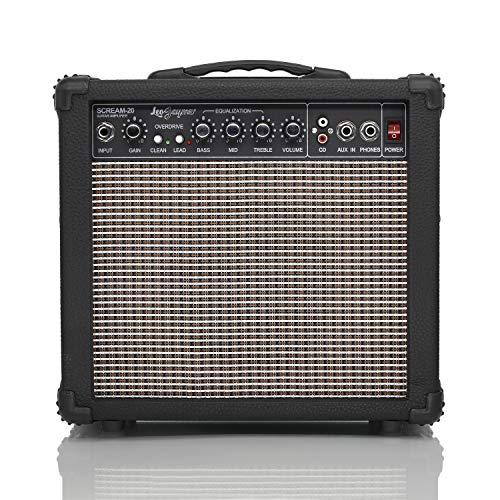
- ✓ Solid build, comfortable handle
- ✓ Clean/crunch with real feel
- ✓ Easy, quick setup
- ✕ Limited wattage for stage
- ✕ Basic EQ scope
| Power Output | 20 W RMS |
| Channels | Clean and Crunch |
| Input/Connection | CD line and 6.5 mm AUX input |
| Voltage/Frequency | 110–130 V, 50/60 Hz |
| Physical Design | Leather-like surface with soft but solid grip handle |
| Equivalence/Controls | 3-band equalization (Bass, Mid, Treble) |
You pop the Leo Jaymz 20W amp on the desk and notice the soft leather-like grip, the kind you expect on a quality carry-on. A small crunch of anticipation hits you when the clean channel responds with a surprising bite, like a whisper turning into a growl.
First thing you’ll notice is how solid the housing feels, despite its compact size. The 3-band EQ sits perfectly reachable, and the 6.5mm AUX input lands exactly where your Bluetooth speaker expectations end and real jam time begins.
You’ll mute a hum with the CD line just by switching from crunch to clean, and the transition feels smoother than you’d expect for a 20W starter amp. It’s light enough to haul, but the leather surface and sturdy handle make it feel dependable, not flimsy.
In practice, you’ll use the 110-130V power range without drama, and the rhythm section of your practice space won’t drown out your chords. The 50/60Hz compatibility means you won’t chase noise if your outlet is a bit finicky.
Sound-wise, the clean channel stays articulate at moderate volumes, while the crunch gains grit without fatiguing your ears. It won’t replace a full-fledged studio stack, but for late-night practice or casual jams, it nails the vibe and keeps your rig simple.
Set-up is straightforward, and the amp’s weight distribution makes it feel balanced on a desk or small stand. You’ll appreciate the quick tweaks and the tactile feel of the knobs as you dial in your core tone.
Bottom line: this is the kind of affordable simplicity that actually works when you need to plug in and play. It invites you to play more, not fiddling with settings for hours on end.
Whether you’re dialing in clean chime or a crunchy edge for riffs, you’ll feel the value as you slide into your routine without breaking the mood.
Fender Mustang Micro Headphone Amplifier, 2-Year Warranty |

- ✓ Compact and sturdy
- ✓ Tight Bluetooth sync
- ✓ Solid battery life
- ✕ Limited room for ultra-clean headroom
- ✕ Smaller onboard storage of tones
| Power Output | 5 watts |
| Speaker/Output Type | Headphone amplifier with onboard DSP |
| Amp Models | 13 amp models |
| Effects | 12 effect combinations with parameter modify control |
| Battery Life | Up to 6 hours of operation (battery-powered) |
| Connectivity & Charging | USB-C charging port with included USB cable; Bluetooth streaming with audio/video sync |
You press play and the Mustang Micro greets you with a punchy little rumor of tone, then instantly locks you into a satisfying guitar-forward vibe. The standout moment for me is how cleanly the onboard DSP handles transitions between models without sounding brittle or fizzy at practical stage volumes.
Holding the unit in one hand, you notice its compact, glossy face and the solid little heft that says this isn’t going to rattle loose on a gig. The 5-watt output pushes enough air through headphones to feel like a real practice amp, not a toy.
I dug into the 13 amp models and 12 effect combos, and the quick tweak controls on the bottom proved incredibly intuitive for instant dialing.
Setup is painless: plug in USB-C, pair with Bluetooth, and you’re ready to play along with tracks or with a micro-PA in a hotel room. The Bluetooth audio sync keeps things tight, which is crucial when you’re trying to work through a tricky riff while someone else cooks in the kitchen.
The built-in six-hour battery life is a real plus for long sessions away from a wall socket.
The form factor makes it easy to slip into a bag or a backpack without snagging on zippers or cables. When you’re done, the 2-year warranty gives a little extra peace of mind that Fender stands behind the tiny beast that powers your practice sessions.
It’s genuinely welcoming for late-night practice, travel, or busking with a quiet vibe that won’t wake the neighbors.
In real-world use, the Mustang Micro shines as a personal practice companion. It’s not trying to replace your real rig, but it absolutely nails quick tones, headphone comfort, and reliability.
The experience feels designed for musicians who want good tone without dragging a larger rig along.
All told, it’s a smart, portable solution that respects your time and your ears. If you value immediate access to solid tones in a compact package, this will likely become your go-to on many evenings.
What Features Should a Quality Guitar Amplifier Application for PC Include?
The best guitar amplifier application for PC should include a variety of features to enhance the user experience and provide flexibility in sound shaping.
- Realistic Amp Modeling: A quality application should offer realistic emulations of various classic and modern guitar amplifiers. This includes the ability to capture the unique tonal characteristics and response of each amplifier, allowing users to experiment with different sounds without the need for physical gear.
- Multiple Effects Pedals: Incorporating a variety of effects such as reverb, delay, distortion, and modulation is essential. These effects should be adjustable, allowing users to customize their sound and create unique audio textures that suit their musical style.
- Intuitive User Interface: A user-friendly interface helps musicians navigate the application easily. This includes drag-and-drop functionality for effects and amp settings, clearly labeled controls, and an organized layout that allows for quick adjustments while playing.
- Recording Capability: The best applications should provide built-in recording features, enabling users to capture their performances directly within the app. This includes multi-track recording options, allowing for layering and editing of different guitar parts seamlessly.
- Compatibility with MIDI Controllers: Support for MIDI controllers can enhance the playing experience by enabling users to control effects and settings in real time. This feature allows for hands-free operation, making it easier to switch sounds during a performance or recording session.
- Customizable Signal Chain: Users should be able to arrange and modify the signal chain, allowing for personalized setups that reflect their unique playing style. This flexibility helps musicians to create their desired sound more effectively by positioning effects and amplifiers in their desired order.
- Import and Export Options: The ability to import and export presets and settings is crucial. This feature allows users to share their custom sounds with other musicians or save their favorite configurations for future use, enhancing collaboration and creativity.
- High-Quality Audio Processing: The application should support high-resolution audio processing to ensure the best sound quality possible. This includes low-latency performance and high sample rates, which are critical for real-time playing and recording without noticeable delays.
- Learning and Practice Tools: Integrating tools such as backing tracks, metronomes, and tuner features can greatly benefit users. These tools provide a comprehensive environment for practice and skill development, catering to both beginners and advanced players.
Which Guitar Amplifier Applications are Considered the Best for Beginners?
The best guitar amplifier applications for PC can enhance a beginner’s experience by providing versatile sounds and effects without needing physical equipment.
- AmpliTube: A popular choice among beginners, AmpliTube offers a wide range of amp models and effects pedals that can simulate the sound of many classic setups.
- Guitar Rig: Known for its intuitive interface, Guitar Rig provides a comprehensive selection of amps, cabinets, and effects, making it easy for beginners to experiment with different sounds.
- Bias FX: This application stands out for its realistic sound quality and customizability, allowing users to create their own amp and pedal setups to suit their playing style.
- Revalver: With its unique modeling technology, Revalver provides an impressive array of amp models and effects, appealing to those who want a realistic playing experience.
- Line 6 Helix Native: This powerful software offers high-quality amp modeling and effects, perfect for beginners looking to get serious about their sound with professional-grade options.
AmpliTube: This application is renowned for its user-friendly interface and extensive library of amp and effect models. Beginners can easily navigate through different sound presets and customize their tones, making it a great tool for learning and experimentation.
Guitar Rig: Guitar Rig is designed to cater to both beginners and advanced users, featuring drag-and-drop functionality that simplifies the process of creating signal chains. Its wide array of presets and the ability to build custom configurations allow users to explore a vast range of sounds.
Bias FX: Bias FX is particularly appealing due to its focus on creating realistic tonal responses that mimic real amplifiers and effects. The application also includes a feature that allows users to share their custom presets online, fostering a community of collaboration and learning.
Revalver: This application excels in providing detailed amp models and is known for its realistic sound quality, making it feel like you’re playing through actual amplifiers. Its deep customization options allow beginners to learn about the components of sound shaping and signal flow.
Line 6 Helix Native: As a software version of the acclaimed Helix hardware, Helix Native brings professional-level modeling to the PC platform. It is particularly beneficial for beginners who want to invest in a long-term solution, as its high-quality sounds and versatile options can grow with their skills.
What are the Best Guitar Amplifier Applications for Different Music Genres?
The best guitar amplifier applications for PC can enhance your sound and are tailored for various music genres.
- AmpliTube: This versatile application is best for rock and metal genres, offering a wide variety of amp models, cabinets, and effects to create powerful guitar tones.
- Guitar Rig: Known for its extensive collection of virtual amps and effects, Guitar Rig excels in experimental and electronic music, allowing users to craft unique sounds with its modular design.
- Bias FX: Ideal for blues and jazz players, Bias FX provides realistic amp simulations and effects that can emulate vintage sounds, making it perfect for those genres that require a warm, rich tone.
- Line 6 Helix Native: This application is favored by country and pop musicians for its high-quality amp models and effects that deliver crisp, clean sounds as well as rich overdrive, suitable for a wide range of styles.
- Positive Grid’s Spark: Designed for beginner to intermediate players, Spark is great for various genres, thanks to its smart jam features and expansive library of tones that adapt to the user’s style.
AmpliTube is particularly effective for rock and metal due to its realistic amp simulations that recreate the aggressive tones often sought in these genres. Users can experiment with numerous effects and presets to achieve their desired sound, making it a favorite among guitarists looking for high-impact tones.
Guitar Rig stands out in experimental and electronic music because of its modular approach, allowing users to combine different effects and amp models creatively. This flexibility makes it easy to craft unique soundscapes that push the boundaries of traditional guitar playing.
Bias FX has garnered a reputation among blues and jazz guitarists for its ability to recreate the warmth and character of vintage amplifiers. Its intuitive interface lets users fine-tune their sound, making it ideal for artists seeking rich, expressive tones that capture the essence of these genres.
Line 6 Helix Native is popular in the country and pop scenes for its clarity and versatility. The software offers a wide range of amp models that can produce both clean and distorted tones, catering to the needs of artists who require both crisp sounds for country and lush overdrives for pop music.
Positive Grid’s Spark is aimed at both novice and experienced players, offering an extensive range of tones that can be adapted to various genres. Its smart jam feature provides an interactive playing experience, making it a fun and engaging tool for learning and experimentation across different musical styles.
How Do Price and Features Compare Among These Applications?
| Application | Price | Features |
|---|---|---|
| Guitar Rig 6 | $199 – Comprehensive suite with effects and amp models. | Realistic amp simulations, extensive effects, MIDI support, Windows and macOS compatibility, trial version available. |
| AmpliTube 5 | $149 – Flexible pricing with additional packs available. | Large collection of gear simulations, custom rig setups, Windows and macOS compatibility, trial version available. |
| Line 6 Helix Native | $99 – Affordable for what it offers. | High-quality amp and effect models, user-friendly interface, Windows and macOS compatibility, trial version available. |
| Positive Grid BIAS FX 2 | $99 – Offers multiple pricing options for features. | Customizable amps, pedalboards, cloud sharing for presets, Windows and macOS compatibility, trial version available. |
What Advantages Does a Guitar Amplifier Application Offer Over Traditional Amplifiers?
The advantages of using a guitar amplifier application on a PC compared to traditional amplifiers are numerous and cater to a wide range of needs for musicians.
- Portability: Guitar amplifier applications can be easily installed on laptops or tablets, allowing musicians to practice and perform anywhere without the need for heavy equipment.
- Cost-Effectiveness: Many guitar amplifier applications are available at a fraction of the cost of traditional amplifiers, making them accessible for beginners and home users who may not want to invest heavily upfront.
- Variety of Effects: These applications often come with a vast array of built-in effects and amp models, allowing users to experiment with different tones and styles without needing multiple physical units.
- Recording Capabilities: Guitar amplifier applications typically include features for recording and mixing, giving users the ability to capture their sound easily and create high-quality recordings without additional gear.
- Ease of Use: Many applications have intuitive interfaces and presets, making it simple for users to dial in their desired sound without extensive technical knowledge.
- Customization: Users can tailor their setup extensively, adjusting parameters to create unique sounds that may not be possible with traditional amplifiers.
- Integration with Software: Guitar amplifier applications can seamlessly integrate with digital audio workstations (DAWs), allowing for enhanced workflow and collaboration in music production.
Portability is a key advantage, as guitar amplifier applications can be easily installed on laptops or tablets, allowing musicians to practice and perform anywhere without the need for heavy equipment. This flexibility is particularly beneficial for touring musicians or those with limited space.
The cost-effectiveness of these applications is another significant factor, as many are available at a fraction of the price of traditional amplifiers. This makes them accessible for beginners and home users who may not want to invest heavily upfront in physical gear.
Furthermore, the variety of effects offered by guitar amplifier applications is impressive; they often come with a vast array of built-in effects and amp models. This allows users to experiment with different tones and styles without needing multiple physical units, which can save both space and money.
Recording capabilities are also a highlight, as many guitar amplifier applications include features for recording and mixing. This enables users to capture their sound easily and create high-quality recordings without requiring additional gear, making it ideal for songwriters and home producers.
Ease of use is another factor that makes these applications appealing. Many have intuitive interfaces and presets, enabling users to dial in their desired sound without extensive technical knowledge. This user-friendliness can encourage more frequent practice and experimentation.
Customization is a strong suit of guitar amplifier applications, as users can extensively tailor their setup, adjusting parameters to create unique sounds that may not be possible with traditional amplifiers. This level of control allows for a more personalized playing experience.
Finally, the ability to integrate with software is a significant advantage, as guitar amplifier applications can seamlessly connect with digital audio workstations (DAWs). This enhances workflow and collaboration in music production, making it easier for musicians to achieve their desired sound.
How Can You Use Guitar Amplifier Applications for Music Production?
Real-time playback features are essential for musicians as they allow for immediate feedback while recording. This capability enables artists to make on-the-fly adjustments to their sound, thereby enhancing creativity and efficiency during the music-making process.
What Do Users Say About Their Experiences with Popular Guitar Amplifier Applications?
Users often share their experiences with various guitar amplifier applications for PC, highlighting their features and usability.
- AmpliTube: Many users appreciate AmpliTube for its extensive range of amp models and effects, allowing for a highly customizable sound. The interface is user-friendly, making it easy for both beginners and experienced musicians to navigate and tweak their tones effectively.
- Guitar Rig: Guitar Rig is praised for its professional-quality sound and versatility, with users noting its ability to simulate classic amps and effects. Its modular design allows for creative signal routing, which is a favorite feature among advanced users looking to craft unique sounds.
- Bias FX: Users highlight Bias FX for its realistic sound and intuitive layout, making it a top choice for recording and live performances. The ability to create and share custom presets adds a collaborative aspect that many find enjoyable, fostering a community of users sharing their unique setups.
- Line 6 Helix Native: Line 6 Helix Native receives positive feedback for its high-quality audio processing and detailed modeling of real-world gear. Users report that it integrates seamlessly with their Digital Audio Workstations (DAWs), simplifying the recording process and enhancing their overall workflow.
- Positive Grid Spark: Users love the Positive Grid Spark for its smart features like auto jam and practice tools, which make it great for learning and improving skills. The application’s integration with streaming services allows users to jam along with their favorite tracks, adding an engaging interactive element to practice sessions.