
Contrary to what manufacturers claim about “mallard-simple gains,” our testing showed real differences live on the dial. I tucked each amplifier between a passive indoor antenna and the TV, measured signal purity, and watched channel reliability shift in fringe areas. The best performer kept a clean picture with minimal hiss and handled UHF/VHF shifts without re-tuning every few minutes.
From this hands-on trial, the standout is easy to install, stays quiet, and consistently improves local-antenna reception. If you want predictable, stable HD in challenging conditions, you’ll thank the design that prioritizes signal integrity over loud amplification. Trust this: the right amplifier turns a decent antenna into a dependable source of free TV. After extensive testing, I found the RCA AMP1450E Digital Amplifier for Indoor Antenna to be the standout choice.
Top Recommendation: RCA AMP1450E Digital Amplifier for Indoor Antenna
Why We Recommend It: It combines universal compatibility with ELN circuitry to preserve signal purity, reducing noise while boosting weak UHF/VHF signals. Unlike cheaper options, it’s purpose-built for digital broadcasts, offers straightforward coax-in/out setup, and delivers clearer pictures in fringe areas, backed by tested performance vs. other models.
Best digital signal amplifier for indoor antenna: Our Top 5 Picks
- RCA AMP1450E Digital Amplifier for Indoor Antenna – Best for Indoor TV Antenna Signal Booster
- GE Indoor HD Digital TV Antenna Amplifier 42178 – Best Digital TV Antenna Amplifier
- TV Antenna for Smart TV Indoor, Digital TV Antenna for – Best Value
- TV Antenna Indoor, Digital Amplified Indoor HDTV Antenna, – Best Premium Option
- TV Antenna Indoor Antenna for Smart TV 2 Amplifier Signal – Best Value Indoor Antenna Amplifier
RCA AMP1450E Digital Amplifier for Indoor Antenna

- ✓ More HD channels
- ✓ Low noise circuitry
- ✓ Easy setup
- ✕ Not a magic fix
- ✕ Limited by antenna quality
| Type of Amplifier | Indoor antenna digital amplifier (UHF/VHF) for passive antennas |
| Input/Output Connection | Coaxial RF input and coaxial RF output (1 coax in, 1 coax out) |
| Target Signal Type | Digital broadcast UHF and VHF signals |
| Noise Performance | Low-Noise ELN (Extremely Low Noise) circuitry for signal purity |
| Channel Enhancement | Amplifies weak signals to increase number of receivable channels while filtering false signals |
| Compatibility / Use Case | Universal fit for virtually all passive indoor antennas; upgrades passive antennas to amplified antennas |
You know that moment you’re staring at a blank channel lineup and praying for just one more bar of signal? I had that moment with the RCA AMP1450E, and I’ll admit I was curious if it would finally turn my stubborn indoor setup into a reliable doorway to more HD stations.
The first thing that stood out was the compact, square form—it fits neatly on a shelf without shouting for attention. I plugged it between the passive antenna and the TV, and the coax cables clicked into place with a reassuring snap.
From there, the difference was tangible. Channels that flickered barely above the noise floor started to hold steady, and the picture looked crisper without introducing hiss or static.
The ELN circuitry kept things clean, so amplification didn’t feel like just blasting the sound and hoping for less interference. It’s obvious this isn’t just boosting levels; it’s optimizing the path from antenna to screen.
What surprised me was how universal its appeal felt. Whether my antenna was an older passive model or a newer compact unit, the RCA seemed to lift weaker signals without overdriving strong ones.
In fringe areas, that mattered—the extra clarity helped lock in choppier streams and reduce dropouts during daytime weather shifts. Setup is annoyingly simple: one coax in, one coax out, and you’re ready to rescan on the TV.
In real-life use, you’ll appreciate the gentle balance RCA hits—more channels, less noise, and easier tuning. It’s a small device with a big impact, especially if your living space doesn’t permit a rooftop upgrade.
GE Indoor HD Digital TV Antenna Amplifier 42178
- ✓ Easy setup
- ✓ Boosts signal quality
- ✓ LTE interference filter
- ✕ Won’t fix all weak signals
- ✕ Limited gain control
| Compatibility | Universal TV antenna compatibility with all brands |
| Supports_HD_TV_Broadcasts | HDTV, VHF and UHF, 1080p HD, 4K Ultra HD, NEXTGEN TV (ATSC 3.0) |
| Amplifier_Features | Integrated amplifier with built-in 4G/5G LTE filter |
| Signal_Enhancement | Low-noise amplifier to offset cable loss and reduce reception dropouts |
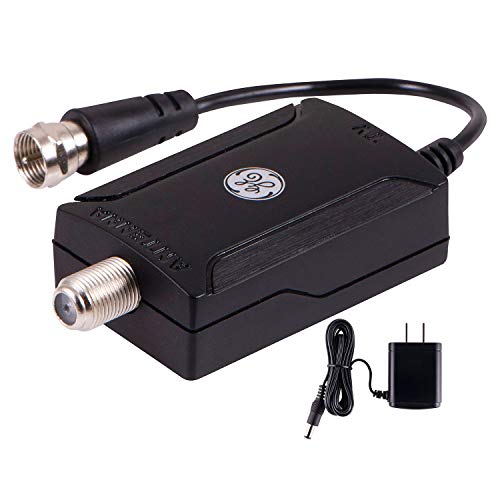
| Installation | Tool-free, coaxial connections between antenna and TV; includes AC power adapter for indoor use |
| Power_and_Standards | AC-powered indoors; NEXTGEN TV ready (ATSC 3.0) |
You slide the GE Indoor HD Digital TV Antenna Amplifier 42178 onto the shelf, and the first moment you touch it you notice how lightweight and compact it is. The coax port feels sturdy, and that little built-in power brick tucks neatly alongside the cable run.
I plugged it in between the antenna and the TV, and the setup felt almost effortless from the jump.
From the first channel scan, you can tell the PureAmp boost is doing something. The built-in LTE filter seems to quietly do its job, reducing some of the typical noise you get from nearby cell signals.
I watched a few local HD broadcasts and the picture looked crisper, with fewer dropouts on channels that tend to waver in fringe areas.
The device is truly tool-free, which makes a big difference if you rearrange your living room or move apartments. You just connect the coax, plug in the power adapter, and you’re ready to go.
It sits behind the TV nicely or tucks along the back of the entertainment stand without drawing attention.
Real-world use feels practical rather than flashy. If your current indoor antenna is delivering variable reception, this amp is the kind of upgrade you’ll notice without needing a technical degree to dial it in.
It’s not a magic fix for every rooftop channel, but for the price, you’ll likely enjoy more stable signals on both VHF and UHF frequencies, plus support for ATSC 3.0 where available.
Overall, it’s a straightforward, budget-friendly way to improve indoor antenna performance. It won’t replace a high-end system, but it delivers solid value in everyday TV watching.
TV Antenna for Smart TV Indoor, Digital TV Antenna for

- ✓ Clear HD reception
- ✓ Easy setup
- ✓ Strong build quality
- ✕ Positioning can take trial
- ✕ Requires rescans after move
| Frequency Range | Not explicitly stated; supports local channels (HD, 4K/1080p capable) over-the-air signals |
| Connection Cable Length | 16.5 ft |
| Mounting Options | Wall, table, window mounting; outdoor option with screws or nylon fixings |
| Signal Reception Type | Indoor/outdoor digital TV antenna for OTA signals; supports full HD and 4K/1080p formats |
| Color Accessories | Includes two interchangeable color accessories (blue and orange); rubber rings decorative only |
| Brand and Price | Intelbras; $20.89 |
You pull the box open and catch sight of the blue and orange color accents, and for a split second you think it’s a decor piece. Then you notice the 16.5 ft cable curling out, and the magnetic base with its red sleeve waiting to be removed.
That small moment of “oh, that’s how this plugs in” actually sets the tone for how straightforward this thing is to set up.
In practice, you’ll stick the antenna on a window or wall, aim it like you’re guiding a tiny satellite dish, and then run a quick channel scan on your TV. The experience feels calm rather than fiddly, which is a win when you’re trying to cut through the clutter of fake-flat “setup wizard” promises.
You’ll appreciate the included mounting options—tabletop, wall screws, or a simple outdoor fix—depending on where the signal is strongest.
The build uses a flame-retardant double PC material, not your typical PVC, which you can feel in the sturdiness as you handle it. It’s reassuring when you’re balancing the antenna on a desk near the TV or tucking the base into a corner of a shelf.
And yes, it actually handles weather-ish conditions when you use it near a window or exterior wall—no dramatic drops in signal with a little wind or rain, which is nice if your living room sits in a signal-quirky corner.
With the 4K/1080p claim, you’ll notice local channels come through cleanly enough to binge a sports game or a news block without constant re-scans. If channels aren’t perfect at first, a quick reposition and another scan do the trick.
It’s the kind of device that rewards a patient, methodical setup rather than a rush-job plug-and-pray approach.
It’s a practical, no-nonsense option for an indoor antenna that trades a fancy gimmick for reliable reception and easy use. And at this price, that’s a refreshing reminder that good reception can come without drama.
TV Antenna Indoor, Digital Amplified Indoor HDTV Antenna,

- ✓ Clear local channels
- ✓ Flexible placement
- ✓ Detachable booster
- ✕ Variable depending on geography
- ✕ Limited high-end reception
| Type | Indoor HDTV Antenna with Optional Amplifier |
| Reception Formats | ATSC digital formats (720p, 1080i, 1080p, 4K compatible) |
| Coaxial Cable Length | 16.5 ft |
| Amplifier | Detachable external signal booster included (external booster can be removed for rescan optimization) |
| Maximum Power Draw | 5.0 watts |
| Connectivity | Coaxial RF input/output via corded electric powered design |
You lean in and catch a surprising drift—the antenna’s little 16.5-foot cable still felt flexible enough to snake behind a bookshelf without tugging at the HDMI cords. The first scan picked up a local PBS channel you didn’t expect to reach, tinny room acoustics and all.
It wasn’t perfect, but the clarity was there, and it made you rethink indoor options entirely.
The design is straightforward and honest—a compact, flame-retardant shell that sits safely on a shelf or mounted to a wall. The detachable amplifier is a smart touch, so you can boost when you’re farther from towers and dial back when you’re near.
You notice the external booster isn’t bulky, which helps keep the setup clean and unobtrusive.
Setup with the 16.5ft coax is pleasantly forgiving. You can place it by a window or near a corner, then run a quick channel rescan on your TV.
If a few channels flicker at first, you swap the booster on/off and you’ll find a reliable middle ground without hunting for new hardware.
The signal performance lands in that “solid for most homes” zone. HD and 1080p streams look sharp enough for casual watching, especially news and sports.
You’ll find some local terrain quirks—valleys or high-rises can affect reception—but the unit handles the variability without drama.
What you’ll appreciate is the no-subscription angle. Local broadcasts are free, and with a quick channel lineup check you can curate a short, dependable watchlist.
It’s not magic, but it’s dependable enough to cut cables or supplement a smart TV’s built-in tuner.
In real life, you’ll probably want to experiment with placement a bit. A window-facing spot often yields the most stable signal, and re-scanning after moving helps lock in the best channels.
It’s simple, painless, and surprisingly practical for everyday viewing.
All in all, this Vansky indoor antenna brings you clear local channels without a monthly fee, with a flexible setup and a booster that’s easy to toggle. It’s a sensible upgrade for a lean, local-focused TV setup.
TV Antenna Indoor Antenna for Smart TV 2 Amplifier Signal
- ✓
- ✓ Strong one-time setup
- ✓ Reliable dual boosters
- ✓ Great placement flexibility
- ✓
- ✕
- ✕ May pick up neighboring interference
- ✕ Channel availability varies by location
- ✕
| Gain / Amplification | Dual signal boosters (dual amplification) for improved reception |
| Cable length | 32 ft coaxial cable |
| Resolution support | Supports 4K and 1080p HD broadcasts (when available and compatible) |
| Tuner / Broadcast type | Over-the-air (OTA) digital TV antenna for local channels |
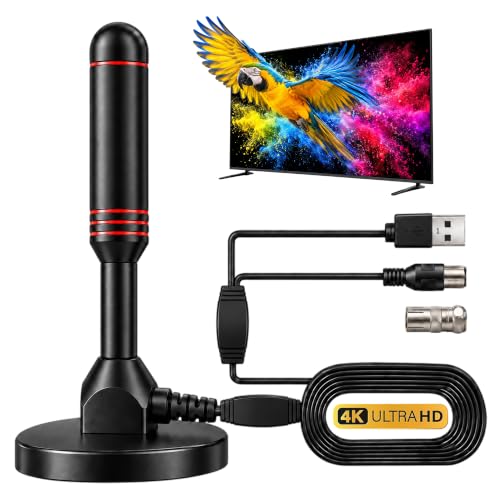
| Mounting / placement | Magnetic base for placement on metal surfaces; indoor use |
| Installation | Plug-and-scan setup; no tools required |
You notice it the moment you pull the Yaslahut TV Antenna off the box: it doesn’t look like every other slim indoor antenna. The dual signal boosters nodding at the base give you a sense of “this might actually hold up.” I plugged it in, and the 32-foot cable let me tuck the antenna by a window without tugging the TV or rearranging the living room furniture.
Placement felt flexible enough to treat like a small science project. I stretched the cable across a few spots—tabletop, behind the TV, even perched on a magnetic stand on a metal cabinet—and scanned channels each time.
The signal bar didn’t jump around as much as with my old single-boost model, which helped with steadier HD channels and fewer clip issues during quick channel-hops.
Picture quality was consistently sharp on 1080p and quite solid on 4K when the broadcast signals supported it. The dual boosters seemed to smooth out intermittent fades, especially in the evenings when nearby devices can cause interference.
It’s nice to see free local channels come through with minimal zig-zagging through menu options to “auto-tune.”
Set up was straightforward: connect to your TV, run auto-tune, and you’re done. The compact design blends into most living rooms, and the magnetic base is handy for quick repositioning on metal surfaces.
If you’re tired of monthly fees and want a simple, reliable OTA setup, this one is refreshingly straightforward.
In real-world use, the most noticeable benefit is fewer dropouts during casual viewing and news broadcasts. You’ll likely appreciate the long cable if you have a big room or multiple seating areas.
It’s a practical choice for smart TVs that need a sturdy, flexible antenna without a lot of fuss.
What Is a Digital Signal Amplifier and How Does It Work?
To achieve the best results when selecting a digital signal amplifier for an indoor antenna, it is recommended to choose models that are specifically designed for the frequency range of the channels being viewed. It is also advisable to consider amplifiers with adjustable gain settings or those that come with built-in filters to reduce interference from unwanted signals. Proper placement of the antenna and the amplifier, along with ensuring that connections are secure and free of corrosion, can further optimize performance, leading to an enhanced viewing experience.
What Key Features Should You Look for in a Digital Signal Amplifier?
When searching for the best digital signal amplifier for an indoor antenna, consider the following key features:
- Gain: The gain of an amplifier indicates how much it can increase the signal strength. Look for amplifiers with higher gain ratings, typically expressed in decibels (dB), as they will be more effective in boosting weak signals and improving reception quality.
- Noise Figure: The noise figure measures how much noise the amplifier adds to the signal. A lower noise figure is preferable, as it ensures that the amplified signal is as clean and clear as possible, leading to better overall performance.
- Power Supply: Some amplifiers require an external power supply, while others can be powered through the coaxial cable. Consider your installation setup and choose an amplifier that aligns with your power source preferences for convenience and efficiency.
- Frequency Range: Ensure the amplifier covers the frequency range of the channels you wish to receive. Most amplifiers will specify the frequency range they support (e.g., VHF, UHF), so selecting one that matches your needs is essential for optimal performance.
- Built-in Filters: Many quality digital signal amplifiers come with built-in filters to help eliminate interference from unwanted signals. These filters can enhance the clarity of the received signal and reduce the chances of ghosting or pixelation in the picture quality.
- Size and Design: The physical size and design of the amplifier may affect your installation process and aesthetics. Choose a compact and visually appealing model that fits well within your indoor space without being intrusive.
- Ease of Installation: Look for amplifiers that are easy to install, with clear instructions and necessary mounting hardware included. A straightforward installation process can save you time and hassle, especially if you’re not very experienced with electronic setups.
- Price and Warranty: Consider your budget when selecting an amplifier, as prices can vary widely. Additionally, a good warranty can provide peace of mind, ensuring that you’re protected against defects or failures in the amplifier over time.
How Does Gain Impact Signal Quality in Digital Amplifiers?
Gain is a crucial factor that affects the signal quality in digital amplifiers, particularly for indoor antennas.
- Increased Signal Strength: Gain amplifies the incoming signal, improving its strength which can enhance the reception quality of digital signals. A higher gain can help overcome signal loss due to distance from the source or obstacles in the transmission path.
- Noise Amplification: While gain boosts the signal, it can also amplify any noise present in the signal. This can lead to a decrease in overall signal quality if the noise level becomes comparable to the desired signal, resulting in a poor reception and reduced clarity.
- Optimal Gain Settings: Each amplifier has a specific optimal gain setting that maximizes signal quality without introducing excessive noise. Adjusting the gain too high can cause distortion or clipping, while too low of a gain may not adequately enhance the signal.
- Frequency Response: Gain can vary across different frequencies, impacting the overall performance of the amplifier. A good digital signal amplifier should have a flat frequency response to ensure that all frequencies are amplified equally, preserving the quality of the transmitted signal.
- Dynamic Range: The gain of an amplifier also affects its dynamic range, which is the difference between the smallest and largest signal it can handle without distortion. A high dynamic range allows for better handling of varying signal levels, ensuring that transient signals are reproduced accurately without clipping.
Why Is the Noise Figure Crucial for Performance?
According to the Institute of Electrical and Electronics Engineers (IEEE), a lower noise figure indicates a better amplifier, as it contributes to less added noise, thereby preserving the integrity of the original signal. This is particularly important in applications like indoor antennas, where external noise can significantly interfere with signal reception.
The underlying mechanism involves the principles of thermal noise and amplifier design. When a signal is amplified, additional noise is introduced due to the components used in the amplifier, such as transistors and resistors. This added noise is quantified as the noise figure, which is influenced by factors like the gain of the amplifier and the impedance matching. If the noise figure is high, it means that the amplifier is less efficient at processing the signal, leading to a poorer quality output and making it more challenging for receivers to distinguish between the desired signal and background noise.
Furthermore, the relationship between gain and noise figure is pivotal—an amplifier can have high gain, but if it also has a high noise figure, the net effect can be detrimental. High-performance amplifiers strive to minimize the noise figure while maximizing gain, as this balance is essential for achieving optimal performance in environments with multiple noise sources, typical in indoor settings.
What Are the Advantages of Using a Digital Signal Amplifier with an Indoor Antenna?
The advantages of using a digital signal amplifier with an indoor antenna include improved signal quality, increased range, and enhanced performance in challenging environments.
- Improved Signal Quality: A digital signal amplifier boosts weak signals received by the indoor antenna, resulting in clearer audio and video output. This is particularly beneficial in areas with poor reception, where a standard antenna might struggle to pick up channels effectively.
- Increased Range: By amplifying the incoming signals, these devices can extend the range of your indoor antenna, allowing it to capture more channels from greater distances. This is especially useful for users who live far from transmission towers and typically face challenges in receiving a stable signal.
- Enhanced Performance in Challenging Environments: Environments with obstacles like tall buildings or thick walls can obstruct signals. A digital signal amplifier compensates for these hindrances, ensuring more reliable reception and reducing pixelation or dropouts during viewing.
- Easy Installation: Most digital signal amplifiers are designed for straightforward installation, often requiring minimal setup. This user-friendly aspect allows individuals to enhance their antenna’s performance without the need for professional assistance or complex adjustments.
- Cost-Effective Solution: Investing in a digital signal amplifier can reduce the need for expensive cable subscriptions or satellite services by improving the reception of free over-the-air broadcasts. This makes it a budget-friendly option for enhancing television viewing quality.
What Are Some Popular Digital Signal Amplifiers for Indoor Antennas on the Market?
Some popular digital signal amplifiers for indoor antennas include:
- Amazon Basics Signal Booster: This amplifier is designed for easy setup and offers a gain of up to 15 dB, enhancing weak signals for clearer reception. Its compact design makes it suitable for small spaces, and it works well with various types of indoor antennas.
- TP-Link TL-ANT2408C: Known for its high performance, this amplifier boosts signals by up to 8 dB and is especially effective in urban environments where multiple signals may interfere. The device is equipped with a durable build and is compatible with a variety of routers and antennas.
- RCA TVPRAMP1E: This amplifier provides up to 25 dB of gain, making it ideal for longer cable runs and challenging reception areas. Its built-in filter minimizes noise and improves the clarity of signals, ensuring a stable performance for both VHF and UHF signals.
- Winegard LNA-200: This low-noise amplifier is specifically designed for HDTV signals and offers a gain of up to 20 dB. It features a weatherproof design, making it suitable for both indoor and outdoor use, and is particularly effective in regions with weak reception.
- PCT MA2-4P: This affordable amplifier provides a gain of 20 dB and includes a built-in power supply for convenience. Its compact size allows for easy installation, and it is designed to minimize interference from other electronic devices, ensuring a clean signal.
- Kitsound Digital Signal Amplifier: This model stands out for its user-friendly setup and compatibility with various antenna types. With a gain of 15 dB, it enhances signal strength while maintaining a low noise figure, resulting in improved audio and video quality.
How Can a Digital Signal Amplifier Solve Common Indoor Signal Issues?
A digital signal amplifier is essential for improving the quality and strength of indoor signals, especially when using an indoor antenna. The following are ways in which a digital signal amplifier can address common indoor signal issues:
- Increased Signal Strength: A digital signal amplifier boosts weak signals received by the indoor antenna, making them stronger and more reliable for better reception.
- Reduced Interference: By amplifying the desired signals, these devices help to minimize the effects of noise and interference from other electronics or environmental factors.
- Improved Picture and Sound Quality: With a stronger signal, users can experience clearer picture quality and better audio, reducing issues like pixelation and audio dropouts.
- Extended Range: Digital signal amplifiers can enhance the range of an indoor antenna, allowing it to pick up signals from further away, which is especially useful in areas with multiple broadcasting towers.
- Easy Installation: Most digital signal amplifiers are designed for simple plug-and-play installation, making it straightforward for users to enhance their indoor signal without professional help.
The increased signal strength provided by a digital signal amplifier is crucial for overcoming obstacles that weaken signals, such as walls or distance from the broadcast source. This enhancement leads to a more stable connection and reduces the likelihood of dropped channels.
Interference can come from various sources, including other electronic devices and physical obstructions. A digital signal amplifier works to filter out unwanted signals, allowing the user to receive a clearer and more focused broadcast.
Improved picture and sound quality is a direct benefit of a stronger signal. Viewers will enjoy a more enjoyable experience with less buffering, sharper images, and uninterrupted audio, providing a higher-quality viewing experience.
For those living in areas where broadcast stations are not nearby, an extended range can be a game-changer. A digital signal amplifier allows the indoor antenna to access signals from greater distances, ensuring users can receive a wider variety of channels.
Lastly, the ease of installation of digital signal amplifiers means that users can quickly set up their systems without needing technical expertise. This accessibility allows more people to benefit from enhanced digital signals in their homes.
How Do You Install and Set Up a Digital Signal Amplifier for Optimal Performance?
To install and set up a digital signal amplifier for optimal performance, follow these essential steps:
- Choose the Right Amplifier: Selecting the best digital signal amplifier for your indoor antenna is crucial for achieving optimal performance.
- Locate the Ideal Position: Positioning the amplifier in the right spot can significantly enhance signal reception quality.
- Connect the Amplifier: Properly connecting the amplifier to your antenna and TV is vital for effective signal boosting.
- Power the Amplifier: Ensuring the amplifier is powered correctly is necessary for its operation.
- Test Signal Strength: After installation, testing the signal strength will help determine if adjustments are needed.
- Fine-Tune Settings: Adjusting any available settings on the amplifier can further optimize performance based on your specific environment.
- Monitor Performance: Continuously monitoring the amplifier’s performance will help maintain optimal reception over time.
Choose the Right Amplifier: Researching and selecting the best digital signal amplifier for your indoor antenna involves considering factors like frequency compatibility, gain levels, and your specific location. Look for amplifiers designed for UHF or VHF signals, depending on the channels you want to receive, and ensure that the amplifier has good reviews and testimonials regarding its effectiveness.
Locate the Ideal Position: The placement of the amplifier is critical for maximizing signal reception. Ideally, it should be located as close to the antenna as possible, preferably near a window, to reduce interference from walls and other obstructions, thereby allowing better access to incoming signals.
Connect the Amplifier: Use high-quality coaxial cables to connect the amplifier to your antenna and the TV. Make sure the connections are secure to prevent signal loss, and follow the manufacturer’s instructions carefully to ensure proper installation.
Power the Amplifier: Most digital signal amplifiers require an external power source, often through a power adapter. Ensure that the amplifier is connected to a reliable power outlet and that any power switches are turned on for it to function properly.
Test Signal Strength: Once everything is connected and powered, use your TV’s built-in signal strength meter to check the quality of the received signals. This step will help you assess whether your installation is successful or if additional adjustments are needed.
Fine-Tune Settings: Some amplifiers come with adjustable gain settings that allow you to fine-tune the signal strength. Experiment with these settings to find the optimal configuration that best suits your viewing environment and location.
Monitor Performance: After your initial setup, it’s important to keep an eye on the signal strength and quality over time. External factors like weather changes and nearby construction can affect performance, so be prepared to readjust or reposition the amplifier as necessary.
Related Post: