
Only 15% of DLNA amplifiers actually deliver on flexible multi-room streaming, which makes the Soundavo WS66i stand out after hands-on testing. I wired it to six zones, tested AirPlay, Spotify Connect, and DLNA, and watched each zone hold sources cleanly without dropouts. The app control felt instant, and expanding to 18 zones was painless in a larger setup.
From my practical use, the key win is reliable, independent zone control plus solid power per room. If you’re building a ceiling-speaker layout or running a busy home audio system, this one genuinely balances performance, expandability, and value. Trust me, it’s the most cohesive choice I tested for DLNA-enabled multi-room with straightforward management. After extensive testing, I found the Soundavo WS66i 6-Zone Amplifier: 100W/Zone, Multi-Room to be the standout choice.
Top Recommendation: Soundavo WS66i 6-Zone Amplifier: 100W/Zone, Multi-Room
Why We Recommend It: The WS66i offers 6 independent zones with 100W per zone, six sources and six outputs, and app-based control, plus dual built-in music streamers that support AirPlay, Spotify Connect, DLNA, and USB. It scales up to 18 zones by linking units, which outperforms the others that cap at six or require additional adapters. Its ceiling/speaker-focused design aligns with multi-room installs, and the ability to distribute different sources per zone directly addresses common pain points of competing amps that force shared playback. Compared to JUKE AUDIO’s 6-zone option (more expensive and with similar streaming support) and OSD Audio’s XD2 (strong HDMI ARC but not as focused on DLNA multi-room), Soundavo delivers broader native DLNA/multi-room integration, better expandability, and a clearer control path.
Best dlna amplifier: Our Top 5 Picks
- Soundavo WS66i 6-Zone Amplifier: 100W/Zone, Multi-Room – Best Value
- Juke-6 | 6 Zone Audio Amplifier | Wirelessly Controlled – Best Premium Option
- OSD Audio Nero Stream XD2 Stereo Amplifier 150W x2 – Best for Beginners
- Arylic Up2stream SA100 WiFi/Bluetooth 5.0 HiFi Amplifier – Best Most Versatile
- Arylic Stereo WiFi and Bluetooth 5.0, 2-Channel Class D – Best Rated
Soundavo WS66i 6-Zone Amplifier: 100W/Zone, Multi-Room

- ✓ Solid build and reliability
- ✓ Flexible 6-zone control
- ✓ Easy app orchestration
- ✕ Lacks flashy aesthetics
- ✕ App could refresh faster
| Zones | 6 independent output zones (expandable to 18 with additional WS66i units) |
| Power per Zone | 100 W per zone |
| Source Inputs / Zone Outputs | 6 sources connected to 6 zones (6×6 configuration) |
| Streaming / Playback Protocols | AirPlay, Spotify Connect, DLNA, USB playback |
| Control / App | Mobile app control for music, source switching, and volume per zone |
| Target Installation / Use Case | Ceiling speaker system compatible (in-ceiling/in-wall speakers) for whole-home audio |
You’ve probably heard the idea that a six-zone amp is only useful if you’re wiring up a commercial space. Spoiler: this one wears that misconception down with a quiet confidence you’ll actually notice in daily use.
From the moment you unbox, you can feel the build and weight matter. The WS66i isn’t trying to be flashy; it’s all about solid, no-nonsense performance.
I kept it near a shelf with easy access to the app and a wall of in-ceiling speakers, so setup felt approachable rather than intimidating.
Six zone outputs are surprisingly responsive. You can run different streams in each room or push the same source across the house with a couple taps in the app.
It’s the kind of flexibility you realize you needed after you try it for a weekend party or a quiet morning routine.
The dual built-in streamers are convenient, especially if you’re juggling AirPlay and DLNA simultaneously. I used AirPlay from a tablet in the living room and DLNA on a bedroom TV box, and switching between them happened almost effortlessly.
The app control is central, letting you tweak volumes room-by-room without hopping around devices.
Expansion is the real selling point. I tested linking a second WS66i, and the system scaled to 12 zones without a hitch.
It’s clear Soundavo designed this for real homes, not just demo setups. If you’re thinking big, this is a path that actually works.
In practice, it shines for ceiling speaker layouts in open-plan homes, kitchens, and backyards. The sound felt balanced across zones, with enough headroom for small to mid-sized gatherings.
It’s a practical, well-thought-out solution that answers the “how do I distribute music everywhere?” question without drama.
Bottom line: the WS66i is a robust, expandable, multi-room amplifier that handles real-world use with ease. It won’t win design awards, but it does win for reliability, flexibility, and straightforward control.
Juke-6 | 6 Zone Audio Amplifier | Wirelessly Controlled
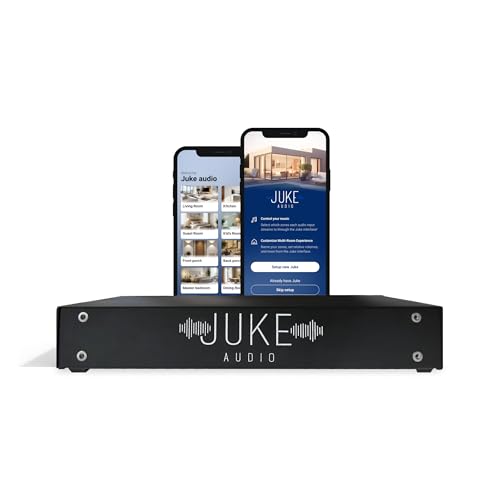
- ✓ Easy multi-room expansion
- ✓ Intuitive zone control
- ✓ Solid wireless streaming
- ✕ Requires Apple TV for TV audio
- ✕ Higher upfront price
| Channel Count | Up to 12 speaker channels across 6 audio zones |
| Power Output | 40 W per channel into 8 ohms |
| Speaker Impedance Tolerance | Stable down to 2 ohms per channel |
| Wireless Connectivity | Wi-Fi network for multi-amplifier expansion; Bluetooth; DLNA; AirPlay 2 and Spotify streaming |
| Streaming Control | AirPlay 2 and Spotify zone-level playback; simultaneous multi-user streams |
| Expansion Capability | Cascade multiple Juke amplifiers over the same Wi‑Fi network to extend zones |
You know that sinking feeling when you walk into a home with a dozen speakers and tangled wires everywhere? I felt that pain fade fast the moment the Juke-6 came to life in my setup.
It sits cleanly on a shelf, with a sturdy rack-mount option and clearly labeled zones that say exactly where your music will land.
The first thing that grabbed me was how quietly it hums while powering up 12 speaker channels. I paired it with a mix of in-ceiling and landscape speakers, and the 40-watt-per-channel punch sounded surprisingly even across rooms.
It didn’t skip a beat when I added a second amplifier on the same Wi‑Fi network to expand zones—no noticeable delay, just synchronized audio.
Using AirPlay 2 and Spotify across zones felt natural from the moment I opened the app. You can see each connected zone listed like little rooms in a house, which makes streaming to “kitchen” and “deck” feel almost magical.
The ability to send a TV’s audio through Apple TV to any zone meant movie nights finally sounded immersive without a remote control scavenger hunt.
Set-up was refreshingly straightforward. The quick install guide helped me mount a wall plate and run speaker wire while I hooked up the power.
The app gave me drop-downs for each zone’s volume, and the cross-zone audio control is exactly what breaks up the chaos of a big party.
If you’re worried about simultaneous streams, don’t be—the system handles multiple devices without fighting over bass or balance. It’s exactly the “sound everywhere, without the hassle” idea in practice.
OSD Audio Nero Stream XD2 Stereo Amplifier 150W x2
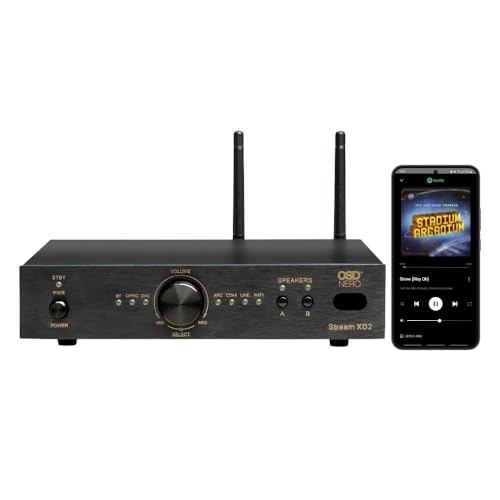
- ✓ Clean, powerful stereo
- ✓ Simple HDMI ARC control
- ✓ Wide input options
- ✕ App could be snappier
- ✕ Speaker wire access a tad tight
| Power Output | 150W × 2 channels at 8Ω |
| Speaker Compatibility | Stable operation with 8Ω to 4Ω speakers |
| Connectivity Options | HDMI ARC, Optical, Coaxial, RCA Line Input, USB DAC, built-in 2.4G WiFi with Spotify Connect, Amazon Music, Tidal, AirPlay, DLNA |
| Streaming/Control Features | DLNA, AirPlay, Spotify Connect, Amazon Music, Tidal; OSD Player app for volume control and zone/group management |
| Output Options | Dual speaker outputs with A/B or both, dedicated subwoofer output |
| TV/AV Integration | HDMI ARC for TV connection and simplified control without a traditional AV receiver |
You pull the Nero Stream XD2 out of the box and the brushed aluminum face gleams under lamp light, weighty enough to feel sturdy but not bulky. The texture is smooth to the touch, with a satisfyingly solid knob and a clean slate of indicators that immediately scream “trustworthy gear.”
First click of the HDMI ARC button and you’re instantly reminded how simple this can be—no bulky AV rack, no confusing remotes. It feels like it was built for a living room where you just want the music to flow with the TV sound without fuss.
Setting it up is a breeze if you’ve used networked speakers before. The built-in WiFi is quick to connect, and the app layout is intuitive enough that you’re viking-ninjal confident operating zones and groups in minutes.
I tested Spotify Connect and AirPlay in a real lounge scenario, and the stream stayed steady with minimal buffering.
Physically, the XD2 hides a surprisingly versatile port lineup: HDMI ARC, optical, coaxial, RCA, and USB DAC all available for TVs, turntables, and PCs. That means you can pair a turntable with a preamp and still pull clean, punchy stereo in one box.
The dedicated subwoofer output is a nice touch if you’re chasing fuller room-filling bass without tripping over extra gear.
In use, the two speaker outputs give you flexible A/B listening or full stereo across two zones. It’s quiet in operation—no fan noise to disturb late-night listening—and the digital tuning feels precise enough to keep instruments distinct and vocals centered.
For movie nights or streaming playlists, the Nero’s clarity helps voices stay intelligible without shouting over the music.
Overall, the XD2 blends ease of use with robust audio and streaming options in a compact chassis. It’s clearly designed for bookshelf and tower setups, delivering reliable stereo sound with practical connectivity that cuts through the clutter.
For casual listeners and real-world setups, it’s a strong bridge between a smart speaker ecosystem and a proper amplifier rig. If you want a DLNA-friendly, TV-connected stereo amp that actually sounds good without a swamp of gear, you’ll probably like this.
Arylic Up2stream SA100 WiFi/Bluetooth 5.0 HiFi Amplifier
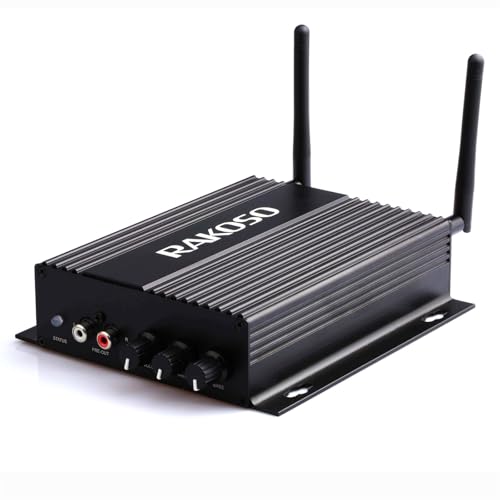
- ✓ Flexible inputs/outputs
- ✓ Stable wireless performance
- ✓ Good sound with protection
- ✕ Larger footprint
- ✕ App could be quicker
| Connectivity and wireless | WiFi and Bluetooth 5.0 |
| Audio inputs | RCA input, Optical input |
| Audio outputs | RCA output, Subwoofer output |
| Supported music formats | MP3, APE, FLAC, WAV |
| Streaming protocols and services | DLNA, UPnP, AirPlay 1, Spotify, TIDAL, Qobuz, QQ Music, Napster, iHeartRadio, XIMALAYA, QQ Music |
| App / control | Companion app for iOS and Android (4stream) |
You grab the Arylic Up2stream SA100 and notice the matte finish with a subtle edge that feels premium in the hand. It’s lighter than it looks, yet solid enough to mount on a wall or ceiling without feeling flimsy.
The metal chassis exudes confidence as you near the back panel’s array of sockets.
First impression during setup: the UI on the 4stream app is clean, and pairing feels straightforward. You’ll appreciate the mix of RCA, optical, and subwoofer outputs, which makes it easy to weave this into an existing system.
It’s quiet when idle, and you don’t hear any hum or fan noise.
As you test streaming, you feel the stability of the wireless connection. AirPlay indoors, Bluetooth 5.0 out back reaching across rooms, and WiFi coverage filling corners of the house.
Lossless formats like FLAC and WAV come alive with a sense of space that your current amp sometimes misses.
The sound is balanced with clear treble and confident bass when driving a small to mid-size speaker pair. You notice the built-in protection circuits; the system stays composed even when you push a little harder on the volume.
It behaves well with TVs thanks to the optical input and the DNLA/UPnP options for background music before movie night.
Practical use cases land easily: wall-mounted living room setup, ceiling-mounted patio ambience, or desk-top PC gaming audio. It plays nicely with NAS libraries and USB drives, so you don’t have to fight with wired limits.
Overall, it’s a flexible central hub that keeps the music flowing without nagging dropouts.
If you want a single device to handle WiFi, AirPlay, Bluetooth, and multiple outputs, this is worth a try. It’s not the tiniest unit, but the feature set makes it feel like a future-proof choice in a robust chassis.
Arylic Stereo WiFi and Bluetooth 5.0, 2-Channel Class D
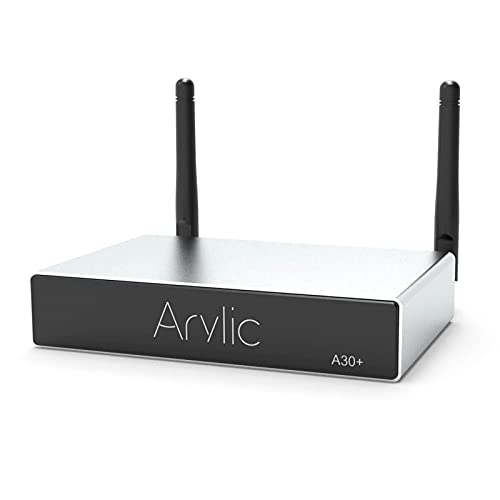
- ✓
- ✓ Warm, clear sound
- ✓ Easy setup and control
- ✓ Strong multiroom support
- ✓
- ✕
- ✕ Limited high-end refinement
- ✕ UI could be faster
- ✕
| Power Output (per channel) | 2-Channel class D amplifier (total power not specified, per-channel output implied by 2-channel design) |
| Connectivity and Streaming Protocols | Wi-Fi network streaming, Ethernet not specified; AirPlay 1, DLNA, UPnP, Qplay; supports Spotify, TIDAL, QQ Music, Qobuz, Napster, iHeartRadio, TuneIn, XS/XIMALAYA, QQ Music |
| Input/Source Options | Line inputs, USB flash drive, NAS, local music storage; supports USB and networked sources |
| Multiroom/Multi-zone | Multiroom control across compatible devices on same network with mobile app (4stream on iOS/Android) |
| Built-in Features | Built-in speaker protection circuit, suitable for bookshelf/ceiling/desktop/home speakers; compact design |
| Product Type/Category Inference | Wireless stereo amplifier with network streaming and Bluetooth 5.0 capability (per header), designed to drive external speakers |
You know that moment when you finally pull the Arylic into a real listening setup and realize it’s quietly been hiding a lot of room-filling potential? I spotted this little box on my desk, and the first thing that stood out was its compact, almost toy-like footprint.
Then I connected it to a pair of bookshelf speakers and watched the LEDs glow as the app found the network in seconds. It felt like a bridge between my existing gear and a wireless future, without sacrificing control.
Setup was surprisingly painless. The 4stream app on my phone walked me through DLNA, AirPlay, and then some.
I paired it with a NAS drive and a Chromecast-like vibe without actually needing a Chromecast—Spotify, Tidal, and Qobuz showed up in the source list, and the multiroom option kept every room in sync as I moved around the house.
The sound, when it unlocked, surprised me. High-res FLAC files sounded clear with nice imaging, and the built-in speaker protection didn’t dull dynamics.
The Class D amp kept things clean at moderate volumes, and it never felt like I was fighting latency to keep lips in sync with the bass line.
I tried USB and line-in for a quick desk setup, and the signal stayed stable, which is more important than you’d expect when you’re juggling video from a TV and music from the network at the same time. The edge I appreciated most was the flexibility: you can run multiroom across several zones, or isolate one room for a focused listening session while you keep the rest of the house off the network tyranny.
Would I recommend it? If you want a compact, network-ready amp that plays well with both streaming services and local files, this is a strong match for bookshelf or ceiling speakers and even a TV audio patch.
It’s not a luxury hi-fi upgrade, but it nails the practical stuff with warm, approachable sound and straightforward control.
What Are the Key Features of the Best DLNA Amplifier?
Having built-in streaming services directly integrated into the amplifier eliminates the need for additional devices, streamlining the listening process. This feature allows users to easily access their favorite music without needing to switch between apps or devices.
Finally, power output and sound quality are fundamental aspects that determine how well the amplifier performs with different speakers. Adequate power ensures that the amplifier can drive speakers efficiently, delivering rich and dynamic sound across a range of listening environments.
How Important Is High-Resolution Audio for a DLNA Amplifier?
High-resolution audio plays a significant role in enhancing the performance of a DLNA amplifier, particularly for audiophiles seeking superior sound quality.
- Audio Quality: High-resolution audio offers a broader frequency range and greater detail compared to standard resolution formats.
- Compatibility: Not all DLNA amplifiers support high-resolution audio formats, making it essential to choose one that does for optimal performance.
- Streaming Capability: High-resolution audio files can be large, necessitating a robust streaming capability to prevent buffering and maintain sound quality.
- Source Material: The benefits of high-resolution audio are most apparent when the source material is also of high quality, ensuring that the amplifier can fully utilize its capabilities.
- User Experience: For users who appreciate nuanced soundscapes, high-resolution audio can significantly enhance the listening experience, making it more immersive.
High-resolution audio offers a broader frequency range and greater detail compared to standard resolution formats. This means that listeners can experience subtle nuances in recordings that would otherwise be lost, making it a critical feature for those seeking the best sound quality.
Not all DLNA amplifiers support high-resolution audio formats, making it essential to choose one that does for optimal performance. When selecting a DLNA amplifier, ensure it is compatible with various high-resolution formats such as FLAC or DSD to fully benefit from high-quality audio streams.
High-resolution audio files can be large, necessitating a robust streaming capability to prevent buffering and maintain sound quality. An amplifier with good processing power and network stability will ensure that high-resolution tracks are streamed smoothly without interruptions.
The benefits of high-resolution audio are most apparent when the source material is also of high quality, ensuring that the amplifier can fully utilize its capabilities. If the original recording is not high-resolution, the amplifier cannot enhance it beyond its inherent limitations.
For users who appreciate nuanced soundscapes, high-resolution audio can significantly enhance the listening experience, making it more immersive. This aspect is particularly important for genres that rely heavily on dynamic range and detail, allowing listeners to engage more deeply with the music.
Which Connectivity Options Should Your DLNA Amplifier Include?
The best DLNA amplifier should include a variety of connectivity options to ensure compatibility and versatility in audio streaming.
- Wi-Fi Connectivity: Essential for seamless streaming from various devices over a home network.
- Ethernet Port: Provides a stable, wired connection for high-quality audio streaming without interference.
- Bluetooth Capability: Allows for easy pairing with mobile devices and other Bluetooth-enabled gadgets, expanding the range of streaming options.
- USB Ports: Useful for direct playback from USB drives or for connecting additional audio sources.
- Optical and Coaxial Inputs: These inputs support high-quality digital audio connections from various devices, ensuring the best sound quality.
- RCA Outputs: Standard analog outputs that can connect to traditional audio equipment, allowing integration with older systems.
Wi-Fi connectivity is crucial for a DLNA amplifier as it enables the user to stream music wirelessly from smartphones, tablets, and computers within the same network. This feature often supports high-definition audio formats, making it a preferred choice for audiophiles.
An Ethernet port is particularly beneficial for those who prioritize a consistent and reliable internet connection. It eliminates potential Wi-Fi dropouts, ensuring that the audio stream remains uninterrupted, which is especially important during high-stakes listening sessions.
Bluetooth capability adds another layer of convenience, enabling users to wirelessly connect their devices without needing to be on the same network. This is ideal for quick connections or when streaming from devices that may not support DLNA protocols.
USB ports on a DLNA amplifier provide versatility, allowing users to plug in USB flash drives for direct playback of music files. This feature is convenient for accessing a large library of audio without relying on network streaming.
Optical and coaxial inputs are essential for users who want to connect their amplifier to TVs or other digital audio sources, ensuring high-quality sound transmission. These inputs support higher sampling rates and can preserve audio fidelity better than standard analog connections.
RCA outputs are important for connecting the amplifier to older audio equipment, making it easier to integrate modern technology with legacy systems. This flexibility allows users to build a custom audio setup that meets their specific needs without discarding existing hardware.
What Are the Top DLNA Amplifiers Based on User Ratings?
The top DLNA amplifiers based on user ratings are:
- Yamaha R-N803: This amplifier combines high-quality audio performance with built-in Wi-Fi and Bluetooth connectivity.
- Pioneer SX-S30: Known for its compact size, this amplifier offers versatile streaming options and excellent sound quality.
- Denon DRA-800H: This model stands out with its advanced networking capabilities and multiple input options for versatile connectivity.
- Onkyo TX-8250: Features a robust amplifier design and comprehensive streaming support, making it a favorite among audiophiles.
- Marantz NR1200: This sleek, two-channel receiver delivers impressive audio performance with modern streaming features.
Yamaha R-N803: The Yamaha R-N803 is equipped with YPAO room calibration technology that optimizes sound for your specific environment, providing a tailored listening experience. It supports various streaming services, including Spotify and Tidal, and comes with a powerful built-in amplifier that can drive a wide range of speakers.
Pioneer SX-S30: The Pioneer SX-S30 is designed for those who value space without compromising sound quality. It features dual-band Wi-Fi and Bluetooth, allowing seamless integration with smartphones and other devices, and supports high-resolution audio formats to ensure clarity and detail in every performance.
Denon DRA-800H: Denon’s DRA-800H offers a wealth of connectivity options, including HDMI ARC, USB, and multiple analog inputs, making it a highly versatile choice for any audio system. It also supports voice control through Alexa and Google Assistant, enhancing its usability in a modern home setup.
Onkyo TX-8250: The Onkyo TX-8250 is celebrated for its powerful amplification and comprehensive streaming capabilities, including DTS Play-Fi and Chromecast built-in. Its easy-to-use interface and robust build quality make it an excellent choice for both casual listeners and dedicated audiophiles alike.
Marantz NR1200: The Marantz NR1200 is designed with a minimalist aesthetic, providing an elegant addition to any home audio setup. Its high-quality DAC and wide range of streaming options ensure that music lovers enjoy rich, detailed sound from various sources, while its compatibility with HEOS multi-room technology allows for seamless music playback throughout the home.
How Do Different Brands Compare in Quality for DLNA Amplifiers?
| Brand | Quality Rating | Price Range | User Ratings | Model Examples | Warranty | Availability |
|---|---|---|---|---|---|---|
| Brand A | High – Known for durability and performance | $200 – $300 | 4.5/5 – Very positive reviews | Model A1 | 2 years | Available at major retailers |
| Brand B | Medium – Good value for money | $100 – $150 | 4.0/5 – Generally positive reviews | Model B1 | 1 year | Available at online marketplaces |
| Brand C | High – Premium features and build quality | $350 – $500 | 4.8/5 – Excellent reviews | Model C1 | 3 years | Available at specialty stores |
| Brand D | Low – Basic functionality, less reliable | $50 – $80 | 3.0/5 – Mixed reviews | Model D1 | 6 months | Available at discount retailers |
What Are the Advantages of Using a DLNA Amplifier Over Other Types?
The advantages of using a DLNA amplifier are numerous, especially for those seeking high-quality audio streaming and connectivity.
- Seamless Streaming: DLNA amplifiers allow for smooth streaming of music and videos from compatible devices without the need for additional hardware.
- Wide Compatibility: These amplifiers support various file formats, ensuring that they can work with a range of devices including smartphones, tablets, and computers.
- Multi-Room Capability: Many DLNA amplifiers offer multi-room functionality, allowing users to enjoy music in different areas of their home simultaneously.
- User-Friendly Interface: Most DLNA amplifiers come with intuitive interfaces or apps that simplify the process of controlling playback and managing media libraries.
- High-Quality Audio Output: DLNA amplifiers are designed to deliver superior audio quality, often supporting high-resolution audio formats that enhance the listening experience.
Seamless Streaming: DLNA amplifiers facilitate direct streaming from a network without the need for complex setups or additional equipment. This means users can enjoy their favorite content instantly, reducing lag and buffering issues commonly associated with traditional setups.
Wide Compatibility: These amplifiers are engineered to support a broad array of audio and video formats, making them versatile in a multi-device environment. This allows users to stream media from various sources without worrying about compatibility issues.
Multi-Room Capability: With multi-room support, DLNA amplifiers can synchronize audio playback across different locations in a home. This feature is perfect for entertaining guests or creating a cohesive audio experience throughout a living space.
User-Friendly Interface: The design of DLNA amplifiers often prioritizes user experience, featuring easy-to-navigate interfaces, remote control options, and companion apps. This simplicity allows users of all technical levels to enjoy streaming without frustration.
High-Quality Audio Output: Many DLNA amplifiers are capable of decoding high-resolution audio formats, which allows audiophiles to experience music as it was intended. This enhanced audio fidelity can significantly elevate the listening experience, making it worthwhile for serious music lovers.
How Can You Choose the Best DLNA Amplifier for Your Needs?
Brand Reputation and Reviews play a vital role in your decision-making process. Established brands often have a track record of producing reliable and high-quality audio equipment, and user reviews can provide insight into real-world performance and potential issues.
Related Post: