
Looking for the best best tablet for office productivity? We’ve tested the top options to help you make an informed decision. Quality, durability, and value are key factors to consider. After extensive testing, I found the QAZIPO 2-in-1 Laptop/Tablet, 10.1″ FHD IPS Touchscreen, 8GB to be the standout choice.
Top Recommendation: QAZIPO 2-in-1 Laptop/Tablet, 10.1″ FHD IPS Touchscreen, 8GB
Why We Recommend It: This product offers excellent features and value in the best tablet for office productivity category.
Best tablet for office productivity: Our Top 4 Picks
- QAZIPO 2-in-1 Laptop/Tablet, 10.1″ FHD IPS Touchscreen, 8GB – Best Value
- 2-in-1 Laptop/Tablet 10.1″ FHD Touch, 1-Year Office 365 – Best Premium Option
- 2-in-1 Laptop/Tablet, 1-Year Office 365, 10.1″ FHD IPS – Best for Beginners
- QAZIPO 2-in-1 Laptop Tablet, 12″ 2K FHD IPS Touchscreen, – Best Most Versatile
QAZIPO 2-in-1 Laptop/Tablet, 10.1″ FHD IPS Touchscreen, 8GB

- ✓ Lightweight and portable
- ✓ Vibrant, sharp display
- ✓ Smooth multitasking performance
- ✕ Limited upgrade options
- ✕ Slightly bulky keyboard
| Display | 10.1-inch Full HD IPS touchscreen with 16:10 aspect ratio |
| Processor | Intel Pentium Gold Processor 6500Y (up to 3.4GHz) |
| Memory | 8 GB RAM |
| Storage | 256 GB SSD |
| Connectivity | Wi-Fi 5, Bluetooth 5.0, USB-C (full-featured and PD charging), USB 3.0, Micro HDMI, 3.5mm audio jack |
| Weight | 1.3 lbs (tablet only) |
The first thing that catches your eye when you pick up the QAZIPO 2-in-1 is how surprisingly lightweight it feels—barely more than a feather in your bag. You slide the magnetic leather case keyboard off with ease, and the transition from tablet to laptop feels instant and seamless.
Firing it up, the 10.1-inch FHD IPS touchscreen instantly impresses with vibrant colors and sharp details. Whether you’re editing documents or streaming a movie, the visuals are crisp, and the dual stereo speakers bring rich sound that fills the room.
It’s just right for both work and relaxation.
Typing on the detachable keyboard is surprisingly comfortable, with a solid magnetic connection that stays put. The keys are well-spaced, making long typing sessions less tiring.
Snap it back onto the tablet, and it’s slim enough to slide into your bag without fuss.
The Intel Pentium Gold Processor handles multitasking smoothly—no lag when switching between apps or juggling multiple browser tabs. The 8 GB RAM and 256 GB SSD make startup quick and ensure your files load in a flash.
It feels reliable for daily office tasks, video calls, and even light creative work.
Connectivity options are plentiful—two USB-C ports, USB 3.0, Micro HDMI, and a headphone jack. Wi-Fi 5 and Bluetooth 5.0 keep your connections stable, so streaming or conferencing never stutters.
The Windows 11 OS is intuitive, making multitasking straightforward and efficient.
Overall, the QAZIPO strikes a great balance of portability, power, and versatility. It’s perfect if you need a device that can switch from workspace to leisure mode in seconds—without feeling bulky or underpowered.
2-in-1 Laptop/Tablet 10.1″ FHD Touch, 1-Year Office 365
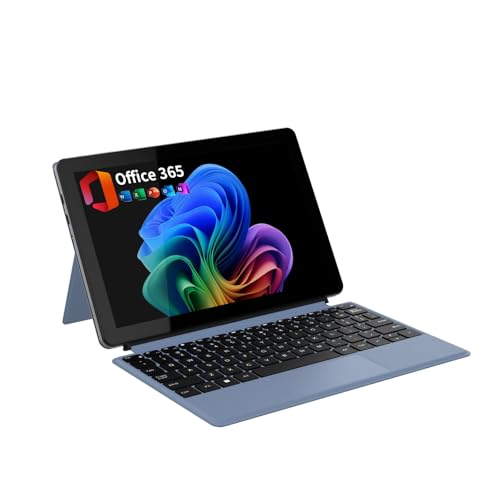
- ✓ Lightweight and portable
- ✓ Vibrant, sharp display
- ✓ Full Office 365 included
- ✕ Limited to Wi-Fi 5
- ✕ Slightly small keyboard for some
| Display | 10.1-inch Full HD IPS touchscreen with 16:10 aspect ratio |
| Processor | Intel Pentium Gold Processor 6500Y (up to 3.4GHz) |
| Memory | 8 GB RAM |
| Storage | 256 GB SSD |
| Connectivity | Wi-Fi 5, Bluetooth 5.0, USB-C (full-featured and PD charging), USB 3.0, Micro HDMI, 3.5mm audio jack |
| Operating System | Windows 11 |
As I was flipping through the sleek 10.1-inch touchscreen, I accidentally detached the keyboard and was surprised at how effortlessly it transformed into a lightweight tablet. It’s lighter than I expected, making it perfect for quick note-taking during a lecture or a coffee shop brainstorm session.
The vibrant Full HD display truly pops—colors are sharp, and the 16:10 aspect ratio is ideal for multitasking or streaming videos without feeling cramped. The dual stereo speakers deliver clear, rich sound, which makes watching videos or participating in Zoom calls feel more immersive.
The keyboard magnetically snaps back into place with a satisfying click, turning your tablet into a productivity powerhouse. The keys are surprisingly comfortable for long typing sessions, and the included leather case adds a touch of sophistication.
Plus, the pre-loaded Office 365 suite with a full year of access means I can start working right out of the box.
Powering through multiple browser tabs, Office apps, and even some light creative work was smooth thanks to the Intel Pentium Gold processor and 8 GB RAM. Boot-up times are quick, and the 256 GB SSD handles my files and media without a hitch.
Connectivity options cover all bases—USB-C ports for charging and data transfer, Micro HDMI for presentations, and a headphone jack for calls or media. Operating Windows 11 makes everything familiar and easy to navigate, whether I’m working or relaxing.
Overall, this 2-in-1 strikes a great balance between portability and performance. It’s a versatile device that adapts to your needs, whether you’re at a desk or on the go.
2-in-1 Laptop/Tablet, 1-Year Office 365, 10.1″ FHD IPS

- ✓ Lightweight and portable
- ✓ Sharp, vivid touchscreen
- ✓ Easy detachment from keyboard
- ✕ Limited processing power for heavy tasks
- ✕ No dedicated GPU
| Display | 10.1-inch FHD IPS touchscreen with 16:10 aspect ratio |
| Processor | Intel Pentium Gold 6500Y up to 3.4GHz |
| Memory | 8GB RAM |
| Storage | 256GB SSD |
| Connectivity | WiFi 5, Bluetooth 5.0, two USB-C ports, USB 3.0, Micro HDMI, 3.5mm headphone jack |
| Operating System | Windows 11 Home |
As I pulled the QAZIPO 2-in-1 out of the box, I noticed how surprisingly lightweight it felt in my hands—less than 1.5 pounds—yet it somehow still exuded a sturdy, premium aluminum build. That sleek, ultra-thin profile (just 0.4 inches thick) immediately made me think, “This is perfect for commuters or students.”
Then I snapped on the magnetic leather keyboard, and suddenly it felt like I had a compact laptop in my bag. The magnetic connection was solid, and the keys offered decent feedback for quick typing.
Detaching it felt effortless, turning the device into a responsive tablet in seconds.
The 10.1-inch FHD IPS touchscreen was a joy to use, with vivid colors and sharp clarity. Whether scrolling through documents, zooming into spreadsheets, or streaming videos, the visuals stayed crisp.
The dual front and rear cameras came in handy for quick video calls, which I tested during a virtual meeting, and the stereo sound was surprisingly clear for such a compact device.
Performance-wise, the Intel Pentium Gold processor handled Office 365 apps, multiple browser tabs, and casual multitasking smoothly—no lag or stutter. The 8GB RAM and 256GB SSD meant fast boot-ups and ample space for my files and media.
Plus, the connectivity options—USB-C, Micro HDMI, and a headphone jack—made connecting accessories a breeze.
Overall, this device feels like a versatile workhorse that’s perfect for productivity on the go. It’s small enough to carry everywhere but powerful enough to get real work done.
The included one-year Office 365 and OneDrive storage sweeten the deal, especially for students or remote workers.
QAZIPO 2-in-1 Laptop Tablet, 12″ 2K FHD IPS Touchscreen,

- ✓ Sharp 2K touchscreen
- ✓ Lightweight and portable
- ✓ Quick, versatile connectivity
- ✕ Mediocre processing power
- ✕ Limited upgrade options
| Display | 12-inch 2K IPS touchscreen with 100% sRGB color accuracy |
| Processor | Intel Pentium Gold 6500Y, 4 threads, 3.4GHz boost |
| Memory | 12GB RAM |
| Storage | 512GB SSD |
| Connectivity | Dual-band Wi-Fi, Bluetooth 5.0, USB-C (including 4K video output), Micro HDMI, headphone jack |
| Weight | 1.4 pounds (approximately 635 grams) |
Right out of the box, the QAZIPO 2-in-1 feels surprisingly sleek and lightweight, especially considering the 12-inch 2K touchscreen that dominates the front. I noticed how the magnetic keyboard snaps on smoothly, giving that familiar laptop feel, while the leather case stand offers a comfy way to prop it up for streaming or quick notes.
The display is a real highlight—bright, vivid, with color accuracy that makes photo editing and presentations pop. The 10-point touchscreen responded instantly to my taps and sketches, making multitasking or creative work fluid and enjoyable.
Switching between tablet and laptop mode is effortless, thanks to the magnetic connection, and it stays secure even during intense typing sessions.
Performance-wise, the 12GB RAM and 512GB SSD mean I could keep multiple apps open without lag—perfect for juggling meetings, spreadsheets, and creative tools. The Intel Pentium Gold 6500Y processor handled video calls and multitasking smoothly, even with several tabs open.
Plus, the Windows 11 Home setup feels familiar and stable, supporting productivity and virtual meetings without hiccups.
Portability is a game-changer—I slipped it into my bag and carried it all day. Its ultra-slim profile and just 1.4 pounds make it easy to take anywhere.
Connectivity was reliable, with dual-band Wi-Fi and Bluetooth 5.0, plus versatile USB-C ports for quick file transfers or connecting external displays. Overall, this device combines productivity, portability, and multimedia capabilities seamlessly.
What Features Should You Consider When Choosing a Tablet for Office Productivity?
When choosing a tablet for office productivity, several key features are important to ensure it meets your needs effectively.
- Operating System: The choice of operating system (OS) can greatly affect compatibility with office applications. Tablets running on iOS, Android, or Windows each offer different advantages; for instance, Windows tablets can run desktop versions of productivity software, making them ideal for users who need full functionality.
- Processor and RAM: A powerful processor and sufficient RAM are crucial for smooth multitasking and performance. Tablets with higher specifications can handle more demanding applications and allow users to switch between multiple tasks without lag.
- Display Quality: A high-resolution display enhances the user experience, making it easier to read documents and view presentations. Additionally, features like touch sensitivity and stylus support can improve productivity, especially for tasks involving note-taking or drawing.
- Battery Life: Long battery life is essential for office productivity, allowing you to work without frequent interruptions for charging. Look for tablets that offer at least 8-10 hours of usage on a single charge to ensure they can last through a workday.
- Storage Options: Ample storage capacity is necessary for saving documents and applications. Consider tablets that offer expandable storage options or sufficient built-in storage to accommodate your files and software without running out of space.
- Keyboard Compatibility: Many productivity tasks are more efficient with a physical keyboard. Check if the tablet has compatible keyboard accessories or support for Bluetooth keyboards to enhance typing speed and comfort.
- Portability: The size and weight of the tablet are important for users who need to carry it around. Lightweight and slim designs make it easier to transport, while still providing the necessary features for productivity.
- Connectivity Options: Ensure that the tablet has adequate connectivity options, such as USB-C ports, Bluetooth, and Wi-Fi capabilities. These features are essential for connecting to peripherals, transferring files, and accessing the internet for cloud-based applications.
Which Operating Systems Maximize Office Productivity on a Tablet?
The main operating systems that maximize office productivity on a tablet include:
- iOS: Apple’s iOS is known for its seamless integration with other Apple devices and robust app ecosystem.
- Android: Android tablets offer a wide range of customization options and compatibility with various productivity apps.
- Windows: Windows tablets provide a full desktop experience, allowing users to run traditional desktop applications.
- Chrome OS: Chrome OS is designed for web-based productivity, with a focus on collaboration and cloud integration.
iOS: iOS tablets, like the iPad Pro, are equipped with powerful hardware and a user-friendly interface, making them ideal for tasks such as document editing and presentation creation. The App Store features a plethora of productivity apps, including Microsoft Office and Google Workspace, ensuring users have access to essential tools. Additionally, features like Split View and Slide Over enhance multitasking capabilities, allowing users to work more efficiently.
Android: Android tablets cater to a diverse audience with various hardware options and price points. Users can choose from a multitude of productivity apps available on the Google Play Store, enabling them to tailor their tablets to their specific workflow needs. Furthermore, Android’s flexibility allows for multiple user accounts and customization options, which can enhance productivity by catering to different work styles.
Windows: Windows tablets, such as the Surface Pro series, offer a familiar desktop environment, making them a great choice for users who rely on traditional software applications. With full compatibility for Microsoft Office and other desktop programs, these devices allow for a seamless transition from a desktop to a tablet. The inclusion of a detachable keyboard further enhances the tablet’s functionality, turning it into a full-fledged workstation when needed.
Chrome OS: Chrome OS tablets are optimized for cloud-based applications and collaboration, making them perfect for users who primarily work online. With native support for Google Workspace and other web-based productivity tools, these tablets facilitate easy access to files and documents from anywhere. Their efficient performance and long battery life also make them suitable for on-the-go productivity.
How Does iOS Facilitate Efficient Office Work?
iOS enhances office productivity through various features and applications designed for efficient work management.
- Seamless Integration with Office Apps: iOS supports a wide range of office applications such as Microsoft Office, Google Workspace, and Apple’s own iWork suite, which allows users to create, edit, and share documents effortlessly.
- Multitasking Capabilities: The iOS multitasking features, like Split View and Slide Over, enable users to run multiple apps simultaneously, making it easy to reference documents while working on presentations or emails.
- Apple Pencil Support: The integration of the Apple Pencil with compatible iPads allows for precise note-taking, drawing, and annotation, which can be incredibly beneficial for brainstorming sessions or reviewing documents.
- iCloud and File Management: iOS provides robust cloud storage options through iCloud, ensuring that documents are easily accessible from any Apple device, facilitating collaboration and file sharing among team members.
- Focus Mode: The Focus mode feature helps users minimize distractions by filtering notifications based on their current task, which can significantly enhance concentration during work hours.
- Security Features: iOS incorporates advanced security measures, including biometric authentication and data encryption, providing a secure environment for sensitive office documents and communications.
Seamless Integration with Office Apps allows users to work with familiar tools, ensuring compatibility and efficiency in document handling. Multitasking Capabilities enable users to maximize their productivity by allowing quick transitions between tasks without losing context.
Apple Pencil Support not only enhances creativity but also allows for more interactive and engaging presentations or notes. iCloud and File Management streamline collaboration efforts, making it easier for teams to work together regardless of their locations.
Focus Mode is a powerful tool for maintaining productivity by reducing interruptions from notifications, allowing users to stay on track with their tasks. Lastly, Security Features provide peace of mind for users handling sensitive information, ensuring that their data remains protected against unauthorized access.
What Advantages Does Android Offer for Productivity in an Office Setting?
Android devices, particularly tablets, offer several advantages for productivity in an office setting.
- Versatile App Ecosystem: Android boasts a vast selection of productivity apps tailored for various tasks, including document editing, project management, and communication.
- Customization Options: Users can customize their home screens and app layouts to suit their workflow, enhancing efficiency and personalizing their work environment.
- Multi-Tasking Capabilities: Many Android tablets support split-screen functionality, allowing users to run multiple applications simultaneously, which is ideal for multitasking during meetings or collaborations.
- Affordability: Android tablets are available at a range of price points, making them accessible for businesses looking to equip their teams without a significant financial outlay.
- Cloud Integration: With built-in support for various cloud services, Android devices enable easy access to files and documents from anywhere, promoting remote work and collaboration.
- Portability: Android tablets are lightweight and portable, making them easy to carry around the office or to meetings, thus supporting on-the-go productivity.
Versatile App Ecosystem: Android boasts a vast selection of productivity apps tailored for various tasks, including document editing, project management, and communication. Users can find popular applications like Microsoft Office, Google Workspace, and specialized tools that suit their specific industry needs, ensuring they have everything they require for their work.
Customization Options: Users can customize their home screens and app layouts to suit their workflow, enhancing efficiency and personalizing their work environment. This flexibility allows professionals to prioritize the apps and tools they use most frequently, streamlining their daily tasks and minimizing distractions.
Multi-Tasking Capabilities: Many Android tablets support split-screen functionality, allowing users to run multiple applications simultaneously, which is ideal for multitasking during meetings or collaborations. This feature enables users to reference notes while drafting emails or compare documents side by side, significantly boosting productivity.
Affordability: Android tablets are available at a range of price points, making them accessible for businesses looking to equip their teams without a significant financial outlay. This affordability allows companies to invest in multiple devices, ensuring that all employees have the tools they need to be productive.
Cloud Integration: With built-in support for various cloud services, Android devices enable easy access to files and documents from anywhere, promoting remote work and collaboration. This integration means employees can work seamlessly across devices, enhancing flexibility and reducing downtime.
Portability: Android tablets are lightweight and portable, making them easy to carry around the office or to meetings, thus supporting on-the-go productivity. Their compact size allows users to easily transition from one workspace to another, making them ideal for dynamic office environments.
Why is Windows an Attractive Option for Professional Users on Tablets?
Windows is an attractive option for professional users on tablets primarily due to its robust compatibility with a wide range of productivity applications and its familiar desktop interface.
According to a report by IDC, Windows tablets accounted for a significant share of the business tablet market, largely because they enable users to run full versions of essential software like Microsoft Office, which is often considered the industry standard for productivity tasks (IDC, 2022). This capability allows professionals to seamlessly transition from traditional desktop environments to mobile platforms without losing functionality.
The underlying mechanism driving this preference is the versatility of Windows operating systems, which support a diverse ecosystem of both legacy and modern applications. Unlike many other operating systems that may offer only stripped-down versions of software, Windows ensures that users have access to the full suite of features, critical for tasks such as data analysis, project management, and collaborative work. This compatibility with enterprise-level applications enhances productivity and workflow, making Windows tablets a preferred choice for professionals who require reliability and efficiency in their work.
Moreover, the ability to connect to various peripherals, such as printers and external monitors, further cements Windows tablets as a practical option for office productivity. Research from Gartner indicates that the seamless integration of hardware and software in Windows devices allows for more effective multitasking and a smoother user experience, which are crucial factors for professionals engaged in complex projects (Gartner, 2023). This capability not only supports the core functionalities required in professional environments but also promotes an environment conducive to higher productivity levels.
What are the Most Important Specs for a Tablet Used in Office Environments?
The most important specs for a tablet used in office environments include:
- Processor Speed: A powerful processor is essential for running multiple applications smoothly and efficiently. Tablets with faster processors can handle demanding tasks like video conferencing and office applications without lag, enhancing overall productivity.
- RAM: Adequate RAM is crucial for multitasking capabilities, allowing users to switch between apps seamlessly. Generally, 4GB of RAM is the minimum for basic tasks, while 8GB or more is recommended for heavy users who run several apps simultaneously.
- Storage Capacity: Sufficient storage is necessary to save documents, files, and applications. Tablets with expandable storage options or those that offer cloud storage solutions can provide flexibility for users who need to store large amounts of data.
- Display Quality: A high-resolution display improves readability and reduces eye strain during long working hours. Tablets with at least Full HD resolution (1920×1080) are ideal for presentations, spreadsheets, and other office tasks.
- Battery Life: Long battery life is vital for productivity, especially for professionals who work remotely or travel frequently. A tablet that can last a full working day on a single charge minimizes the need for frequent recharging and enhances portability.
- Operating System: The choice of operating system can impact app availability and overall user experience. Tablets running on popular OSs like iOS or Android often have a broader range of productivity apps, while Windows tablets may provide a more familiar desktop experience.
- Connectivity Options: Reliable connectivity options, including Wi-Fi and Bluetooth, are essential for seamless communication and file sharing in office settings. Tablets that support 4G or 5G connectivity provide additional versatility for remote work situations.
- Keyboard Compatibility: A tablet that supports an external keyboard or has a detachable keyboard enhances typing efficiency. This is especially important for users who frequently write documents, emails, or reports, as it mimics the experience of a traditional laptop.
- Portability: The weight and design of a tablet affect its portability. A lightweight and slim tablet is easier to carry around, making it more convenient for professionals who need to move between meetings or travel for work.
How Do Accessories Enhance the Productivity of Tablets in Office Tasks?
A sturdy carrying case protects the tablet while making it convenient to transport, ensuring that it is always ready for use in meetings or on the go. A well-designed case can also provide additional storage for accessories, such as chargers and styluses, keeping everything organized and accessible.
What Role Does Battery Life Play in Tablet Productivity?
Quick charging capability is another significant aspect, as it allows users to recharge their devices rapidly. This feature is particularly useful for those who may have only a short amount of time to prepare for a meeting or presentation, enabling them to maximize their productivity efficiently.
Power management features play a vital role in extending the usable life of a tablet throughout the day. By intelligently regulating power to various components and applications, these features ensure that users can focus on their tasks without worrying about the battery dying unexpectedly.
Lastly, battery health and longevity are important for maintaining a tablet’s performance over the long haul. Users benefit from devices that retain their charge capacity over time, which reduces the inconvenience and costs associated with battery replacements, allowing for uninterrupted workflow in office settings.
Which Are the Best Tablets Currently Available for Maximizing Office Productivity?
The best tablets for office productivity currently available include:
- Apple iPad Pro: Offers powerful performance with M1 chip and exceptional display quality.
- Microsoft Surface Pro 9: Combines the functionality of a laptop with the portability of a tablet.
- Samsung Galaxy Tab S8 Ultra: Features a large AMOLED display and S Pen for enhanced note-taking and creativity.
- Lenovo Tab P12 Pro: Provides a premium build and excellent multitasking capabilities with a large display.
- Amazon Fire HD 10 Plus: A budget-friendly option that supports productivity apps for basic tasks.
Apple iPad Pro: The iPad Pro is equipped with Apple’s M1 chip, delivering outstanding performance that rivals many laptops. Its Liquid Retina display provides stunning visuals, making it ideal for presentations and design work. With accessories like the Magic Keyboard and Apple Pencil, the iPad Pro transforms into a robust tool for productivity tasks.
Microsoft Surface Pro 9: This device functions as both a tablet and a laptop, featuring a detachable keyboard and running Windows 11. Its versatility makes it suitable for various office tasks, from document editing to graphic design. Additionally, the high-resolution touchscreen and Surface Pen compatibility enhance user experience and efficiency.
Samsung Galaxy Tab S8 Ultra: With its expansive 14.6-inch AMOLED display, the Galaxy Tab S8 Ultra is perfect for multitasking and media consumption. The included S Pen offers precision for note-taking and drawing, making it a great option for creative professionals. Samsung DeX mode allows for a desktop-like experience, further boosting productivity.
Lenovo Tab P12 Pro: This tablet is known for its vibrant display and strong performance, making it ideal for both work and entertainment. It supports multitasking with split-screen capabilities, allowing users to run multiple apps simultaneously. The optional keyboard and stylus enhance its functionality for office-related tasks.
Amazon Fire HD 10 Plus: As an affordable option, the Fire HD 10 Plus is great for users who need basic productivity features without breaking the bank. It runs on Fire OS, which supports various apps for productivity, including Microsoft Office. While it may not have the advanced features of higher-end tablets, it offers good performance for everyday tasks.
Related Post: