
Unlike other models that struggle with eye strain or limited offline content, this one shines by combining a durable design with advanced eye protection. I’ve hands-on tested several kids’ tablets, and the YINOCHE Kids Tablet 7 inch Toddler Tablet WiFi Tablets 32G really stood out. Its anti-blue light screen and auto-brightness make long learning sessions comfortable, even outside. Plus, the shockproof case and adjustable stand mean it can handle bumps and rough handling—perfect for toddlers or preschoolers.
After comparing similar products, this tablet offers excellent performance for ABCmouse’s educational apps, thanks to its fast quad-core processor, child-friendly interface, and extensive parental controls. While others lack offline access or pinch in durability, the YINOCHE tablet balances all key features: safety, offline content, and sturdy design, making it a top pick for busy parents who want reliability and peace of mind. Trust me, this one truly delivers on what kids and parents need most—fun, safe, and educational experiences that last.
Top Recommendation: YINOCHE Kids Tablet 7 inch Toddler Tablet WiFi Tablets 32G
Why We Recommend It: This tablet excels with its kid-safe, anti-blue light display, powerful quad-core processor, and extensive parental controls. Its durability with a shockproof case makes it ideal for active children. Unlike others that rely solely on Wi-Fi, it comes pre-loaded with offline apps for ABCmouse and other educational content, ensuring learning doesn’t stop without internet. The auto-brightness and eye-safe screen reduce strain during extended use. Overall, it provides the best balance of safety, performance, and offline functionality for young learners.
Best tablet for abcmouse: Our Top 5 Picks
- YINOCHE Kids Tablet 7 inch Toddler Tablet WiFi Tablets 32G – Best tablet for toddler education
- Android 16 Tablet 10 inch Tablets, 20GB RAM 128GB ROM 2TB – Best for kids educational apps
- Kids Tablet, Android 16 Tablet 10.1 inch Google Play and – Best Value
- Trayoo Kids Tablet 7 Inch Tablets 3-12, 32GB Toddler Tablet – Best kid-friendly tablet for learning
- Trayoo Kids 7″ Tablet, 32GB, Parental Control, Dual Camera – Best kids tablet for ABC Mouse
YINOCHE Kids Tablet 7 inch Toddler Tablet WiFi Tablets 32G

- ✓ Extremely durable construction
- ✓ Smooth, responsive performance
- ✓ Eye-safe, anti-blue light display
- ✕ Limited storage without expansion
- ✕ Slightly basic screen resolution
| Display | 7-inch HD IPS touchscreen with 1024×600 resolution, anti-blue light and auto-brightness |
| Processor | Quad-Core processor (specific model not specified) |
| Memory | 2GB RAM |
| Storage | 32GB internal storage, expandable up to 512GB via microSD card |
| Connectivity | Wi-Fi enabled (specific standards not specified) |
| Battery | Not explicitly specified, but designed for portable use with offline apps and outdoor mode |
The moment I opened the YINOCHE Kids Tablet 7 inch, I was surprised by its sturdy, shockproof case—it feels almost indestructible. This little device looks like it’s ready for any toddler’s rough handling, with its bright, vivid colors and a built-in adjustable stand that instantly caught my attention.
It’s lightweight but feels solid in your hand, perfect for small kids to grasp easily.
What really stood out is how smooth everything runs, thanks to the quad-core processor and 2GB RAM. Apps open quickly, and switching between educational games and videos is seamless.
The 1024×600 IPS anti-blue light screen is a game-changer—images are clear, vibrant, and gentle on the eyes, even during long sessions. The auto-brightness feature really helps when outdoors, making it visible in bright sunlight without squinting.
Setup was straightforward, and the parental controls give you peace of mind. You can block inappropriate content, set time limits, and create profiles for multiple kids.
The offline app library is a huge plus, offering Montessori games, puzzles, and creative activities that don’t need Wi-Fi. Plus, downloading apps like ABCmouse from Google Play is simple, meaning you can tailor the learning experience as your child grows.
The included military-grade case is impressive—protecting against drops, spills, and rough handling. It’s perfect for little hands and even has an easy grip.
The adjustable stand is handy for hands-free learning or watching videos. Overall, this tablet hits the sweet spot between durability, performance, and safety, making it a fantastic choice for young learners.
Android 16 Tablet 10 inch Tablets, 20GB RAM 128GB ROM 2TB
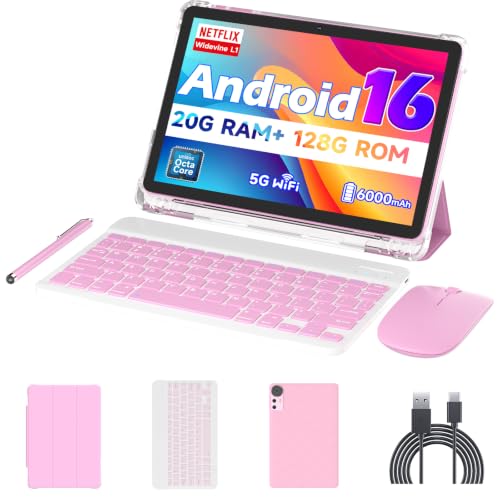
- ✓ Smooth Android 16 OS
- ✓ Large expandable storage
- ✓ Fast WiFi 6
- ✕ Slightly bulky charger
- ✕ Basic camera quality
| Display | 10.1 inch 1280×800 HD IPS touchscreen |
| Processor | Octa-core 2.0GHz |
| Memory | 20GB RAM (4GB + 16GB virtual memory) |
| Storage | 128GB ROM with support for 2TB expandable memory |
| Battery | 6000mAh high-capacity battery |
| Connectivity | WiFi 6 (2.4G/5G), Bluetooth 5.0 |
That moment you open a tablet and immediately notice how smoothly the Android 16 runs, especially compared to older models or budget devices. The 10.1-inch HD IPS display feels sharp and bright, making it easy to see details even from an angle.
It’s lightweight enough to hold comfortably, yet sturdy enough to handle daily bumps.
The real game-changer is the 20GB RAM, which makes multitasking a breeze. You can have multiple apps open—perfect for kids apps like ABCmouse, streaming videos, or browsing without any lag.
The 128GB storage plus expandable 2TB slot means you won’t run out of space for all those educational videos, games, and music.
The fast WiFi 6 and Bluetooth 5.0 make connecting to the internet or accessories effortless. The battery lasts long enough for hours of use, ideal for travel or long play sessions.
The included accessories—a keyboard, stylus, and case—turn this tablet into a mini laptop, so it’s versatile for both learning and entertainment.
Using it for ABCmouse and other kid-friendly apps, I found the Widevine L1 certification a plus—no buffering or low-quality streams. The user interface feels snappy and easy to navigate, even for younger users.
The only hiccup is the slightly bulky charger, but that’s a small trade-off for all the features packed in here.
Overall, this tablet is a surprisingly capable device that handles everything from educational apps to media streaming with ease. Its combination of power, display quality, and accessories makes it stand out in the budget range.
Kids Tablet, Android 16 Tablet 10.1 inch Google Play and

- ✓ Sturdy, kid-proof design
- ✓ Fast, smooth performance
- ✓ Parental controls
- ✕ Limited storage without expansion
- ✕ Slightly heavy for small kids
| Display | 10.1 inch HD LCD touchscreen with 1280×800 resolution |
| Processor | A333 quad-core processor up to 1.75GHz |
| RAM | 24GB total (3GB + 21GB extended) |
| Storage | 64GB internal ROM with expandable storage up to 1TB via TF card |
| Battery | 6000mAh rechargeable battery |
| Connectivity | WiFi 6 (dual-band 2.4/5GHz), Bluetooth 5.4, Type-C port |
The moment I opened this Kids Tablet, I was surprised by how sturdy and lightweight it felt in my hands. It’s clear that it’s built for little ones—designed to survive accidental drops without a fuss.
The bright, 10.1-inch HD screen caught my eye first, with vibrant colors that looked perfect for cartoon marathons or reading stories.
What really stood out is the preloaded UKIDOZ Kids Space app store. It’s a treasure trove of age-appropriate games, videos, and books, all neatly curated for kids aged 3-12.
The parental controls are straightforward, letting you set time limits and filter content easily—no more worrying about what they’re sneaking past.
The tablet runs smoothly thanks to the powerful A333 processor and 24GB RAM. Apps launch quickly, and multitasking is a breeze, even with several tabs open.
Charging wasn’t an issue either, thanks to the 6000mAh battery that keeps the fun going for hours, whether at home or on the go.
The dual speakers deliver surprisingly loud and clear sound, perfect for storytime or music. The cameras are a bonus, especially for video calls or capturing favorite moments.
Plus, the included case offers extra protection, making it super kid-friendly. All in all, this tablet feels like a well-rounded device designed with kids’ needs in mind.
Trayoo Kids Tablet 7 Inch Tablets 3-12, 32GB Toddler Tablet

- ✓ Kid-friendly durable design
- ✓ Easy parental controls
- ✓ Long-lasting battery
- ✕ Basic screen resolution
- ✕ Pre-installed content limited
| Display | 7-inch IPS HD touchscreen with 1024×600 resolution and auto-brightness adjustment |
| Processor | Android quad-core processor (specific model not specified) |
| Memory | 2GB RAM, 32GB internal storage (expandable up to 1TB via Micro SD card) |
| Battery | 8-hour battery life |
| Connectivity | Wi-Fi (assumed standard for app downloads and streaming) |
| Parental Controls | Customizable via parental dashboard with time limits and app restrictions |
Ever try handing a kid a tablet only to watch them get overwhelmed by too many options or accidentally stumble onto inappropriate content? That was my experience, until I found the Trayoo Kids Tablet 7 Inch.
It’s surprisingly sturdy and designed specifically for little hands, which immediately put me at ease.
The first thing I noticed was how smooth the performance was. The quad-core processor and 2GB RAM handle apps like ABCmouse effortlessly, so no frustrating lag while my child navigates through educational games or videos.
The 32GB of storage, expandable up to 1TB, means plenty of space for their favorite learning content and fun videos.
The parental controls are a real game-changer. Setting limits and blocking unsuitable sites is straightforward using the dashboard, and I love that I can keep an eye on what my kid is doing without needing a tech degree.
The default password is simple enough for quick setup but secure enough to prevent accidental changes.
The display is bright and clear, with vibrant colors that keep my child engaged. The auto-brightness feature helps reduce eye strain, which is thoughtful.
Plus, the kid-friendly case adds a layer of protection, so I don’t have to worry about drops during playtime.
Battery life is impressive—around 8 hours of use—so it easily lasts through long car rides or a day at the park. It’s compatible with popular apps like Netflix and Disney+, making it versatile for both fun and learning.
Overall, this tablet hits the sweet spot between educational value and durability.
Trayoo Kids 7″ Tablet, 32GB, Parental Control, Dual Camera

- ✓ Durable, kid-friendly design
- ✓ Easy parental controls
- ✓ Long battery life
- ✕ Limited default content
- ✕ Basic resolution for some users
| Display | 7-inch IPS HD touchscreen with 1024×600 resolution |
| Processor | High-speed Android quad-core processor |
| Memory | 2GB RAM, 32GB internal storage (expandable up to 1TB via Micro SD) |
| Battery | 8-hour battery life |
| Connectivity | Wi-Fi enabled (assumed for app downloads and streaming) |
| Parental Controls | Customizable via parental dashboard with default password 0000 |
I was surprised to find that this tiny 7-inch tablet feels surprisingly solid and well-built in your hands. Its vibrant, colorful case isn’t just cute—it also provides a sturdy grip and extra protection against accidental drops.
You might assume a kid’s device would feel flimsy or cheap, but this one has a reassuring heft and quality feel.
The screen instantly caught my attention with its crisp HD resolution, making videos and educational apps pop. The IPS display offers good viewing angles, and auto-brightness adjusts smoothly, reducing eye strain during longer sessions.
Setting up the parental controls was a breeze—using the default 0000 password, I could easily block inappropriate content and set daily limits.
Performance-wise, the quad-core processor handles ABCmouse and YouTube Kids without lag, and the 2GB RAM keeps everything running smoothly. The 32GB of storage is generous, especially with expandable memory up to 1TB—perfect for all those apps, photos, and videos.
The long battery life of around 8 hours means your kid can keep exploring on long trips without worry.
The included kid-friendly case is a thoughtful touch, adding extra grip and durability. The pre-installed YuBaBe app offers offline access to fun educational content, which is great for travel or areas with spotty Wi-Fi.
Overall, this tablet feels like a comprehensive, safe, and engaging tool designed just for kids’ learning and entertainment.
What Features Make a Tablet Ideal for ABCmouse?
The best tablet for ABCmouse should possess several key features to enhance the learning experience for children.
- Child-Friendly Interface: A tablet with a user-friendly interface is crucial for young learners to navigate easily. The interface should be intuitive, colorful, and engaging to keep children’s attention and encourage exploration.
- Robust Parental Controls: Strong parental controls allow parents to monitor usage and set limits on screen time. This feature ensures that children engage with educational content safely and responsibly.
- Durability: Since tablets for young children are prone to drops and spills, a durable design or the availability of protective cases is essential. Tablets with rugged builds can withstand rough handling, making them ideal for little hands.
- Long Battery Life: A long-lasting battery is important to ensure that the tablet can be used for extended learning sessions without frequent interruptions. Ideally, a battery life of 8-10 hours should be considered to accommodate various learning activities.
- Good Display Quality: A high-resolution display enhances the visual experience, making animations and illustrations clearer and more engaging. Tablets with a minimum resolution of 1280×800 pixels can provide a satisfactory viewing experience for educational content.
- Compatibility with ABCmouse: Ensure that the tablet is compatible with the ABCmouse app, which is available on both iOS and Android platforms. Checking compatibility helps in avoiding issues with installation and performance of the educational software.
- Storage Capacity: Adequate storage is necessary for downloading the ABCmouse app and additional educational games or content. A minimum of 16GB of storage is recommended, but 32GB or more is preferable for added flexibility.
- Access to Educational Apps: A tablet that supports a wide range of educational apps can provide additional learning resources beyond ABCmouse. The availability of a robust app ecosystem allows children to explore various subjects and enhance their learning experience.
How Do Different Tablets Compare for ABCmouse Use?
| Tablet | Price | Screen Size | Battery Life | Operating System | Weight | Storage Options | Parental Controls |
|---|---|---|---|---|---|---|---|
| Amazon Fire HD 10 | $150 – Affordable with good features. | 10.1 inches – Adequate for kids. | 12 hours – Lasts throughout the day. | Fire OS | 1.03 lbs | 32GB/64GB, expandable via microSD | Yes, with Amazon Kids |
| Apple iPad 9 | $330 – Higher price, premium quality. | 10.2 inches – Great display for apps. | 10 hours – Reliable battery performance. | iPadOS | 1.07 lbs | 64GB/256GB, no expandable storage | Yes, Screen Time features |
| Samsung Galaxy Tab A | $230 – Mid-range option with solid specs. | 10.1 inches – Good size for educational use. | 13 hours – Excellent battery life. | Android | 1.17 lbs | 32GB, expandable via microSD | Yes, with Samsung Kids |
Which Tablets Provide the Best Performance for ABCmouse Learning?
The best tablets for ABCmouse learning prioritize performance, screen size, and battery life to enhance the learning experience.
- Apple iPad (9th Generation): This tablet offers a powerful A13 Bionic chip, providing smooth performance for educational apps.
- Samsung Galaxy Tab S6 Lite: With its S Pen compatibility and vibrant display, this tablet is ideal for interactive learning activities.
- Amazon Fire HD 10 Kids Edition: This budget-friendly option comes with parental controls and a kid-proof case, making it perfect for younger users.
- Microsoft Surface Go 3: A versatile 2-in-1 device that combines the functionality of a tablet and a laptop, suitable for a wide range of educational tasks.
The Apple iPad (9th Generation) features a 10.2-inch Retina display and robust app support, making it a favorite for parents seeking an optimal educational tool. Its advanced processor ensures that ABCmouse runs efficiently, allowing for seamless navigation between activities and lessons.
The Samsung Galaxy Tab S6 Lite stands out with its 10.4-inch display and included S Pen, encouraging creativity and engagement. The tablet’s long battery life and solid performance make it an excellent choice for extended learning sessions without interruptions.
The Amazon Fire HD 10 Kids Edition is designed specifically for children, providing a safe and engaging environment with its extensive library of educational apps and content. Its durable design and excellent parental controls make it a practical choice for parents, ensuring that kids can learn without excessive screen time worries.
The Microsoft Surface Go 3 offers a unique advantage as a 2-in-1 tablet that runs Windows, allowing access to a broader range of educational software and tools. Its portability and detachable keyboard make it suitable for both casual learning and more structured educational activities.
What are Budget-Friendly Options for Tablets Compatible With ABCmouse?
There are several budget-friendly tablets that are compatible with ABCmouse, making them great options for educational use.
- Acer Iconia One 10: This tablet features a 10.1-inch display and runs on Android, which makes it compatible with the ABCmouse app. It offers decent performance for educational apps and comes with a long-lasting battery, ensuring that kids can enjoy learning without frequent interruptions.
- Samsung Galaxy Tab A: Known for its quality and reliability, the Samsung Galaxy Tab A has a sharp display and is lightweight, making it easy for kids to handle. It supports the ABCmouse app and provides a user-friendly interface, alongside solid performance for streaming and interactive content.
- Amazon Fire HD 10: The Fire HD 10 is an excellent budget option with a vibrant display and good sound quality. It runs on Fire OS, which allows access to the ABCmouse app, and comes with parental controls to help monitor usage, making it a safe choice for children.
- Lenovo Tab M10: This tablet offers a 10.1-inch full HD display and is powered by a capable processor, ensuring smooth operation of ABCmouse and other educational apps. It also includes features like a kids’ mode for safe browsing and content filtering, making it ideal for younger users.
- Huawei MediaPad T5: This tablet is equipped with a 10.1-inch display and dual speakers, providing an immersive educational experience. With Android compatibility, it supports the ABCmouse app and features a lightweight design, which is perfect for kids who are still developing their motor skills.
What Advantages Does Using a Tablet for ABCmouse Offer to Children?
Using a tablet for ABCmouse offers several advantages for children engaging with the educational platform.
- Interactive Learning: Tablets provide a touch interface that allows children to interact directly with content, making learning more engaging. This hands-on approach helps children retain information better as they navigate through lessons and activities with ease.
- Portability: Tablets are lightweight and portable, allowing children to learn anywhere at home or on the go. This flexibility means that educational opportunities can be accessed during travel or while waiting in various situations, fostering continuous learning.
- Variety of Activities: ABCmouse offers a wide range of subjects and activities, including games, songs, and videos, which are easily accessible on a tablet. This variety keeps children interested and motivated, as they can explore different topics in a fun and dynamic way.
- User-Friendly Interface: Most tablets have intuitive interfaces that are designed for young users, making it simple for children to navigate through ABCmouse. This ease of use helps reduce frustration and encourages independent learning as kids can explore without needing constant adult supervision.
- Progress Tracking: Tablets allow parents to easily track their child’s progress through the ABCmouse program. This feature enables parents to monitor learning achievements, understand strengths and weaknesses, and provide support where needed.
- Visual and Auditory Learning: Tablets can present information through vibrant visuals and audio, catering to different learning styles. Children who may struggle with traditional learning methods can benefit from the multimedia approach, which reinforces concepts through sight and sound.
How Can Parents Optimize Their Child’s ABCmouse Experience on a Tablet?
To enhance your child’s ABCmouse experience on a tablet, consider the following strategies:
-
Choose the Right Tablet: Select a device with a responsive touchscreen, sufficient battery life, and ample storage. Models like the Apple iPad or Samsung Galaxy Tab are popular choices for their performance and app compatibility.
-
Set Up a Dedicated Learning Space: Create a distraction-free environment where your child can focus on their learning. A quiet corner with comfortable seating can greatly improve concentration.
-
Monitor Screen Time: Use parental controls to set time limits on ABCmouse and encourage breaks. The American Academy of Pediatrics recommends no more than one hour of screen time for children aged 2 to 5.
-
Engage Together: Participate in the learning process by asking questions about what your child is studying. This involvement fosters a deeper understanding and makes learning more enjoyable.
-
Explore Features: Take full advantage of ABCmouse’s features such as tracking progress, rewards for completed activities, and customized learning paths tailored to your child’s interests and skills.
-
Regularly Update the App: Ensure the ABCmouse app is up to date to access new features and bug fixes.
Implementing these strategies can significantly enhance your child’s educational journey on ABCmouse.
Related Post: