
The landscape for Android tablets changed dramatically with the arrival of power-packed devices like the TCL TAB A1 Plus NXTPAPER Android Tablet. Having tested various options, I can confidently say that this tablet truly stands out for spreadsheet use. Its 12.2″ 2.4K display offers vibrant clarity, while the 120Hz refresh keeps scrolling smooth—ideal for navigating complex spreadsheets. The Note + T-Pen 2 feature enhances productivity with natural writing and precise pressure sensitivity, making data entry and adjustments effortless. Plus, the tablet’s multitasking capabilities with split-screen and multi-window modes let you view your spreadsheets alongside other apps seamlessly.
What really impressed me is how it balances performance and usability. The Snapdragon 4 Gen 2 processor ensures smooth handling of large data files, while the long-lasting 10,000mAh battery supports extended work sessions. After comparing all options, this device combines high-quality features, versatility, and affordability. It’s not just a tablet; it’s a portable office hub. If you want a dependable, feature-rich device for spreadsheet work, I highly recommend the TCL TAB A1 Plus NXTPAPER Android Tablet.
Top Recommendation: TCL TAB A1 Plus NXTPAPER Android Tablet, 12.2″ 2.4K 120Hz
Why We Recommend It: It excels in display quality with a 12.2″ 2.4K resolution, ensuring crisp and readable spreadsheets. The advanced note-taking with TCL Note + T-Pen 2, offering 4096 pressure levels, makes data entry and annotations smooth and precise. Its multitasking features, like Quick Split-screen and PC Mode, let you compare and edit spreadsheets efficiently. The high-performance Snapdragon 4 Gen 2 chip manages large files without lag, and the long-lasting 10,000mAh battery supports full workdays. Compared to smaller or less capable tablets, its superior screen size and processing power make it the best choice for serious spreadsheet work on Android.
Best spreadsheet for android tablet: Our Top 4 Picks
- TCL TAB A1 Plus NXTPAPER Android Tablet, 12.2″ 2.4K 120Hz – Best Value
- Android 16 Tablet with Keyboard, 10″ 26GB+256GB+2TB Expand – Best Premium Option
- 13-Inch Android Tablet with Keyboard, 32GB/256GB/2TB, Black – Best for Beginners
- EITOMIN Android Tablet 2026 Latest 10 inch Tablet – Best Budget Android Tablet
TCL TAB A1 Plus NXTPAPER Android Tablet, 12.2″ 2.4K 120Hz

- ✓ Paper-like display comfort
- ✓ Seamless mode switching
- ✓ Strong performance and battery
- ✕ Slightly bulky for one-handed use
- ✕ Not ideal for high-end gaming
| Display | 12.2-inch 2.4K resolution, 3:2 aspect ratio, 120Hz refresh rate |
| Processor | Qualcomm Snapdragon 4 Gen 2 octa-core (4nm) |
| Memory | 6GB RAM + up to 10GB virtual RAM, 256GB storage, microSD expansion up to 2TB |
| Battery | 10,000mAh capacity with 33W fast charging |
| Cameras | 8MP front and rear cameras, HD recording |
| Stylus Support | T-Pen 2 with 4096 pressure levels and interchangeable tips |
The moment I unboxed the TCL TAB A1 Plus NXTPAPER, I was immediately struck by its large 12.2″ display and sleek metal unibody. It feels sturdy yet lightweight, making it easy to hold for extended periods.
The textured anti-fingerprint coating keeps it looking clean even after hours of use.
The real game-changer is the paper-like display. It’s soft on the eyes, reducing glare whether you’re reading reports in bright daylight or unwinding with an eBook at night.
The automatic brightness and color temperature adjustments genuinely make long reading or note sessions comfortable without eye strain.
Switching between reading, note-taking, and streaming is seamless thanks to the upgraded VersaView feature. With just a tap on the NXTPAPER key, it instantly switches modes, keeping your workflow fluid.
The 12.2″ 2.4K screen is crisp, and multitasking with split-screen or multi-window makes juggling spreadsheets, notes, and videos simple and intuitive.
The TCL Note + T-Pen 2 combo offers a natural writing experience. The pen’s 4096 pressure levels and interchangeable tips make sketching or jotting down ideas feel just like on paper.
Plus, the AI-powered tools like Smart Translator and Text Assist help boost productivity when deadlines loom.
Performance-wise, the Snapdragon 4 Gen 2 processor delivers smooth multitasking, even with demanding apps or light gaming. The 6GB RAM and expandable storage up to 2TB mean you won’t run out of space or speed.
The 10,000mAh battery is impressive, lasting through long work sessions with fast charging when needed.
The sound is surprisingly rich for a tablet, filling the room with stereo speakers that get loud without distortion. The cameras are decent for video calls and quick captures, while the durable build and IP54 protection make it perfect for on-the-go use.
Android 16 Tablet with Keyboard, 10″ 26GB+256GB+2TB Expand

- ✓ Powerful performance for multitasking
- ✓ Bright, sharp 10-inch display
- ✓ Converts easily into a workstation
- ✕ MicroSD card not included
- ✕ Slightly bulky design
| Display | 10-inch IPS LCD with 1920×1200 resolution |
| Processor | Likely Octa-core ARM Cortex-A53 or similar (inferred from Android 16 system and high performance needs) |
| Memory | 26GB RAM (6GB + 20GB virtual RAM) |
| Storage | 256GB built-in eMMC storage, expandable up to 2TB via microSD card |
| Battery | 8000mAh lithium-polymer battery |
| Connectivity | Dual-band WiFi 5G, Bluetooth 5.0, USB Type-C port |
Many folks assume that a budget tablet like this one is only good for basic browsing or streaming. But I quickly found out that this Relndoo Android 16 Tablet blows that misconception out of the water.
The first thing that caught my eye was its sleek 10-inch display. It’s bright, sharp, and balances portability with a decent viewing area.
The touchscreen feels smooth, and navigating through apps is a breeze, thanks to the powerful 26GB RAM and 256GB storage. You can run multiple apps, browse dozens of tabs, and even play some heavy games without any lag.
The built-in Gemini AI surprised me. It’s like having a smart assistant right at your fingertips.
I used it to draft emails, summarize articles, and even organize my notes—super handy for work or study. Connecting the keyboard and mouse instantly converted this tablet into a portable mini-laptop, perfect for handling spreadsheets, documents, and emails on the go.
Networking was smooth with dual-band 5G WiFi and Bluetooth 5.0. Streaming HD videos on Netflix or Disney+ was seamless, with no buffering.
The battery life is solid, too, lasting all day even with heavy use, thanks to the 8000mAh capacity.
Of course, there are some limits. The microSD expansion is great, but you’ll need to buy a card separately.
Also, the tablet’s bulkiness isn’t ideal for pocket carry, but it’s fine in a bag or case. Overall, this device offers a laptop-like experience at a very attractive price.
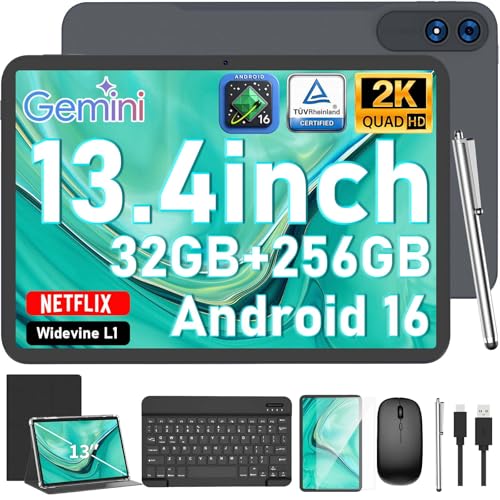
13-Inch Android Tablet with Keyboard, 32GB/256GB/2TB, Black
- ✓ Large, vivid display
- ✓ Fast and smooth performance
- ✓ Expandable storage
- ✕ Slightly bulky for pocket
- ✕ Keyboard layout could improve
| Display | 13.4-inch IPS LCD, 1920 x 1200 HD resolution |
| Processor | Unisoc T615 octa-core |
| Memory | 32 GB RAM (8 GB + 24 GB), 256 GB internal storage, expandable up to 2TB via TF card |
| Battery | 10,000 mAh high-density lithium-ion |
| Connectivity | 5G Wi-Fi, Bluetooth 5.0 |
| Operating System | Android 16 |
There’s a common belief that large-screen tablets are just for media consumption or light browsing. But this 13-inch Android tablet with a keyboard challenged that idea for me right away.
Its sleek black finish feels sturdy, and the expansive 13.4-inch display makes multitasking a breeze.
Once I fired it up, the first thing I noticed was how smooth everything ran, thanks to the octa-core T615 processor. Switching between apps, editing spreadsheets, or even streaming Netflix in HD was seamless.
The 1920 x 1200 resolution on the screen makes everything sharp and vibrant, perfect for both work and entertainment.
The 32GB RAM combined with 256GB of storage, plus the option to expand up to 2TB, means you’ll never worry about space. I managed large files and multiple tabs without a hiccup.
The split-screen feature really shines here, especially when working on spreadsheets while referencing documents side by side.
The battery life surprised me — a solid 10,000mAh capacity keeps it running through long work sessions or flights without needing a recharge. With 5G Wi-Fi and Bluetooth 5.0, connectivity was quick and reliable, whether I was on video calls or transferring files.
The bundle includes a keyboard, mouse, stylus, and protective case, transforming this tablet into a versatile workstation. It’s lightweight enough to carry around but feels substantial enough to handle serious work.
Honestly, I was impressed by how well it handled multitasking, gaming, and streaming all in one device.
Overall, this tablet debunked the myth that bigger screens are only for entertainment. It’s a solid choice for anyone needing a powerful, portable device for work, study, or even some casual gaming.
EITOMIN Android Tablet 2026 Latest 10 inch Tablet

- ✓ Vibrant, sharp display
- ✓ Strong multitasking performance
- ✓ Long battery life
- ✕ No stylus included
- ✕ Heavier than some tablets
| Display | 10.1-inch FHD IPS touchscreen with vivid colors and sharp details |
| Processor | MTK8183 octa-core 2.0GHz 64-bit chip |
| Memory | 16GB RAM (8GB physical + 8GB virtual), 128GB internal storage, expandable up to 1TB |
| Battery | 7000mAh capacity, up to 12 hours of usage |
| Connectivity | Dual-band WiFi (5GHz + 2.4GHz, IEEE 802.11 a/b/g/n/ac), Bluetooth 5.0, GPS |
| Cameras | 13MP rear camera and 8MP front camera |
As soon as I unboxed the EITOMIN 10-inch Android tablet, I was struck by how sleek and solid it feels in my hands. The smooth black finish and slightly textured back give it a premium look without feeling slippery.
The weight is just right—not too heavy, making it comfortable to hold for long periods.
The 10.1-inch FHD IPS display truly stands out, delivering vibrant colors and sharp details that make browsing, streaming, or working feel immersive. I especially appreciated the dual speakers; they pack a punch and make videos and music sound lively without external speakers.
The dual cameras, 13MP and 8MP, are surprisingly clear, perfect for quick video calls or snapping photos on the go.
Performance-wise, the octa-core 2.0GHz processor handles multitasking like a champ. I opened multiple apps, streamed videos, and used a spreadsheet without any lag.
The 16GB RAM (plus virtual RAM) and 128GB storage, expandable up to 1TB, mean I never worry about space or speed bottlenecks. Downloading apps from Google Play was seamless, and the split-screen feature made multitasking a breeze.
Battery life impressed me—lasting around 12 hours on a single charge, even with heavy use. The 7000mAh capacity means I can take this on long trips without worrying about finding an outlet.
Plus, the built-in GPS, Bluetooth 5.0, and fast WiFi keep me connected and productive everywhere.
Overall, this tablet combines power, screen quality, and versatility at an excellent price. Perfect for work, entertainment, or casual browsing.
It feels like a well-rounded device that won’t disappoint.
What Key Features Should You Look for in a Spreadsheet App for Android Tablets?
When searching for the best spreadsheet for Android tablets, several key features can enhance your experience and productivity.
- User Interface: A clean and intuitive user interface is crucial for ease of use, especially on a tablet screen. Look for apps that offer a touch-friendly design and well-organized menus that allow for quick access to essential functions.
- Collaboration Tools: Modern spreadsheet applications often include features that enable real-time collaboration with others. This allows multiple users to edit and comment on the same document simultaneously, which is essential for teamwork and productivity.
- Compatibility: Ensure the app supports various file formats, including Excel (.xlsx) and Google Sheets. This compatibility allows for easy sharing and editing of files across different platforms and devices, reducing the likelihood of formatting errors.
- Advanced Functions: Look for apps that provide a range of advanced functions and formulas, similar to desktop versions. This includes financial, statistical, and logical functions that can enhance your data analysis capabilities.
- Cloud Integration: Apps that offer cloud storage integration enable you to access your spreadsheets from anywhere and ensure your data is backed up securely. Check for compatibility with popular cloud services like Google Drive, OneDrive, or Dropbox.
- Templates and Customization: The availability of pre-designed templates can save time and effort when starting new projects. A good app should also allow for customization to meet specific user needs, whether for personal or professional use.
- Offline Access: It’s beneficial to choose an app that allows for offline access to your spreadsheets. This feature ensures that you can view and edit your documents even without an internet connection, syncing changes once you’re back online.
- Performance and Speed: The app should perform efficiently without lag, even when handling large datasets. A responsive app enhances the user experience, allowing for smooth navigation and calculation processes.
- Support and Updates: Regular updates and customer support are essential for addressing bugs and improving functionality. Check if the app has a reliable support system and a history of consistent updates to keep up with evolving user needs and technology.
Which Spreadsheet Apps Are Most Compatible with Android Tablets?
The best spreadsheet apps for Android tablets are designed to enhance productivity and compatibility across devices.
- Google Sheets: A highly accessible and collaborative tool that integrates seamlessly with other Google Workspace applications.
- Microsoft Excel: A powerful spreadsheet tool offering extensive functionalities and features familiar to many users, especially in business environments.
- Zoho Sheet: A feature-rich spreadsheet application that allows for real-time collaboration and is part of a larger suite of productivity tools.
- WPS Office Spreadsheets: A versatile office suite that includes a spreadsheet tool, known for its user-friendly interface and compatibility with various file formats.
- LibreOffice Calc: An open-source alternative that provides a robust set of features for users who prefer a desktop-like experience on their tablets.
Google Sheets: This app is cloud-based, allowing users to create and edit spreadsheets from anywhere with internet access. Its real-time collaboration features make it ideal for teams, as multiple users can work on the same document simultaneously and see changes instantly.
Microsoft Excel: Widely regarded as the industry standard for spreadsheets, Excel for Android tablets offers a comprehensive set of features, including advanced formulas, pivot tables, and data visualization tools. It syncs with OneDrive, enabling access to files across devices, and users familiar with the desktop version will find the mobile interface intuitive.
Zoho Sheet: Part of the Zoho Office Suite, Zoho Sheet supports real-time collaboration and offers a variety of templates and functions to streamline data analysis. Its compatibility with Excel formats and user-friendly design makes it a solid choice for both personal and professional use.
WPS Office Spreadsheets: This app combines a spreadsheet tool with word processing and presentation features, providing a complete office solution for Android tablet users. It supports a wide range of formats, including Excel files, and offers cloud storage options for easy access to documents on the go.
LibreOffice Calc: As part of the LibreOffice suite, Calc provides users with a robust set of spreadsheet functionalities, including complex calculations and extensive formatting options. Although it is primarily a desktop application, its mobile compatibility allows users to work on spreadsheets effectively without compromising on features.
How Does Microsoft Excel Meet Android Users’ Needs?
Microsoft Excel meets Android users’ needs through its comprehensive features and user-friendly interface.
- Cross-Platform Compatibility: Excel allows users to seamlessly work on documents across different devices, including Android tablets, PCs, and Macs.
- Robust Functionality: The app includes a wide array of formulas, functions, and data analysis tools, making it suitable for both basic and advanced spreadsheet tasks.
- User-Friendly Interface: The interface is designed for touch navigation, making it easy for users to create and edit spreadsheets on their Android devices.
- Cloud Integration: Excel integrates with OneDrive, enabling users to save their work in the cloud and access it from anywhere, ensuring that important files are always available.
- Collaboration Features: Users can share spreadsheets with others and collaborate in real-time, allowing multiple users to work on the same document simultaneously.
Cross-platform compatibility ensures that users can start a project on one device and continue on another without losing any progress, making it ideal for professionals who switch between devices frequently.
Robust functionality in Excel includes the ability to perform complex calculations, create pivot tables, and generate charts, which empowers users to analyze and visualize data effectively.
The user-friendly interface is tailored for touch interactions, featuring intuitive gestures and menus that enhance the experience for tablet users, allowing for easier navigation and editing.
Cloud integration through OneDrive means users can easily back up their files and access them from any device with an internet connection, providing peace of mind and convenience.
Collaboration features allow teams to work together efficiently, as users can comment, edit, and track changes in real-time, making Excel a powerful tool for group projects and business environments.
What Unique Features Does Google Sheets Provide for Android Tablets?
Google Sheets offers several unique features that enhance its functionality on Android tablets, making it one of the best spreadsheets for this platform.
- Real-time Collaboration: Google Sheets allows multiple users to work on the same spreadsheet simultaneously. This feature is particularly useful for teams who need to edit and analyze data together, as changes are instantly reflected for all users.
- Offline Mode: Users can access and edit their spreadsheets without an internet connection by enabling offline mode. This feature ensures that work can continue uninterrupted, and changes will sync automatically once connectivity is restored.
- Customizable Templates: Google Sheets provides a variety of templates to suit different needs, such as budgeting, invoicing, and project management. These templates help users save time and maintain consistency in their documents.
- Integration with Google Workspace: As part of the Google ecosystem, Sheets integrates seamlessly with other Google services like Drive, Docs, and Gmail. This connectivity facilitates easy sharing and data importing/exporting, enhancing productivity.
- Data Visualization Tools: Google Sheets includes built-in charting and graphing tools that allow users to create visually appealing representations of their data. These tools help in making complex data more understandable and accessible.
- Advanced Functions and Formulas: The app supports a wide range of functions and formulas that can handle complex calculations. This allows users to perform sophisticated data analysis directly on their tablets, making it a powerful tool for financial and statistical tasks.
- Voice Input and Editing: Users can take advantage of voice recognition technology to input data or commands without typing. This feature can significantly speed up data entry, especially on larger spreadsheets, making it more efficient for users on the go.
What Advantages Does WPS Office Provide for Android Tablet Users?
WPS Office offers several advantages for Android tablet users seeking the best spreadsheet experience.
- User-Friendly Interface: WPS Office features an intuitive and streamlined interface that is designed specifically for touch interactions, making it easy for users to navigate and operate spreadsheets on their tablets.
- Cross-Platform Compatibility: The application supports various file formats, including Microsoft Excel, allowing users to easily share and collaborate with others regardless of the software they are using.
- Cloud Integration: WPS Office provides seamless integration with cloud storage services, enabling users to access their spreadsheets from anywhere and ensuring that their data is backed up and easily shareable.
- Rich Feature Set: The app includes a variety of advanced features such as pivot tables, charts, and formula editing, equipping users with the necessary tools to perform complex data analysis directly from their tablets.
- Customizable Templates: WPS Office offers a range of customizable templates for various spreadsheet needs, helping users to quickly create professional-looking documents without starting from scratch.
- Collaboration Tools: The software allows real-time collaboration with multiple users, making it ideal for teams who need to work together on projects and share updates instantaneously.
- Offline Access: Users can access and edit their spreadsheets offline, providing flexibility for those who may not always have internet connectivity while using their Android tablets.
How Do User Reviews Impact the Choice of Spreadsheet Apps for Android Tablets?
Support and Updates: Comments regarding customer support and the frequency of updates inform users about the app’s longevity and the developer’s commitment to improving the product. Users often prefer apps that receive regular updates for new features and bug fixes, as this indicates a responsive development team.
Real-World Use Cases: Users often share real-world scenarios and practical applications of the spreadsheet apps, providing prospective users with relatable examples of how the apps can meet their specific needs. By understanding how others utilize the app for budgeting, project management, or data analysis, potential users can gauge its effectiveness in their own situations.
What Are the Pricing Models Available for Spreadsheet Apps on Android Tablets?
The available pricing models for spreadsheet apps on Android tablets vary to cater to different user needs.
- Free Version: Many spreadsheet apps offer a free version with basic functionalities, allowing users to create and edit spreadsheets without any cost.
- Freemium Model: This model provides a free version with limited features, while users can pay for additional functionalities or premium features as needed.
- Subscription-Based Pricing: Some apps charge a monthly or yearly fee that grants users access to all features and regular updates, often appealing to businesses or power users.
- One-Time Purchase: Certain spreadsheet apps require a single upfront payment for a license, providing users with permanent access to the app without recurring fees.
- Enterprise Licensing: For organizations, some spreadsheet apps offer bulk licensing options that can be customized based on the number of users and specific features required, often including additional support services.
The free version typically suffices for casual users who need basic functionalities, such as creating or editing simple spreadsheets without advanced features. However, the freemium model is attractive for those who may eventually want to upgrade to access more sophisticated tools, such as collaboration features or advanced data analysis options.
Subscription-based pricing is ideal for users who require ongoing access to the latest features, especially in a business context where updates and support are essential. Alternatively, the one-time purchase model appeals to users who prefer to avoid recurring charges and are satisfied with the features available at the time of purchase.
For larger organizations, enterprise licensing provides a scalable solution, allowing companies to manage multiple users while often receiving enhanced customer support and tailored features to meet their specific needs.
Which Spreadsheet Apps Offer the Best Integrations for Android Tablets?
The best spreadsheet apps for Android tablets that offer robust integrations include:
- Microsoft Excel: A powerful spreadsheet tool known for its extensive features and compatibility with other Microsoft Office applications.
- Google Sheets: A cloud-based spreadsheet application that excels in real-time collaboration and integrates seamlessly with Google Workspace.
- Zoho Sheet: A versatile spreadsheet app that offers a wide array of integrations with other Zoho applications and third-party services.
- WPS Office Spreadsheet: A comprehensive office suite that includes a spreadsheet application with good compatibility for various formats and integrations.
- OfficeSuite: A full-featured office application that includes a spreadsheet editor, providing solid integration with cloud storage services.
Microsoft Excel: Excel is renowned for its advanced functionalities, such as pivot tables, data analysis tools, and extensive formatting options. It integrates well with other Microsoft services like OneDrive and Teams, allowing users to access and share files easily across devices, making it ideal for professional use.
Google Sheets: Google Sheets stands out for its collaboration features, enabling multiple users to edit documents in real-time. It integrates effortlessly with Google Drive, Gmail, and other Google services, as well as third-party tools through add-ons, which enhances productivity for teams working remotely.
Zoho Sheet: This app provides a rich set of features for data manipulation and visualization, along with an intuitive interface. Zoho Sheet integrates with various Zoho applications, such as Zoho CRM and Zoho Projects, as well as popular third-party services, making it suitable for businesses that utilize the Zoho ecosystem.
WPS Office Spreadsheet: WPS Office offers a familiar interface for users of Microsoft Office and supports a range of file formats, ensuring compatibility. It also provides integration with cloud storage services like Google Drive and Dropbox, allowing for easy access and sharing of documents across different platforms.
OfficeSuite: OfficeSuite includes a robust spreadsheet tool with an array of features for data analysis and presentation. It integrates with various cloud storage services, including Google Drive, OneDrive, and Dropbox, providing users with flexibility in saving and accessing their files securely from anywhere.
Related Post: