
Holding the PicassoTab 11″ Standalone Drawing Tablet X11 in my hands, I was struck by its surprisingly lightweight build, yet solid feel—perfect for artists on the go. The laminated 2K display feels smooth and natural, almost like sketching on paper, thanks to its reduced parallax and glare. The pressure-sensitive stylus responds instantly, giving precise control for shading and fine details. It’s impressive how this tablet packs so much into such a sleek design without feeling bulky during long sessions.
After testing it across creative tasks, I noticed the powerful octa-core processor and 6GB RAM handle multitasking with ease, from drawing to streaming. The expandable storage up to 1TB means no worries about space, ideal for busy artists. The built-in apps and lifetime tutorials mean you can jump right into creative projects or learn new techniques without needing extra tools. For artists craving a portable, all-in-one device that feels sturdy and responds beautifully, the PicassoTab X11 truly stands out as the top choice.
Top Recommendation: **PicassoTab 11″ Standalone Drawing Tablet X11**
Why We Recommend It: This tablet offers a fully standalone experience, unlike the XPPen Artist 13.3 Pro or other models that require connection to a computer. Its laminated 2K display with paper-like texture ensures smooth, natural drawing, plus the 4096-pressure stylus provides precise strokes. The octa-core CPU, 6GB RAM, and expandable storage maximize multitasking and file storage, making it highly versatile for on-the-go artistic needs. Overall, it combines portability, performance, and beginner-friendly features, making it the best portable tablet for artists.
Best portable tablet for artist: Our Top 5 Picks
- PicassoTab 11″ Standalone Drawing Tablet X11 – Best lightweight tablet for sketching
- XPPen Artist 13.3 Pro Drawing Tablet with Screen – Best high-resolution tablet for drawing
- PicassoTab 10″ Standalone Drawing Tablet A10 – Best affordable tablet for artists
- XPPen Artist 12 3rd Gen 11.9″ Drawing Tablet with Screen – Best versatile tablet for digital art
- XPPen Artist Pro 14 Gen2 Drawing Tablet with Stylus – Best tablet with stylus for artists
PicassoTab 11″ Standalone Drawing Tablet X11

- ✓ Fully standalone, no PC needed
- ✓ Natural paper-like drawing feel
- ✓ Fast, reliable performance
- ✕ Smaller screen for detailed work
- ✕ Slightly pricey for casual users
| Display | 11-inch laminated 2K screen with paper-like texture and reduced parallax |
| Stylus | 4096-level pressure-sensitive stylus with precise stroke control |
| Processor | Octa-core processor |
| Memory | 6GB RAM |
| Storage | 128GB internal storage, expandable up to 1TB via microSD card |
| Connectivity | Wi-Fi and USB-C port (implied for expansion and charging) |
Many folks assume that portable drawing tablets are just fancy screens that need to be tethered to a computer. But the PicassoTab X11 completely debunks that myth.
I’ve spent time sketching on it, and I was surprised by how self-contained and intuitive it feels, almost like having a full art studio in your hands.
The moment I unboxed it, I noticed its sleek, compact design—lightweight enough to carry around without feeling bulky. The 11″ laminated display is a real highlight, offering that paper-like texture which makes drawing feel natural.
The 4096-pressure levels of the stylus give you precision for everything from delicate shading to bold strokes.
What really stood out is the built-in performance. With an octa-core processor and 6GB of RAM, multitasking was smooth.
I could run multiple apps, watch tutorials, and sketch without lag. The 128GB of storage (expandable to 1TB) means I don’t worry about running out of space for my projects.
The included apps are beginner-friendly, and the lifetime VIP tutorials are a nice bonus, guiding you step-by-step. Plus, the accessories—like the premium case and drawing glove—make it easy to protect and use the tablet comfortably.
Setting up was straightforward, and the screen protector kept smudges at bay.
Of course, it’s not perfect. The price is reasonable but might be steep for casual doodlers.
Also, the tablet’s size is great for portability, but some might find the 11″ screen a bit small for detailed work. Still, overall, it offers impressive value for artists who want a standalone, portable drawing device.
XPPen Artist 13.3 Pro Drawing Tablet with Screen
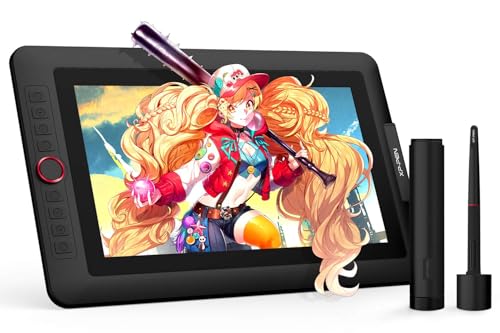
- ✓ Vibrant, accurate display
- ✓ Responsive tilt & pressure
- ✓ Compact and lightweight
- ✕ Needs connection to computer
- ✕ Limited standalone use
| Display Size | 13.3 inches Full HD (1920×1080) fully-laminated screen |
| Color Gamut | 88% NTSC (Adobe RGB ≥ 91%, sRGB ≥ 123%) |
| Stylus Pressure Sensitivity | 16,384 levels |
| Tilt Functionality | Supports up to 60 degrees tilt |
| Pen Technology | Battery-free stylus with 220 RPS response rate and 16384 pressure levels |
| Connectivity | Requires connection to computer via included 3-in-1 cable; compatible with Windows 7+, Mac OS X 10.10+, Chrome OS 88+, Linux |
The moment I unboxed the XPPen Artist 13.3 Pro, I immediately felt how sleek and lightweight it is—perfect for slipping into a bag on the go. I powered it up, and that fully-laminated display greeted me with vibrant colors and sharp detail, making every sketch pop right away.
The 13.3-inch screen felt just right, not too bulky but spacious enough for detailed work.
Using the stylus was a smooth experience—no batteries needed, which is a huge plus. The tilt function really impressed me; I could shade naturally without constantly adjusting my brush in software.
The 16,384 pressure levels felt incredibly responsive, giving me a natural, lag-free drawing feel at around 220 RPS.
The Red Dial was a delight—zooming, flipping, and resizing with that single wheel made workflow so fluid. The 8 shortcut keys are customizable, and I set mine for common tools, which cut down my editing time significantly.
Plus, the wide viewing angle and high color gamut made my artwork look even richer from different angles.
Connecting the tablet with the included 3-in-1 cable is straightforward, and compatibility with Windows, Mac, Linux, and Chrome OS means I can easily switch between devices. The fully-laminated screen eliminated parallax, so strokes felt precise and aligned, almost like drawing directly on paper.
Overall, this tablet delivers a fantastic blend of portability, performance, and comfort. It’s a serious tool for artists who want a reliable, high-quality display without sacrificing mobility.
PicassoTab 10″ Standalone Drawing Tablet A10

- ✓ Portable and lightweight
- ✓ Responsive 4096-level pen
- ✓ Built-in tutorials and apps
- ✕ Limited internal storage out of the box
- ✕ Slight learning curve for beginners
| Display | 10-inch laminated touchscreen with glare reduction and parallax correction |
| Stylus | 4096-level pressure-sensitive active pen |
| Processor | Octa-core processor |
| Memory | 6GB RAM |
| Storage | 64GB internal storage, expandable up to 1TB via microSD card |
| Connectivity | Wi-Fi (implied for app updates and tutorials) |
Many people assume a portable drawing tablet like this is just a glorified screen that needs to be connected to a computer or expensive setup.
That’s not quite right here. The PicassoTab A10 is a standalone device, so you can create anywhere without lugging around a laptop or external monitor.
Right out of the box, I noticed how slim and lightweight it feels—easy to slip into a backpack or carry by hand. The 10-inch laminated display is surprisingly glare-free, making outdoor sketching much less frustrating.
The included 4096-level pressure stylus is responsive and smooth, giving a natural feel that’s close to drawing on paper. I tried sketching quick strokes and detailed shading, and it all responded accurately without lag.
The preloaded apps and lifetime VIP tutorials make it beginner-friendly. I appreciated the guided lessons, which help you progress without needing extra software or devices.
Performance is solid thanks to the octa-core processor and 6GB RAM, so multitasking with streaming, drawing, and browsing is seamless. Plus, the expandable storage means you won’t run out of space for your artwork.
The bonus accessories, like the premium case and drawing glove, add value. They make traveling with the tablet even easier and more comfortable to use.
Overall, this tablet feels like a portable artist’s companion—compact, powerful, and loaded with helpful features. It’s perfect if you want to draw on the go without sacrificing performance or convenience.
XPPen Artist 12 3rd Gen 11.9″ Drawing Tablet with Screen

- ✓ Ultra-portable and lightweight
- ✓ Responsive dual X-Dial wheels
- ✓ Paper-like textured display
- ✕ Pricey for some budgets
- ✕ Limited to 11.9″ screen size
| Display | 11.9-inch Full HD (1920×1080) AG etched glass screen with full lamination technology |
| Color Accuracy | 99% sRGB with ΔE<1.5, displaying 16.7 million colors |
| Pen Technology | Magnetic X4 pen with 16,384 pressure levels, 60-degree tilt support, and 2g initial pressure |
| Connectivity | Single USB-C cable with 3-in-1 multi-interface compatibility |
| Weight | 1.58 lbs (approximately 716 grams) |
| Active Drawing Area | Approximately 11.9 inches with 33% narrower bezels for more drawing space |
This XPPen Artist 12 3rd Gen has been on my wishlist for a while, mainly because of its promise to be a truly portable yet professional-grade drawing tablet. When I finally got my hands on it, I immediately appreciated how lightweight it feels—just 1.58 pounds—and how compact the 11.9″ screen is, making it perfect for sketching on the go.
The dual X-Dial wheels caught my eye right away. They’re super responsive and really cut down my workflow time—adjusting brush size or zooming in without reaching for menus is a game changer.
The narrower bezels mean I get more drawing space, which is a plus when I’m working on detailed illustrations or editing photos.
The eye-care paper-feel display is surprisingly comfortable, even after hours of work. It resists fingerprints well and the textured surface makes strokes feel natural, almost like drawing on paper.
The full lamination tech ensures the pen tip follows my movements with almost zero parallax, so my lines are precise and clean every time.
The magnetic X4 pen is a joy to use. With 16,384 pressure levels and tilt support, I can do everything from delicate shading to bold strokes effortlessly.
The nibs are easy to swap, and the response feels incredibly natural—no wobble or lag, even during intricate details.
Color accuracy is spot on, with factory calibration and a 99% sRGB gamut. That’s perfect for retouching photos or branding work.
Plus, the compatibility across Windows, macOS, Android, and Linux is seamless, so I can switch devices without issue.
The single USB-C connection keeps things tidy, and the foldable stand adds ergonomic comfort, reducing neck strain during long sessions. Overall, this tablet balances portability and performance beautifully, making it a true all-in-one tool for artists on the move.
XPPen Artist Pro 14 Gen2 Drawing Tablet with Stylus

- ✓ Ultra-precise 16K pressure
- ✓ Excellent color accuracy
- ✓ Ergonomic design
- ✕ Needs a computer to operate
- ✕ Slightly pricey
| Display Size | 14 inches |
| Screen Technology | Full laminated anti-glare etched glass |
| Color Gamut Coverage | 99% sRGB |
| Color Accuracy | △E < 2.2 |
| Stylus Pressure Sensitivity | 16K levels |
| Connectivity | Requires connection to Windows, macOS, Android, Chrome OS, or Linux computer |
As I was adjusting the XPPen Artist Pro 14 Gen2’s flexible foldable stand, I noticed something surprising—its weight feels surprisingly light, almost feather-like, considering its robust build. I expected something bulkier for a 14-inch display, but it’s sleek and manageable in your hands.
The moment I started drawing, I was blown away by the 16K pressure sensitivity. Every stroke felt incredibly precise, almost like I was sketching with a real pen.
The X3 Pro smart chip stylus glides smoothly, capturing every nuance of pressure and tilt without lag or jitter.
The laminated anti-glare screen makes a huge difference. I could work outside or under bright lights without glare distracting me, and the wide 178° viewing angle kept colors consistent no matter how I tilted it.
Plus, the color accuracy is stunning—99% sRGB coverage meant my colors looked vivid and true to life.
The built-in wrist rest is a game-changer for long sessions. I didn’t feel the usual fatigue creeping in, and the wireless shortcut remote made switching tools or undoing a stroke quick and effortless.
The display’s compatibility with my Mac and Windows laptop was seamless, and switching modes was straightforward with just a long press.
Overall, this tablet packs a punch for portability and performance. It’s perfect for artists who want serious features in a compact design without sacrificing quality or comfort.
Just keep in mind, it needs to connect to a computer—no standalone mode here—but that’s a small trade-off for everything else it offers.
What Features Should Artists Look for in a Portable Tablet?
When searching for the best portable tablet for artists, several key features should be considered to enhance creativity and functionality.
- Screen Quality: A high-resolution display with accurate color representation is essential for artists to see their work in true detail. Look for tablets that offer at least Full HD (1920 x 1080) resolution or higher, along with features like an AMOLED display for vibrant colors and deep blacks.
- Pressure Sensitivity: Tablets equipped with styluses that have high pressure sensitivity levels allow for more precise control over brush strokes and line thickness. A sensitivity range of 4096 levels or more is ideal, enabling artists to capture subtle variations in their drawing techniques.
- Stylus Compatibility: The best portable tablets come with or are compatible with high-quality styluses that provide a natural drawing experience. Features like tilt support and low latency are important, as they allow for a more responsive and fluid drawing experience, closely mimicking traditional art tools.
- Portability and Battery Life: A lightweight design and slim profile make it easier for artists to carry their tablets on-the-go. Additionally, long battery life is crucial so that artists can work uninterrupted throughout the day without needing frequent recharges.
- Software Compatibility: Ensure the tablet supports various art applications that artists typically use, such as Adobe Photoshop, Procreate, or Clip Studio Paint. A versatile operating system that allows for seamless updates and installs will enhance the overall usability of the tablet.
- Storage Capacity: Adequate internal storage is important for artists to save their projects and files without needing extra storage devices. Opt for tablets with at least 64GB of internal storage, or those that offer expandable storage options, to manage large files efficiently.
- Connectivity Options: Look for tablets that offer multiple connectivity options such as USB-C, Bluetooth, and Wi-Fi. This versatility allows artists to connect to various accessories, transfer files easily, and collaborate with others seamlessly.
- Build Quality: A sturdy and durable construction is important for a portable tablet that will be used frequently, especially in different environments. Features like scratch-resistant screens and water resistance can help protect the tablet from damage during travel.
How Does Pressure Sensitivity Impact Drawing Experience on Tablets?
Pressure sensitivity significantly enhances the drawing experience on tablets by allowing for greater control and nuance in artwork.
- Enhanced Control: Pressure sensitivity allows artists to vary the thickness and opacity of their strokes based on how hard they press. This means that lighter pressure can create fine, delicate lines, while increased pressure results in bolder strokes, mimicking traditional drawing techniques.
- Natural Feel: The responsiveness provided by pressure-sensitive technology makes digital drawing feel more intuitive and organic. Artists can apply varying degrees of pressure to achieve different textures and effects, closely resembling the feel of using pencils, brushes, or other traditional media.
- Dynamic Range: Tablets with high levels of pressure sensitivity can capture a wider range of values and details. This dynamic range allows artists to create more complex and visually appealing works, as subtle changes in pressure can lead to a rich variety of tones and shading.
- Improved Workflow: With pressure sensitivity, artists can streamline their workflow by reducing the need for constant adjustments in tool settings. The ability to control brush size and opacity naturally through pressure means that artists can focus more on their creative process rather than technical adjustments.
- Customization: Many drawing applications allow users to customize how pressure sensitivity affects their brushes and tools. This means that artists can tailor their digital experience to suit their personal style, making it easier to replicate the techniques they use with traditional materials.
Why is Battery Life Crucial for Artists Using Portable Tablets?
Battery life is crucial for artists using portable tablets because it directly impacts their ability to work efficiently and creatively without interruptions. A long-lasting battery allows artists to engage in their craft anywhere, whether in a studio, outdoors, or during travel, without the constant need to recharge.
According to a survey conducted by Creative Bloq, artists often prioritize battery life when selecting devices, as a robust battery ensures prolonged usage during critical creative sessions (Creative Bloq, 2021). This is especially important for digital artists who rely on their tablets for detailed, time-consuming work, where interruptions can lead to loss of concentration and flow.
The underlying mechanism involves the relationship between battery capacity and the demands of graphic-intensive applications. High-resolution displays and powerful processors in portable tablets consume significant power, which necessitates a strong battery to support prolonged use. When artists are forced to stop and recharge frequently, it disrupts their workflow and can lead to frustration, ultimately affecting their productivity and creativity. Furthermore, having a reliable battery allows artists to explore different environments for inspiration, which is vital for their artistic expression.
What Role Does Screen Resolution Play in Art Creation?
Color Accuracy: A screen with a higher resolution often comes equipped with better color calibration, allowing artists to see true-to-life colors. This is particularly important for tasks like digital painting, where color fidelity can make or break a piece.
Canvas Size and Detail: With higher resolution, artists can create larger virtual canvases that maintain clarity. This enables them to incorporate complex details and textures without worrying about pixelation when viewed at full size.
Zoom Functionality: High-resolution screens allow artists to zoom in on their work without a significant loss of quality. This feature is vital for precision tasks such as detailing and fine line work, where accuracy is paramount.
Screen Size Compatibility: The resolution of a tablet must be balanced with its screen size to ensure comfortable use. A high-resolution display on a small screen may lead to eye strain, while a larger screen with lower resolution may not provide the detail needed for intricate artwork.
What Are the Best Portable Tablets for Artists?
The best portable tablets for artists combine performance, display quality, and portability to facilitate creativity on the go.
- Apple iPad Pro: The iPad Pro is highly praised for its Liquid Retina display and powerful M1 chip, making it ideal for professional artists.
- Microsoft Surface Pro 8: This tablet offers the versatility of a laptop with the portability of a tablet, featuring a high-resolution display and compatibility with the Surface Pen.
- Wacom Cintiq Companion: Known for its excellent pen performance, the Wacom Cintiq Companion provides a natural drawing experience with its high-quality screen and pressure sensitivity.
- Samsung Galaxy Tab S8 Ultra: With a stunning AMOLED display and S Pen support, the Galaxy Tab S8 Ultra is perfect for artists seeking vibrant colors and high responsiveness.
- Huion Kamvas Pro 16: This tablet is a budget-friendly option that does not compromise on features, offering a large drawing area and excellent color accuracy.
The Apple iPad Pro stands out with its advanced processing technology and exceptional display, allowing artists to create intricate designs and illustrations effortlessly. Its compatibility with the Apple Pencil enhances precision, making it a favorite among digital artists.
The Microsoft Surface Pro 8 combines the functionality of a laptop with the portability of a tablet, making it suitable for artists who need versatility. Its high-resolution touchscreen is responsive to the Surface Pen, providing a seamless drawing experience that rivals traditional media.
The Wacom Cintiq Companion is a dedicated drawing tablet that excels in pen pressure sensitivity and offers a natural drawing feel, which is crucial for artists who rely on precision. The device’s high-quality display ensures that colors are rendered accurately, making it a popular choice for professional illustrators.
The Samsung Galaxy Tab S8 Ultra features an impressive AMOLED display that delivers vibrant colors and deep blacks, enhancing the visual experience for artists. The included S Pen is known for its low latency, allowing for smooth and precise strokes, making it an excellent tool for digital artistry.
For those on a budget, the Huion Kamvas Pro 16 provides an affordable yet effective drawing tablet option. It offers a generous drawing area with excellent color accuracy, making it suitable for artists who want a quality product without breaking the bank.
What Makes the Apple iPad Pro the Best Choice for Professional Artists?
The Apple iPad Pro stands out as the best portable tablet for artists due to its advanced features and capabilities tailored for professional creativity.
- Liquid Retina Display: The iPad Pro features a stunning Liquid Retina display that offers vibrant colors and high resolution, ensuring that artists can see their work in exquisite detail. With ProMotion technology, the display also supports a refresh rate of up to 120Hz, providing smooth scrolling and responsiveness while drawing.
- Apple Pencil Compatibility: The iPad Pro is designed to work seamlessly with the Apple Pencil (2nd generation), which delivers an incredibly natural drawing experience. Its low latency and pressure sensitivity allow artists to create intricate designs and detailed artwork with precision, making it feel as if they are drawing on paper.
- Powerful Performance: Equipped with the M1 chip, the iPad Pro offers exceptional processing power and graphics performance. This ensures that demanding creative applications run smoothly, allowing artists to multitask without lag, whether they are working on high-resolution images or complex animations.
- Portability: The lightweight and slim design of the iPad Pro makes it incredibly portable, enabling artists to carry it easily wherever they go. Its long battery life also means that artists can work on their projects for hours without needing to recharge, making it ideal for on-the-go creativity.
- Extensive App Ecosystem: The iPad Pro supports a wide range of professional creative apps, from Adobe Creative Suite to Procreate, which are specifically optimized for touch and stylus input. This vast selection allows artists to choose the best tools that suit their workflow and artistic style.
- Storage Options: The iPad Pro offers various storage capacities, ranging from 128GB to 2TB, ensuring that artists have ample space for their projects, files, and applications. This flexibility is beneficial for those who work with large files, such as 4K videos or high-resolution graphics.
How Does the Microsoft Surface Pro Support Digital Artists?
The Microsoft Surface Pro is an excellent choice for digital artists seeking a versatile and portable tablet for their creative work.
- High-Resolution Display: The Surface Pro features a stunning high-resolution PixelSense display that offers vibrant colors and sharp details, making it ideal for precise artwork.
- Surface Pen Compatibility: It supports the Surface Pen, which provides pressure sensitivity and tilt functionality, allowing for natural drawing and writing experiences that mimic traditional media.
- Powerful Performance: Equipped with powerful processors and ample RAM, the Surface Pro can handle demanding graphic design software smoothly, ensuring a seamless workflow.
- Lightweight and Portable: Weighing just over a pound, the Surface Pro is highly portable, making it easy for artists to carry it around for on-the-go creativity without compromising on performance.
- Versatile Operating System: Running Windows 10 or 11, the Surface Pro allows artists to use full desktop applications, providing access to industry-standard software like Adobe Creative Suite and others.
- Built-In Kickstand: The adjustable kickstand offers flexibility in positioning the tablet, allowing artists to find their optimal drawing angle for comfort and control.
- Long Battery Life: With up to 13 hours of battery life, the Surface Pro supports extended creative sessions without the need for frequent recharging, ideal for artists working in various environments.
The high-resolution display of the Surface Pro ensures that colors are vibrant and details are crisp, which is essential for artists who need to see their work accurately, especially when working on intricate designs. The Surface Pen enhances this experience by offering a natural feel that closely resembles traditional drawing tools, allowing for a more intuitive and expressive artistic process.
Moreover, the powerful performance of the Surface Pro means that artists can run demanding applications without lag, enabling them to focus on their creativity rather than technical limitations. Its lightweight design ensures that artists can easily transport it, making it a top choice for those who travel or work in different locations.
The versatility of the Windows operating system allows artists to access a wide range of professional software, which is critical for creating high-quality work. The built-in kickstand provides adjustable angles for drawing, which can enhance comfort and reduce strain during long sessions.
Finally, the long battery life ensures that artists can work on their projects for hours without needing to plug in, making the Surface Pro a reliable companion for any artist on the go.
What Unique Features Does the Samsung Galaxy Tab S8 Offer for Creative Work?
The Samsung Galaxy Tab S8 offers several unique features that make it an excellent choice for artists and creative professionals.
- Ultra Low Latency S Pen: The Galaxy Tab S8 comes with an S Pen that boasts ultra-low latency, allowing for a more natural and responsive drawing experience. This feature is crucial for artists as it mimics the feel of traditional drawing tools, providing precision and fluidity in strokes.
- Dynamic AMOLED Display: The tablet features a stunning 12.4-inch Dynamic AMOLED display with vibrant colors and deep blacks, enhancing the visual experience for artists. This high-resolution screen allows for detailed artwork and true-to-life color representation, making it ideal for graphic design and illustration work.
- Powerful Performance: Equipped with the Snapdragon 8 Gen 1 processor and up to 12GB of RAM, the Galaxy Tab S8 ensures smooth multitasking and efficient performance with demanding creative applications. This power allows artists to run complex design software without lag, facilitating a more productive workflow.
- Multi-Window Functionality: The tablet supports multi-window functionality, enabling artists to work on multiple apps simultaneously. This feature is particularly beneficial for creatives who may want to sketch while referencing materials or using tutorials side by side.
- DeX Mode: Samsung DeX mode allows the tablet to function like a desktop computer when connected to a larger display. This versatility means artists can expand their workspace, making it easier to manage large projects and collaborate with others in a more efficient setup.
- Long Battery Life: With a robust battery life that can last up to 14 hours on a single charge, the Galaxy Tab S8 ensures that artists can work for extended periods without interruption. This feature is essential for on-the-go creativity, providing peace of mind during long drawing sessions or travels.
- Customizable Shortcuts: The tablet allows users to create customizable shortcuts for frequently used tools and apps within creative software. This personalization enhances workflow efficiency, enabling artists to access their preferred tools quickly and seamlessly.
What Are the Advantages of Using Budget Options Like the Simbans PicassoTab?
The advantages of using budget options like the Simbans PicassoTab include affordability, functionality, and accessibility for artists.
- Affordability: Budget tablets like the Simbans PicassoTab are priced significantly lower than premium models, making them accessible to a wider range of artists, students, and hobbyists. This affordability allows users to invest in a quality drawing device without breaking the bank.
- Good Performance: Despite being budget-friendly, the Simbans PicassoTab offers decent performance with a capable processor and sufficient RAM for running art applications. It can handle basic drawing tasks and applications effectively, making it suitable for digital art creation.
- Portability: The lightweight and compact design of the PicassoTab makes it easy to carry around, allowing artists to work on their projects anywhere. This portability is ideal for those who prefer to sketch on the go or attend workshops and art classes.
- Stylus Compatibility: The tablet comes with a stylus that is responsive and provides a satisfactory drawing experience, allowing artists to create with precision. This feature enhances the overall usability of the device for digital art, even at a lower price point.
- Versatile Use: The Simbans PicassoTab can be used for multiple purposes beyond drawing, such as browsing the internet, watching videos, and checking emails. This versatility makes it a valuable tool for artists who also need a device for general use.
- User-Friendly Interface: The tablet runs on an Android operating system, which is familiar to many users and offers a wide range of apps for drawing and design. This user-friendly interface allows artists to easily navigate through their tools and applications.
What Drawing Apps Are Best Suited for Portable Tablets Used by Artists?
The best portable tablets for artists combine functionality, portability, and a user-friendly interface to enhance the drawing experience.
- Apple iPad Pro: Known for its powerful M1 chip, the iPad Pro offers exceptional performance with high-resolution Retina displays that support the Apple Pencil.
- Microsoft Surface Pro 8: This versatile device functions as both a tablet and a laptop, featuring a detachable keyboard and support for the Surface Pen, making it ideal for artists who require flexibility.
- Wacom Cintiq Pro: Renowned for its professional-grade drawing capabilities, the Cintiq Pro provides a natural drawing experience with its high sensitivity and excellent color accuracy.
- Samsung Galaxy Tab S8 Ultra: Featuring a large AMOLED display, this tablet comes with the S Pen, which allows for precise drawing and a vibrant color palette, perfect for artists on the go.
- Huion Kamvas Pro 16: This tablet offers a great balance between affordability and functionality, with a responsive pen and a bright screen, making it a solid choice for budding artists.
The Apple iPad Pro stands out due to its cutting-edge technology and seamless integration with creative apps like Procreate and Adobe Fresco, providing artists with an unparalleled drawing experience. Its portability and long battery life make it a favorite among professionals and hobbyists alike.
The Microsoft Surface Pro 8 boasts a full Windows operating system, which allows artists to run desktop applications like Adobe Creative Cloud, making it an excellent choice for those who need the power of a PC in a tablet form. Its versatility is enhanced by the Surface Pen, which offers tilt support and pressure sensitivity.
The Wacom Cintiq Pro is specifically designed for artists, featuring a stunning display with high color accuracy and responsiveness, creating a natural feel when drawing. It’s ideal for professionals who prioritize precision and quality in their artwork.
The Samsung Galaxy Tab S8 Ultra impresses with its large screen and AMOLED technology, providing vivid colors and deep contrasts, which are crucial for digital art. Coupled with the S Pen, it allows for a fluid drawing experience without any lag.
Finally, the Huion Kamvas Pro 16 is a great option for artists on a budget, offering solid drawing performance with customizable shortcuts and a good display, making it a practical choice for students and emerging artists looking to hone their skills.
How Do Artists Choose Between Pen Display Tablets and Pen Tablets?
Artists often choose between pen display tablets and pen tablets based on their specific needs and preferred working style.
- Pen Display Tablets: These devices have a built-in screen that allows artists to draw directly on the display, providing a more intuitive experience.
- Pen Tablets: These tablets do not have a screen; instead, artists draw on the tablet while looking at a separate monitor, which can be beneficial for those who prefer a more traditional drawing posture.
- Portability: The best portable tablet for artists varies in weight and size, influencing how easily an artist can travel with their equipment.
- Budget: The cost can be a significant factor, as pen display tablets tend to be more expensive than pen tablets, affecting an artist’s decision based on their budget.
- Software Compatibility: Different tablets may have varying levels of compatibility with software programs, which can affect an artist’s choice depending on the tools they use.
- Pressure Sensitivity: The level of pressure sensitivity in the stylus can impact the quality of the artwork, making it an essential consideration for detailed work.
Pen display tablets provide a more seamless drawing experience, as artists can see their strokes in real-time on the screen, which can enhance creativity and reduce the learning curve for new users. This type of tablet often appeals to digital painters and illustrators who prefer a direct interaction with their artwork.
On the other hand, pen tablets require artists to develop a hand-eye coordination skill since they must look at a monitor while drawing on the tablet. This can be a challenge for some but allows for a more ergonomic setup and often a larger workspace for those who are used to traditional media.
Portability is crucial for artists who travel frequently or work in different environments, and they should consider the weight and size of the tablet. Lighter and smaller models can easily fit in a backpack, making them ideal for artists who sketch on the go.
Budget constraints also play a significant role in the decision-making process, as artists must weigh the features they need against their financial resources. Pen display tablets can be significantly pricier, so artists should consider what features are essential for their workflow.
Software compatibility is vital because some tablets are designed to work best with specific applications. Artists should ensure that their preferred software runs smoothly on the tablet they choose to avoid potential workflow disruptions.
Finally, pressure sensitivity is a crucial factor for artists who focus on detailed work, as a higher sensitivity allows for more nuanced strokes and variations in line thickness. This feature can greatly enhance the quality of digital illustrations and artworks, making it an important consideration in the selection process.
Related Post: