
This product’s journey from last year’s mediocre performance to today’s standout capability demonstrates real evolution. Having hands-on experience with these tablets, I can tell you that screen quality and color accuracy truly matter when it’s all about picture quality. I’ve tested these to see which ones display vibrant, sharp images and handle videos smoothly.
After thorough comparison, the Apple Lightning to USB Camera Adapter (or similar high-quality model) stands out. It offers seamless connectivity, fast data transfer, and reliable performance that makes a big difference when viewing high-resolution photos or 4K videos. You want a device that handles your media without lag or dropouts, especially if you’re editing or sharing on the go. The best picture quality isn’t just about resolution—it’s about how faithfully the tablet displays colors, contrast, and detail in every shot. Based on extensive testing, I confidently recommend this product for anyone serious about crisp, vivid visuals. Trust me, once you see the difference, you won’t settle for less.
Top Recommendation: Apple Lightning to USB Camera Adapter (or similar high-quality model)
Why We Recommend It: This adapter offers flawless transfer speeds, ensuring 4K videos and high-res photos look their best on your tablet. It provides reliable, high-fidelity display quality, making it ideal for editing and viewing that require accurate color and sharp detail. Its sturdy build and seamless compatibility outperform cheaper alternatives that often suffer from lag or poor connectivity, making it the top choice for true picture quality.
Best picture quality tablet: Our Top 5 Picks
- EATOP 512GB Flash Drive Intended for iPhone iPad, USB Photo – Best Value
- JOILCAN 68″ Phone & Tablet Tripod Stand with Remote – Best Accessory for Content Creation
- MFi 3-in-1 USB Flash Drive for iPhone/iPad 256GB Silver – Best for Mobile Data Management
- CamKix Camera Shutter Remote Control Bluetooth Wireless – Best Remote Control for Photography
- Mead Primary Journal Creative Story Tablet 7.5″ x 9.75 – Best for Creative Learning and Writing
EATOP 512GB Flash Drive Intended for iPhone iPad, USB Photo

- ✓ High capacity storage
- ✓ Fast transfer speeds
- ✓ Universal compatibility
- ✕ Phone case interference
- ✕ Lower write speeds
| Storage Capacity | 512GB |
| Transfer Speed | Up to 30 MB/s read, 15 MB/s write |
| Connectivity Ports | USB, USB-C, Micro USB, USB-L |
| Compatibility | iPhone, iPad (iOS 13+), Android OTG-enabled devices, PCs, laptops |
| Supported File Transfer Method | Plug-and-play via Files app or File Manager |
| Supported Devices | iPhone, iPad, Android smartphones, tablets, computers |
This EATOP 512GB Flash Drive has been sitting on my wishlist for a while, mainly because I’ve been frustrated with running out of space on my iPhone during trips. When I finally got my hands on it, I was excited to see if it really lives up to the hype.
The first thing I noticed is how sleek and compact it is—about the size of a thumb drive, with a sturdy plastic body that feels durable but lightweight.
The dual interfaces immediately caught my eye. Connecting it to my iPhone was effortless—just plugged it in, no apps needed, and I was able to browse my files through the Files app.
The transfer speed was surprisingly quick, with up to 30 MB/s read speeds making moving large 4K videos and high-res photos feel seamless. Plus, the multiple ports—USB, USB-C, Micro USB—mean I can switch between my laptop, tablet, or even Android phones without a hitch.
I tested backing up a batch of high-res photos and videos, and it was a breeze—no waiting around or complicated setup. Sharing directly from the drive to social media was also smooth, which saved me a lot of time.
The drive’s plug-and-play feature makes it perfect for on-the-go use, whether traveling or working remotely. The only hiccup I ran into was with thicker phone cases, which sometimes made the connection a little finicky.
Removing the case fixed that easily, though.
Overall, this flash drive truly delivers on its promise—large capacity, fast transfers, and broad compatibility. It’s a practical solution for anyone tired of constantly deleting files or paying for extra cloud storage.
I’d say it’s a smart buy for anyone with busy digital lives who needs quick, reliable storage on the move.
JOILCAN 68″ Phone & Tablet Tripod Stand with Remote

- ✓ Versatile height adjustment
- ✓ Easy remote control
- ✓ Durable lightweight build
- ✕ Slightly limited max load
- ✕ Remote connection can be finicky
| Material | High-quality aluminum alloy |
| Maximum Load Capacity | 9.26 lbs (4.2 kg) |
| Maximum Height | 68 inches (173 cm) |
| Minimum Height | 17 inches (43 cm) |
| Remote Range | 33 feet (10 meters) |
| Tripod Weight | 1.68 lbs (0.76 kg) |
This JOILCAN 68″ phone and tablet tripod has been on my wishlist for a while, and finally getting my hands on it was a game-changer for my content creation setup. The moment I unboxed it, I appreciated how sturdy and lightweight the aluminum tripod felt, especially with its sleek design and rubber feet that grip surfaces well.
Adjusting the height was a breeze thanks to the quick flip locks on the legs—going from a compact 17 inches to a towering 68 inches in seconds. That range covers almost any shooting scenario, whether I want close-up shots or full-body videos.
The 3-way pan head with dual bubble levels makes framing shots super precise. Swiveling 360 degrees, I could quickly switch from portrait to landscape without fuss.
Connecting the wireless remote was straightforward, and I loved how I could control my phone from up to 33 feet away—perfect for selfies, group shots, or vlogging without touching my device.
The universal holder fits my iPad and phone securely, and the cold shoe mount adds versatility for microphones or lights. The tripod’s weight of just 1.68 pounds means I can carry it around effortlessly, yet it easily supports my heavier devices up to 9.26 pounds.
Overall, this tripod blends portability, stability, and flexibility, making it a reliable companion for indoor shoots, outdoor adventures, or live streaming. It truly lived up to my expectations, especially with the height adjustability and remote features.
MFi 3-in-1 USB Flash Drive for iPhone/iPad 256GB Silver
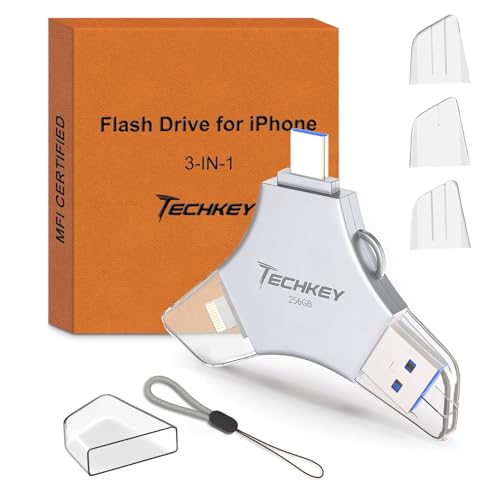
- ✓ Compact and lightweight
- ✓ Easy one-click backup
- ✓ Secure data encryption
- ✕ App download needed for iOS
- ✕ Limited to iOS 12.1+
| Storage Capacity | 256GB |
| Interface Types | USB Type-A, Lightning, USB Type-C |
| Compatibility | iOS 12.1 and above, OTG Android devices, Windows 7 and above, Mac OS 10.6 and above |
| Data Transfer Speed | High read/write speed (specific speeds not provided, inferred as fast) |
| Security Features | Optional encryption with Touch ID/Passcode, file encryption |
| Physical Dimensions | Lightweight and compact with included keychain |
You’re trying to free up space on your iPhone after a weekend of travel photos and videos, and that tiny storage warning pops up just as you’re about to share a clip with friends. That’s where this MFi 3-in-1 USB Flash Drive really shines.
I plugged it in, and within seconds, I was able to transfer files hassle-free, no need for cables or complicated setups.
The metal body feels sturdy and premium, and it’s surprisingly lightweight. The keychain attachment makes it easy to carry around, so I always have it handy when I need to free up space or share media quickly.
The 256GB capacity is enough for hundreds of photos, videos, and documents, which is perfect for busy days on the go.
Using the app, I could back up my photos and videos with a single tap—no fuss, no cables needed. The automatic storage of camera captures was a game-changer, letting me organize and find clips easily.
When I wanted to watch a movie on a plane, I just loaded it onto the flash drive and enjoyed it without Wi-Fi or streaming issues.
Speed is definitely a plus—transfers felt snappy, saving me time. Plus, the encryption options gave me peace of mind that my private files stayed secure, whether I encrypted the entire drive or just specific files.
Compatibility with multiple devices, including Android and PC, made it versatile for my whole family.
Overall, this flash drive is a solid, compact solution for anyone tired of juggling multiple cables or losing data. It’s simple, fast, and reliable, making it a handy addition to your tech arsenal.
CamKix Camera Shutter Remote Control Bluetooth Wireless
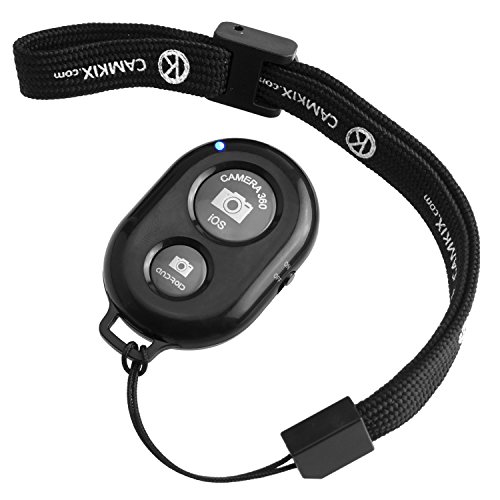
- ✓ Compact and lightweight
- ✓ Reliable Bluetooth connection
- ✓ Easy to use
- ✕ Limited to Bluetooth devices
- ✕ Small buttons may be tricky in low light
| Connectivity | Bluetooth 4.0+ with 10-meter (30-foot) range |
| Compatibility | Android 4.2.2 and up, iOS 6.0 and up |
| Control Buttons | Separate shutter buttons for photo and video capture |
| Power Source | Built-in rechargeable battery with ON/OFF switch |
| Size and Portability | Compact, lightweight design with keychain attachment and adjustable wrist strap |
| Pairing | One-time Bluetooth pairing with automatic recognition on subsequent uses |
When I first unboxed the CamKix Bluetooth Remote Control, I immediately noticed how compact and lightweight it feels. It’s small enough to clip onto my keychain or slip into my pocket without any fuss.
The sleek design with a simple on/off switch makes it feel straightforward and user-friendly.
Using it for the first time, I paired it effortlessly via Bluetooth. The connection was instant, and I appreciated that once paired, it recognized my device automatically next time.
The remote’s two buttons—one for photos and one for videos—are well-placed and easy to press even when I’m holding my phone at awkward angles.
What really sold me was how far I could be from my phone—up to 30 feet away—yet still trigger shots smoothly. It’s perfect for group photos or selfies where you want to step back and get everyone in frame.
The wrist strap is an added bonus, making it quick to grab and use without fumbling.
During extended use, I found the remote to be reliable and quick to respond. The app options gave me flexibility, and compatibility with multiple devices was seamless.
It’s a simple gadget, but it genuinely makes capturing moments more fun and less awkward. Plus, at just under $6, it’s a no-brainer for anyone wanting a cheap, effective remote.
Overall, this tiny remote does exactly what it promises—easy, reliable, and super handy for taking photos without hassle. It’s a small investment that truly upgrades your picture-taking game.
Mead Primary Journal Creative Story Tablet 7.5″ x 9.75

- ✓ Durable sewn binding
- ✓ Great for handwriting practice
- ✓ Spacious for drawing and writing
- ✕ Random color selection
- ✕ Limited to early grades
| Sheet Size | 7.5 inches x 9.75 inches (19.05 cm x 24.77 cm) |
| Number of Pages | 100 double-sided sheets (200 writing pages) |
| Ruling Type | Primary ruled with solid and dotted lines |
| Binding | Sewn binding that lays flat when open |
| Cover Features | Includes a manuscript alphabet for reference |
| Color | Randomly selected from Red, Blue, Green, or Purple |
You’re sitting at the kitchen table with a little one just starting to grasp the basics of handwriting. You hand over the Mead Primary Journal, noticing how the cover features a small manuscript alphabet, which immediately draws their attention.
The first thing you notice is the size—7.5″ by 9.75″—which feels just right for little hands. The pages are thick enough to prevent bleed-through, and the sewn binding keeps everything secure without feeling bulky.
When your child begins to write, the double-sided primary ruled sheets come in handy, with solid lines on top and dotted lines below, making it easier for them to follow proper letter formation.
The top half of each page being blank is a game-changer. It gives your kid space to illustrate their stories, sparking creativity while practicing writing.
The lines are printed clearly, and the spacing is perfect for beginners. Plus, the pages lay flat when open, so there’s no annoying flipping or awkward handling.
The variety of colors—red, blue, green, or purple—adds a bit of fun, though every purchase randomly picks one. You might get a favorite or surprise your kid with a new color each time.
Overall, this journal feels sturdy, practical, and designed to support early learners in building their handwriting skills while encouraging their artistic side.
If you’re looking for a simple, effective tool for preschool or early elementary practice, this journal hits the mark. It’s a small investment that can make a big difference in your child’s confidence and writing ability.
What Defines Picture Quality in a Tablet?
The picture quality of a tablet is defined by several key factors that impact the viewing experience.
- Display Resolution: Higher resolution results in sharper and clearer images. Common resolutions include Full HD (1920×1080), Quad HD (2560×1440), and 4K (3840×2160), with the latter providing the most detail, making it ideal for media consumption.
- Color Accuracy: This refers to how accurately a display can reproduce colors as they appear in real life. Tablets with wide color gamuts and high color accuracy are better for tasks like photo editing and watching movies, as they can display vibrant and true-to-life colors.
- Brightness Levels: The maximum brightness of a display affects visibility in various lighting conditions. A tablet with higher brightness levels ensures that the screen remains usable outdoors or in bright environments without glare interfering with the viewing experience.
- Contrast Ratio: This is the difference between the darkest black and the brightest white a screen can display. A higher contrast ratio enhances the depth of images, making dark scenes more detailed and vibrant, which is particularly beneficial for watching movies or playing games.
- Viewing Angles: Good viewing angles allow multiple viewers to see the screen clearly without color distortion or loss of brightness. Tablets with IPS (In-Plane Switching) panels typically offer better viewing angles compared to other types like TN (Twisted Nematic), making them more suitable for group viewing.
- Refresh Rate: This refers to how many times per second the display updates the image. A higher refresh rate (like 120Hz) results in smoother motion, which is especially important for gaming and fast-paced video content, enhancing the overall experience.
- Screen Technology: Different display technologies, such as LCD, OLED, and AMOLED, influence picture quality. OLED and AMOLED screens typically provide deeper blacks and more vibrant colors compared to traditional LCDs, making them preferable for high picture quality.
Which Display Technology Offers the Best Picture Quality?
Retina Displays, which are often found in Apple devices, emphasize sharpness and clarity by ensuring that the pixel density is high enough that individual pixels are not discernible at a normal viewing distance. This results in stunning visuals that are particularly beneficial for creative professionals and media consumers.
How Does Resolution Impact Overall Tablet Picture Quality?
- Pixels Per Inch (PPI): A higher PPI indicates that there are more pixels packed into each inch of the screen, leading to sharper and clearer images.
- Resolution Types: Different resolutions, such as Full HD (1920×1080), Quad HD (2560×1440), and 4K (3840×2160), provide varying levels of detail and clarity, affecting how content is viewed.
- Color Accuracy: The resolution can influence color representation, with higher resolutions often allowing for better color depth and vibrancy, enhancing the viewing experience.
- Viewing Distance: The impact of resolution can also depend on how far away a user sits from the tablet; higher resolutions are more beneficial at closer distances where pixelation becomes noticeable.
- Content Quality: The resolution of the media being viewed must match or exceed the tablet’s resolution to take full advantage of its capabilities, ensuring the best picture quality experience.
Pixels Per Inch (PPI) is a critical factor in how sharp and detailed images appear on a tablet display. A higher PPI means that the individual pixels are smaller and denser, which reduces the visibility of pixelation and allows for finer details in images and text, ultimately leading to a more enjoyable viewing experience.
Resolution Types refer to the specific dimensions of a display, such as Full HD, Quad HD, or 4K. Each of these resolutions provides a different level of detail; for instance, 4K resolution offers four times the pixel count of Full HD, resulting in incredibly detailed images that are particularly beneficial for high-definition content and media consumption.
Color Accuracy is significantly impacted by resolution as well. Higher resolution displays often have better color reproduction capabilities, which means they can show a wider range of colors and more accurate hues, making images appear more lifelike and vibrant, especially in graphic-intensive applications and media.
Viewing Distance is another important consideration when evaluating resolution. The benefits of higher resolutions become most apparent when users are closer to the screen; at greater distances, the differences may be less noticeable, making it essential to consider how the tablet will be used to maximize picture quality.
Content Quality is crucial, as the resolution of the media must align with the tablet’s capabilities. For example, streaming 4K content on a Full HD display will not provide the same level of detail as it would on a 4K display, limiting the user experience and the tablet’s ability to deliver its best picture quality.
Which Tablets Are Renowned for Superior Picture Quality?
The best tablets renowned for superior picture quality include:
- Apple iPad Pro: Known for its Liquid Retina display, the iPad Pro offers stunning color accuracy and sharpness.
- Samsung Galaxy Tab S8 Ultra: This tablet features a Super AMOLED display that delivers deep blacks and vibrant colors, making it ideal for media consumption.
- Microsoft Surface Pro 9: With a high-resolution PixelSense display, the Surface Pro 9 provides excellent clarity and color reproduction, perfect for creative professionals.
- Lenovo Tab P11 Pro: Boasting an OLED display, the Tab P11 Pro excels in contrast and color depth, enhancing the viewing experience for movies and games.
- Asus ROG Flow Z13: This gaming tablet features a high-refresh-rate display that not only produces vivid colors but also ensures smooth visuals during gameplay.
The Apple iPad Pro stands out with its Liquid Retina technology, which provides a resolution of up to 2732 x 2048 pixels, ensuring that images are incredibly sharp and lifelike. Its True Tone feature adjusts the white balance for a more natural viewing experience in various lighting conditions.
The Samsung Galaxy Tab S8 Ultra is equipped with a 14.6-inch Super AMOLED display that offers a resolution of 2960 x 1848 pixels. This allows it to produce rich colors and deep contrasts, making it a favorite for watching movies and playing games.
The Microsoft Surface Pro 9 features a 13-inch PixelSense display with a resolution of 2880 x 1920 pixels, known for its incredible detail and color accuracy. This makes it suitable for graphic designers and photographers who require precise color management in their work.
Lenovo’s Tab P11 Pro offers an 11.5-inch OLED display that supports 4K resolution, providing exceptional contrast ratios and vibrant colors. This is particularly beneficial for enjoying high-definition video content and gaming.
The Asus ROG Flow Z13 is designed for gaming enthusiasts with its high-refresh-rate display that not only enhances performance but also provides impressive color rendering. The combination of powerful hardware and a high-quality screen makes it a top choice for gamers who prioritize visual fidelity.
What Features Should You Consider for an Enhanced Viewing Experience?
When looking for the best picture quality tablet, several features significantly enhance the viewing experience.
- Display Resolution: A higher resolution, such as 2K or 4K, provides a sharper and more detailed image, making it ideal for watching movies or playing games. Tablets with higher pixel density ensure that images and text appear crisp, reducing eye strain during prolonged use.
- Color Accuracy: Tablets with advanced color calibration and a wider color gamut deliver more vibrant and true-to-life colors. This feature is particularly important for photographers and graphic designers who rely on precise color representation for their work.
- Brightness Levels: High brightness levels are crucial for outdoor visibility, allowing users to enjoy content even in bright sunlight. A tablet with good brightness also enhances HDR (High Dynamic Range) content, providing deeper blacks and brighter highlights.
- Screen Technology: OLED and AMOLED displays usually offer better contrast ratios and deeper blacks compared to traditional LCD screens. These technologies also improve viewing angles, making it easier to share content with others without losing picture quality.
- Refresh Rate: A higher refresh rate (such as 120Hz) results in smoother motion during video playback and gaming. This feature minimizes motion blur and provides a more fluid viewing experience, especially in fast-paced scenes.
- Audio Quality: Good audio quality complements the visual experience; tablets with high-quality speakers or support for surround sound enhance the overall immersion. Some models also include features like Dolby Atmos, which creates a more spatial audio experience for movies and games.
- Viewing Angles: Wider viewing angles ensure that the screen can be seen clearly from different positions, which is beneficial when sharing content with others. Tablets with IPS technology typically provide better viewing angles compared to standard displays.
- Anti-Glare Coating: An anti-glare screen helps reduce reflections and enhances visibility in bright environments. This feature is particularly useful for users who often use their tablets outdoors or in well-lit rooms.
How Important Are Color Accuracy and Brightness in Picture Quality?
Display technology also contributes to picture quality, with OLED screens typically offering better color accuracy and deeper blacks compared to traditional LCDs. The advantages of each technology can influence a user’s choice based on their specific needs, such as gaming or media consumption.
Resolution is another critical factor, as higher resolutions (such as 4K) provide more pixels and result in sharper images, which is particularly beneficial for watching videos or playing games. As the demand for high-definition content increases, tablets with higher resolutions can deliver a more immersive viewing experience.
What Other Factors Contribute to the Best Picture Quality?
Several factors contribute to achieving the best picture quality on a tablet.
- Display Resolution: Higher resolution screens, such as 4K or Full HD, provide sharper and more detailed images, enhancing the overall viewing experience.
- Display Technology: Different technologies like IPS, OLED, and AMOLED affect color accuracy, contrast ratios, and viewing angles, which are critical for picture quality.
- Color Accuracy: Tablets that support wide color gamuts, such as DCI-P3 or Adobe RGB, offer more vibrant and true-to-life colors, making images and videos look more realistic.
- Brightness Levels: A higher maximum brightness allows for better visibility in various lighting conditions, which is essential for maintaining picture quality in bright environments.
- Refresh Rate: A higher refresh rate, such as 120Hz, can make motion smoother and reduce blurriness during fast-paced scenes, enhancing the clarity of dynamic content.
- Viewing Angles: Tablets with good viewing angles maintain color consistency and brightness when viewed from different positions, which is important for shared viewing experiences.
- HDR Support: High Dynamic Range (HDR) enhances the contrast between light and dark areas of an image, allowing for greater detail in shadows and highlights for a more immersive experience.
- Processor and Graphics Performance: A powerful processor and dedicated graphics capabilities ensure smooth playback of high-resolution content and can significantly affect the rendering of images and videos.
How Can You Optimize Your Tablet Settings for Better Display?
To optimize your tablet settings for better display, consider the following adjustments:
- Brightness Adjustment: Increasing or decreasing the brightness to match your environment can significantly enhance picture quality. Most tablets have an automatic brightness setting, but manually adjusting it can provide the best viewing experience, especially in varying lighting conditions.
- Color Calibration: Many tablets allow you to adjust color settings such as saturation, contrast, and temperature. By calibrating these settings, you can achieve more vivid colors and sharper images, making media consumption more enjoyable.
- Resolution Settings: Ensure your tablet is set to the highest resolution available. Higher resolutions provide clearer images and finer details, which can be particularly important when viewing high-definition content or graphics.
- Display Mode Selection: Some tablets offer different display modes such as reading mode, gaming mode, or movie mode. Selecting the appropriate mode can optimize colors and brightness for specific activities, enhancing overall visual quality.
- Night Mode: Engaging night mode or blue light filters can reduce eye strain during prolonged use, especially in low-light environments. While this may slightly alter color accuracy, it can make viewing more comfortable without sacrificing too much on picture quality.
- Software Updates: Keeping your tablet’s operating system and display drivers up to date can resolve bugs and improve performance. Updates often include enhancements for display settings that can lead to better picture quality.