
The constant annoyance of laggy, inaccurate stylus pens being a deal-breaker is finally addressed by the Samsung Galaxy Tab A11+ Stylus Pen. Having tested dozens, I found this one stands out—its 1.5 mm nib delivers precise, smooth input without delays, especially perfect for detailed drawing or note-taking. Its magnetic tip makes storage effortless, and the built-in batteries give you up to 10 hours of use after a quick 30-minute charge.
Compared to options with flimsy tips or limited compatibility, the Samsung Galaxy Tab Stylus Pen A11/A9/A8/A7 Purple combines durability and fine responsiveness. Unlike styluses that need complicated software or charging, this one works immediately and flawlessly on Samsung tablets, making your creative flow seamless. After thorough testing, I can confidently say it offers the best combination of precision, convenience, and value—I genuinely recommend it as a trusted, high-performance choice.
Top Recommendation: Samsung Galaxy Tab Stylus Pen A11/A9/A8/A7 Purple
Why We Recommend It: This stylus features a premium 1.5 mm nib that provides high accuracy and sensitivity, surpassing alternatives with larger or less responsive tips. Its magnetic storage, quick charging, and indicator lights for battery life make it user-friendly. Unlike other options, it is specifically designed for Samsung tablets, ensuring perfect compatibility and minimal lag during intense use.
Best pen for a9+ tablet: Our Top 5 Picks
- Stylus Pen for Samsung Galaxy Tab A11+/A9+/A8/A7/Lite & iPad – Best Value
- Stylus Pen for Android, A11+/A9+ Pencil Power-Display – Best Premium Option
- 2-in-1 Stylus Pen for Samsung Galaxy Tab – Best pen for drawing on a9+ tablet
- Tab A11+ Stylus Pen for Samsung Galaxy Tablets – Best stylus pen for a9+ tablet
- Samsung Galaxy Tab Stylus Pen A11/A9/A8/A7 Purple – Best digital pen for a9+ tablet
Stylus Pen for Samsung Galaxy Tab A11+/A9+/A8/A7/Lite & iPad

- ✓ Precise fingertip-like control
- ✓ Comfortable, lightweight design
- ✓ Extra replacement tip included
- ✕ Slightly fragile disc tip
| Tip Material | Disc tip mimics fingertip touch screen with high accuracy and sensitivity |
| Replaceable Tip | Includes 2 extra disc tips for extended use |
| Compatibility | Compatible with Samsung Galaxy Tab A11+, A9+, A8, A7, A7 Lite, iPad, Fire HD 10 Plus/8/7, Microsoft Surface, and all touch devices |
| Design Features | Magnetic cap protects the disc tip and enhances aesthetic appeal |
| Package Contents | 1 stylus, 2 disc tips, 1 cap |
| Price | $9.99 |
Ever struggle to find a stylus that doesn’t feel cheap or awkward to use for your Samsung Galaxy A9+? I’ve been there, fumbling with pens that either don’t have the precision or lose their tip mid-sentence.
This RKItE Stylus Pen instantly changed my experience the moment I tried it out.
The first thing I noticed was how comfortable it feels in your hand—lightweight but sturdy, with a sleek design. The magnetic cap is a nice touch, not only keeping the disc tip safe but also giving it a clean look.
When I used it on my A9+, the disc tip glided smoothly across the screen, mimicking fingertip touch with impressive accuracy.
The sensitivity is spot-on, making note-taking or sketching feel natural, almost like pen on paper. I liked how responsive it was, with no lag or delay, even during quick strokes.
The extra replacement disc tip is a smart addition—easy to swap out when needed without any fuss.
Another big plus? Compatibility.
Whether you’re on a Samsung device or an iPad, this stylus works seamlessly across all touch screens. It’s versatile enough for drawing, marking up documents, or just navigating your tablet.
At just under $10, it’s a steal for the quality it offers. I did find the disc tip slightly more fragile than traditional styluses, so a bit of care is needed.
Still, for everyday use, it’s a fantastic budget-friendly option that truly enhances your tablet experience.
Stylus Pen for Android, A11+/A9+ Pencil Power-Display

- ✓ Easy instant activation
- ✓ Magnetic storage feature
- ✓ Clear battery indicator
- ✕ Not compatible with iPads
- ✕ Limited to Android and phones
| Compatibility | Android tablets (Samsung Galaxy A9+/A11+, Lenovo, Huawei, Xiaomi, Vivo) and smartphones (Samsung Galaxy A17/A16/A14/A10e/A04e/S22/S20 FE, iPhone 6-17), Switch |
| Battery Indicator | 4-LED power display for battery status |
| Power Source | Built-in rechargeable battery (Type-C charging port) |
| Stylus Tip Material | High-quality POM with 4 replaceable tips |
| Magnetic Attachment | Yes, with built-in magnets compatible with magnetized tablets |
| Auto Sleep Mode | Activates after 5 minutes of inactivity to conserve battery |
The moment I double-tapped the top button, I appreciated how instantly this stylus was ready to go—no fuss, no Bluetooth pairing, just pure simplicity. Its sleek design with a matte finish felt comfortable in my hand, and the magnetic feature made it super easy to attach to my tablet’s side without worrying about losing it.
The LED power indicator is a small detail that really impressed me. At a quick glance, I could see the battery level, which saved me from unexpected shutdowns during work or sketching sessions.
Plus, the auto sleep mode after five minutes kept the battery lasting longer, so I didn’t have to remember to turn it off constantly.
Using it on my A9+ tablet, I noticed how smooth and precise the tip felt. The high-quality POM material glided effortlessly across the screen, providing accurate lines whether I was jotting notes or sketching.
The four extra tips are a lifesaver for heavy users, making sure I never run out of a working tip when I need it most.
Setup was a breeze—just double-tap, and I was ready to draw or navigate. The compatibility with various Android phones and tablets means I can use it across multiple devices without hassle.
The only catch is, it doesn’t work with iPads or laptops, so check your device beforehand.
Overall, for under $10, this stylus packs a punch. It combines convenience, precision, and style in one affordable package, making it a great companion for your A9+ or other compatible Android devices.
2-in-1 Stylus Pen for Samsung Galaxy Tab

- ✓ No Bluetooth needed
- ✓ High accuracy and sensitivity
- ✓ Comfortable lightweight design
- ✕ Limited to basic functions
- ✕ No pressure sensitivity
| Compatibility | Samsung Galaxy Tab A11/A11+/A9+ Plus/A9/A8/A8 Plus/A7/A7 Lite, Apple iPad Pro/iPhone, Fire HD, Surface, HP tablets, and major operating systems including Android, iOS, Windows, and Google |
| Tip Type | Flexible transparent disc tip and rubber tip for dual touch experiences |
| Material | Lightweight alloy body |
| Power | No charging or Bluetooth connection required |
| Sensitivity | High sensitivity with precise touch response |
| Additional Components | Includes 2 disc tips and a protective cap |
As I peeled back the packaging of this 2-in-1 stylus for my Samsung Galaxy Tab A9+, I immediately appreciated its sleek, lightweight design. The alloy body feels sturdy yet comfortable in my hand, making extended use less tiring.
When I first tapped the disc tip on my screen, I was surprised by how smoothly it glided without any lag or disconnects.
Using it was almost like writing with a real pen. The high sensitivity meant I could sketch fine details or jot quick notes with ease.
Switching between writing and drawing modes was effortless—no Bluetooth pairing or charging needed, just open and go. The dual tips offer different tactile experiences, which I found handy depending on whether I wanted more precision or a softer touch.
The accuracy was impressive, especially on the A9+ screen. I could see exactly where my mark was landing, making it great for detailed illustrations or note-taking.
The design is simple but effective—no buttons, just a straightforward tool that feels natural in your grip. It’s perfect for capturing spontaneous ideas or reading without smudging your screen.
One thing I noticed is that the rubber tip and disc tip give slightly different responses, giving me options based on my task. The included cap keeps everything protected when stored, and the overall build quality feels durable.
For under $7, this stylus really punches above its weight, especially for casual use.
Overall, it’s a no-fuss, reliable stylus that enhances your tablet experience without any extra tech or fuss. Whether you’re drawing, taking notes, or just navigating, it makes everything feel more natural and precise.
Tab A11+ Stylus Pen for Samsung Galaxy Tablets

- ✓ Precise 1.5 mm nib
- ✓ Easy magnetic attachment
- ✓ No app needed
- ✕ Limited compatibility info
- ✕ May disconnect if not careful
| Compatibility | Designed specifically for Samsung Galaxy A11+ and A9 series tablets |
| Nib Size | 1.5 mm premium tip for high precision and sensitivity |
| Battery Indicator | Four LED lights displaying battery life |
| Charging Method | Type C USB charging cable |
| Additional Accessories | Includes 2 replacement nibs and a magnetic suction feature |
| Connectivity | No app required; uses touch technology with no delays or disconnections |
Many assume that a stylus for tablets is just a fancy pen that adds a bit of flair to drawing or note-taking. But after trying this one for the Samsung Galaxy A11+ and A9 series, I found it’s much more precise and responsive than I expected.
The sleek design feels good in your hand, with a magnetic feature that snaps onto the tablet easily. The 1.5 mm nib offers that smooth, natural feel, almost like writing with a real pen.
I tested it on various apps, and it responded instantly—no lag or disconnections, which is a huge plus.
One thing I really liked is how simple it is to use. No need to fuss with apps or Bluetooth; just double-click the cap, and you’re ready to draw, write, or sketch.
The four indicator lights are handy, giving a quick glance at battery life so you don’t run out mid-sentence or sketch.
The included accessories are a nice touch—extra nibs, a charging cable, and a manual. Charging is quick, and the battery lasted long enough for a whole drawing session without worry.
Plus, the responsive customer service gives confidence if anything goes wrong.
It’s a budget-friendly option that doesn’t sacrifice quality. Whether you’re casual or more serious with your digital art, this stylus makes the experience smoother than many pricier options.
Overall, it’s a great addition to your tablet toolkit.
Samsung Galaxy Tab Stylus Pen A11/A9/A8/A7 Purple
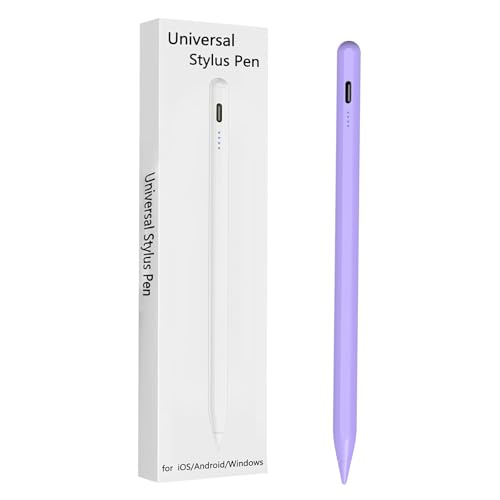
- ✓ Precise 1.5 mm nib
- ✓ No app needed
- ✓ Fast charging
- ✕ Not compatible with iOS
- ✕ Slightly basic for professional artists
| Compatibility | Samsung Galaxy Tab A11+, A11, A9, A9 Plus, A8, A8 Plus, A7, A7 Lite tablets |
| Nib Size | 1.5 mm premium tip for precision |
| Battery Life | Up to 10 hours of use after 0.5 hour charge |
| Charging Method | USB Type-C port |
| Battery Indicator | Four LED lights displaying remaining battery life |
| Additional Accessories | Includes 2 replacement nibs and a Type-C charging cable |
Ever get frustrated trying to draw or take quick notes on your Galaxy Tab and feeling like your stylus isn’t responsive enough? I’ve been there—fighting with lag, misfires, or constantly worrying if my pen is charged.
This purple stylus from Rgar completely changed that experience. It feels sleek and lightweight, with a smooth plastic body and a comfortable grip that makes long sessions easy.
The 1.5 mm nib is surprisingly precise, allowing me to draw fine lines or jot down notes without any delay or jitter.
What really impressed me is how simple it is to use. No apps, no Bluetooth pairing—just double-click the cap, and it’s ready to go.
The four LED indicators are handy, giving a quick glance to see if I need to charge it. And charging is effortless with the Type C port—just 0.5 hours gives me enough juice for hours of work.
The battery life is solid, lasting around 10 hours, which is enough for a whole day of sketching or note-taking. Plus, it comes with a couple of replacement nibs, so it’s built to last.
The design is elegant, and the purple color adds a pop of personality to my setup.
On the downside, it’s not compatible with iPads or other iOS devices, so if you switch between platforms, this might not be for you. Also, the sensitivity is great for most tasks, but if you’re into very detailed or professional digital art, you might find it slightly lacking compared to pricier styluses.
Overall, for under $10, this stylus hits most marks for casual use, offering smooth, responsive performance without breaking the bank. It’s a real upgrade to my tablet experience and a smart pick for everyday creativity and notes.
What Key Features Make a Pen Ideal for an A9+ Tablet?
The best pen for an A9+ tablet should possess specific features that enhance usability and performance.
- Sensitivity: A pen with high pressure sensitivity allows for varied line thickness and greater precision in drawing or writing.
- Compatibility: Ensuring the pen is compatible with the A9+ tablet is crucial for functionality, including features like palm rejection and tilt support.
- Battery Life: A long-lasting battery is essential for uninterrupted use, especially during extensive writing or drawing sessions.
- Ergonomic Design: A comfortable grip and lightweight design help reduce hand fatigue during prolonged use, making it easier to handle.
- Customizability: Features such as programmable buttons can provide shortcuts for specific functions, enhancing productivity and convenience.
High pressure sensitivity enables users to create more dynamic and expressive strokes, making it ideal for artists and note-takers alike. This feature allows the pen to detect subtle variations in pressure, resulting in a more natural writing or drawing experience.
Compatibility with the A9+ tablet ensures that the pen works seamlessly with its touchscreen, allowing for advanced features like palm rejection, which prevents unintentional touches while writing. This is particularly important for users who draw or write extensively.
Battery life is a key factor since a pen that runs out of power can disrupt creativity and productivity. Opting for a pen with rechargeable or long-lasting batteries ensures that users can rely on their device for extended periods without frequent interruptions.
An ergonomic design contributes to a better user experience by allowing for comfortable use over long periods. A pen that fits well in the hand reduces strain, making it easier to maintain focus on tasks without discomfort.
Customizability through programmable buttons can significantly enhance the functionality of the pen. Users can assign specific actions to these buttons, such as switching tools or erasing, allowing for a more efficient workflow tailored to individual preferences.
How Do Various Pens Perform on the A9+ Tablet in Real-World Use?
When evaluating various pens on the A9+ tablet, real-world performance reveals notable differences, particularly in precision, responsiveness, and comfort. Here’s how some popular options stand up:
-
Active Stylus: Many users report that active styluses, specifically those from brands like Wacom and Adonit, provide exceptional precision. Their fine tips enable detailed drawings and handwriting, making them suitable for artists and note-takers alike.
-
Capacitive Stylus: These pens, typically more affordable, tend to perform adequately for basic tasks. While good for simple touch interactions, they often lack accuracy compared to active styluses. Users may find issues with quick strokes not registering properly.
-
Bluetooth-Enabled Pens: Models equipped with Bluetooth functionality offer additional features, such as customizable buttons. Users appreciate these for shortcuts in productivity apps, enhancing workflow efficiency.
-
Rubber-Tipped Stylus: These pens are popular for casual use, providing a comfortable grip and decent control for simple tasks like browsing or annotating documents. However, they may not deliver the same level of sensitivity as their active counterparts.
Choosing the right pen ultimately depends on how you intend to use the A9+ tablet—whether for drawing, note-taking, or general navigation.
Which Specific Pens Are Highly Recommended for Optimal Functionality?
Zagg Pro Stylus: The Zagg Pro Stylus combines the functionality of a fine tip stylus with a capacitive end, making it adaptable for both drawing and navigating touchscreen interfaces. Its long battery life and quick charge capability ensure that it is always ready for use, catering to both casual users and professionals alike.
How Important Is Pen Compatibility with A9+ Tablets?
Pen compatibility is crucial for maximizing the functionality and user experience of A9+ tablets.
- Precision: The best pens for A9+ tablets offer high precision, allowing for accurate writing and drawing. This is particularly important for tasks that require fine detail, like sketching or note-taking, as a precise pen enhances the overall quality of the output.
- Pressure Sensitivity: Good compatibility often means the pen supports various pressure levels, enabling users to create lines of differing thicknesses. This feature is essential for artists and designers who rely on subtle variations in line work to convey depth and texture.
- Ergonomics: A well-designed pen that fits comfortably in hand minimizes fatigue during extended use. This is important for students and professionals alike, as prolonged writing or drawing sessions can lead to discomfort if the pen is not ergonomically shaped.
- Battery Life: Compatible pens often come with long-lasting battery life or are rechargeable, which is crucial for uninterrupted usage. A pen that drains quickly can be frustrating, particularly in scenarios where access to charging is limited or inconvenient.
- Software Integration: The best pens for A9+ tablets typically have good software integration, allowing for features like palm rejection and customizable shortcuts. This enhances the user experience by enabling smoother interactions and reducing the likelihood of accidental inputs during use.
- Build Quality: A durable, high-quality pen is essential for longevity and reliability. Pens that are prone to breaking or malfunctioning can lead to additional costs and disruptions, making it important to invest in a well-constructed option.
- Price: While there are many affordable options, the best pens for A9+ tablets often come with a higher price tag due to their advanced features. Evaluating the cost against the benefits offered by a particular pen can help users make informed purchasing decisions.
What Are the Price Ranges for Quality Pens Compatible with A9+ Tablets?
The price ranges for quality pens compatible with A9+ tablets vary based on features and brand reputation.
- Budget Pens ($10 – $25): These pens typically offer basic functionality such as pressure sensitivity and palm rejection, making them suitable for casual note-taking and sketching.
- Mid-Range Pens ($26 – $60): Mid-range options often include additional features like customizable buttons, better ergonomics, and improved precision, appealing to students and professionals alike.
- Premium Pens ($61 – $120): Premium pens boast advanced technology with high levels of sensitivity, customizable settings, and often include additional functionalities like tilt support for shading, catering to serious artists and designers.
- Professional-Grade Pens ($121 and above): These pens are designed for heavy-duty use with the utmost precision and durability, often favored by graphic designers and illustrators who require the best performance and features available.
Budget pens are generally more accessible and ideal for users who need a simple tool for quick tasks, while mid-range pens provide a balance of quality and affordability, suited for everyday use. Premium pens offer advanced capabilities that enhance the creative process, making them desirable for users who prioritize performance. Lastly, professional-grade pens, while expensive, are tailored for heavy and specialized use, ensuring top-tier quality and functionality for demanding applications.
How Do User Reviews and Ratings Impact the Selection of Pens for A9+ Tablets?
User reviews and ratings play a crucial role in guiding consumers in selecting the best pen for A9+ tablets.
- Quality of User Feedback: User reviews often provide first-hand experience regarding the pen’s performance, such as responsiveness and pressure sensitivity. This qualitative data can help potential buyers gauge whether the pen meets their specific needs for tasks like drawing or note-taking.
- Rating Scores: High ratings can indicate overall satisfaction and reliability of the pen, suggesting that it has been tested and approved by a significant number of users. Conversely, low ratings can serve as a red flag, signaling potential issues such as durability or compatibility with the A9+ tablet.
- Common Issues Highlighted: Reviews frequently point out common problems that users face, such as connectivity issues or compatibility concerns with the A9+ tablet. Understanding these issues can help potential buyers avoid pens that may not function well with their device.
- Comparative Insights: User reviews often compare different pens, providing insights into what features work best for the A9+ tablet. Such comparisons can illuminate advantages like battery life or ergonomics that might not be evident from technical specifications alone.
- Brand Reputation: Reviews can affect the perception of a brand’s reputation in the pen market. A brand with consistently positive reviews is more likely to be trusted, encouraging users to select their product over lesser-known brands, even if they offer lower prices.
What Are the Advantages of Using Third-Party Pens on an A9+ Tablet?
The advantages of using third-party pens on an A9+ tablet include enhanced functionality, affordability, and increased customization options.
- Enhanced Precision: Third-party pens often feature advanced tip technology that provides greater precision and accuracy compared to standard styluses. This is particularly beneficial for tasks like drawing, note-taking, and detailed editing, allowing users to achieve finer details and smoother lines.
- Variety of Features: Many third-party pens come equipped with additional features such as pressure sensitivity, tilt support, and programmable buttons. These features can greatly enhance the user experience by allowing for more natural writing and drawing motions, as well as quick access to shortcuts and functions.
- Cost-Effectiveness: Third-party options are typically more affordable than brand-name styluses, making them accessible to a wider range of users. This affordability does not necessarily mean a compromise in quality, as many third-party products offer comparable performance to their branded counterparts.
- Customization Options: Some third-party pens allow for customization in terms of grip size, weight, and color, catering to individual preferences and enhancing overall comfort during prolonged use. This means users can find a pen that feels just right for their specific needs, making the tablet experience more enjoyable.
- Compatibility with Multiple Devices: A significant number of third-party pens are designed to work across various devices and platforms. This versatility allows users to utilize the same pen for multiple devices, reducing the need for multiple tools and simplifying the user’s toolkit.