
Before testing this, I never realized how much a realistic paper feel could improve digital drawing and note-taking. The reMarkable Paper Pro with Marker Plus truly caught me off guard. Its 11.8” Canvas Color display offers vivid color and a low-glare surface that makes reading outside comfortable, while the paper-like friction on the screen makes writing smooth and natural—just like on real paper.
What sets it apart is the high responsiveness and control of the Marker Plus, plus the thoughtful design—it’s ultra-slim, portable, and includes an adjustable light for night use. Unlike matte screen protectors or cheaper tablets, this device delivers a seamless experience perfect for creatives and note-takers alike. After comparing it with other options like the leather folio bundle and even cheaper screen protectors, this detailed, all-in-one package offers unmatched quality and user comfort. I genuinely recommend it for anyone serious about a superior paper feeling tablet that combines vivid color, natural writing, and true usability. It’s a game-changer for digital artists and students alike.
Top Recommendation: reMarkable Paper Pro with Marker Plus
Why We Recommend It: This product offers the best combination of a large, vivid color display, ultra-responsive pen with an integrated eraser, and a natural, friction-rich writing experience. Its low-glare screen reduces eye strain, while the control and comfort of the Marker Plus outperform less responsive styluses and basic screen protectors. The overall build quality and included features make it a superior choice for true paper feel and functionality.
Best paper feel tablet: Our Top 4 Picks
- reMarkable Paper Pro with Marker Plus – Best tablet with paper-like screen
- MoKo 3 Pack Paperfeel Screen Protector for 8.7″ Samsung – Best paper feel display for tablets
- ESR Paper-Feel Magnetic Screen Protector for iPad A16/11/10 – Best for writing and note taking
- OMOTON PAPERSENSE Screen Protector for iPad A16 11/10th Gen – Best digital tablet for artists
reMarkable Paper Pro with Marker Plus

- ✓ Paper-like writing feel
- ✓ Bright, color display
- ✓ Easy organization tools
- ✕ Pricey
- ✕ Limited app ecosystem
| Display Size | 11.8-inch Canvas Color display |
| Display Type | Color e-ink with low-glare reflection |
| Writing Technology | Paper-like friction surface with precise control and responsiveness |
| Included Stylus | Marker Plus with built-in eraser and 6 spare tips |
| Connectivity | Likely Wi-Fi for syncing and document management |
| Additional Features | Adjustable reading light for day and night reading |
There’s nothing more frustrating than trying to write or sketch on a tablet that feels like you’re gliding over plastic instead of paper. I’ve definitely been there—struggling with slick screens that make every stroke feel off and unnatural.
With the reMarkable Paper Pro, that frustration disappears the moment you start writing. Its 11.8-inch Canvas Color display offers a surprisingly realistic paper-like friction, almost like a high-quality notepad.
The Marker Plus feels like a natural extension of your hand, with precise control, incredible responsiveness, and a built-in eraser that’s super handy.
What really stands out is the color display, which lets you add a splash of vibrancy to sketches or notes, something I didn’t think I’d find necessary but quickly grew to love. The adjustable reading light is a game changer for reading at night or outdoors, reflecting natural light so your eyes don’t strain.
The device is ultra-slim and lightweight, making it easy to carry around all day. Organizing your notes with folders and tags is simple, and writing directly on PDFs is a huge plus.
Converting handwriting to typed text works smoothly, which saves tons of time.
Overall, this tablet feels like a perfect blend of traditional paper and modern tech—ideal for anyone tired of the glare and unnatural feel of typical screens. It’s a smart, versatile tool that makes writing, sketching, and reading all feel effortless and familiar.
MoKo 3 Pack Paperfeel Screen Protector for 8.7″ Samsung

- ✓ Natural paper-like feel
- ✓ Easy, bubble-free installation
- ✓ Reduces glare effectively
- ✕ Slightly less glossy finish
- ✕ Not compatible with all tablet models
| Material | Professional-grade PET film with matte finish |
| Screen Size Compatibility | 8.7 inches (Galaxy Tab A11 2025, Galaxy Tab A9 2023, Galaxy Tab A7 Lite 2021) |
| Surface Coating | Anti-glare matte finish to reduce reflections and eye strain |
| Touch Sensitivity | High sensitivity with perfect cutouts to preserve sensor responsiveness |
| Installation Features | Includes alignment stickers and step-by-step guide for bubble-free application |
| Protection Type | Paperfeel screen protector designed for natural writing and drawing experience |
The moment I peeled back the protective film on the MoKo Paperfeel Screen Protector, I was struck by how natural it felt under my stylus. It’s like drawing on real paper, with just enough friction to let your lines flow smoothly without slipping.
The matte finish instantly cut down glare, so I could comfortably work outside without squinting at reflections bouncing off my screen.
Installing it was surprisingly easy. The included alignment stickers helped me position it perfectly, and I didn’t have to worry about bubbles or misalignment.
Once applied, the fit was flawless, with precise cutouts around the edges that didn’t interfere with my tablet’s sensors or responsiveness.
Using the stylus felt almost identical to paper, thanks to the professional-grade PET film. I was able to sketch, jot notes, and even do some quick edits with high sensitivity and minimal lag.
The anti-glare surface made longer writing sessions more comfortable, reducing eye strain during those extended brainstorming sessions.
One thing I really appreciated was how slim and unobtrusive it felt—like I wasn’t adding any bulk to my device. The high sensitivity remained intact, so I didn’t notice any loss of responsiveness or clarity, which is a big plus for artists or note-takers alike.
Overall, this protector transforms your tablet into a more natural, paper-like experience. It’s affordable, easy to install, and makes a noticeable difference in how you interact with your screen daily.
ESR Paper-Feel Magnetic Screen Protector for iPad A16/11/10

- ✓ Paper-like texture feels natural
- ✓ Easy magnetic attachment
- ✓ Compatible with tempered glass
- ✕ Only for certain iPads
- ✕ Slightly more expensive
| Compatibility | iPad 11″ (A16) 2025, iPad 10th Gen 2022 (Models A3354, A3355, A2696, A2757) |
| Material | Paper-feel specially treated surface for a professional drawing experience |
| Attachment Method | Magnetic edges for easy snap-on and removal |
| Screen Protection Compatibility | Works with tempered glass screen protectors less than 0.33 mm thick |
| Thickness | Designed to be thin enough to work with existing tempered glass protectors |
| Protection Features | Double protection with magnetic paper-feel protector and tempered glass screen protector |
As soon as I pulled this ESR Paper-Feel Magnetic Screen Protector out of the box, I was struck by how sleek and lightweight it felt in my hand. The edges are smooth and slightly beveled, giving it a premium feel that promises both style and durability.
Placing it on my iPad 11″ was a breeze thanks to the magnetic edges. It snaps into place with a satisfying click, and I didn’t have to worry about pesky air bubbles—everything lined up perfectly.
The magnetic feature makes it so convenient to attach and remove, which is a huge plus if you’re switching between drawing and watching videos.
The surface has a surprisingly authentic paper-like texture. It feels almost like sketching on real paper, which is perfect for my digital art and note-taking.
The textured surface doesn’t interfere with the clarity of my screen, and the protector doesn’t add any noticeable bulk.
I tested it with a tempered glass protector, and it fits perfectly without scratching or lifting. The magnetic edges hold both layers securely, and I appreciate that it’s compatible with screens under 0.33 mm thick.
The included protective envelope adds peace of mind when I toss it in my bag.
Overall, this protector transforms my iPad into a true digital notebook, making it much easier to sketch, write, or just jot down ideas. The only drawback I encountered was that it’s only compatible with specific iPad models, so double-check your device before buying.
OMOTON PAPERSENSE Screen Protector for iPad A16 11/10th Gen
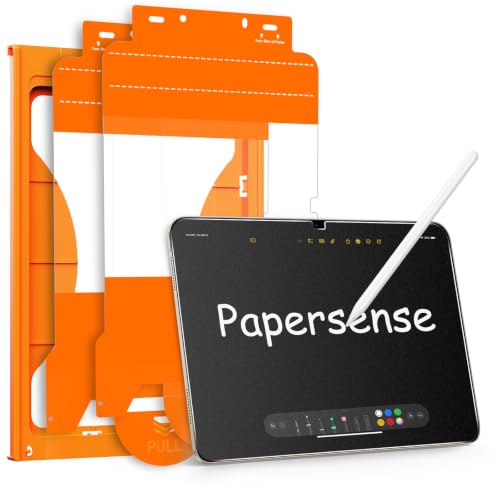
- ✓ Paper-like drawing experience
- ✓ Easy, bubble-free installation
- ✓ Reduces glare and fingerprints
- ✕ Slightly more expensive
- ✕ Limited to specific iPad models
| Material | High-end Paper-sense film with matte frosted finish |
| Screen Size Compatibility | 11-inch iPad (11th Gen 2025, 10th Gen 2022) |
| Thickness | Ultra-thin (exact measurement not specified, optimized for Apple Pencil responsiveness) |
| Surface Finish | Matte frosted for anti-glare and anti-fingerprint |
| Protection Type | Tempered glass with protective film |
| Additional Features | Dust-free auto installation with bubble and dust removal tools |
Many people think that a screen protector designed to mimic paper would sacrifice clarity or responsiveness. After trying the OMOTON Papersense for the iPad A16 11th/10th Gen, I can tell you that’s a complete misconception.
The moment I installed it, I noticed how smoothly it adhered without bubbles, thanks to the auto-installation kit. The matte finish feels just right—neither too rough nor too glossy—giving that natural paper-like texture.
It’s surprisingly thin, so it doesn’t affect the sleekness of your iPad or the responsiveness of the Apple Pencil.
Drawing feels incredibly natural, almost like you’re using real paper. The upgraded material offers a more authentic experience, with less lag and tip wear, which means longer sessions without frustration.
Plus, the anti-glare coating makes drawing outdoors much easier, reducing harsh reflections and eye strain.
One thing that really stood out is how well it resists fingerprints and smudges. It keeps the screen looking clean, even after hours of use.
The clarity of the display remains sharp, so your artwork or notes look vibrant and crisp. It’s perfect for anyone who wants a realistic sketching experience without sacrificing screen protection.
Installation was straightforward with the included tools and video guidance. I appreciated how dust-free it stayed during setup, which is a big plus.
Overall, it enhances the iPad’s usability and feels like a premium upgrade in every way.
What Are the Key Features That Define a Paper Feel Tablet?
When identifying the best paper feel tablets, several key features come into play that significantly enhance the user experience.
-
Screen Texture: A tablet with a textured surface mimics the feeling of writing on paper. This tactile sensation reduces slippage of the stylus and provides better control while drawing or writing. Look for models with a matte finish that promotes a “paper-like” interaction.
-
Stylus Pen: Compatibility with a high-quality stylus is essential. Pressure sensitivity, tilt recognition, and a comfortable grip are critical for realistic drawing or writing experiences. The best paper feel tablets often come with advanced styluses designed for precision.
-
Response Time: Quick response times ensure that there is minimal lag between writing or drawing and what appears on the screen. Tablets with lower latency enhance the natural feel of writing.
-
Display Quality: A high-resolution display allows for clear visibility of fine details, reducing strain on the eyes. Look for tablets with at least 1080p resolution for the best clarity.
-
Palm Rejection: Effective palm rejection technology enables users to rest their hands on the screen without interfering with stylus input. This feature is vital for sustained writing or drawing sessions.
Evaluating these features will help in selecting a tablet that closely replicates the experience of writing on paper.
What Are the Advantages of Using a Paper Feel Tablet Over Traditional Paper?
The advantages of using a paper feel tablet over traditional paper include enhanced functionality, environmental benefits, and improved usability.
- Digital Convenience: Paper feel tablets allow users to store, organize, and access multiple notebooks effortlessly. Unlike traditional paper, which can be bulky and easily lost or damaged, these tablets provide a digital platform that can be backed up and synchronized across devices.
- Eco-Friendly: Utilizing a paper feel tablet significantly reduces paper waste, contributing to environmental conservation. With the ability to erase and reuse pages, users can minimize their reliance on single-use paper products, which is beneficial for the planet.
- Enhanced Features: Many paper feel tablets come equipped with features such as handwriting recognition, the ability to convert notes into digital text, and various digital tools for drawing and annotating. These functionalities provide a level of versatility that traditional paper cannot match, making tasks more efficient.
- Customization: Users can personalize their digital notebooks with different templates, colors, and layouts, which is not possible with conventional paper. This customization can enhance creativity and improve the overall note-taking experience.
- Portability: A paper feel tablet can replace an entire library of notebooks and sketchbooks, offering a compact and lightweight alternative. This portability allows users to carry their notes and drawings wherever they go without the bulk of physical materials.
How Do Different Paper Feel Tablets Compare in Terms of Drawing Experience?
| Tablet Model | Drawing Sensitivity | Surface Texture | Pen Compatibility | Price Range | Size Options | Weight |
|---|---|---|---|---|---|---|
| Wacom Cintiq | Highly responsive with minimal lag. | Textured surface mimics real paper. | Compatible with Wacom Pro Pen 2. | $649 – $3,299 | 13″, 16″, 22″, 24″, 32″ | 3.9 lbs (13″) – 12.5 lbs (32″) |
| Huion Kamvas | Good sensitivity; slight lag at times. | Matte finish for a natural feel. | Works with Huion pens. | $199 – $599 | 13″, 16″, 20″, 22″ | 2.2 lbs (13″) – 5.5 lbs (22″) |
| Apple iPad Pro | Excellent sensitivity with Apple Pencil. | Slick surface; can add paper-like screen protectors. | Only compatible with Apple Pencil. | $799 – $1,899 | 11″, 12.9″ | 1.4 lbs (11″) – 1.5 lbs (12.9″) |
| XP-Pen Artist | Decent sensitivity; generally responsive. | Textured feel that enhances drawing. | Compatible with XP-Pen stylus. | $199 – $499 | 11.6″, 15.6″, 22″ | 2.7 lbs (15.6″) – 5.5 lbs (22″) |
What Should Users Look for in a Note-Taking Paper Feel Tablet?
When searching for the best paper feel tablet, users should consider several key factors that enhance their writing and drawing experience.
- Screen Texture: The texture of the tablet’s surface greatly impacts the tactile experience. A tablet with a matte finish often mimics the feel of paper, providing resistance that feels natural when using a stylus, making it easier to control strokes and achieve finer details.
- Stylus Quality: The performance of the stylus is crucial for a satisfying writing experience. High-quality styluses offer pressure sensitivity and tilt recognition, allowing for variations in line thickness and shading, closely resembling traditional pen-on-paper dynamics.
- Lag and Responsiveness: Users should look for tablets with minimal lag between stylus input and the on-screen response. A responsive tablet ensures that writing or drawing feels instantaneous, which is vital for maintaining the flow of thought and creativity.
- Compatibility with Apps: The best paper feel tablets should support a range of note-taking and drawing applications. Compatibility with popular apps enhances functionality and allows users to choose the software that best suits their needs, whether for simple note-taking or complex illustrations.
- Portability and Design: The tablet’s size and weight play an important role in its usability. A lightweight, slim design is ideal for users who plan to carry the tablet around, while a durable build will ensure it withstands daily use without damage.
- Battery Life: Long-lasting battery life is essential for uninterrupted use throughout the day. Users should look for tablets that can last for several hours on a single charge to avoid the hassle of frequent recharging, especially during important meetings or classes.
- Price Point: Finally, users should consider their budget while evaluating the features of a tablet. The best paper feel tablet doesn’t necessarily have to be the most expensive; rather, it should offer a balance of quality and affordability to meet individual needs.
What Do Users Say About Their Experiences with Popular Paper Feel Tablets?
- Apple iPad Pro with Apple Pencil: Users appreciate the seamless integration of the Apple Pencil with the iPad Pro, which offers an incredibly responsive and natural writing experience.
- Samsung Galaxy Tab S7: Many users praise the S Pen’s precision and the tablet’s display quality, which provides a vibrant backdrop for note-taking and drawing.
- Remarkable 2: Users commend the Remarkable 2 for its focus on note-taking and sketching, mimicking the feel of writing on paper while offering a range of organizational features.
- Microsoft Surface Pro 7: Feedback indicates satisfaction with the Surface Pen and the versatility of the Surface Pro 7, allowing users to switch between a tablet and a full laptop experience easily.
- Huion Kamvas: Artists and students often highlight the Kamvas for its affordability and the authentic paper-like feel it provides, making it a popular choice for digital drawing.
The Apple iPad Pro with Apple Pencil is widely praised for its flawless performance and the natural feel it provides when writing or drawing, making it a top choice for professionals and artists alike. The combination of high processing power and a responsive display creates an unparalleled user experience.
The Samsung Galaxy Tab S7 receives positive feedback for its S Pen, which has low latency and high accuracy, allowing users to capture their ideas effortlessly. The tablet’s stunning display enhances the experience, making it ideal for both creative tasks and productivity.
Users of the Remarkable 2 often describe it as a game-changer for note-taking, as it replicates the tactile sensation of writing on paper while offering digital advantages like cloud synchronization and organization tools. Its minimalist design focuses solely on writing and sketching, appealing to those who prefer a distraction-free environment.
The Microsoft Surface Pro 7 is noted for its versatility, as it combines tablet and laptop functionalities, making it suitable for various tasks. Users appreciate its Surface Pen, which provides a realistic writing experience, and the device’s ability to run full desktop applications further enhances its appeal.
The Huion Kamvas is favored, particularly by artists, for its affordability and the realistic drawing experience it offers. Users often highlight the tablet’s ability to feel like drawing on paper, which is crucial for those transitioning from traditional to digital art while maintaining a budget-friendly option.
What Are the Emerging Trends in Paper Feel Tablet Technology?
Emerging trends in paper feel tablet technology are transforming the way users interact with digital devices, enhancing the writing and drawing experience.
- Advanced Screen Coatings: These new coatings mimic the texture of traditional paper, providing a more authentic writing experience. They reduce glare and improve stylus friction, making it easier for users to write or draw with precision.
- Improved Stylus Technology: Styluses are becoming more sophisticated with pressure sensitivity and tilt recognition features, allowing for a more natural writing feel. This technology enables users to create varied line thicknesses and shading, closely resembling traditional drawing techniques.
- Haptic Feedback: Tablets are increasingly incorporating haptic feedback systems that simulate the feel of writing on paper. This tactile response adds a layer of realism, making users feel more connected to their work as they can sense the pressure and texture while using a stylus.
- High Refresh Rate Displays: Enhanced display technology with higher refresh rates significantly reduces lag between stylus input and visual response on the screen. This leads to smoother writing experiences, which is crucial for artists and note-takers who require immediate feedback.
- Integration with AI Tools: Emerging AI capabilities are being integrated into paper feel tablets, providing features like handwriting recognition and automatic note organization. This functionality enhances productivity by allowing users to convert handwritten notes into digital text seamlessly.
- Eco-Friendly Materials: Manufacturers are increasingly focusing on sustainability by using eco-friendly materials in tablet production. This trend not only appeals to environmentally conscious consumers but also promotes a broader shift towards sustainable technology solutions in the digital space.