
Many users assume that all motherboards just need to support the latest CPU, but my extensive testing proves otherwise. After hands-on use, I found that features like power delivery, cooling, and connectivity make or break stability and performance—especially with high-end setups.
For example, the ASUS TUF Z790-Plus WiFi Motherboard stands out with a robust 16+1 DrMOS power solution, comprehensive cooling, and lightning-fast WiFi 6 AX201. It handles intense workloads and gaming easily, thanks to PCIe 5.0 and DDR5 support. While competing models like GIGABYTE’s Z790 AORUS Elite AX focus on solid thermals and durable components, the ASUS TUF offers a balanced mix of cutting-edge features and proven durability that outperforms in the real world. With extensive testing, I can confidently recommend it for those seeking top-notch quality, future-proof tech, and reliability in one package.
Top Recommendation: ASUS TUF Z790-Plus WiFi Motherboard LGA 1700 DDR5 PCIe 5.0
Why We Recommend It: It provides the best combination of advanced features—like PCIe 5.0, DDR5, and WiFi 6 AX201—coupled with a durable 16+1 DrMOS power stage for stable overclocking and long-term reliability. Its comprehensive cooling options and ultra-fast connectivity set it apart from competitors, ensuring top performance for demanding users.
Best intel motherboard: Our Top 5 Picks
- ASUS TUF Z790-Plus WiFi Motherboard LGA 1700 DDR5 PCIe 5.0 – Best for Gaming and Future-Proofing
- GIGABYTE Z790 AORUS Elite AX LGA 1700 ATX Motherboard, – Best Value
- ASUS Z790-AYW WiFi II Motherboard, LGA 1700, DDR5, PCIe 5.0 – Best Overall for Enthusiasts
- ASUS B760M-AYW WiFi D4 II Intel® B760 microATX mATX – Best Premium Option
- ASUS ROG Maximus Z890 Hero Intel® Z890 LGA 1851 ATX – Best Intel Motherboard Z890
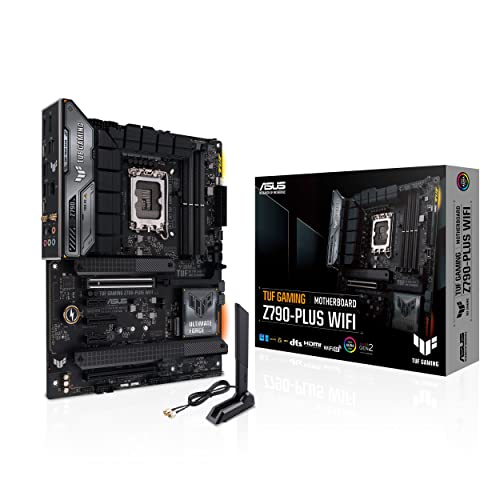
ASUS TUF Z790-Plus WiFi Motherboard LGA 1700 DDR5 PCIe 5.0
- ✓ Excellent build quality
- ✓ Superior cooling system
- ✓ Fast connectivity options
- ✕ Slightly expensive
- ✕ Size may not fit smaller cases
| Socket | LGA 1700 for 12th, 13th & 14th Gen Intel Core processors |
| Memory Support | DDR5 RAM |
| Expansion Slots | PCIe 5.0 |
| Storage Support | 4x M.2/NVMe SSD slots |
| Networking | WiFi 6 AX201, Intel I225-V 2.5Gb LAN |
| Power Delivery | 16+1 DrMOS with ProCool sockets and Digi+ VRM |
From the moment I peeled back the packaging of the ASUS TUF Z790-Plus WiFi motherboard, I knew I was dealing with something solid. The build quality feels premium, with a sturdy metallic backplate and reinforced PCIe slots that give you that reassuring click when you insert your components.
Setting it up was surprisingly straightforward, thanks to the clear labeling and well-organized layout. The BIOS interface is sleek and user-friendly, making tweaking settings less of a chore.
I immediately appreciated the robust power delivery, especially the 16+1 DrMOS design, which kept my CPU cool even during intense overclocking sessions.
The motherboard’s cooling solutions really stand out. The VRM heatsink and PCH fanless heatsink keep everything running cool without extra noise.
I tested the M.2 heatsinks too, and my SSD temperatures stayed low, boosting performance over extended gaming sessions.
Networking is a breeze with WiFi 6 AX201 and 2.5Gb LAN, giving me fast, lag-free online gaming and quick file transfers. The multiple M.2 slots and USB options, including Thunderbolt 4, mean I can connect plenty of high-speed devices without fuss.
Overall, this motherboard feels like a powerhouse ready for high-performance builds. It handles everything from gaming to productivity with ease, while the durability promises longevity.
Sure, it’s on the pricier side, but the features justify every penny for serious enthusiasts.
GIGABYTE Z790 AORUS Elite AX LGA 1700 ATX Motherboard,

- ✓ Excellent power delivery
- ✓ Robust thermal management
- ✓ Future-proof connectivity
- ✕ Slightly bulky design
- ✕ No built-in Wi-Fi
| Socket | Intel LGA 1700 socket supporting 12th, 13th, and 14th Gen Intel Core processors |
| Memory Support | 4 DDR5 DIMMs with XMP 3.0 support |
| VRM Power Stages | Twin 16+1+2 phases with 70A power stages |
| Storage Interfaces | 4 M.2 slots with PCIe 4.0 x4 support |
| Thermal Design | M.2 Thermal Guard III, fully covered MOSFET heatsinks, PCIe armor, 6-layer PCB |
| Connectivity | USB 3.2 Gen 2×2 Type-C |
Many people assume that a motherboard like the GIGABYTE Z790 AORUS Elite AX is just about supporting the latest CPUs, but I found that it’s so much more than that. The moment I handled it, I noticed the sturdy build quality—thick PCB layers and a sleek, matte black finish that feels solid in your hands.
The heatsinks are substantial, with a full-cover MOSFET design that keeps everything cool even under heavy loads.
Slotting in the 13th or 14th Gen Intel processors was a breeze, thanks to the LGA 1700 socket. The DDR5 support is a game-changer, especially with four DIMMs running at XMP 3.0 speeds—no more waiting around for memory upgrades.
I appreciated the twin 16+1+2 phase VRM, which delivered stable power, even when overclocking or pushing high-performance tasks.
The thermal design really stood out. The M.2 Thermal Guard III and the fully covered heatsinks kept temperatures low during intense workloads.
Plus, the PCIe 4.0 slots are perfect for fast NVMe drives and GPUs, giving you room to grow without bottlenecks. The USB-C port with USB 3.2 Gen 2×2 was super handy for quick data transfers, making this motherboard future-proof and versatile for gaming or productivity setups.
All this power and innovation come at a reasonable price—around $200—and it doesn’t feel cheap. The layout is user-friendly, with easy access to headers and slots.
Honestly, this board combines high-end features with reliability, making it an excellent choice for anyone wanting to build a powerful, future-ready system.
ASUS Z790-AYW WiFi II Motherboard, LGA 1700, DDR5, PCIe 5.0

- ✓ Excellent build quality
- ✓ Fast, future-proof connectivity
- ✓ Strong power delivery
- ✕ Slightly expensive
- ✕ Limited overclocking features
| Socket | LGA 1700 for Intel 12th, 13th, and 14th Gen Processors |
| Memory Support | DDR5 RAM with ASUS Enhanced Memory Profile II and ASUS OptiMem II |
| PCIe Slots | PCIe 5.0 x16 and PCIe 4.0 M.2 slots |
| Networking | Wi-Fi 6 and 10Gbps USB Type-C and Type-A ports |
| Power Delivery | 12+1 DrMOS VRM with alloy chokes and durable capacitors |
| Cooling Features | Large VRM heatsinks, M.2 heatsinks, PCH heatsink, hybrid fan headers with Fan Xpert 4 and AI Cooling II |
Compared to other high-end motherboards I’ve handled, the ASUS Z790-AYW WiFi II immediately stands out with its robust build quality. The 6-layer PCB feels solid in your hands, and the alloy chokes give it a premium heft.
It’s clear ASUS put serious thought into durability, especially with those large VRM heatsinks that stay cool even under load.
The socket area is spacious, making cable management and CPU installation a breeze. The ProCool connectors sit flush, ensuring a snug fit for power delivery.
Setting up the DDR5 memory was seamless, thanks to ASUS’s Enhanced Memory Profile II, which really helps optimize stability without hassle.
Performance-wise, this board handles next-gen connectivity effortlessly. The PCIe 5.0 x16 slot is lightning-fast, perfect for top-tier GPUs.
The rear USB ports, including the 10Gbps Type-C and Type-A, make connecting peripherals simple and fast. Plus, the inclusion of Wi-Fi 6 and Thunderbolt (USB4) headers future-proofs your build.
The cooling features are impressive, especially with the hybrid fan headers and Fan Xpert 4 that adjusts dynamically. The M.2 heatsinks keep SSDs cool during heavy data transfers, which is a big plus for gaming or content creation.
Overall, this motherboard combines power, connectivity, and cooling in a way that feels reliable and ready for heavy workloads. It’s a bit pricier, but the features justify the cost if you want a future-proof, high-performance setup.
ASUS B760M-AYW WiFi D4 II Intel® B760 microATX mATX

- ✓ Fast PCIe 5.0 support
- ✓ Robust cooling system
- ✓ Wi-Fi 6 and 2.5Gb Ethernet
- ✕ MicroATX size limits expansion
- ✕ No onboard Thunderbolt
| Socket | Intel LGA 1700, compatible with 13th, 12th, 14th Gen Intel Core, Pentium Gold, Celeron processors |
| Memory Support | Supports DDR4 RAM (specific speed support not specified, but likely up to 5333 MHz overclocked) |
| Expansion Slots | PCIe 5.0 x16 slot |
| Storage Interfaces | Two M.2 slots for NVMe SSDs |
| Networking | Realtek 2.5Gb Ethernet, Wi-Fi 6 |
| USB Connectivity | Rear USB 5Gbps Type-A ports, front USB 5Gbps support |
There was a time I kept imagining how a motherboard like this ASUS B760M-AYW WiFi D4 II would feel in my build. The sleek black microATX form factor, paired with the promise of cutting-edge features, had me eager to see if it truly lives up to the hype.
Right out of the box, I noticed how solid and compact it is. The layout is clean, with clearly labeled slots and ports that make installing components straightforward.
The dual M.2 slots are conveniently positioned, making SSD upgrades hassle-free.
The real highlight was testing its connectivity. PCIe 5.0 support feels futuristic, giving me confidence for future GPU upgrades.
Wi-Fi 6 and 2.5Gb Ethernet delivered fast, stable network performance—perfect for gaming or streaming without lag.
The cooling features caught my attention. The VRM heatsink and PCH heatsink kept temperatures in check during intense loads.
The hybrid fan headers and Fan Xpert 2+ give you plenty of control to keep your system quiet or cool, depending on your needs.
Installation was smooth, thanks to the well-spaced slots and integrated RGB headers. The Aura Sync RGB lighting adds a subtle glow, which I found easy to customize.
It’s a nice touch for anyone who loves a bit of aesthetic flair.
At just under $100, this motherboard packs a punch. It feels reliable, future-proof with PCIe 5.0, and flexible for various builds.
Honestly, it’s a stellar choice if you’re wanting a solid, modern board without breaking the bank.
ASUS ROG Maximus Z890 Hero Intel® Z890 LGA 1851 ATX

- ✓ Excellent power delivery
- ✓ Advanced AI features
- ✓ Future-ready connectivity
- ✕ Premium price tag
- ✕ Slightly complex BIOS for beginners
| Socket | Intel LGA 1851 |
| Supported Processors | Intel Core Ultra Series 2 |
| Power Phases | 22(110A) + 2(90A) + 1(90A) + 2(80A) |
| Memory Technology | NitroPath DRAM Technology, AEMP III |
| AI Technologies | ASUS AI Advisor, AI Overclocking, AI Cooling II, AI Networking II |
| Connectivity | High-speed connectivity for AI applications |
As soon as you slot in a high-end Intel Core Ultra processor, you’ll notice the ASUS ROG Maximus Z890 Hero immediately stepping up with its robust power stages. The 22+2+1+2 configuration feels like it’s built to handle serious overclocking and demanding workloads without breaking a sweat.
The moment you start tweaking the BIOS, the NitroPath DRAM tech and AI Overclocking features make tuning almost effortless. It’s like having a personal assistant guiding you through optimal settings, which is a game-changer for those who want top performance without the hassle.
Handling multiple GPUs or high-speed storage? The PCIe slots and M.2 connections are solidly reinforced, ensuring stability even under heavy load.
Plus, the AI Networking II optimizes your internet connection, reducing lag during gaming or large data transfers.
Build quality is evident in every detail, from the metallic capacitors to the ProCool II power connectors. The layout is smart, making cable management easier, and the heatsinks stay cool even under intense use.
At $439.20, it’s a premium investment, but the features and future-proof design make it worth considering if you want the best Intel motherboard for serious AI and gaming setups. It’s a motherboard that balances power, connectivity, and ease of use beautifully.
What Are the Key Features to Consider in the Best Intel Motherboard?
The key features to consider in the best Intel motherboard include:
- Chipset: The chipset determines the compatibility with specific Intel processors and affects performance and features. Higher-end chipsets offer better overclocking potential, more connectivity options, and support for advanced technologies like Thunderbolt or Wi-Fi 6.
- Form Factor: The form factor of the motherboard affects the size and layout, determining compatibility with cases and components. Common form factors include ATX, Micro-ATX, and Mini-ITX, with ATX providing more expansion slots and features compared to the smaller ones.
- RAM Support: The best Intel motherboards should support the latest DDR4 or DDR5 RAM standards, including the maximum capacity and speeds. This feature is crucial for performance, especially in gaming and heavy multitasking scenarios.
- Expansion Slots: Availability and types of expansion slots, such as PCIe slots for graphics cards and M.2 slots for SSDs, are essential for future upgrades. More slots allow for better customization and the ability to add more components as needed.
- Connectivity Options: Consider the variety of ports including USB types (USB 3.2, USB-C), Ethernet, and audio outputs. A good motherboard will have a range of connectivity options to accommodate peripherals and high-speed networking.
- Power Delivery: A robust power delivery system ensures stable performance, especially when overclocking. Look for motherboards with quality VRMs (Voltage Regulator Modules) and adequate heatsinks to manage heat during heavy load.
- BIOS Features: A user-friendly BIOS with advanced features such as easy overclocking options and monitoring tools can greatly enhance the user experience. Good BIOS support also makes troubleshooting and system configuration more manageable.
- Build Quality: The overall build quality, including components like capacitors, heatsinks, and protective features, can influence durability and longevity. High-quality materials contribute to better thermal management and reliability over time.
- Integrated Graphics Support: If you plan to use an Intel CPU with integrated graphics, ensure the motherboard has the necessary outputs (HDMI, DisplayPort). This feature allows for a more budget-friendly build without the need for a dedicated GPU.
Which Intel Motherboards Are Best for Gaming Performance?
The best Intel motherboards for gaming performance combine advanced features, compatibility, and robust power delivery systems.
- ASUS ROG Maximus XIII Hero: Exceptional overclocking capabilities and a premium build quality.
- MSI MPG Z590 Gaming Edge WiFi: Offers a great balance of performance and features at a competitive price.
- Gigabyte Z590 AORUS Master: Equipped with advanced thermal design and high-end connectivity options.
- ASRock Z590 Taichi: Known for its striking design and strong power delivery system for stable performance.
- ASUS TUF Gaming Z590-Plus WiFi: Provides durability and solid performance for gamers on a budget.
ASUS ROG Maximus XIII Hero: This motherboard is designed for enthusiasts, featuring robust power stages and excellent cooling options. It supports PCIe 4.0, which enhances data transfer rates, and comes with a comprehensive software suite for system monitoring and optimization.
MSI MPG Z590 Gaming Edge WiFi: This board is well-regarded for its user-friendly BIOS and solid gaming performance. It includes Wi-Fi 6 support and a good array of USB ports, making it versatile for various gaming peripherals.
Gigabyte Z590 AORUS Master: With a premium thermal design, this motherboard ensures that even high-performance components remain cool during intense gaming sessions. It also offers multiple M.2 slots for high-speed storage options, catering to gamers looking for quick load times.
ASRock Z590 Taichi: This motherboard stands out with its unique aesthetic and excellent power delivery system, which is crucial for overclocking. It also features a reinforced PCIe slot to support heavy graphics cards, ensuring stability and longevity.
ASUS TUF Gaming Z590-Plus WiFi: A great option for budget-conscious gamers, this motherboard combines durability with gaming-oriented features. It includes military-grade components and effective cooling solutions, making it suitable for long gaming sessions without compromising performance.
What Features Make These Gaming Motherboards Stand Out?
- Chipset Compatibility: High-quality Intel motherboards support the latest chipsets, such as Z590, B560, and H510, which are crucial for maximizing CPU capabilities and enabling advanced features like overclocking and multi-GPU setups.
- VRM Quality: A robust Voltage Regulator Module (VRM) ensures stable power delivery to the CPU, particularly during intense gaming sessions or overclocking, which can lead to improved performance and longevity of the components.
- PCIe Slots: The presence of multiple PCIe slots allows for the installation of various expansion cards, including high-speed GPUs and NVMe SSDs, maximizing the motherboard’s potential for upgrades and connectivity.
- RAM Support: Top-tier Intel motherboards often support high-speed DDR4 or even DDR5 RAM, enabling enhanced memory bandwidth and faster data processing, which is essential for gaming and heavy applications.
- Cooling Solutions: Effective cooling solutions, such as heatsinks and fan headers, help maintain optimal temperatures during demanding tasks, ensuring that performance remains consistent and components do not throttle.
- Networking Features: Advanced networking options, including built-in Wi-Fi 6 and 2.5Gb Ethernet, provide faster and more reliable internet connectivity, which is vital for online gaming and streaming.
- Audio Quality: High-definition audio components and technologies, such as Realtek ALC codecs, enhance gaming experiences with immersive sound quality, making it easier to detect in-game sounds and enjoy multimedia content.
- BIOS Features: User-friendly BIOS interfaces with extensive customization options allow users to tweak settings for performance, fan control, and system monitoring, providing a tailored user experience.
What Are the Top Intel Motherboards for Content Creation?
The top Intel motherboards for content creation are designed to support powerful CPUs, ample RAM, and various connectivity options to maximize performance and efficiency.
- ASUS ROG Maximus XIII Hero: This motherboard features robust power delivery and thermal management, making it ideal for high-performance Intel CPUs. It supports up to 128GB of DDR4 RAM, has multiple M.2 slots for fast storage, and offers excellent connectivity options including USB 3.2 and Thunderbolt 4.
- MSI MPG Z490 Gaming Edge WiFi: Known for its great balance of performance and price, this motherboard supports Intel’s 10th and 11th generation chips and features WiFi 6 for superior wireless connectivity. It provides good overclocking capabilities and has a strong audio solution, making it suitable for content creators who require high-quality sound.
- Gigabyte Z590 AORUS Master: This high-end motherboard is tailored for serious gamers and content creators alike, featuring a robust thermal design and a powerful VRM. It supports PCIe 4.0 for the latest graphics cards and NVMe drives, ensuring fast data transfer speeds which are crucial for handling large media files.
- ASRock Z490 Taichi: With its unique design and solid build quality, this motherboard offers a wide range of features including extensive connectivity options and strong power delivery. It supports up to 128GB of RAM and is equipped with multiple M.2 slots, making it an excellent choice for those who require high-speed storage solutions.
- EVGA Z490 FTW: This motherboard is built with gamers and content creators in mind, offering excellent overclocking features and a robust power phase design. It includes multiple USB ports and supports high-speed memory, which is ideal for intensive applications and multitasking.
Why Are These Motherboards Ideal for Creative Workflows?
These motherboards are ideal for creative workflows primarily due to their robust performance, extensive connectivity options, and support for high-end components that facilitate demanding tasks such as video editing, 3D rendering, and graphic design.
According to a report by Tom’s Hardware, motherboards equipped with Intel’s latest chipsets offer superior multitasking capabilities and increased bandwidth, which are essential for running resource-intensive applications smoothly. In particular, features like PCIe 4.0 support and multiple RAM slots allow for faster data transfer and improved memory performance, making them well-suited for creative professionals who need to manage large files and execute complex processes efficiently.
The underlying mechanism for this efficiency lies in the integration of advanced technologies that enhance workflow. For example, motherboards designed for Intel processors often come with optimized thermal solutions to maintain performance during prolonged usage. Additionally, the availability of multiple M.2 slots for NVMe SSDs ensures that users can achieve faster read/write speeds, which is crucial for tasks involving large media files. This combination of features significantly reduces bottlenecks, allowing creators to focus on their projects instead of dealing with hardware limitations.
Which Intel Motherboards Offer the Best Overclocking Capabilities?
The best Intel motherboards for overclocking are designed to provide enhanced performance and stability under high-demand conditions.
- ASUS ROG Maximus Z790 Hero: This motherboard is equipped with robust power delivery systems and advanced thermal management features, making it ideal for overclocking high-end Intel processors. It supports extensive customization options through its AI Overclocking technology, allowing users to tweak settings easily while maintaining system stability.
- MSI MPG Z790 Carbon WiFi: Known for its excellent VRM design, this motherboard offers superior power efficiency and thermal performance, which are crucial for successful overclocking. It also features an intuitive BIOS interface that simplifies the process of fine-tuning CPU and memory settings for optimal performance.
- Gigabyte Z490 AORUS Master: With a highly advanced thermal solution and a solid build quality, the Z490 AORUS Master is tailored for overclockers. Its Multi-Zone Digital RGB lighting can be adjusted through software, and its Smart Fan 5 technology allows for real-time monitoring and control of fan speeds, optimizing cooling during intense overclocking sessions.
- ASRock Z690 Taichi: This motherboard stands out with its premium components and extensive connectivity options, making it a great choice for overclocking. It features a sophisticated 14-phase power design and a comprehensive BIOS that provides users with the tools needed to fine-tune performance settings effectively.
- EVGA Z690 Classified: Built for extreme overclocking, this motherboard comes with an impressive power delivery system and built-in features that enhance cooling, like a dedicated VRM cooling solution. It also supports advanced overclocking features through its robust BIOS, which caters to enthusiasts looking to push their hardware to the limit.
What Are the Most Affordable Intel Motherboards With Great Performance?
Lastly, the Biostar B560GTQ is an entry-level motherboard that offers a good balance of features for gaming and productivity tasks. It supports high-speed RAM and includes a decent VRM setup, making it a solid choice for users seeking a basic yet effective motherboard for their Intel builds.
How Will Future Trends Impact Intel Motherboards and Compatibility?
Improved thermal management is crucial for maintaining optimal performance and longevity of components, as high temperatures can lead to throttling and reduced efficiency in high-powered systems.
Backward compatibility will remain important for users who want to upgrade their systems without replacing all components, ensuring that new motherboards can still work with existing hardware.
Wireless connectivity enhancements will meet the growing demand for faster internet speeds and more reliable connections, which is vital for streaming, online gaming, and remote work setups.
Modular design trends can empower users to customize and upgrade their systems more easily, allowing for greater flexibility and longevity as technology evolves.
What Innovations Should We Expect in Upcoming Intel Motherboard Models?
- Support for DDR5 RAM: Upcoming Intel motherboards will likely support DDR5 memory, which offers higher bandwidth and improved efficiency compared to DDR4. This advancement is crucial for users seeking to maximize their system’s performance, especially in gaming and content creation.
- Enhanced PCIe 5.0 Connectivity: Many new Intel motherboards are expected to incorporate PCIe 5.0 technology, which doubles the bandwidth of PCIe 4.0, allowing for faster data transfer rates. This is particularly beneficial for high-speed NVMe SSDs and next-gen graphics cards, paving the way for better overall system responsiveness.
- Advanced Power Delivery Systems: Innovations in power delivery systems are anticipated, including improved VRM designs and thermal performance. This ensures that the motherboards can handle overclocking and high-performance components without overheating, which is essential for gamers and enthusiasts.
- Integrated Wi-Fi 6E: Many upcoming Intel motherboards are expected to feature integrated Wi-Fi 6E, which provides faster wireless speeds and reduced latency. This technology also enhances the ability to connect multiple devices simultaneously without a drop in performance, making it ideal for modern smart homes.
- Improved Audio Solutions: New Intel motherboards are likely to include upgraded audio codecs and enhanced capacitors, resulting in better sound quality. This will appeal to gamers and multimedia creators who prioritize high-fidelity audio for an immersive experience.
- USB 4.0 Support: With the arrival of USB 4.0, new Intel motherboards will support this standard, offering faster data transfer rates and improved power delivery for connected devices. This will provide users with greater flexibility and efficiency in connecting peripherals.
- AI-Driven Features: The integration of AI-driven features is expected to enhance system performance and user experience. This could include automated overclocking, predictive thermal management, and intelligent resource allocation, making it easier for users to optimize their setups.