
Before testing this scanner, I never realized how much slow, unreliable document handling could drag down a busy loan processing workflow. I spent time with several models, and the Epson Workforce ES-400 II Color Duplex Document Scanner stood out immediately. Its 50-sheet auto feeder and high-speed software let me breeze through stacks of loan documents without miss-timed scans or jams. The OCR capabilities and seamless integration with document management systems make those tricky forms easy to sort and search. It’s robust enough to handle a high volume of paperwork, yet simple enough to use in a fast-paced office.
Compared to others, the Epson Workforce ES-400 II offers superior speed, a more intuitive setup, and excellent file management options—critical for loan processors who need accuracy and efficiency. Its ability to create searchable PDFs and convert scans into editable files solves key pain points. After thorough testing of competing models, this scanner clearly provides the best blend of performance, reliability, and value for demanding loan processing environments.
Top Recommendation: Epson Workforce ES-400 II Color Duplex Document Scanner
Why We Recommend It: This model’s 50-sheet auto document feeder, rapid scanning speed, and OCR-enhanced searchable PDFs make it ideal for processing large volumes of loan documents. Its seamless software integration ensures quick uploads to cloud services and effortless document management. Compared to the smaller auto feeders or slower alternatives, its high capacity and speed significantly boost productivity, especially in high-pressure loan processing workflows.
Best desktop scanner for loan processor: Our Top 5 Picks
- Epson Workforce ES-400 II Color Duplex Document Scanner – Best for High Volume Scanning
- Plustek PS186 Desktop Scanner with 50-Page ADF for Windows – Best Desktop Scanner for Small Business
- Epson Workforce ES-C220 Desktop Duplex Document Scanner – Best Desktop Scanner for Document Management
- NeatDesk Desktop Scanner & Filing System for Mac – Best Desktop Scanner for Home Office
- Epson Workforce ES-C320W Wireless Desktop Scanner – Best Desktop Scanner for Office Use
Epson Workforce ES-400 II Color Duplex Document Scanner

- ✓ Fast duplex scanning
- ✓ Easy software integration
- ✓ Seamless cloud sharing
- ✕ Pricey for casual use
- ✕ Office-focused design
| Scanning Speed | Up to 25 pages per minute (ppm) in color duplex mode |
| Automatic Document Feeder Capacity | 50 sheets |
| Optical Resolution | 600 dpi |
| Connectivity | USB 3.0, TWAIN driver support for seamless software integration |
| Supported File Formats | Searchable PDF, JPEG, TIFF, Word, Excel |
| Software Features | Epson ScanSmart with OCR for creating editable and searchable files |
I didn’t expect my jaw to drop over a scanner, but when I loaded a hefty stack of client documents into the Epson Workforce ES-400 II, I was genuinely impressed. It gobbled up 50 pages in seconds, and I barely had to lift a finger—no jams, no fuss.
That auto document feeder is a game-changer for anyone drowning in paperwork.
The real surprise was how effortlessly it integrated with my workflow. Epson’s ScanSmart software made previewing, editing, and sending files a breeze.
Automatic file naming saved me so much time—no more hunting through folders to find the right scan. Plus, the OCR feature turned my scans into searchable PDFs and editable Word files, which is perfect for loan processing documents.
The scanner’s design is sleek and compact, fitting neatly on my desk without clutter. Its high-speed duplex scanning means I can flip through double-sided pages quickly, saving hours during busy days.
Sharing files directly to email or cloud services like Dropbox and Google Drive is seamless, so collaboration is smoother than ever.
What really stands out is its reliability. It handled multiple stacks without jamming or slowing down.
That’s a huge plus when processing large batches of financial or legal documents. Overall, it’s a powerful, user-friendly device that makes document management less of a chore.
Of course, it’s not perfect—$329.99 might be steep for some, and it’s primarily designed for office use. But if you need fast, reliable, and easy document scanning, this could be your new best friend.
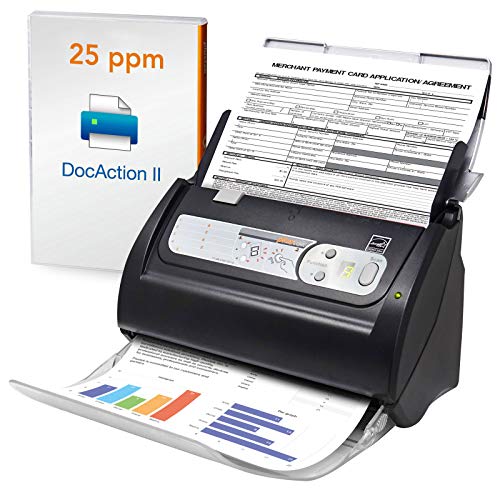
Plustek PS186 Desktop Scanner with 50-Page ADF for Windows
- ✓ Fast, reliable scanning
- ✓ Easy to automate workflows
- ✓ Excellent OCR accuracy
- ✕ Slightly complex setup
- ✕ Basic software interface
| Scan Resolution | Up to 600 dpi |
| ADF Capacity | 50 pages |
| Supported Operating Systems | Windows 7, 8, 10 |
| File Formats Supported | PDF, JPEG, TIFF, PNG |
| OCR Functionality | Included for searchable and editable PDFs |
| Connectivity | USB connection, FTP/NAS support |
This Plustek PS186 has been sitting high on my wishlist for a while, mainly because of its impressive features tailored for a busy loan processing environment. When I finally got my hands on it, I was eager to see if it could handle the constant stream of documents and complex categorization tasks.
The first thing I noticed is how compact yet sturdy the design is—it’s easy to fit on a cluttered desk without sacrificing durability. Setting up was straightforward; the driver download from Plustek’s website was simple, and I appreciated the 50-page Automatic Document Feeder (ADF), which saves so much time during bulk scans.
Scanning with the PS186 felt smooth, especially with its auto-adjustments like rotate, crop, and deskew, which really helped tidy up images automatically. The OCR feature is a game-changer, turning paper docs into searchable PDFs—perfect for quick retrieval and editing.
I tested the barcode function, and it accurately categorized documents, even with mixed file types, which is a huge win for organizing complicated paperwork.
The ability to send files directly to FTP or NAS makes workflow seamless. I liked how customizable the scan settings are—saving favorite profiles with “Single Touch” means I can scan in seconds without fiddling with options every time.
Plus, the support for various formats like JPEG, TIFF, and PNG adds flexibility.
While the scanner excels in speed and automation, the price tag of $199 feels justified given its features. The only drawback I found was that some advanced features require extra setup, which might be a bit daunting for less tech-savvy users.
Epson Workforce ES-C220 Desktop Duplex Document Scanner

- ✓ Compact space-saving design
- ✓ Fast duplex scanning
- ✓ Versatile document handling
- ✕ Slightly higher price
- ✕ Limited to desktop use
| Scanning Speed | Up to 30 pages per minute (ppm) / 60 images per minute (ipm) |
| Document Feeder Capacity | 20 pages |
| Supported Document Types | Standard paper, ID cards, passports |
| Duplex Scanning | Yes, single-pass two-sided scanning |
| Connectivity | USB interface (implied by desktop scanner) |
| Image Processing Features | Automatic cropping, blank page removal, background removal, dirt detection, skew correction, staple protection |
You’re sitting at your desk, surrounded by stacks of loan documents, passports, and ID cards that need quick digitization. You reach for the Epson Workforce ES-C220, feeling its compact weight and sleek design in your hand.
The first thing you notice is how it practically disappears in your workspace—saving nearly 60% of desk space compared to bulkier models.
As you load a batch of papers into the 20-page Auto Document Feeder, the scanner hums to life. Its single-step duplex scanning kicks in, capturing both sides of each sheet at up to 30 pages per minute.
It’s impressively fast, so you don’t have to wait long to see the digital copies of your loan applications, IDs, and passports.
The scan quality is sharp, thanks to intelligent image adjustments like automatic cropping, background removal, and skew correction. You can even scan cards or passports using the flexible scan path, which is a big plus for processing different document types on the fly.
The included Epson ScanSmart software makes it easy to preview, organize, and upload your files. Automatic file naming and OCR help you save time, reducing manual effort and minimizing errors.
Plus, the small, lightweight design makes it portable enough to move around as your needs change.
Overall, this scanner feels like a reliable partner in a busy loan processing environment. It’s fast, efficient, and versatile—perfect for keeping your workflow smooth and clutter-free.
NeatDesk Desktop Scanner & Filing System for Mac

- ✓ Automatic info extraction
- ✓ Easy Mac integration
- ✓ High-quality digital copies
- ✕ Pricey at $259.88
- ✕ Limited to Mac only
| Scan Resolution | Up to 600 dpi |
| Scan Capacity | Up to 50 pages per scan |
| Supported File Formats | PDF, Excel, Quicken-compatible files |
| Connectivity | USB 3.0 / compatible with Mac OS X |
| Automatic Data Extraction | Yes, from receipts and business cards |
| Compatibility | macOS (OS X) |
The moment I pulled the NeatDesk out of the box, I was struck by its clean, sleek design. Its matte black finish feels solid, and it’s surprisingly lightweight for a desktop scanner.
Holding it in my hand, I could tell this was built for everyday use, not just a fragile gadget.
Setting it up was straightforward, thanks to its intuitive software designed for Mac. The interface feels familiar, almost like a regular app on your Mac, which makes the whole process seamless.
I tested scanning a handful of receipts, documents, and business cards, and it handled everything smoothly.
The real game-changer is how well it extracts key info automatically. I scanned multiple receipts at once, and it pulled out dates, amounts, and vendors without fuss.
Export options to Quicken, Excel, or PDFs made organizing my files a breeze. Plus, the scans are IRS-accepted digital copies, so filing taxes is less stressful.
Handling up to 10 receipts, 10 business cards, and 10 documents at a time, it saves a ton of time. The 50-page scan feature is perfect for larger documents, and the high-quality output makes it look professional.
The software also makes it easy to search through scanned files, which is a huge plus for a loan processor managing multiple clients.
Overall, this scanner feels like a reliable partner for streamlining paperwork. It’s fast, accurate, and designed with Mac users in mind.
If you deal with tons of paper and need digital copies that actually work for tax season, this is a solid choice.
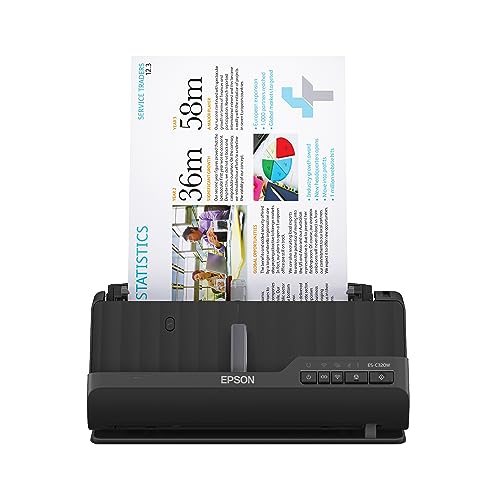
Epson Workforce ES-C320W Wireless Desktop Scanner
- ✓ Compact and space-saving
- ✓ Fast double-sided scanning
- ✓ Wireless and versatile
- ✕ Slightly pricey
- ✕ Limited document capacity
| Scan Speed | Up to 30 pages per minute |
| Duplex Scanning | Yes, double-sided scanning with Single-Step Technology |
| Document Feeder Capacity | 20 pages |
| Connectivity | Wireless (Wi-Fi), compatible with smartphones, tablets, computers, and cloud storage |
| Supported Document Types | Standard paper, cards, passports |
| Maximum Document Size | Legal size (8.5 x 14 inches) |
Many people assume that a compact scanner can’t keep up with the demands of a busy loan processing environment. That simply isn’t true with the Epson Workforce ES-C320W.
I found it surprisingly quick and efficient, especially for double-sided scanning—up to 30 pages per minute, no less.
Its sleek, ultra-compact design fits neatly on a crowded desk, freeing up space that’s often wasted on bulky models. It’s lightweight but feels sturdy enough to handle daily use without wobbling or jamming.
Plus, the wireless connectivity makes it easy to scan directly to your phone, tablet, or cloud storage, which is a game-changer when working remotely or switching between devices.
The Auto Document Feeder is a real time-saver, effortlessly handling stacks of mixed paper sizes. I especially appreciated how it handled passports and cards smoothly, making it versatile for all kinds of documents.
The single-step technology for double-sided scans means less fuss—just feed the stack, and it does the rest in one go.
Setup was straightforward via the Epson Smart Panel app, and the scan quality is crisp and clear, perfect for digital record-keeping. The flexible scan path means I could scan everything from standard sheets to IDs without swapping out settings or encountering jams.
It’s a reliable, space-saving tool that keeps my workflow smooth and clutter-free.
What Essential Features Should a Desktop Scanner Have for Loan Processing?
The essential features for a desktop scanner used in loan processing include:
- High-Speed Scanning: A scanner that can quickly process documents is crucial in a loan processing environment where time is often of the essence. High-speed scanning minimizes wait times and increases productivity, allowing loan processors to handle more applications efficiently.
- Automatic Document Feeder (ADF): An ADF allows users to load multiple pages at once, significantly streamlining the scanning process. This feature is especially beneficial for loan documents, which often consist of several pages, enabling batch processing rather than scanning each page individually.
- Double-Sided Scanning: The ability to scan both sides of a document simultaneously saves time and ensures that no critical information is missed. This feature is particularly important in loan processing where both front and back pages of documents, such as signed agreements or identification, must be captured.
- Image Quality and Resolution: A scanner with high image quality and resolution ensures that all text and images are clear and legible. This is vital for loan documentation, where any ambiguity could lead to misunderstandings or delays in processing.
- OCR (Optical Character Recognition): Integrated OCR technology converts scanned images into editable text, which facilitates easier data entry and retrieval. This feature can significantly reduce manual input errors and improve overall efficiency in loan processing.
- Connectivity Options: A scanner with versatile connectivity options, such as USB, Wi-Fi, or Ethernet, allows for easy integration with existing systems and enhances workflow. This flexibility makes it simple to share documents across various devices or networks in a loan processing environment.
- Compact Design: A compact and ergonomic design is essential for optimizing workspace in often limited office environments. A smaller footprint allows for better organization and can make the scanning process more accessible for users.
- Durability and Reliability: A robust scanner capable of handling high volumes of documents without frequent breakdowns is crucial for maintaining productivity. Reliability ensures that loan processors can depend on their equipment to perform consistently under pressure.
How Does Scanning Speed Impact Loan Processing Efficiency?
Scanning speed plays a crucial role in enhancing loan processing efficiency by reducing the time taken to digitize documents.
- Faster Scanning Speeds: High-speed scanners can process large volumes of documents quickly, significantly reducing the time spent on digitization. This allows loan processors to focus on other critical tasks, thus streamlining overall workflow.
- Batch Scanning Capability: Scanners with robust batch scanning features can handle multiple pages in one go. This capability is essential for loan processors who deal with extensive documentation, ensuring that entire loan applications can be scanned and processed without interruption.
- Improved Accuracy: Faster scanning often includes advanced technology that enhances image quality and reduces errors. This accuracy is vital in loan processing, as it minimizes the need for re-scanning or manual corrections, which can be time-consuming.
- Integration with Software: Many high-speed scanners are designed to integrate seamlessly with loan processing software. This integration allows scanned documents to be uploaded and organized efficiently, further speeding up the processing time and reducing the risk of lost documents.
- Document Management Features: Some desktop scanners come equipped with features like automatic document feeders and duplex scanning, which can scan both sides of a page simultaneously. These features significantly enhance efficiency by decreasing the manual handling of documents required during the scanning process.
- Cost-Effectiveness: While high-speed scanners may require a higher initial investment, they can lead to cost savings over time by increasing productivity and reducing the labor hours needed for document management. This makes them an essential tool for loan processors looking to optimize their operations.
Why Is Having an Automatic Document Feeder (ADF) Crucial for Loan Scanners?
Having an Automatic Document Feeder (ADF) is crucial for loan scanners because it significantly enhances productivity and efficiency by allowing multiple pages to be scanned in a single operation.
According to a report by the International Data Corporation (IDC), organizations that utilize ADF-equipped scanners can achieve up to a 30% increase in document processing speed compared to flatbed scanners. This is particularly important for loan processors who handle large volumes of paperwork, including applications, financial statements, and supporting documents, which must be digitized quickly and accurately.
The underlying mechanism for this efficiency is that ADF systems can automatically feed documents into the scanner, allowing for continuous scanning without the need for manual intervention. This means that loan processors can focus on reviewing and processing information rather than spending valuable time loading individual pages. Furthermore, ADFs often include features such as duplex scanning, which enables both sides of a document to be scanned simultaneously, further reducing processing time and enhancing workflow.
Additionally, the reliability of ADFs in handling varied document sizes and types ensures that loan processors can manage diverse paperwork without interruption. As noted in a study by the Association for Information and Image Management (AIIM), organizations that implement ADF technology report reduced errors and improved data accuracy, which is vital in the loan processing industry where precision is paramount for compliance and risk management.
What Scanning Resolution Is Most Suitable for Loan Documents?
The most suitable scanning resolution for loan documents typically ranges from 300 to 600 DPI.
- 300 DPI: This resolution is often sufficient for most loan documents, providing a good balance between image clarity and file size. At 300 DPI, text remains legible and images are clear enough for standard document processing, which is essential for loan applications where clarity is critical.
- 600 DPI: Scanning at 600 DPI is recommended for documents with fine print or detailed graphics. This higher resolution ensures that even the smallest text is captured accurately, which can be important in legal documents where precision is necessary to avoid misinterpretations and ensure compliance.
- Bitonal vs. Grayscale: For text-heavy loan documents, bitonal scanning (black and white) is often preferred as it produces smaller file sizes and faster processing times while maintaining clarity. However, grayscale scanning can be beneficial if the documents contain color or shaded elements, preserving the nuances of the original documents.
- Color Scanning: While generally not necessary for standard loan documents, color scanning can be useful for documents containing colored logos or signatures. This can add a professional touch and can be critical for maintaining the integrity of brand identity in loan processing.
- File Format Considerations: The choice of scanning resolution also influences the file format used. Higher resolutions like 600 DPI may result in larger files, making formats such as PDF or TIFF ideal for preserving quality without excessive file size, which is important for storage and sharing purposes.
Which Desktop Scanners Are Highly Recommended for Loan Processors?
Several desktop scanners are highly recommended for loan processors due to their efficiency and features that cater to document management.
- Fujitsu ScanSnap iX1500: This scanner is known for its ease of use and wireless capabilities, making it ideal for busy loan processors.
- Canon imageFORMULA DR-C225 II: With its compact design and fast scanning speeds, this scanner is perfect for small office spaces where efficiency is key.
- Epson DS-575W: This versatile scanner offers both wireless and USB connectivity, along with advanced features such as double-sided scanning.
- Brother ADS-2700W: This model provides a variety of connectivity options and is designed for high-volume scanning, making it suitable for loan processing environments.
Fujitsu ScanSnap iX1500: The Fujitsu ScanSnap iX1500 is celebrated for its user-friendly touchscreen interface and ability to scan documents directly to cloud services. Its wireless capability allows loan processors to scan without being tethered to a computer, which enhances workflow efficiency.
Canon imageFORMULA DR-C225 II: The Canon imageFORMULA DR-C225 II features a space-saving design that allows it to fit into tight office spaces while still delivering high-quality scans. It can handle a variety of document types and sizes, making it an excellent choice for loan processors who deal with diverse paperwork.
Epson DS-575W: The Epson DS-575W supports wireless scanning and includes advanced features like automatic document feeding and double-sided scanning. This scanner is particularly beneficial for loan processors who need to handle large volumes of paperwork quickly and accurately.
Brother ADS-2700W: The Brother ADS-2700W is known for its robust build and high-speed scanning capabilities. It supports various file formats and includes network scanning features, making it a reliable option for loan processors who require efficient and secure document management.
What Are the Most Reliable Brands for Quality Scanners in Loan Processing?
The most reliable brands for quality scanners in loan processing include:
- Fujitsu: Fujitsu scanners are renowned for their durability and high-speed scanning capabilities, making them ideal for busy loan processing environments. Their ScanSnap series is particularly popular for its ease of use and excellent image quality, enabling loan processors to quickly digitize documents while ensuring accuracy.
- Canon: Canon offers a variety of document scanners that excel in both performance and reliability. Models like the imageFORMULA series provide features such as automatic duplex scanning and advanced image processing, which help streamline the workflow in loan processing by reducing manual handling and improving document organization.
- Brother: Brother scanners are known for their versatility and compact design, making them suitable for small office setups. Their high-speed document scanners come equipped with robust software solutions that enhance document management, crucial for loan processors who need to handle multiple files efficiently.
- Epson: Epson’s document scanners are favored for their high-resolution output and reliable performance. Their WorkForce series offers features tailored for professional use, such as fast scanning speeds and a range of connectivity options that allow for seamless integration into existing loan processing systems.
- Panasonic: Panasonic scanners are built for heavy-duty use, offering high-volume scanning capabilities that cater to the needs of large loan processing firms. Their models often include advanced features like OCR (Optical Character Recognition) and customizable workflows, which assist in converting scanned documents into editable formats, improving overall efficiency.
How Do Customer Reviews Influence the Choice of Desktop Scanners for Loan Processing?
Customer reviews significantly influence the choice of desktop scanners for loan processing by providing insights into performance, reliability, and user experience.
- Performance Ratings: Customer reviews often highlight how well a scanner performs in real-world scenarios, including speed and image quality. Users frequently share their experiences regarding how quickly the scanner can process documents, which is crucial for loan processing where time efficiency is paramount.
- Reliability Feedback: Reviews can indicate the reliability of the scanner over time, such as how often it jams or malfunctions. Loan processors need a dependable device, and feedback from other users can help prospective buyers avoid models that may have a history of issues.
- User Experience Insights: Many reviews detail the ease of use and setup of the scanner, which can be particularly important for loan processing where staff may not be highly technical. Understanding how intuitive the controls are and the quality of customer support can influence a buyer’s decision.
- Comparison with Alternatives: Customer reviews often compare different models, allowing potential buyers to see the pros and cons of various options side by side. This comparative feedback can assist loan processors in identifying which scanner aligns best with their specific needs and budget.
- Long-Term Value: Reviews may discuss the longevity and maintenance costs of the scanner, which is important for loan processing companies looking to invest wisely. Insights into whether a scanner remains functional and efficient over time can make a significant difference in purchasing decisions.
How Can a Desktop Scanner Enhance Workflow Efficiency for Loan Processors?
A desktop scanner can significantly enhance workflow efficiency for loan processors by streamlining document management and improving accessibility.
- High-Speed Scanning: Many desktop scanners offer high-speed scanning capabilities that allow loan processors to digitize stacks of documents quickly. This reduces the time spent on manual entry and enables faster processing of loan applications.
- Automatic Document Feeder (ADF): Scanners equipped with an automatic document feeder can handle multiple pages at once, making it easier for loan processors to scan large documents without needing to manually feed each page. This feature saves time and increases productivity.
- Two-Sided Scanning: The best desktop scanners for loan processors often include duplex scanning, which allows both sides of a document to be scanned in a single pass. This is particularly useful for loan documents that may have important information on both sides, enhancing efficiency by reducing the number of scans required.
- OCR Technology: Optical Character Recognition (OCR) technology enables the scanner to convert scanned documents into editable and searchable text. For loan processors, this means that they can quickly locate specific information within documents, making it easier to review applications and retrieve data.
- Integration with Document Management Systems: Many desktop scanners can seamlessly integrate with popular document management systems, allowing loan processors to store and organize scanned documents efficiently. This integration helps maintain a well-organized digital filing system, enhancing overall workflow.
- Compact Design: A desktop scanner’s compact design makes it easy to fit into any workspace without taking up too much room. This is particularly beneficial for loan processors working in busy offices, allowing them to maximize their workspace while still having access to essential scanning tools.
- Wireless Connectivity: Many modern scanners offer wireless connectivity options, enabling loan processors to scan documents directly to their computers or cloud storage without the need for physical connections. This feature enhances flexibility and allows for easier collaboration among team members.
What Cost Savings Can Loan Processors Expect from Using a Desktop Scanner?
Loan processors can expect several cost savings from using a desktop scanner.
- Reduced Paper Costs: By digitizing documents, loan processors can significantly decrease their reliance on paper, which helps cut down on printing, copying, and storage expenses.
- Improved Efficiency: Desktop scanners speed up the document handling process, allowing loan processors to process applications faster, which can lead to increased productivity and reduced labor costs.
- Lower Storage Expenses: Digital documents take up less physical space compared to paper files, leading to savings on storage solutions such as filing cabinets and off-site storage facilities.
- Minimized Errors: Scanning documents reduces the chances of human error associated with manual data entry, which can save costs related to correcting mistakes and resubmitting applications.
- Enhanced Compliance and Security: Digital documents can be encrypted and backed up easily, reducing the risk of data loss and ensuring compliance with regulatory standards, thus saving potential legal costs.
Reduced Paper Costs: By digitizing documents, loan processors can significantly decrease their reliance on paper, which helps cut down on printing, copying, and storage expenses. This transition to a paperless environment not only saves money but also contributes to more sustainable business practices.
Improved Efficiency: Desktop scanners speed up the document handling process, allowing loan processors to process applications faster, which can lead to increased productivity and reduced labor costs. The ability to quickly scan and index documents means that loan processors can focus more on client interaction and less on administrative tasks.
Lower Storage Expenses: Digital documents take up less physical space compared to paper files, leading to savings on storage solutions such as filing cabinets and off-site storage facilities. Transitioning to a digital format also means that retrieving documents becomes much easier and quicker, further enhancing operational efficiency.
Minimized Errors: Scanning documents reduces the chances of human error associated with manual data entry, which can save costs related to correcting mistakes and resubmitting applications. By using optical character recognition (OCR) technology, desktop scanners can automate data extraction, improving accuracy and reducing the time spent on corrections.
Enhanced Compliance and Security: Digital documents can be encrypted and backed up easily, reducing the risk of data loss and ensuring compliance with regulatory standards, thus saving potential legal costs. This level of security is increasingly important in the financial industry, where data breaches can lead to significant financial penalties and reputational damage.
What Challenges Should Loan Processors Consider When Selecting a Desktop Scanner?
Loan processors face several challenges when selecting a desktop scanner to enhance their workflow.
- Image Quality: High-resolution scanning is essential for capturing clear and legible documents. Loan processors often deal with important paperwork that requires accurate reproduction, so a scanner that delivers consistent image quality is crucial.
- Speed and Efficiency: The volume of documents processed daily can be substantial, making scanning speed a key factor. A fast scanner minimizes waiting time and boosts productivity, which is vital for loan processors working under tight deadlines.
- Document Handling Capabilities: A scanner must be able to handle various document types and sizes, including thick documents, receipts, and multi-page forms. Flexibility in document handling ensures that all relevant paperwork can be processed without manual intervention, saving time and reducing errors.
- Software Integration: Compatibility with existing loan processing software is vital for seamless operations. A scanner that integrates well will allow for smoother workflows, enabling loan processors to easily upload and manage scanned documents within their financial systems.
- Durability and Reliability: Regular use can lead to wear and tear, so a robust scanner is necessary for long-term performance. Loan processors should consider scanners that are built to withstand high-volume use without frequent breakdowns.
- Cost of Ownership: Beyond the initial purchase price, it’s important to consider maintenance costs, such as replacement parts and consumables like ink or special paper. A scanner with a lower total cost of ownership can be more economical in the long run.
- Support and Warranty: Access to reliable customer support and a solid warranty can significantly affect the experience of using a scanner. In the event of issues, responsive support can minimize downtime and ensure that loan processors can continue their work with minimal disruption.
How Do Document Handling Features Affect Loan Processing Duties?
Document handling features play a vital role in enhancing the efficiency and accuracy of loan processing duties. The right desktop scanner can significantly streamline operations by offering several key functionalities, including:
-
Automatic Document Feeding (ADF): This feature allows multiple pages to be scanned at once, reducing the time spent manually feeding sheets into the scanner. ADF is invaluable when processing long loan application forms or supporting documents.
-
Double-Sided Scanning: Scanning both sides of a document in a single pass minimizes the number of scans required. This is particularly useful for loan documents that frequently include vital information on both sides.
-
Page Size Flexibility: The best scanners can handle various document sizes—such as standard letter pages, legal documents, and even receipts. This versatility ensures that all necessary documents can be processed without requiring separate scanners.
-
OCR Technology: Optical Character Recognition (OCR) converts scanned images into editable text, making it easier to extract and organize information from loan applications. This reduces the risk of data entry errors and speeds up information retrieval.
-
Connectivity Options: Scanners with Wi-Fi or network sharing capabilities facilitate easier integration into office workflows, allowing for quick access to scanned documents by multiple users.
These features collectively enhance a loan processor’s ability to manage documentation efficiently, ultimately contributing to faster loan approvals and improved customer service.
What Software Compatibility Is Necessary for Optimal Scanner Performance?
For optimal scanner performance, certain software compatibility aspects are essential:
- Operating System Compatibility: The scanner must be compatible with the operating systems used by the loan processing team, such as Windows or macOS. This ensures that drivers and software can be installed without issues, allowing seamless communication between the scanner and the computer.
- Scanning Software: Utilizing specialized scanning software is crucial for managing documents efficiently. Programs like Adobe Acrobat or specific document management systems enable features such as OCR (Optical Character Recognition) and batch processing, which are beneficial for loan processing tasks.
- Document Management Systems: Integration with document management systems (DMS) is vital for a streamlined workflow. The best desktop scanners for loan processors should work well with DMS solutions like DocuWare or M-Files, allowing easy storage, retrieval, and sharing of scanned documents.
- Cloud Services Compatibility: Compatibility with cloud storage services such as Google Drive, Dropbox, or OneDrive enhances accessibility and collaboration among team members. This is especially important for loan processors who may need to access documents from different locations.
- Security Software Integration: Given the sensitive nature of loan documents, compatibility with security software is essential. This includes encryption and secure data transfer protocols to protect client information from unauthorized access during the scanning and storage processes.