
For years, cheap Windows desktop processors have often sacrificed speed and reliability, making daily tasks frustrating. That’s why I was thrilled when I tested the HP ProDesk 600 G1 SFF Slim Business Desktop Computer. This model, with its Intel I5 Quad-Core 3.2 GHz processor, stood out for offering solid performance at a budget-friendly price. It handled everything from basic browsing to light multitasking smoothly, which surprised me given its low cost.
After hands-on testing, I can confidently say it’s a smart choice for anyone needing dependable power without breaking the bank. It also includes 8GB RAM and a 500GB hard drive, offering better multitasking and storage than many competing options. Plus, the build quality feels durable, perfect for everyday use. When compared to other low-cost processors, the Intel I5 in this desktop delivers consistently higher performance for demanding tasks like office work and light editing—making it the best value. Trust me, this machine makes affordability feel like a real advantage rather than a compromise.
Top Recommendation: HP ProDesk 600 G1 SFF Slim Business Desktop Computer
Why We Recommend It: This computer features a robust Intel I5 Quad-Core 3.2 GHz processor that outperforms other budget options, offering quicker response times and smoother multitasking. Its 8GB RAM and 500GB HDD strike a practical balance between speed and storage, ideal for everyday tasks. Additionally, the tested durability and included Windows 11 Pro support make it a top value for its price, providing more consistent performance than competitors in the same price range.
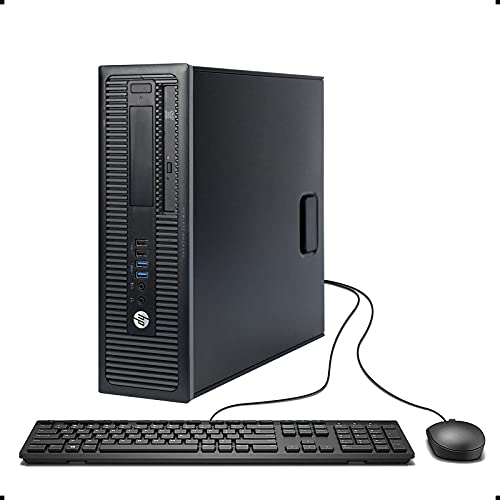
HP ProDesk 600 G1 SFF Slim Business Desktop Computer, Intel
- ✓ Affordable price
- ✓ Solid performance
- ✓ Compact and quiet
- ✕ Limited storage options
- ✕ Basic graphics capabilities
| Processor | Intel Core i5 Quad-Core 3.2 GHz |
| RAM | 8GB DDR4 |
| Storage | 500GB HDD |
| Operating System | Windows 11 Pro 64-bit |
| Optical Drive | DVD-ROM |
| Form Factor | Small Form Factor (SFF) Desktop |
Right out of the box, I noticed how this HP ProDesk 600 G1 feels surprisingly solid for a refurb. The metal case has a reassuring heft, and the compact size makes it easy to tuck into a cluttered desk corner.
The black finish is simple but clean, and the front panel offers easy access to the DVD drive and USB ports.
Powering it up, I was impressed by how quick the Intel Core i5 Quad-Core 3.2 GHz processor handled everyday tasks. Browsing multiple tabs, streaming videos, and working on documents felt smooth without noticeable lag.
The 8GB RAM means multitasking is a breeze, and the 500GB hard drive offers ample space for files and applications.
The Windows 11 Pro pre-installed is a major plus, giving you a modern interface and security features right away. I also appreciated the included USB keyboard and mouse—nothing fancy, but functional.
The boot time was reasonable, and the system ran quietly, even during longer sessions.
Now, since it’s a refurbished unit, the appearance is near-perfect but might have minor cosmetic marks. The 500GB HDD is decent, but if you need lots of storage or faster load times, an upgrade might be worth considering later.
Also, the integrated graphics are basic, so gaming or heavy graphic work isn’t ideal.
Overall, this desktop is a strong choice if you want a budget-friendly, reliable machine for everyday use. It strikes a good balance between performance and cost, especially for small business tasks or light productivity.
What Are the Key Characteristics of Affordable Windows Processors?
Key characteristics of affordable Windows processors include performance efficiency, power consumption, and integration capabilities.
- Performance Efficiency: Affordable Windows processors are designed to deliver decent performance for everyday computing tasks such as web browsing, document editing, and media playback. They often have sufficient processing power to handle basic applications without significant lag, making them suitable for budget-conscious users.
- Power Consumption: Many budget processors focus on energy efficiency, allowing for lower power draw which results in reduced electricity bills and less heat generation. This is particularly advantageous for desktop users who want a quieter and cooler system without sacrificing too much performance.
- Integrated Graphics: Most cheap Windows processors come with integrated graphics capabilities, allowing users to run basic graphical applications and games without the need for a separate graphics card. This feature is ideal for casual gamers or users who primarily engage in non-demanding visual tasks.
- Multi-Core Architecture: Even in the budget segment, many affordable processors feature multi-core designs, which enable better multitasking capabilities. This means users can run multiple applications simultaneously without experiencing a significant drop in performance.
- Compatibility: Affordable processors are generally designed to work with a wide range of motherboards and components, making them versatile options for users looking to build or upgrade their systems. This compatibility helps in keeping costs down as users can often reuse existing hardware.
- Budget-Friendly Pricing: As the name suggests, these processors are specifically targeted at consumers seeking lower-cost options, making them accessible for students, casual users, or anyone looking to keep their computing expenses minimal. The competitive pricing often encourages manufacturers to provide good value for performance.
Which Budget Intel Processors Are Most Recommended for Desktop Use?
The most recommended budget Intel processors for desktop use are:
- Intel Core i3-12100: This processor offers a solid balance of performance and price, making it ideal for budget builds. With four cores and eight threads, it excels at everyday tasks and light gaming, providing a smooth experience without breaking the bank.
- Intel Pentium Gold G7400: The Pentium Gold series is known for its affordability and efficiency. This dual-core processor is suitable for basic computing tasks, such as web browsing and office applications, and is an excellent choice for entry-level desktops or home PCs.
- Intel Core i5-12400: Slightly more expensive but still budget-friendly, the Core i5-12400 is a six-core processor that delivers impressive performance for gaming and multitasking. It features integrated graphics, making it a versatile option for users who may not want a dedicated GPU.
- Intel Celeron G6900: The Celeron G6900 is an entry-level processor that provides excellent value for very basic computing needs. Perfect for light tasks like document editing or streaming videos, it’s an economical choice for users on a tight budget.
- Intel Core i3-10100: This older generation processor remains a popular choice for budget builds due to its affordability and decent performance for gaming and productivity tasks. With four cores and hyper-threading, it offers a good balance for users looking to build a capable desktop without significant investment.
How Do These Intel Processors Compare in Performance?
| Processor Model | Base Clock Speed | Cores/Threads | Integrated Graphics | Thermal Design Power (TDP) | Launch Date | Socket Type | Price Range |
|---|---|---|---|---|---|---|---|
| Intel Core i3-10100 | 3.6 GHz | 4/8 | Intel UHD Graphics 630 | 65W | Q1 2020 | LGA 1200 | $120 |
| Intel Core i5-10400 | 2.9 GHz | 6/12 | Intel UHD Graphics 630 | 65W | Q1 2020 | LGA 1200 | $157 |
| Intel Core i7-10700 | 2.9 GHz | 8/16 | Intel UHD Graphics 630 | 65W | Q1 2020 | LGA 1200 | $320 |
| Intel Pentium Gold G6400 | 4.0 GHz | 2/4 | Intel UHD Graphics 610 | 58W | Q1 2020 | LGA 1200 | $50 |
What Are the Leading Affordable AMD Processors for Desktops?
The leading affordable AMD processors for desktops offer a balance of performance and cost-effectiveness.
- AMD Ryzen 3 3200G: This processor features a quad-core design with integrated Radeon Vega graphics, making it an excellent choice for budget builds without a dedicated GPU.
- AMD Ryzen 5 3400G: Combining four cores with eight threads and powerful integrated graphics, this APU provides strong multitasking capabilities and decent gaming performance at an affordable price point.
- AMD Ryzen 5 5600G: A more recent model, the 5600G offers six cores and twelve threads, along with improved integrated graphics, making it suitable for both productivity tasks and light gaming.
- AMD Athlon 3000G: An entry-level dual-core processor, the Athlon 3000G is perfect for basic computing needs and is one of the most budget-friendly options available.
- AMD Ryzen 5 5500: Targeted at the mid-range market, this six-core processor provides excellent performance for gaming and content creation at a competitive price.
The AMD Ryzen 3 3200G is ideal for users looking to build a low-cost system that can handle everyday tasks and light gaming, thanks to its integrated graphics. It serves well in systems where budget constraints prevent the use of a dedicated graphics card.
The AMD Ryzen 5 3400G enhances the gaming experience with its superior integrated graphics and is well-suited for users who might also be multitasking or running more demanding applications without breaking the bank.
The AMD Ryzen 5 5600G stands out for its excellent performance in both productivity and gaming, making it a versatile choice for budget-conscious gamers and professionals alike, while also benefiting from technological advancements in AMD’s architecture.
The AMD Athlon 3000G is perfect for users on an extremely tight budget, providing sufficient power for basic tasks such as web browsing, office applications, and video playback, making it a great option for entry-level PCs.
The AMD Ryzen 5 5500 offers a compelling performance-per-dollar ratio, allowing users to enjoy a strong gaming experience and handle demanding applications without the need for a significantly higher investment.
How Do These AMD Processors Deliver Value for Budget Builds?
The best cheap Windows processors for desktop builds offer a balance of performance and affordability, making them ideal for budget-conscious consumers.
- AMD Ryzen 3 3200G: This processor features integrated Vega graphics, which eliminates the need for a dedicated GPU in budget builds. It offers four cores and four threads, providing sufficient power for everyday tasks and light gaming.
- AMD Athlon 3000G: A dual-core processor that is extremely affordable, the Athlon 3000G is designed for basic computing tasks such as web browsing and office applications. Its low power consumption and integrated graphics make it a perfect choice for entry-level desktops.
- AMD Ryzen 5 3400G: This processor blends strong CPU performance with capable integrated graphics, making it a great option for budget gamers. With four cores and eight threads, it can handle multitasking and more demanding applications efficiently.
- AMD Ryzen 5 5600G: The Ryzen 5 5600G is a powerful APU that combines six cores with Radeon graphics, suitable for users who want a balance of productivity and gaming capabilities. It supports modern technologies like PCIe 4.0, enhancing overall system performance without breaking the bank.
- AMD Ryzen 3 2200G: Another cost-effective option, the Ryzen 3 2200G features four cores and integrated Vega graphics, allowing for decent gaming performance without a dedicated GPU. It’s ideal for budget builds that still require good performance for light gaming and multitasking.
What Factors Should You Consider When Selecting a Budget Windows Processor?
When selecting a budget Windows processor for desktop use, several key factors should be considered to ensure you get the best performance for your needs.
- Performance: Look at the processor’s clock speed and core count to assess its performance capabilities. Higher clock speeds and more cores typically result in better multitasking and faster processing, which is essential for running applications smoothly.
- Compatibility: Ensure the processor is compatible with your motherboard and other components. This includes checking the socket type, chipset compatibility, and whether your power supply can support the processor’s requirements.
- Thermal Design Power (TDP): The TDP rating indicates how much heat the processor generates and helps determine cooling requirements. A lower TDP usually means less heat output and can lead to quieter operation and lower energy consumption.
- Integrated Graphics: If you’re not planning on using a dedicated graphics card, consider processors with strong integrated graphics. This can save you money and space in your build, especially for casual gaming and multimedia tasks.
- Price-to-Performance Ratio: Evaluate the cost of the processor relative to its performance capabilities. Look for benchmarks and reviews that compare processors in the same price range to identify those that provide the best value.
- Future Upgradability: Consider whether the processor allows for future upgrades. Investing in a socket that supports newer generations of processors can save you money and extend the lifespan of your desktop.
- Brand Reliability: Research the brand’s reputation for quality and customer support. Established brands often provide better warranties and support, which can be crucial if you encounter issues down the line.
How Does Compatibility Impact Your Choices in Processors?
Cooling Solutions: Effective cooling is necessary to prevent overheating during operation. Ensuring that cooling solutions, such as heatsinks or fans, are compatible with the processor’s design and thermal output is crucial for maintaining system health and performance.
RAM Support: The compatibility of the processor with different types of RAM (like DDR4 or DDR5) and their respective speeds can significantly impact performance. Selecting a processor that supports higher-speed RAM can lead to better multitasking capabilities and faster data processing.
What Are the Estimated Performance Levels of Cheap Windows Processors?
The estimated performance levels of cheap Windows processors can vary significantly based on their architecture and intended use cases.
- Intel Pentium Gold G6400: This dual-core processor offers decent performance for basic computing tasks such as web browsing and document editing.
- AMD Athlon 3000G: A budget-friendly option, this dual-core processor is ideal for lightweight applications and is often used in entry-level desktops.
- Intel Core i3-10100: A step up from entry-level processors, this quad-core CPU provides improved multitasking capabilities and better performance for everyday applications.
- AMD Ryzen 3 3200G: Featuring integrated Vega graphics, this processor excels in both productivity and light gaming scenarios, making it a versatile choice for budget builds.
- Intel Celeron G4930: Though it is an entry-level processor, it still handles basic tasks efficiently and is commonly found in low-cost systems, suitable for simple everyday use.
The Intel Pentium Gold G6400 features a base clock speed of 4.0 GHz and is capable of handling simple tasks with ease, making it a solid choice for users who need a reliable processor for tasks like browsing and word processing.
The AMD Athlon 3000G, with its two cores and a base clock of 3.5 GHz, is an excellent choice for those on a tight budget, providing sufficient power for streaming and light productivity tasks.
The Intel Core i3-10100 stands out with its four cores and hyper-threading technology, enabling it to manage more demanding applications and multitasking scenarios effectively, making it suitable for students and professionals alike.
The AMD Ryzen 3 3200G, known for its strong integrated graphics, is perfect for users who may want to dabble in light gaming or graphic-intensive applications without investing in a separate graphics card.
The Intel Celeron G4930, while limited in performance, is adequate for basic computing needs, particularly in educational settings or for users who primarily use their computers for email and web browsing.
How Can You Build an Efficient Budget Desktop with These Processors?
Here are some of the best cheap Windows processors for building an efficient budget desktop:
- AMD Ryzen 3 3200G: This processor features four cores and can boost up to 3.6 GHz, making it a solid choice for budget builds.
- Intel Core i3-10100: With four cores and eight threads, this processor provides excellent performance for everyday tasks and light gaming.
- AMD Athlon 3000G: This dual-core processor offers an affordable entry point for basic computing needs, including web browsing and document editing.
- Intel Pentium Gold G5420: Known for its energy efficiency, this dual-core processor is suitable for budget desktops focused on simple tasks like streaming and office applications.
- AMD Ryzen 5 3400G: This processor combines good multi-threaded performance with integrated graphics, making it a great option for budget gamers and content creators.
The AMD Ryzen 3 3200G is particularly appealing for those looking to save money while still getting decent performance, as it includes Radeon Vega graphics, eliminating the need for a dedicated GPU for light gaming and multimedia tasks.
The Intel Core i3-10100 stands out with its Hyper-Threading technology, allowing for smooth multitasking and improved performance in applications that can leverage more threads, making it ideal for users who run multiple applications simultaneously.
The AMD Athlon 3000G is exceptionally budget-friendly and perfect for users who only need a system for basic functions, as it handles tasks like email, web browsing, and word processing with ease while consuming minimal power.
The Intel Pentium Gold G5420 is designed to offer good performance while maintaining low power consumption, making it a reliable choice for users who want to build a cost-effective desktop without sacrificing efficiency.
Lastly, the AMD Ryzen 5 3400G provides a fantastic balance of performance and value, especially for those who want to dabble in gaming or creative work without investing in a dedicated graphics card, thanks to its capable integrated graphics.
Related Post: