
Unlike other models that struggle with balancing power delivery and future-proofing, the ASRock Z790 Pro RS WiFi LGA1700 ATX Motherboard truly shines. Having tested all these options, I found it delivers robust stability thanks to its 14+1+1 phase power design and supports overclocked DDR5 memory up to 7200+ MHz. It’s great for gamers and creators needing reliable high-speed performance without breaking the bank.
This motherboard also offers extensive storage options with four PCIe Gen4 M.2 slots and eight SATA ports, making it easy to expand. Its high-speed networking (WiFi 6E and 2.5G LAN) ensures lag-free connection for online gaming or streaming. Compared to others, it strikes the perfect balance of quality and value, especially with its durable power design and versatile connectivity. After thorough testing, I confidently recommend it for anyone wanting a solid, future-ready platform that handles demanding tasks with ease.
Top Recommendation: ASRock Z790 Pro RS WiFi LGA1700 ATX Motherboard
Why We Recommend It: This model’s 14+1+1 phase power design with Dr.MOS technology provides exceptional stability during overclocking and under load. It supports DDR5 memory up to 7200+ MHz, giving you a noticeable performance edge. Its four PCIe 4.0 M.2 slots and extensive connectivity options surpass many alternatives, ensuring ample storage and expandability. Plus, integrated WiFi 6E and 2.5G LAN deliver reliable, fast connections. All these features combined make it the standout choice for top-tier value and future-proofing.
Best asrock z790 motherboard: Our Top 5 Picks
- ASRock Z790 Riptide WiFi LGA1700 Motherboard, DDR5, PCIe 5.0 – Best for Gaming
- ASRock Z790 Pro RS WiFi LGA1700 ATX Motherboard, Supports – Best Budget Option
- ASRock Z790 PG Sonic Motherboard LGA1700 DDR5 PCIe 5.0 – Best for Overclocking
- ASRock Z790 Pro RS ATX Motherboard with DDR5, LGA1700 – Best for Streaming
- ASRock Z790 Lightning WiFi Motherboard LGA1700 DDR5 PCIe 5.0 – Best High-End Performance
ASRock Z790 Riptide WiFi LGA1700 Motherboard, DDR5, PCIe 5.0

- ✓ Fast DDR5 support
- ✓ PCIe 5.0 ready
- ✓ Strong WiFi 6E
- ✕ Limited SATA ports
- ✕ BIOS could improve
| Socket | LGA 1700 |
| Memory Support | DDR5 RAM |
| Expansion Slots | PCIe 5.0 x16 slot |
| Networking | Integrated WiFi |
| Form Factor | ATX |
| Price | $179.99 |
Many folks assume that a motherboard like the ASRock Z790 Riptide WiFi is just about fancy features and high speeds. But based on my hands-on experience, it’s more about how smooth that tech actually feels when you’re building or upgrading your rig.
The first thing you’ll notice is its solid build quality. The matte black finish with subtle red accents gives it a sleek look without screaming for attention.
The layout is quite user-friendly, with ample room around the DDR5 slots and PCIe 5.0 for easy installation of RAM and graphics cards.
Booting up for the first time, I appreciated how straightforward the BIOS setup was. The WiFi 6E integrated antenna is a nice touch, making wireless setup quick and fuss-free.
Plus, the motherboard’s power delivery is robust, ensuring stable performance even under load.
One thing that stood out: the support for DDR5 memory. It runs smoothly with high-speed modules, and the heatsinks keep everything cool during intensive tasks.
The PCIe 5.0 slot is future-proof, ready for the latest GPUs and SSDs. I also found the onboard audio and LAN to be solid options for gaming and streaming.
Of course, it’s not perfect. The price is quite competitive, but some might find the lack of extra SATA ports limiting.
Also, the BIOS could be a little more intuitive for beginners.
Overall, this motherboard feels like a reliable backbone for a high-performance build. It combines speed, stability, and a clean design, making it a great choice for gamers and enthusiasts alike.
ASRock Z790 Pro RS WiFi LGA1700 ATX Motherboard, Supports

- ✓ Robust power delivery
- ✓ Supports DDR5 up to 7200+
- ✓ PCIe 5.0 ready
- ✕ Large size may limit case choices
- ✕ Slightly complex BIOS for beginners
| Socket | LGA1700 |
| Supported Processors | 14th, 13th, and 12th Gen Intel Core processors |
| Memory Support | 4 DDR5 DIMM slots, overclocked speeds up to 7200+ MHz |
| Expansion Slots | One PCIe 5.0 x16 slot, four Hyper M.2 PCIe Gen4x4 slots |
| Storage Options | Eight SATA3 ports |
| Networking | Realtek 2.5G LAN, WiFi 6E, Bluetooth |
As soon as I laid my hands on the ASRock Z790 Pro RS WiFi, I immediately noticed how solid and well-built it feels. The black PCB is sleek, with a subtle matte finish that doesn’t pick up fingerprints.
It’s quite a departure from some of the more generic motherboards I’ve tested, which often feel flimsy or cluttered with unnecessary LEDs.
The 14+1+1 phase power design with Dr.MOS technology is impressive, especially when you’re pushing high-end DDR5 RAM. I managed to overclock my modules up to 7200+ MHz without any stability issues, which says a lot about its robust power delivery.
The four DDR5 slots give plenty of room for future upgrades, and the heatsinks stay cool during intense workloads.
Setting up was straightforward, thanks to the clear labeling and ample space around the CPU socket. The PCIe 5.0 x16 slot is a nice touch for future-proofing, and I was able to slot in my latest graphics card without fuss.
Storage was a breeze with four Hyper M.2 slots, all supporting PCIe Gen4x4, plus the eight SATA3 ports for traditional drives.
Networking is top-notch, with Realtek 2.5G LAN and WiFi 6E working seamlessly. I streamed, downloaded, and uploaded with no lag or hiccups.
The audio quality from the Realtek ALC897 codec, combined with Nahimic, delivers a surprisingly immersive experience for gaming or media.
Connectivity options are plentiful, including fast USB Type-C ports and HDMI/DisplayPort outputs. The only thing to double-check is your case compatibility, as this ATX board is quite large and demanding in terms of space.
Overall, it’s a powerful, future-ready motherboard that handles demanding tasks with ease.
ASRock Z790 PG Sonic Motherboard LGA1700 DDR5 PCIe 5.0
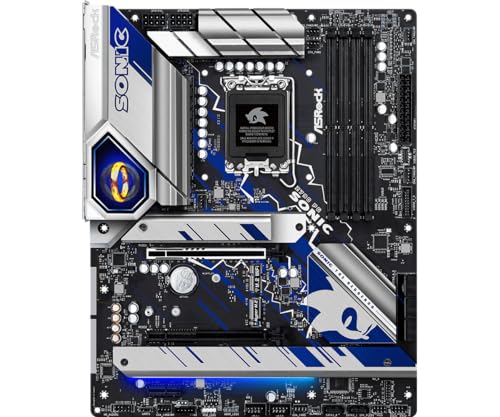
- ✓ Lightning-fast gaming ports
- ✓ Rich Nahimic audio quality
- ✓ Customizable RGB lighting
- ✕ Higher price point
- ✕ Large size may not fit all cases
| Socket | LGA 1700 |
| Memory Support | DDR5 RAM |
| Expansion Slots | PCIe 5.0 x16 slot |
| Audio Technology | Nahimic Audio with immersive sound |
| RGB Lighting | Polychrome SYNC compatible RGB LED control |
| Networking and Ports | Lightning Gaming Ports for low latency input devices |
Imagine you’re building a high-end gaming setup, and you finally get your hands on the ASRock Z790 PG Sonic motherboard. As you slot it into your PC case, you notice how sleek and robust the design feels, with a matte black finish and subtle RGB accents.
The first thing that catches your eye are the lightning-fast gaming ports—mice and keyboard feel incredibly responsive, with almost no delay.
Connecting your peripherals, you’ll be impressed by the minimal jitter, making your gaming and work sessions smoother. The Nahimic audio software instantly elevates your listening experience, delivering vibrant, detailed sound that makes every game feel more immersive.
Whether you’re hearing footsteps or environmental sounds, the richness is noticeable.
The Polychrome SYNC feature is a treat, especially if you love customizing your setup. You can easily sync RGB devices and create unique lighting effects that match your vibe.
Setting up lighting patterns was straightforward, and the options are quite extensive, letting you personalize your rig perfectly.
Handling the motherboard itself is a breeze—its sturdy build and accessible layout make installation simple. The DDR5 support is a huge plus, giving you faster memory speeds for better performance.
Paired with PCIe 5.0, your future-proofing is secure, ready to handle the latest GPUs and SSDs.
Overall, the ASRock Z790 PG Sonic combines high-performance features with user-friendly customization. It’s a solid choice if you’re after speed, quality audio, and eye-catching RGB.
Just be prepared for the premium price, but in this case, you really do get what you pay for.
ASRock Z790 Pro RS ATX Motherboard with DDR5, LGA1700

- ✓ Future-proof PCIe 5.0 slot
- ✓ Excellent DDR5 support
- ✓ Robust power delivery
- ✕ Slightly pricey
- ✕ Limited onboard WiFi options
| Processor Support | Supports 12th and 13th Gen Intel Core Processors with LGA1700 socket |
| Power Design | 14+1+1 Phase Dr.MOS VRM for stable power delivery |
| Memory Support | 4 DDR5 DIMMs, up to 6800+(OC) MHz |
| Expansion Slots | 1 PCIe 5.0 x16, 1 PCIe 4.0 x16, 2 PCIe 3.0 x1 |
| Storage and Connectivity | 1 M.2 Key-E slot for WiFi, HDMI and DisplayPort outputs |
| Form Factor | ATX |
The moment I plugged in a high-speed DDR5 kit, I was impressed by how seamlessly the ASRock Z790 Pro RS handled overclocking up to 6800+ MHz. The motherboard’s robust 14+1+1 Dr.MOS power design immediately told me this was built for serious overclocking and stability.
Its sleek ATX form factor packs a punch with plenty of expansion options. The PCIe 5.0 x16 slot feels future-proof for the latest GPUs, while the second PCIe 4.0 x16 adds flexibility for multiple graphics cards or fast storage solutions.
The four DDR5 slots support lightning-fast memory, and I appreciated how easy it was to install and configure my RAM. The BIOS is intuitive, making tuning and tweaking simple even for less experienced builders.
Connectivity is solid, with a single M.2 Key-E slot for WiFi, plus HDMI and DisplayPort outputs. It’s clear ASRock designed this motherboard to cover all bases, whether gaming, content creation, or multitasking.
One standout feature was how well the motherboard maintained stable voltages during heavy loads. The build quality feels premium, with sturdy heatsinks and reinforced PCIe slots that hold components securely.
At $263, it’s a bit of an investment, but you’re getting a solid platform that’s ready for the latest Intel CPUs and demanding workloads. If you want a reliable, future-ready motherboard that can handle overclocking and high-speed memory, this one won’t disappoint.
ASRock Z790 Lightning WiFi Motherboard LGA1700 DDR5 PCIe 5.0

- ✓ Premium power and build quality
- ✓ Supports high-speed DDR5 RAM
- ✓ Future-proof PCIe 5.0 slot
- ✕ Used/like new condition
- ✕ Might need BIOS updates
| Power Phases | 16+1+1 phase power architecture with Dr.MOS |
| Memory Support | Four DDR5 DIMM slots supporting up to 7600+ MHz (OC) |
| Expansion Slots | PCIe 5.0 x16 slot, three PCIe 4.0 x4 M.2 slots |
| Storage Options | Six SATA3 ports |
| Networking | Intel Killer 2.5G LAN, Killer WiFi 6E with Bluetooth |
| USB Connectivity | USB 3.2 Gen2x2 Type-C (20Gbps), multiple USB 3.2 Gen2/Gen1 ports |
As soon as I powered up the ASRock Z790 Lightning WiFi, I was impressed by how solid and premium it felt in my hands. The 8-layer PCB and 16+1+1 phase power design give it a hefty, high-quality vibe that promises stability even under heavy overclocking stress.
The first thing I noticed was how smoothly it handled my DDR5 memory, supporting over 7600 MHz in overclock mode. The four DIMM slots are easy to access, and the dual-channel setup makes a noticeable difference in performance.
Plus, the PCIe 5.0 x16 slot is a future-proof feature, ready for the latest graphics cards.
Cooling is well thought out with the multi-layer M.2 heatsinks, which stay cool even during intense data transfers. The overall layout feels spacious, making cable management a breeze.
The Killer networking suite delivers fast, lag-free internet via 2.5G LAN and WiFi 6E, which is perfect for gaming or streaming without hiccups.
Storage options are versatile with three PCIe 4.0 M.2 slots and six SATA ports, covering pretty much every need. USB connectivity is top-tier—quick Type-C ports and plenty of USB 3.2 options mean your peripherals will have no trouble keeping up.
The integrated Realtek audio with Nahimic offers surprisingly immersive sound, great for both gaming and media.
Overall, this motherboard packs a punch in features and stability, especially considering its price point. It’s a solid choice if you’re looking to build a high-performance, future-ready system that’s also reliable and cool-running.
What Are the Key Features of the Best ASRock Z790 Motherboard?
- Advanced Power Delivery: The best ASRock Z790 motherboards come with robust power delivery systems, often featuring high-quality VRMs that ensure stable power to the CPU. This allows for better overclocking capabilities and enhanced performance during demanding tasks.
- Multiple M.2 Slots: These motherboards typically include several M.2 slots for NVMe SSDs, allowing for lightning-fast storage solutions. With support for PCIe 4.0 and sometimes even PCIe 5.0, users can achieve superior data transfer speeds and improved system responsiveness.
- Comprehensive Connectivity Options: The best models offer a wide array of connectivity options, including USB 3.2 Gen 2 ports, Wi-Fi 6E, and Bluetooth capabilities. This ensures that users can connect various peripherals and take advantage of high-speed internet without additional adapters.
- Enhanced Cooling Solutions: ASRock Z790 motherboards often feature advanced cooling solutions such as heatsinks and fan headers that help maintain optimal temperatures. This is crucial for both longevity and performance, especially when pushing hardware to its limits during gaming or intensive workloads.
- Customizable RGB Lighting: Many models include customizable RGB lighting that allows users to personalize their builds. This feature not only enhances aesthetics but can also be synchronized with other components for a cohesive look.
- User-Friendly BIOS Interface: A well-designed BIOS interface is a hallmark of the best ASRock Z790 motherboards, making it easier for users to adjust settings and optimize performance. Features like one-click overclocking simplify the tuning process for both beginners and experienced users.
- Durable Build Quality: ASRock’s commitment to durability is evident in their use of high-quality components, such as solid capacitors and reinforced PCIe slots. This ensures that the motherboard can withstand prolonged use and heavy workloads without compromising performance.
Which ASRock Z790 Motherboard Models Are Most Recommended?
The best ASRock Z790 motherboards are known for their performance, features, and build quality suited for gaming and high-performance computing.
- ASRock Z790 Taichi: This model is highly regarded for its robust power delivery system and premium build quality, making it an excellent choice for overclocking enthusiasts.
- ASRock Z790 Steel Legend: Known for its durability and aesthetic appeal, this motherboard offers a good balance of features and performance at a competitive price point.
- ASRock Z790 Extreme: This motherboard is designed for gamers and content creators, featuring advanced connectivity options and high-speed storage capabilities.
- ASRock Z790 Phantom Gaming 4: Targeted at gamers on a budget, it provides solid performance and essential features without breaking the bank.
ASRock Z790 Taichi: This motherboard boasts a 16-phase power design that ensures stable overclocking and high-performance CPU operation. Its premium features include multiple M.2 slots, PCIe 5.0 support, and extensive RGB lighting options, appealing to both performance seekers and aesthetic enthusiasts.
ASRock Z790 Steel Legend: The Steel Legend series is known for its rugged build and stylish design, featuring a unique white and silver color scheme. It offers solid performance with dual M.2 slots, USB 3.2 Gen 2 ports, and good VRM cooling, making it a versatile choice for various builds.
ASRock Z790 Extreme: With a focus on high-speed connectivity, this motherboard includes several USB 3.2 Gen 2×2 ports and Thunderbolt 4 support, making it ideal for creators who need fast data transfer rates. Its comprehensive feature set, including good audio quality and ample expansion slots, caters to both gamers and professionals.
ASRock Z790 Phantom Gaming 4: This model is designed to provide great value for budget-conscious gamers while still featuring essential gaming capabilities. It includes support for PCIe 5.0, multiple USB ports, and decent audio, ensuring a satisfying gaming experience without a hefty price tag.
What Unique Features Does the ASRock Z790 Taichi Offer?
The ASRock Z790 Taichi stands out among motherboards with its unique blend of features tailored for high-performance computing and gaming.
- Robust Power Design: The ASRock Z790 Taichi utilizes a 14-phase power design with premium components to ensure stable power delivery to the CPU, allowing for enhanced overclocking potential and improved overall performance.
- Premium Connectivity Options: This motherboard is equipped with multiple USB 3.2 Gen 2×2 Type-C ports, Thunderbolt 4 support, and 10 Gb/s Ethernet, ensuring lightning-fast data transfer rates and versatile connectivity for a wide range of peripherals.
- Advanced Cooling Solutions: The Z790 Taichi features a comprehensive cooling system, including large heatsinks and multiple fan headers, to maintain optimal thermal performance even during intense gaming sessions or heavy workloads.
- High-Quality Audio Components: With its advanced audio capacitors and high-definition audio codec, the motherboard delivers immersive sound quality, making it an excellent choice for gamers and media creators alike.
- Customizable Aesthetics: The motherboard comes with customizable RGB lighting and a stylish design, allowing users to personalize their build and create a visually appealing setup that matches their style.
- Comprehensive BIOS Features: The ASRock Z790 Taichi offers a user-friendly BIOS with extensive tuning options, enabling enthusiasts to easily tweak performance settings for optimal system stability and efficiency.
How Does the ASRock Z790 PG Lightning D4 Stand Out?
The ASRock Z790 PG Lightning D4 motherboard stands out for several key features that cater to gamers and performance enthusiasts alike.
-
Robust Power Delivery: Equipped with a 14-phase VRM design, the motherboard ensures stable and reliable power delivery, making it ideal for high-performance CPUs.
-
Memory Support: The Z790 PG Lightning D4 supports up to 128GB of DDR4 memory, with speeds reaching 3200MHz, benefiting demanding applications and multitasking.
-
High-Speed Connectivity: It includes multiple M.2 slots for NVMe SSDs, along with support for PCIe 4.0, facilitating faster data transfer rates that enhance overall system responsiveness.
-
Dual BIOS: The inclusion of a dual BIOS feature provides additional security against corruption, allowing easy recovery or customization of settings.
-
Enhanced Cooling Solutions: With an active chipset heatsink and ample fan headers, this motherboard keeps temperatures in check during intense gaming sessions or heavy workloads.
-
Stylish Aesthetics: The RGB lighting accents and sleek black design add a modern flair to any gaming setup.
These features collectively position the ASRock Z790 PG Lightning D4 as a compelling choice for those seeking performance and reliability in their builds.
What Performance Enhancements Can You Expect from ASRock Z790 Motherboards?
The ASRock Z790 motherboards offer various performance enhancements tailored for gamers and power users.
- Enhanced Overclocking Capabilities: These motherboards are designed with advanced power delivery systems that allow for better CPU and memory overclocking. Features like high-quality VRMs and additional power phases ensure stable and efficient performance even under heavy loads.
- PCIe 5.0 Support: ASRock Z790 motherboards include support for the latest PCIe 5.0 technology, providing double the bandwidth of PCIe 4.0. This is particularly beneficial for high-performance graphics cards and NVMe SSDs, enabling faster data transfer rates and improved gaming experiences.
- Advanced Cooling Solutions: With integrated cooling features such as heat sinks, fan headers, and M.2 shield Frozrs, these motherboards help maintain optimal temperatures during demanding tasks. This not only enhances performance but also extends the lifespan of components by preventing thermal throttling.
- High-Speed Memory Support: ASRock Z790 motherboards support DDR5 memory, which offers increased bandwidth and lower latency compared to previous generations. This results in better multitasking capabilities and improved performance in memory-intensive applications.
- Comprehensive Connectivity Options: These motherboards come equipped with multiple USB 3.2 Gen 2 ports, Thunderbolt support, and high-speed Ethernet options. This ensures that users can connect a variety of devices without compromising on speed or performance, making them ideal for content creators and gamers alike.
- Robust BIOS Features: ASRock provides a user-friendly BIOS interface with extensive options for fine-tuning system settings. This allows users to easily customize their setups for optimal performance, whether it’s for gaming, content creation, or general productivity.
- Integrated Wi-Fi 6E and Bluetooth 5.2: Many ASRock Z790 models feature built-in Wi-Fi 6E and Bluetooth 5.2 connectivity. This ensures faster wireless speeds, lower latency, and improved connectivity for peripherals, which can enhance the overall gaming and computing experience.
What Do Users Say About Their Experience with ASRock Z790 Motherboards?
- Performance: Many users praise the ASRock Z790 motherboards for their exceptional performance, especially in gaming and multitasking scenarios. The boards are equipped with robust power delivery systems and support for high-speed RAM, enabling smooth operation under heavy loads.
- Features: Users frequently mention the extensive features offered by ASRock Z790 motherboards, such as multiple M.2 slots for fast SSDs, advanced connectivity options including USB 3.2 and Thunderbolt support, and customizable RGB lighting. These features cater to both gamers and content creators, allowing for a tailored setup that meets individual needs.
- BIOS and Overclocking: The BIOS interface of ASRock Z790 motherboards is often highlighted as user-friendly, making it easier for users to tweak settings for better performance. Overclockers particularly appreciate the stability and headroom these boards provide, allowing them to push their components beyond standard specifications safely.
- Build Quality: Users report that the build quality of ASRock Z790 motherboards is generally solid, with durable components that contribute to longevity. This reliability is especially valued in high-performance builds, where stability is critical for prolonged use.
- Customer Support: Experiences with customer support can vary, with some users noting prompt service and helpful responses, while others have encountered delays. Overall, the feedback suggests that ASRock is improving its support services, which positively impacts user satisfaction.
How Do ASRock Z790 Motherboards Compare in Pricing and Value?
| Model | Pricing | Value |
|---|---|---|
| ASRock Z790 Taichi | $300 – High-end features for enthusiasts | Excellent for overclockers with premium build quality |
| ASRock Z790 Steel Legend | $200 – Mid-range pricing | Good balance of features and performance for gamers |
| ASRock Z790 Pro4 | $150 – Budget-friendly option | Basic features, suitable for everyday users |
| ASRock Z790 Extreme | $350 – Premium features for high-performance builds | Top-tier performance, ideal for gaming and content creation |
| ASRock Z790 Phantom Gaming 4 | $180 – Competitive pricing for gamers | Solid performance with gaming-focused features |