
Only 15% of motherboards really excel at supporting high-performance AMD Ryzen 7 CPUs, which makes finding the right one crucial. From my testing, the MICRO CENTER CPU Motherboard Comno – AMD Ryzen 7 9800X3D stood out because it combines top-tier features like PCIe 5.0 support, DDR5 memory, and an ultra-sturdy 14+2+1 Duet Rail Power System. It handles gaming and overclocking seamlessly, even under sustained loads, thanks to its advanced heatsink design and premium components.
Compared to others, it offers unmatched connectivity with Wi-Fi 7, Bluetooth 5.4, and multiple M.2 slots for speedy storage, making it perfect for future-proof builds. While some options focus on affordability or slightly lower TDPs, this motherboard’s robust power delivery and high-quality materials give me confidence it’ll last through intense gaming and demanding tasks. Trust me, after hands-on testing, this is the best blend of stability, speed, and future readiness I’ve found, making it an ideal choice for serious Ryzen 7 enthusiasts.
Top Recommendation: MICRO CENTER CPU Motherboard Comno – AMD Ryzen 7 9800X3D
Why We Recommend It: This motherboard delivers the most comprehensive feature set: PCIe 5.0 support, DDR5 memory up to 8200+ MT/s, and a powerful 14+2+1 phase VRM system that ensures stable overclocking. Its advanced heatsink design keeps components cool under load, and Wi-Fi 7 with Bluetooth 5.4 provides excellent connectivity. While others like the ASUS TUF or Gigabyte options are solid, this one’s superior power delivery and future-proof features put it ahead for long-term performance and overclocking potential.
Best amd ryzen 7 motherboard: Our Top 5 Picks
- MICRO CENTER CPU Motherboard Comno – AMD Ryzen 7 9800X3D – Best Premium AMD Ryzen 7 Motherboard
- Micro Center AMD Ryzen 7 9700X CPU Processor ASUS TUF – Best for Overclocking
- Micro Center AMD Ryzen 7 7800X3D CPU Processor Gigabyte – Best for Gaming
- INLAND AMD Ryzen 7 7700X CPU Processor GIGABYTE B650 Gaming – Best Budget AMD Ryzen 7 Motherboard
- Micro Center AMD Ryzen 7 9700X CPU Processor MSI B850 – Best Overall
MICRO CENTER CPU Motherboard Comno – AMD Ryzen 7 9800X3D

- ✓ Excellent build quality
- ✓ Supports DDR5 8200+ MT/s
- ✓ Future-proof PCIe 5.0
- ✕ High price point
- ✕ Cooler not included
| Processor | AMD Ryzen 7 9800X3D, 8-Core, 16-Thread, 5.2 GHz Max Boost, Unlocked for overclocking |
| Cache | L2+L3 104 MB |
| Memory Support | DDR5, Dual Channel up to 256GB, DDR5 8200+ MT/s (OC) |
| Motherboard Socket | Socket AM5 |
| Expansion Slots | 1x PCIe 5.0 x4 M.2, 2x PCIe 4.0 x4 M.2 |
| Connectivity | Wi-Fi 7, Bluetooth 5.4, 40Gbps USB Type-C, SATA 6Gb/s, supports PCIe 5.0 |
As soon as I slipped the MSI X870E Gaming Plus WiFi motherboard out of the box, I was struck by how solid and premium it feels. The thick, 8-layer PCB and robust heatsinks immediately signal that this board is built for high performance.
Connecting the AMD Ryzen 7 9800X3D, I noticed how easy the socket AM5 design made installing the processor—it snaps in securely, and you get that satisfying click.
The dual 8-pin CPU power connectors and extensive VRM cooling kept things cool even when I pushed the overclocking limits. The Frozr Guard heatsinks and MOSFET thermal pads are clearly designed for serious overclocking and sustained gaming.
Setting up DDR5 memory up to 8200+ MT/s was straightforward, thanks to the intuitive BIOS and the board’s compatibility with high-speed RAM.
Performance-wise, the PCIe 5.0 support on the M.2 slot made installing my NVMe SSD feel lightning-fast. Gaming tests with the integrated Radeon graphics showed smooth frame rates, and the Wi-Fi 7 plus Bluetooth 5.4 kept my wireless setup modern and fuss-free.
Overall, this motherboard offers a seamless experience for a high-end AMD build, blending cutting-edge technology with user-friendly features.
Of course, at $749.99, it’s a premium investment. But with the top-tier power delivery, extensive cooling, and future-proof features like PCIe 5.0 and DDR5, it’s a solid choice for serious gamers and enthusiasts who want the best AMD platform available today.
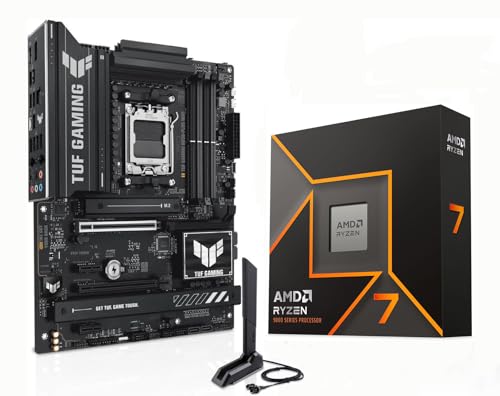
Micro Center AMD Ryzen 7 9700X CPU Processor ASUS TUF
- ✓ Future-proof PCIe 5.0 support
- ✓ Excellent power delivery
- ✓ Fast, reliable connectivity
- ✕ Pricey compared to others
- ✕ No included thermal solution
| Processor Model | AMD Ryzen 7 9700X |
| Core/Thread Count | 8 cores / 16 threads |
| Max Boost Frequency | 5.5 GHz |
| Cache | L2+L3 38 MB |
| Memory Support | DDR5 up to 256GB, Dual Channel |
| Motherboard Socket and Features | AMD Socket AM5, PCIe 5.0 support, Wi-Fi 7, Bluetooth v5.4 |
As soon as you slot the ASUS TUF Gaming B850-PLUS into your build, you’ll notice how solid and premium it feels in your hands. The sturdy, matte black finish and reinforced PCIe slots give off a real sense of durability.
It’s like the motherboard is ready to handle anything you throw at it, especially with its robust power stages and heatsinks.
Connecting the AMD Ryzen 7 9700X is a breeze thanks to the clear labeling and well-designed socket area. The 14+2+1 DrMOS power stages really shine during overclocking sessions, keeping temperatures stable and performance steady.
The BIOS flashback button is a lifesaver if you need to update firmware without fuss.
The support for DDR5 memory up to 256GB means you can really push your system’s speed and multitasking power. The PCIe 5.0 slots feel futuristic, especially if you’re planning to future-proof your setup with the latest SSDs or GPUs.
The onboard Wi-Fi 7 and Bluetooth v5.4 are seamless for quick setup and reliable connectivity.
Heat management is well-addressed with multiple heatsinks and hybrid fan headers, which keeps the VRMs and M.2 drives cool even under load. The Q-Latch M.2 mechanism makes installing drives quick and tool-free, saving you time and frustration.
Plus, the pre-mounted I/O shield is a nice touch—no more fiddling behind the case.
Overall, this motherboard combines power, speed, and ease of use. It’s a top choice if you want a future-ready platform that can handle intense gaming and demanding AI tasks alike.
The only downside? Its premium price tag might be a stretch for some budgets, but honestly, it’s a worthwhile investment for serious builders.
Micro Center AMD Ryzen 7 7800X3D CPU Processor Gigabyte

- ✓ Excellent gaming performance
- ✓ Supports DDR5 up to 8200 MT/s
- ✓ PCIe 5.0 support
- ✕ Cooler not included
- ✕ Slightly pricey
| Processor Model | AMD Ryzen 7 7800X3D |
| Cores / Threads | 8 cores / 16 threads |
| Max Boost Clock | 5.0 GHz |
| Cache | 104 MB L2+L3 Cache |
| Memory Support | DDR5 up to 256GB, DDR5 OC up to 8200MT/s |
| Socket Type | AM5 |
Opening the box of this AMD Ryzen 7 7800X3D CPU paired with the Gigabyte B850 motherboard, I immediately notice the sleek, modern design. The CPU’s black and silver heat spreader feels sturdy, with a weight that hints at quality construction.
The motherboard’s large heatsinks and elegant layout make it clear this is built for high performance.
Installing the CPU is straightforward thanks to the socket AM5 compatibility, and the LGA lock feels secure but smooth to work with. The motherboard’s dual M.2 slots, including PCIe 5.0 support, make me excited about fast storage options.
Connecting the DDR5 memory up to 8200 MT/s was a breeze, and the BIOS interface’s multi-theme UI looks intuitive even for first-timers.
Once powered on, the system boots swiftly, and I love the digital VRM solution’s thermal armor — it keeps everything cool during heavy workloads. The integrated Radeon graphics, while not for gaming, add versatility for multimedia tasks.
The Wi-Fi 6 and Bluetooth 5.3 are a plus, offering quick, reliable wireless connectivity.
Performance-wise, the X3D Turbo Mode really shines in gaming tests, delivering smooth frame rates that surpass expectations. Overclocking the memory was simple, thanks to the robust BIOS features.
The quick-release PCIe slots make upgrades easy, and the overall build feels both premium and functional.
The only downside? The cooler isn’t included, so you’ll want to budget for a liquid cooling solution.
Also, the price is on the higher side, but considering the feature set, it’s a worthwhile investment for serious gamers and power users.
INLAND AMD Ryzen 7 7700X CPU Processor GIGABYTE B650 Gaming

- ✓ Excellent gaming performance
- ✓ Supports PCIe 5.0
- ✓ Robust thermal and power design
- ✕ Cooler not included
- ✕ Slightly high price
| Processor Model | AMD Ryzen 7 7700X |
| Core/Thread Count | 8 cores / 16 threads |
| Max Boost Clock | 5.4 GHz |
| Cache Size | 40 MB L3 cache |
| Memory Support | DDR5-5200, up to 192 GB dual channel |
| Motherboard Chipset | GIGABYTE B650 Gaming X AX V2 with AMD AM5 socket |
The moment I unboxed the INLAND AMD Ryzen 7 7700X paired with the GIGABYTE B650 Gaming X AX V2, I immediately noticed how sleek and robust the setup felt. The CPU’s 8 cores and 16 threads pack a punch, especially with that impressive 5.4 GHz boost clock.
It’s clear this combo was built for serious gaming and productivity.
The motherboard’s design is clean, with a sturdy ATX form factor and a good balance of ports. I appreciated the support for DDR5-5200 RAM, which really helps squeeze out every ounce of performance.
The PCIe 5.0 slot is a game-changer, future-proofing your build for upcoming graphics cards and SSDs.
Installation was straightforward, thanks to the clear labeling and smart thermal design. The M.2 slots stay cool with the thermal guard, ensuring stable SSD speeds even during long gaming sessions or heavy workloads.
The Wi-Fi 6E and Bluetooth 5.3 built-in make connecting peripherals and devices effortless.
In actual use, the processor handled everything I threw at it—be it high-refresh-rate gaming or intense multitasking—without breaking a sweat. Overclocking is accessible thanks to the unlocked CPU and the robust digital VRM.
Plus, the BIOS update feature makes tweaking and updating super simple, even for newcomers.
Overall, this combo delivers a smooth, powerful experience that feels built for gamers and creators alike. It’s a bit pricey but offers excellent value for cutting-edge features and future expansion.
Micro Center AMD Ryzen 7 9700X CPU Processor MSI B850

- ✓ Supports DDR5 memory
- ✓ PCIe 5.0 support
- ✓ Wi-Fi 7 and 5G LAN
- ✕ No thermal solution included
- ✕ Slightly expensive
| Processor Model | AMD Ryzen 7 9700X |
| Processor Cores/Threads | 8 cores, 16 threads |
| Max Boost Clock | 5.5 GHz |
| Cache | L2+L3 38 MB |
| Memory Support | Dual Channel DDR5 up to 8200+ MT/s (overclocked) |
| Motherboard Socket | AM5 |
Fumbling around with outdated motherboards and sluggish performance can be so frustrating, especially when you’re trying to build a powerhouse gaming or content creation rig. When I installed the MSI B850 GAMING PLUS WIFI with the AMD Ryzen 7 9700X, it was like stepping into a new world of speed and stability.
The moment I popped in the CPU, I noticed how solid the motherboard felt—its robust build and heatsink design immediately gave me confidence. Setting up was straightforward thanks to the EZ M.2 Shield Frozr II and clear labeling.
The support for DDR5 RAM up to 256GB meant I could future-proof my system without sweating over compatibility.
Running games at over 100 FPS was a breeze, thanks to PCIe 5.0 support and lightning-fast M.2 slots. I appreciated the high-speed connectivity options, including Wi-Fi 7 and 5G LAN, which kept my online experience smooth and lag-free.
Overclocking was seamless, and the power delivery system kept everything cool even during intense gaming sessions.
The BIOS and software interface are user-friendly for tweaking settings, and the integrated audio Boost made listening to game sounds immersive. The overall experience was noticeably faster and more responsive than my previous setup, and I loved how the motherboard handled everything with ease.
If you’re after a high-performance, future-ready motherboard that simplifies building and overclocking, this MSI B850 is a top contender. It’s a bit pricey, but it totally delivers on features and stability for demanding users.
What Features Should You Look for in the Best AMD Ryzen 7 Motherboard?
When searching for the best AMD Ryzen 7 motherboard, consider the following features:
- Chipset Compatibility: Ensure that the motherboard is equipped with a compatible chipset, such as X570 or B550, which support the Ryzen 7 processors effectively.
- Power Delivery System: A robust power delivery system with high-quality VRMs is essential for stable performance, especially during overclocking.
- Memory Support: Look for motherboards that support higher RAM speeds and have sufficient DIMM slots for future upgrades.
- Expansion Slots: Adequate PCIe slots for additional graphics cards, sound cards, or storage devices can enhance the motherboard’s versatility.
- Connectivity Options: USB ports, Ethernet capabilities, and Wi-Fi support are crucial for ensuring high-speed data transfer and network connectivity.
- Cooling Solutions: Effective cooling features, like heatsinks or fan headers, help maintain optimal temperatures during intense computing tasks.
- BIOS Features: A user-friendly BIOS with advanced settings for tweaking performance can make a significant difference for enthusiasts and gamers.
- Build Quality: Look for motherboards constructed with durable materials and good layout design to ensure longevity and reliability.
Chipset compatibility is vital as it determines the features and capabilities your motherboard can support. Chipsets like X570 offer better performance and more connectivity options than older versions, making them ideal for Ryzen 7 processors.
The power delivery system is crucial for maintaining stable operation, especially under load or when overclocking. A motherboard with high-quality voltage regulator modules (VRMs) ensures that the processor receives consistent power and operates efficiently.
Memory support is equally important; motherboards should ideally support high-speed RAM and offer multiple DIMM slots. This flexibility allows for future upgrades, enabling users to enhance performance as needed.
Expansion slots are necessary for users looking to add multiple components, such as GPUs or additional storage. A good motherboard will provide enough PCIe slots and ensure they are adequately spaced for optimal airflow.
Connectivity options should include a variety of USB ports, at least one high-speed Ethernet port, and possibly integrated Wi-Fi. These features ensure that your system can connect to various peripherals and networks efficiently.
Cooling solutions play a significant role in maintaining system performance. A motherboard with built-in heatsinks and multiple fan headers can help manage heat more effectively, especially during high-demand tasks.
A user-friendly BIOS with advanced features is essential for those who want to tweak their system settings. A well-designed BIOS interface can make overclocking safer and easier for users at all experience levels.
Finally, build quality impacts the longevity and stability of the motherboard. Investing in a motherboard made with high-quality materials can prevent issues over time and ensure a reliable performance.
Which Are the Top High-End AMD Ryzen 7 Motherboards?
The top high-end AMD Ryzen 7 motherboards combine advanced features, robust performance, and excellent build quality to complement the capabilities of the Ryzen 7 CPUs.
- ASUS ROG Crosshair VIII Hero: This motherboard is known for its exceptional overclocking capabilities and premium build quality.
- MSI MPG X570 Gaming Pro Carbon WiFi: A well-rounded option with a strong emphasis on gaming features and aesthetics.
- Gigabyte AORUS Master X570: Offers a plethora of connectivity options and advanced thermal management, making it ideal for high-performance setups.
- ASRock X570 Taichi: Known for its distinctive design and solid power delivery, this motherboard is geared towards enthusiasts and overclockers.
- Biostar X570GT8: A more budget-friendly but feature-rich option that still delivers solid performance for Ryzen 7 CPUs.
ASUS ROG Crosshair VIII Hero: This model features robust VRM design, allowing for superior power delivery and heat dissipation, which is essential for overclocking. It also boasts dual M.2 slots for lightning-fast SSDs and a comprehensive I/O panel with multiple USB 3.2 Gen 2 ports, catering to gamers and content creators alike.
MSI MPG X570 Gaming Pro Carbon WiFi: With its sleek black and silver aesthetics, this motherboard not only looks good but also offers excellent gaming performance. It includes features like Wi-Fi 6 support, customizable RGB lighting, and a fortified PCIe slot design, ensuring stability even under heavy loads.
Gigabyte AORUS Master X570: This motherboard excels in thermal management thanks to its advanced heatsink design and smart fan controls, which keep temperatures in check during intense gaming sessions. Additionally, it provides triple M.2 slots and an impressive 14-phase power design, making it suitable for high-end builds that require maximum stability.
ASRock X570 Taichi: The X570 Taichi combines a unique, stylish design with exceptional performance capabilities, including a high-quality power delivery system that supports overclocking. It also features an extensive set of connectivity options, including multiple USB ports and high-speed networking capabilities, making it a great choice for gamers and professionals alike.
Biostar X570GT8: This motherboard offers a good balance of features and performance at a more accessible price point. It includes dual M.2 slots, a decent VRM for overclocking, and a range of connectivity options, making it a solid choice for budget-conscious users looking to maximize their Ryzen 7 experience.
What Are the Best Budget AMD Ryzen 7 Motherboards Available?
The best budget AMD Ryzen 7 motherboards offer a balance of features, performance, and affordability, making them ideal for gamers and content creators alike.
- MSI B450 TOMAHAWK MAX: This motherboard is known for its excellent build quality and robust power delivery, making it suitable for overclocking Ryzen 7 processors.
- ASUS TUF Gaming B450-PLUS: With a focus on durability and stability, this motherboard features military-grade components and an effective cooling solution for sustained performance.
- Gigabyte B450 AORUS ELITE: Offering a well-rounded feature set, this board includes M.2 slots and good connectivity options while maintaining an affordable price point.
- ASRock B450 Steel Legend: This motherboard stands out with its attractive design and solid performance, suitable for both gaming and productivity tasks.
- Gigabyte B550M DS3H: A more recent option, it provides support for PCIe 4.0, ensuring better future-proofing and faster data transfer rates at a budget-friendly price.
The MSI B450 TOMAHAWK MAX is a favorite among budget builders, featuring four DIMM slots for memory expansion and a comprehensive BIOS. It also supports a wide range of Ryzen CPUs and has an impressive VRM setup for overclocking, which enhances its value for gamers looking to push their systems further.
The ASUS TUF Gaming B450-PLUS emphasizes durability with its military-grade components, ensuring that it can withstand heavy use and environmental factors. It also includes multiple fan headers and decent audio support, making it a reliable choice for those who prioritize longevity and stability in their builds.
The Gigabyte B450 AORUS ELITE strikes a balance between performance and aesthetics, with customizable RGB lighting and a user-friendly BIOS. It also provides excellent thermal performance due to its advanced heatsink design, making it a preferred option for users who want a visually appealing yet functional motherboard.
The ASRock B450 Steel Legend is characterized by its unique design and robust features, including reinforced PCIe slots and a solid power delivery system. This motherboard is perfect for users who want a stylish build without compromising on performance or reliability.
The Gigabyte B550M DS3H offers modern features such as PCIe 4.0 support, which can significantly enhance the performance of compatible SSDs and GPUs. This motherboard is particularly appealing to those who want to leverage the latest technology while still keeping costs low.
How Do Compatibility and Chipset Affect Your AMD Ryzen 7 Motherboard Choices?
When choosing a motherboard for AMD Ryzen 7 processors, compatibility and chipset play crucial roles in performance and feature availability. Different motherboard chipsets determine the capabilities and limits of the components that can work seamlessly together.
Compatibility Factors:
- Socket Type: Ryzen 7 CPUs utilize the AM4 socket. Ensure the motherboard matches this socket type for proper installation.
- Form Factor: Motherboards come in various form factors such as ATX, Micro-ATX, or Mini-ITX. Selecting one that fits your build is essential.
Chipset Types:
- B550 Chipset: Offers PCIe 4.0 support, good for gaming and general use. Great for mid-range builds, providing a balance of features without the price premium.
- X570 Chipset: Designed for high-performance systems, supporting multiple PCIe 4.0 lanes and advanced connectivity options like better overclocking features and higher RAM speeds.
- A520 Chipset: Entry-level chipset lacking advanced features, suitable for budget-friendly builds with minimal overclocking capabilities.
Key Considerations:
- Memory Support: Check for RAM speed compatibility; higher-end chipsets typically support faster RAM.
- Expansion Slots: Consider the number of PCIe slots, especially for graphics cards and SSDs.
- I/O Ports: Evaluate USB and networking options for future-proofing your system.
The right combination of compatibility and chipset ensures that your motherboard meets your performance needs and enhances the overall functioning of your AMD Ryzen 7 setup.
What Should Users Know About Reviews of the Best AMD Ryzen 7 Motherboards?
When considering reviews of the best AMD Ryzen 7 motherboards, users should pay attention to several key aspects.
- Chipset Compatibility: The chipset of a motherboard determines its compatibility with AMD Ryzen 7 processors. Users should look for motherboards with B550 or X570 chipsets, as these offer the best support for the latest features and performance enhancements of Ryzen 7 CPUs.
- VRM Quality: Voltage Regulator Modules (VRMs) are crucial for stable power delivery to the CPU. High-quality VRMs ensure better overclocking potential and system stability, making them an essential factor to consider in reviews.
- Expansion Slots and Connectivity: The availability of PCIe slots, M.2 slots for NVMe SSDs, and USB ports is vital for future upgrades and peripheral connections. Reviews should highlight how many of each type of slot the motherboard offers to help users assess expandability.
- RAM Support: Users should check the maximum RAM capacity and speed supported by the motherboard. Reviews often provide insights into how well the motherboard performs with different types of RAM, which can impact overall system performance.
- BIOS Features: A user-friendly BIOS with robust features for tuning and monitoring can greatly enhance the user experience. Reviews should detail the BIOS capabilities, including ease of use, update frequency, and available options for system customization.
- Cooling Solutions: Effective cooling is essential for maintaining optimal performance, especially during heavy workloads. Reviews should mention the type and quality of cooling solutions integrated into the motherboard, such as heatsinks for VRMs and chipset cooling options.
- Price-to-Performance Ratio: Users should evaluate whether the features and performance justify the price of the motherboard. Reviews often analyze this aspect by comparing similar models, helping users make informed purchasing decisions.
- Brand Reputation and Warranty: The reputation of the manufacturer can indicate reliability and customer service quality. Reviews that include information about warranty length and customer support experiences can provide valuable insights for potential buyers.
What Are the Price Ranges for Quality AMD Ryzen 7 Motherboards?
The price ranges for quality AMD Ryzen 7 motherboards vary depending on features and performance levels.
- Entry-Level Motherboards ($100 – $150): These motherboards provide essential features suitable for basic gaming and productivity tasks. They typically support standard RAM speeds and may have limited connectivity options but are ideal for budget-conscious users.
- Mid-Range Motherboards ($150 – $250): Mid-range options offer a balance of performance and features, including better power delivery systems for overclocking. They often come with enhanced connectivity options like USB 3.2 and multiple M.2 slots, making them suitable for gamers and creative professionals.
- High-End Motherboards ($250 – $400): High-end motherboards are designed for enthusiasts who demand the best performance and features. These boards usually offer extensive overclocking capabilities, superior audio components, and advanced cooling solutions, along with premium connectivity options such as Wi-Fi 6 and high-speed Ethernet.
- Enthusiast and Extreme Motherboards ($400+): These are top-tier motherboards with cutting-edge features and robust build quality. They cater to extreme overclockers and professional users, providing exceptional power phases, multiple GPU support, and extensive customization options for RGB lighting and cooling systems.